2013 SKODA CITIGO clutch
[x] Cancel search: clutchPage 45 of 176

Seats and stowing
Front seats
Introduction
This chapter contains information on the following subjects:
Adjusting the front seats
43
Foldable front passenger seat
43
Front seat heating
44
The driver's seat should be adjusted in such a way that the pedals can be fully
pressed to the floor with slightly bent legs.
The seat backrest on the driver's seat should be adjusted in such a way that the
upper point of the steering wheel can be easily reached with slightly bent arms.
Correct adjustment of the seats is particularly important:
› for safely and quickly reaching the controls;
› for a relaxed body position that reduces fatigue;
› for achieving maximum protection from the seat belts and the airbag system.
WARNINGGeneral information■Caution when adjusting the seat! You may suffer injuries or bruises as a re-
sult of adjusting the seat without paying proper attention.■
The seat backrests must not be tilted too far back when driving, as this will
impair the function of the seat belts and of the airbag system – risk of injury!
■
Never carry more people than the number of seats in the vehicle.
■
Each occupant must correctly fasten the seat belt belonging to the seat.
Children must be fastened » page 103, Transporting children safely with a
suitable restraint system.
■
The front seats and the head restraints must always be adjusted according
to height, so that the occupants can be protected as effectively as possible.
■
Do not carry any objects on the front passenger seat except objects de-
signed for this purpose (e.g. child seat) – risk of accident!
WARNINGInformation for the driver■Only adjust the driver's seat when the vehicle is stationary – risk of accident!■
Maintain a distance of at least 25 cm to the steering wheel. Not maintaining
this minimum distance will mean that the airbag system will not be able to
properly protect you – risk to life!
■
Ensure that there are no objects in the driver's footwell, as these may get
caught in the pedal apparatus when driving or braking. You would then no
longer be able to operate the clutch, brake or acceleration pedals.
WARNINGInformation for the front seat passenger■Maintain a distance of at least 25 cm to the dash panel. Not maintaining this
minimum distance will mean that the airbag system will not be able to proper-
ly protect you – hazard!■
Always keep your feet in the footwell when the car is being driven – never
place your feet on the instrument panel, out of the window or on the surfaces
of the seats. You will be exposed to increased risk of injury if it becomes nec-
essary to apply the brake or in the event of an accident. If an airbag is de-
ployed, you may suffer fatal injuries when adopting an incorrect seated posi-
tion!
Note
After a certain time, play can develop within the adjustment mechanism of the
backrest angle.
42Using the system
Page 53 of 176

■On vehicles with a panoramic sliding roof, make sure that the tilted panoramic
sliding roof not strike any items which are transported.■
Ensure that the luggage compartment lid does not hit the roof load when
opened.
■
The height of the vehicle changes after mounting a roof luggage rack system
and the load that is secured to it. Compare the vehicle height with available clear-
ances, such as underpasses and garage doors.
■
Always remove the roof luggage rack system before entering an automated car
wash.
■
Ensure the roof aerial is not impaired by the secured load.
For the sake of the environment
The increased aerodynamic drag results in a higher fuel consumption.
fixing points for base support
Fig. 47
Attachment points
First read and observe the introductory information and safety warn- ings
on page 49.
Perform the assembly and disassembly according to the enclosed instructions.
CAUTION
Observe the information regarding the assembly and disassembly in the enclosed
instructions.
Roof load
First read and observe the introductory information and safety warn-
ings
on page 49.
The maximum permissible roof load (including roof rack system) of 50 kg and the
maximum permissible total weight of the vehicle should not be exceeded.
The full permissible roof load cannot be used if a roof rack system with a lower
load carrying capacity is used. In this case, the roof rack system must only be loa-
ded up to the maximum weight limit specified in the fitting instructions.
Useful equipment
Introduction
This chapter contains information on the following subjects:
Cup holder
51
Ash tray
51
Cigarette lighter
52
12-volt power socket
52
Clothes hooks
53
Parking ticket holder
53WARNING■ Do not place anything on the dash panel. These objects might slide or fall
down when driving (when accelerating or cornering) and may distract you
from concentrating on the traffic – there is the risk of an accident.■
When driving, ensure that no objects from the centre console or from other
storage compartments can get into the driver's footwell. You would then no
longer be able to apply the brakes or operate the clutch or accelerator pedal –
risk of accident!
■
Ash and cigarette or cigar stubs must only be discarded in ashtrays!
50Using the system
Page 56 of 176

■Only use accessories that have been tested for electromagnetic compatibility in
accordance with the applicable directives.■
Before turning the ignition on or off, and before starting the car, switch off the
device connected to the 12-volt power socket to prevent any damage caused by
voltage fluctuations.
■
Observe the operating instructions for the connected devices!
Clothes hooks
First read and observe the introductory information and safety warn-ings
on page 50.
The clothes hooks are located at the centre door bars.
WARNING■ Ensure that any clothes hanging from the hooks do not impair your vision to
the rear.■
Only use the hooks for hanging light items of clothing and ensure that there
are no heavy or sharp-edged objects in the pockets.
■
Do not use clothes hangers for hanging up items of clothing otherwise this
may reduce the effectiveness of side airbag.
CAUTION
The maximum permissible load of the hooks is 2 kg.
Parking ticket holder
Fig. 52
Windscreen: Parking ticket hold-
erFirst read and observe the introductory information and safety warn-
ings on page 50.
The note holder » Fig. 52 is designed e.g. for attaching car park tickets.
WARNINGThe attached note has to always be removed before starting off in order not
to restrict the driver's vision.
Storage compartments
Introduction
This chapter contains information on the following subjects:
Storage compartment on the driver's side
54
Storage compartment on the front passenger side
54
storage Storage compartment with lid on the front passenger side
54
Bag holder
55
Photo holder
55
Storage compartment in the front centre console
55
Multimedia holder
56
Meshed pockets on the front seat rests
56
Storage compartments in front of the rear seats
56WARNING■ Do not place anything on the dash panel. These objects might slide or fall
down when driving and may distract you from concentrating on the traffic –
risk of accident!■
When driving, ensure that no objects from the centre console or from other
storage compartments can get into the driver's footwell. You would then no
longer be able to apply the brakes or operate the clutch or accelerator pedal –
risk of accident!
53Seats and stowing
Page 57 of 176
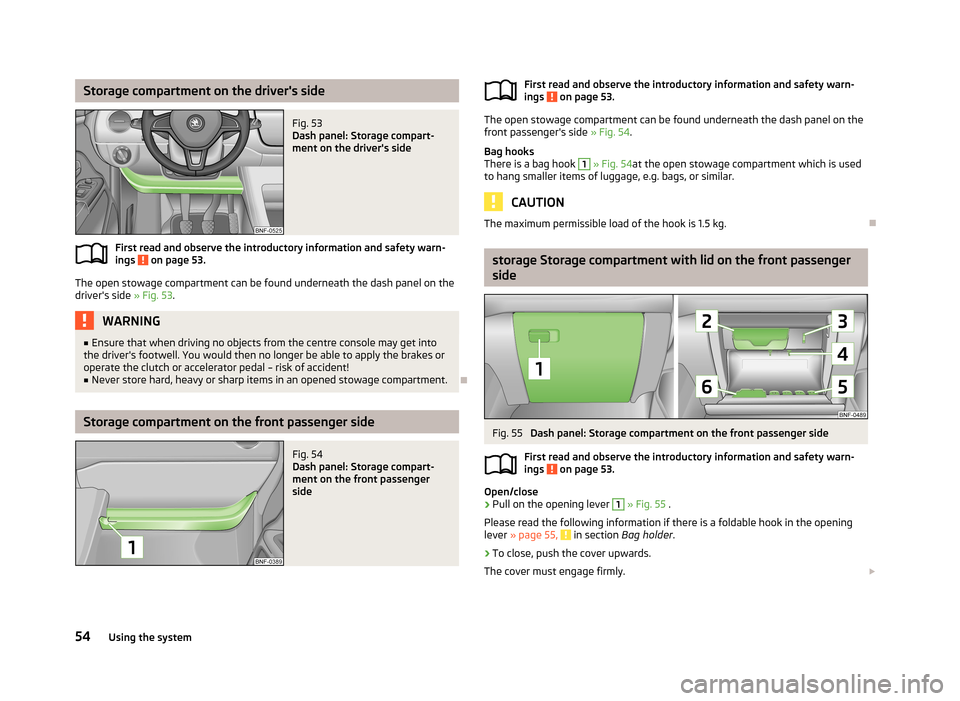
Storage compartment on the driver's sideFig. 53
Dash panel: Storage compart-
ment on the driver's side
First read and observe the introductory information and safety warn-
ings on page 53.
The open stowage compartment can be found underneath the dash panel on the
driver's side » Fig. 53.
WARNING■
Ensure that when driving no objects from the centre console may get into
the driver's footwell. You would then no longer be able to apply the brakes or
operate the clutch or accelerator pedal – risk of accident!■
Never store hard, heavy or sharp items in an opened stowage compartment.
Storage compartment on the front passenger side
Fig. 54
Dash panel: Storage compart-
ment on the front passenger
sideFirst read and observe the introductory information and safety warn-
ings on page 53.
The open stowage compartment can be found underneath the dash panel on the
front passenger's side » Fig. 54.
Bag hooks
There is a bag hook
1
» Fig. 54 at the open stowage compartment which is used
to hang smaller items of luggage, e.g. bags, or similar.
CAUTION
The maximum permissible load of the hook is 1.5 kg.
storage Storage compartment with lid on the front passenger
side
Fig. 55
Dash panel: Storage compartment on the front passenger side
First read and observe the introductory information and safety warn-
ings
on page 53.
Open/close
›
Pull on the opening lever
1
» Fig. 55 .
Please read the following information if there is a foldable hook in the opening
lever » page 55,
in section Bag holder .
›
To close, push the cover upwards.
The cover must engage firmly.
54Using the system
Page 71 of 176

Electronic immobilizerFirst read and observe the introductory information and safety warn-ings
on page 67.
An electronic chip is integrated in the head of the key. The immobiliser is deacti-vated with the aid of this chip when the key is inserted in the ignition lock. The
electronic immobiliser is automatically activated when the ignition key is with-
drawn from the lock.
The engine will not start if a non-authorized ignition key is used.
Ignition lock
Fig. 68
Positions of the vehicle key in
the ignition lock
First read and observe the introductory information and safety warn-
ings on page 67.
Ignition switched off, engine off, the steering can be locked
Ignition switched on
Starting engine
To lock the steering , with the ignition key withdrawn, turn the steering wheel
until the steering locking pin engages audibly.
If the steering is locked and the key cannot or can only be turned with difficulty
into position
2
» Fig. 68 , move the steering wheel back and forth and the steer-
ing lock unlocks.
Note
We recommend locking the steering wheel
whenever leaving the vehicle. This
acts as a deterrent against the attempted theft of your car.
123Starting the engine
First read and observe the introductory information and safety warn-
ings
on page 67.
›
Move the gearshift lever into neutral or move the selector lever into position N
and firmly apply the handbrake.
›
Switch on the ignition
2
» Fig. 68 on page 68.
›
Depress and hold the clutch pedal (vehicles with a manual gearbox) or brake
pedal (vehicles with an automatic gearbox) until the engine starts.
›
Turn the key into position
3
to the stop and release immediately after the en-
gine has been started – do not apply the accelerator.
After letting go, the vehicle key will return to position
2
.
›
Release the handbrake.
If the engine does not start within 10 seconds, turn the key to position
1
. Repeat
the start-up process after approx. half a minute.
Switching off the engine
First read and observe the introductory information and safety warn-ings
on page 67.
Switch off the engine by turning the ignition key into position
1
» Fig. 68 on
page 68.
Brakes
Introduction
This chapter contains information on the following subjects:
Information on braking
69
Handbrake
70
68Driving
Page 72 of 176

WARNING■Greater physical effort is required for braking when the engine is switched
off – risk of accident!■
The clutch pedal must be actuated when braking on a vehicle with manual
transmission, when the vehicle is in gear and at low revs. Otherwise, the func-
tion of the brake booster may be impaired – risk of accident!
■
In the event of damage occurring to the standard fitted front spoiler or the
retrofitting of another front spoiler, wheel hubs etc. » page 110, Modifica-
tions, adjustments and technical alterations , It must be ensured that the air
supply to the front brake is not impaired. The front brakes may overheat,
which can have a negative impact on the functioning of the braking system –
risk of accident!
■
Never leave children unattended in the vehicle. The children might, for ex-
ample, release the handbrake or take the vehicle out of gear. The vehicle could then start to move – risk of accident!
CAUTION
■ Observe the recommendations on the new brake pads » page 74.■Never let the brakes slip with light pressure on the pedal if braking is not neces-
sary. This causes the brakes to overheat and can also result in a longer braking distance and excessive wear.
Information on braking
First read and observe the introductory information and safety warn-
ings
on page 68.
If the brakes are applied in full and the control unit for the braking system consid-
ers the situation to be dangerous for the following traffic, the brake light flashes
automatically.
After the speed was reduced below around 10 km/h or the vehicle was stopped,
the brake light stops flashing and the hazard warning light system switches on.
The hazard warning light system is switched off automatically after accelerating
or driving off again.
Before travelling a long distance at a steep gradient, reduce speed and shift into
the next lowest gear. As a result, the braking effect of the engine will be used,
reducing the load on the brakes. Any additional braking should be completed in-
termittently, not continuously.
Wear-and-tear
The wear of the brake pads is dependent on the operating conditions and driving
style.
The brake pads wear more quickly if a lot of journeys are completed in towns and over short distances or if a very sporty style of driving is adopted.
Under these severe conditions , the thickness of the brake pads must also be
checked by a specialist garage between service intervals.
Wet roads or road salt
The performance of the brakes can be delayed as the brake discs and brake pads
may be moist or have a coating of ice or layer of salt on them in winter. The
brakes are cleaned and dried by applying the brakes several times.
Corrosion
Corrosion on the brake discs and dirt on the bake pads occur if the vehicle has
been parked for a long period and if you do not make much use of the braking
system. The brakes are cleaned and dried by applying the brakes several times.
Faults in the brake surface
If it is found that the braking distance has suddenly become longer and that the
brake pedal can be depressed further, the brake system may be faulty.
Visit a specialist garage immediately and adjust your style of driving appropriatelyas you will not know the exact extent of the damage.
Low brake fluid level
An insufficient level of brake fluid may result in problems in the brake system. The
level of the brake fluid is monitored electronically » page 16,
Braking system .
Brake booster The brake booster increases the pressure generated with the brake pedal. The brake booster only operates when the engine is running.
69Starting-off and Driving
Page 73 of 176

HandbrakeFig. 69
Handbrake
First read and observe the introductory information and safety warn-ings on page 68.
Apply
›
Pull the handbrake lever firmly upwards.
Loosening
›
Pull the handbrake lever up slightly and at the same time push in the locking
button » Fig. 69 .
›
Move the lever right down while pressing the lock button.
The handbrake warning light
lights up when the handbrake is applied, provided
the ignition is on.
A warning signal sounds if the vehicle is inadvertently driven off with the hand-
brake applied.
The handbrake warning is activated if the vehicle is driven at a speed of more
than around 6 km/h for more than 3 seconds.
WARNINGPlease note that the handbrake must be fully released. A handbrake which is only partially released can result in the rear brakes overheating. This can havea negative effect on the operation of the brake system – risk of accident!
Manual gear changing and pedals
Introduction
This chapter contains information on the following subjects:
Manual gear changing
70
Pedals
71
Manual gear changing
Fig. 70
Shift pattern of the transmission
First read and observe the introductory information given on page 70.
Always depress the clutch pedal all the way down. This prevents uneven wear to
the clutch.
The gearshift indicator must be observed when changing gear » page 12.
Only engage reverse gear when the vehicle is stationary. Depress the clutch pedal
and hold it fully depressed. Wait a moment before reverse gear is engaged to
avoid any shift noises.
The reversing lights will come on once reverse gear is engaged, provided the igni- tion is on.
WARNINGNever engage reverse gear when driving – risk of accident! 70Driving
Page 87 of 176

Storing a speedFig. 79
Operating lever: Operating the
cruise control system
First read and observe the introductory information and safety warn-
ings on page 83.
Storing a speed
›
Turn the switch
A
» Fig. 79 into the ON position.
›
After the desired speed has been reached, press the rocker button
B
into the
SET position.
After you have released the rocker button
B
out of the position SET, the speed
you have just stored is maintained at a constant speed without having to depress
the accelerator.
Changing a stored speed
First read and observe the introductory information and safety warn-
ings
on page 83.
Increasing the speed with the accelerator
›
Depress the accelerator to increase the speed.
›
Release the accelerator to reduce the speed back down to the preset speed.
However, if the saved speed is exceeded by more than 10 km/h for a period of
more than 5 minutes by depressing the accelerator, the stored speed is deleted from the memory. You have to re-store the desired speed.
Increasing the speed with the rocker button
B›
Press the rocker button
B
» Fig. 79 on page 84 into the RES position.
›
The speed will increase continuously, if the rocker button is pressed and held in
the RES position. Release the rocker button once the desired speed is reached.
The set speed is then stored in the memory.
Decreasing the speed›The stored speed can be reduced by pressing the rocker button B » Fig. 79 on
page 84 into the position SET .›
The speed will decrease continuously, if the rocker button is pressed and held in
the SET position. Release the rocker button once the desired speed is reached.
The set speed is then stored in the memory.
›
If the rocker button is released at a speed of under approx. 25 km/h, the speed is not stored and the memory is erased. The speed must then be stored again
by pressing the rocker button
B
in the SET position after increasing the speed
of the vehicle to more than approx. 25 km/h.
The speed can also be reduced by depressing the brake pedal, which temporarily deactivates the system.
Off temporarily
First read and observe the introductory information and safety warn-
ings
on page 83.
The cruise control system can be temporarily switched offby pushing the switch
A
» Fig. 79 on page 84 into the spring-mounted CANCEL position or by depress-
ing the brake or clutch pedal.
The set speed remains stored in the memory.
Briefly push the rocker button
B
into the RES position to resume the set speed
after the clutch or brake pedal is released.
Switch off completely
First read and observe the introductory information and safety warn-
ings
on page 83.
›
Turn the switch
A
» Fig. 79 on page 84 » page 84 into the OFF position.
84Driving