2013 PEUGEOT 5008 ECO mode
[x] Cancel search: ECO modePage 100 of 364
VIS
98
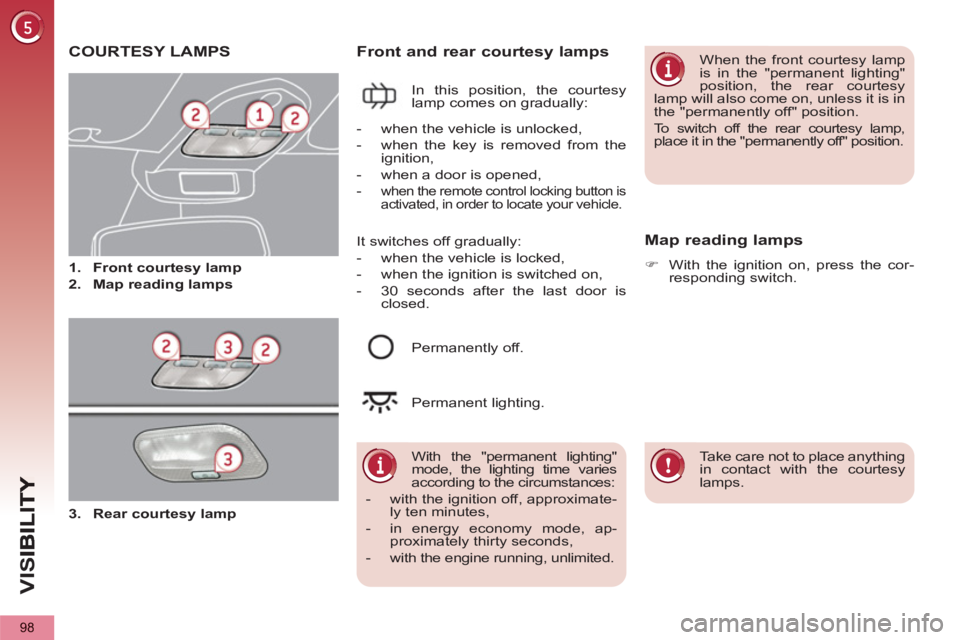
COURTESY LAMPS
1.
Front courtesy lamp
2.
Map reading lamps
Front and rear courtesy lamps
In this position, the courtesy
lamp comes on gradually:
Map reading lamps
)
With the ignition on, press the cor-
responding switch.
With the "permanent lighting"
mode, the lighting time varies
according to the circumstances:
- with the ignition off, approximate-
ly ten minutes,
- in energy economy mode, ap-
proximately thirty seconds,
- with the engine running, unlimited.
- when the vehicle is unlocked,
- when the key is removed from the
ignition,
- when a door is opened,
-
when the remote control locking button is
activated, in order to locate your vehicle.
Permanently off.
Permanent lighting.
When the front courtesy lamp
is in the "permanent lighting"
position, the rear courtesy
lamp will also come on, unless it is in
the "permanently off" position.
To switch off the rear courtesy lamp,
place it in the "permanently off" position.
Take care not to place anything
in contact with the courtesy
lamps.
It switches off gradually:
- when the vehicle is locked,
- when the ignition is switched on,
- 30 seconds after the last door is
closed.
3.
Rear courtesy lamp
Page 102 of 364
VIS
100
Different lighting times are
available:
- when the ignition is off, approxi-
mately ten minutes,
- in energy economy mode, ap-
proximately thirty seconds,
- when the engine is running, no limit.
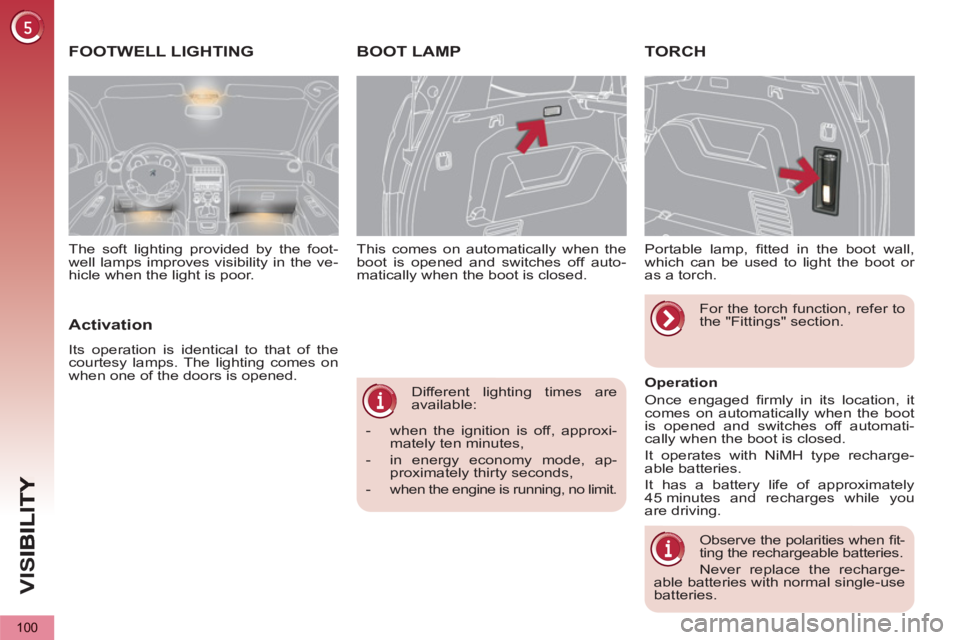
This comes on automatically when the
boot is opened and switches off auto-
matically when the boot is closed.
BOOT LAMP TORCH
Portable lamp, fi tted in the boot wall,
which can be used to light the boot or
as a torch.
Operation
Once engaged fi rmly in its location, it
comes on automatically when the boot
is opened and switches off automati-
cally when the boot is closed.
It operates with NiMH type recharge-
able batteries.
It has a battery life of approximately
45 minutes and recharges while you
are driving.
Observe the polarities when fi t-
ting the rechargeable batteries.
Never replace the recharge-
able batteries with normal single-use
batteries.
For the torch function, refer to
the "Fittings" section.
FOOTWELL LIGHTING
Activation
Its operation is identical to that of the
courtesy lamps. The lighting comes on
when one of the doors is opened. The soft lighting provided by the foot-
well lamps improves visibility in the ve-
hicle when the light is poor.
Page 109 of 364
FITTINGS
107
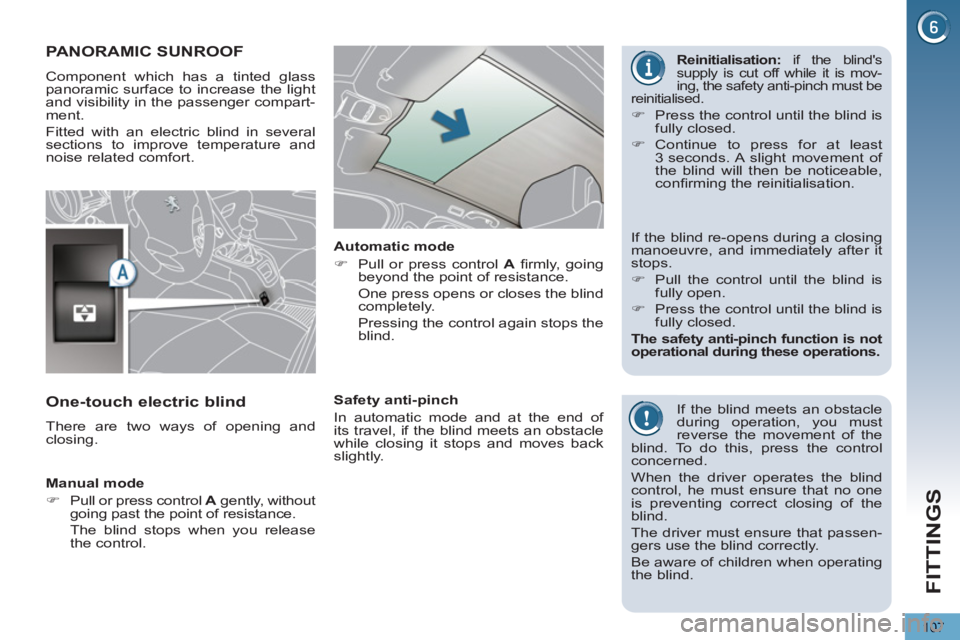
PANORAMIC SUNROOF
Component which has a tinted glass
panoramic surface to increase the light
and visibility in the passenger compart-
ment.
Fitted with an electric blind in several
sections to improve temperature and
noise related comfort.
If the blind meets an obstacle
during operation, you must
reverse the movement of the
blind. To do this, press the control
concerned.
When the driver operates the blind
control, he must ensure that no one
is preventing correct closing of the
blind.
The driver must ensure that passen-
gers use the blind correctly.
Be aware of children when operating
the blind.
Manual mode
)
Pull or press control A
gently, without
going past the point of resistance.
The blind stops when you release
the control.
Automatic mode
)
Pull or press control A
fi rmly, going
beyond the point of resistance.
One press opens or closes the blind
completely.
Pressing the control again stops the
blind.
Safety anti-pinch
In automatic mode and at the end of
its travel, if the blind meets an obstacle
while closing it stops and moves back
slightly.
One-touch electric blind
There are two ways of opening and
closing.
If the blind re-opens during a closing
manoeuvre, and immediately after it
stops.
)
Pull the control until the blind is
fully open.
)
Press the control until the blind is
fully closed.
The safety anti-pinch function is not
operational during these operations.
Reinitialisation:
if the blind's
supply is cut off while it is mov-
ing, the safety anti-pinch must be
reinitialised.
)
Press the control until the blind is
fully closed.
)
Continue to press for at least
3 seconds. A slight movement of
the blind will then be noticeable,
confi rming the reinitialisation.
Page 131 of 364
SA
F
129
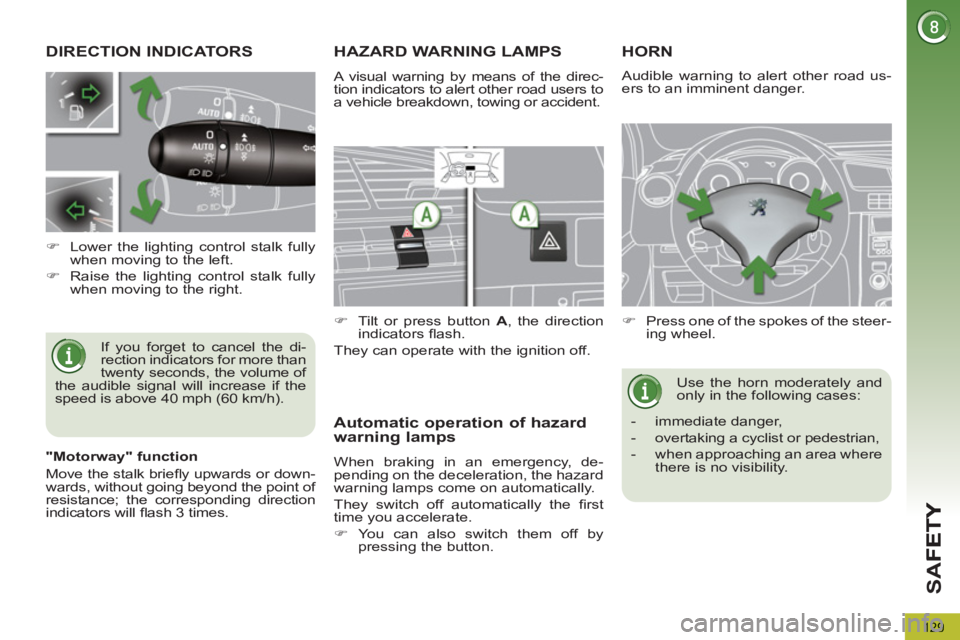
DIRECTION INDICATORS
If you forget to cancel the di-
rection indicators for more than
twenty seconds, the volume of
the audible signal will increase if the
speed is above 40 mph (60 km/h).
)
Lower the lighting control stalk fully
when moving to the left.
)
Raise the lighting control stalk fully
when moving to the right.
HAZARD WARNING LAMPS
A visual warning by means of the direc-
tion indicators to alert other road users to
a vehicle breakdown, towing or accident.
)
Tilt or press button A
, the direction
indicators fl ash.
They can operate with the ignition off.
Automatic operation of hazard
warning lamps
When braking in an emergency, de-
pending on the deceleration, the hazard
warning lamps come on automatically.
They switch off automatically the fi rst
time you accelerate.
)
You can also switch them off by
pressing the button.
HORN
)
Press one of the spokes of the steer-
ing wheel.
Use the horn moderately and
only in the following cases:
- immediate danger,
- overtaking a cyclist or pedestrian,
- when approaching an area where
there is no visibility.
Audible warning to alert other road us-
ers to an imminent danger.
"Motorway" function
Move the stalk briefl y upwards or down-
wards, without going beyond the point of
resistance; the corresponding direction
indicators will fl ash 3 times.
Page 143 of 364
D
R
141
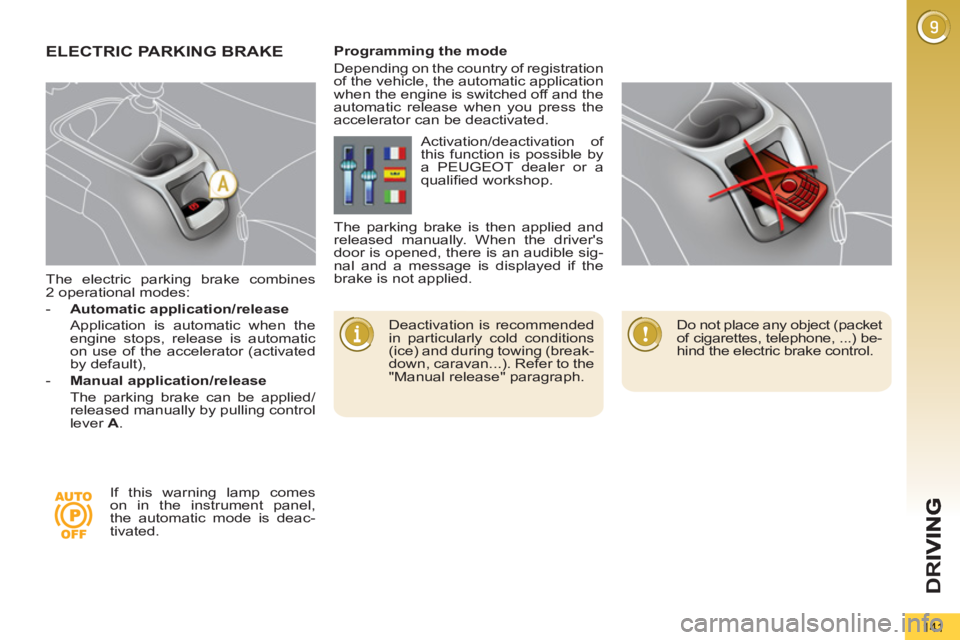
The electric parking brake combines
2 operational modes:
- Automatic application/release
Application is automatic when the
engine stops, release is automatic
on use of the accelerator (activated
by default),
- Manual application/release
The parking brake can be applied/
released manually by pulling control
lever A
.
ELECTRIC PARKING BRAKE
Deactivation is recommended
in particularly cold conditions
(ice) and during towing (break-
down, caravan...). Refer to the
"Manual release" paragraph.
Programming the mode
Depending on the country of registration
of the vehicle, the automatic application
when the engine is switched off and the
automatic release when you press the
accelerator can be deactivated.
If this warning lamp comes
on in the instrument panel,
the automatic mode is deac-
tivated. Activation/deactivation of
this function is possible by
a PEUGEOT dealer or a
qualifi ed workshop.
The parking brake is then applied and
released manually. When the driver's
door is opened, there is an audible sig-
nal and a message is displayed if the
brake is not applied.
Do not place any object (packet
of cigarettes, telephone, ...) be-
hind the electric brake control.
Page 156 of 364
D
R
I
154
On a steep descent or in the
event of sharp acceleration,
the speed limiter will not be
able to prevent the vehicle from ex-
ceeding the programmed speed.
To avoid any risk of jamming of the
pedals:
- ensure that the mat is positioned
correctly,
- do not fi t one mat on top of an-
other.
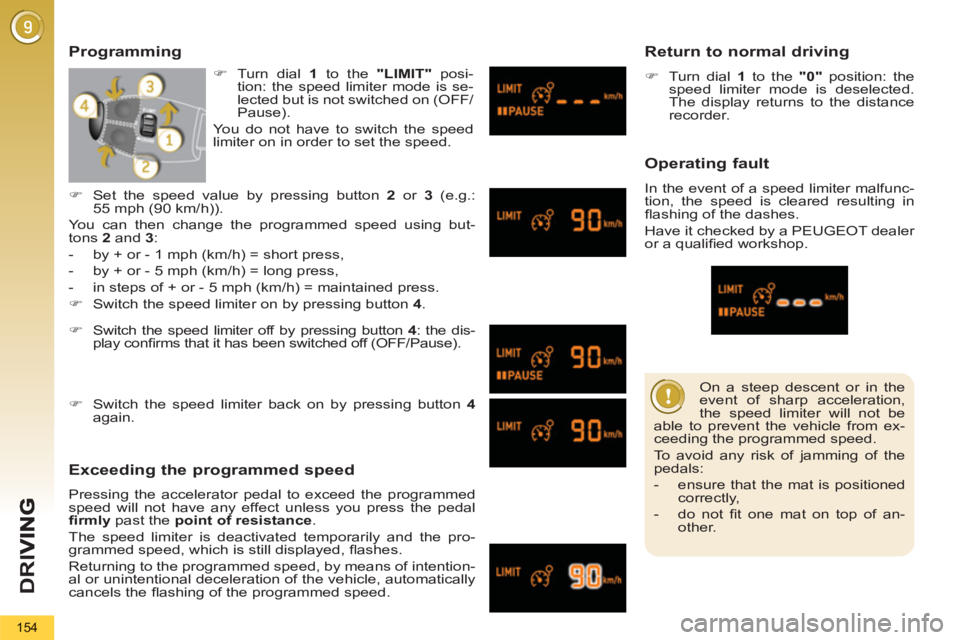
Programming
Exceeding the programmed speed
Pressing the accelerator pedal to exceed the programmed
speed will not have any effect unless you press the pedal
fi rmly
past the point of resistance
.
The speed limiter is deactivated temporarily and the pro-
grammed speed, which is still displayed, fl ashes.
Returning to the programmed speed, by means of intention-
al or unintentional deceleration of the vehicle, automatically
cancels the fl ashing of the programmed speed.
Return to normal driving
)
Turn dial 1
to the "0"
position: the
speed limiter mode is deselected.
The display returns to the distance
recorder.
Operating fault
In the event of a speed limiter malfunc-
tion, the speed is cleared resulting in
fl ashing of the dashes.
Have it checked by a PEUGEOT dealer
or a qualifi ed workshop.
)
Switch the speed limiter off by pressing button 4
: the dis-
play confi rms that it has been switched off (OFF/Pause).
)
Switch the speed limiter back on by pressing button 4
again.
)
Set the speed value by pressing button 2
or 3
(e.g.:
55 mph (90 km/h)).
You can then change the programmed speed using but-
tons 2
and 3
:
- by + or - 1 mph (km/h) = short press,
- by + or - 5 mph (km/h) = long press,
- in steps of + or - 5 mph (km/h) = maintained press.
)
Switch the speed limiter on by pressing button 4
.
)
Turn dial 1
to the "LIMIT"
posi-
tion: the speed limiter mode is se-
lected but is not switched on (OFF/
Pause).
You do not have to switch the speed
limiter on in order to set the speed.
Page 157 of 364
D
R
155
CRUISE CONTROL
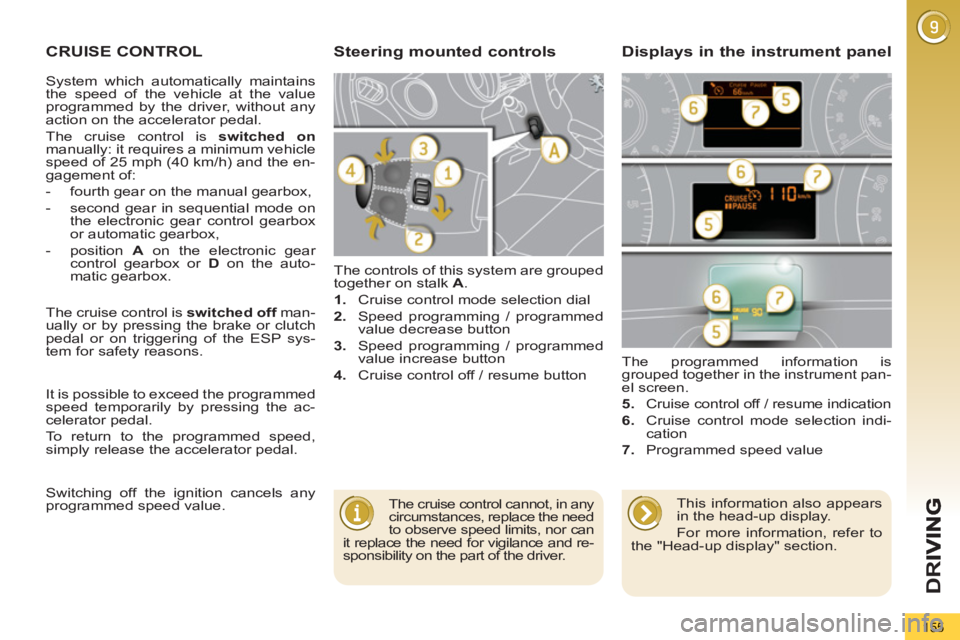
The controls of this system are grouped
together on stalk A
.
1.
Cruise control mode selection dial
2.
Speed programming / programmed
value decrease button
3.
Speed programming / programmed
value increase button
4.
Cruise control off / resume button The programmed information is
grouped together in the instrument pan-
el screen.
5.
Cruise control off / resume indication
6.
Cruise control mode selection indi-
cation
7.
Programmed speed value
Steering mounted controls Displays in the instrument panel
The cruise control cannot, in any
circumstances, replace the need
to observe speed limits, nor can
it replace the need for vigilance and re-
sponsibility on the part of the driver.
The cruise control is switched off
man-
ually or by pressing the brake or clutch
pedal or on triggering of the ESP sys-
tem for safety reasons.
It is possible to exceed the programmed
speed temporarily by pressing the ac-
celerator pedal.
To return to the programmed speed,
simply release the accelerator pedal.
Switching off the ignition cancels any
programmed speed value.
This information also appears
in the head-up display.
For more information, refer to
the "Head-up display" section.
System which automatically maintains
the speed of the vehicle at the value
programmed by the driver, without any
action on the accelerator pedal.
The cruise control is switched on
manually: it requires a minimum vehicle
speed of 25 mph (40 km/h) and the en-
gagement of:
- fourth gear on the manual gearbox,
- second gear in sequential mode on
the electronic gear control gearbox
or automatic gearbox,
- position A
on the electronic gear
control gearbox or D
on the auto-
matic gearbox.
Page 158 of 364
D
R
I
156
When the cruise control is
switched on, be careful if you
maintain the pressure on one
of the programmed speed chang-
ing buttons: this may result in a very
rapid change in the speed of your ve-
hicle.
Do not use the cruise control on slip-
pery roads or in heavy traffi c.
On a steep descent, the cruise con-
trol will not be able to prevent the
vehicle from exceeding the pro-
grammed speed.
To avoid any risk of jamming of the
pedals:
- ensure that the mat is positioned
correctly,
- never fi t one mat on top of another.
Exceeding the programmed speed
Intentional or unintentional exceeding of the programmed
speed results in fl ashing of this speed in the screen.
Return to the programmed speed, by means of intentional or
unintentional deceleration of the vehicle, automatically can-
cels the fl ashing of the speed.
Return to normal driving
)
Turn dial 1
to the "0"
position: the cruise control mode is
deselected. The display returns to the distance recorder.
Operating fault
In the event of a cruise control malfunc-
tion, the speed is cleared resulting in
fl ashing of the dashes.
Have it checked by a PEUGEOT dealer
or a qualifi ed workshop.
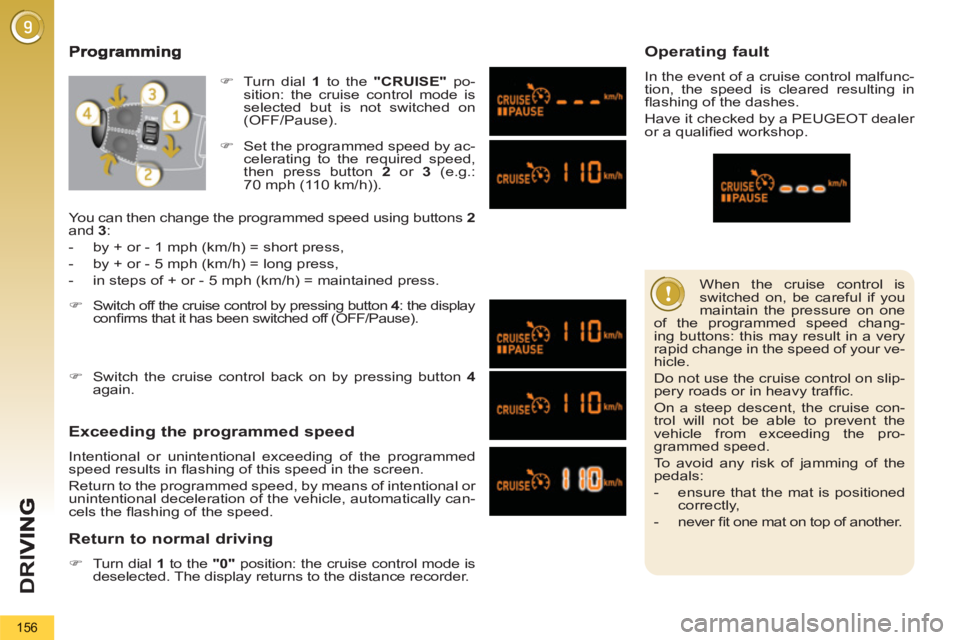
)
Set the programmed speed by ac-
celerating to the required speed,
then press button 2
or 3
(e.g.:
70 mph (110 km/h)).
)
Switch off the cruise control by pressing button 4
: the display
confi rms that it has been switched off (OFF/Pause).
)
Switch the cruise control back on by pressing button 4
again.
You can then change the programmed speed using buttons 2
and 3
:
- by + or - 1 mph (km/h) = short press,
- by + or - 5 mph (km/h) = long press,
- in steps of + or - 5 mph (km/h) = maintained press.
)
Turn dial 1
to the "CRUISE"
po-
sition: the cruise control mode is
selected but is not switched on
(OFF/Pause).