Page 240 of 324
06
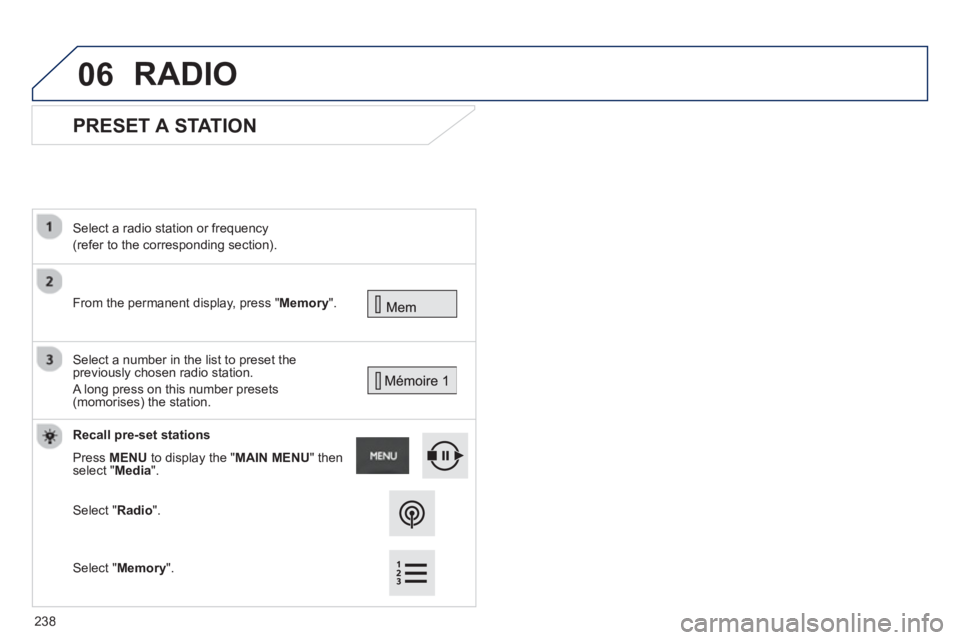
PRESET A STATION
From the permanent display, press "Memory".
Select a radio station or frequency
(refer to the corresponding section).
Select a number in the list to preset the
previously chosen radio station.
A long press on this number presets (momorises) the station.
Recall
pre-set stations
Press MENUto display the " MAIN MENU " then select " Media".
Select "Radio".
RADIO
Select "Memory".
238
Page 241 of 324
06
239
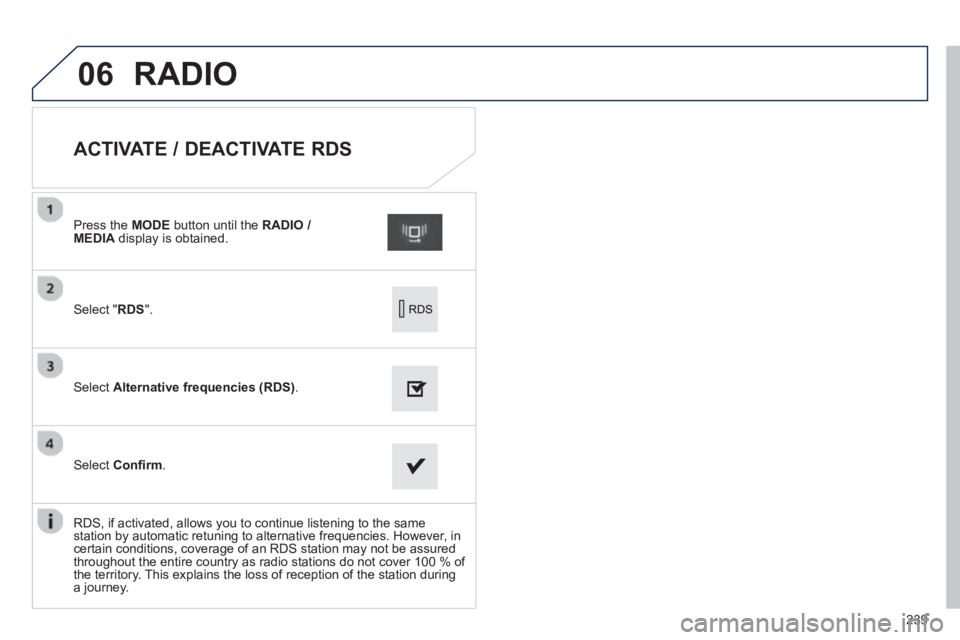
ACTIVATE / DEACTIVATE RDS
Select " RDS".
Press the MODE
button until the RADIO / MEDIA
display is obtained.
Select Alternative frequencies (RDS).
Select Confi rm.
RD
S, if activated, allows you to continue listening to the same
station by automatic retuning to alternative frequencies. However, incertain conditions, coverage of an RDS station may not be assured
throughout the entire country as radio stations do not cover 100 % of
the territory. This explains the loss of reception of the station during
a journey.
RADIO
Page 242 of 324

06
240
CD, MP3 CD, USB PLAYER, AUXILIARY
Insert the CD in the player, insert the USBmemory stick in the USB player or connect theUSB peripheral to the USB port using a suitablecable (not supplied).
The s
ystem builds playlists (in temporarymemory), an operation which can take froma few seconds to several minutes at the fi rstconnection.
R
educe the number of non-music fi les and the number of folders to reduce the waiting time.
The pla
ylists are updated every time the ignition
is switched off or connection of a USB memory stick. However, the system memorises these
lists and if they are not modifi ed, the loadingtime will be shorter.
Pla
y starts automatically after a period which
depends on the capacity of the USB memory stick.SELECTION OF SOURCE
The steering mounted SRC(source) button can be used to go to thenext media source, available if the source is active.
"CD / CD MP
3"
"
USB, iPod
"
"
Bluetooth (streaming)
"
"Auxiliary
"
"Radio"
Select changing source then choose thesource. Pr
ess the MODE button
until the RADIO / MEDIA
display is obtained.
It is also possible to chan
ge source from the
top bar.
MUSIC
Page 243 of 324

06
241
CD, MP3 CD / USB PLAYER
The audio equipment will only play audio fi les with ".wma, .aac, .fl ac, .ogg and .mp3" fi le extensions and with a bit rate of between32 Kbps and 320 Kbps.
It also supports VBR
(Variable Bit Rate) mode.
No other t
ype of fi le (.mp4, .m3u...) can be played.
WMA fi les must be of the standard wma 9 t
ype.
The samplin
g rates supported are 11, 22, 44 and 48 KHz.
It is advisable to restrict fi le names to 20 characters, without usin
g of special characters (e.g.: " " ? ; ù) to avoid any playing and displayingproblems.
In order to be able to play a recorded
CDR or CDRW, whenrecording it is preferable to select the ISO 9660 level 1, 2 or Jolietstandard.
If the disc is recorded in another format it ma
y not be playedcorrectly.
It is recommended that the same recordin
g standard is always used
for an individual disc, with as low a speed as possible (4x maximum)for optimum sound quality.
In the particular case o
f a multi-session CD, the Joliet standard isrecommended.
INFORMATION AND ADVICE
The s
ystem supports USB mass storage or
iPod devices via the USB port (suitable cable not supplied).
Control of the peripheral device is with the
audio system controls.
Other peripherals, not recognised onconnection, must be connected to the auxiliary socket using a Jack cable (not supplied).
In order to be read, a U
SB memory stick must be formatted FAT 16or 32.
MUSIC
The system does not support the operation of an Apple®
player and®
a USB memory stick connected at the same time.
It is recommended that o
ffi cial AppleÆ
USB cables are used toÆ
ensure correct operation.
Page 246 of 324
06
USING THE AUXILIARY INPUT (AUX)
Cable not supplied
Connect the portable device (MP3 player…) to the auxiliary JACK
socket using an audio cable.
First ad
just the volume of your portable device (to a high level). Then
adjust the volume of your audio system.
Displa
y and management of the controls are via the portable device.
Select changing the source.
Press the MODE button until the RADIO
display is obtained.
Select the AUXILIARYsource.Y
MUSIC
244
Page 247 of 324

06
245
- " Ambience" (choice of 6 musical ambiences)
- " Bass"
-"
Treble"
-
"Loudness" (Activate/Deactivate)
-
"Distribution" (" Driver
", "rAll passengers", " Front speakers only
")
The audio settin
gs ( Ambience
, Bass
, Trebleand Loudness) are
different and independent for each sound source.
The settin
gs for distribution and balance are common to all sources.
The distribution
(or spatialisation using the Arkamys© system)©
of sound is an audio process that allows the audio quality to be
adapted to the number of listeners in the vehicle.
On-board audio: Arkamys©
Sound Staging.©
With Sound Staging, the driver and passengers are immersed in an
"audio scene" recreating the natural atmosphere of an auditorium:
truly a part of the scene and its surroundings.
This new sensation is made possible b
y software in the audiosystem which processes the digital signals from the media players (radio, CD, MP3…) without changing the audio settings. This
processing takes account of the characteristics of the passenger compartment to produce optimum results.
The Arkam
ys© software installed in your audio system processes ©
the digital signal from the media players (radio, CD, MP3, ...) and
recreates a natural musical scene, with harmonious placement of
instruments and voices in the space in front of passengers, level with
the windscreen.
AUDIO
Select "Audio".
Press Menu to display the "MAIN MENU
", then select " Preferences".
Select "Ambience
" or " Distribution".
SETTINGS
Page 249 of 324
247
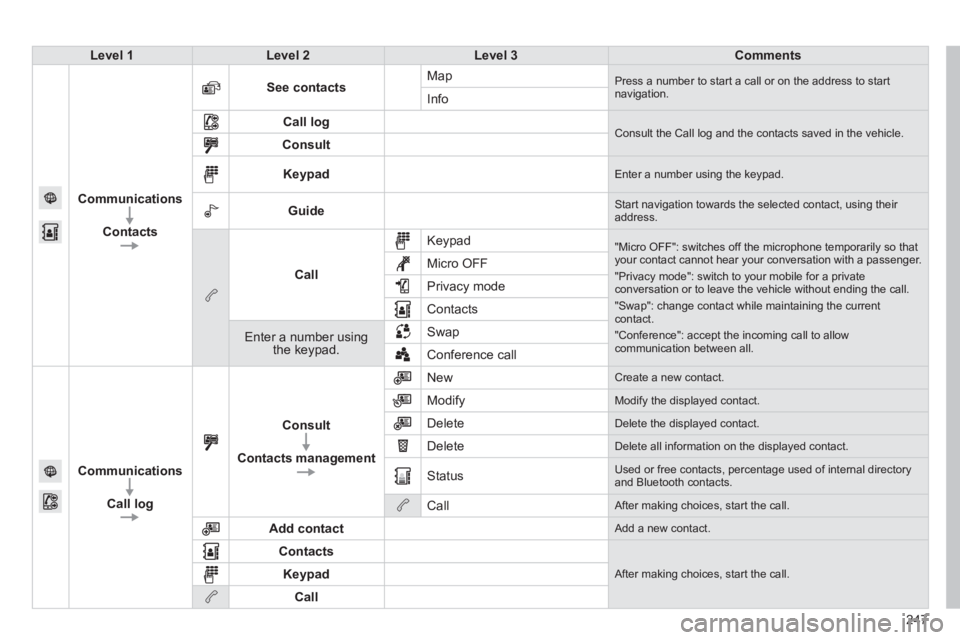
Level 1Level 2Level 3Comments
Communications
Contacts
See contactsMap Press a number to start a call or on the address to startnavigation.Info
Call log Consult the Call log and the contacts saved in the vehicle. Consult
Keypad Enter a number using the keypad.
Guide Start navigation towards the selected contact, using their address.
Call
Keypad
"Micro OFF": switches off the microphone temporarily so thatyour contact cannot hear your conversation with a passenger.
"Privacy mode": switch to your mobile for a privateconversation or to leave the vehicle without ending the call.
"Swap": change contact while maintaining the currentcontact.
"Conference": accept the incoming call to allow communication between all.
Micro OFF
Privac
y mode
Contacts
Enter a number using the keypad.SwapConference call
Communications
Call lo
g
Consult
Contacts management
New Create a new contact.
Modify
Modify the displayed contact.
Delete
Delete the displayed contact.
Delete
Delete all information on the displayed contact.
Status
Used or free contacts, percentage used of internal directory and Bluetooth contacts.
Call
After making choices, start the call.
Add contact
Add a new contact.
Contacts
After making choices, start the call. Keypad
Call
Page 252 of 324
07
250
The " Hands-free" profi le should be used in preference if "Streaming"
is not desired.
The abilit
y of the system to connect with only one profi le depends on
the telephone. The two profi les may both connect by default.
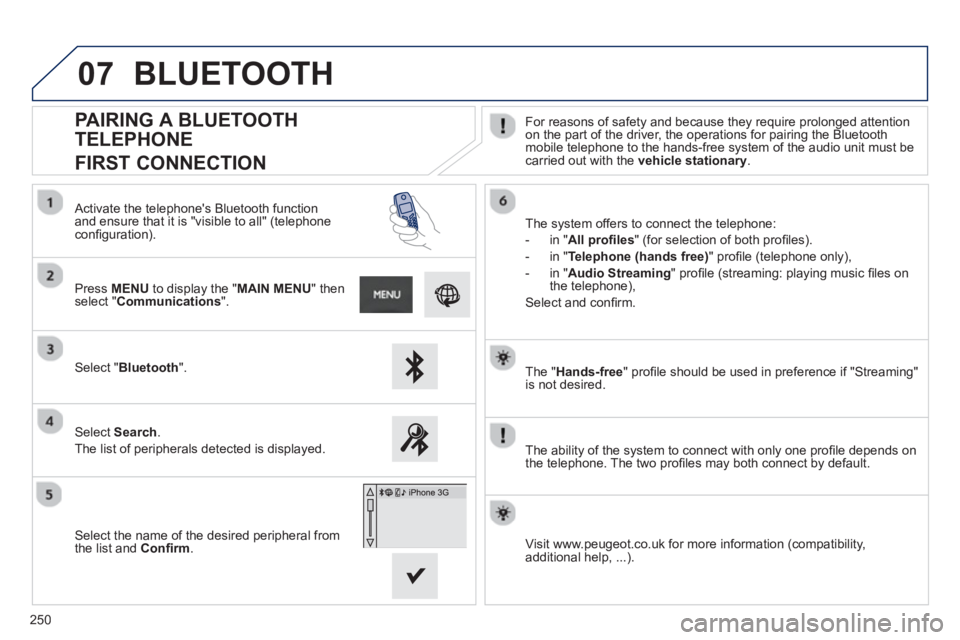
PAIRING A BLUETOOTH
TELEPHONE
FIRST CONNECTION
For reasons of safety and because they require prolonged attention on the part of the driver, the operations for pairing the Bluetooth
mobile telephone to the hands-free system of the audio unit must becarried out with the vehicle stationary
.
Select " Bluetooth".
Press MENU
to display the "MAIN MENU" thenselect "Communications".
Select Search.
The list of peripherals detected is displayed.
Activate the telephone's Bluetooth
function and ensure that it is "visible to all" (telephoneconfi guration).
The system offers to connect the telephone:
-
in"All profi les" (for selection of both profi les).
-
in "Telephone (hands free)" profi le (telephone only),
-
in "Audio Streaming
" profi le (streaming: playing music fi les on
the telephone),
Select and confi rm.
Select the name of the desired peripheral from
t
he list and Confi rm.
Visit www.peugeot.co.uk for more information (compatibility,
additional help, ...).
BLUETOOTH