2013 MERCEDES-BENZ SPRINTER lock
[x] Cancel search: lockPage 188 of 334

Selecting the display for the status bar
Using the steering wheel buttons
X
Press the 0010or0007 button repeatedly
until the Settings menu appears in the
display.
X Press the 0001button to switch to the
submenu selection.
X Press the 0011or0012 button to select the
Inst. cluster submenu.
X Press the 0001button to select the
Select disp. function.
The selection marker is on the current
setting.
X Press the 0011or0012 button to select
whether to display the outside temperature
or the speed (digital speedometer).
The selected display is then shown
permanently in the lower part of the
display.
Selecting the unit for the tire pressure Using the steering wheel buttons
X
Press the 0010or0007 button repeatedly
until the Settings menu appears in the
display.
X Press the 0001button to switch to the
submenu selection.
X Press the 0011or0012 button to select the
Inst. cluster submenu.X
Press the 0001button to select the Tire pres. function.
The selection marker is on the current
setting.
X Press the 0011or0012 button to select the
unit for the tire pressure in the display:
bar or
psi .
Clocks ubmenu Setting the time
Using the steering wheel buttons
X
Press the 0010or0007 button repeatedly
until the Settings menu appears in the
display.
X Press the 0001button to switch to the
submenu selection.
X Press the 0011or0012 button to select the
Clock submenu.
X Press the 0001button to select the Set clock Hours or
Minutes function.
X Press the 0011or0012 button to set the
values.
Selecting the time format 186
On-board computer (vehiclesw
ith steering wheel buttons)On-board computer and displays
Page 189 of 334

Using the steering wheel buttons
X
Press the 0010or0007 button repeatedly
until the Settings menu appears in the
display.
X Press the 0001button to switch to the
submenu selection.
X Press the 0011or0012 button to select the
Clock submenu.
X Press the 0001button to select the
12/24 h function.
The selection marker is on the current
setting.
X Press the 0011or0012 button to select the
12 h or
24 h clock format.
Lighting submenu Setting daytime running lamp mode
For safety reasons, it is only possible to
change this setting when the vehicle is
stationary. The factory setting is
Constant in
countries in which daytime running lamp
mode is mandatory.
Using the steering wheel buttons
X Press the 0010or0007 button repeatedly
until the Settings menu appears in the
display.
X Press the 0001button to switch to the
submenu selection.
X Press the 0011or0012 button to select the
Lighting submenu. X
Press the 0001button to select the
Hdlmp. mode function.
The selection marker is on the current
setting.
X Press the 0011or0012 button to select the
Manual or
Constant (daytime running
lamp mode) setting.
If you have activated daytime running lamp
mode and the light switch is set to 000C, the
following light up automaticallyw hen the
engine is running:
R the parking lamps
R the low-beam headlamps
R the tail lamps
R the license plate lamps
i USA only:
If you turn the light switch to 000Bor
0004, the corresponding light switches on.
If the light switch is turned to 0007,
daytime running lamp mode remains
activated.
Canada only:
If you turn the light switch to 0004, the low-
beam headlamps switch on. Daytime
running lamp mode remains activated if the
light switch is turned to 000Bor0007.
i For safety reasons, it is not possible to
reset the Hdlmp. mode function to the
factory setting while the vehicle is in
motion. You will see the following message
in the display: Setting only possible at standstill .
Switching surround lighting (locator
lighting) on/off On-board computer (vehicles with steering wheel buttons)
187On-board computer and displays Z
Page 190 of 334

Using the steering wheel buttons
X
Press the 0010or0007 button repeatedly
until the Settings menu appears in the
display.
X Press the 0001button to switch to the
submenu selection.
X Press the 0011or0012 button to select the
Lighting submenu.
X Press the 0001button to select the Loc.lighting function.
The selection marker is on the current
setting.
X Press the 0011or0012 button to switch
the surround lighting (locator lighting) On or
Off .
If you switch the surround lighting to On , the
following lamps light up in the dark after you
have unlocked the vehicle using the key:
R the parking lamps
R the tail lamps
R the license plate lamps
R the fog lamps
The surround lighting automatically switches
off after 40 seconds or when you:
R open the driver's door
R insert the key into the ignition lock
R lock the vehicle using the key
Setting the exterior lighting delayed
switch-off In the
Headlamps submenu, you can set
whether and for how long you wish the
exterior lighting to remain on after closing the
doors. Using the steering wheel buttons
X
Press the 0010or0007 button repeatedly
until the Settings menu appears in the
display.
X Press the 0001button to switch to the
submenu selection.
X Press the 0011or0012 button to select the
Lighting submenu.
X Press the 0001button to select the
Headlamps function.
The selection marker is on the current
setting.
X Press the 0011or0012 button to select
whether and for how long you wish the
exterior lighting to remain on.
If you have set the delayed switch-off and
switch off the engine, the following remain lit:
R the parking lamps
R the tail lamps
R the license plate lamps
R the fog lamps
i You can reactivate this function by
opening a door within 10 minutes.
The exterior lighting is switched off after
60 seconds if you do not open a door or if
you do not close an opened door after the
engine has been switched off.
Vehicle submenu Setting the radio station selection
With the
Search function, you can set how
the radio changes the station when you
operate it with the steering wheel buttons
(not with Audio 20). 188
On-board computer (vehicles with steering wheel buttons)On-board computer and displays
Page 192 of 334

i
When you call up the trip computer again,
it displays the last function called up.
The units of the statistical information
displayed are set permanently for each
specific country, and are therefore
independen tofthe units selected in the
Settings menu.
Trip computer "After start" or "After
reset" Example: "After start" trip computer
0005
Distance
0006 Time
0026 Average speed
0025 Average fuel consumption
Using the steering wheel buttons
X Press the 0010or0007 button to select
After start .
Or
X Press the 0001or0009 button to select
After reset .
The values in the After start submenu
refer to the start of the journey. The values in
the After reset submenu are calculated
from the last time the trip computer was
reset.
The After start trip computer function is
automatically reset if:
R the ignition has been switched off for more
than four hours.
R 999 hours have been exceeded.
R 9,999 miles have been exceeded.
The After reset trip computer is
automatically reset if the value exceeds
9,999 hours or 99,999 miles. i
If you turn the key to position 0in the
ignition lock or remove it, all the values are
reset after approximately four hours.
The values will not be reset if you turn the
key back to position 1or 2during this time.
Calling up the range Using the steering wheel buttons
X
Press the 0010or0007 button to select
After start .
X Select Range using the
0001or0009
button.
The approximate distance which can be
covered with the tank's current contents
and your current style of driving is shown.
i If there is only a small amount of fuel left
in the fuel tank, the 0016Please refuel message is shown instead of the range.
Resetting the trip computer Using the steering wheel buttons
X
Press the 0010or0007 button to select
After start .
X Press the 0001or0009 button to select the
function you would like to reset.
X Press and hold the 0007reset button until the
values are reset to "0". Telephone menu
Introduction G
WARNING
If you operate information systems and
communication equipment integrated in the
vehicle while driving, you will be distracted
from traffic conditions. You could also lose
control of the vehicle. There is a risk of an
accident.
Only operate the equipment when the traffic
situation permits. If you are not sure that this
is possible, park the vehicle paying attention 190
On-board computer (vehicles with steering wheel buttons)On-board computer and displays
Page 199 of 334

Display messages on vehicles wit
hsteering wheel buttons
Safety systems Display messages Possible causes/consequences and
0004 Solutions
ABS
Visit workshop ABS has been deactivated due to a malfunction. ESP
®
, ASR and
BAS, as well as cruise control, have also been deactivated as a
result.
G WARNING
The brake system continue sto function normally, but without the
functions listed above. The wheels could therefore lock if you
brake hard, for example.
This causes steerability and braking to be greatly impaired. The
braking distance can increase in emergency braking situations.
The driven wheels can spin when accelerating.
If ESP ®
is not operational, ESP ®
will not stabilize the vehicle.
There is an increased risk of skidding and accidents.
X Drive on with care.
X Visit a qualified specialist workshop immediately. ABS
Unavailable ABS is temporarily unavailable. ESP
®
, ASR and BAS, as well as
cruise control, are also unavailable as a result.
G WARNING
The brake system continues to function normally, but without the
functions listed above. The wheels could therefore lock if you
brake hard, for example.
This causes steerability and braking to be greatly impaired. The
braking distance can increase in emergency braking situations.
The driven wheels can spin when accelerating.
If ESP ®
is not operational, ESP ®
will not stabilize the vehicle.
There is an increased risk of skidding and accidents.
X Drive a short distance at a speed above 13 mph(20 km/h).
If the display message disappears, the functions mentioned
above are available again.
If the display message continues to be displayed:
X Drive on with care.
X Visit a qualified specialist workshop immediately. Display messages
197On-board computer and displays Z
Page 200 of 334

Display messages Possible causes/consequences and
0004 Solutions
ABS
Unavailable AB
Sh as been deactivated due to undervoltage. ESP ®
, ASR and
BAS, as well as cruise control, are also unavailable as a result.
The battery may no tbe being charged.
G WARNING
The brake system continues to function normally, but without the
functions listed above. The wheels could therefore lock if you
brake hard, for example.
This causes steerability and braking to be greatly impaired.
The braking distance can increase in emergency braking
situations.
The driven wheels can spin when accelerating.
If ESP ®
is not operational, ESP ®
will not stabilize the vehicle.
There is an increased risk of skidding and accidents.
X Drive on with care.
X Visit a qualified specialist workshop immediately. 000A
Visit workshop ASR has been deactivated due to a malfunction.
The engine power output may be reduced.
G WARNING
The driven wheels can spin when accelerating.
There is an increased risk of skidding and accidents.
X Drive on with care.
X Visit a qualified specialist workshop immediately. 000A
Visit workshop BASh
as been deactivated due to a malfunction.
G WARNING
The brake system continues to function normally, but without
electronic support.
The braking distance can increase in emergency braking
situations.
There is a ris kofanaccident.
X Drive on with care.
X Visit a qualified specialist workshop immediately. 198
Display messagesOn-board computer and displays
Page 201 of 334

Display messages Possible causes/consequences and
0004 Solutions
000A
Unavailable ASR and BA
Shave been deactivated due to undervoltage.
The battery may no tbe being charged.
G WARNING
The brake system continues to function normally, but without the
functions listed above. The wheels could therefore lock if you
brake hard, for example.
The braking distance can increase in emergency braking
situations. The driven wheels can spin when accelerating.
There is an increased risk of skidding and accidents.
X Drive on with care.
X Visit a qualified specialist workshop immediately. 0005
Brake wear Visit
workshop The brake pads/linings have reached their wear limit.
X Have the brake pads/linings replaced as soon as possible at a
qualified specialist workshop. 0008
Brake fluid Visit
workshop There is insufficient brake fluid in the fluid reservoir.
G WARNING
Braking performance can be impaired.
There is a risk of an accident.
X Stop the vehicle as soon as possible, paying attention to road
and traffic conditions.
X Check the brake fluid level in the brake fluid reservoir
(Y page 245).
If the brake fluid is below the MIN mark:
X Do not continue driving under any circumstances.
X Do not add brake fluid. This does not solve the problem.
X Consult a qualified specialist workshop.
If the brake fluid is above the MIN mark:
X Drive on with care.
X Visit a qualified specialist workshop immediately. Display messages
199On-board computer and displays Z
Page 202 of 334
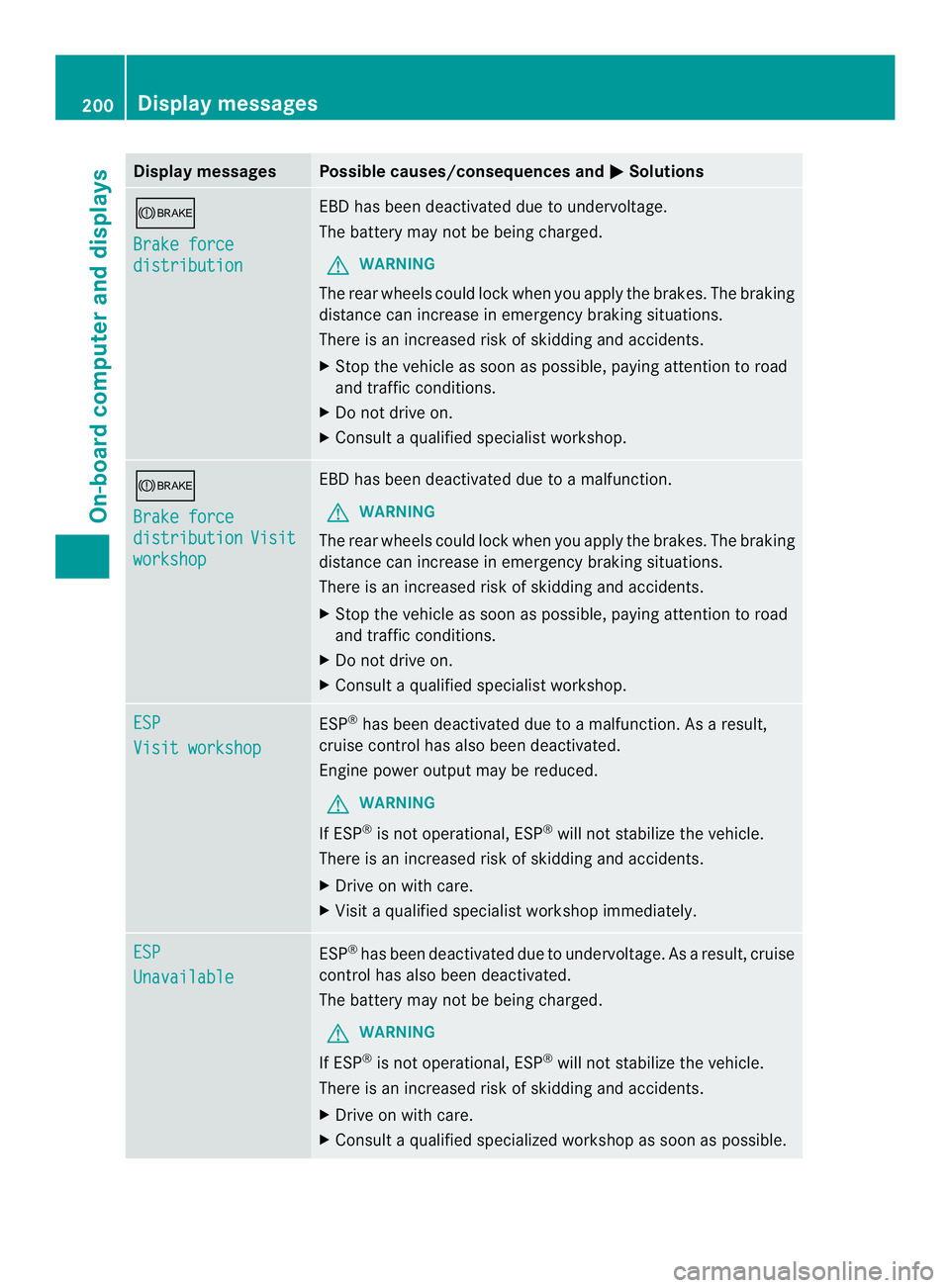
Display messages Possible causes/consequences and
0004 Solutions
0008
Brake force
distribution EB
Dh as been deactivated due to undervoltage.
The battery may no tbe being charged.
G WARNING
The rear wheels could lock when you apply the brakes. The braking
distance can increase in emergency braking situations.
There is an increased risk of skidding and accidents.
X Stop the vehicle as soon as possible, paying attention to road
and traffic conditions.
X Do not drive on.
X Consult a qualified specialist workshop. 0008
Brake force
distribution Visit
workshop EBDh
as been deactivated due to a malfunction.
G WARNING
The rear wheels could loc kwhen you apply the brakes. The braking
distance can increase in emergency braking situations.
There is an increased risk of skidding and accidents.
X Stop the vehicle as soon as possible, paying attention to road
and traffic conditions.
X Do not drive on.
X Consult a qualified specialist workshop. ESP
Visit workshop ESP
®
has been deactivated due to a malfunction. As a result,
cruise control has also been deactivated.
Engine power output may be reduced.
G WARNING
If ESP ®
is not operational, ESP ®
will not stabilize the vehicle.
There is an increased risk of skidding and accidents.
X Drive on with care.
X Visit a qualified specialist workshop immediately. ESP
Unavailable ESP
®
has been deactivated due to undervoltage. As a result, cruise
control has also been deactivated.
The battery may not be being charged.
G WARNING
If ESP ®
is not operational, ESP ®
will not stabilize the vehicle.
There is an increased risk of skidding and accidents.
X Drive on with care.
X Consult a qualified specialized workshop as soon as possible. 200
Display messagesOn-board computer and displays