2013 MERCEDES-BENZ SL-CLASS ROADSTER tow
[x] Cancel search: towPage 169 of 572

As DISTRONIC PLUS transmits radar waves,
it can resemble the radar detectors of the
responsible authorities. You can refer to the
relevant chapter in the Operator's Manual if
questions are asked about this.
i
USA only:
This device has been approved
by the FCC as a "Vehicular Radar System".
The radar sensor is intended for use in an
automotive radar system only. Removing,
altering or tampering with the device will
void any warranties, and is not permitted
by the FCC. Do not tamper with, alter, or
use the device in any non-approved way.
Any unauthorized modification to this
device could void the user's authority to
operate the equipment.
i Canada only: This device complies with
RSS-210 of Industry Canada. Operation is
subject to the following two conditions:
1. This device may not cause interference,
and
2. this device must accept any interference
received, including interference that may
cause undesired operation of the device.
Removal, tampering, or altering of the
device will void any warranties and is not
permitted. Do not tamper with, alter, or use
the device in any non-approved way.
Any unauthorized modification to this
device could void the user's authority to
operate the equipment. Cruise control lever Cruise control lever
:
To store the current speed or a higher
speed
; To set the specified minimum distance
= To store the current speed or call up the
last stored speed
? To store the current speed or a lower
speed
A To deactivate DISTRONIC PLUS
Activating DISTRONIC PLUS; storing,
maintaining and calling up a speed Important safety notes
G
WARNING
When the DISTRONIC PLUS is switched on,
the vehicle can be braked. You should
therefore switch off the DISTRONIC PLUS if
the vehicle must be towed.
In order to activate DISTRONIC PLUS, the
following conditions must be fulfilled:
R the engine
must be started. It may take up
to two minutes after pulling away before
DISTRONIC PLUS is operational.
R your vehicle must not be secured by the
electric parking brake.
R ESP ®
must be activated.
R the transmission must be in position D.
R the driver's door must be closed when you
shift from P to D or your seat belt must be
fastened. Driving systems
167
Driving and parking Z
Page 170 of 572
R
the front-passenger door must be closed.
R the vehicle must not skid.
Activating while driving Cruise control lever
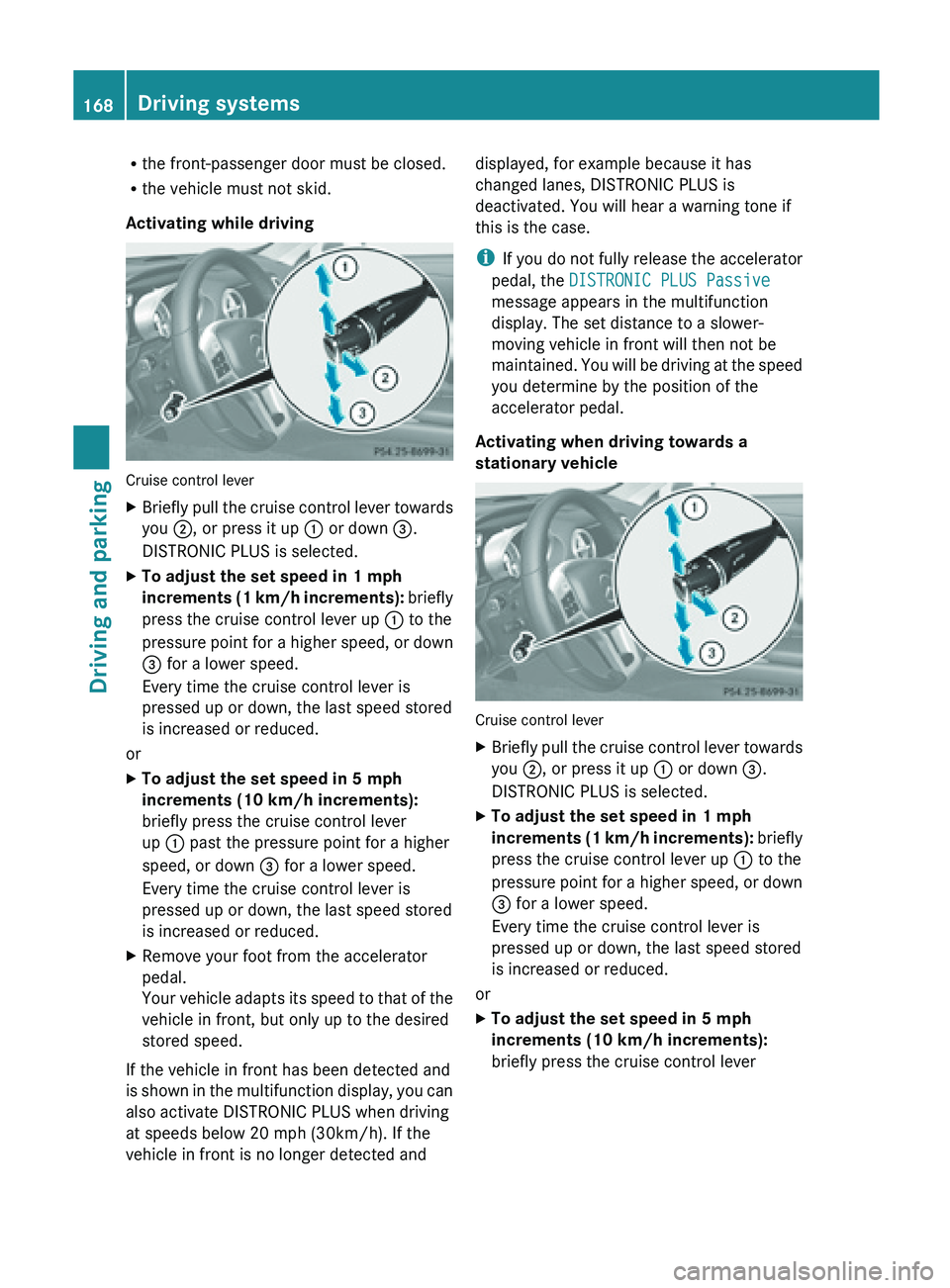
X
Briefly pull the cruise control lever towards
you ;, or press it up : or down =.
DISTRONIC PLUS is selected.
X To adjust the set speed in 1 mph
increments (1
km/h increments): briefly
press the cruise control lever up : to the
pressure point for a higher speed, or down
= for a lower speed.
Every time the cruise control lever is
pressed up or down, the last speed stored
is increased or reduced.
or
X To adjust the set speed in 5 mph
increments (10 km/h increments):
briefly press the cruise control lever
up : past the pressure point for a higher
speed, or down = for a lower speed.
Every time the cruise control lever is
pressed up or down, the last speed stored
is increased or reduced.
X Remove your foot from the accelerator
pedal.
Your vehicle
adapts its speed to that of the
vehicle in front, but only up to the desired
stored speed.
If the vehicle in front has been detected and
is shown
in the multifunction display, you can
also activate DISTRONIC PLUS when driving
at speeds below 20 mph (30km/h). If the
vehicle in front is no longer detected and displayed, for example because it has
changed lanes, DISTRONIC PLUS is
deactivated. You will hear a warning tone if
this is the case.
i
If you
do not fully release the accelerator
pedal, the DISTRONIC PLUS Passive
message appears in the multifunction
display. The set distance to a slower-
moving vehicle in front will then not be
maintained. You will be driving at the speed
you determine by the position of the
accelerator pedal.
Activating when driving towards a
stationary vehicle Cruise control lever
X
Briefly pull the cruise control lever towards
you ;, or press it up : or down =.
DISTRONIC PLUS is selected.
X To adjust the set speed in 1 mph
increments (1
km/h increments): briefly
press the cruise control lever up : to the
pressure point for a higher speed, or down
= for a lower speed.
Every time the cruise control lever is
pressed up or down, the last speed stored
is increased or reduced.
or
X To adjust the set speed in 5 mph
increments (10 km/h increments):
briefly press the cruise control lever168
Driving systems
Driving and parking
Page 171 of 572
up
: past the pressure point for a higher
speed, or down = for a lower speed.
Every time the cruise control lever is
pressed up or down, the last speed stored
is increased or reduced.
If the vehicle in front of you is stationary, you
can only
activate DISTRONIC PLUS once your
vehicle is stationary as well.
i DISTRONIC PLUS can only be activated at
under 20 mph (30km/h) if a vehicle in front
has been detected. Therefore, the
DISTRONIC PLUS distance display in the
instrument cluster should be activated
(Y page 214).
i You can use the cruise control lever to set
the stored speed and the control on the
cruise control lever to set the specified
minimum distance (Y page 172).
Pulling away and driving G
WARNING
When you step on the brake pedal, you switch
off the DISTRONIC PLUS except when the
vehicle is
at a standstill. The DISTRONIC PLUS
will no longer brake your vehicle. You are
always responsible for maintaining a distance
from other vehicles, observing road speeds
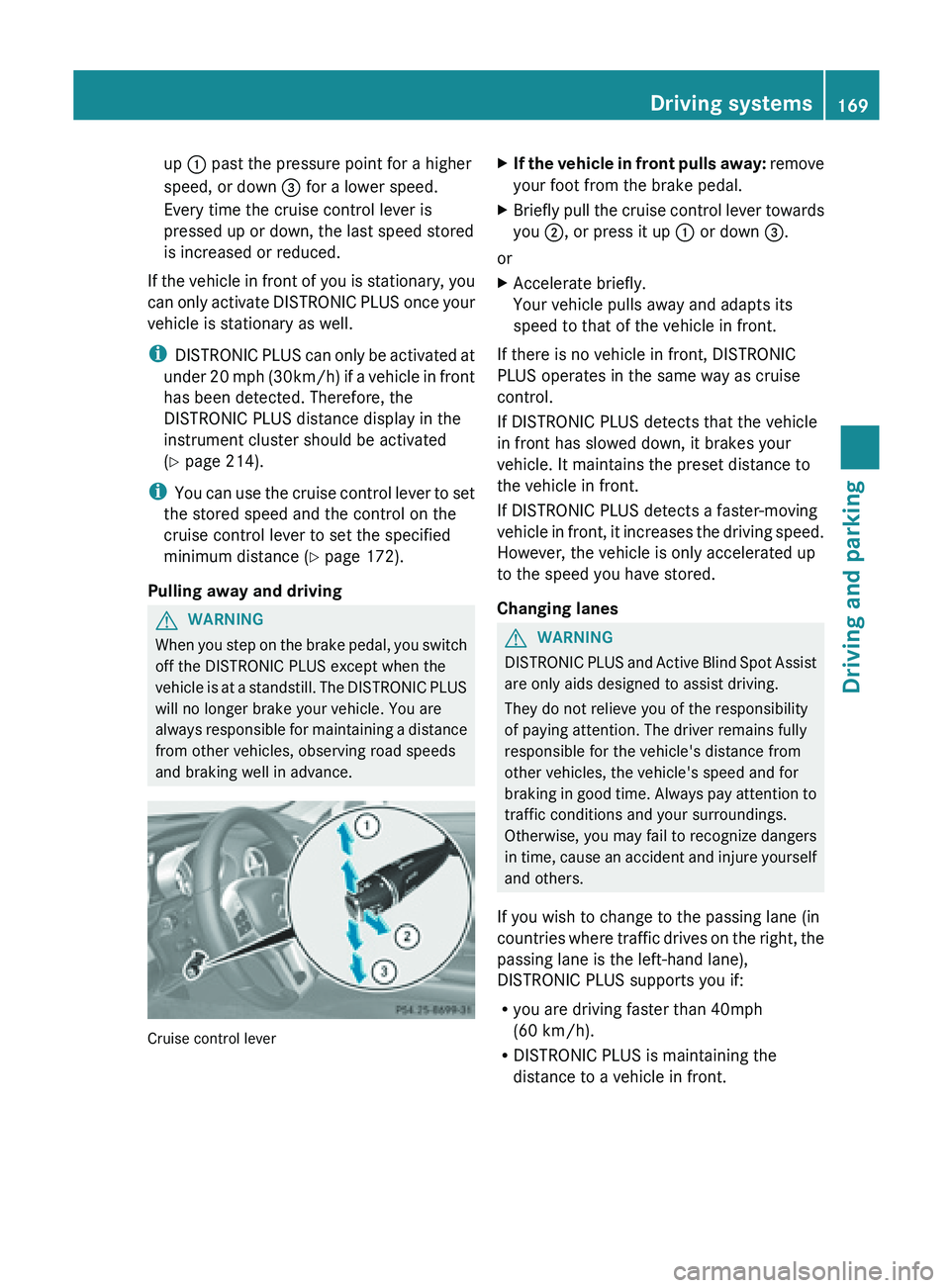
and braking well in advance. Cruise control lever X
If the vehicle in front pulls away: remove
your foot from the brake pedal.
X Briefly
pull the cruise control lever towards
you ;, or press it up : or down =.
or
X Accelerate briefly.
Your vehicle pulls away and adapts its
speed to that of the vehicle in front.
If there is no vehicle in front, DISTRONIC
PLUS operates in the same way as cruise
control.
If DISTRONIC PLUS detects that the vehicle
in front has slowed down, it brakes your
vehicle. It maintains the preset distance to
the vehicle in front.
If DISTRONIC PLUS detects a faster-moving
vehicle in
front, it increases the driving speed.
However, the vehicle is only accelerated up
to the speed you have stored.
Changing lanes G
WARNING
DISTRONIC PLUS and Active Blind Spot Assist
are only aids designed to assist driving.
They do not relieve you of the responsibility
of paying attention. The driver remains fully
responsible for the vehicle's distance from
other vehicles, the vehicle's speed and for
braking in
good time. Always pay attention to
traffic conditions and your surroundings.
Otherwise, you may fail to recognize dangers
in time, cause an accident and injure yourself
and others.
If you wish to change to the passing lane (in
countries where traffic drives on the right, the
passing lane is the left-hand lane),
DISTRONIC PLUS supports you if:
R you are driving faster than 40mph
(60 km/h).
R DISTRONIC PLUS is maintaining the
distance to a vehicle in front. Driving systems
169
Driving and parking Z
Page 173 of 572
front. The specified minimum distance is set
using the control on the cruise control lever.
The electric parking brake automatically
secures the vehicle if DISTRONIC PLUS is
activated and:
R
the driver's door is open and the driver's
seat belt is unfastened.
R the engine is switched off, unless it is
automatically switched off by the ECO
start/stop function.
R a system malfunction occurs.
R the power supply is not sufficient.
If a
malfunction occurs, then the transmission
may also be shifted into position P
automatically.
Storing the current speed or calling up the
last stored speed G
WARNING
The set speed stored in memory should only
be set again if prevailing road conditions and
legal speed limits permit. Possible
acceleration or deceleration differences
arising from returning to the preset speed
could cause
an accident and/or serious injury
to you and others. Cruise control lever
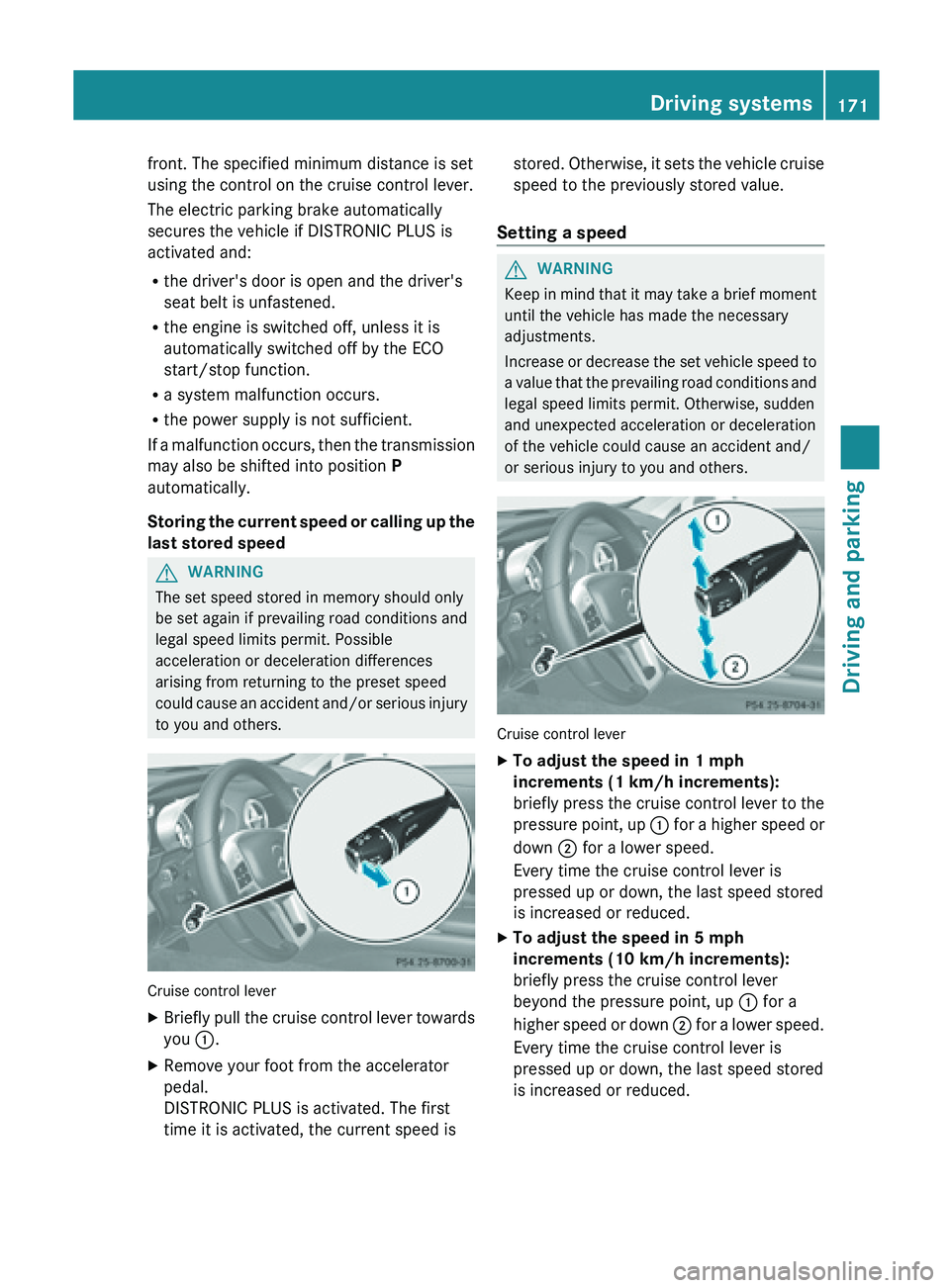
X
Briefly pull the cruise control lever towards
you :.
X Remove your foot from the accelerator
pedal.
DISTRONIC PLUS is activated. The first
time it is activated, the current speed is stored. Otherwise, it sets the vehicle cruise
speed to the previously stored value.
Setting a speed G
WARNING
Keep in mind that it may take a brief moment
until the vehicle has made the necessary
adjustments.
Increase or
decrease the set vehicle speed to
a value that the prevailing road conditions and
legal speed limits permit. Otherwise, sudden
and unexpected acceleration or deceleration
of the vehicle could cause an accident and/
or serious injury to you and others. Cruise control lever
X
To adjust the speed in 1 mph
increments (1 km/h increments):
briefly press
the cruise control lever to the
pressure point, up : for a higher speed or
down ; for a lower speed.
Every time the cruise control lever is
pressed up or down, the last speed stored
is increased or reduced.
X To adjust the speed in 5 mph
increments (10 km/h increments):
briefly press the cruise control lever
beyond the pressure point, up : for a
higher speed
or down ; for a lower speed.
Every time the cruise control lever is
pressed up or down, the last speed stored
is increased or reduced. Driving systems
171
Driving and parking Z
Page 176 of 572
R
you pull the cruise control lever towards
you in order to pull away and the front-
passenger door is open.
R the vehicle has skidded.
If DISTRONIC PLUS is deactivated, you will
hear a warning tone. You will see the
DISTRONIC PLUS Off message in the
multifunction display for approximately five
seconds.
Tips for driving with DISTRONIC PLUS Important safety notes
G
WARNING
The DISTRONIC PLUS works to maintain the
speed selected
by the driver unless a moving
obstacle proceeding directly ahead of it in the
same travel direction is detected (e.g.
following another vehicle ahead of you at your
set distance).
This means that:
R Your vehicle can pass another vehicle after
you have changed lanes.
R While in a sharp turn or if the preceding
vehicle is in a sharp turn, the DISTRONIC
PLUS could lose sight of the preceding
vehicle. Your vehicle could then accelerate
to the previously selected speed.
The DISTRONIC PLUS regulates only the
distance between your vehicle and those
directly ahead of it. It may not register
stationary objects in the road, e.g.:
R a stopped vehicle in a traffic jam
R a disabled vehicle
R an oncoming vehicle
The driver must always be alert, observe all
traffic and intercede as required by means of
steering or braking the vehicle. G
WARNING
The DISTRONIC PLUS should not be used in
snowy or icy road conditions.
The following
contains descriptions of certain
road and traffic conditions in which you must be particularly attentive. In such situations,
brake if necessary. DISTRONIC PLUS is then
deactivated.
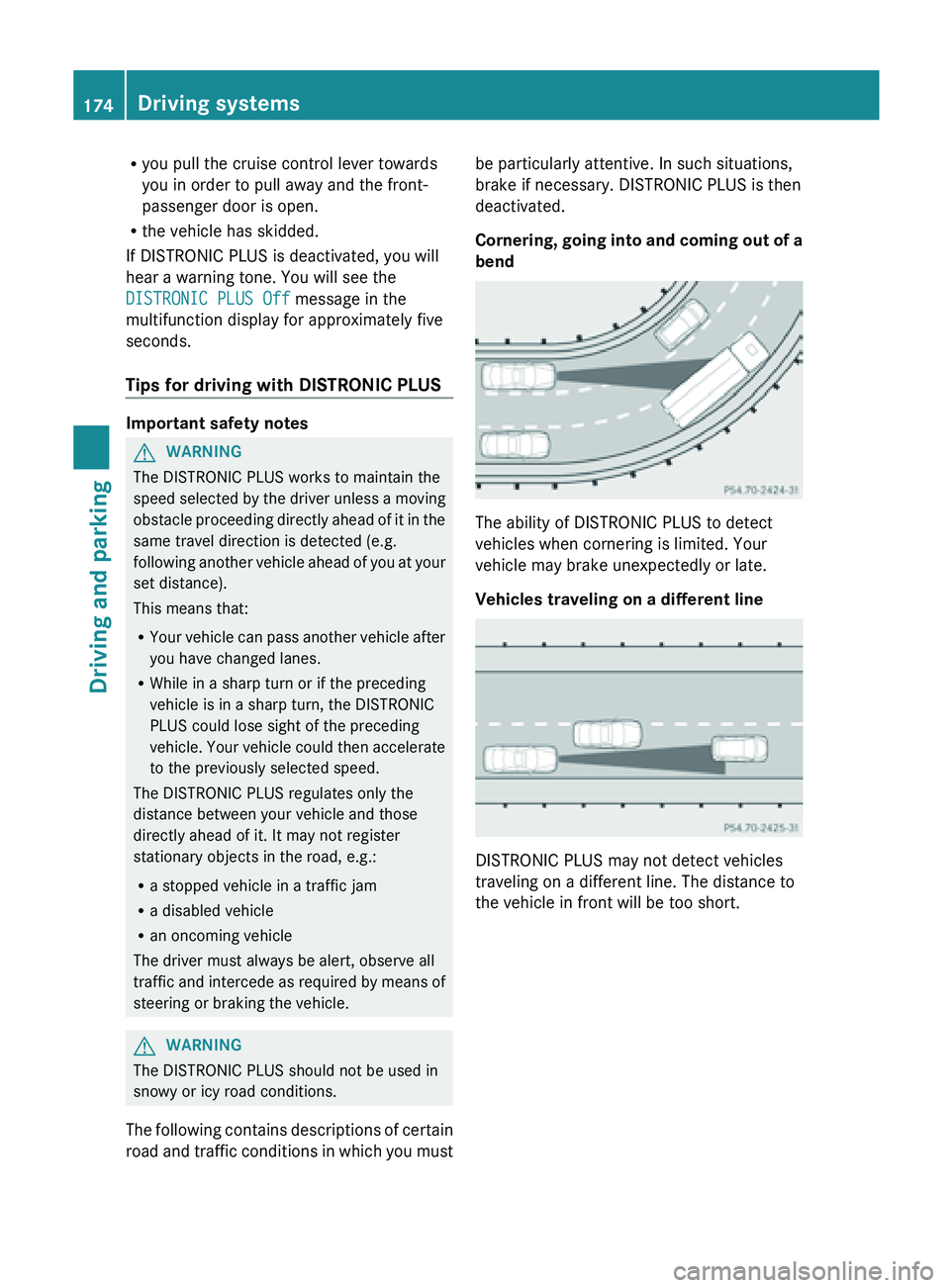
Cornering,
going
into and coming out of a
bend The ability of DISTRONIC PLUS to detect
vehicles when cornering is limited. Your
vehicle may brake unexpectedly or late.
Vehicles traveling on a different line
DISTRONIC PLUS may not detect vehicles
traveling on a different line. The distance to
the vehicle in front will be too short.174
Driving systems
Driving and parking
Page 177 of 572

Other vehicles changing lanes
DISTRONIC PLUS has not detected the
vehicle cutting in yet. The distance to this
vehicle will be too short.
Narrow vehicles
DISTRONIC PLUS has not yet detected the
vehicle in front on the edge of the road,
because of its narrow width. The distance to
the vehicle in front will be too short.
Obstructions and stationary vehicles
DISTRONIC PLUS does not brake for
obstacles or stationary vehicles. If, for example, the detected vehicle turns a corner
and
reveals
an obstacle or stationary vehicle,
DISTRONIC PLUS will not brake for these.
Crossing vehicles DISTRONIC PLUS may mistakenly detect
vehicles that are crossing your lane.
Activating DISTRONIC PLUS at traffic lights
with
crossing
traffic, for example, could cause
your vehicle to pull away unintentionally. HOLD function
Important safety notes G
WARNING
The vehicle's brakes are applied when the
HOLD function is activated. For this reason,
deactivate the
HOLD function if the vehicle is
to be set in motion by other means (e.g. in a
car wash or by towing). G
WARNING
Never get out of the vehicle when the HOLD
function is activated.
The HOLD function must never be operated
or deactivated
by a passenger or from outside
the vehicle.
The HOLD function does not replace the
electric parking brake and must not be used
for parking. Driving systems
175
Driving and parking
Z
Page 193 of 572

G
WARNING
Under the following circumstances, the rear
view camera
will not function, or will function
in a limited manner:
R if the trunk lid is open
R in heavy rain, snow or fog
R at night or in very dark places
R if the camera is exposed to very bright light
R if the area is lit by fluorescent light or LED
lighting (the display may flicker)
R if there is a sudden change in temperature,
e.g. when driving into a heated garage in
winter
R if the camera lens is dirty or obstructed
R if the rear of your vehicle is damaged. In this
event, have the camera position and setting
checked at a qualified specialist workshop.
Do not use the rear view camera in these
types of situation. You could otherwise injure
others or damage objects and your vehicle
while you are parking.
General notes Rear
view camera
: is
in the trunk lid handle.
Rear view camera : is an optical parking and
maneuvering aid. It shows the area behind
your vehicle with guide lines in the COMAND
display.
The area behind the vehicle is displayed as a
mirror image, as in the rear view mirror.
i The text of messages shown in the
COMAND display depends on the language
setting. The following are examples of rear view camera messages in the COMAND
display.
Activating/deactivating the rear view
camera X
To activate: make
sure that the SmartKey
is in position 2 in the ignition lock.
X Make sure that the function "show rear
view camera display" is selected in
COMAND (Y page 276).
X Engage reverse gear.
The area
behind the vehicle is shown in the
COMAND display with guide lines.
To deactivate: the rear view camera is
deactivated if you:
R shift the transmission to position P
R drive forwards 33 ft (10 m)
R shift the transmission from position R to
another position (after 15 seconds)
R drive forwards at a speed of over 5 mph
(10km/h)
Displays in the COMAND display G
WARNUNG
Using
the rear view camera can be dangerous
if you are color-blind or if your ability to
distinguish colors is impaired.
Only use the rear view camera if you can see
and distinguish
between all the colored guide
lines that are displayed by the rear view
camera in the COMAND display. G
WARNING
Please
note that objects that do not touch the
ground may appear to be further away than
they actually are, for example:
R the bumper
of a vehicle parked behind you
R the trailer drawbar
R the ball coupling of a trailer tow hitch
R the rear end of a truck
R a slanted post
In such cases, you should not use the guide
lines to judge the distance. You may misjudge Driving systems
191
Driving and parking
Z
Page 230 of 572
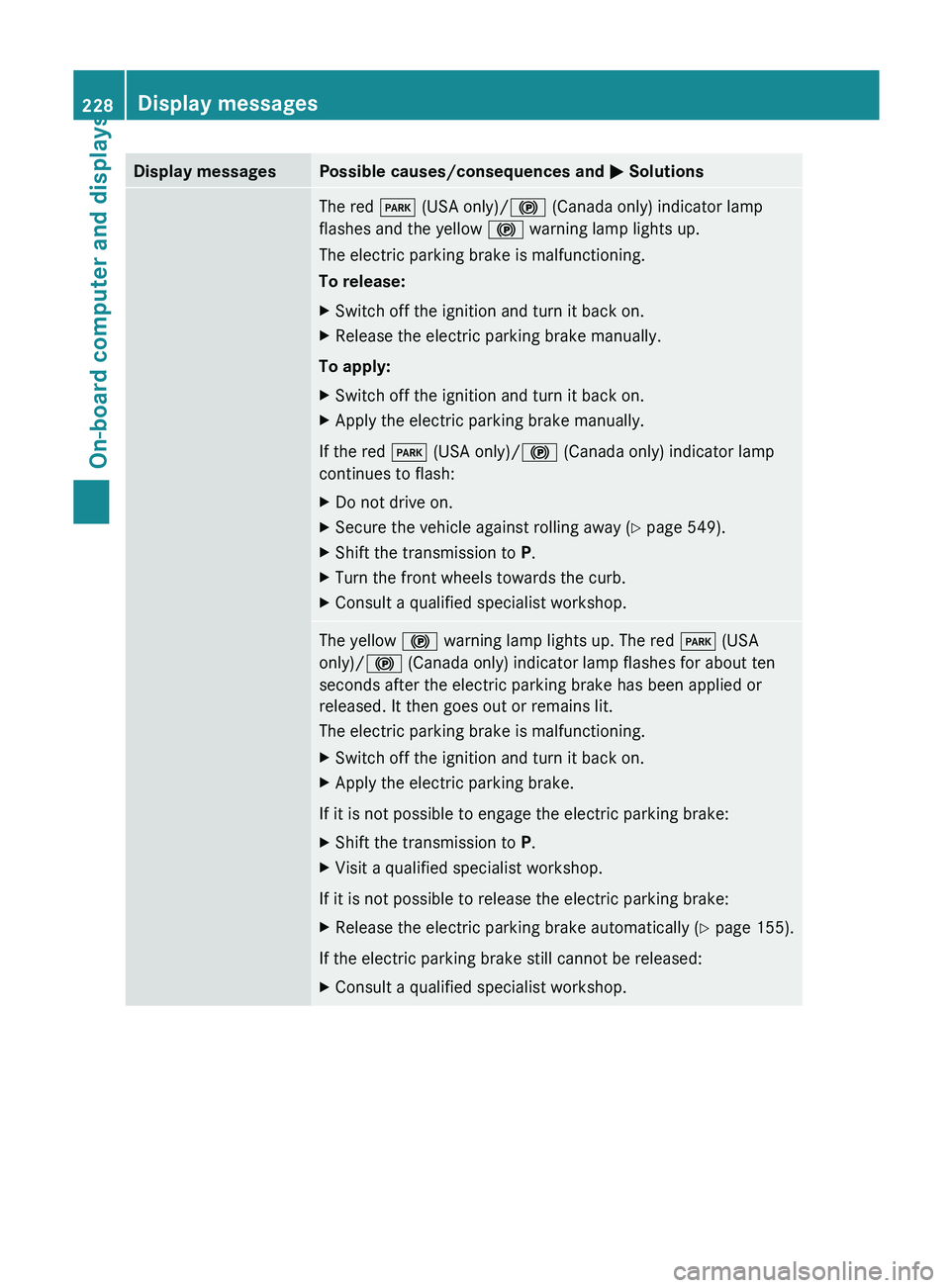
Display messages Possible causes/consequences and
M SolutionsThe red
F (USA only)/! (Canada only) indicator lamp
flashes and the yellow ! warning lamp lights up.
The electric parking brake is malfunctioning.
To release:
X Switch off the ignition and turn it back on.
X Release the electric parking brake manually.
To apply:
X Switch off the ignition and turn it back on.
X Apply the electric parking brake manually.
If the red F (USA only)/! (Canada only) indicator lamp
continues to flash:
X Do not drive on.
X Secure the vehicle against rolling away ( Y page 549).
X Shift the transmission to P.
X Turn the front wheels towards the curb.
X Consult a qualified specialist workshop. The yellow
! warning lamp lights up. The red F (USA
only)/! (Canada only) indicator lamp flashes for about ten
seconds after the electric parking brake has been applied or
released. It then goes out or remains lit.
The electric parking brake is malfunctioning.
X Switch off the ignition and turn it back on.
X Apply the electric parking brake.
If it is not possible to engage the electric parking brake:
X Shift the transmission to P.
X Visit a qualified specialist workshop.
If it is not possible to release the electric parking brake:
X Release the electric parking brake automatically ( Y page 155).
If the electric parking brake still cannot be released:
X Consult a qualified specialist workshop.228
Display messagesOn-board computer and displays