2013 LINCOLN MKZ lights
[x] Cancel search: lightsPage 147 of 474
For questions or comments, please
contact HomeLink at
www.homelink.com or
1-800-355-3515.
Erasing the Function Button Codes
Note:
You cannot erase individual
buttons. 1. Press and hold the outer two
function buttons simultaneously
for approximately 20 seconds until
the indicator lights above the
buttons flash rapidly.
2. When the indicator lights flash, release the buttons. The codes for
all buttons are erased.
Reprogramming a Single Button
To program a device to a previously
trained button, follow these steps:
1. Press and hold the desired button.
Do NOT release the button.
2. The indicator light will begin to flash after 20 seconds. Without
releasing the button, follow Step
1 in the Programming section. For questions or comments, contact
HomeLink at www.homelink.com or
1-800-355-3515.
Programming to a Genie
Intellicode® 2 Garage Door Opener
Note:
The Genie Intellicode 2
transmitter must already be
programmed to operate with the
garage door opener.
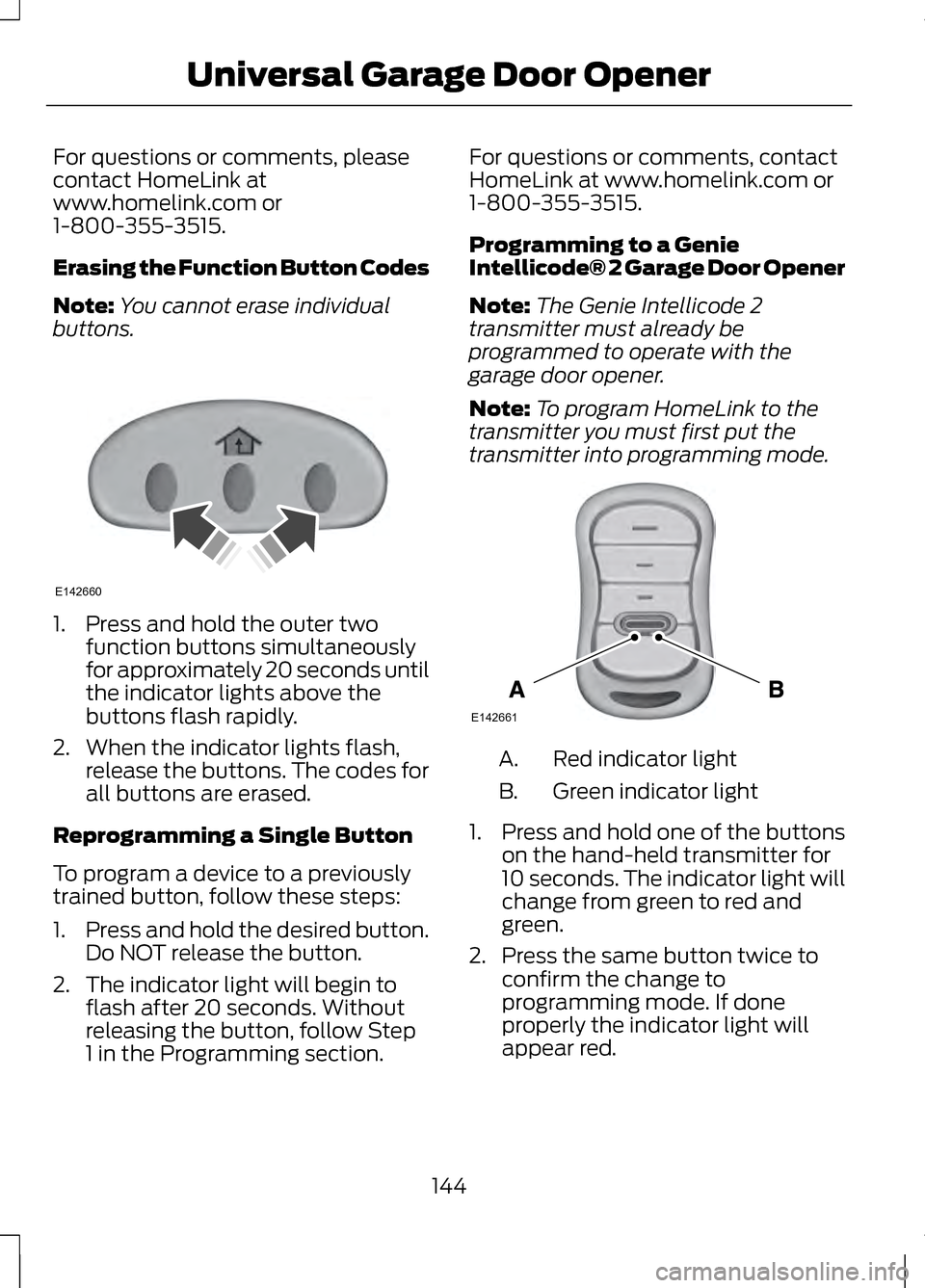
Note: To program HomeLink to the
transmitter you must first put the
transmitter into programming mode. Red indicator light
A.
Green indicator light
B.
1. Press and hold one of the buttons
on the hand-held transmitter for
10 seconds. The indicator light will
change from green to red and
green.
2. Press the same button twice to confirm the change to
programming mode. If done
properly the indicator light will
appear red.
144
Universal Garage Door OpenerE142660 E142661
Page 148 of 474

3. Hold the transmitter within 1–
3
inches (2 –8 centimeter) of the
button on the visor you want to
program.
4. Press and hold both the programmed Genie button on the
hand-held transmitter and the
button you want to program. The
indicator light on the visor will flash
rapidly when the programming is
successful.
Note: The Genie transmitter will
transmit for up to 30 seconds. If
HomeLink does not program within 30
seconds the Genie transmitter will need
to be pressed again. If the Genie
transmitter indicator light displays
green and red, release the button until
the indicator light turns off before
pressing the button again.
Once HomeLink has been
programmed successfully, the Genie
transmitter must be changed out of
program mode. To do this:
1. Press and hold the previously programmed Genie button on the
hand-held transmitter for 10
seconds. The indicator light will
change from red to red and green.
2. Press the same button twice to confirm the change. If done
correctly the indicator light will
turn green.
Programming HomeLink to the
Genie Intellicode Garage Door
Opener Motor
Note: You may need a ladder to
access the garage door opener motor. 1.
Press and hold the program button
on the garage door opener motor
until both blue indicator lights turn
on.
2. Release the program button. Only the smaller round indicator light
should be on.
3. Press and release the program button. The larger purple indicator
light will flash.
Note: The next two steps must be
completed in 30 seconds.
4. Press and release the Genie Intellicode 2 hand-held
transmitter ’s previously
programmed button. Both
indicator lights on the garage door
opener motor unit should now
flash purple.
5. Press and hold the previously programmed button on the visor
for 2 seconds. Repeat this step up
to 3 times until the garage door
moves.
Programming is now complete.
145
Universal Garage Door OpenerE142662
Page 173 of 474

If Your Vehicle Gets Stuck In
Mud or Snow
Note:
Do not rock the vehicle if the
engine is not at normal operating
temperature or damage to the
transmission may occur.
Note: Do not rock the vehicle for more
than a minute or damage to the
transmission and tires may occur, or
the engine may overheat.
If your vehicle gets stuck in mud or
snow, it may be rocked out by shifting
between forward and reverse gears,
stopping between shifts in a steady
pattern. Press lightly on the
accelerator in each gear.
HILL START ASSIST (IF
EQUIPPED) WARNINGS
The system does not replace the
parking brake. When you leave
your vehicle, always apply the parking
brake and put the vehicle in
P (Park). You must remain in your vehicle
once you have activated the
system. During all times, you are
responsible for controlling your
vehicle, supervising the system and
intervening, if required. If the engine is revved
excessively, or if a malfunction
is detected, the system will be
deactivated. The system makes it easier to pull
away when your vehicle is on a slope
without the need to use the parking
brake.
When the system is active, your
vehicle will remain stationary on the
slope for two to three seconds after
you release the brake pedal. This
allows you time to move your foot
from the brake to the accelerator
pedal. The brakes are released
automatically once the engine has
developed sufficient drive to prevent
your vehicle from rolling down the
slope. This is an advantage when
pulling away on a slope, (for example
from a car park ramp, traffic lights or
when reversing uphill into a parking
space).
The system will activate
automatically on any slope which can
result in significant vehicle rollback.
Using Hill Start Assist
1.
Press the brake pedal to bring your
vehicle to a complete standstill.
Keep the brake pedal pressed.
2. If the sensors detect that your vehicle is on a slope, the system
will be activated automatically.
3. When you remove your foot from the brake pedal, your vehicle will
remain on the slope without rolling
away for approximately two or
three seconds. This hold time will
automatically be extended if you
are in the process of driving off.
4. Drive off in the normal manner. The brakes will be released
automatically.
170
Transmission
Page 184 of 474

PRINCIPLE OF OPERATION
The traction control system helps
avoid drive wheel spin and loss of
traction.
If your vehicle begins to slide, the
system applies the brakes to
individual wheels and, when needed,
reduces engine power at the same
time. If the wheels spin when
accelerating on slippery or loose
surfaces, the system reduces engine
power in order to increase traction.
USING TRACTION
CONTROL
In certain situations (e.g. stuck in snow
or mud), turning the traction control
off may be beneficial as this allows
the wheels to spin with full engine
power. Turn off the traction control
system through the information
display. See General Information
(page 100). System Indicator Lights and
Messages WARNING
If a failure has been detected
within the AdvanceTrac system,
the stability control light will
illuminate steadily. Verify that the
AdvanceTrac system was not
manually disabled through the
information display. If the stability
control light still illuminates steadily,
have the system serviced by an
authorized dealer immediately.
Operating your vehicle with
AdvanceTrac disabled could lead to
an increased risk of loss of vehicle
control, vehicle rollover, personal
injury and death. The stability control light
temporarily illuminates on
engine start-up and flashes
when a driving condition activates the
stability system. The stability control off light
temporarily illuminates on
engine start-up and stays on
when the traction control system is
turned off.
When the traction control system is
turned off or on, a message appears
in the information display showing
system status.
181
Traction ControlE138639
Page 196 of 474

Active guidelines are only shown with
fixed guidelines. To use active
guidelines, turn the steering wheel to
point the guidelines toward an
intended path. If the steering wheel
position is changed while reversing,
the vehicle might deviate from the
original intended path.
The fixed and active guidelines fade
in and out depending on the steering
wheel position. The active guidelines
are not shown when the steering
wheel position is straight.
Always use caution while reversing.
Objects in the red zone are closest to
your vehicle and objects in the green
zone are farther away. Objects are
getting closer to your vehicle as they
move from the green zone to the
yellow or red zones. Use the side view
mirrors and rear view mirror to get
better coverage on both sides and rear
of the vehicle.
Selectable settings for this feature are
ACTIVE + FIXED, FIXED and OFF.
Visual Park Aid Alert
Note:
Visual park alert is only available
when the transmission is in R
(Reverse).
Note: The reverse sensing system is
not effective at speeds above 3 mph
(5 km/h) and may not detect certain
angular or moving objects. The system uses red, yellow and green
highlights which appear on top of the
video image when an object is
detected by the reverse sensing
system. The alert highlights the
closest object detected. The reverse
sensing alert can be disabled and if
visual park aid alert is enabled,
highlighted areas are still displayed.
Selectable settings for this feature are
ON and OFF.
Manual Zoom
WARNING
When manual zoom is on, the
full area behind the vehicle is not
shown. Be aware of your surroundings
when using the manual zoom feature. Note:
Manual zoom is only available
when the transmission is in R
(Reverse).
Note: When manual zoom is enabled,
only the centerline is shown.
This allows you to get a closer view of
an object behind the vehicle. The
zoomed image keeps the bumper in
the image to provide a reference. The
zoom is only active while the
transmission is in R (Reverse). When
the transmission is shifted out of R
(Reverse), the feature automatically
turns off and must be reset when it is
used again.
193
Parking Aids
Page 217 of 474

Zone coverage also decreases when
parking at shallow angles. Here, the
left sensor is mostly obstructed; zone
coverage on that side is severely
limited.
System Lights and Messages
The BLIS and cross traffic alert
systems illuminate a yellow alert
indicator in the outside mirror on the
side of the vehicle the approaching
vehicle is coming from. Note:
The alert indicator dims when
nighttime darkness is detected.
Cross traffic alert also sounds an
audible warning and a message
appears in the information display
indicating a vehicle is coming from the
right or left. Cross traffic alert works
with the reverse sensing system which
sounds its own series of tones. See
Parking Aid (page 184).
System Sensors WARNING
Just prior to the system
recognizing a blocked condition
and alerting the driver, the number of
missed objects will increase. To help
avoid injuries, NEVER use the BLIS as
a replacement for using the side and
rear view mirrors and looking over your
shoulder before changing lanes. BLIS
is not a replacement for careful driving
and only an assist. 214
Driving AidsE142441 E142442
Page 233 of 474

The braking system of the tow
vehicle is rated for operation at the
GVWR not GCWR.
Separate functioning brake
systems are required for safe
control of towed vehicles and
trailers weighing more than 1500
pounds (680 kilograms) when
loaded.
Trailer Lamps
Trailer lamps are required on most
towed vehicles. Make sure all running
lights, brake lights, turn signals and
hazard lights are working. Contact
your authorized dealer or trailer rental
agency for proper instructions and
equipment for hooking up the lamps.
Before Towing a Trailer
Practice turning, stopping and
backing-up to get the feel of the
vehicle-trailer combination before
starting on a trip. When turning, make
wider turns so the trailer wheels clear
curbs and other obstacles.
When Towing a Trailer
•
Do not drive faster than 70 mph
(113 km/h) during the first 500
miles (800 kilometers).
• Do not make full-throttle starts.
• Check your hitch, electrical
connections and trailer wheel lug
nuts thoroughly after you have
traveled 50 miles (80 kilometers). •
When stopped in congested or
heavy traffic during hot weather,
place the gearshift in position P to
aid engine and transmission
cooling and to help A/C
performance.
• Turn off the speed control with
heavy loads or in hilly terrain. The
speed control may turn off
automatically when you are towing
on long, steep grades.
• Shift to a lower gear when driving
down a long or steep hill. Do not
apply the brakes continuously, as
they may overheat and become
less effective.
• If your transmission is equipped
with a grade assist or Tow/Haul
feature, use this feature when
towing. This provides engine
braking and helps eliminate
excessive transmission shifting for
optimum fuel economy and
transmission cooling.
• Allow more distance for stopping
with a trailer attached. Anticipate
stops and brake gradually.
230
Towing
Page 296 of 474

General Information
WARNING
Failure to follow these guidelines
could result in an increased risk
of loss of vehicle control, injury or
death. Note:
Do not use the kit if a tire has
become severely damaged by driving
the vehicle with a tire that has
insufficient air pressure. Only punctured
areas located within the tire tread can
be sealed with the kit.
Do not attempt to repair punctures
larger than 1.4 inch (6.4 mm) or
damage to the tire's sidewall. The tire
may not completely seal.
Loss of air pressure may adversely
affect tire performance. For this
reason:
Note: Do not drive the vehicle above
50 mph (80 km/h).
Note: Do not drive further than 120
miles (200 km). Drive only to the
closest Ford Motor Company
authorized dealer or tire repair shop to
have your tire inspected.
• Drive carefully and avoid abrupt
steering maneuvers.
• Periodically monitor tire inflation
pressure in the affected tire; if the
tire is losing pressure, have the
vehicle towed.
• Read the information in the Tips
for Use of the Kit section to ensure
safe operation of the kit and your
vehicle. Tips for Use of the Kit
Read the following list of tips to
ensure safe operation of the kit:
•
Before operating the kit, make sure
your vehicle is safely off the road
and away from moving traffic. Turn
on the hazard lights.
• Always set the parking brake to
ensure the vehicle doesn't move
unexpectedly.
• Do not remove any foreign objects,
such as nails or screws, from the
tire.
• When using the kit, leave the
engine running (only if the vehicle
is outdoors or in a well-ventilated
area) so the compressor doesn't
drain the vehicle's battery.
• Do not allow the compressor to
operate continuously for more
than 15 minutes; this will help
prevent the compressor from
overheating.
• Never leave the kit unattended
when it is operating.
• Sealant compound contains latex.
Make sure that you use the
non-latex gloves provided to avoid
an allergic reaction.
• Keep the kit away from children.
• Only use the kit when the ambient
temperature is between -22°F
(–30°C) and 158°F (70°C).
293
Wheels and Tires