2013 LINCOLN MKZ warning
[x] Cancel search: warningPage 207 of 474

Alertness level is fine, no rest required.
Alertness level is critical, indicating
that a rest should be taken as soon as
safely possible.
The status bar will travel from left to
right as the calculated alertness level
decreases. As the rest icon is
approached the color turns from
green to yellow and then finally red
when a rest break should be taken.
•
Green - No rest required.
• Yellow - First (temporary) warning.
• Red - Second warning.
Note: If you have recently received a
warning; you should consider resting,
even if the current assessment is with
the typical range.
Note: The alertness level will be
shown in grey if the camera sensor
cannot track the road lane markings or
if the vehicle speed drops below
approximately 40 mph (65 km/h). Resetting the System
You can reset the system by either:
•
Switching the ignition off and on.
• Stopping the vehicle and then
opening and closing the driver ’s
door.
COLLISION WARNING SYSTEM
(If Equipped) WARNINGS
This system is designed to be a
supplementary driving aid. It is
not intended to replace the driver ’s
attention, and judgment, or the need
to apply the brakes. This system does
NOT activate the brakes
automatically. Failure to press the
brake pedal to activate the brakes
may result in a collision. The collision warning system
with brake support cannot help
prevent all collisions. Do not rely on
this system to replace driver judgment
and the need to maintain distance
and speed. Note:
The system does not detect,
warn or respond to potential collisions
with vehicles to the rear or sides of the
vehicle.
Note: The collision warning system is
active at speeds above approximately
5 mph (8 km/h). 204
Driving AidsE131358 E131359 E156130
Page 208 of 474

This system is designed to alert the
driver of certain collision risks. A radar
detects if your vehicle is rapidly
approaching another vehicle traveling
in the same direction as yours.
If it is, a red warning light illuminates
and an audible warning chime sounds.
The brake support system assists the
driver in reducing the collision speed
by charging the brakes. If the risk of
collision further increases after the
warning light illuminates, the brake
support prepares the brake system
for rapid braking. This may be
apparent to the driver. The system
does not automatically activate the
brakes but, if the brake pedal is
pressed, full force braking is applied
even if the brake pedal is lightly
pressed.
Using the Collision Warning
System
WARNING
The collision warning system
’s
brake support can only help
reduce the speed at which a collision
occurs if the driver applies the
vehicle ’s brakes. The brake pedal
must be pressed just like any typical
braking situation. The warning system and chime can
be turned on and off separately; the
warning system sensitivity can be
adjusted to one of three possible
settings by using the information
display control. See General
Information (page 100).
Note: If the system cannot be turned
off in a vehicle equipped with MyKey®,
See Principle of Operation (page 58).
Note: If collision warnings are
perceived as being too frequent or
disturbing then the warning sensitivity
can be reduced, though the
manufacturer recommends using the
highest sensitivity setting where
possible. Setting lower sensitivity
would lead to fewer and later system
warnings. See
General Information
(page 100).
Blocked Sensors 205
Driving AidsE156131 E145632
Page 209 of 474

If a message regarding a blocked
sensor appears in the information
display, the radar signals from the
sensor have been obstructed. The
sensors are located behind a fascia
cover near the driver side of the lower
grille. When the sensors are
obstructed, a vehicle ahead cannot
be detected and the collision warning
system does not function. The
following table lists possible causes
and actions for this message being
displayed.
Action
Cause
Clean the grille surface in front of the
radar or remove the object causing the obstruction
The surface of the radar in the grille is
dirty or obstructed in some way
Wait a short time. It may take several
minutes for the radar to detect that it is no longer obstructed
The surface of the radar in the grille is
clean but the message remains in the display
The collision warning system is
temporarily disabled. Collision warning should automatically reactivate a
short time after the weather conditions improve
Heavy rain, spray, snow, or fog is inter-
fering with the radar signals
The collision warning system is
temporarily disabled. Collision warning should automatically reactivate a
short time after the weather conditions improve
Swirling water, or snow or ice on the
surface of the road may interfere with the radar signals
206
Driving Aids
Page 210 of 474

System Limitations
WARNING
The collision warning system
’s
brake support can only help
reduce the speed at which a collision
occurs if the driver applies the
vehicle ’s brakes. The brake pedal
must be pressed just like any typical
braking situation. Due to the nature of radar technology,
there may be certain instances where
vehicles do not provide a collision
warning. These include:
•
Stationary vehicles or vehicles
moving below 6 mph (10 km/h).
• Pedestrians or objects in the
roadway.
• Oncoming vehicles in the same
lane.
• Severe weather conditions (see
blocked sensor section).
• Debris build-up on the grille near
the headlamps (see blocked
sensor section).
• Small distance to vehicle ahead.
• Steering wheel and pedal
movements are large (very active
driving style).
•
Certain conditions may reduce the
visibility of the warning lamp;
therefore, it is recommended to keep
the audible warning on. If the front end of the vehicle is hit or
damaged, the radar sensing zone may
be altered causing missed or false
collision warnings. See your
authorized dealer to have your
collision warning radar checked for
proper coverage and operation.
LINCOLN DRIVE CONTROL
The Lincoln driving experience is
delivered through a suite of
sophisticated electronic vehicle
systems that continuously monitor
both your inputs and the road
conditions to optimize ride comfort,
steering, handling, and powertrain
response and sound.
These systems include:
•
Continuously Controlled Damping
which dynamically adjusts the
shock absorbers in real time to
match the road surface and your
inputs.
• Electronically Power-Assisted
Steering which adjusts steering
effort and feel based on vehicle
speed and your inputs.
• Active Noise Control which utilizes
vehicle electronics to enhance the
acoustic experience.
• Electronic Stability Control and
Traction Control which maintain
vehicle control in adverse
conditions or high performance
driving.
• Electronic Throttle Control which
enhances the powertrain response
to your inputs.
207
Driving Aids
Page 211 of 474

These systems have a range of modes
which you can choose from in order
to customize your ideal driving
experience:
•
Comfort – Provides a more relaxed
driving experience. Steering effort
is decreased, suspension
movement is more fluid. Comfort
mode is ideal when enhanced
traveling comfort is desired.
• Normal – Delivers a balanced
combination of comfortable,
controlled ride and confident
handling and powerful yet quiet
powertrain sound. This mode
provides an engaging drive
experience and a direct connection
to the road without sacrificing any
of the composure demanded from
a luxury vehicle. Unwanted noises
from the powertrain are cancelled
while desired sounds are shaped
to deliver a smooth powerful note.
This setting is ideal for everyday
use and daily driving.
• Sport – Provides a sportier driving
experience. Suspension stiffens,
with an emphasis on handling and
control. The engine responds more
directly to your inputs and takes
on a more powerful tone. Sport
mode is intended to be used during
more spirited driving.
You can configure which of the
Adaptive Drive modes is active when
the vehicle is in D (Drive) or in S
(Sport). The configuration is retained
until modified from the main menu on
the information display. See General
Information (page 100). LANE KEEPING SYSTEM WARNING
The system is designed to aid the
driver. It is not intended to
replace the driver ’s attention and
judgment. The driver is still
responsible to drive with due care and
attention. Note:
The system needs to be
activated by the driver at each key
cycle.
Note: The system works above 40
mph (64 km/h).
Note: The system works as long as one
lane marking can be detected by the
camera.
Note: If the camera is blocked or if the
windshield is damaged, the system
may not function.
Note: When Aid mode is on and the
system detects no driver steering
activity for a short continuous period
of time, the system alerts the driver to
put their hands on the steering wheel.
The system may detect a light
grip/touch on the steering wheel as
hands off driving.
The system detects unintentional
drifting toward the outside of the lane
and alerts and/or aids the driver to
stay in the lane through the steering
system and instrument cluster display.
The system automatically detects and
tracks the road lane markings using a
camera that is mounted behind the
interior rear view mirror.
208
Driving Aids
Page 213 of 474
When the system is turned off, the
lane marking graphics will not be
displayed.
Note:
The overhead vehicle graphic
may still be displayed if adaptive cruise
control is enabled.
While the system is on, the color of
the lane markings will change to
indicate the system status.
Gray: Indicates that the system is
temporarily unable to provide a
warning or intervention on the
indicated side(s). This may be
because:
• the vehicle is under the activation
speed
• the turn indicator is active
• the vehicle is in a dynamic
maneuver
• the road has no or poor lane
markings in the camera
field-of-view
• the camera is obscured or unable
to detect the lane markings due to
environmental conditions (e.g.
significant sun angles or shadows,
snow, heavy rain, fog), traffic
conditions (e.g. following a large
vehicle that is blocking or
shadowing the lane), or vehicle
conditions (e.g. poor headlamp
illumination). See Troubleshooting for additional
information.
Green: Indicates that the system is
available or ready to provide a
warning or intervention, on the
indicated side(s).
Yellow: Indicates that the system is
providing or has just provided a lane
keeping aid intervention.
Red: Indicates that the system is
providing or has just provided a lane
keeping alert warning.
The system can be temporarily
suppressed at any time by the
following:
• Quick braking
• Fast acceleration
• Using the turn signal indicator
• Evasive steering maneuver
210
Driving Aids
Page 215 of 474
Why does the vehicle not come back into the middle of the lane always, as
expected, in the Aid or Aid + Alert mode?
High cross winds
Large road crown
Rough roads, grooves, shoulder drop-offs
Heavy uneven loading of the vehicle or improper tire inflation pressure
If the tires have been exchanged (including snow tires), or the suspension has
been modified
BLIND SPOT MONITOR
Blind Spot Information System
(BLIS®) with Cross Traffic
Alert (If Equipped) WARNING
To help avoid injuries, NEVER use
the BLIS as a replacement for
using the interior and exterior mirrors
and looking over your shoulder before
changing lanes. BLIS is not a
replacement for careful driving and
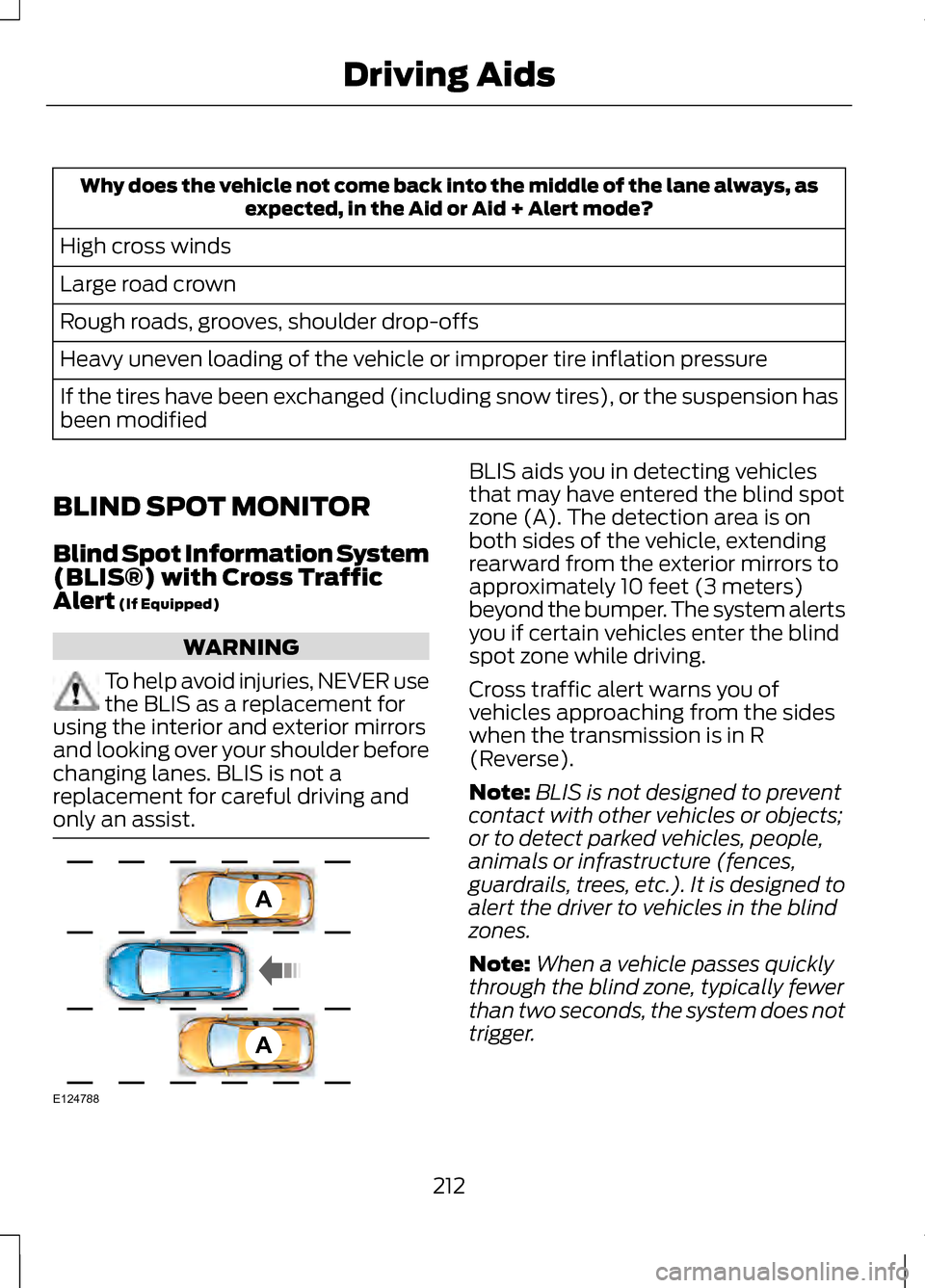
only an assist. BLIS aids you in detecting vehicles
that may have entered the blind spot
zone (A). The detection area is on
both sides of the vehicle, extending
rearward from the exterior mirrors to
approximately 10 feet (3 meters)
beyond the bumper. The system alerts
you if certain vehicles enter the blind
spot zone while driving.
Cross traffic alert warns you of
vehicles approaching from the sides
when the transmission is in R
(Reverse).
Note:
BLIS is not designed to prevent
contact with other vehicles or objects;
or to detect parked vehicles, people,
animals or infrastructure (fences,
guardrails, trees, etc.). It is designed to
alert the driver to vehicles in the blind
zones.
Note: When a vehicle passes quickly
through the blind zone, typically fewer
than two seconds, the system does not
trigger.
212
Driving AidsA
A
E124788
Page 216 of 474

Using the Systems
BLIS turns on when the engine is
started and the vehicle is driven
forward above 5 mph (8 km/h); it
remains on while the transmission is
in D (Drive) and N (Neutral). If shifted
out of D (Drive) or N (Neutral), the
system enters cross traffic alert mode.
Once shifted back into D (Drive), BLIS
turns back on when the vehicle is
driven above 5 mph (8 km/h).
Note:
BLIS does not function in R
(Reverse) or P (Park) or provide any
additional warning when a turn signal
is on. Note:
Cross traffic alert detects
approaching vehicles from up to 45
feet (14 meters) away though coverage
decreases when the sensors are
blocked. Reversing slowly helps
increase the coverage area and
effectiveness. WARNING
To help avoid personal injury,
NEVER use the cross traffic alert
system as a replacement for using the
interior and exterior mirrors and
looking over your shoulder before
backing out of a parking space. Cross
traffic alert is not a replacement for
careful driving and only an assist. In this first example, the left sensor is
only partially obstructed; zone
coverage is nearly maximized.
213
Driving AidsE142440