2013 LINCOLN MKZ HYBRID seats
[x] Cancel search: seatsPage 276 of 475

Protected components
Fuse amp rating
Fuse or relay
number
Lighting (ambient, glovebox, vanity,
dome, trunk)
10A
1
1
Memory seats, Lumbar, Power mirror
7.5A 1
2
Driver door unlock
20A 1
3
Not used (spare)
5A 1
4
Subwoofer amplifier, THX amplifier
20A 1
5
Not used (spare)
10A 2
6
Not used (spare)
10A 2
7
Not used (spare)
10A 2
8
Not used (spare)
10A 2
9
Power trunk logic, Keypad
5A 2
10
Not used (spare)
5A 2
11
Climate control, Gear shift
7.5A 2
12
Steering wheel column, Cluster,
Datalink logic
7.5A
2
13
Hybrid battery control module
10A 2
14
Datalink/Gateway module
10A 2
15
Trunk release
15A 1
16
Not used (spare)
5A 2
17
Ignition, Push button stop/start
5A 2
18
274
MKZ (CC9) Fuses
Page 277 of 475

Protected components
Fuse amp rating
Fuse or relay
number
Passenger airbag disabled indicator,
Transmission range
5A
2
19
Adaptive headlamps
5A 2
20
Humidity and in-car temperature, Rear
climate seats
5A
2
21
Occupant classification sensor
5A 2
22
Delayed accessory (power inverter
logic, moonroof logic)
10A
1
23
Central lock/unlock
30A 1
24
Driver door (window, mirror)
30A 1
25
Front passenger door (window, mirror)
30A 1
26
Moonroof
30A 1
27
THX amplifier
20A 1
28
Rear driver side door (window)
30A 1
29
Rear passenger side door (window)
30A 1
30
Not used (spare)
15A 1
31
GPS, Voice control, Display, Adaptive
cruise control, Radio frequency
receiver
10A
1
32
Radio, Active noise control
20A 1
33
Run/start (fuse #19, 20, 21, 22, 35, 36,
37, circuit breaker)
30A
1
34
Restraints control module
5A 1
35
275
MKZ (CC9) Fuses
Page 299 of 475

To clean these items, follow these
tips:
•
You can clean the windows with a
non-abrasive cleaner such as
Motorcraft Ultra-Clear Spray Glass
Cleaner.
• You can clean the wiper blades
with isopropyl rubbing-alcohol or
Motorcraft Premium Windshield
Wash Concentrates in the U.S., or
Premium Quality Windshield
Washer Fluid in Canada. Be sure
to replace wiper blades when they
appear worn or do not function
properly.
• Do not use abrasives, as they may
cause scratches.
• Do not use fuel, kerosene, or paint
thinner to clean any parts.
If you cannot remove those streaks
after cleaning with the glass cleaner
or if the wipers chatter and move in a
jerky motion, clean the outer surface
of the windshield and the wiper
blades using a sponge or soft cloth
with a neutral detergent or
mild-abrasive cleaning solution. After
cleaning, rinse the windshield and
wiper blades with clean water. The
windshield is clean if beads do not
form when you rinse the windshield
with water.
Note: Do not use sharp objects, such
as a razorblade, to clean the inside of
the rear window or to remove decals,
as this may cause damage to the rear
window defroster ’s heated grid lines. CLEANING THE INTERIOR WARNINGS
Do not use cleaning solvents,
bleach or dye on the vehicle
’s
safety belts, as these actions may
weaken the belt webbing. On vehicles equipped with
seat-mounted airbags, do not
use chemical solvents or strong
detergents. Such products could
contaminate the side airbag system
and affect performance of the side
airbag in a collision. For fabric, carpets, cloth seats, safety
belts and seats equipped with side
airbags:
•
Remove dust and loose dirt with a
vacuum cleaner.
• Remove light stains and soil with
Motorcraft Professional Strength
Carpet & Upholstery Cleaner.
• If grease or tar is present on the
material, spot-clean the area first
with Motorcraft Spot and Stain
Remover. In Canada, use
Motorcraft Multi-Purpose Cleaner.
• If a ring forms on the fabric after
spot cleaning, clean the entire area
immediately (but do not
oversaturate) or the ring will set.
• Do not use household cleaning
products or glass cleaners, which
can stain and discolor the fabric
and affect the flame retardant
abilities of the seat materials.
297
MKZ (CC9) Vehicle Care
Page 300 of 475
CLEANING THE
INSTRUMENT PANEL AND
INSTRUMENT CLUSTER
LENS
WARNING
Do not use chemical solvents or
strong detergents when cleaning
the steering wheel or instrument panel
to avoid contamination of the airbag
system. Clean the instrument panel and
cluster lens with a clean, damp, white
cotton cloth, then use a clean and dry
white cotton cloth to dry these areas.
•
Avoid cleaners or polishes that
increase the gloss of the upper
portion of the instrument panel.
The dull finish in this area helps
protect you from undesirable
windshield reflection.
• Be certain to wash or wipe your
hands clean if you have been in
contact with certain products such
as insect repellent and suntan
lotion in order to avoid possible
damage to the interior painted
surfaces.
• Do not use household or glass
cleaners as these may damage the
finish of the instrument panel,
interior trim and cluster lens.
• Do not allow air fresheners and
hand sanitizers to spill onto interior
surfaces. If a spill occurs, wipe off
immediately. Damage may not be
covered by your warranty. If a staining liquid like coffee or juice
has been spilled on the instrument
panel or on interior trim surfaces,
clean as follows:
1. Wipe up spilled liquid using a
clean, white, cotton cloth.
2. Wipe the surface with a damp, clean, white cotton cloth. For more
thorough cleaning, use a mild soap
and water solution. If the spot
cannot be completely cleaned by
this method, the area may be
cleaned using a commercially
available cleaning product
designed for automotive interiors.
3. If necessary, apply more soap and
water solution or cleaning product
to a clean, white, cotton cloth and
press the cloth onto the soiled
area. Allow this to set at room
temperature for 30 minutes.
4. Remove the soaked cloth and if it is not soiled badly, use this cloth
to clean the area by using a
rubbing motion for 60 seconds.
5. Following this, wipe area dry with a clean, white, cotton cloth.
CLEANING LEATHER SEATS
(IF EQUIPPED)
For routine cleaning, wipe the surface
with a soft, damp cloth. For more
thorough cleaning, wipe the surface
with a mild soap and water solution.
Dry the area with a soft cloth. In
Canada, use Motorcraft® Vinyl
Cleaner.
298
MKZ (CC9) Vehicle Care
Page 348 of 475

•
Eject: Eject a CD from the
entertainment system.
• SOURCE: Touch the word
repeatedly to see all available
media modes. The screen does not
change, but you see the media
change in the lower left status bar.
• SOUND:
Touch the word to
access the Sound menu where you
can adjust settings such as: Bass,
Treble, Midrange, Balance and
Fade, DSP (Digital Signal
Processing), THX Deep Note
Demo, Occupancy Mode and
Speed Compensated Volume.
(Your vehicle may not have all of
these sound options.)
• Hazard flasher: Switch the hazard
flashers off and on.
Cleaning the Touchscreen
Display
Use a clean, soft cloth such as one
used for cleaning glasses. If dirt or
fingerprints are still visible, apply a
small amount of alcohol to the cloth.
Do not pour or spray alcohol onto the
display. Do not use detergent or any
type of solvent to clean the display.
Support
The SYNC support team is available
to help you with any questions you are
not able to answer on your own.
Monday-Saturday, 8:30am-8:00pm
EST.
In the United States, call:
1-888-270-1055.
In Canada, call: 1-800-565-3673. Times are subject to change due to
holidays.
Safety Information WARNING
Driving while distracted can
result in loss of vehicle control,
crash and injury. We strongly
recommend that you use extreme
caution when using any device that
may take your focus off the road. Your
primary responsibility is the safe
operation of your vehicle. We
recommend against the use of any
hand-held device while driving and
encourage the use of voice-operated
systems when possible. Make sure you
are aware of all applicable local laws
that may affect the use of electronic
devices while driving. •
Do not attempt to service or repair
the system. See an authorized
dealer.
• Do not operate playing devices if
the power cords or cables are
broken, split or damaged. Place
cords and cables out of the way,
so they do not interfere with the
operation of pedals, seats,
compartments or safe driving
abilities.
346
MKZ (CC9) MyLincoln Touch
™
Page 398 of 475
Power
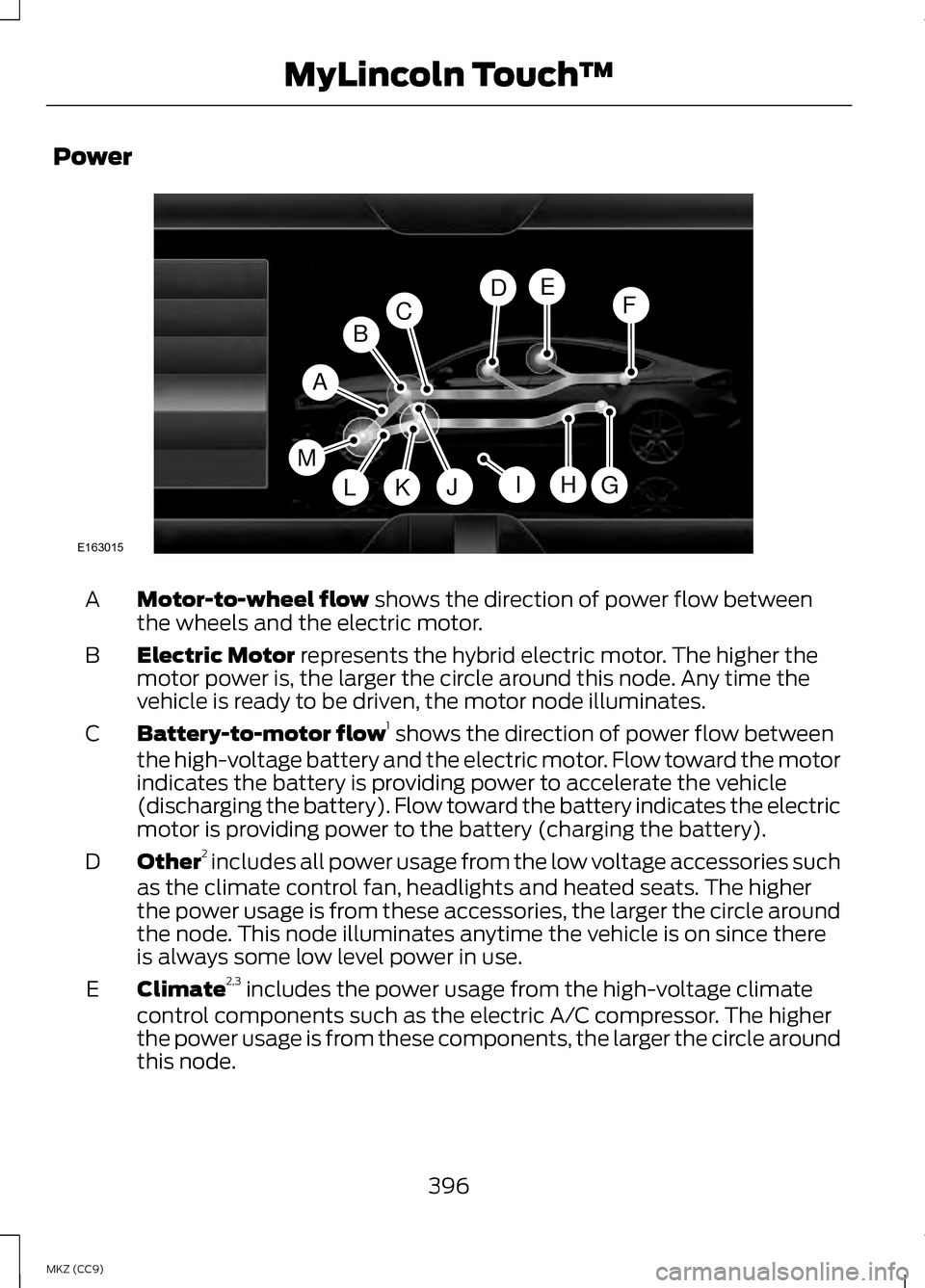
Motor-to-wheel flow shows the direction of power flow between
the wheels and the electric motor.
A
Electric Motor
represents the hybrid electric motor. The higher the
motor power is, the larger the circle around this node. Any time the
vehicle is ready to be driven, the motor node illuminates.
B
Battery-to-motor flow 1
shows the direction of power flow between
the high-voltage battery and the electric motor. Flow toward the motor
indicates the battery is providing power to accelerate the vehicle
(discharging the battery). Flow toward the battery indicates the electric
motor is providing power to the battery (charging the battery).
C
Other 2
includes all power usage from the low voltage accessories such
as the climate control fan, headlights and heated seats. The higher
the power usage is from these accessories, the larger the circle around
the node. This node illuminates anytime the vehicle is on since there
is always some low level power in use.
D
Climate 2,3
includes the power usage from the high-voltage climate
control components such as the electric A/C compressor. The higher
the power usage is from these components, the larger the circle around
this node.
E
396
MKZ (CC9) MyLincoln Touch
™A
G
FDE
BC
HJLKI
E163015
M
Page 414 of 475
Vehicle Health Report Privacy
Notice
When you create a Vehicle Health
Report, Ford Motor Company may
collect your cellular phone number
(to process your report request) and
diagnostic information about your
vehicle. Certain versions or updates
to Vehicle Health Report may also
collect more vehicle information. Ford
may use your vehicle information it
collects for any purpose. If you do not
want to disclose your cellular phone
number or vehicle information, do not
run the feature or set up your Vehicle
Health Report profile at
www.SYNCMyRide.com. See
www.SYNCMyRide.com (Vehicle
Health Report Terms and Conditions,
and Privacy Statement) for more
information.
CLIMATE
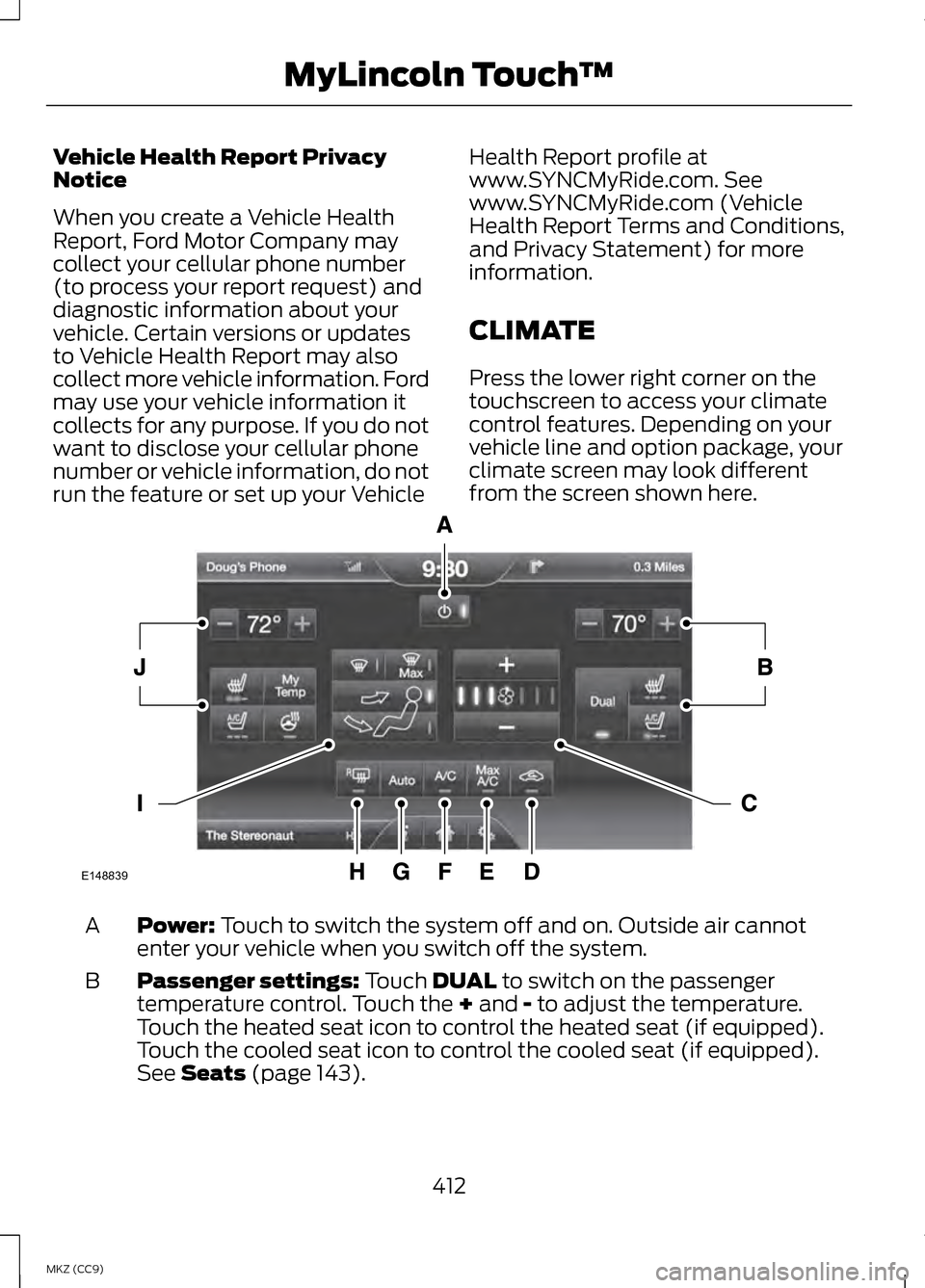
Press the lower right corner on the
touchscreen to access your climate
control features. Depending on your
vehicle line and option package, your
climate screen may look different
from the screen shown here.
Power: Touch to switch the system off and on. Outside air cannot
enter your vehicle when you switch off the system.
A
Passenger settings:
Touch DUAL to switch on the passenger
temperature control. Touch the + and - to adjust the temperature.
Touch the heated seat icon to control the heated seat (if equipped).
Touch the cooled seat icon to control the cooled seat (if equipped).
See
Seats (page 143).
B
412
MKZ (CC9) MyLincoln Touch
™E148839
Page 416 of 475

Manual airflow distribution controls:Floor/Defrost: Distributes
air through the windshield defroster vents, demister vents, floor vents
and rear seat floor vents, and provides outside air to reduce window
fogging. Panel:
Distributes air through the instrument panel vents.
Panel/Floor: Distributes air through the instrument panel vents,
demister vents, floor vents and rear seat floor vents. Floor: Distributes
air through the demister vents, floor vents and rear seat floor vents.
Defrost:
Touch to clear the windshield of fog and thin ice. Touch again
to return to the previous airflow selection. When switched on, defrost
distributes outside air through the windshield defroster vents and
demister vents to reduce window fogging.
I
Driver settings:
Depending on your vehicle and option package, you
may have the following features: Touch the + and - to adjust the
temperature. Touch the heated seat icon to control the heated seat
(if equipped). Touch the cooled seat icon to control the cooled seat
(if equipped). See
Seats (page 143). Touch MyTemp to select your
previously pre-set temperature setpoint. Touch and hold MyTemp to
store a new pre-set for temperature setpoint. Touch the heated steering
wheel icon (if equipped) to warm the steering wheel.
J
Note: If your vehicle is equipped with
a wood-trimmed steering wheel, it
does not heat between the 10 o'clock
and 2 o'clock positions.
Climate Control Voice
Commands Press the voice button on the
steering wheel controls.
When prompted, say any of
the following commands: Climate control commands
"Climate automatic"
"Climate my temperature" "Climate off""Climate on" Climate control commands
"Climate temperature <15.5-29.5> degrees"
"Climate temperature <60-85> degrees"
"Help"
There are additional climate control
commands but in order to access
them, you have to say "Climate" first.
When the system is ready to listen,
you may say any of the following
commands:
414
MKZ (CC9) MyLincoln Touch
™E142599