Page 523 of 1168
Maintenance
70
7
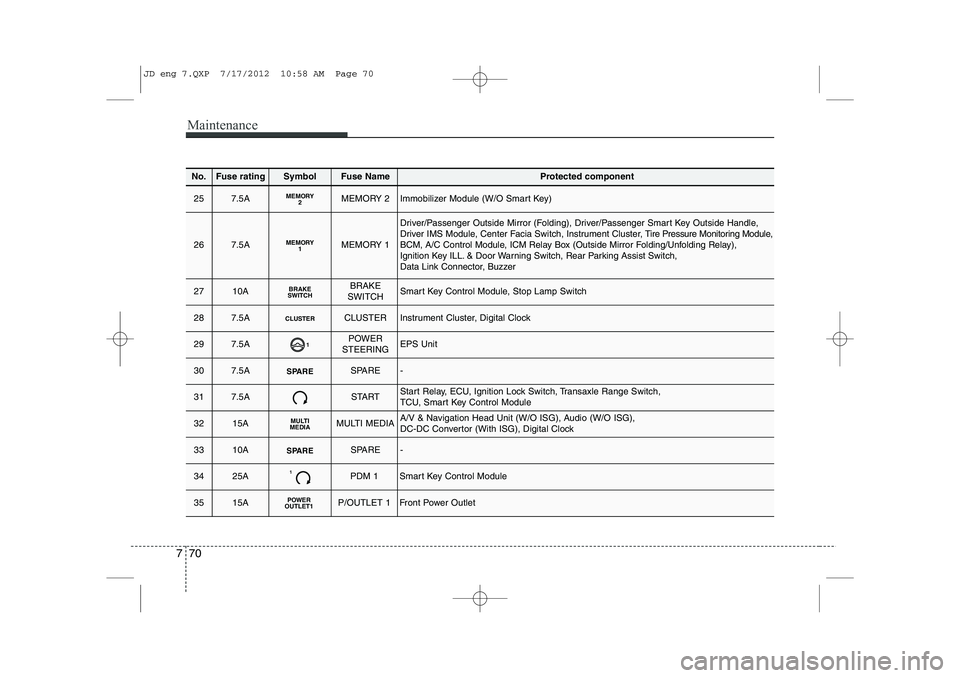
No.Fuse ratingSymbolFuse NameProtected component
257.5AMEMORY2MEMORY 2Immobilizer Module (W/O Smart Key)
267.5AMEMORY1MEMORY 1
Driver/Passenger Outside Mirror (Folding), Driver/Passenger Smart Key Outside Handle, Driver IMS Module, Center Facia Switch, Instrument Cluster, Tire Pressure Monitoring Module,
BCM, A/C Control Module, ICM Relay Box (Outside Mirror Folding/Unfolding Relay),
Ignition Key ILL. & Door Warning Switch, Rear Parking Assist Switch,
Data Link Connector, Buzzer
2710ABRAKE
SWITCHBRAKE
SWITCHSmart Key Control Module, Stop Lamp Switch
287.5ACLUSTERCLUSTERInstrument Cluster, Digital Clock
297.5A1POWER
STEERINGEPS Unit
307.5ASPARESPARE-
317.5ASTARTStart Relay, ECU, Ignition Lock Switch, Transaxle Range Switch,
TCU, Smart Key Control Module
3215AMULTI
MEDIAMULTI MEDIAA/V & Navigation Head Unit (W/O ISG), Audio (W/O ISG),
DC-DC Convertor (With ISG), Digital Clock
3310ASPARESPARE-
3425A1PDM 1Smart Key Control Module
3515APOWER
OUTLET1P/OUTLET 1Front Power Outlet
JD eng 7.QXP 7/17/2012 10:58 AM Page 70
Page 524 of 1168
771
Maintenance
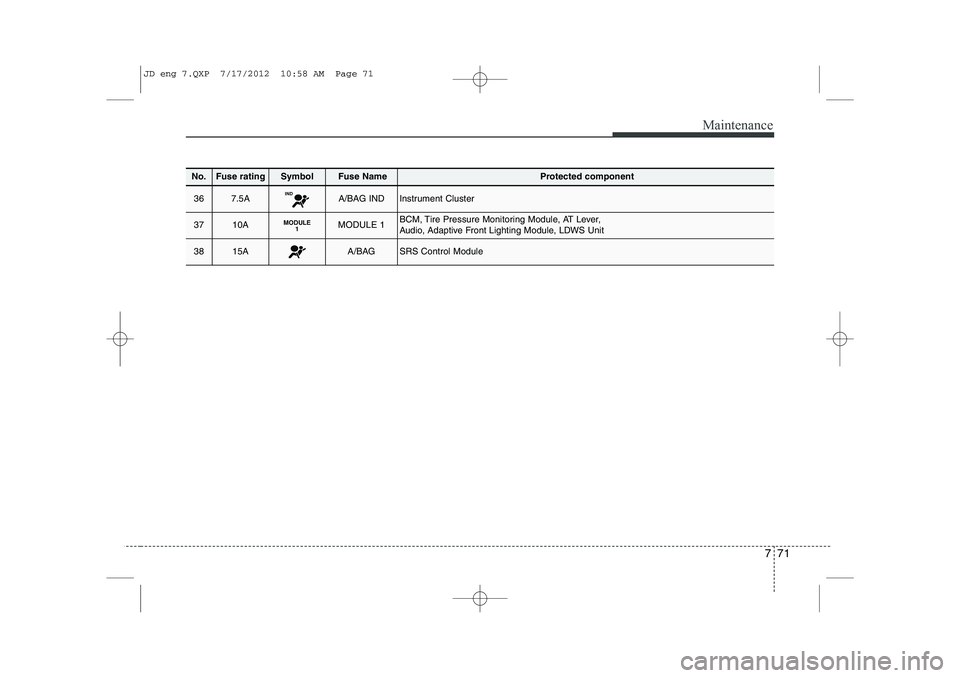
No.Fuse ratingSymbolFuse NameProtected component
367.5AINDA/BAG INDInstrument Cluster
3710AMODULE1MODULE 1BCM, Tire Pressure Monitoring Module, AT Lever,
Audio, Adaptive Front Lighting Module, LDWS Unit
3815AA/BAGSRS Control Module
JD eng 7.QXP 7/17/2012 10:58 AM Page 71
Page 573 of 1168

Index
2
I
Active ECO system . . . . . . . . . . . . . . . . . . . . . . . . . . . 5-32
AFLS (Adaptive Front Lighting System) . . . . . . . . 4-117
Air bag warning label . . . . . . . . . . . . . . . . . . . . . . . . . 3-63
Air bag warning light . . . . . . . . . . . . . . . . . . . . . . . . . 3-43
Air bags . . . . . . . . . . . . . . . . . . . . . . . . . . . . . . . . . . . . 3-40
Air bag warning label . . . . . . . . . . . . . . . . . . . . . . . 3-54
Air bag warning light . . . . . . . . . . . . . . . . . . . . . . . . 3-43
Curtain air bag . . . . . . . . . . . . . . . . . . . . . . . . . . . . . 3-54
Driver's and passenger's front air bag . . . . . . . . . . 3-48
Passenger’s front air bag ON indicator . . . . . . . . . 3-44
Passenger’s front air bag ON/OFF switch . . . . . . . 3-50
Side impact air bag. . . . . . . . . . . . . . . . . . . . . . . . . . 3-53
SRS components and functions . . . . . . . . . . . . . . . . 3-45
Air cleaner . . . . . . . . . . . . . . . . . . . . . . . . . . . . . . . . . . 7-43
Air conditioner compressor label . . . . . . . . . . . . . . . 8-11
Air conditioning system . . . . . . . . . . . . . . . . . . . . . . . . 8-3
Alarm system. . . . . . . . . . . . . . . . . . . . . . . . . . . . . . . . 4-14
Aming . . . . . . . . . . . . . . . . . . . . . . . . . . . . . . . . . . . . . . 7-87
Anti-lock brake system (ABS) . . . . . . . . . . . . . . . . . . 5-41
Appearance care Interior care . . . . . . . . . . . . . . . . . . . . . . . . . . . . . . 7-103
Armrest (Rear seat) . . . . . . . . . . . . . . . . . . . . . . . . . . 3-14
Ashtray. . . . . . . . . . . . . . . . . . . . . . . . . . . . . . . . . . . . 4-154
Audio remote control . . . . . . . . . . . . . . . . . . . . . . . . 4-164 Audio system . . . . . . . . . . . . . . . . . . . . . . . . . . . . . . . 4-169
Audio remote control . . . . . . . . . . . . . . . . . . . . . . . 4-170
Roof antenna . . . . . . . . . . . . . . . . . . . . . . . . . . . . . . 4-169
Auto defogging system . . . . . . . . . . . . . . . . . . . . . . . 4-149
Auto light/AFLS position . . . . . . . . . . . . . . . . . . . . . 4-112
Automatic climate control system . . . . . . . . . . . . . . 4-136 Air conditioning . . . . . . . . . . . . . . . . . . . . . . . . . . . 4-145
Automatic heating and air conditioning . . . . . . . 4-137
Climate control air filter . . . . . . . . . . . . . . . . . . . . 4-146
Manual heating and air conditioning . . . . . . . . . . 4-139
Automatic transaxle / DCT . . . . . . . . . . . . . . . . . . . . 5-23 DS mode. . . . . . . . . . . . . . . . . . . . . . . . . . . . . . . . . . . 5-27
Paddle shifter . . . . . . . . . . . . . . . . . . . . . . . . . . . . . . 5-28
Shift lock system . . . . . . . . . . . . . . . . . . . . . . . . . . . . 5-29
Sports mode. . . . . . . . . . . . . . . . . . . . . . . . . . . . . . . . 5-27
Automatic transaxle shift position indicator (Normal vision) . . . . . . . . . . . . . . . . . . . . . . . . . . . . . 4-49
Automatic transaxle shift position indicator (Super vision) . . . . . . . . . . . . . . . . . . . . . . . . . . . . . . 4-62
Aux, USB and iPod . . . . . . . . . . . . . . . . . . . . . . . . . . 4-158
Barrier net . . . . . . . . . . . . . . . . . . . . . . . . . . . . . . . . . 4-161
Battery . . . . . . . . . . . . . . . . . . . . . . . . . . . . . . . . . . . . . 7-50
Battery replacement (Remote keyless entry) . . . . . . . 4-9
Battery saver function . . . . . . . . . . . . . . . . . . . . . . . 4-110
A
B
JD eng Index.qxp 7/21/2012 11:45 AM Page 2
Page 598 of 1168

25
Your vehicle at a glance
INSTRUMENT PANEL OVERVIEW
OJD012004R❈ The actual shape may differ from the illustration. 1. Instrument cluster ........................4-46, 59
2. Horn ...................................................4-39
3. Steering wheel audio control............4-170
4. Cruise control switch /
Speed limiter switch ...................5-51/5-56
5. Driver’s air bag ...................................3-48
6. Ignition switch or ENGINE START/STOP button .......5-5/5-9
7. Hazard warning switch .....................4-109
8. Audio ................................................4-171
9. Seat warmer .......................................3-12
10. Central door lock switch ...................4-18
11. ESC OFF button...............................5-44
12. Climate control system ........4-127/4-136
13. Cigar lighter ....................................4-154
14. Aux, USB and iPod port .................4-158
15. Power outlet ...................................4-157
16. Front passenger’s air bag ................3-48
17. Glove box .......................................4-152
JD RHD 2.QXP 7/21/2012 12:58 PM Page 5
Page 821 of 1168
Features of your vehicle
158
4
Aux, USB and iPod
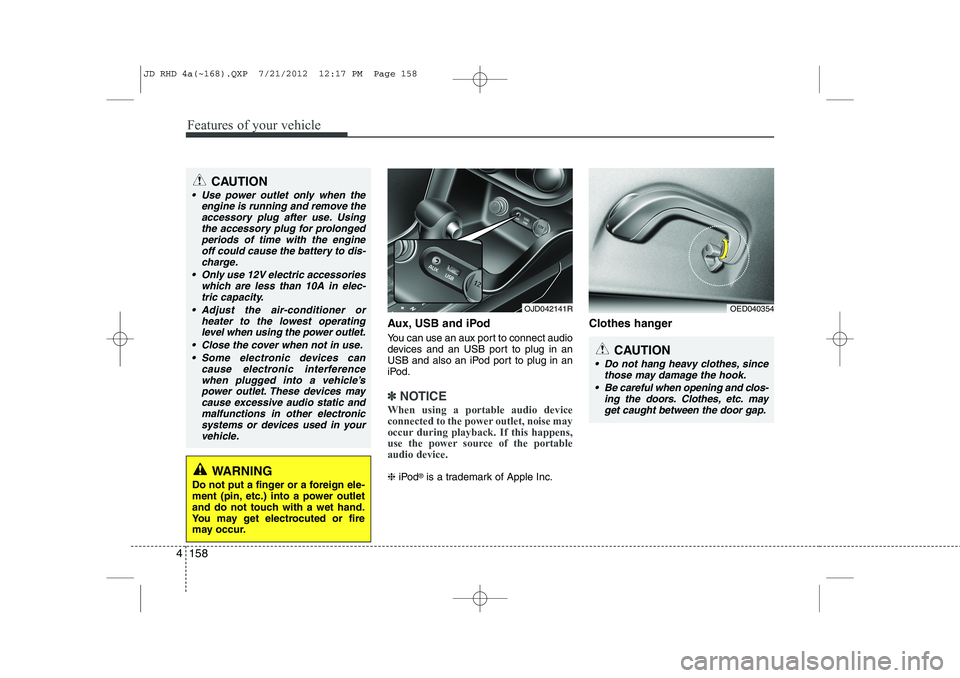
You can use an aux port to connect audio
devices and an USB port to plug in an
USB and also an iPod port to plug in an
iPod.
✽✽
NOTICE
When using a portable audio device
connected to the power outlet, noise may
occur during playback. If this happens,
use the power source of the portableaudio device.
❈ iPod ®
is a trademark of Apple Inc. Clothes hanger
OED040354
CAUTION
Do not hang heavy clothes, since
those may damage the hook.
Be careful when opening and clos- ing the doors. Clothes, etc. mayget caught between the door gap.
OJD042141R
WARNING
Do not put a finger or a foreign ele-
ment (pin, etc.) into a power outlet
and do not touch with a wet hand.
You may get electrocuted or fire
may occur.
CAUTION
Use power outlet only when the engine is running and remove the
accessory plug after use. Usingthe accessory plug for prolongedperiods of time with the engine off could cause the battery to dis-
charge.
Only use 12V electric accessories which are less than 10A in elec-tric capacity.
Adjust the air-conditioner or heater to the lowest operatinglevel when using the power outlet.
Close the cover when not in use. Some electronic devices can cause electronic interference
when plugged into a vehicle’spower outlet. These devices maycause excessive audio static and malfunctions in other electronic
systems or devices used in yourvehicle.
JD RHD 4a(~168).QXP 7/21/2012 12:17 PM Page 158
Page 832 of 1168
4 169
Features of your vehicle
✽✽NOTICE
If you install an aftermarket HID head
lamp, your vehicle’s audio and electron-ic device may malfunction.
Antenna
Roof antenna
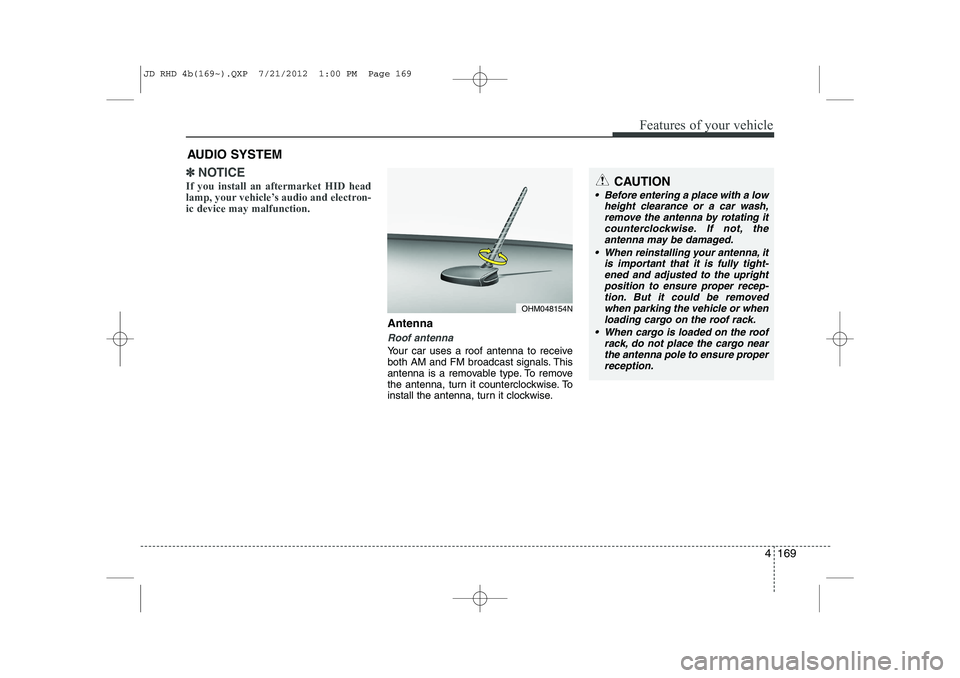
Your car uses a roof antenna to receive
both AM and FM broadcast signals. This
antenna is a removable type. To remove
the antenna, turn it counterclockwise. To
install the antenna, turn it clockwise.
AUDIO SYSTEM
CAUTION
• Before entering a place with a low
height clearance or a car wash,
remove the antenna by rotating itcounterclockwise. If not, theantenna may be damaged.
When reinstalling your antenna, it is important that it is fully tight-ened and adjusted to the upright position to ensure proper recep-tion. But it could be removed
when parking the vehicle or whenloading cargo on the roof rack.
When cargo is loaded on the roof rack, do not place the cargo near
the antenna pole to ensure proper reception.
OHM048154N
JD RHD 4b(169~).QXP 7/21/2012 1:00 PM Page 169
Page 833 of 1168
Features of your vehicle
170
4
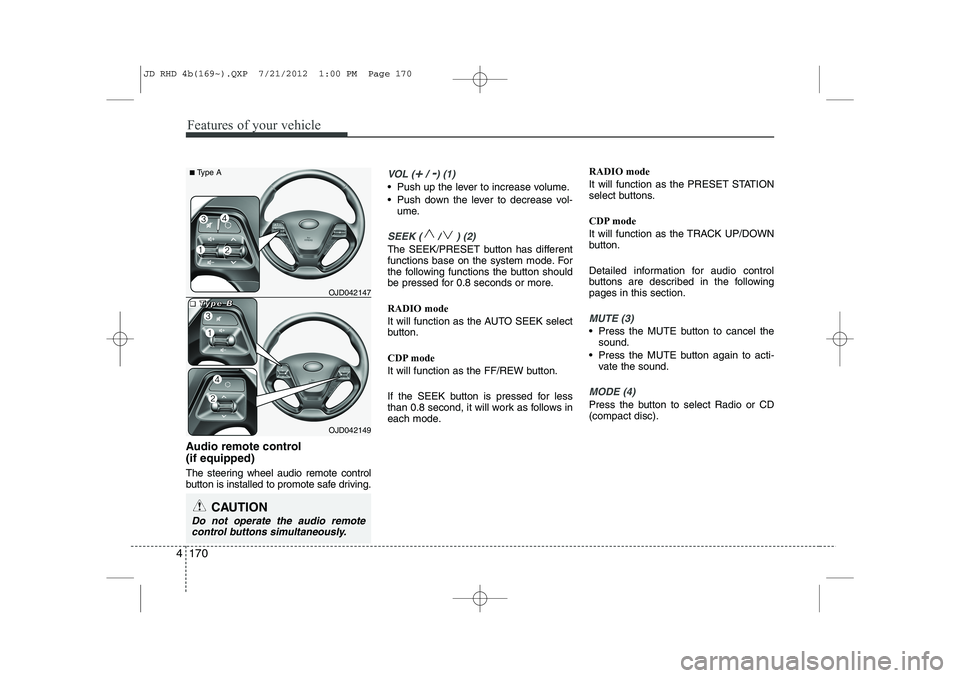
Audio remote control (if equipped)
The steering wheel audio remote control
button is installed to promote safe driving.
VOL (+/ -) (1)
• Push up the lever to increase volume.
Push down the lever to decrease vol-
ume.
SEEK ( / ) (2)
The SEEK/PRESET button has different
functions base on the system mode. For
the following functions the button should
be pressed for 0.8 seconds or more. RADIO mode
It will function as the AUTO SEEK select
button.
CDP mode
It will function as the FF/REW button.
If the SEEK button is pressed for less
than 0.8 second, it will work as follows in
each mode. RADIO mode
It will function as the PRESET STATION
select buttons.
CDP mode
It will function as the TRACK UP/DOWN
button.
Detailed information for audio control
buttons are described in the followingpages in this section.
MUTE (3)
Press the MUTE button to cancel the
sound.
Press the MUTE button again to acti- vate the sound.
MODE (4)
Press the button to select Radio or CD (compact disc).
CAUTION
Do not operate the audio remote
control buttons simultaneously.
OJD042149
■
■■■TTTTyyyyppppeeee BBBBOJD042147
■
Type A
JD RHD 4b(169~).QXP 7/21/2012 1:00 PM Page 170
Page 834 of 1168
4 171
Features of your vehicle
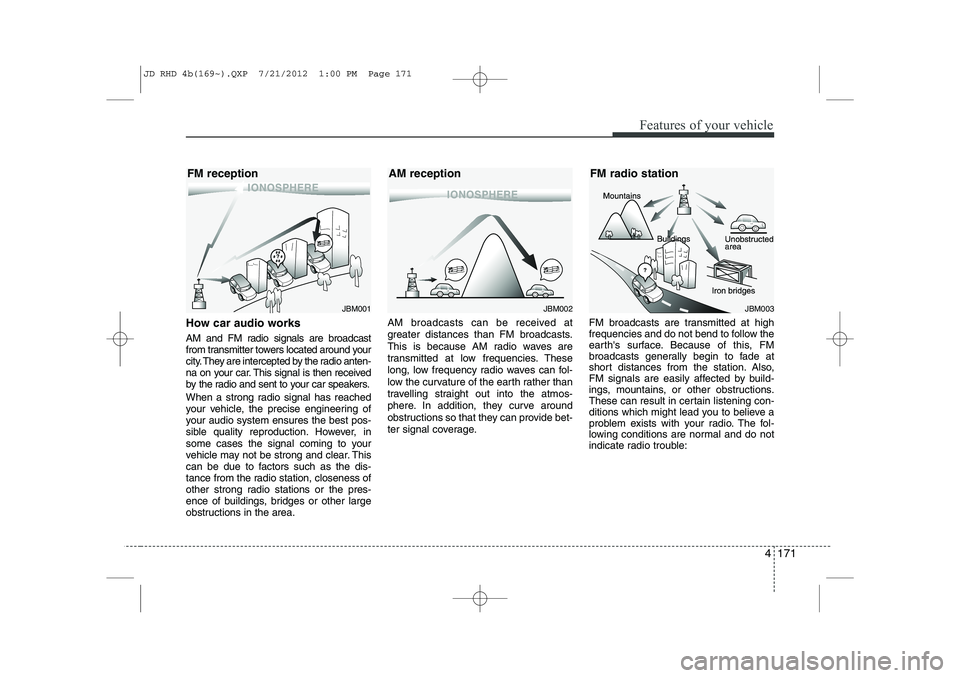
How car audio works
AM and FM radio signals are broadcast
from transmitter towers located around your
city. They are intercepted by the radio anten-
na on your car. This signal is then received
by the radio and sent to your car speakers.
When a strong radio signal has reached
your vehicle, the precise engineering of
your audio system ensures the best pos-
sible quality reproduction. However, in
some cases the signal coming to your
vehicle may not be strong and clear. This
can be due to factors such as the dis-
tance from the radio station, closeness of
other strong radio stations or the pres-
ence of buildings, bridges or other large
obstructions in the area.AM broadcasts can be received at
greater distances than FM broadcasts.
This is because AM radio waves are
transmitted at low frequencies. These
long, low frequency radio waves can fol-
low the curvature of the earth rather than
travelling straight out into the atmos-
phere. In addition, they curve around
obstructions so that they can provide bet-
ter signal coverage.
FM broadcasts are transmitted at high
frequencies and do not bend to follow the
earth's surface. Because of this, FM
broadcasts generally begin to fade at
short distances from the station. Also,
FM signals are easily affected by build-
ings, mountains, or other obstructions.
These can result in certain listening con-
ditions which might lead you to believe a
problem exists with your radio. The fol-
lowing conditions are normal and do not
indicate radio trouble:
JBM001JBM002JBM003
FM reception AM reception FM radio station
JD RHD 4b(169~).QXP 7/21/2012 1:00 PM Page 171