2013 KIA CEED Auto
[x] Cancel search: AutoPage 316 of 1168
4 237
Features of your vehicle
Bluetooth®Wireless Technology
Using Bluetooth®Wireless
Technology Handsfree
Bluetooth®Wireless Technology
refers to a short-distance wireless
networking technology which uses a
2.45GHz frequency to connect vari-
ous devices within a certain distance.
Supported within PCs, external
devices,
Bluetooth®Wireless
Technology phones, PDAs, various
electronic devices, and automotive
environments,
Bluetooth®Wireless
Technology allows data to be trans-
mitted at high speeds without hav-
ing to use a connector cable.
Bluetooth®Wireless Technology
Handsfree refers to a device which
allows the user to conveniently
make phone calls with
Bluetooth®
Wireless Technology mobilephones through the audio system.
CAUTION
Bluetooth®Wireless Technology
Handsfree is a feature that
enables drivers to practice safe driving. Connecting the car audiosystem with a Bluetooth
®
Wireless Technology phone allows the user to convenientlymake calls, receive calls, and
manage the phone book. Beforeusing the Bluetooth
®Wireless
Technology , carefully read the contents of this user’s manual.
Excessive use or operations while driving may lead to negli-gent driving practices and be the cause of accidents.
Do not operate the device exces- sively while driving.
Viewing the screen for prolonged periods of time is dangerous andmay lead to accidents. When driv-ing, view the screen only for short
periods of time.
JD eng 4c(209~).qxp 8/27/2012 9:55 AM Page 237
Page 329 of 1168
![KIA CEED 2013 Owners Manual Features of your vehicle
250
4
SETUP
Starting Mode
Press the key to display the Setup screen.
You can select and control options relat-
ed to [Display], [Sound], [Phone] and[System]. Display Sett](/manual-img/2/57944/w960_57944-328.png "KIA CEED 2013 Owners Manual Features of your vehicle
250
4
SETUP
Starting Mode
Press the key to display the Setup screen.
You can select and control options relat-
ed to [Display], [Sound], [Phone] and[System]. Display Sett")
Features of your vehicle
250
4
SETUP
Starting Mode
Press the key to display the Setup screen.
You can select and control options relat-
ed to [Display], [Sound], [Phone] and[System]. Display Settings
Adjusting the Brightness
Press the key Select
[Display] Select [Brightness]
Use the , buttons to adjust the
screen brightness or set the Brightness
on Automatic, Day, or Night mode.
Press the button to reset. (
1) Automatic : Adjusts the brightness
automatically
( 2) Day : Always maintains the bright-
ness on high
( 3) Night : Always maintains the bright-
ness on low
Pop-up Mode
Press the key Select
[Display] Select [Pop-up Mode]
This feature is used to display the Pop-up
Mode screen when entering radio and
media modes.
When this feature is turned on, pressing
the or key will display
the Pop-up Mode screen.
✽✽NOTICE
The media Pop-up Mode screen can be
displayed only when two or more mediamodes have been connected.
MEDIA RADIO
SETUP
Default
SETUP SETUP
JD eng 4c(209~).qxp 8/27/2012 9:56 AM Page 250
Page 331 of 1168
![KIA CEED 2013 Owners Manual Features of your vehicle
252
4
SDVC (Speed Dependent Volume
Control)
Press the key Select
[Sound] Select [Speed Dependent
Vol.]
The volume level is controlled automati-
cally according to the vehi](/manual-img/2/57944/w960_57944-330.png "KIA CEED 2013 Owners Manual Features of your vehicle
252
4
SDVC (Speed Dependent Volume
Control)
Press the key Select
[Sound] Select [Speed Dependent
Vol.]
The volume level is controlled automati-
cally according to the vehi")
Features of your vehicle
252
4
SDVC (Speed Dependent Volume
Control)
Press the key Select
[Sound] Select [Speed Dependent
Vol.]
The volume level is controlled automati-
cally according to the vehicle speed.
SDVC can be set by selecting from
Off/Low/Mid/High.
Voice Recognition Setting
Press the key Select
[Sound] Select [Volume Dialogue]
Use the , buttons to adjust the
Volume Dialog.
Touch Screen Beep
Press the key Select
[Sound] Select [Touch ScreenBeep]
This feature is used to turn the touch
screen beep on/off.SETUP SETUP SETUP
JD eng 4c(209~).qxp 8/27/2012 9:56 AM Page 252
Page 337 of 1168
Features of your vehicle
258
4
Command Function
More Help Provides guidance on commands that can be
used anywhere in the system.
Help Provides guidance on commands that can be
used within the current mode.
Call
phone bookEx) Call “John”
Phone Provides guidance on Phone related com- mands. After saying this command, say “Call
History”, “
Phone book”, “Dial Number” to exe-cute corresponding functions.
Call History Displays the Call History screen.
Phone bookDisplays the phone bookscreen. After saying
this command, say the name of a phone booksaved in the phone bookto automatically con-nect the call.
Dial Number Display the Dial number screen. After saying this command, you can say the number what
you want to call.
Redial Connects the most recently called number. Radio
When listening to the radio, displays the next
radio screen. (FM1 ➟FM2 ➟FMA ➟ AM ➟
AMA)
When listening to a different mode, displaysthe most recently played radio screen.
Command Function FM
When currently listening to the FM radio,
maintains the current state.
When listening to a different mode, displaysthe most recently played FM screen.
FM1(FM One) Displays the FM1 screen.
FM2(FM Two) Displays the FM2 screen.
FMA Displays the FMA screen.
AM Displays the AM screen.
AMA Displays the AMA screen.
FM Preset 1~6 Plays the most recently played broadcast
saved in FM Preset 1~6.
AM Preset 1~6 Plays the broadcast saved in AM Preset 1~6.
FM 87.5~107.9 Plays the FM broadcast of the corresponding
frequency.
AM 530~1710 Plays the AM broadcast of the corresponding
frequency.
TA on Enable Traffic Announcement
TA off Disable Traffic Announcement
News on Enable RDS News feature
News off Disable RDS News feature
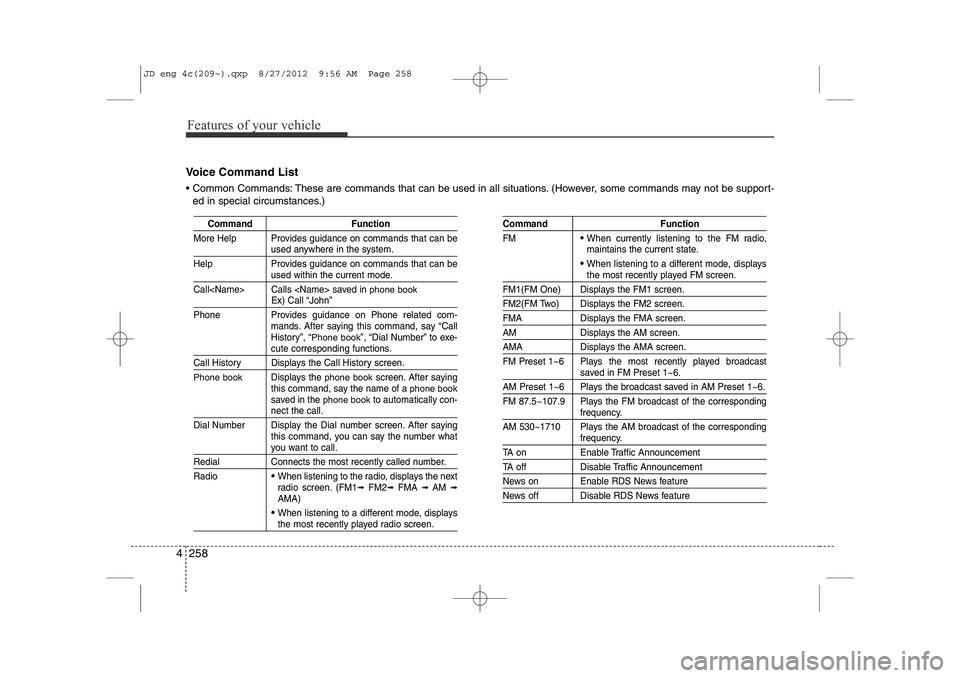
Voice Command List
Common Commands: These are commands that can be used in all situations. (However, some commands may not be support- ed in special circumstances.)
JD eng 4c(209~).qxp 8/27/2012 9:56 AM Page 258
Page 339 of 1168
Features of your vehicle
260
4
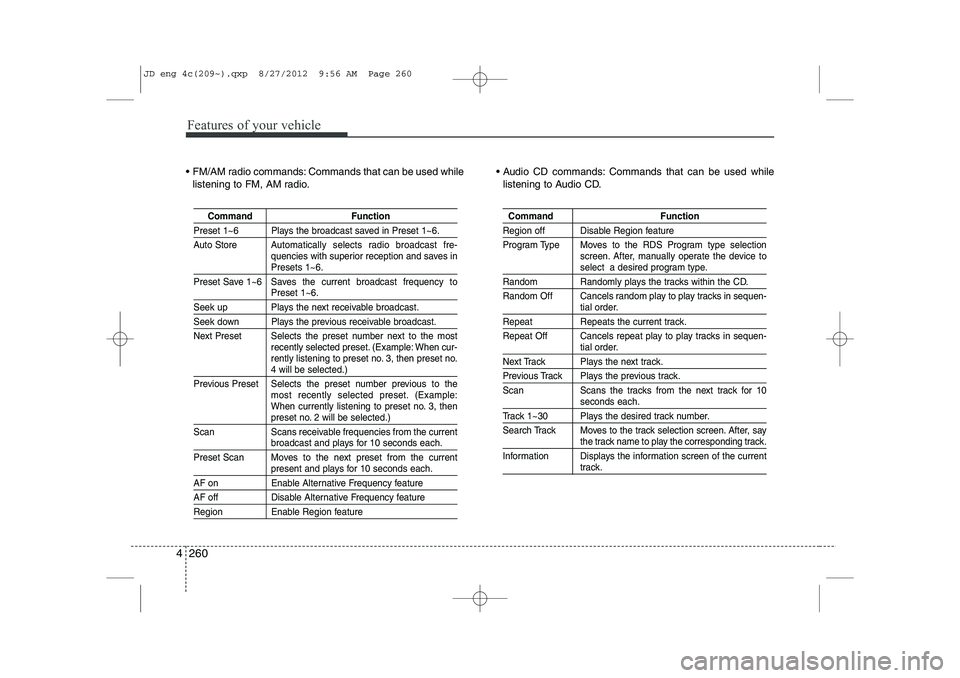
FM/AM radio commands: Commands that can be used while
listening to FM, AM radio. Audio CD commands: Commands that can be used while
listening to Audio CD.
Command Function
Preset 1~6 Plays the broadcast saved in Preset 1~6.
Auto Store A utomatically selects radio broadcast fre-
quencies with superior reception and saves in
Presets 1~6.
Preset Save 1~6 Saves the current broadcast frequency to
Preset 1~6.
Seek up Plays the next receivable broadcast.
Seek down Plays the previous receivable broadcast.
Next Preset Selects the preset number next to the most recently selected preset. (Example: When cur-
rently listening to preset no. 3, then preset no.
4 will be selected.)
Previous Preset Selects the preset number previous to the most recently selected preset. (Example:
When currently listening to preset no. 3, then
preset no. 2 will be selected.)
Scan Scans receivable frequencies from the current
broadcast and plays for 10 seconds each.
Preset Scan Moves to the next preset from the current
present and plays for 10 seconds each.
AF on Enable Alternative Frequency feature
AF off Disable Alternative Frequency feature
Region Enable Region feature
Command Function
Region off Disable Region feature
Program Type Moves to the RDS Program type selection screen. After, manually operate the device to
select a desired program type.
Random Randomly plays the tracks within the CD.
Random Off Cancels random play to play tracks in sequen-
tial order.
Repeat Repeats the current track.
Repeat Off Cancels repeat play to play tracks in sequen-
tial order.
Next Track Plays the next track.
Previous Track Plays the previous track.
Scan Scans the tracks from the next track for 10
seconds each.
Track 1~30 Plays the desired track number.
Search Track Moves to the track selection screen. After, say
the track name to play the corresponding track.
Information Displays the information screen of the current
track.
JD eng 4c(209~).qxp 8/27/2012 9:56 AM Page 260
Page 347 of 1168

Driving your vehicle
6
5
Ignition switch position
LOCK
The steering wheel locks to protect
against theft. The ignition key can be
removed only in the LOCK position.
When turning the ignition switch to the
LOCK position, push the key inward at
the ACC position and turn the key towardthe LOCK position.
ACC (Accessory)
The steering wheel is unlocked and elec-
trical accessories are operative.
✽✽
NOTICE
If difficulty is experienced turning the
ignition switch to the ACC position, turnthe key while turning the steering wheel
right and left to release the tension.
ON
The warning lights can be checked
before the engine is started. This is the
normal running position after the engine
is started.
Do not leave the ignition switch ON if the engine is not running to prevent battery
discharge.
START
Turn the ignition key to the START posi-
tion to start the engine. The engine will
crank until you release the key; then it
returns to the ON position. The brake
warning lamp can be checked in thisposition.
WARNING - Ignition key
Never turn the ignition switch to LOCK or ACC while the vehicle is
moving. This would result in loss of
directional control and braking
function, which could cause anaccident.
The anti-theft steering column lock (if equipped) is not a substitute for
the parking brake. Before leaving
the driver’s seat, always make sure
the shift lever is engaged in 1 st
gear
for the manual transaxle or P (Park)
for the automatic transaxle, set the
parking brake fully and shut the
engine off. Unexpected and sud-
den vehicle movement may occur ifthese precautions are not taken.
Never reach for the ignition switch, or any other controls through the
steering wheel while the vehicle is
in motion. The presence of yourhand or arm in this area could
cause a loss of vehicle control, an
accident and serious bodily injuryor death.
Do not place any movable objects around the driver’s seat as they
may move while driving, interferewith the driver and lead to an acci-dent.
JD eng 5.qxp 7/17/2012 10:40 AM Page 6
Page 348 of 1168
57
Driving your vehicle
Starting the engine
✽✽
NOTICE - Kick down mecha- nism
If your vehicle is equipped with a kick down mechanism in the accelerator
pedal, it prevents you from driving at
full throttle unintentionally by making
the driver require increased effort to
depress the accelerator pedal. However,
if you depress the pedal more than
approximately 80%, the vehicle can be
at full throttle and the accelerator pedal
will be easier to depress. This is not amalfunction but a normal condition.
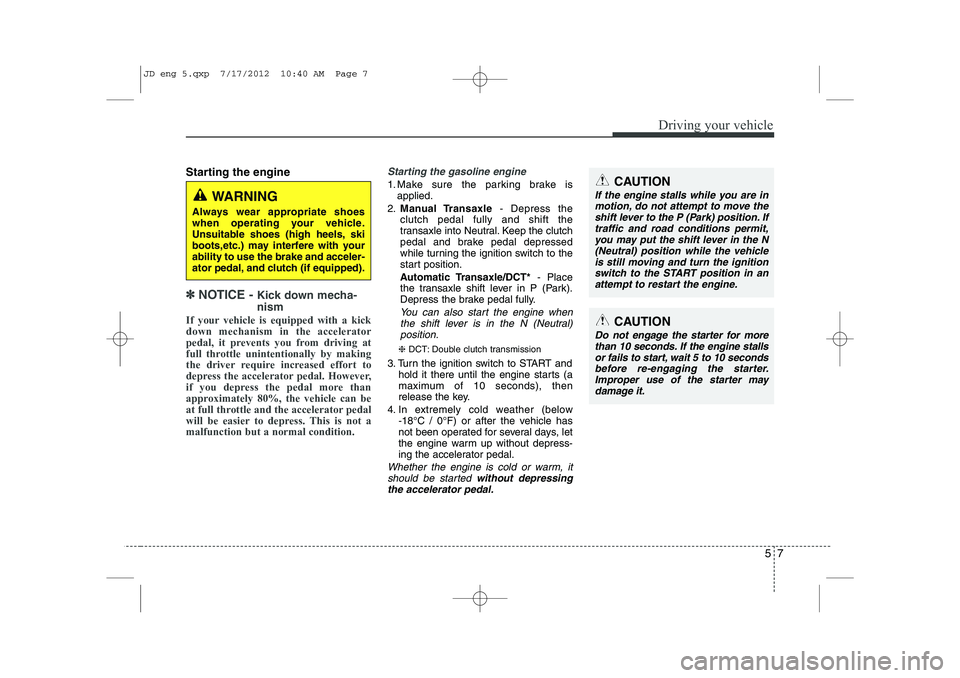
Starting the gasoline engine
1. Make sure the parking brake is applied.
2. Manual Transaxle - Depress the
clutch pedal fully and shift the
transaxle into Neutral. Keep the clutch
pedal and brake pedal depressed
while turning the ignition switch to the
start position.
Automatic Transaxle/DCT* - Place
the transaxle shift lever in P (Park).
Depress the brake pedal fully.
You can also start the engine when
the shift lever is in the N (Neutral)position.
❈ DCT: Double clutch transmission
3. Turn the ignition switch to START and hold it there until the engine starts (a
maximum of 10 seconds), then
release the key.
4. In extremely cold weather (below -18°C / 0°F) or after the vehicle has
not been operated for several days, let
the engine warm up without depress-
ing the accelerator pedal.
Whether the engine is cold or warm, it
should be started without depressing
the accelerator pedal.
CAUTION
If the engine stalls while you are in motion, do not attempt to move the
shift lever to the P (Park) position. Iftraffic and road conditions permit,you may put the shift lever in the N (Neutral) position while the vehicle
is still moving and turn the ignitionswitch to the START position in an attempt to restart the engine.
CAUTION
Do not engage the starter for morethan 10 seconds. If the engine stallsor fails to start, wait 5 to 10 seconds
before re-engaging the starter.Improper use of the starter maydamage it.
WARNING
Always wear appropriate shoes
when operating your vehicle.
Unsuitable shoes (high heels, ski
boots,etc.) may interfere with yourability to use the brake and acceler-
ator pedal, and clutch (if equipped).
JD eng 5.qxp 7/17/2012 10:40 AM Page 7
Page 349 of 1168

Driving your vehicle
8
5
Starting the diesel engine
To start the diesel engine when the engine is cold, it has to be pre-heated
before starting the engine and then have
to be warmed up before starting to drive.
1. Make sure the parking brake is
applied.
2. Manual Transaxle - Depress the
clutch pedal fully and shift the
transaxle into Neutral. Keep the clutch
pedal and brake pedal depressed
while turning the ignition switch to the
start position.
Automatic Transaxle - Place the
transaxle shift lever in P(park).
Depress the brake pedal fully.
You can also start the engine when the
shift lever is in the N(neutral) position.
3. Turn the ignition switch to the ON posi- tion to pre-heat the engine. Then the
glow indicator light will illuminate.
4. If the glow indicator light goes out, turn the ignition switch to the START posi-tion and hold it there until the engine
starts (a maximum of 10 seconds),
then release the key.
✽✽
NOTICE
If the engine does not start within 10
seconds after the preheating is complet-
ed, turn the ignition key once more to
the LOCK position for 10 seconds, and
then to the ON position, in order to pre-heat again.
Starting and stopping the engine for tur-
bocharger intercooler
1. Do not race or accelerate the engine immediately after starting.
If the engine is cold, idle for several
seconds before sufficient lubrication isensured in the turbocharger unit.
2. After high speed or extended driving, requiring a heavy engine load, run theengine on idle condition about 1
minute before turning it off.
This idle time will allow the tur-bocharger to cool prior to shutting the
engine off.
W-60
Glow indicator light
CAUTION
Do not turn off the engine immedi-
ately after it has been subjected to a heavy load. Doing so may causesevere damage to the engine or
turbo charger unit.
JD eng 5.qxp 7/17/2012 10:40 AM Page 8