2013 Hyundai Sonata Hybrid service
[x] Cancel search: servicePage 147 of 425
467
Features of your vehicle
✽ ✽
NOTICE
• The above warning message may
appear even though the active air flap
has not malfunctioned. If this occurs,
check the air flap for foreign matter
or if the flap has frozen.
• If the active air flap has frozen, the
warning message may not illuminate
immediately.
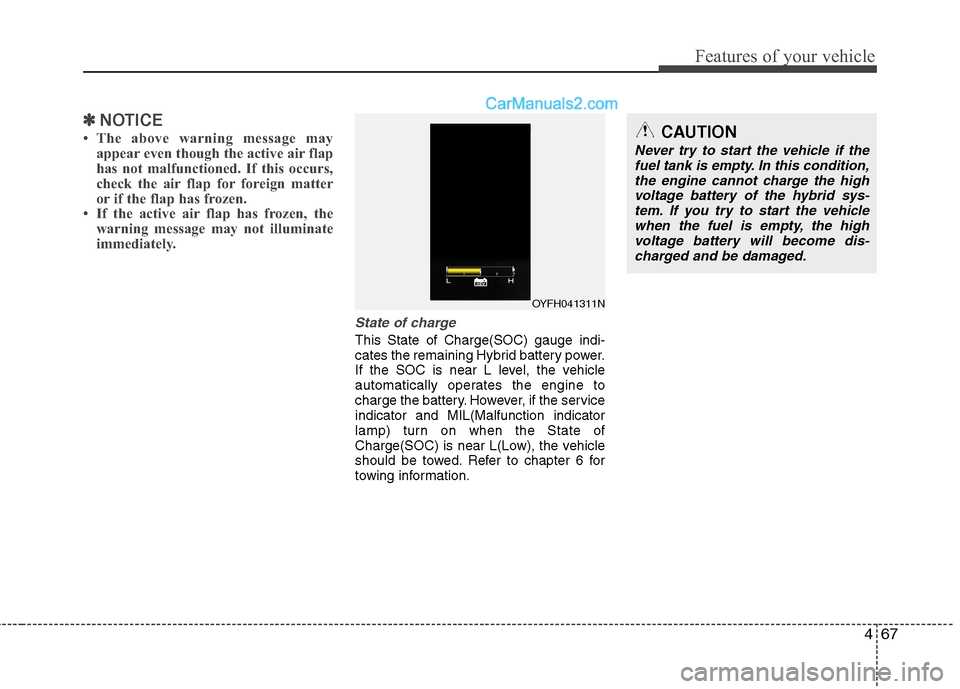
State of charge
This State of Charge(SOC) gauge indi-
cates the remaining Hybrid battery power.
If the SOC is near L level, the vehicle
automatically operates the engine to
charge the battery. However, if the service
indicator and MIL(Malfunction indicator
lamp) turn on when the State of
Charge(SOC) is near L(Low), the vehicle
should be towed. Refer to chapter 6 for
towing information.
OYFH041311N
CAUTION
Never try to start the vehicle if the
fuel tank is empty. In this condition,
the engine cannot charge the high
voltage battery of the hybrid sys-
tem. If you try to start the vehicle
when the fuel is empty, the high
voltage battery will become dis-
charged and be damaged.
Page 172 of 425
Features of your vehicle
92 4
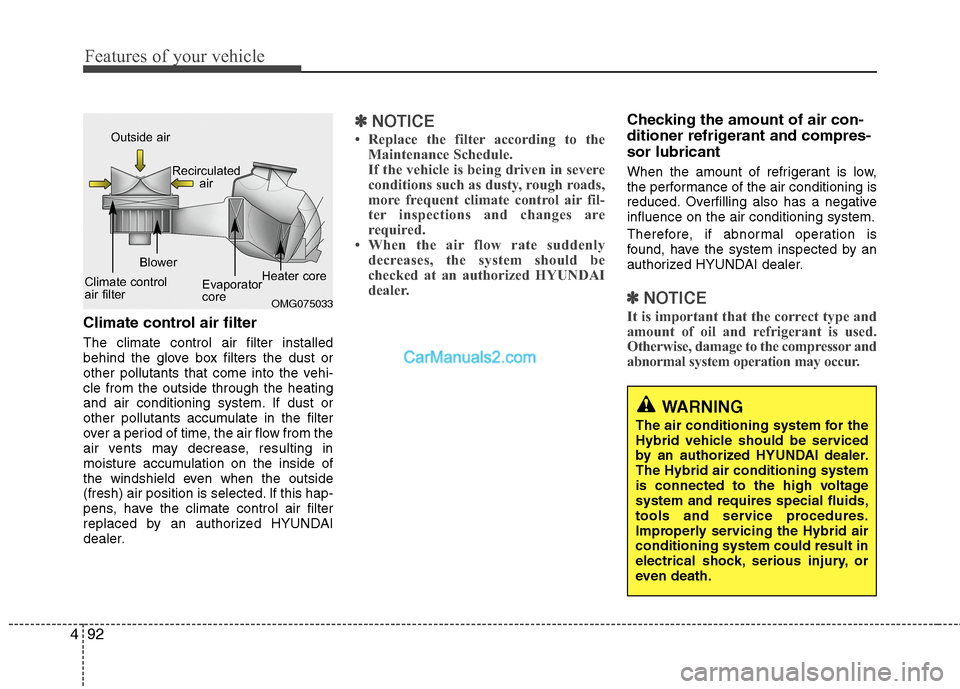
Climate control air filter
The climate control air filter installed
behind the glove box filters the dust or
other pollutants that come into the vehi-
cle from the outside through the heating
and air conditioning system. If dust or
other pollutants accumulate in the filter
over a period of time, the air flow from the
air vents may decrease, resulting in
moisture accumulation on the inside of
the windshield even when the outside
(fresh) air position is selected. If this hap-
pens, have the climate control air filter
replaced by an authorized HYUNDAI
dealer.
✽ ✽
NOTICE
• Replace the filter according to the
Maintenance Schedule.
If the vehicle is being driven in severe
conditions such as dusty, rough roads,
more frequent climate control air fil-
ter inspections and changes are
required.
• When the air flow rate suddenly
decreases, the system should be
checked at an authorized HYUNDAI
dealer.
Checking the amount of air con-
ditioner refrigerant and compres-
sor lubricant
When the amount of refrigerant is low,
the performance of the air conditioning is
reduced. Overfilling also has a negative
influence on the air conditioning system.
Therefore, if abnormal operation is
found, have the system inspected by an
authorized HYUNDAI dealer.
✽ ✽
NOTICE
It is important that the correct type and
amount of oil and refrigerant is used.
Otherwise, damage to the compressor and
abnormal system operation may occur.OMG075033
Outside air
Recirculated
air
Climate control
air filterBlower
Evaporator
coreHeater core
WARNING
The air conditioning system for the
Hybrid vehicle should be serviced
by an authorized HYUNDAI dealer.
The Hybrid air conditioning system
is connected to the high voltage
system and requires special fluids,
tools and service procedures.
Improperly servicing the Hybrid air
conditioning system could result in
electrical shock, serious injury, or
even death.
Page 183 of 425
4103
Features of your vehicle
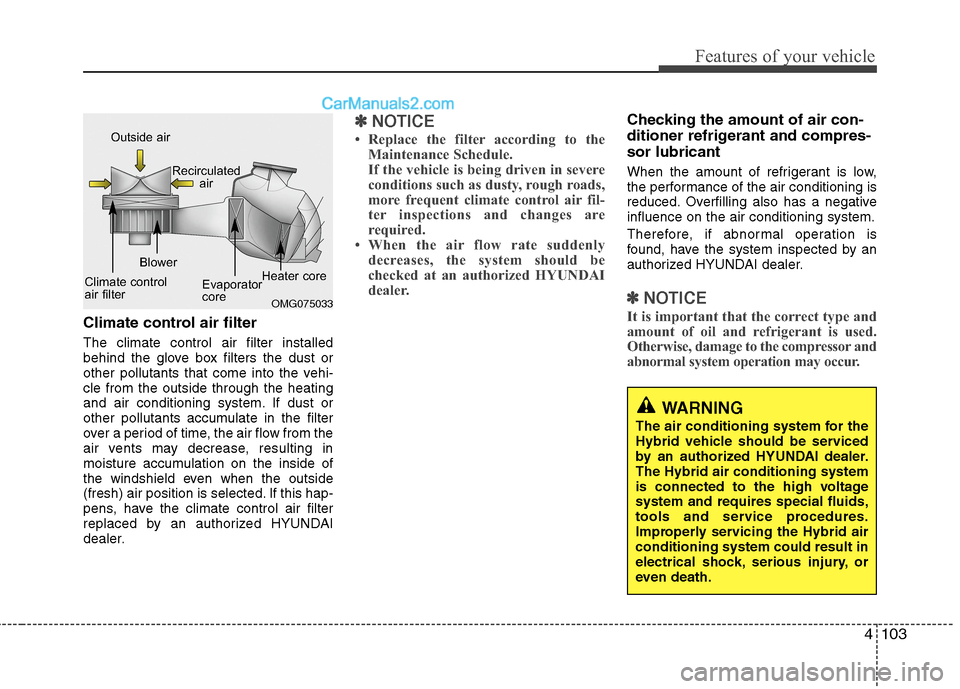
Climate control air filter
The climate control air filter installed
behind the glove box filters the dust or
other pollutants that come into the vehi-
cle from the outside through the heating
and air conditioning system. If dust or
other pollutants accumulate in the filter
over a period of time, the air flow from the
air vents may decrease, resulting in
moisture accumulation on the inside of
the windshield even when the outside
(fresh) air position is selected. If this hap-
pens, have the climate control air filter
replaced by an authorized HYUNDAI
dealer.
✽ ✽
NOTICE
• Replace the filter according to the
Maintenance Schedule.
If the vehicle is being driven in severe
conditions such as dusty, rough roads,
more frequent climate control air fil-
ter inspections and changes are
required.
• When the air flow rate suddenly
decreases, the system should be
checked at an authorized HYUNDAI
dealer.
Checking the amount of air con-
ditioner refrigerant and compres-
sor lubricant
When the amount of refrigerant is low,
the performance of the air conditioning is
reduced. Overfilling also has a negative
influence on the air conditioning system.
Therefore, if abnormal operation is
found, have the system inspected by an
authorized HYUNDAI dealer.
✽ ✽
NOTICE
It is important that the correct type and
amount of oil and refrigerant is used.
Otherwise, damage to the compressor and
abnormal system operation may occur. OMG075033
Outside air
Recirculated
air
Climate control
air filterBlower
Evaporator
coreHeater core
WARNING
The air conditioning system for the
Hybrid vehicle should be serviced
by an authorized HYUNDAI dealer.
The Hybrid air conditioning system
is connected to the high voltage
system and requires special fluids,
tools and service procedures.
Improperly servicing the Hybrid air
conditioning system could result in
electrical shock, serious injury, or
even death.
Page 228 of 425
![Hyundai Sonata Hybrid 2013 Owners Manual Features of your vehicle
148 4
Phone MENU
Press the key to display three
menus (Call History, Contacts, Phone
Setup).
Call history
Press the key Set [ Call
History] through the TUNE knob or
key.
Th](/manual-img/35/19650/w960_19650-227.png "Hyundai Sonata Hybrid 2013 Owners Manual Features of your vehicle
148 4
Phone MENU
Press the key to display three
menus (Call History, Contacts, Phone
Setup).
Call history
Press the key Set [ Call
History] through the TUNE knob or
key.
Th")
Features of your vehicle
148 4
Phone MENU
Press the key to display three
menus (Call History, Contacts, Phone
Setup).
Call history
Press the key Set [ Call
History] through the TUNE knob or
key.
The call history is displayed and can be
used to select a number and make a call.
If call history does not exist, a screen
asking whether to download call history
is displayed. (The download feature may
not be supported in some mobile
phones)Contacts
Press the key Set [ Contacts]
through the TUNEknob or key.
The Contacts are displayed and can be
used to select a number and make a call.
❈ If more than one number is saved to
one contact, then a screen showing
the mobile phone number, house and
office number are displayed. Select the
desired number to make the call.
❈ If Contacts do not exist, a screen asking
whether to download Contacts is dis-
played. (The download feature may not
be supported in some mobile phones)
Phone Setup
Press the key Set [ Phone
Setup] through the TUNEknob or
key.
The Bluetooth®Wireless Technology
enabled mobile phone setup screen is
displayed. For more information, refer to
“Phone Setup”.
3
PHONE
2
PHONE
1
PHONE
PHONECAUTION IN USING
BLUETOOTH®WIRELESS
TECHNOLOGY CELLU-
LAR PHONE
Do not use a cellular phone or
perform Bluetooth®Wireless
Technology settings (e.g. pairing
a phone) while driving.
Some Bluetooth
®Wireless
Technology-enabled phones may
not be recognized by the system or
fully compatible with the system.
Before using Bluetooth
®Wireless
Technology related features of
the audio system, refer your
phone’s User’s Manual for phone-
side Bluetooth
®Wireless
Technology operations.
The phone must be paired to the
audio system to use Bluetooth
®
Wireless Technology related fea-
tures.
You will not be able to use the
hands-free feature when your
phone (in the car) is outside of
the cellular service area (e.g. in a
tunnel, in a underground, in a
mountainous area, etc.).
(Continued)
Page 229 of 425
4149
Features of your vehicle
NOTE:
Bluetooth®Wireless Technology
phone compatibility can be checked
by visiting www.hyundaiusa.com and
under the SERVICE & PARTS - BLUE-
TOOTH COMPATIBILITY menu.
The website provides 9 types of
information, including information
on Pairing, Connection, Handsfree
Calling, Streaming, and more.(Continued)
If the cellular phone signal is poor
or the vehicles interior noise is too
loud, it may be difficult to hear the
other person’s voice during a call.
Do not place the phone near or
inside metallic objects, otherwise
communications with Bluetooth
®
Wireless Technology system or
cellular service stations can be
disturbed.
While a phone is connected
through Bluetooth
®Wireless
Technology your phone may dis-
charge quicker than usual for
additional Bluetooth
®Wireless
Technology-related operations.
Some cellular phones or other
devices may cause interference
noise or malfunction to audio
system. In this case, store the
device in a different location may
resolve the condition.
Phone contact names should be
saved in English or they may not
be displayed correctly.
(Continued)
(Continued)
If Priority is set upon vehicle igni-
tion(IGN/ACC ON), the Bluetooth
®
Wireless Technology phone will
be automatically connected.
Even if you are outside, the
Bluetooth
®Wireless Technology
phone will be automatically con-
nected once you are in the vicini-
ty of the vehicle.
If you do not want automatic
Bluetooth
®Wireless Technology
connection, turn the Bluetooth®
Wireless Technology feature off.
The hands-free call volume and
quality may differ depending on
the mobile phone type.
Page 240 of 425
Features of your vehicle
160 4
Blue Link®
Hyundai aims to offer differentiated cus-
tomer values through a ‘Connected Car
Life,’ which is to provide consumers with
fast and reliable IT technology. As con-
sumers’ lifestyles become more and
more mobile in thanks to remarkable
advances in smart phones, tablet PCs
and overall wireless telecommunication,
new lifestyle patterns demand seamless
connection between one’s office, home,
outdoors and automobiles.
Automobile companies are now faced with
the task of shifting their paradigm from
vehicle-centered services to customer
value-centered services, with the ultimate
goal of securing global leadership in the
field of vehicle IT and telematics.
Hyundai Motor plans to achieve this by
realizing a terminal platform flexible to
changes in IT technology, cooperating with
global IT companies, creating an eco-sys-
tem and providing the latest contents &
services based on an open environment.
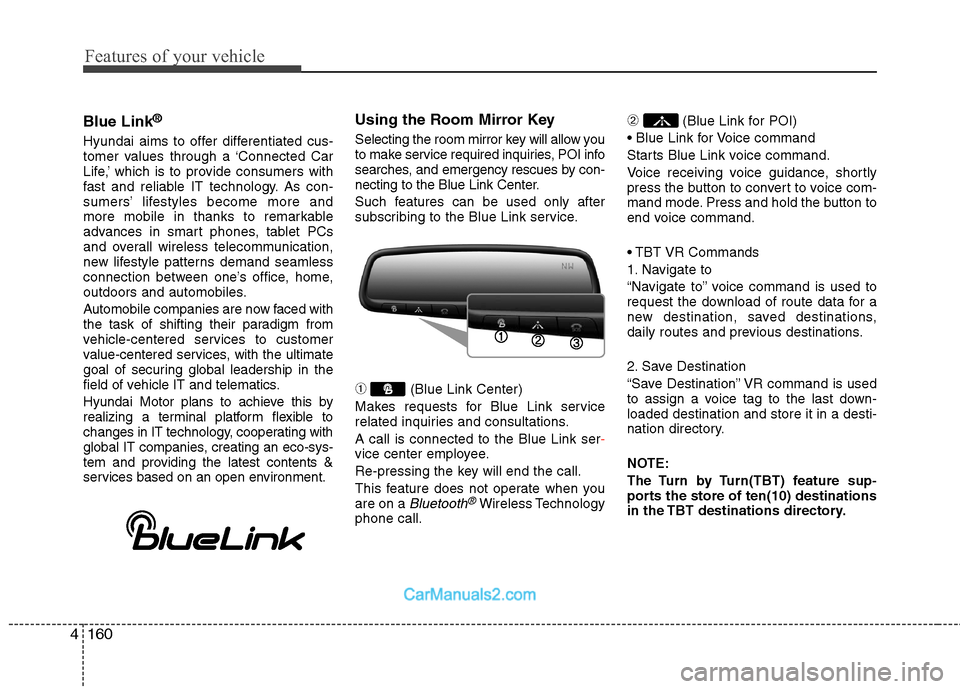
Using the Room Mirror Key
Selecting the room mirror key will allow you
to make service required inquiries, POI info
searches, and emergency rescues by con-
necting to the Blue Link Center.
Such features can be used only after
subscribing to the Blue Link service.
➀(Blue Link Center)
Makes requests for Blue Link service
related inquiries and consultations.
A call is connected to the Blue Link ser-
vice center employee.
Re-pressing the key will end the call.
This feature does not operate when you
are on a
Bluetooth®Wireless Technology
phone call.
➁ (Blue Link for POI)
Starts Blue Link voice command.
Voice receiving voice guidance, shortly
press the button to convert to voice com-
mand mode. Press and hold the button to
end voice command.
1. Navigate to
“Navigate to” voice command is used to
request the download of route data for a
new destination, saved destinations,
daily routes and previous destinations.
2. Save Destination
“Save Destination” VR command is used
to assign a voice tag to the last down-
loaded destination and store it in a desti-
nation directory.
NOTE:
The Turn by Turn(TBT) feature sup-
ports the store of ten(10) destinations
in the TBT destinations directory.
Page 253 of 425
511
Driving your vehicle
R (Reverse)
Use this position to drive the vehicle
backward.N (Neutral)
The wheels and transaxle are not
engaged. The vehicle will roll freely even
on the slightest incline unless the parking
brake or service brakes are applied.
D (Drive)
This is the normal forward driving posi-
tion. The transaxle will automatically shift
through a 6-gear sequence, providing the
best fuel economy and power.
For extra power when passing another
vehicle or climbing grades, depress the
accelerator, at which time the transaxle
will automatically downshift to a lower
gear.
✽ ✽
NOTICE
Always come to a complete stop before
shifting into D (Drive).
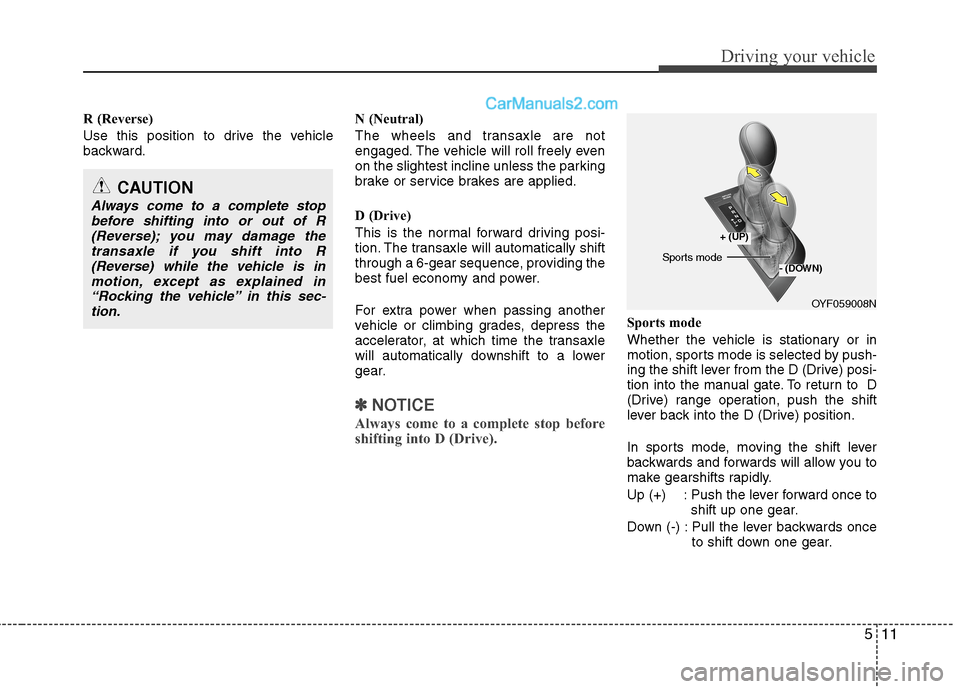
Sports mode
Whether the vehicle is stationary or in
motion, sports mode is selected by push-
ing the shift lever from the D (Drive) posi-
tion into the manual gate. To return to D
(Drive) range operation, push the shift
lever back into the D (Drive) position.
In sports mode, moving the shift lever
backwards and forwards will allow you to
make gearshifts rapidly.
Up (+) : Push the lever forward once to
shift up one gear.
Down (-) : Pull the lever backwards once
to shift down one gear.
CAUTION
Always come to a complete stop
before shifting into or out of R
(Reverse); you may damage the
transaxle if you shift into R
(Reverse) while the vehicle is in
motion, except as explained in
“Rocking the vehicle” in this sec-
tion.
OYF059008N
+ (UP)
- (DOWN)Sports mode
Page 256 of 425
Driving your vehicle
14 5
Moving up a steep grade from a stand-
ing start
To move up a steep grade from a stand-
ing start, depress the brake pedal, shift
the shift lever to D (Drive). Depress the
accelerator gradually while releasing the
service brakes.
Power brakes
Your vehicle's brake system is power-
assisted by the electric hydraulic pump.
In the event the brakes lose power
because of a brake control system mal-
function, unstable power supply or some
other reason, you can still stop your vehi-
cle by applying greater force to the brake
pedal than you normally would. The stop-
ping distance, however will be longer. For
your safety, please have the system
checked as soon as possible.WARNING
If your vehicle becomes stuck in
snow, mud, sand, etc., then you
may attempt to rock the vehicle free
by moving it forward and backward.
Do not attempt this procedure if
people or objects are anywhere
near the vehicle. During the rocking
operation the vehicle may suddenly
move forward or backward as it
becomes unstuck, causing injury
or damage to nearby people or
objects.
BRAKE SYSTEM
WARNING- Brakes
Do not drive with your foot rest-
ing on the brake pedal. This will
create abnormal high brake tem-
peratures, excessive brake lining
and pad wear, and increased
stopping distances.
When descending a long or steep
hill, shift to a lower gear and
avoid continuous application of
the brakes. Continuous brake
application will cause the brakes
to overheat and could result in a
temporary loss of braking per-
formance.
(Continued)