Page 232 of 422

CONT INUED
HFL uses a Class 2 Bluetooth,
which means, the maximum range
between your phone and vehicle is
30 feet (10 meters).
During a call, HFL allows you to talk
up to 30 minutes af ter you remove
the key from the ignition switch.
However, this may weaken the
vehicle’s battery. You can make calls using a name in
the HFL phonebook or any phone
number. You can also redial the last
number called.Once connected, you will hear the
person you called through the
audio speakers.
Follow the HFL prompts to
confirm the name and make
the call.
Follow the HFL prompts to
conf irm the number and say
‘‘ ’’ or ‘‘ .’’
Follow the HFL prompts and say
thenamestoredintheHFL
phonebook that you want to call.
Follow the HFL prompts and say
the phone number you want to dial.
Say ‘‘ ’’ or ‘‘ .’’
Say ‘‘ ’’ or ‘‘ .’’
Press and release the HFL Talk
button bef ore a command.
Press and release the HFL Talk
button bef ore a command.
1.
2.
3. 1.
2.
3.
BluetoothHandsFreeL ink
Making a Call
Call Dial
Call Dial
Call DialT o make a call using a phone
number:
Tomakeacallusinganameinthe
HFL phonebook:
227
12/08/09 16:29:00 31SJC670_234
Features
Page 243 of 422

�Î
�Î
If you get into the vehicle while you
are on the phone, the call can be
automatically transferred to HFL
with the ignition switch in the
ACCESSORY (I) or ON (II) position.
Press and release the HFL Talk
button bef ore a command.Say ‘‘ .’’
Press and release the HFL Talk
button bef ore a command.
Say ‘‘ .’’Press and release the HFL Talk
button bef ore a command.
Say ‘‘ .’’
Follow the HFL prompts to
conf irm the number. Follow the HFL prompts and say
the new 4-digit passcode. Say ‘‘ ’’ after
Follow the HFL prompts and say
‘‘ ’’ or ‘‘ .’’ You
can also say ‘‘ ’’ f or no audible
incoming call notif ication. Say ‘‘ ’’ after
T he defaul t setting is a ring tone.HFL will let you know if auto
transfer is on or off, depending
on the previous setting. Follow
the HFL prompts to change
the setting.
Say ‘‘
’’ af ter the
prompts.
2.
3.
4. 1.
2.
3.
1.
2.
3.
1.:
System setup
System setup
System setup
Change passcode
Ring tone PromptOf f
Call notif ication
Auto transf er
BluetoothHandsFreeL ink
T o change your securit y passcode: T o select eit her a ring t one or a prompt as t he incoming callnotification : To activate or deactivate the auto
transfer function:
238
12/08/09 16:30:53 31SJC670_245
Featuresthe prompts.
the prompts.
Page 245 of 422
Press and release the HFL Talk
button bef ore a command.Say ‘‘ .’’
Follow the HFL prompts to
change the language to English or
French.
If you have not named your paired
phone in the language you just
selected, HFL will ask you to name it
in the current language.
When French is your currently
selected language, you can give voice
commands in French. The
word mark and logos
are registered trademarks owned by
Bluetooth SIG, Inc. and any use of
such marks by Honda Motor Co.,
Ltd. is under license. Other
trademarks and trade names are
those of their respective owners.
This device complies with the
appropriate requirements or the
required standards. See page f or
more inf ormation.
Refer to the navigation system
manual for operation of the
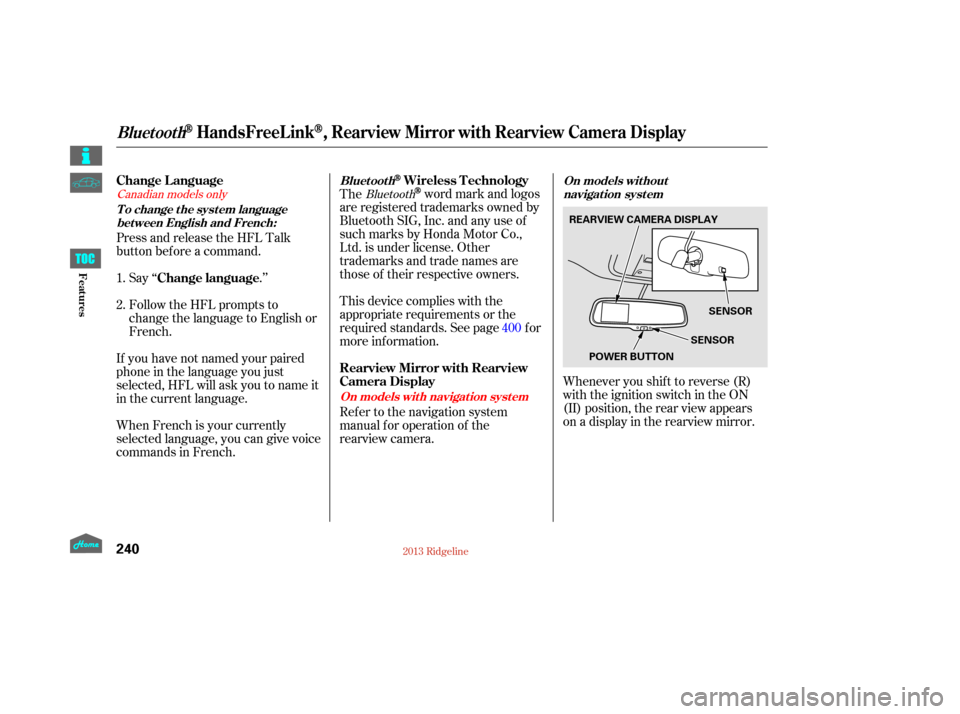
rearview camera. Whenever you shif t to reverse (R)
with the ignition switch in the ON
(II) position, the rear view appears
on a display in the rearview mirror.
1.
2.
400Bluetooth
Canadian models only
Change Language
Change languageWireless Technology
Rearview Mirror with Rearview
Camera Display
To change the system language bet ween English and French: Bluet oot h
On models without
navigation system
On models wit h navigat ion syst em
BluetoothHandsFreeL ink, Rearview Mirror with Rearview Camera Display
240
REARVIEW CAMERA DISPLAY SENSOR
SENSOR
POWER BUTTON
12/09/07 16:43:17 31SJC670_247
Features
Page 273 of 422
Apply the parking brake.
In cold weather, turn of f all
electrical accessories to reduce
the drain on the battery.
Make sure the shif t lever is in
Park. Press on the brake pedal.Without touching the accelerator
pedal, turn the ignition key to the
START (III) position. Do not hold
the key in the START (III)
position f or more than 15 seconds
at a time. If the engine does not
start right away, pause for at least
10 seconds bef ore trying again.
1.
2.
3.
4.
Starting the Engine
268
T he immobilizer system protects your
vehicle f rom thef t. If an improperly
coded key (or other device) is used, the
engine’s f uel system is disabled. For
more inf ormation, see page .The engine is harder to start in cold
weather. Also, the thinner air f ound at
altitudes above 8,000 f eet (2,400
meters) adds to this problem.
101
12/08/09 16:34:41 31SJC670_275
Driving
Page 274 of 422

These indicators on the instrument
panel show which position the shif t
lever is in.The ‘‘D’’ indicator comes on f or a
f ew seconds when you turn the
ignition switch to the ON (II)
position. If it f lashes while driving (in
any shif t position), it indicates a
possible problem in the transmission.
If the malf unction indicator lamp
comes on along with the ‘‘D’’
indicator, there is a problem with the
automatic transmission control
system. Avoid rapid acceleration, and
have the transmission checked by
your dealer as soon as possible.
To shif t f rom Park to any position,
pressfirmlyonthebrakepedal,and
pull the shif t lever toward you. You
cannot shif t out of Park when the
ignition switch is in the LOCK (0) or
ACCESSORY (I) position.
When the ‘‘D’’ indicator warns of a
possible problem with the
transmission, you will see a ‘‘CHECK
TRANSMISSION’’ message on the
multi-information display (see
page
).
91
CONT INUED
On models with navigation system
Shif t L ever Position Indicators Shif ting
Automatic Transmission
269
SHIFT LEVER
12/08/09 16:34:49 31SJC670_276
Driving
Page 275 of 422

�µ�µThis position mechani-
cally locks the transmission. Use
Park whenever you are turning of f or
starting the engine. To shif t out of
Park, you must press on the brake
pedal and have your f oot of f the
accelerator pedal. Pull the shift lever
towards you, then move it out
If you have done all of the above and
still cannot move the lever out of
Park, see on
page .
You must also pull the shif t lever
towards you to shift into Park. To
avoid transmission damage, come to
a complete stop bef ore shif ting into
Park. The shif t lever must be in Park
for you to remove the key from the
ignition switch. Press the brake
pedal and pull the shift lever towards
you to shift from Park to reverse. To
shift from reverse to neutral, come
to a complete stop, and then shift.
Pull the shift lever towards you
before shifting into reverse
273
To shift from: PtoR
RtoP
NtoR Dto2 2to1
1to2
2toD
DtoN
NtoD RtoN Do this:
Press the brake pedal, and
pull the shift lever towards
you.
Pull the shift lever towards
you.
Move the shift lever.
Automatic Transmission
Park (P)
Shif t L ock Release Reverse (R)
270
12/08/09 16:34:54 31SJC670_277
Driving
of Park.
from neutral.
Page 276 of 422

�µ
�µ
CONT INUED
Press the D3 switch on the end of
the shif t lever to turn this mode on
or of f ; the D3 indicator comes on
whenever D3 is selected.
TheD3switchcanbeoperatedonly
when the ignition switch is in the ON
(II) position and the shif t lever is in
the D position.
Use this position f or
your normal driving. The
transmission automatically selects a
suitable gear (1 through 5) f or your
speed and acceleration. You may
notice the transmission shif ting up at
higher engine speeds when the
engine is cold. This helps the engine
warm up f aster.
Af ter you stop in D, 2, 1, N, or R
position with the ignition switch in
the ACCESSORY (I) position f or an
extended period, you may not be
able to move the shift lever from
neutral to reverse or Park. In this
case, press the brake pedal, and turn
the ignition switch to the ON (II)
position, then shif t out of neutral. Use neutral if you
need to restart a stalled engine, or if
it is necessary to stop brief ly with
the engine idling. Shif t to the Park
position if you need to leave your
vehicle for any reason. Press on the
brake pedal when you are moving
the shift lever from neutral to
another gear.
Automatic Transmission
D3Drive (D)
Neutral (N)
271
D3 SWITCH
12/08/09 16:35:00 31SJC670_278
Driving
Page 277 of 422

�µTo shif t to second,
pull the shif t lever towards you, then
shif t to the lower gear. This position
locks the transmission in second
gear. It does not downshif t to f irst
gear when you come to a stop.
Use second gear:
For more power when climbing.
To increase engine braking when
going down steep hills.
For starting out on a slippery
surf ace or in deep snow.
To help reduce wheel spin.
When driving downhill with a
trailer.
This will increase
Shif ting out of the D position will
cancel D3, and cause the D3
indicator to go out. Selecting the D
position again will resume D3, and
the indicator will come on.
Turning the ignition switch to the
LOCK (0) position turns D3 of f . To
use D3 when you restart the engine,
select the D position, and press the
D3 switch again.
The D3 indicator also comes on
for a few seconds when you
turn the ignition switch to the ON
(II) position.
When D3 is on, the transmission
selects only the f irst three gears.
Use D3 f or engine braking when
going down a steep hill.
Automatic Transmission
Second (2)When t owing a t railer on level roads
under normal driving condit ions, donot use D3.
272
D3 INDICATOR
12/08/09 16:35:09 31SJC670_279
Driving
the automatic transmission
fluid temperature and may
cause overheating.