Page 85 of 573
84
uuGauges and DisplaysuInformation Display
Instrument Panel
Information Display
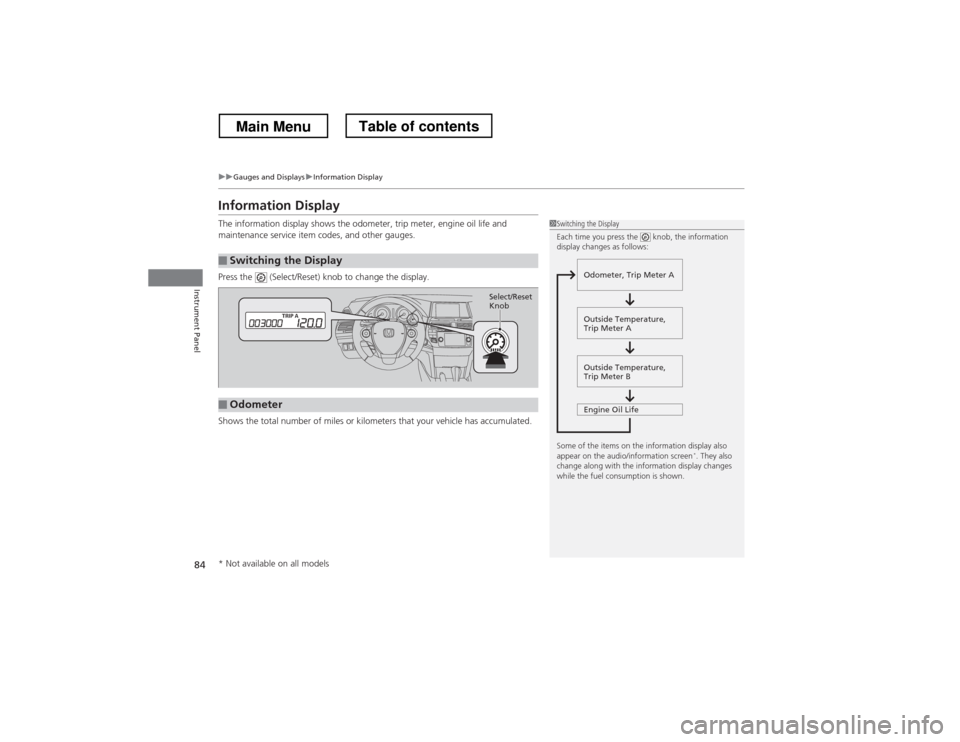
The information display shows the odometer, trip meter, engine oil life and
maintenance service item codes, and other gauges.
Press the (Select/Reset) knob to change the display.
Shows the total number of miles or kilometers that your vehicle has accumulated.
■Switching the Display
1Switching the Display
Each time you press the knob, the information
display changes as follows:
Some of the items on the information display also
appear on the audio/information screen *
. They also
change along with the information display changes
while the fuel consumption is shown.
Outside Temperature,
Trip Meter B
Engine Oil Life
Odometer, Trip Meter A
Outside Temperature,
Trip Meter A
■Odometer
Select/Reset Knob
* Not available on all models
Main MenuTable of contents
Page 92 of 573
91
Continued
Controls
Locking and Unlocking the Doors
Key Types and Functions
This vehicle comes with the following keys:
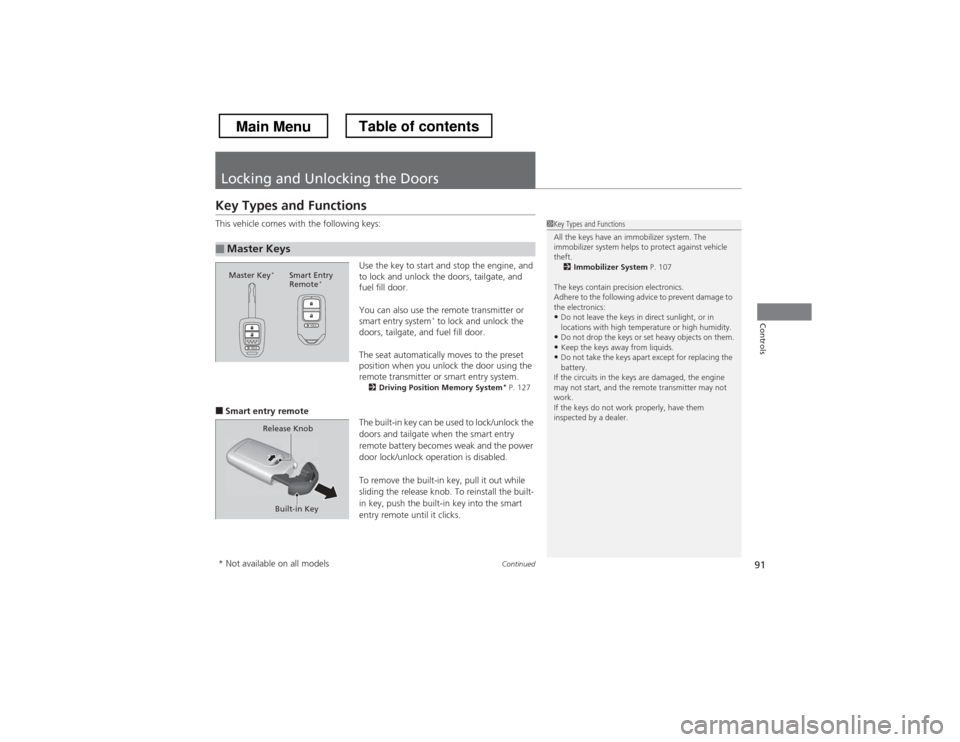
Use the key to start and stop the engine, and
to lock and unlock the doors, tailgate, and
fuel fill door.
You can also use the remote transmitter or
smart entry system*
to lock and unlock the
doors, tailgate, and fuel fill door.
The seat automatically moves to the preset
position when you unlock the door using the
remote transmitter or smart entry system. 2 Driving Posi tion Memory System *
P. 127
■ Smart entry remote
The built-in key can be used to lock/unlock the
doors and tailgate when the smart entry
remote battery becomes weak and the power
door lock/unlock operation is disabled.
To remove the built-in key, pull it out while
sliding the release knob. To reinstall the built-
in key, push the built-in key into the smart
entry remote until it clicks.
■Master Keys
1Key Types and Functions
All the keys have an immobilizer system. The
immobilizer system helps to protect against vehicle theft.2 Immobilizer System P. 107
The keys contain precision electronics.
Adhere to the following advice to prevent damage to the electronics: • Do not leave the keys in direct sunlight, or in
locations with high temperature or high humidity.
• Do not drop the keys or set heavy objects on them.
• Keep the keys away from liquids.
• Do not take the keys apart except for replacing the
battery.
If the circuits in the keys are damaged, the engine
may not start, and the remote transmitter may not work.
If the keys do not work properly, have them
inspected by a dealer.
Master Key *
Smart Entry
Remote *
Built-in Key
Release Knob
* Not available on all models
Main MenuTable of contents
Page 95 of 573
94
uuLocking and Unlocking the DoorsuLocking/Unlocking the Doors from the Outside
Controls
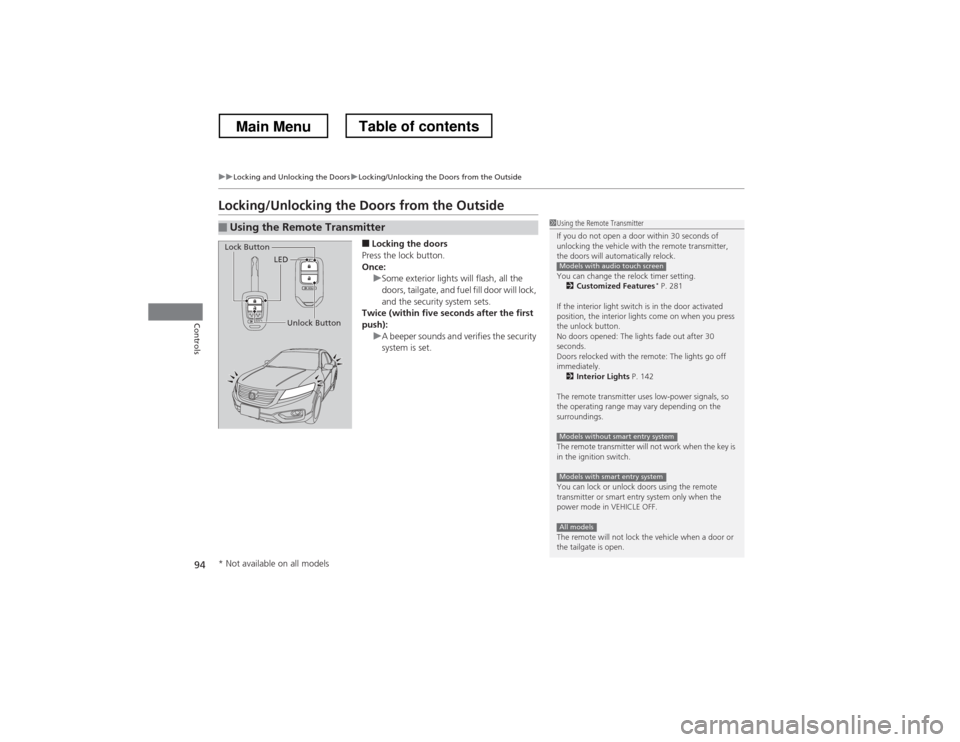
Locking/Unlocking the Doors from the Outside■Locking the doors
Press the lock button.
Once:
uSome exterior lights will flash, all the
doors, tailgate, and fuel fill door will lock,
and the security system sets.
Twice (within five seconds after the first
push):
uA beeper sounds and verifies the security
system is set.
■Using the Remote Transmitter1Using the Remote Transmitter
If you do not open a door within 30 seconds of
unlocking the vehicle with the remote transmitter,
the doors will automatically relock.
You can change the relock timer setting. 2 Customized Features *
P. 281
If the interior light switch is in the door activated
position, the interior lights come on when you press
the unlock button.
No doors opened: The lights fade out after 30
seconds.
Doors relocked with the remote: The lights go off immediately. 2 Interior Lights P. 142
The remote transmitter uses low-power signals, so
the operating range may vary depending on the
surroundings.
The remote transmitter will not work when the key is
in the ignition switch.
You can lock or unlock doors using the remote
transmitter or smart entry system only when the
power mode in VEHICLE OFF.
The remote will not lock the vehicle when a door or
the tailgate is open.
Models with audio touch screen
Models without smart entry system
Models with smart entry system
All models
LED
Unlock Button
Lock Button
* Not available on all models
Main MenuTable of contents
Page 96 of 573
Continued95
uuLocking and Unlocking the DoorsuLocking/Unlocking the Doors from the Outside
Controls
■Unlocking the doors
Press the unlock button.
Once:
uSome exterior lights flash twice, and the driver’s door and fuel fill door unlock.
Twice:
uThe remaining doors and tailgate unlock.
1Using the Remote Transmitter
If the distance at which it works varies, the battery is probably low.
If the LED does not come on when you press a
button, the battery is dead. 2 Replacing the Button Battery P. 507
You can customize the door unlock mode setting. 2 Customized Features *
P. 281
Models with audio touch screen
* Not available on all models
Main MenuTable of contents
Page 97 of 573
uuLocking and Unlocking the DoorsuLocking/Unlocking the Doors from the Outside
96
Controls
When you carry the smart entry remote, you
can lock/unlock the doors, the tailgate, and
the fuel fill door.
You can lock/unlock the doors within a radius
of about 32 inches (80 cm) of the outside door
handle. You can open the tailgate within
about 32 inches (80 cm) radius from the
tailgate release button.
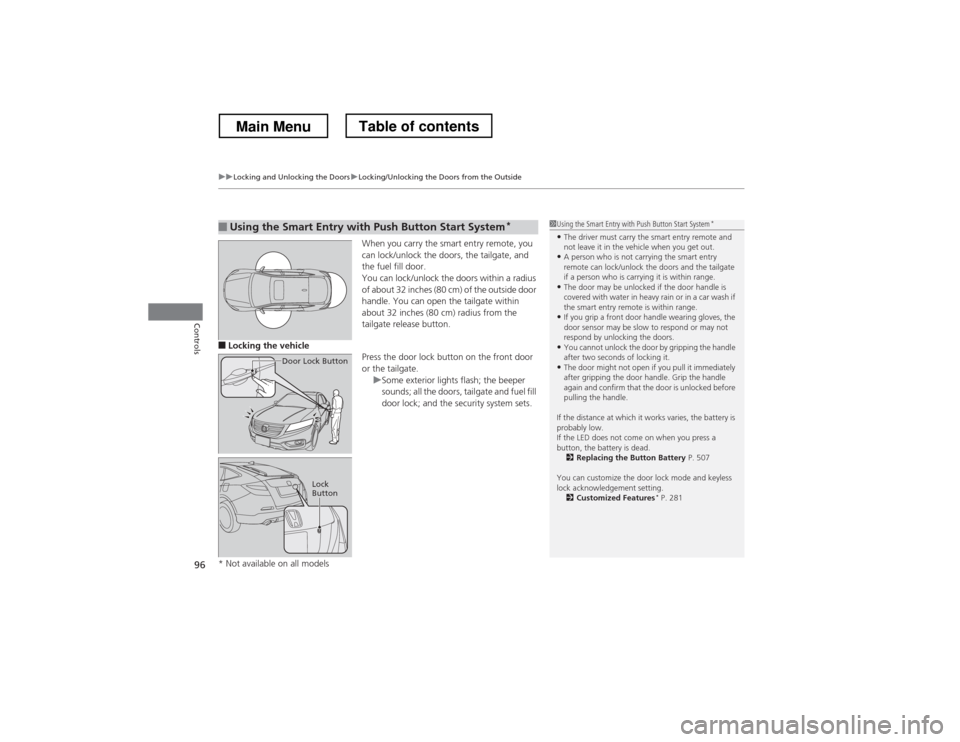
■ Locking the vehicle
Press the door lock button on the front door
or the tailgate.
uSome exterior lights flash; the beeper
sounds; all the doors, tailgate and fuel fill
door lock; and the security system sets.
■Using the Smart Entry with Push Button Start System*
Door Lock Button
Lock
Button
1Using the Smart Entry with
Push Button Start System*
• The driver must carry the smart entry remote and
not leave it in the vehicle when you get out.
• A person who is not carrying the smart entry
remote can lock/unlock the doors and the tailgate
if a person who is carrying it is within range.
• The door may be unlocked if the door handle is
covered with water in heavy rain or in a car wash if
the smart entry remote is within range.
• If you grip a front door handle wearing gloves, the
door sensor may be slow to respond or may not
respond by unlocking the doors.
• You cannot unlock the door by gripping the handle
after two seconds of locking it.
• The door might not open if you pull it immediately
after gripping the door handle. Grip the handle
again and confirm that the door is unlocked before
pulling the handle.
If the distance at which it works varies, the battery is probably low.
If the LED does not come on when you press a
button, the battery is dead. 2 Replacing the Button Battery P. 507
You can customize the door lock mode and keyless
lock acknowledgement setting. 2 Customized Features *
P. 281
* Not available on all models
Main MenuTable of contents
Page 100 of 573
99
uuLocking and Unlocking the DoorsuLocking/Unlocking the Doors from the Inside
Controls
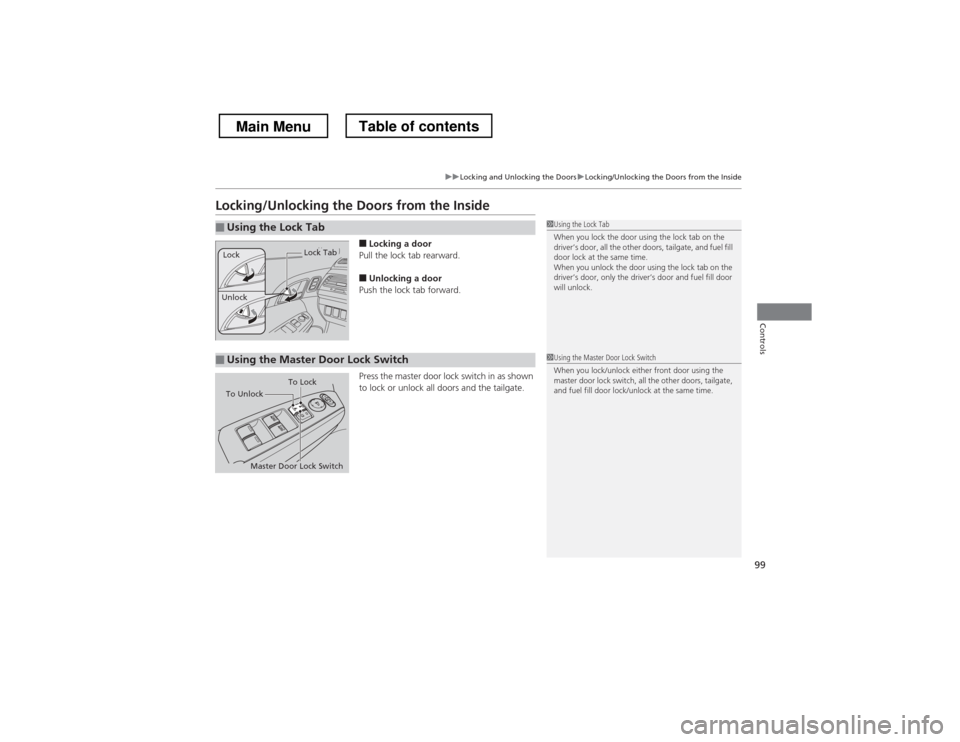
Locking/Unlocking the Doors from the Inside■Locking a door
Pull the lock tab rearward.
■ Unlocking a door
Push the lock tab forward.
Press the master door lock switch in as shown
to lock or unlock all doors and the tailgate.
■Using the Lock Tab1Using the Lock Tab
When you lock the door using the lock tab on the
driver’s door, all the other doors, tailgate, and fuel fill
door lock at the same time.
When you unlock the door using the lock tab on the
driver’s door, only the driver’s door and fuel fill door will unlock.
Unlock
Lock Tab
Lock
■Using the Master Door Lock Switch1Using the Master Door Lock Switch
When you lock/unlock either front door using the
master door lock switch, all the other doors, tailgate,
and fuel fill door lock/unlock at the same time.
To Unlock
Master Door Lock Switch To Lock
Main MenuTable of contents
Page 189 of 573
188
uuAudio System Basic OperationuAudio/Information Screen
Features
■Info
Shows the Trip Computer or Clock/Wallpaper information.
Press , rotate to select an item, then press .
Info menu items
Current Drive (Trip computer)
Shows the range, and instant and average fuel economy of the current trip, as well
as the average fuel economy from your last trip.
History of Trip A (Trip computer)
Shows the range, average fuel economy and distance traveled for the current trip,
as well as the average fuel economy and distances traveled during the last three
driving cycles.
Each time you reset the trip meter A, the information on the display updates. The
history of the previous three driving cycles is kept.
Delete History 1. Rotate to select Delete History, then press .
2. You will receive a confirmation message on the screen. Rotate to select Yes,
then press .
Clock/Wallpaper
Shows the current clock type and wallpaper
Clock/Wallpaper Change
Enters the clock and wallpaper setting menu screen.
Main MenuTable of contents
Page 220 of 573
219
uuAudio System Basic OperationuAudio/Information Screen
Continued
Features
■Audio
Shows the current audio information.
■ Navigation
Shows the navigation screen. 2 Refer to the Navigation System Manual
■ Phone
Shows the HFL information. 2
Bluetooth ® HandsFreeLink ® P. 367
■ Info
Shows the Trip Computer or Clock/Wallpaper and other information. Rotate
to select an item, then press .
■ Trip computer (Current Drive)
Shows the range, and instant and average fuel economy of the current trip, as well
as the average fuel economy from your last trip.
■ Trip computer (History of Trip A)
Shows the range, average fuel economy and distances traveled for the current trip, as well
as the average fuel economy and distances traveled during the last three driving cycles.
Each time you reset the trip meter A, the information on the display updates. The
history of the previous three driving cycles is kept.
■ Deleting the history manually
1. Move on the History of Trip A screen to select Delete History, then press .
2. You will receive a confirmation message on the screen. Rotate to select Yes,
then press .
■ Clock/Wallpaper
Shows a clock screen or an image you import.
Main MenuTable of contents