Page 131 of 321

SENSING SYSTEM (IF EQUIPPED)
WARNING:To help avoid personal injury, please read and
understand the limitations of the system as contained in this
section. Sensing is only an aid for some (generally large and fixed)
objects when moving in reverse on a flat surface at parking speeds.
Traffic control systems, inclement weather, air brakes, and external
motors and fans may also affect the function of the sensing system; this
may include reduced performance or a false activation.
WARNING:To help avoid personal injury, always use caution
when in R (Reverse) and when using the sensing system.
WARNING:This system is not designed to prevent contact with
small or moving objects. The system is designed to provide a
warning to assist the driver in detecting large stationary objects to
avoid damaging the vehicle. The system may not detect smaller objects,
particularly those close to the ground.
WARNING:Certain add-on devices such as large trailer hitches,
bike or surfboard racks and any device that may block the normal
detection zone of the system, may create false beeps.
Note:Keep the sensors (located on the bumper/fascia) free from snow,
ice and large accumulations of dirt. If the sensors are covered, the
system’s accuracy can be affected. Do not clean the sensors with sharp
objects.
Note:If your vehicle sustains damage to the bumper/fascia, leaving it
misaligned or bent, the sensing zone may be altered causing inaccurate
measurement of obstacles or false alarms.
The sensing system warns the driver of obstacles within a certain range
of the bumper area. The system turns on automatically whenever the
ignition is switched on.
When receiving a detection warning, the radio volume is reduced to a
predetermined level. After the warning goes away, the radio volume
returns to the previous level.
130Parking Aids
2013 Transit Connect(tst)
Owners Guide gf, 2nd Printing, November 2012
USA(fus)
Page 135 of 321
PRINCIPLES OF OPERATION
Cruise control lets you maintain a set speed without keeping your foot
on the accelerator pedal.
USING CRUISE CONTROL (IF EQUIPPED)
WARNING:Do not use cruise control in heavy traffic or on
roads that are winding, slippery or unpaved.
Note:Vehicle speed may vary momentarily when driving up or down a
steep hill. Apply the brakes if your vehicle speed increases above the set
speed while driving downhill.
Note:Cruise control will disengage if your vehicle speed decreases more
than 10 mph (16 km/h) below your set speed while driving uphill.
The cruise controls are located on
the steering wheel.
Switching Cruise Control On
Press and releaseON.
Setting a Speed
1. Accelerate to the desired speed.
2. Press and releaseSET+.
3. Take your foot off the accelerator pedal.
The indicator will appear in the instrument cluster.
OFF ON
SETRES
134Cruise Control
2013 Transit Connect(tst)
Owners Guide gf, 2nd Printing, November 2012
USA(fus)
Page 136 of 321
Changing the Set Speed
Note:If you accelerate by pressing the accelerator pedal, the set speed
will not change. When you release the accelerator pedal, you will return
to the speed that you previously set.
•Press and holdSET+orSET–. Release the control when you reach
the desired speed.
•Press and releaseSET+orSET–. The set speed will change in
approximately 1 mph (2 km/h) increments.
•Press the accelerator pedal or brake pedal until you reach the desired
speed. Press and releaseSET+.
Canceling the Set Speed
Tap the brake pedal. The set speed will not be erased.
Resuming the Set Speed
Press and releaseRES.
Switching Cruise Control Off
Note:You will erase the set speed if you switch the system off.
Press and releaseOFFor switch the ignition off.
Cruise Control135
2013 Transit Connect(tst)
Owners Guide gf, 2nd Printing, November 2012
USA(fus)
Page 147 of 321

•Use the speed control in hilly terrain.
•Rest your foot on the brake pedal while driving.
•Drive a heavily loaded vehicle or tow a trailer.
•Carry unnecessary weight (approximately 1 mpg [0.4 km/L] is lost for
every 400 pounds [180 kilograms] of weight carried).
•Add particular accessories to your vehicle (e.g.; bug deflectors,
rollbars or light bars, running boards, ski racks).
•Drive with the wheels out of alignment.
DRIVING THROUGH WATER
If driving through deep or standing
water is unavoidable, proceed very
slowly. Never drive through water
that is higher than the bottom of
the wheel rims (for cars) or the
bottom of the hubs (for trucks).
When driving through water, traction or brake capability may be limited.
Also, water may enter your engine’s air intake and severely damage your
engine or your vehicle may stall.
Note:Driving through deep water where the transmission vent tube is
submerged may allow water into the transmission and cause internal
transmission damage.
Note:Once through the water, always dry the brakes by moving your
vehicle slowly while applying light pressure on the brake pedal. Wet
brakes do not stop the vehicle as quickly as dry brakes.
146Driving Hints
2013 Transit Connect(tst)
Owners Guide gf, 2nd Printing, November 2012
USA(fus)
Page 153 of 321

Preparing Your Vehicle
Note:Use only a 12–volt supply to start your vehicle.
Note:Do not disconnect the battery of the disabled vehicle as this could
damage the vehicle’s electrical system.
1. Park the booster vehicle close to the hood of the disabled vehicle
making sure the two vehicles do not touch. Set the parking brake on
both vehicles and stay clear of the engine cooling fan and other moving
parts.
2. Check all battery terminals. Remove the positive terminal cover
(if equipped) and any excessive corrosion before you attach the battery
cables. Ensure that vent caps are tight and level.
3. Turn the heater fan on in both vehicles to protect from any electrical
surges. Turn all other accessories off.
Connecting the Jumper Cables
WARNING:Do not connect the end of the second cable to the
negative (-) terminal of the battery to be jumped. A spark may
cause an explosion of the gases that surround the battery.
Note:Do not attach the negative (-) cable to fuel lines, engine rocker
covers, the intake manifold or electrical components as grounding points.
Note:In the illustration, the vehicle on the bottom is used to designate
the assisting (boosting) battery.
152Roadside Emergencies
2013 Transit Connect(tst)
Owners Guide gf, 2nd Printing, November 2012
USA(fus)
Page 166 of 321
The high-current fuses are coded as follows:
Fuse or relay
locationFuse amp
ratingProtected circuits
1 7.5A* Heated windshield telltale
2 40A** Right heated windshield, Modified
vehicle – Rear heater blower fan,
Ignition supply
3 50A** Left heated windshield, Modified
vehicle – Battery supply
4 20A** Fuel pump
5 10A* Powertrain control module keep
alive power, Canister solenoid
6 15A* Powertrain control module, Data
link connector
7 20A* Ignition switch
8 15A* Headlamps
9 40A** Passenger compartment fuse
panel II
10 25A** Modified vehicle – Rear turn
signal, Battery supply
11 40A** Ignition overload, Passenger
compartment fuse panel
12 30A** Anti-lock brake system / Roll
stability control pump motor
13 30A* Heater blower motor
25
24
22 2326 2728
29
21A
21B21C
21D
30A
30B30C 30D
31A
31B31C 31D31E 31F
32 3334 35 36
15
16 17
18 19 20
10 11 12
9
3 4
1
25
67 81314
Fuses165
2013 Transit Connect(tst)
Owners Guide gf, 2nd Printing, November 2012
USA(fus)
Page 167 of 321
Fuse or relay
locationFuse amp
ratingProtected circuits
14 10A* Powertrain control module relay
15 20A** Anti-lock brake system / Roll
stability control valves
16 30A** Cooling fan – low
17 50A** Cooling fan – high
18 25A** Daytime running lamps, Low
beam interrupt relay
19 50A** Passenger compartment fuse
panel III
20 — A/C clutch relay
21A — Right heated windshield relay,
Modified vehicle – Rear fan relay
21B — Starter lock relay
21C — High beam headlamp relay
21D — Powertrain control module relay
22 10A* Powertrain control module,
Auxiliary connector, Fuel injectors
23 10A* Right low beam headlamp
24 10A* A/C clutch solenoid
25 10A* Left low beam headlamp
26 10A* Mass air flow sensor, Brake
switch, Backup lamps relay,
Exhaust gas recovery valve
stepper motor, Electronic vapor
canister purge valve, Heated
oxygen sensors, Floor shifter,
Transmission range sensor
27 — Not used
166Fuses
2013 Transit Connect(tst)
Owners Guide gf, 2nd Printing, November 2012
USA(fus)
Page 170 of 321
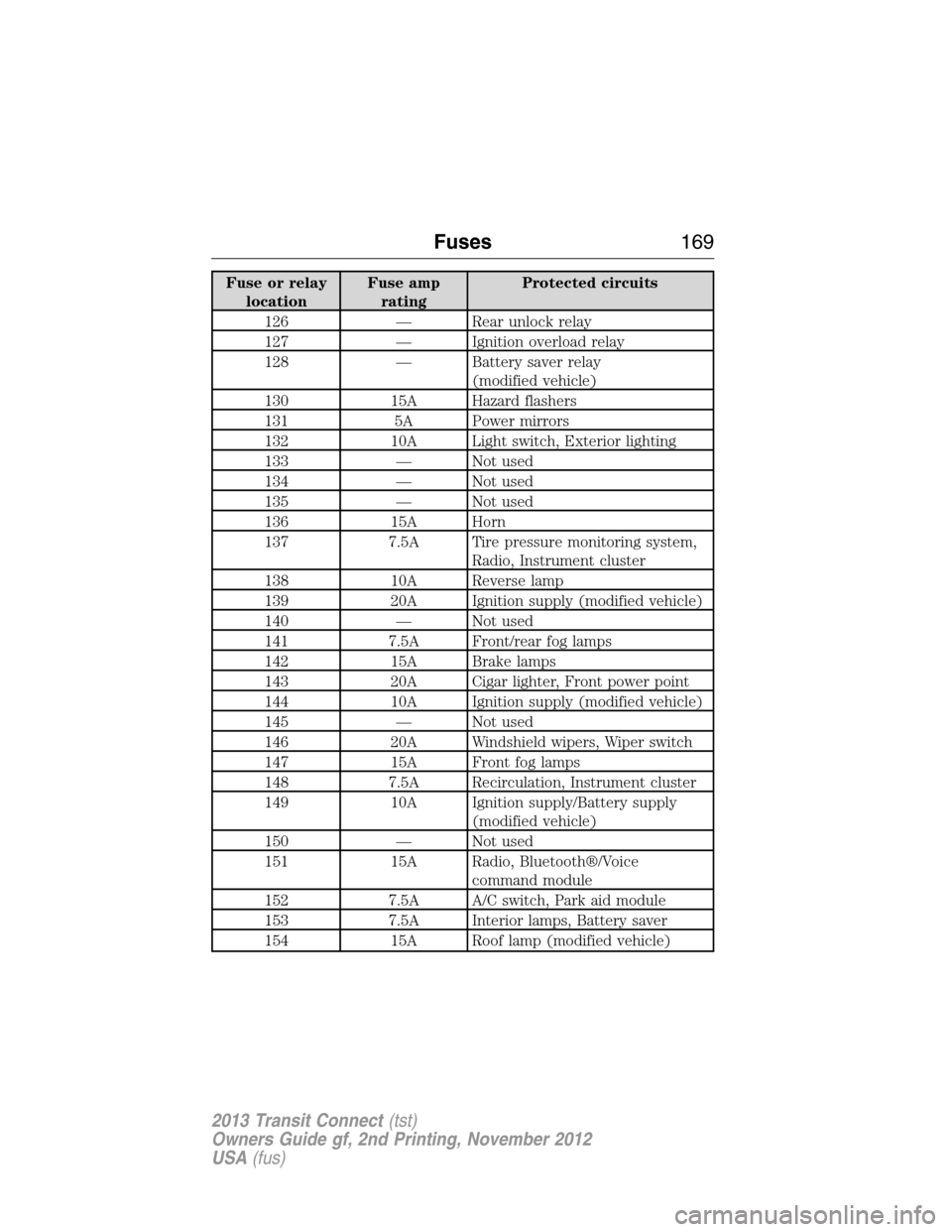
Fuse or relay
locationFuse amp
ratingProtected circuits
126 — Rear unlock relay
127 — Ignition overload relay
128 — Battery saver relay
(modified vehicle)
130 15A Hazard flashers
131 5A Power mirrors
132 10A Light switch, Exterior lighting
133 — Not used
134 — Not used
135 — Not used
136 15A Horn
137 7.5A Tire pressure monitoring system,
Radio, Instrument cluster
138 10A Reverse lamp
139 20A Ignition supply (modified vehicle)
140 — Not used
141 7.5A Front/rear fog lamps
142 15A Brake lamps
143 20A Cigar lighter, Front power point
144 10A Ignition supply (modified vehicle)
145 — Not used
146 20A Windshield wipers, Wiper switch
147 15A Front fog lamps
148 7.5A Recirculation, Instrument cluster
149 10A Ignition supply/Battery supply
(modified vehicle)
150 — Not used
151 15A Radio, Bluetooth®/Voice
command module
152 7.5A A/C switch, Park aid module
153 7.5A Interior lamps, Battery saver
154 15A Roof lamp (modified vehicle)
Fuses169
2013 Transit Connect(tst)
Owners Guide gf, 2nd Printing, November 2012
USA(fus)


