Page 113 of 563
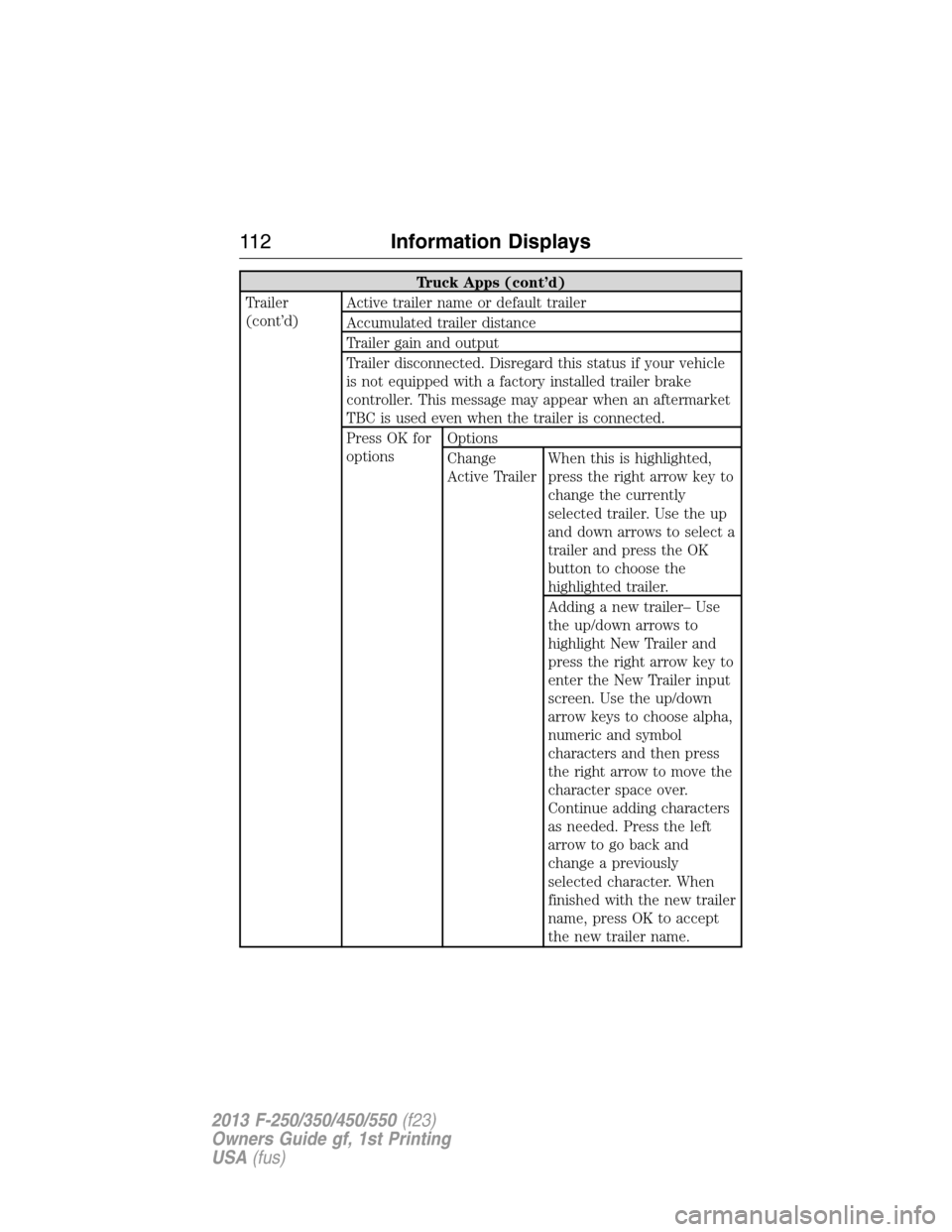
Truck Apps (cont’d)
Trailer
(cont’d)Active trailer name or default trailer
Accumulated trailer distance
Trailer gain and output
Trailer disconnected. Disregard this status if your vehicle
is not equipped with a factory installed trailer brake
controller. This message may appear when an aftermarket
TBC is used even when the trailer is connected.
Press OK for
optionsOptions
Change
Active TrailerWhen this is highlighted,
press the right arrow key to
change the currently
selected trailer. Use the up
and down arrows to select a
trailer and press the OK
button to choose the
highlighted trailer.
Adding a new trailer– Use
the up/down arrows to
highlight New Trailer and
press the right arrow key to
enter the New Trailer input
screen. Use the up/down
arrow keys to choose alpha,
numeric and symbol
characters and then press
the right arrow to move the
character space over.
Continue adding characters
as needed. Press the left
arrow to go back and
change a previously
selected character. When
finished with the new trailer
name, press OK to accept
the new trailer name.
11 2Information Displays
2013 F-250/350/450/550(f23)
Owners Guide gf, 1st Printing
USA(fus)
Page 114 of 563
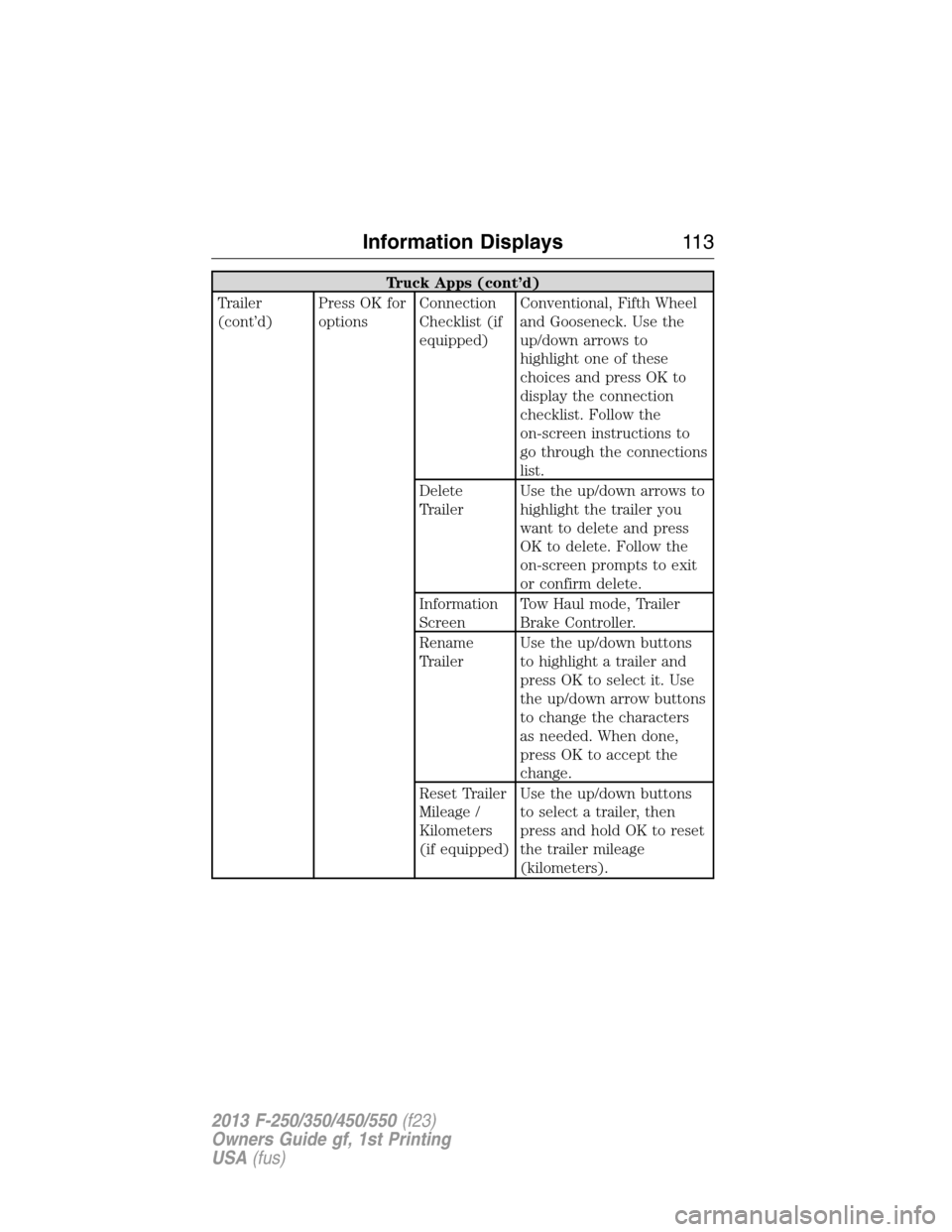
Truck Apps (cont’d)
Trailer
(cont’d)Press OK for
optionsConnection
Checklist (if
equipped)Conventional, Fifth Wheel
and Gooseneck. Use the
up/down arrows to
highlight one of these
choices and press OK to
display the connection
checklist. Follow the
on-screen instructions to
go through the connections
list.
Delete
TrailerUse the up/down arrows to
highlight the trailer you
want to delete and press
OK to delete. Follow the
on-screen prompts to exit
or confirm delete.
Information
ScreenTow Haul mode, Trailer
Brake Controller.
Rename
TrailerUse the up/down buttons
to highlight a trailer and
press OK to select it. Use
the up/down arrow buttons
to change the characters
as needed. When done,
press OK to accept the
change.
Reset Trailer
Mileage /
Kilometers
(if equipped)Use the up/down buttons
to select a trailer, then
press and hold OK to reset
the trailer mileage
(kilometers).
Information Displays11 3
2013 F-250/350/450/550(f23)
Owners Guide gf, 1st Printing
USA(fus)
Page 115 of 563
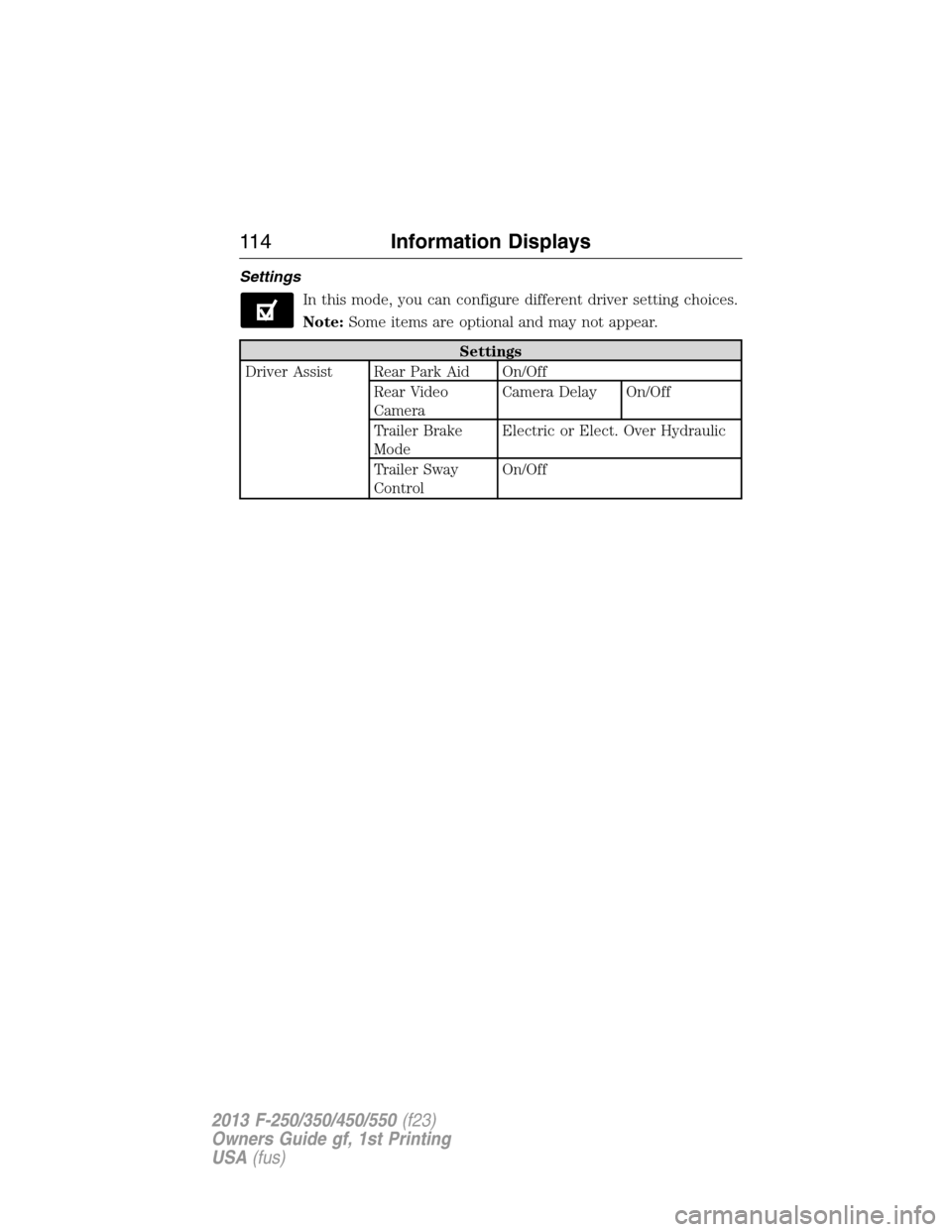
Settings
In this mode, you can configure different driver setting choices.
Note:Some items are optional and may not appear.
Settings
Driver Assist Rear Park Aid On/Off
Rear Video
CameraCamera Delay On/Off
Trailer Brake
ModeElectric or Elect. Over Hydraulic
Trailer Sway
ControlOn/Off
11 4Information Displays
2013 F-250/350/450/550(f23)
Owners Guide gf, 1st Printing
USA(fus)
Page 119 of 563

AdvanceTrac® /
Traction Control
MessagesAction / Description
TRACTION
CONTROL OFFDisplayed when the traction control has been
disabled by the driver. Refer to theTraction
Controlchapter for more information.
Alarm/Security
MessagesAction / Description
TO STOP ALARM
START VEHICLEDisplayed when the perimeter alarm system is
armed and the vehicle is entered using the key
on the driver’s side door. In order to prevent
the perimeter alarm system from triggering,
the ignition must be turned to start or on
before the 12 second chime expires.
SECURITY SYSTEM
FAULTDisplayed when the security system has
detected a fault. See your authorized dealer
for service.
Brake System
MessagesAction / Description
BRAKE FLUID
LEVEL LOWIndicates the brake fluid level is low and the
brake system should be inspected immediately.
Refer toBrake fluidin theMaintenance
chapter.
CHECK BRAKE
SYSTEMDisplayed when the brake system needs
servicing. If the warning stays on or continues
to come on, contact your authorized dealer as
soon as possible.
PARK BRAKE
ENGAGEDDisplayed when the parking brake is set and
the vehicle is in motion.
WARNING:When the CLEANING EXHAUST FILTER message
appears in the message center, do not park near flammable
materials, vapors or structures until filter cleaning is complete.
11 8Information Displays
2013 F-250/350/450/550(f23)
Owners Guide gf, 1st Printing
USA(fus)
Page 128 of 563
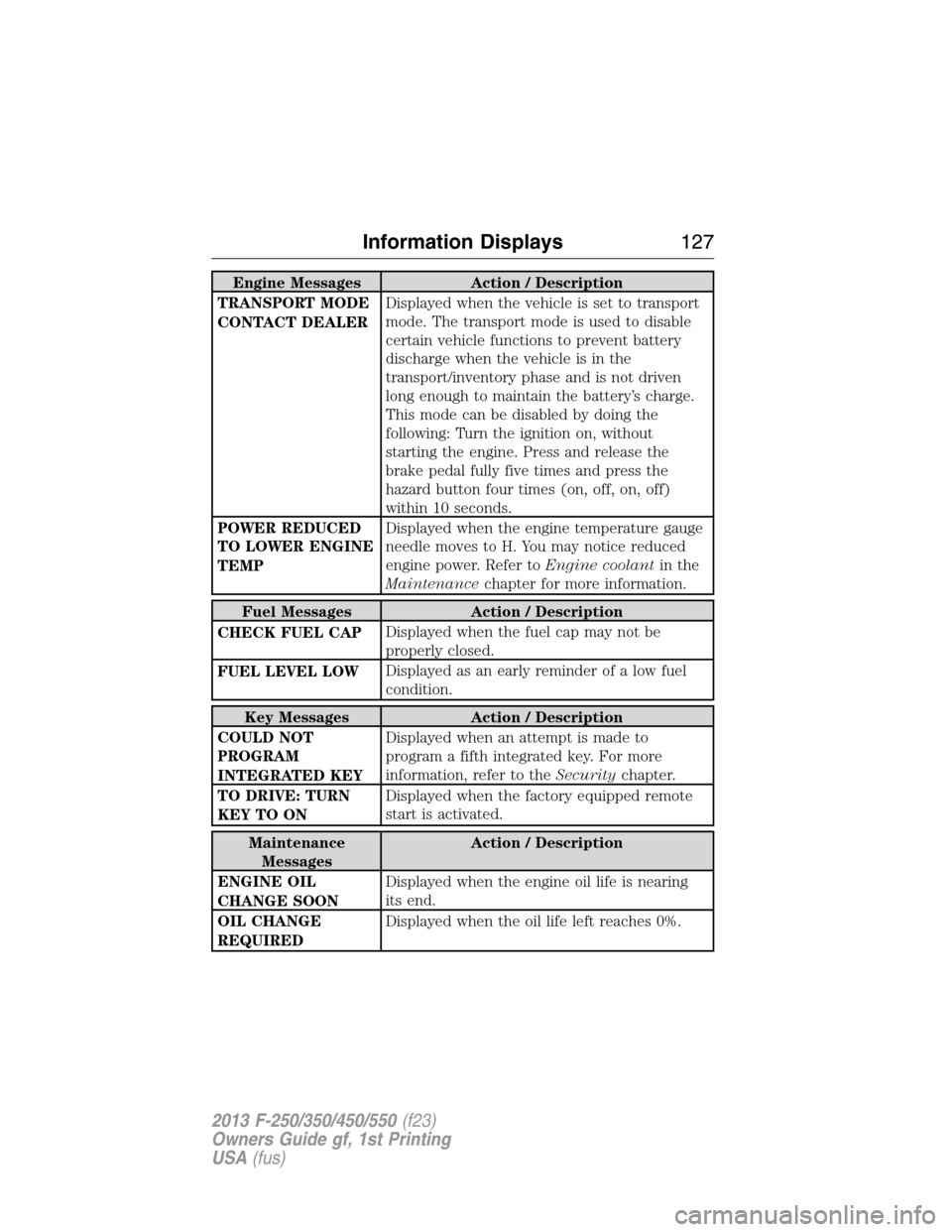
Engine Messages Action / Description
TRANSPORT MODE
CONTACT DEALERDisplayed when the vehicle is set to transport
mode. The transport mode is used to disable
certain vehicle functions to prevent battery
discharge when the vehicle is in the
transport/inventory phase and is not driven
long enough to maintain the battery’s charge.
This mode can be disabled by doing the
following: Turn the ignition on, without
starting the engine. Press and release the
brake pedal fully five times and press the
hazard button four times (on, off, on, off)
within 10 seconds.
POWER REDUCED
TO LOWER ENGINE
TEMPDisplayed when the engine temperature gauge
needle moves to H. You may notice reduced
engine power. Refer toEngine coolantin the
Maintenancechapter for more information.
Fuel Messages Action / Description
CHECK FUEL CAPDisplayed when the fuel cap may not be
properly closed.
FUEL LEVEL LOWDisplayed as an early reminder of a low fuel
condition.
Key Messages Action / Description
COULD NOT
PROGRAM
INTEGRATED KEYDisplayed when an attempt is made to
program a fifth integrated key. For more
information, refer to theSecuritychapter.
TO DRIVE: TURN
KEY TO ONDisplayed when the factory equipped remote
start is activated.
Maintenance
MessagesAction / Description
ENGINE OIL
CHANGE SOONDisplayed when the engine oil life is nearing
its end.
OIL CHANGE
REQUIREDDisplayed when the oil life left reaches 0%.
Information Displays127
2013 F-250/350/450/550(f23)
Owners Guide gf, 1st Printing
USA(fus)
Page 131 of 563

Tire Messages Action / Description
LOW TIRE
PRESSUREDisplays when one or more tires on your
vehicle have low tire pressure.
TIRE PRESSURE
MONITOR FAULTDisplays when the tire pressure monitoring
system is malfunctioning. If the warning stays
on or continues to come on, contact your
authorized dealer.
TIRE PRESSURE
SENSOR FAULTDisplayed when a tire pressure sensor is
malfunctioning, or your spare tire is in use.
For more information on how the system
operates under these conditions refer to the
Wheels and Tireschapter. If the warning
stays on or continues to come on, contact your
authorized dealer as soon as possible.
TIRES NOT
TRAINED - REPEATDisplayed when an error occurs while training
the TPMS. Refer to theWheels and Tires
chapter for more information.
TRAIN LEFT
FRONT TIREDisplayed when training the TPMS.
TRAIN LEFT REAR
TIREDisplayed when training the TPMS.
TRAIN RIGHT
FRONT TIREDisplayed when training the TPMS.
TRAIN RIGHT REAR
TIREDisplayed when training the TPMS.
TRAINING
COMPLETEDisplayed when training of the TPMS system
is complete.
Trailer Messages Action / Description
TRAILER BRAKE
GAIN: XX.X
[OUTPUT]Displays the current gain setting for the trailer
brake.
TRAILER BRAKE
GAIN: XX.X NO
TRAILERDisplays the current gain setting for the trailer
brake when a trailer is not connected.
130Information Displays
2013 F-250/350/450/550(f23)
Owners Guide gf, 1st Printing
USA(fus)
Page 132 of 563
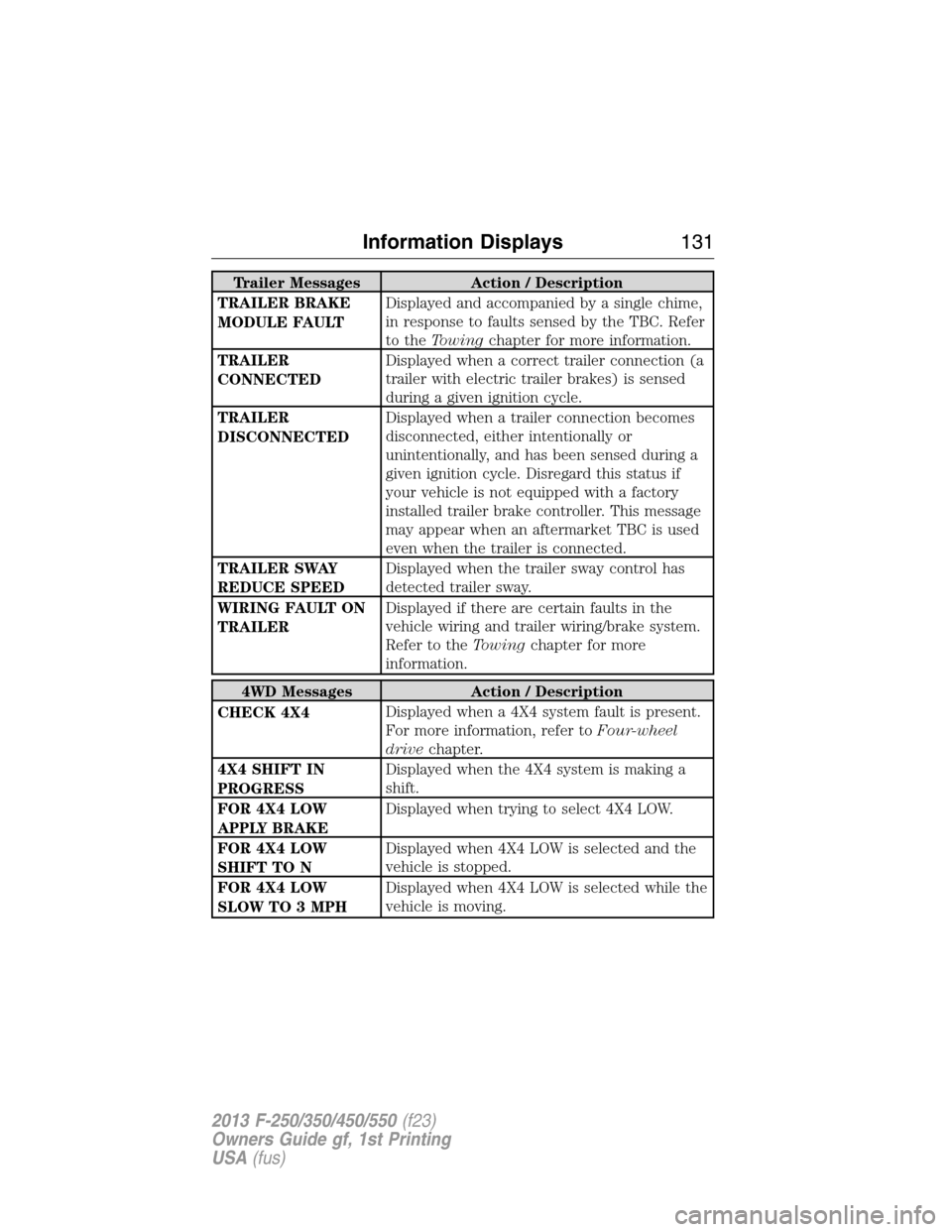
Trailer Messages Action / Description
TRAILER BRAKE
MODULE FAULTDisplayed and accompanied by a single chime,
in response to faults sensed by the TBC. Refer
to theTowingchapter for more information.
TRAILER
CONNECTEDDisplayed when a correct trailer connection (a
trailer with electric trailer brakes) is sensed
during a given ignition cycle.
TRAILER
DISCONNECTEDDisplayed when a trailer connection becomes
disconnected, either intentionally or
unintentionally, and has been sensed during a
given ignition cycle. Disregard this status if
your vehicle is not equipped with a factory
installed trailer brake controller. This message
may appear when an aftermarket TBC is used
even when the trailer is connected.
TRAILER SWAY
REDUCE SPEEDDisplayed when the trailer sway control has
detected trailer sway.
WIRING FAULT ON
TRAILERDisplayed if there are certain faults in the
vehicle wiring and trailer wiring/brake system.
Refer to theTowingchapter for more
information.
4WD Messages Action / Description
CHECK 4X4Displayed when a 4X4 system fault is present.
For more information, refer toFour-wheel
drivechapter.
4X4 SHIFT IN
PROGRESSDisplayed when the 4X4 system is making a
shift.
FOR 4X4 LOW
APPLY BRAKEDisplayed when trying to select 4X4 LOW.
FOR 4X4 LOW
SHIFT TO NDisplayed when 4X4 LOW is selected and the
vehicle is stopped.
FOR 4X4 LOW
SLOW TO 3 MPHDisplayed when 4X4 LOW is selected while the
vehicle is moving.
Information Displays131
2013 F-250/350/450/550(f23)
Owners Guide gf, 1st Printing
USA(fus)
Page 133 of 563
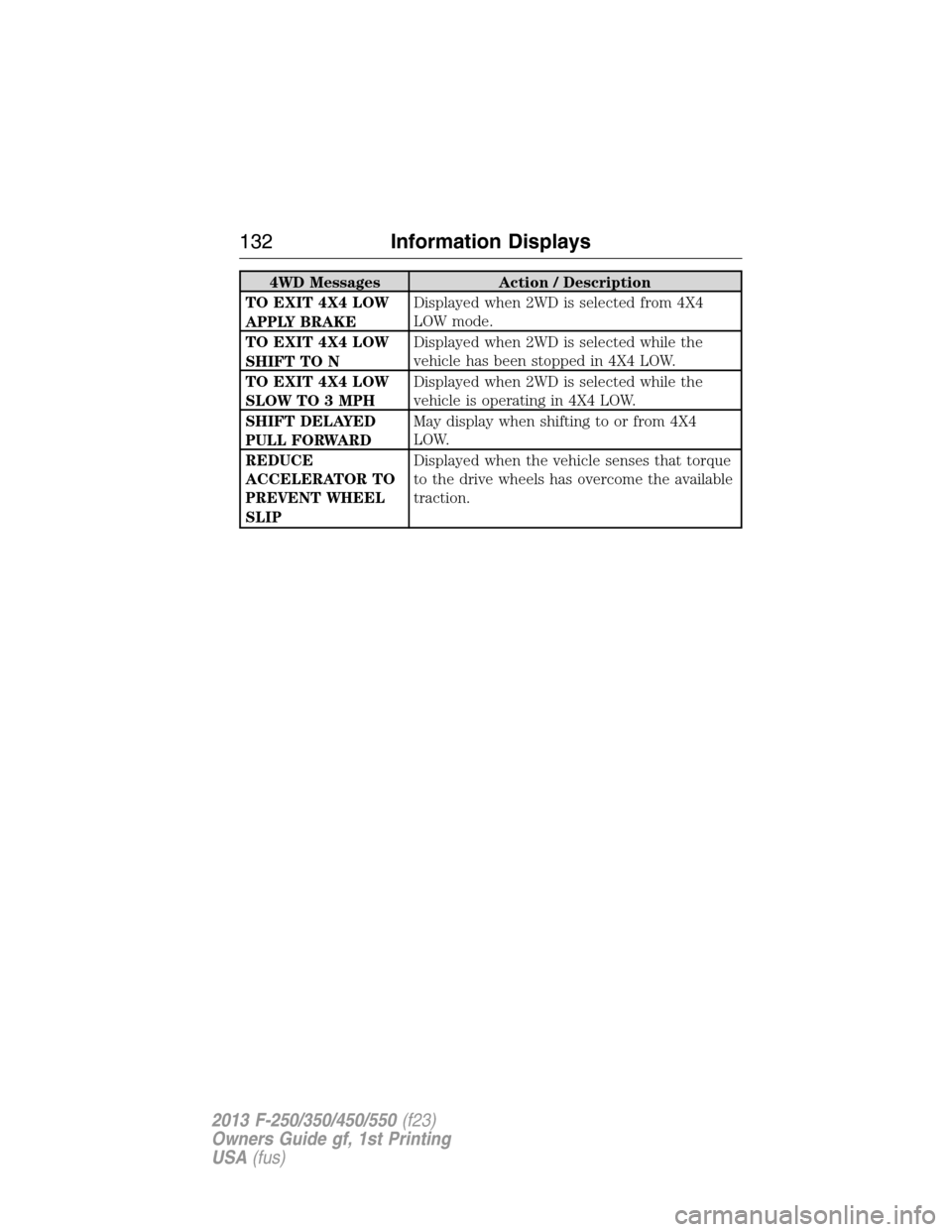
4WD Messages Action / Description
TO EXIT 4X4 LOW
APPLY BRAKEDisplayed when 2WD is selected from 4X4
LOW mode.
TO EXIT 4X4 LOW
SHIFT TO NDisplayed when 2WD is selected while the
vehicle has been stopped in 4X4 LOW.
TO EXIT 4X4 LOW
SLOW TO 3 MPHDisplayed when 2WD is selected while the
vehicle is operating in 4X4 LOW.
SHIFT DELAYED
PULL FORWARDMay display when shifting to or from 4X4
LOW.
REDUCE
ACCELERATOR TO
PREVENT WHEEL
SLIPDisplayed when the vehicle senses that torque
to the drive wheels has overcome the available
traction.
132Information Displays
2013 F-250/350/450/550(f23)
Owners Guide gf, 1st Printing
USA(fus)