Page 126 of 475
F.SOUND:
•Press to access Treble, Bass, Middle, Fade (if equipped) and Balance
menu options.
•Use the up and down arrow buttons to see the various options. When
you make your selection, press the left and right arrow buttons to
increase or decrease the levels. Press OK to set or press MENU to
exit.
•Sound settings can be set for each audio source independently.
G.Memory presets:Store your favorite stations for later access. When
tuned to any station, press and hold a preset button until sound returns.
H.SEEK:
•Press and release to go to the next track or preset radio station.
•Press and hold to fast forward through the current track or to the
next strong radio station (manually advances between station presets
or through radio stations).
I.ON/OFF:
•Press the power control to turn the system on and off.
•Turn to adjust the volume.
J.SEEK:
•Press and release to go to the previous track or preset radio station.
•Press and hold to reverse through the current track or to the
previous strong radio station (manually reverses between station
presets or through radio stations).
K.MENU:Access different audio system features. SeeMenu structure
information later in this section.
L.AUX:Press to access LINE IN (auxiliary input jack) mode.
M.SIRIUS:Press repeatedly to access SAT1, SAT2 and SAT3 satellite
radio modes (if equipped).
N.RADIO:Access different radio features. SeeMenu structure
information later in this section.
O.CD:Access different CD features. SeeMenu structureinformation
later in this section.
126Audio System
2013 Focus(foc)
Owners Guide gf, 1st Printing
USA(fus)
Page 127 of 475
AM/FM/CD WITH SYNC�
WARNING:Driving while distracted can result in loss of vehicle
control, accident and injury. Ford strongly recommends that you
use extreme caution when using any device or feature that may take
your focus off the road. Your primary responsibility is the safe operation
of the vehicle. We recommend against the use of any handheld device
while driving, encourage the use of voice-operated systems when
possible and that you become aware of applicable state and local laws
that may affect use of electronic devices while driving.
Note:Your audio system can operate for up to one hour after the
ignition is turned off. Press the ON/OFF control to operate the system
with the ignition turned off. The system automatically turns off after one
hour.
Audio System127
2013 Focus(foc)
Owners Guide gf, 1st Printing
USA(fus)
Page 128 of 475

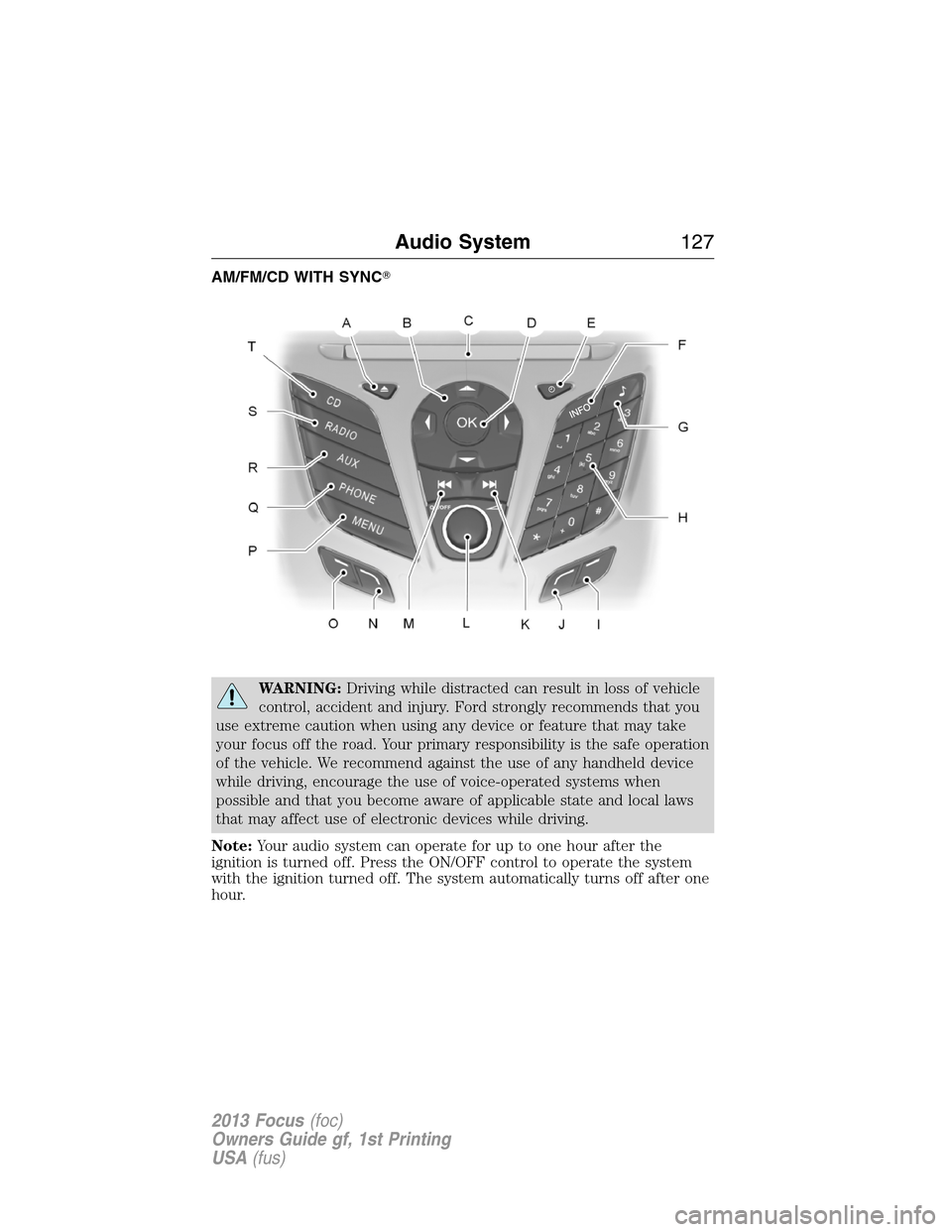
A.Eject:Eject the CD.
B.Cursor arrows:Scroll through on-screen choices.
C.CD slot:Insert a CD.
D.OK:Confirm on-screen selections after pressing MENU.
E.Clock:Set the time:
1. Press the H or M buttons on the outside of the display.
2. Press the H or M buttons repeatedly until the desired time appears.
3. Press OK to confirm the time.
•The clock can also be set by pressing the MENU button and scrolling
to the clock settings menu.
F.INFO:Access any available radio or CD information.
G.SOUND:Adjust the sound settings for Bass, Treble, Balance and
Fade.
H.Number block:
•In radio mode, store your favorite stations for later access. When
tuned to any station, press and hold a preset button until sound
returns.
•In CD mode, select a track.
•In phone mode, enter a phone number.
I.Function Button 4:Select different functions of the audio system
depending on which mode (i.e., radio or CD) you are in.
J.Function Button 3:Select different functions of the audio system
depending on which mode (i.e., radio or CD) you are in.
K.SEEK:
•In radio mode, select a frequency band and press the SEEK button.
The system stops at the first next station it finds up the band.
•In CD mode, press to select the next track or press and hold to
advance within the same track.
L.ON/OFF:
•Press the power control to turn the system on and off.
•Turn to adjust the volume.
128Audio System
2013 Focus(foc)
Owners Guide gf, 1st Printing
USA(fus)
Page 129 of 475
M.SEEK:
•In radio mode, select a frequency band and press the SEEK button.
The system stops at the first next station it finds down the band.
•In CD mode, select the previous track or press and hold to rewind
within the same track.
N.Function Button 2:Select different functions of the audio system
depending on which mode (i.e., radio or CD) you are in.
O.Function Button 1:Select different functions of the audio system
depending on which mode (i.e., radio or CD) you are in.
P.MENU:Access different audio system features. SeeMenu structure
later in this section.
Q.PHONE:Access the phone features of the SYNC�system. See the
SYNC�chapter for more information.
R.AUX:Access the media features of the SYNC�system. See the
SYNC�chapter for more information.
S.RADIO:Access different radio features. SeeMenu structurelater in
this section.
T.CD:Access different CD features. SeeMenu structurelater in this
section.
Audio System129
2013 Focus(foc)
Owners Guide gf, 1st Printing
USA(fus)
Page 130 of 475
AM/FM/CD/SIRIUS SATELLITE RADIO WITH SYNC�
WARNING:Driving while distracted can result in loss of vehicle
control, accident and injury. Ford strongly recommends that you
use extreme caution when using any device or feature that may take
your focus off the road. Your primary responsibility is the safe operation
of the vehicle. We recommend against the use of any handheld device
while driving, encourage the use of voice-operated systems when
possible and that you become aware of applicable state and local laws
that may affect use of electronic devices while driving.
Note:Your audio system can operate for up to one hour after the ignition
is turned off. Press the ON/OFF control to operate the system with the
ignition turned off. The system automatically turns off after one hour.
Note:Some features, such as SIRIUS satellite radio, may not be available
in your location. Check with your authorized dealer.
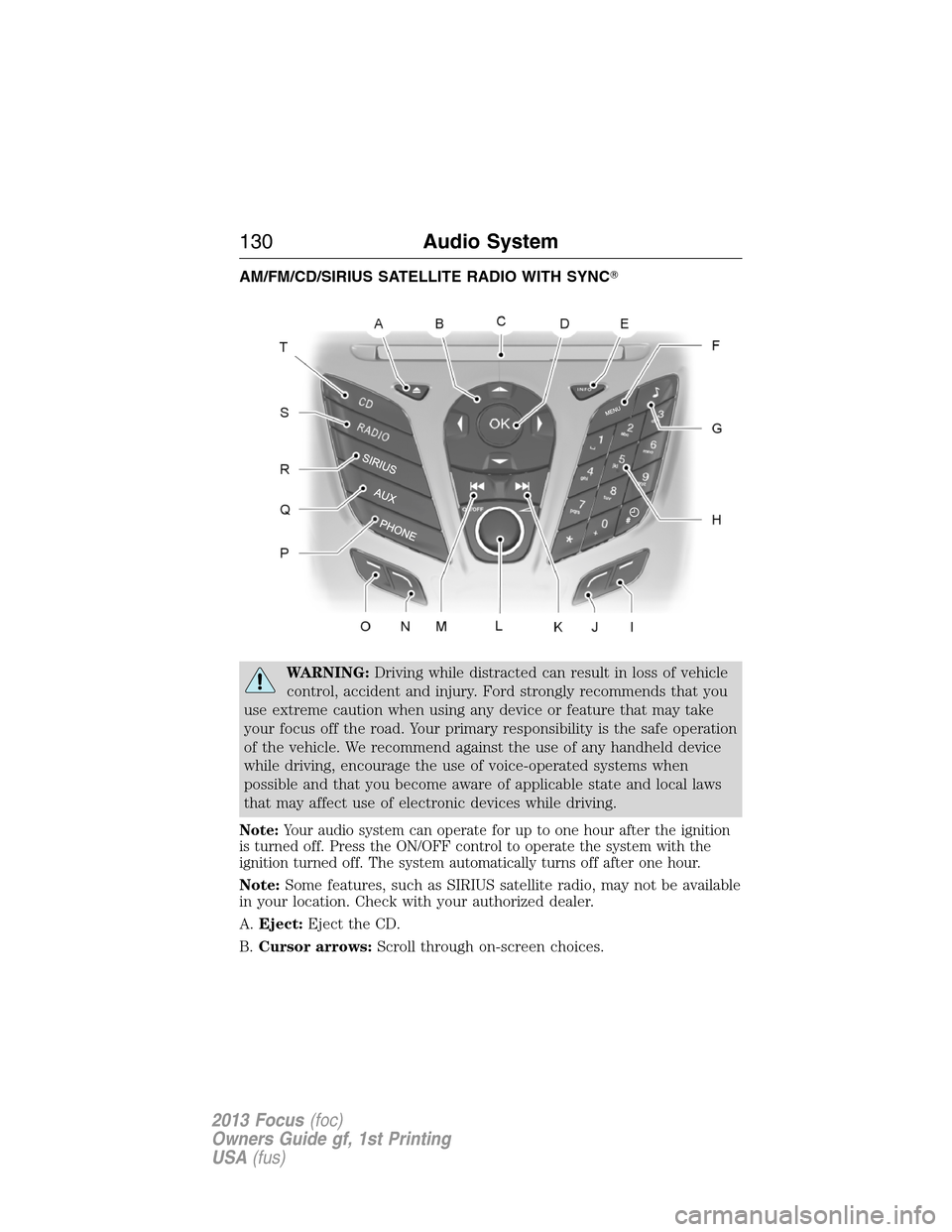
A.Eject:Eject the CD.
B.Cursor arrows:Scroll through on-screen choices.
130Audio System
2013 Focus(foc)
Owners Guide gf, 1st Printing
USA(fus)
Page 131 of 475

C.CD slot:Insert a CD.
D.OK:Confirm on-screen selections after pressing MENU.
E.INFO:Access any available radio or CD information.
F.MENU:Access different audio system features. SeeMenu structure
information later in this section.
G.Sound:Adjust the sound settings for Bass, Treble, Balance and Fade.
H.Number block:
•
In radio mode, store your favorite stations for later access. When tuned
to any station, press and hold a preset button until sound returns.
•In CD mode, select a track.
•In phone mode, enter a phone number.
•The clock function does not work with this button. Press the MENU
button and scroll to the clock settings menu.
I.Function Button 4:Select different functions of the audio system
depending on which mode (i.e., radio or CD) you are in.
J.Function Button 3:Select different functions of the audio system
depending on which mode (i.e., radio or CD) you are in.
K.SEEK:
•Press and release to go to the next track or preset radio station.
•Press and hold to fast forward through the current track or to the
next strong radio station (manually advances between station presets
or through radio stations).
L.ON/OFF:
•Press the power control to turn the system on and off.
•Turn to adjust the volume.
M.SEEK:
•Press and release to go to the previous track or preset radio station.
•Press and hold to reverse through the current track or to the
previous strong radio station (manually reverse between station
presets or through radio stations).
N.Function Button 2:Select different functions of the audio system
depending on which mode (i.e., radio or CD) you are in.
O.Function Button 1:Select different functions of the audio system
depending on which mode (i.e., radio or CD) you are in.
P.PHONE:Access the phone features of the SYNC�system. See the
SYNC�chapter for more information.
Q.AUX:Access the media features of the SYNC�system. See the
SYNC�chapter for more information.
Audio System131
2013 Focus(foc)
Owners Guide gf, 1st Printing
USA(fus)
Page 132 of 475
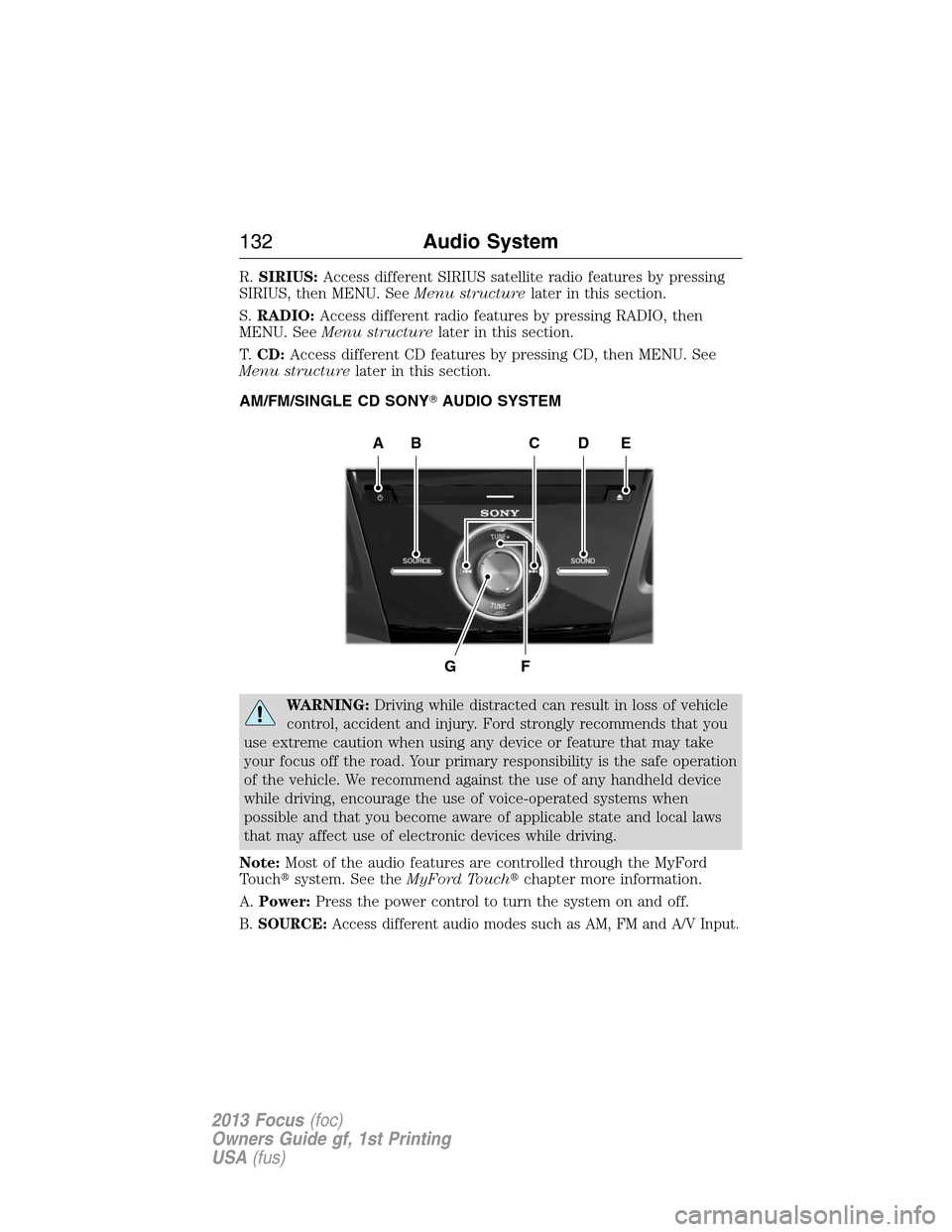
R.SIRIUS:Access different SIRIUS satellite radio features by pressing
SIRIUS, then MENU. SeeMenu structurelater in this section.
S.RADIO:Access different radio features by pressing RADIO, then
MENU. SeeMenu structurelater in this section.
T.CD:Access different CD features by pressing CD, then MENU. See
Menu structurelater in this section.
AM/FM/SINGLE CD SONY�AUDIO SYSTEM
WARNING:Driving while distracted can result in loss of vehicle
control, accident and injury. Ford strongly recommends that you
use extreme caution when using any device or feature that may take
your focus off the road. Your primary responsibility is the safe operation
of the vehicle. We recommend against the use of any handheld device
while driving, encourage the use of voice-operated systems when
possible and that you become aware of applicable state and local laws
that may affect use of electronic devices while driving.
Note:Most of the audio features are controlled through the MyFord
Touch�system. See theMyFord Touch�chapter more information.
A.Power:Press the power control to turn the system on and off.
B.SOURCE:Access different audio modes such as AM, FM and A/V Input.
AEDBC
GF
132Audio System
2013 Focus(foc)
Owners Guide gf, 1st Printing
USA(fus)
Page 133 of 475
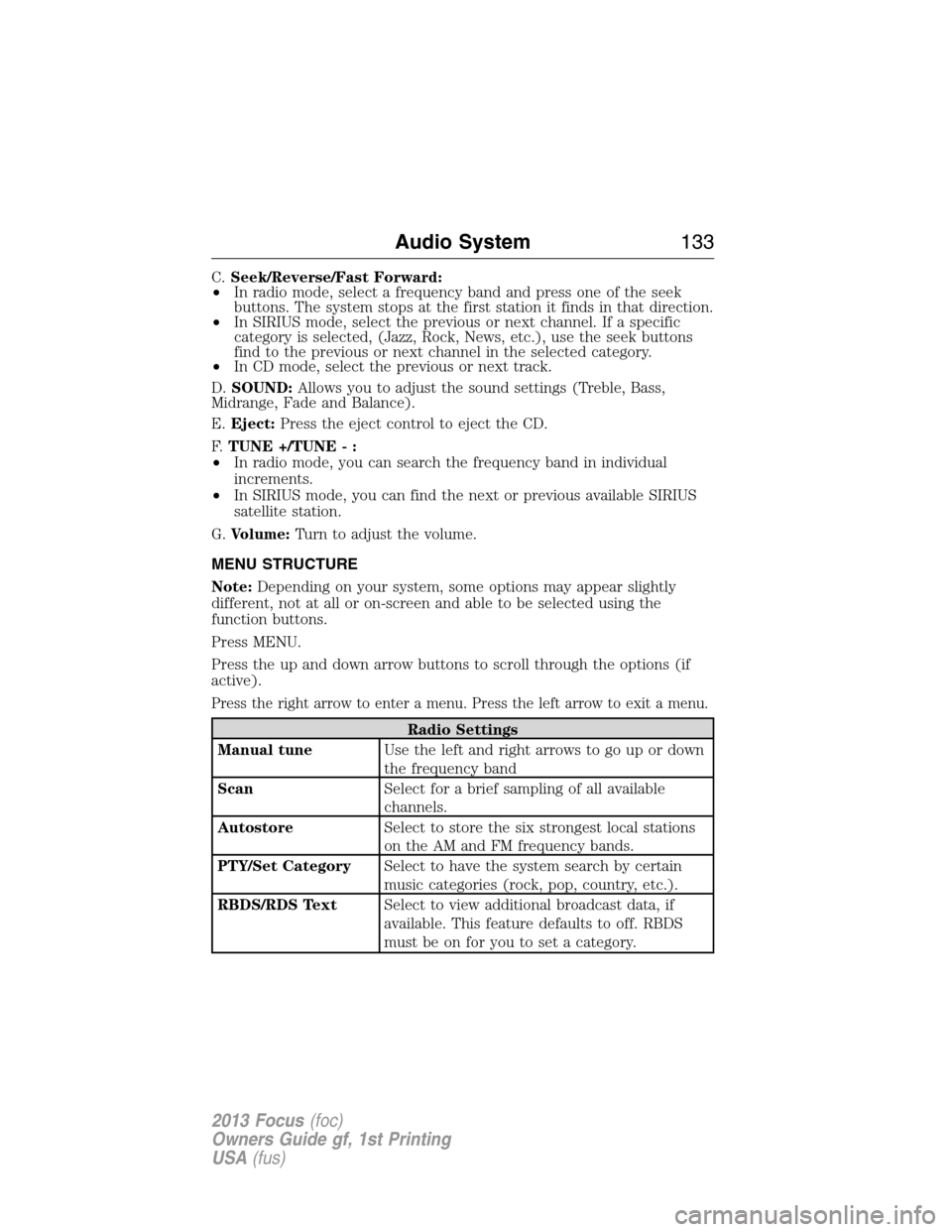
C.Seek/Reverse/Fast Forward:
•In radio mode, select a frequency band and press one of the seek
buttons. The system stops at the first station it finds in that direction.
•In SIRIUS mode, select the previous or next channel. If a specific
category is selected, (Jazz, Rock, News, etc.), use the seek buttons
find to the previous or next channel in the selected category.
•In CD mode, select the previous or next track.
D.SOUND:Allows you to adjust the sound settings (Treble, Bass,
Midrange, Fade and Balance).
E.Eject:Press the eject control to eject the CD.
F.TUNE +/TUNE - :
•In radio mode, you can search the frequency band in individual
increments.
•In SIRIUS mode, you can find the next or previous available SIRIUS
satellite station.
G.Volume:Turn to adjust the volume.
MENU STRUCTURE
Note:Depending on your system, some options may appear slightly
different, not at all or on-screen and able to be selected using the
function buttons.
Press MENU.
Press the up and down arrow buttons to scroll through the options (if
active).
Press the right arrow to enter a menu. Press the left arrow to exit a menu.
Radio Settings
Manual tuneUse the left and right arrows to go up or down
the frequency band
ScanSelect for a brief sampling of all available
channels.
AutostoreSelect to store the six strongest local stations
on the AM and FM frequency bands.
PTY/Set CategorySelect to have the system search by certain
music categories (rock, pop, country, etc.).
RBDS/RDS TextSelect to view additional broadcast data, if
available. This feature defaults to off. RBDS
must be on for you to set a category.
Audio System133
2013 Focus(foc)
Owners Guide gf, 1st Printing
USA(fus)