Page 109 of 386
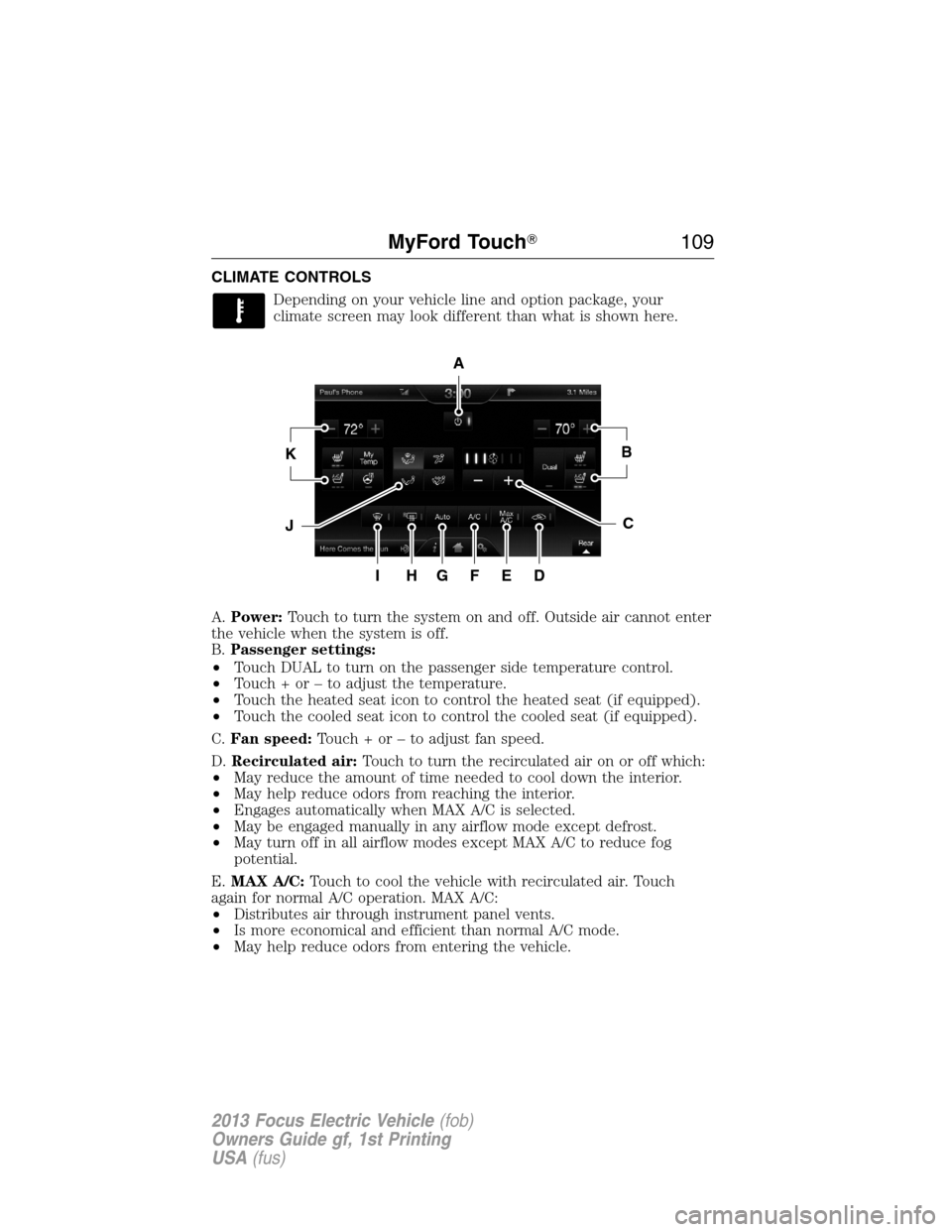
CLIMATE CONTROLS
Depending on your vehicle line and option package, your
climate screen may look different than what is shown here.
A.Power:Touch to turn the system on and off. Outside air cannot enter
the vehicle when the system is off.
B.Passenger settings:
•Touch DUAL to turn on the passenger side temperature control.
•Touch + or – to adjust the temperature.
•Touch the heated seat icon to control the heated seat (if equipped).
•Touch the cooled seat icon to control the cooled seat (if equipped).
C.Fan speed:Touch + or – to adjust fan speed.
D.Recirculated air:Touch to turn the recirculated air on or off which:
•May reduce the amount of time needed to cool down the interior.
•May help reduce odors from reaching the interior.
•Engages automatically when MAX A/C is selected.
•May be engaged manually in any airflow mode except defrost.
•May turn off in all airflow modes except MAX A/C to reduce fog
potential.
E.MAX A/C:Touch to cool the vehicle with recirculated air. Touch
again for normal A/C operation. MAX A/C:
•Distributes air through instrument panel vents.
•Is more economical and efficient than normal A/C mode.
•May help reduce odors from entering the vehicle.
A
KB
JC
IHGFED
MyFord Touch�109
2013 Focus Electric Vehicle(fob)
Owners Guide gf, 1st Printing
USA(fus)
Page 124 of 386
H.Instrument panel:Press to distribute air through the instrument
panel air vents.
I.Footwell:Press to distribute air through the footwell air vents.
J.Air conditioning:Press to switch the air conditioning on or off. Air
conditioning cools your vehicle using outside air. To improve air
conditioning when starting your vehicle, drive with the windows slightly
open for two to three minutes.
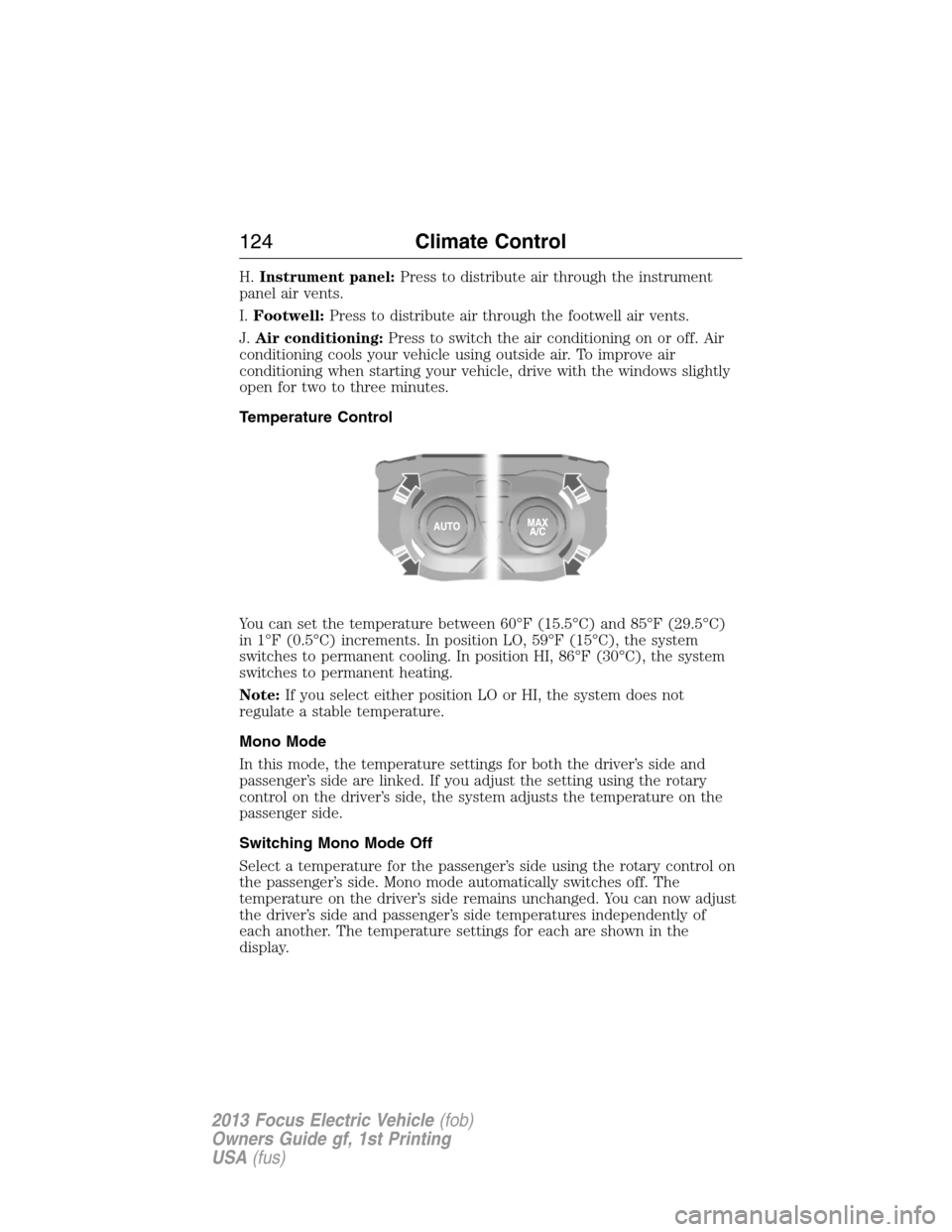
Temperature Control
You can set the temperature between 60°F (15.5°C) and 85°F (29.5°C)
in 1°F (0.5°C) increments. In position LO, 59°F (15°C), the system
switches to permanent cooling. In position HI, 86°F (30°C), the system
switches to permanent heating.
Note:If you select either position LO or HI, the system does not
regulate a stable temperature.
Mono Mode
In this mode, the temperature settings for both the driver’s side and
passenger’s side are linked. If you adjust the setting using the rotary
control on the driver’s side, the system adjusts the temperature on the
passenger side.
Switching Mono Mode Off
Select a temperature for the passenger’s side using the rotary control on
the passenger’s side. Mono mode automatically switches off. The
temperature on the driver’s side remains unchanged. You can now adjust
the driver’s side and passenger’s side temperatures independently of
each another. The temperature settings for each are shown in the
display.
124Climate Control
2013 Focus Electric Vehicle(fob)
Owners Guide gf, 1st Printing
USA(fus)
Page 381 of 386
CD voice commands ...................73
Cell phone use ............................13
Changing a tire .........................291
Child safety seats ......................214
attaching with tether straps ..221
in front seat ............................215
in rear seat ..............................215
LATCH .....................................218
recommendations ...................212
Child safety seats -
booster seats .............................223
Cleaning the touchscreen ..........49
Cleaning your vehicle
engine compartment ..............319
instrument panel ....................321
interior .....................................322
plastic parts ............................320
washing ....................................318
waxing .....................................319
wheels ......................................319
wiper blades ............................320
Climate voice commands .........111
Clock ............................................98
Console ......................................141
Controls
steering column ......................149
Coolant ......................................337
checking and adding ..............337
refill capacities ........................343
specifications ..........................343
Cruise control
(see Speed control) ..................146
Customer Assistance ................278
Ford Extended Service
Plan ..................................348, 350
Getting assistance outside
the U.S. and Canada ..............315
Getting roadside assistance ...278Getting the service you
need .........................................310
Ordering additional owner’s
literature .................................316
Utilizing the
Mediation/Arbitration
Program ...................................314
D
Daytime running lamps
(see Lamps) ..............................130
Defrost .......................................123
Dipstick
automatic transmission
fluid ..........................................340
Display settings ...........................98
Doors
central unlocking ....................159
Driving under special
conditions ..................................269
through water .........................277
Dual automatic temperature
control (DATC) .........................123
E
Emergencies, roadside
jump-starting ..........................303
End user license agreement ....361
Engine
cleaning ...................................319
service points ..........................325
Engine fan .................................325
Event data recording ..................11
F
Fan, Engine Cooling .........324–325
Index381
2013 Focus Electric Vehicle(fob)
Owners Guide gf, 1st Printing
USA(fus)
Page 385 of 386
push button start system .......256
Steering wheel
controls ....................................149
tilting .......................................141
Supported media file types ........77
Supported player, media
formats and metadata
information ..................................77
SYNC�Services ...........................87
System settings .........................100
T
Temperature control
(see Climate control) .......109, 123
Temporary mobility kit .............293
Text messaging ...........................83
Tilt steering wheel ....................141
Tire Pressure Monitoring
System (TPMS)
Tires, Wheels and Loading ....244
Tires ...........................228–229, 291
alignment ................................237
care ..........................................233
changing ..................................291
checking the pressure ............233
inflating ...................................230
label .........................................243
replacing ..................................235
rotating ....................................238
safety practices .......................237
sidewall information ...............238
snow tires and chains ............248
spare tire .................................291
Temporary mobility kit ..........293
terminology .............................229
tire grades ...............................229
treadwear ........................228, 233Touchscreen features
(climate) ....................................109
Towing .......................................254
recreational towing .................254
trailer towing ..........................254
wrecker ....................................306
Traffic preferences ...................116
Transmission
brake-shift interlock (BSI) ....265
fluid, checking and adding
(automatic) .............................340
fluid, refill capacities ..............343
lubricant specifications ..........343
Trunk .........................................151
remote release ........................164
Turn signal ................................133
U
USB port ................................40, 74
V
Vehicle health report ..................96
Vehicle Identification Number
(VIN) ..........................................344
Vehicle loading ..........................248
Voice recognition ........................54
W
Warning lights (see Lights) .......16
Washer fluid ..............................327
Water, Driving through .............277
Wi-Fi ..........................................106
Windows
power .......................................142
rear wiper/washer ...................140
Index385
2013 Focus Electric Vehicle(fob)
Owners Guide gf, 1st Printing
USA(fus)