Page 116 of 558

Speed control (if equipped) (RTT)
The speed control system indicator light changes color to
indicate what mode the system is in:
•On (gray light-type 1, white light-type 2): Illuminates when the speed
control system is turned on. Turns off when the speed control system
is turned off.
•Engaged (white light-type 1, green light-type 2): Illuminates when the
speed control system is engaged. Turns off when the speed control
system is disengaged.
Turn signal
Illuminates when the left or right turn signal or the hazard
warning flasher is turned on. If the indicators stay on or flash
faster, check for a burned out bulb.
AUDIBLE WARNINGS AND INDICATORS
Key In Ignition Warning Chime
Sounds when the key is left in the ignition in the off or accessory
position and the driver’s door is opened.
Sounds when the keyless vehicle is in RUN and the driver’s door is
opened (if equipped).
Headlamps On Warning Chime
Sounds when the headlamps or parking lamps are on, the ignition is off
(the key is not in the ignition) and the driver’s door is opened.
Parking Brake On Warning Chime
Sounds when you have left the parking brake on and drive your vehicle.
If the warning chime remains on after you have released the parking
brake, have the system checked by your authorized dealer immediately.
11 6Instrument Cluster
2013 Flex(471)
Owners Guide gf, 1st Printing
USA(fus)
Page 117 of 558
GENERAL INFORMATION
WARNING:Driving while distracted can result in loss of vehicle
control, accident and injury. Ford strongly recommends that
drivers use extreme caution when using any device or feature that may
take their focus off the road. Your primary responsibility is the safe
operation of the vehicle. We recommend against the use of any
handheld device while driving and that you comply with all applicable
laws.
Various systems on your vehicle can be controlled using the information
display controls on the steering wheel. Corresponding information is
displayed in the information display.
Information Display Controls (Type 1)
•Press the up and down arrow
buttons to scroll through and
highlight the options within a
menu.
•Press the right arrow button to
enter a sub-menu.
•Press the left arrow button to
exit a menu.
•Press the OK button to choose
and confirm a setting/messages.
Information Displays11 7
2013 Flex(471)
Owners Guide gf, 1st Printing
USA(fus)
Page 118 of 558
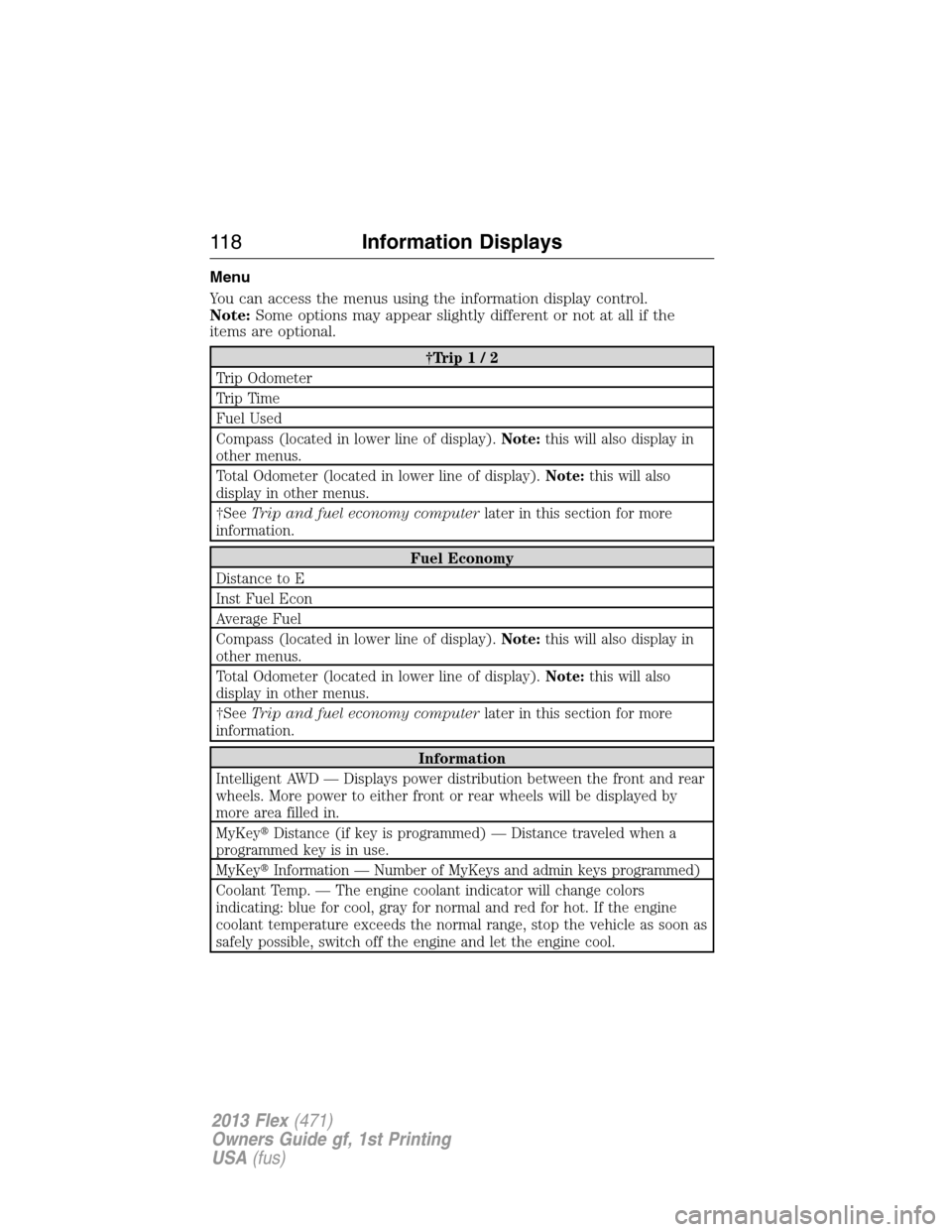
Menu
You can access the menus using the information display control.
Note:Some options may appear slightly different or not at all if the
items are optional.
†Trip1/2
Trip Odometer
Trip Time
Fuel Used
Compass (located in lower line of display).Note:this will also display in
other menus.
Total Odometer (located in lower line of display).Note:this will also
display in other menus.
†SeeTrip and fuel economy computerlater in this section for more
information.
Fuel Economy
Distance to E
Inst Fuel Econ
Average Fuel
Compass (located in lower line of display).Note:this will also display in
other menus.
Total Odometer (located in lower line of display).Note:this will also
display in other menus.
†SeeTrip and fuel economy computerlater in this section for more
information.
Information
Intelligent AWD — Displays power distribution between the front and rear
wheels. More power to either front or rear wheels will be displayed by
more area filled in.
MyKey�Distance (if key is programmed) — Distance traveled when a
programmed key is in use.
MyKey�Information — Number of MyKeys and admin keys programmed)
Coolant Temp. — The engine coolant indicator will change colors
indicating: blue for cool, gray for normal and red for hot. If the engine
coolant temperature exceeds the normal range, stop the vehicle as soon as
safely possible, switch off the engine and let the engine cool.
11 8Information Displays
2013 Flex(471)
Owners Guide gf, 1st Printing
USA(fus)
Page 123 of 558
Information Display Controls (Type 2)
•Press the up and down arrow
buttons to scroll through and
highlight the options within a
menu.
•Press the right arrow button to
enter a sub-menu.
•Press the left arrow button to
exit a menu.
•Press the OK button to choose
and confirm a setting/messages.
Main menu
From the main menu bar on the left side of the information display, you
can choose from the following categories:
Display Mode
Trip1&2
Fuel Economy
Settings
Information
Scroll up/down to highlight one of the categories, then press the right
arrow key or OK to enter into that category. Press the left arrow key as
needed to exit back to the main menu.
Information Displays123
2013 Flex(471)
Owners Guide gf, 1st Printing
USA(fus)
Page 124 of 558

Display Mode
Use the up/down arrow buttons to choose between the
following display options.
Display mode †Option 1 Option 2 Option 3 †Option 4
XXX mi (km) to empty X
Fuel gaugeXXXX
Bar tachometer X X
Round tachometer X X
Engine coolant temp
gaugeX
Total odometer (lower
left corner)XXXX
†Vehicles with Intelligent AWD only. You can choose to have only the
fuel gauge show in this mode. Refer toDisplay>Gauge Display
found in the table under theSettingssection later in this chapter.
Regardless of display mode chosen, when SelectShift Automatic™
transmission (SST) is activated, the cluster will change to the round
tachometer if not already selected. After the round tachometer
displays, other display modes with the bar tachometer can also be
chosen.
•XXX mi (km) to empty: Shows approximate fuel level before the fuel
tank reaches empty. The value is dynamic and can change (raise or
lower) depending on driving style.
•Fuel gauge: Indicates approximately how much fuel is left in the fuel
tank. The fuel gauge may vary slightly when the vehicle is in motion or
on a grade. When the fuel level becomes low, the level indicator will
change to amber. When the fuel level becomes critically low, the level
indicator will change to red.
Note:When a MyKey�is in use, low fuel warnings will display earlier.
The fuel icon and arrow indicates which side of the vehicle the fuel
filler door is located.
•Bar/Round tachometer: Indicates the engine speed in revolutions per
minute. Driving with your tachometer pointer continuously at the top
of the scale may damage the engine. During SelectShift Automatic™
transmission (SST) use, the currently selected gear will appear in the
display.
124Information Displays
2013 Flex(471)
Owners Guide gf, 1st Printing
USA(fus)
Page 130 of 558

Alarm/Security
MessagesAction / Description
To Stop Alarm, Start
VehicleDisplayed when the perimeter alarm system is
armed and the vehicle is entered using the key
on the driver’s side door. In order to prevent
the perimeter alarm system from triggering,
the ignition must be turned to start or on
before the 12 second chime expires.
AWD Messages Action / Description
AWD Off Displayed when the AWD system has been
automatically disabled to protect itself. This is
caused by operating the vehicle with the
compact spare tire installed or if the system is
overheating. The AWD system will resume
normal function and clear this message after
driving a short distance with the road tire
re-installed or after the system is allowed to
cool.
Check AWD Displayed in conjunction with the Throttle
Control/Transmission/AWD light when the AWD
system is not operating properly. If the
warning stays on or continues to come on,
contact your authorized dealer as soon as
possible.
130Information Displays
2013 Flex(471)
Owners Guide gf, 1st Printing
USA(fus)
Page 139 of 558

Do not expose discs to direct sunlight or heat sources for extended
periods of time.
MP3 Track and Folder Structure
Audio systems capable of recognizing and playing MP3 individual tracks
and folder structures work as follows:
•There are two different modes for MP3 disc playback: MP3 track
mode (system default) and MP3 folder mode.
•MP3 track mode ignores any folder structure on the MP3 disc. The
player numbers each MP3 track on the disc (noted by the .mp3 file
extension) from T001 to a maximum of T255.Note:The maximum
number of playable MP3 files may be less depending on the structure
of the CD and exact model of radio present.
•MP3 folder mode represents a folder structure consisting of one level
of folders. The CD player numbers all MP3 tracks on the disc (noted
by the .mp3 file extension) and all folders containing MP3 files, from
F001 (folder) T001 (track) to F253 T255.
•Creating discs with only one level of folders helps with navigation
through the disc files.
If you are burning your own MP3 discs, it is important to understand
how the system reads the structures you create. While various files may
be present, (files with extensions other than mp3), only files with the
.mp3 extension are played; other files are ignored by the system. This
enables you to use the same MP3 disc for a variety of tasks on your work
computer, home computer and your in-vehicle system.
In track mode, the system displays and plays the structure as if it were
only one level deep (all .mp3 files are played, regardless of being in a
specific folder). In folder mode, the system only plays the .mp3 files in
the current folder.
Audio System139
2013 Flex(471)
Owners Guide gf, 1st Printing
USA(fus)
Page 142 of 558
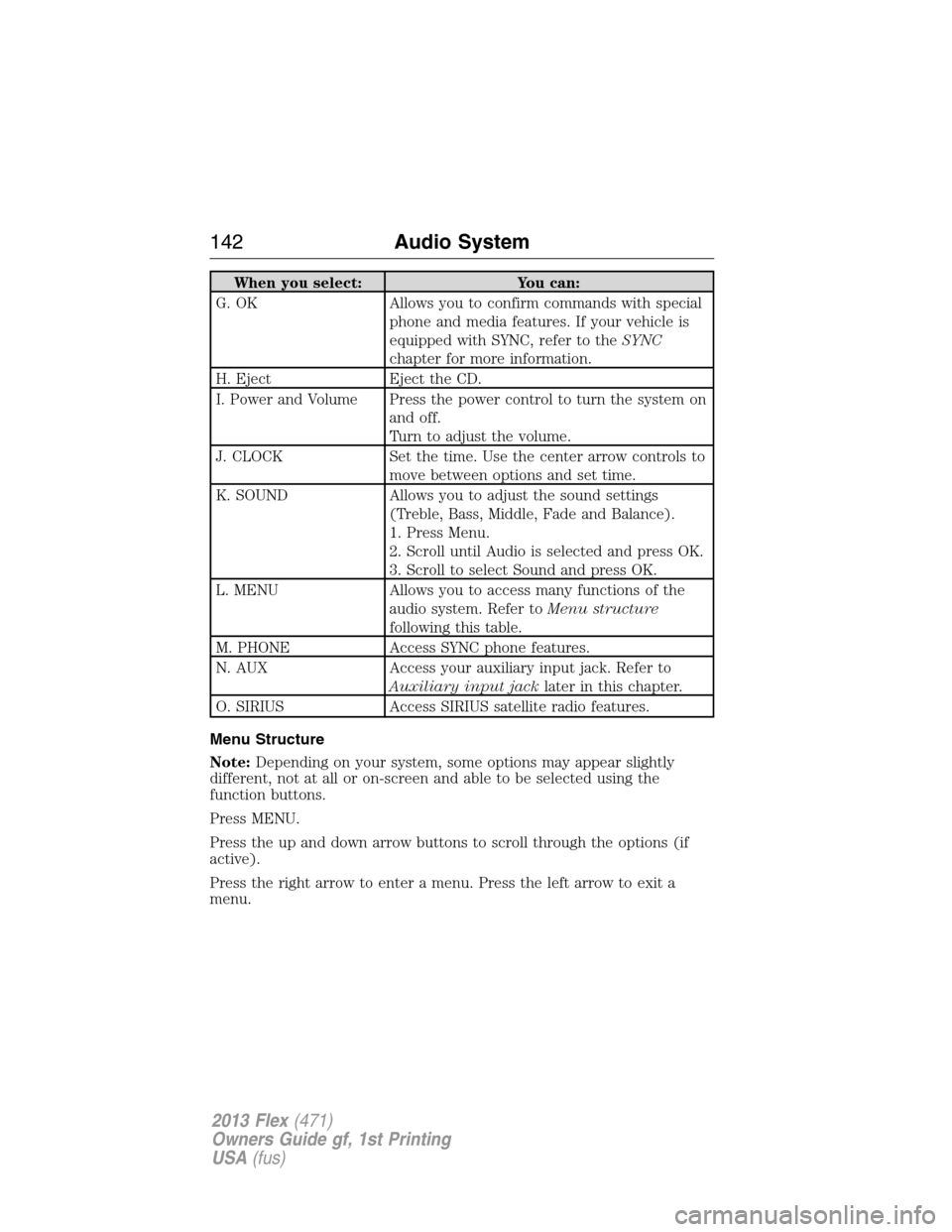
When you select: You can:
G. OK Allows you to confirm commands with special
phone and media features. If your vehicle is
equipped with SYNC, refer to theSYNC
chapter for more information.
H. Eject Eject the CD.
I. Power and Volume Press the power control to turn the system on
and off.
Turn to adjust the volume.
J. CLOCK Set the time. Use the center arrow controls to
move between options and set time.
K. SOUND Allows you to adjust the sound settings
(Treble, Bass, Middle, Fade and Balance).
1. Press Menu.
2. Scroll until Audio is selected and press OK.
3. Scroll to select Sound and press OK.
L. MENU Allows you to access many functions of the
audio system. Refer toMenu structure
following this table.
M. PHONE Access SYNC phone features.
N. AUX Access your auxiliary input jack. Refer to
Auxiliary input jacklater in this chapter.
O. SIRIUS Access SIRIUS satellite radio features.
Menu Structure
Note:Depending on your system, some options may appear slightly
different, not at all or on-screen and able to be selected using the
function buttons.
Press MENU.
Press the up and down arrow buttons to scroll through the options (if
active).
Press the right arrow to enter a menu. Press the left arrow to exit a
menu.
142Audio System
2013 Flex(471)
Owners Guide gf, 1st Printing
USA(fus)

