2013 FORD ESCAPE battery
[x] Cancel search: batteryPage 4 of 423

Customer Assistance
Getting the Services You Need...............201
In California (U.S. Only)............................202
The Better Business Bureau (BBB) AutoLine Program (U.S. Only).....................203
Utilizing the Mediation/Arbitration Program (Canada Only).......................203
Getting Assistance Outside the U.S. and Canada.......................................................204
Ordering Additional Owner's Literature....................................................205
Reporting Safety Defects (U.S. Only)............................................................205
Reporting Safety Defects (Canada Only)............................................................206
Fuses
Changing a Fuse...........................................207
Fuse Specification Chart..........................208
Maintenance
General Information.....................................217
Opening and Closing the Hood................217
Under Hood Overview - 1.6L EcoBoost®..................................................218
Under Hood Overview - 2.0L EcoBoost®..................................................219
Under Hood Overview - 2.5L...................220
Engine Oil Dipstick - 1.6L EcoBoost®..................................................221
Engine Oil Dipstick - 2.5L/2.0L EcoBoost®..................................................221
Engine Oil Check...........................................221
Engine Coolant Check................................222
Automatic Transmission Fluid Check ............................................................225
Brake Fluid Check........................................225
Power Steering Fluid Check.....................225
Fuel Filter........................................................225
Washer Fluid Check....................................225
Changing the Vehicle Battery.................226
Checking the Wiper Blades......................227 Changing the Wiper Blades......................227
Changing the Engine Air Filter.................228
Adjusting the Headlamps.........................229
Removing a Headlamp...............................231
Changing a Bulb............................................231
Bulb Specification Chart...........................235
Vehicle Care
General Information...................................236
Cleaning Products.......................................236
Cleaning the Exterior..................................236
Repairing Minor Paint Damage...............237
Waxing..............................................................237
Cleaning the Engine....................................237
Cleaning the Windows and Wiper
Blades..........................................................238
Cleaning the Interior...................................238
Cleaning the Instrument Panel and Instrument Cluster Lens.......................239
Cleaning Leather Seats.............................239
Cleaning the Alloy Wheels.......................240
Vehicle Storage............................................240
Wheels and Tires
General Information...................................243
Tire Care..........................................................245
Using Snow Chains.....................................256
Tire Pressure Monitoring System...........257
Changing a Road Wheel...........................260
Technical Specifications...........................265
Capacities and Specific- ations
Engine Specifications.................................267
Motorcraft Parts...........................................267
Vehicle Identification Number...............269
Vehicle Certification Label.......................270
Transmission Code Designation............270
Technical Specifications............................271
4
Table of Contents
Page 7 of 423

ABOUT THIS MANUAL
Thank you for choosing Ford. We
recommend that you take some time to
get to know your vehicle by reading this
manual. The more that you know about it,
the greater the safety and pleasure you
will get from driving it.
WARNING
Always drive with due care and
attention when using and operating
the controls and features on your
vehicle.
Note: This manual describes product
features and options available throughout
the range, sometimes even before they are
generally available. It may describe options
not fitted to your vehicle.
Note: Some of the illustrations in this
manual may be used for different models,
so may appear different to your vehicle.
However, the essential information in the
illustrations is always correct.
Note: Always use and operate your vehicle
in line with all applicable laws and
regulations.
Note: Pass on this manual when selling
your vehicle. It is an integral part of the
vehicle.
Protecting the Environment
You must play your part in protecting the
environment. Correct vehicle usage and
the authorized disposal of waste, cleaning
and lubrication materials are significant
steps toward this aim.
SYMBOLS GLOSSARY
These are some of the symbols you may
see on your vehicle.
Safety alert
See Owner's Manual
Anti-lock braking system
Avoid smoking, flames or sparks
Battery
Battery acid
Brake fluid - non petroleum
based
Brake system
Cabin air filter
Check fuel cap
Child safety door lock or unlock
Child seat lower anchor
Child seat tether anchor
Cruise control
7
Introduction
E71340
Page 44 of 423

PRINCIPLE OF OPERATION
The remote control allows you to:
•remotely lock or unlock the vehicle
doors
• unlock the doors without actively using
a key or remote control (intelligent
access only)
• remotely open the power liftgate (if
equipped)
• remotely start or stop the engine (if
equipped)
• arm and disarm the anti-theft system
• activate the panic alarm.
GENERAL INFORMATION ON
RADIO FREQUENCIES
The remote control complies with part 15
of the FCC rules and with RSS-210 of
Industry Canada. Operation is subject to
the following two conditions: (1) This
device may not cause harmful interference,
and (2) This device must accept any
interference received, including
interference that may cause undesired
operation.
Note: Changes or modifications not
expressly approved by the party responsible
for compliance could void the user ’s
authority to operate the equipment.
The typical operating range for your
transmitter is approximately 33 feet (10
meters). Vehicles with the remote start
feature will have a greater range. A
decrease in operating range could be
caused by:
• weather conditions
• nearby radio towers
• structures around the vehicle
• other vehicles parked next to your
vehicle. Intelligent Access (If Equipped)
The system uses a radio frequency signal
to communicate with your vehicle and
authorize your vehicle to unlock when
commanded (either by touching the inside
of the front exterior door handle, by
activating the exterior luggage
compartment button, or a button on the
transmitter itself). If excessive radio
frequency interface is present in the area,
or if the transmitter battery is low, it may
be necessary to mechanically unlock your
door. The mechanical key blade in your
intelligent access key can be used to open
the driver
’s door in this situation. See
Remote Control (page 44).
REMOTE CONTROL
Integrated Keyhead Transmitters
(If Equipped)
Your vehicle may be equipped with two
integrated keyhead transmitters. The key
blade is used to start the vehicle and
unlock or lock the driver ’s door from
outside the vehicle. The transmitter portion
functions as the remote control.
44
Keys and Remote Controls
E142585
Page 45 of 423

Note:Your vehicle ’s keys were issued with
a security label that provides important
vehicle key cut information. Keep the label
in a safe place for future reference.
Intelligent Access Key (If Equipped)
Note: A three-button remote control will
operate similarly.
Your vehicle may be equipped with two
intelligent access keys which operate the
power locks and the remote start system.
The key must be in the vehicle to activate
the push button start system.
The intelligent access key also contains a
removable mechanical key blade that can
be used to unlock the driver door. Slide the
release on the back of the transmitter to
release the key blade, then pull the blade
out.
Note: Your vehicle ’s back-up keys were
issued with a security tag that provides
important vehicle key cut information. Keep
the tag in a safe place for future reference.
Replacing the Battery
Note: Refer to local regulations when
disposing of transmitter batteries.
Note: Do not wipe off any grease on the
battery terminals or on the back surface of
the circuit board.
Note: Replacing the battery will not delete
the transmitter from the vehicle. The
transmitter should operate normally.
The remote control uses one coin-type
three-volt lithium battery CR2032 or
equivalent.
45
Keys and Remote Controls
E138615
E138616
E142431
E138618
Page 46 of 423

Integrated Keyhead Transmitter
1. Twist a thin coin in the slot of thetransmitter near the key ring to remove
the battery cover.
2. Remove the old battery.
3. Insert the new battery. Refer to the instructions inside the transmitter for
the correct orientation of the battery.
Press the battery down to make sure
it is fully in the housing.
4. Snap the battery cover back onto the transmitter.
Intelligent Access Transmitter
1. Remove the backup key from the transmitter.
2. Twist a thin coin in the slot hiddenbehind the backup key slot to remove
the battery cover.
3. Remove the old battery.
4. Insert the new battery. Refer to theinstruction inside the transmitter for
the correct orientation of the battery.
Press the battery down to make sure
it is fully in the housing.
5. Snap the battery cover back onto the transmitter and install the backup key.
Car Finder
Press the button twice within
three seconds. The horn will
chirp and the turn signals will
flash. It is recommended that this method
be used to locate your vehicle, rather than
using the panic alarm.
46
Keys and Remote Controls
E138619
E138620
E142432
E138622
E138623
Page 47 of 423

Note:If locking was not successful or any
door or the liftgate is not closed, or if the
hood is not closed on vehicles equipped
with a perimeter alarm or remote start, the
horn will chirp twice and the lamps will not
flash.
Sounding a Panic Alarm
Note: The panic alarm will only operate
when the ignition is off.
Press the button to activate the
alarm. Press the button again or
turn the ignition on to deactivate.
Remote Start (If Equipped)
WARNING
To avoid exhaust fumes, do not use
remote start if your vehicle is parked
indoors or areas that are not well
ventilated.
Note: Do not use remote start if your vehicle
is low on fuel.
Your vehicle has remote start if
the transmitter has this button.
The remote start feature allows you to
start the engine from outside the vehicle.
The transmitter has an extended operating
range.
Vehicles with automatic climate control
can be configured to operate when the
vehicle is remote started. See Automatic
Climate Control (page 114).
Many states and provinces have
restrictions for the use of remote start.
Check your local and state or provincial
laws for specific requirements regarding
remote start systems.
The remote start system will not work if:
• the ignition is on
• the alarm system is triggered •
the feature has been disabled
• the hood is not closed
• two remote vehicle starts have already
been attempted within the last hour
• the vehicle is not in P (Park)
• the vehicle battery voltage is too low
• the service engine soon indicator was
on the last time the vehicle was driven.
Remote Starting the Engine
Note: Each button press must be done
within three seconds of each other. The
vehicle will not remote start if this sequence
is not followed and the horn will not chirp.The label on your transmitter details the
starting procedure. To remote start the
engine:
1. Press the lock button to lock all the doors.
2. Press the remote start button twice. The exterior lamps will flash twice.
The horn will chirp if the system fails to
start, unless quiet start is on. Quiet start
will run the blower fan at a slower speed
to reduce noise. It can be switched on or
off in the information display. See General
Information (page 84).
47
Keys and Remote Controls
E138624
E138625
E138626
Page 56 of 423

Autolock and Autounlock (If Equipped)
The autolock feature will lock all the doors
when:
•all doors are closed
• the ignition is on
• you shift into any gear putting the
vehicle in motion, and
• the vehicle attains a speed greater than
4 mph (7 km/h).
When autounlock is enabled, all doors will
unlock when the driver door is opened.
Enabling or Disabling Autolock and
Autounlock
Note: Your authorized dealer can perform
this procedure, or you can do the procedure
yourself.
To enable or disable these features, do the
following:
Note: You will have 30 seconds to
complete the procedure.
1. Switch the ignition on.
2. Press the power door lock button three
times.
3. Switch the ignition off.
4. Press the power door lock button three
times.
5. Switch the ignition on. The horn will chirp indicating the programming mode
has been entered.
Autolock: Once in programming mode,
each subsequent short press (less than 1
second) of the power door lock button will
toggle autolock between on and off.
Autounlock: Each subsequent long press
(more than 2 seconds) of the power door
lock button will toggle autounlock between
on and off.
Note: The autounlock feature can be
enabled or disabled independently of the
autolock feature. Illuminated Entry
The interior lamps and select exterior
lamps will illuminate when the remote
entry system is used to unlock the door(s).
The illuminated entry system will turn off
the lights if:
•
the ignition is on
• the remote transmitter lock control is
pressed, or
• after 25 seconds of illumination.
The lights will not turn off if:
• they have been turned on with the
dimmer control, or
• any door is open.
Illuminated Exit
The interior lamps and select exterior
lamps will illuminate when all doors are
closed, the ignition is turned off and the
key is removed from the ignition
(integrated keyhead transmitter only).
The lamps will turn off if all the doors
remain closed and:
• 25 seconds elapse
• the key is inserted in the ignition
(integrated keyhead transmitter only)
• the START/STOP button is pressed
(intelligent access key only).
Battery Saver
If the courtesy lamps, dome lamps or
headlamps are left on, the battery saver
will shut them off 10 minutes after the
ignition has been turned off.
Accessory Mode Battery Saver for
Intelligent Access Keys (If Equipped)
If you shut off the engine and leave the
ignition in the on or accessory mode, the
ignition will shut off after 30 minutes.
56
Locks
Page 58 of 423
Three warning chimes will sound once as
the liftgate begins to power close. Five
short chimes indicate a problem with the
open or close request, caused by:
•the ignition is on and the transmission
is not in P (Park);
• or the battery voltage is below the
minimum operating voltage;
• or the vehicle speed is at or above 3
mph (5 km/h).
If the liftgate falls to the closed direction
after the liftgate has stopped in the open
position, four short warning chimes
indicate excessive weight on the gate or a
possible gas strut failure. See your
authorized dealer if you still have the issue
after the load is removed.
Opening and Closing the Liftgate
WARNING
Make sure all persons are clear of the
power liftgate area before using the
power liftgate control.
Note: Be careful when opening or closing
the liftgate in a garage or other enclosed
area to avoid damaging the liftgate.
Note: Do not leave the liftgate open while
driving. This could damage the liftgate and
its components.
To open or close from the
instrument panel: Press the
instrument panel button.
To open or close with the
remote control: Press the
remote control button twice
within three seconds.
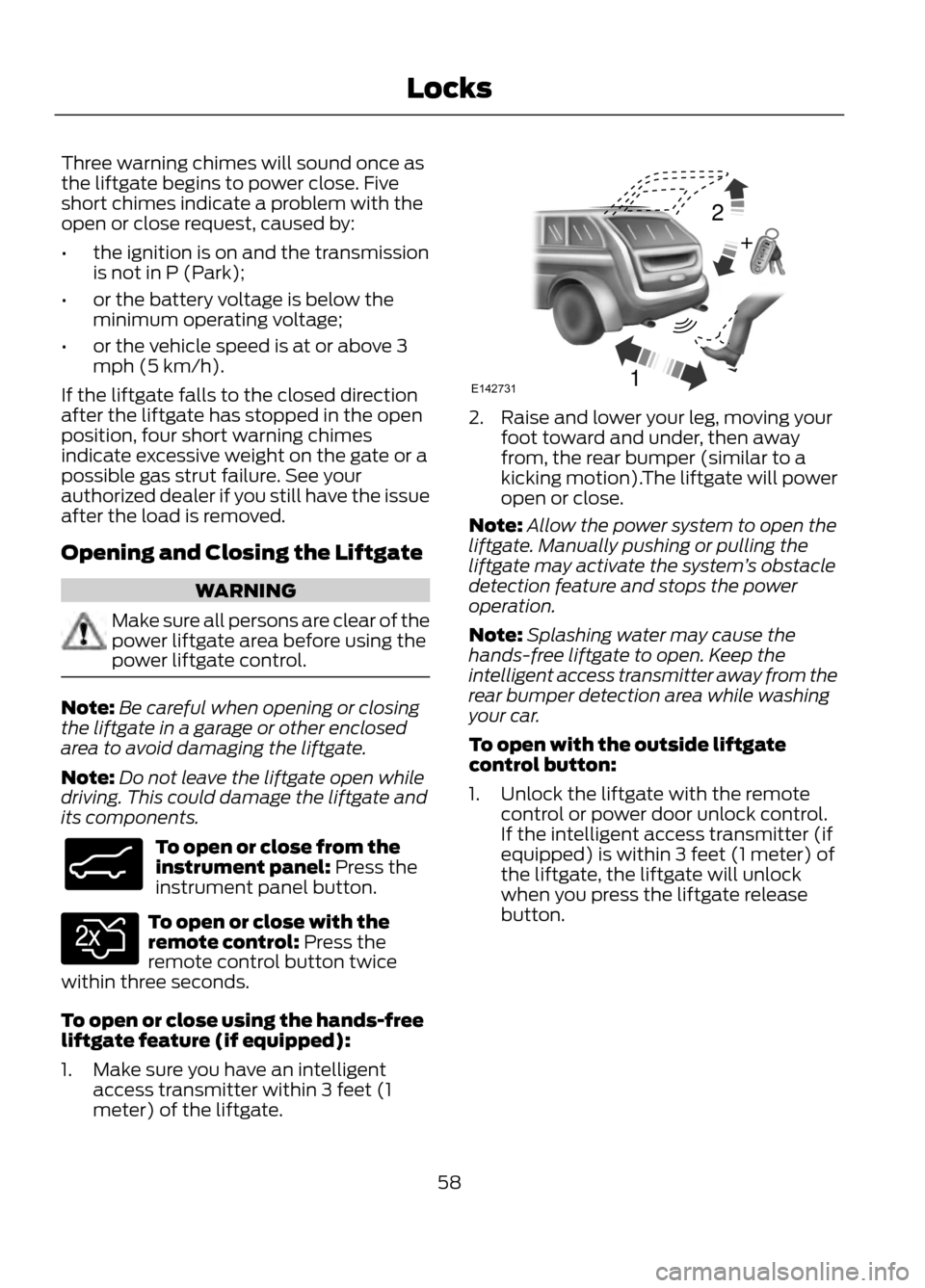
To open or close using the hands-free
liftgate feature (if equipped):
1. Make sure you have an intelligent access transmitter within 3 feet (1
meter) of the liftgate.
2. Raise and lower your leg, moving yourfoot toward and under, then away
from, the rear bumper (similar to a
kicking motion).The liftgate will power
open or close.
Note: Allow the power system to open the
liftgate. Manually pushing or pulling the
liftgate may activate the system ’s obstacle
detection feature and stops the power
operation.
Note: Splashing water may cause the
hands-free liftgate to open. Keep the
intelligent access transmitter away from the
rear bumper detection area while washing
your car.
To open with the outside liftgate
control button:
1. Unlock the liftgate with the remote control or power door unlock control.
If the intelligent access transmitter (if
equipped) is within 3 feet (1 meter) of
the liftgate, the liftgate will unlock
when you press the liftgate release
button.
58
Locks
E138633
E138630
12
+E142731