2013 FORD ESCAPE battery
[x] Cancel search: batteryPage 241 of 423

Body
•Wash vehicle thoroughly to remove
dirt, grease, oil, tar or mud from exterior
surfaces, rear-wheel housing and
underside of front fenders.
• Periodically wash vehicles stored in
exposed locations.
• Touch-up raw or primed metal to
prevent rust
• Cover chrome and stainless steel parts
with a thick coat of auto wax to prevent
discoloration. Re-wax as necessary
when the vehicle is washed.
• Lubricate all hood, door and trunk lid
hinges, and latches with a light grade
oil.
• Cover interior trim to prevent fading.
• Keep all rubber parts free from oil and
solvents.
Engine
• The engine oil and filter should be
changed prior to storage, as used
engine oil contain contaminates that
may cause engine damage.
• Start the engine every 15 days. Run at
fast idle until it reaches normal
operating temperature
• With your foot on the brake, shift
through all the gears while the engine
is running.
Fuel system
• Fill the fuel tank with high-quality fuel
until the first automatic shutoff of the
fuel pump nozzle. Note:
During extended periods of vehicle
storage (30 days or more), fuel may
deteriorate due to oxidation. Add a quality
gas stabilizer product to the vehicle fuel
system whenever actual or expected
storage periods exceed 30 days. Follow the
instructions on the additive label. The
vehicle should then be operated at idle
speed to circulate the additive throughout
the fuel system.
Cooling system
• Protect against freezing temperatures.
• When removing vehicle from storage,
check coolant fluid level. Confirm there
are no cooling system leaks, and fluid
is at the recommended level.
Battery
• Check and recharge as necessary. Keep
connections clean.
• If storing your vehicle for more than 30
days without recharging the battery, it
may be advisable to disconnect the
battery cables to ensure battery charge
is maintained for quick starting.
Note: If battery cables are disconnected, it
will be necessary to reset memory features.
Brakes
• Make sure brakes and parking brake
are fully released.
Tires
• Maintain recommended air pressure.
Miscellaneous
• Make sure all linkages, cables, levers
and pins under vehicle are covered with
grease to prevent rust.
• Move vehicles at least 25 feet (8
meters) every 15 days to lubricate
working parts and prevent corrosion.
241
Vehicle Care
Page 242 of 423
Removing Vehicle From Storage
When your vehicle is ready to come out of
storage, do the following:
•Wash your vehicle to remove any dirt
or grease film build-up on window
surfaces.
• Check windshield wipers for any
deterioration.
• Check under the hood for any foreign
material that may have collected
during storage (mice/squirrel nests).
• Check the exhaust for any foreign
material that may have collected
during storage.
• Check tire pressures and set tire
inflation per the Tire Label.
• Check brake pedal operation. Drive the
vehicle 15 feet (4.5 meters) back and
forth to remove rust build-up.
• Check fluid levels (including coolant,
oil and gas) to make sure there are no
leaks, and fluids are at recommended
levels.
• If the battery was removed, clean the
battery cable ends and inspect.
Contact your authorized dealer if you have
any concerns or issues.
242
Vehicle Care
Page 267 of 423

ENGINE SPECIFICATIONS
2.5L engine
2.0L EcoBoost engine
1.6L EcoBoost engine
Engine
152
122
98
Cubic inches
Minimum 87 octane
Minimum 87 octane
Minimum 87 octane
Required fuel
9.7:1
9.3:1
10.0:1
Compression
ratio
0.049-0.053 in.(1.25-1.35 mm)
0.027-0.031 in.
(0.70-0.80 mm)
0.027-0.031 in. (0.70-
0.80 mm)
Spark plug gap
Drivebelt Routing
1.6L engine
2.0L and 2.5L engines
Long drivebelt is on first pulley
groove closest to engine
A
Short drivebelt is on second
pulley groove farthest from
engine
B
MOTORCRAFT PARTS
2.5L engine
2.0L EcoBoost® engine
1.6L EcoBoost®
engine
Component
FA-1908
Air filter
element 1
FL-910-S
Oil filter 2
BXT-96R-500
Battery
BXT-96R-590
267
Capacities and Specifications
E142479
A
BE142480
Page 275 of 423
•To avoid interference with other vehicle
functions, such as anti-lock braking
systems, amateur radio users who
install radios and antennas onto their
vehicle should not locate the amateur
radio antennas in the area of the
driver's side hood.
• Any non-Ford custom electrical or
electronic accessories or components
that are added to the vehicle by the
authorized dealer or the owner, may
adversely affect battery performance
and durability, and may also adversely
affect the performance of other
electrical systems in the vehicle.
275
Accessories
Page 276 of 423

SERVICE PLANS (U.S. only)
More than 32 million Ford and Lincoln
owners have discovered the powerful
protection of Ford Extended Service Plan.
It is the only extended service plan backed
by Ford Motor Company, and provides
peace of mind protection beyond the New
Vehicle Limited Warranty coverage.
Up to 500+ Covered Vehicle
Components
There are four, new-vehicle Extended
Service Plans with different levels of
coverage. Ask your dealer for details.
1. PremiumCare - Our mostcomprehensive coverage. With over
500 covered components, this plan is
so complete that we generally only
discuss what’ s not covered!
2. ExtraCare - Covers 113 components, and includes many high-tech items.
3. BaseCare - Covers 84 components.
4. PowertrainCare - Covers 29 critical components.
Ford Extended Service Plan is honored by
all Ford and Lincoln Dealers in the U.S. and
Canada. It is the only extended service plan
authorized and backed by Ford Motor
Company. That means you get:
• Reliable, quality service anywhere you
go.
• Factory-trained technicians.
• Ford Authorized Parts used with every
covered repair.
Rental Car Reimbursement
If your vehicle is kept overnight for covered
repairs, you are eligible for rental car
coverage, including Bumper-to-Bumper
warranty repairs, or manufacturer ’s recalls. Transferable Coverage
If you sell your vehicle before your Ford
Extended Service Plan coverage expires,
you can transfer any remaining coverage
to the new owner. Whenever you’re ready
to sell your car, prospective buyers may
feel better about taking a risk on your used
vehicle. Ford Extended Service Plan may
add resale value!
Plus, exclusive 24/7 roadside assistance,
including:
•
Towing, flat-tire change and battery
jump starts.
• Out-of-fuel and lock-out assistance.
• Travel expense reimbursement for
lodging, meals and rental car.
• Destination assistance for taxi, shuttle,
rental car coverage and emergency
transportation.
Ford Extended Service Plan Can
Quickly Pay for Itself
One service bill – the cost of parts and
labor – can easily exceed the price of your
Ford Extended Service Plan Service
Contract. With a Ford Extend Service Plan,
you minimize your risk for unexpected
repair bills and rising repair costs.
Avoid the Rising Cost of Properly
Maintaining Your Vehicle!
Ford Extended Service Plan also offers a
Premium Maintenance Plan that covers
items that routinely wear out.
The coverage is prepaid, so you never have
to worry about affording your vehicle
maintenance. It covers regular checkups,
routine inspections, preventive care and
replacement of items that require periodic
attention for normal wear:
• Wiper blades
• Spark plugs (except California)
• Clutch disc
276
Ford Extended Service Plan (ESP)
Page 286 of 423
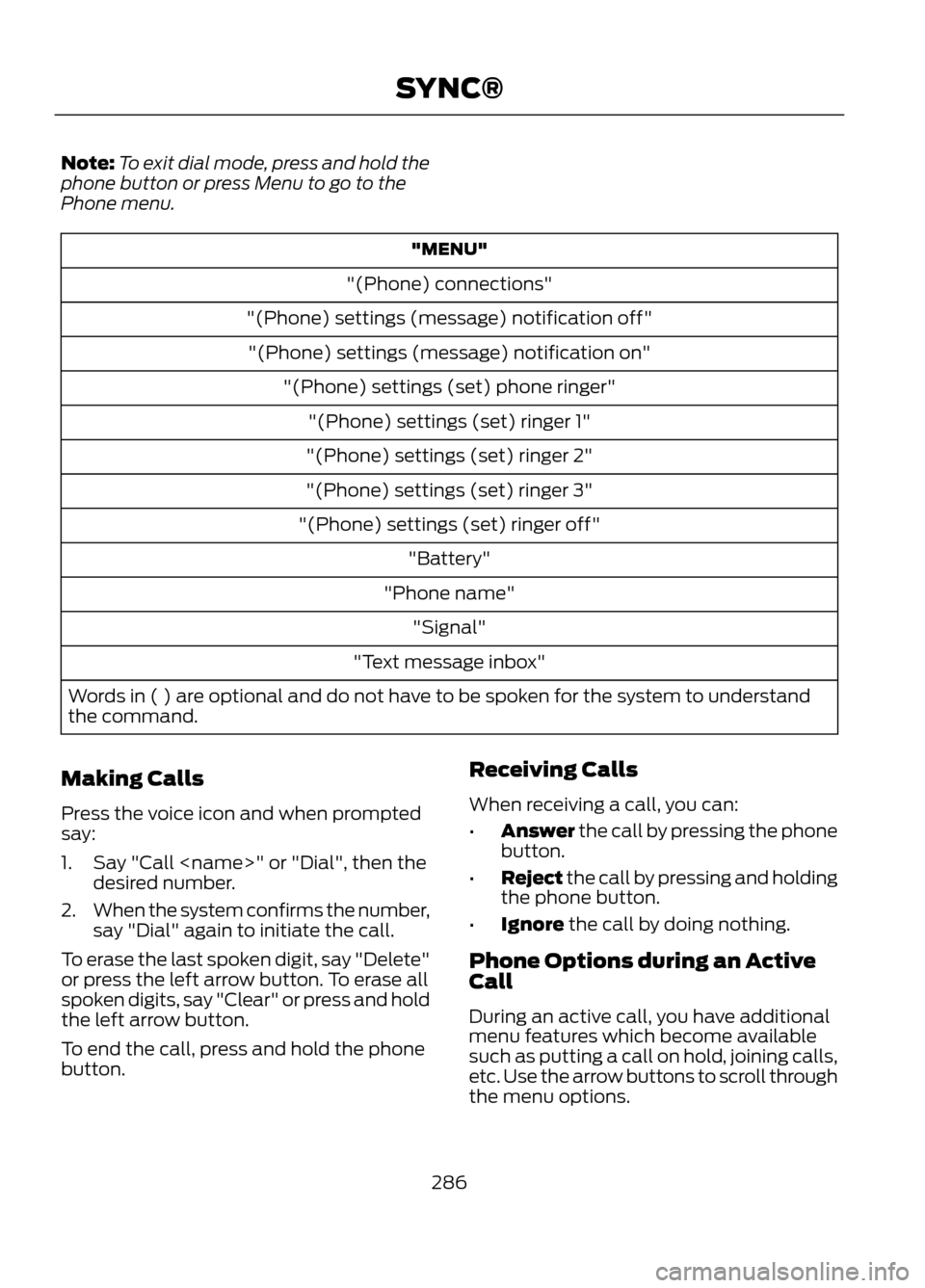
Note:To exit dial mode, press and hold the
phone button or press Menu to go to the
Phone menu.
"MENU"
"(Phone) connections"
"(Phone) settings (message) notification off" "(Phone) settings (message) notification on" "(Phone) settings (set) phone ringer""(Phone) settings (set) ringer 1"
"(Phone) settings (set) ringer 2"
"(Phone) settings (set) ringer 3"
"(Phone) settings (set) ringer off" "Battery"
"Phone name" "Signal"
"Text message inbox"
Words in ( ) are optional and do not have to be spoken for the system to understand
the command.
Making Calls
Press the voice icon and when prompted
say:
1. Say "Call
2. When the system confirms the number,
say "Dial" again to initiate the call.
To erase the last spoken digit, say "Delete"
or press the left arrow button. To erase all
spoken digits, say "Clear" or press and hold
the left arrow button.
To end the call, press and hold the phone
button. Receiving Calls
When receiving a call, you can:
•
Answer the call by pressing the phone
button.
• Reject the call by pressing and holding
the phone button.
• Ignore the call by doing nothing.
Phone Options during an Active
Call
During an active call, you have additional
menu features which become available
such as putting a call on hold, joining calls,
etc. Use the arrow buttons to scroll through
the menu options.
286
SYNC®
Page 291 of 423

1.Press OK when the desired selection is
in the display. The system now needs
to know who to send the message to.
2. Scroll to cycle through Phonebook or Call History entries. You can also
select Enter Number to audibly enter
the desired number.
3. Press OK to enter the desired menu and scroll to select the specific
contact.
4. Press OK when the contact appears and press OK again to confirm when
the system asks if you would like to
send the message. Each text message
is sent with the following signature:
"This message was sent from my
These are phone-dependent features. Your
phone settings allow you to access and
adjust features such as your ring tone, text
message notification, modify your phone
book and also set up automatic download.
1. Press the phone button.
2. Scroll until Phone Settings appears,
then press OK.
3. Scroll to select from the following options:
You Can
When You Select
See the provider, name, signal power, battery power and
roaming status of your connected phone.
Phone Status
Press OK to select and scroll to view the information. When
done, press OK again to return to the phone status menu.
Select which ring tone sounds during an incoming call (one
of the system's or your phone's).
Set Ringer
1. Press OK to select and scroll to hear Ringer 1, Ringer
2, Ringer 3 and Phone Ringer.
2. Press OK to select.
If your phone supports in-band ringing, your phone's ringer
sounds when Phone Ringer is chosen.
Have the option of hearing an audible tone to notify you
when a text message arrives.
Message Notification
1. Press OK to select and scroll between Message Noti-
fication On or Message Notification Off.
2. Press OK to select.
Modify the contents of your phone book (i.e. add, delete,
download). Press OK to select and scroll between:
Modify Phonebook
Add Contacts: Press OK to add more contacts from your
phone book. "Push" the desired contact(s) on your phone.
Refer to your phone's user guide on how to "push"
contacts.
291
SYNC®
Page 296 of 423

See Supplementary Restraints System
(page 35). Important information
regarding airbag deployment is in this
chapter.
See Roadside Emergencies (page 197).
Important information regarding the fuel
pump shut-off is in this chapter.
Setting 911 Assist On
1. Press the phone button to enter thePhone menu.
2. Scroll until 911 Assist is selected.
3. Press OK to confirm and enter the 911 Assist menu.
4. Scroll to choose between the On and Off selections.
5. Press OK when the desired option appears in the radio display. Set On or
Set Off appears in the display as
confirmation.
Off selections include: Off with reminder
and Off without reminder. Off with
reminder provides a display and voice
reminder at phone connection at vehicle
start. Off without reminder provides a
display reminder only without a voice
reminder at phone connection.
To make sure that 911 Assist works
properly:
• SYNC must be powered and working
properly at the time of the incident and
throughout feature activation and use.
• The 911 Assist feature must be set on
prior to the incident.
• A Bluetooth-enabled and compatible
phone has to be paired and connected
to SYNC.
• A connected Bluetooth-enabled phone
must have the ability to make and
maintain an outgoing call at the time
of the incident. •
A connected Bluetooth-enabled phone
must have adequate network coverage,
battery power and signal strength.
• The vehicle must have battery power
and be located in the U.S., Canada or
in a territory in which 911 is the
emergency number.
In the Event of a Crash
Not all crashes deploy an airbag or activate
the fuel pump shut-off (which would
activate 911 Assist); however, if 911 Assist
is triggered, SYNC tries to contact
emergency services. If a connected phone
is damaged or loses connection to SYNC,
SYNC searches for, and tries to connect
to, any available previously paired phone
and tries to make the call to 911.
Before making the call:
• SYNC provides a short window of time
(about 10 seconds) to cancel the call.
Failure to cancel the call results in
SYNC attempting to dial 911.
• SYNC says the following, or a similar
message: "SYNC will attempt to call
911, to cancel the call, press Cancel on
your screen or press and hold the
phone button on your steering wheel."
If the call is not cancelled and a successful
call is made, a pre-recorded message is
played for the 911 operator, then the
occupant(s) in the vehicle is able to talk
with the operator. Be prepared to provide
your name, phone number and location
immediately, because not all 911 systems
are capable of receiving this information
electronically.
296
SYNC®