2013 FORD ESCAPE battery
[x] Cancel search: batteryPage 297 of 423

911 Assist May Not Work If
•Your mobile phone or 911 Assist
hardware was damaged in a crash.
• The vehicle's battery or the SYNC
system has no power.
• The phone(s) paired and connected to
the system was thrown from the
vehicle.
911 Assist Privacy Notice
Once 911 Assist is set on, it may disclose to
emergency services that the vehicle has
been in a crash involving the deployment
of an airbag or activation of the fuel pump
shut-off. Certain versions or updates to 911
Assist may also be capable of
electronically or verbally disclosing to 911
operators the vehicle location or other
details about the vehicle or crash to assist
911 operators to provide the most
appropriate emergency services. If you do
not want to disclose this information, do
not turn the feature on.
Vehicle Health Report
WARNING
Always follow scheduled
maintenance instructions, regularly
inspect your vehicle, and seek repair
for any damage or problem you suspect.
Vehicle Health Report supplements, but
cannot replace normal maintenance and
vehicle inspection. Vehicle Health Report
only monitors certain systems that are
electronically monitored by the vehicle and
will not monitor or report the status of any
other system, (i.e., brake lining wear).
Failure to perform scheduled maintenance
and regularly inspect your vehicle may
result in vehicle damage and serious injury.
Note: Your Vehicle Health Report feature
requires activation prior to use. Visit
www.SYNCMyRide.com to register. There
is no fee or subscription associated with
Vehicle Health Report, but you must register
to use this feature.
Note: This feature may not function
properly if you have enabled caller ID
blocking on your mobile phone. Before
running a report, review Vehicle Health
Report privacy notice.
Note: In order to allow a break-in period for
your vehicle, you may not be able to create
a Vehicle Health Report until your vehicle
odometer has reached 200 miles.
Register for Vehicle Health Report and set
your report preferences at
www.SYNCMyRide.com. After registering
you can request a Vehicle Health Report
(inside your vehicle). Return to your
account at www.SYNCMyRide.com to view
your report. You can also choose for SYNC
to automatically remind you to run reports
at specific mileage intervals. Mobile phone
airtime usage may apply when reporting.
The system allows you to check your
vehicle's overall health in the form of
diagnostic report card. The vehicle health
report contains valuable information such
as:
• Vehicle diagnostic information
• Scheduled maintenance
• Open Recalls and Field Service Actions
• Unserviced items from vehicle
inspections by your authorized dealer
To run a report (after the vehicle has been
running a minimum of 60 seconds):
1. Press the phone button to enter the Phone menu.
2. Scroll until Vehicle Health is selected
and press OK.
3. Scroll to select from User Preferences or Run Report.
297
SYNC®
Page 309 of 423
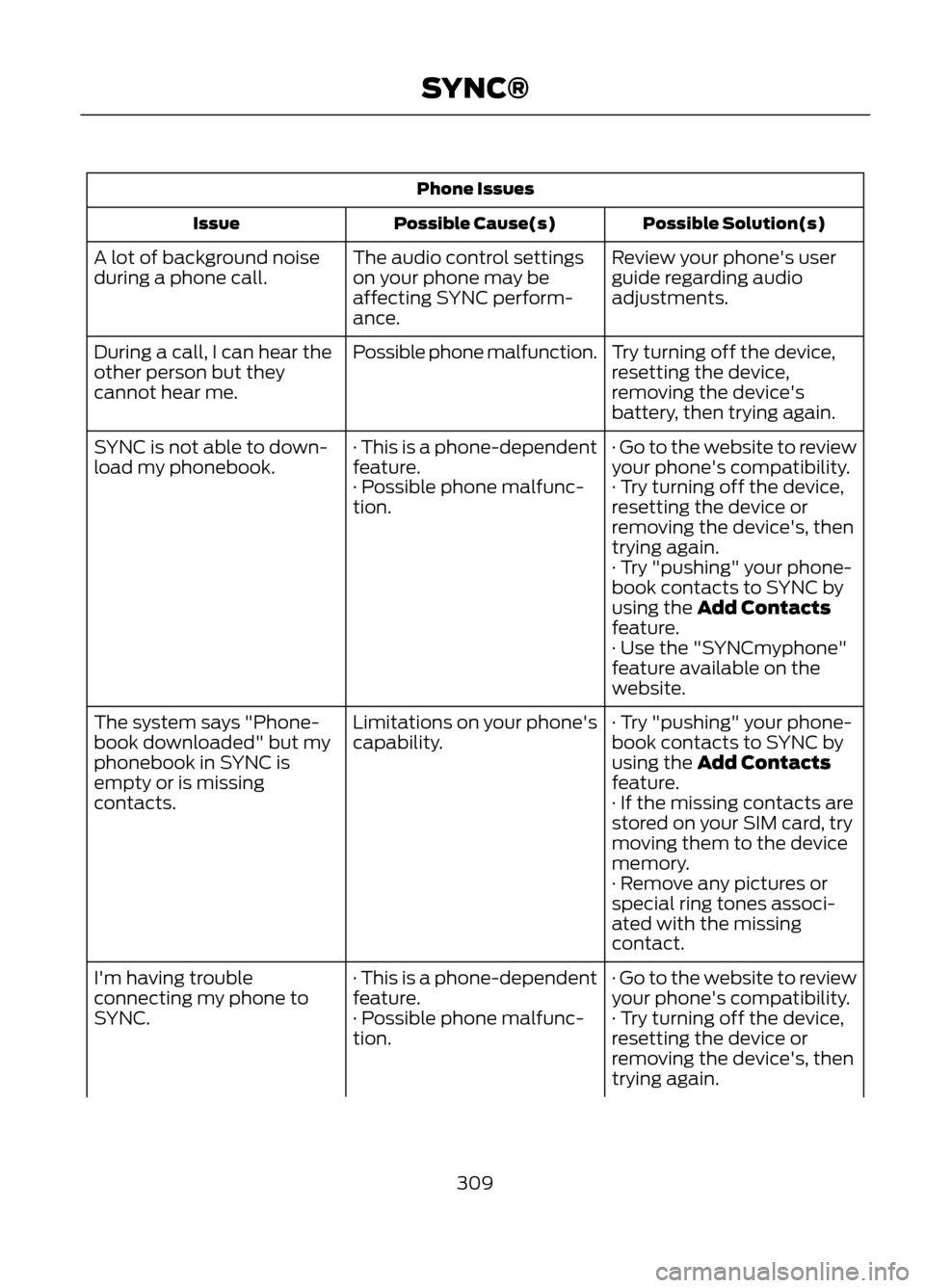
Phone IssuesPossible Solution(s)
Possible Cause(s)
Issue
Review your phone's user
guide regarding audio
adjustments.
The audio control settings
on your phone may be
affecting SYNC perform-
ance.
A lot of background noise
during a phone call.
Try turning off the device,
resetting the device,
removing the device's
battery, then trying again.
Possible phone malfunction.
During a call, I can hear the
other person but they
cannot hear me.
· Go to the website to review
your phone's compatibility.
· This is a phone-dependent
feature.
SYNC is not able to down-
load my phonebook.
· Try turning off the device,
resetting the device or
removing the device's, then
trying again.
· Possible phone malfunc-
tion.
· Try "pushing" your phone-
book contacts to SYNC by
using the Add Contacts
feature.
· Use the "SYNCmyphone"
feature available on the
website.
· Try "pushing" your phone-
book contacts to SYNC by
using the Add Contacts
feature.
Limitations on your phone's
capability.
The system says "Phone-
book downloaded" but my
phonebook in SYNC is
empty or is missing
contacts.
· If the missing contacts are
stored on your SIM card, try
moving them to the device
memory.
· Remove any pictures or
special ring tones associ-
ated with the missing
contact.
· Go to the website to review
your phone's compatibility.
· This is a phone-dependent
feature.
I'm having trouble
connecting my phone to
SYNC.
· Try turning off the device,
resetting the device or
removing the device's, then
trying again.
· Possible phone malfunc-
tion.
309
SYNC®
Page 310 of 423

Phone IssuesPossible Solution(s)
Possible Cause(s)
Issue
· Try deleting your device
from SYNC, deleting SYNC
from your device and trying
again.
· Check the security and
"auto accept/prompt
always" settings relative to
the SYNC Bluetooth
connection on your phone.
· Update your device's firm-
ware.
· Turn off the Auto phone-
book download setting.
· Go to the website to review
your phone's compatibility.
· This is a phone-dependent
feature.
Text messaging is not
working on SYNC.
· Try turning off the device,
resetting the device or
removing the device's, then
trying again.
· Possible phone malfunc-
tion.
USB/Media Issues
Possible Solution(s)
Possible Cause(s)
Issue
· Try turning off the device,
resetting the device,
removing the device's
battery, then trying again.
Possible device malfunction.
I'm having trouble
connecting my device.
· Make sure you are using the
manufacturer's cable.
· Make sure the USB cable is
properly inserted into the
device and the vehicle's USB
port.
310
SYNC®
Page 326 of 423

Intersection"Enter city"
"Change city" "Enter state"
"Change state"
The dual mode feature is also available
when the voice system displays a list of
items to pick from during a voice session,
where you would be able to touch the line
item or say "Line 2". If a command is not
understood or there are multiple options,
the system returns a list for you to choose
from.
MENU
Under the menu setting, you can set your
clock, access and make adjustments to
the display, sound and vehicle settings as
well as access settings for specific modes
or the help feature.
Setting the Clock
Note: The date is set by your vehicle's GPS;
you cannot manually set the date.
Note: If the battery has been disconnected,
the vehicle needs to acquire a GPS signal
to update the clock. Once your vehicle
acquires the signal, it may take a few
minutes for the update to display the correct
time.
1. Press Menu, then Clock.
2. Press + and - to adjust the time.
From this screen, you can also make other
adjustments such as 12-hour or 24-hour
mode, activate GPS time synchronization
and have the system automatically update
new time zones.
Once you update any settings they are
automatically saved. Display Settings
To access and make adjustments to the
touchscreen display using the touchscreen,
press Menu, then Display. Select any of the
following:
•
Brightness
• Auto Dim On/Off
• Mode: Auto, Day or Night
• Edit Wallpaper
To access and make
adjustments to the touchscreen
display using voice commands,
press the voice button on your steering
wheel controls and, when prompted, say
"Display Settings".
Uploading Photos for Your Home
Screen Wallpaper
Note: You cannot load photos directly from
your camera. You must access the photos
from either your USB mass storage device
or from an SD card.
Your system allows you to upload and view
up to 32 photos. To upload photos, press
Menu, Display, then Edit Wallpaper. Follow
the system prompts to upload your
photographs.
Photo Display Limitations
Note: Photographs with extremely large
dimensions (i.e. 2048 x 1536) may not be
compatible and appear as a blank (black)
image on the display.
326
MyFord Touch®
E142599
Page 366 of 423

•A connected Bluetooth-enabled phone
must have adequate network coverage,
battery power and signal strength.
• The vehicle must have battery power
and be located in the U.S., Canada or
in a territory in which 911 is the
emergency number.
In the Event of a Crash
Not all crashes deploy an airbag or activate
the fuel pump shut-off (which would
activate 911 Assist); however, if 911 Assist
is triggered, SYNC tries to contact
emergency services. If a connected phone
is damaged or loses connection to SYNC,
SYNC searches for, and tries to connect
to, any available previously paired phone
and tries to make the call to 911.
Before making the call:
• SYNC provides a short window of time
(about 10 seconds) to cancel the call.
Failure to cancel the call results in
SYNC attempting to dial 911.
• SYNC says the following, or a similar
message: "SYNC will attempt to call
911, to cancel the call, press Cancel on
your screen or press and hold the
phone button on your steering wheel."
If the call is not cancelled and a successful
call is made, a pre-recorded message is
played for the 911 operator, then the
occupant(s) in the vehicle is able to talk
with the operator. Be prepared to provide
your name, phone number and location
immediately, because not all 911 systems
are capable of receiving this information
electronically. 911 Assist May Not Work If
•
Your mobile phone or 911 Assist
hardware was damaged in a crash.
• The vehicle's battery or the SYNC
system has no power.
• The phone(s) paired and connected to
the system was thrown from the
vehicle.
911 Assist Privacy Notice
Once 911 Assist is set on, it may disclose to
emergency services that the vehicle has
been in a crash involving the deployment
of an airbag or activation of the fuel pump
shut-off. Certain versions or updates to 911
Assist may also be capable of
electronically or verbally disclosing to 911
operators the vehicle location or other
details about the vehicle or crash to assist
911 operators to provide the most
appropriate emergency services. If you do
not want to disclose this information, do
not turn the feature on.
Vehicle Health Report (If Equipped)
WARNING
Always follow scheduled
maintenance instructions, regularly
inspect your vehicle, and seek repair
for any damage or problem you suspect.
Vehicle Health Report supplements, but
cannot replace, normal maintenance and
vehicle inspection. Vehicle Health Report
only monitors certain systems that are
electronically monitored by the vehicle and
will not monitor or report the status of any
other system, (i.e., brake lining wear).
Failure to perform scheduled maintenance
and regularly inspect your vehicle may
result in vehicle damage and serious injury.
Note: This feature is only available in the
United States.
366
MyFord Touch®
Page 398 of 423

Check Every Six Months
•Battery connections. Clean if
necessary.
• Body and door drain holes for
obstructions. Clean if necessary.
• Cooling system fluid level and coolant
strength.
• Door weatherstrips for wear. Lubricate
if necessary.
• Hinges, latches and outside locks for
proper operation. Lubricate if
necessary.
• Parking brake for proper operation.
• Safety belts and seat latches for wear
and function. •
Safety warning lamps (brake, ABS,
airbag and safety belt) for operation.
• Washer spray and wiper operation.
Clean or replace blades as necessary.
Multi-Point Inspection
In order to keep your vehicle running right,
it is important to have the systems on your
vehicle checked regularly. This can help
identify potential issues and prevent major
problems. We recommend the following
multi-point inspection be performed at
every scheduled maintenance interval to
help ensure your vehicle keeps running
great.
Multi-Point Inspection Hazard warning system operation
Accessory drive belt(s)
Horn operation
Battery performance
Radiator, cooler, heater and A/C hoses
Engine air filter
Suspension components for leaks ordamage
Exhaust system
Steering and linkage
Exterior lamps operation
Tires (including spare) for wear and properpressure
Fluid levels
*
; fill if necessary
Windshield for cracks, chips or pits
For oil and fluid leaks
Washer spray and wiper operation
Half-shaft dust boots
* Brake, coolant recovery reservoir, automatic transmission and window washer
398
Scheduled Maintenance
Page 414 of 423

Brakes...............................................................156General Information.......................................... 156
Breaking-In.....................................................194
Bulb Specification Chart...........................235
C
Cabin Air Filter................................................119
California Proposition 65.............................10
Capacities and Specifications................267 Technical Specifications................................... 271
Car Wash See: Cleaning the Exterior.............................. 236
Center Console..............................................134
Changing a Bulb............................................231 Lamp Assembly Condensation..................... 231
Replacing Fog, Park and Turn Signal Bulbs.................................................................. 233
Replacing Headlamp Bulbs........................... 232
Replacing HID Headlamp Bulbs................... 232
Replacing High-Mount Brake Lamp Bulb.................................................................... 234
Replacing License Plate Lamp Bulb...........234
Replacing Reverse Lamp Assembly...........234
Replacing Side Marker Bulbs......................... 233
Replacing Tail, Brake and Turn Signal Bulbs.................................................................. 234
Changing a Fuse...........................................207 Fuses....................................................................... 207
Changing a Road Wheel...........................260 Dissimilar Spare Wheel and Tire Assembly
Information..................................................... 260
Tire Change Procedure.................................... 262
Changing the Engine Air Filter.................228 ........................................................................\
.......... 229
1.6L and 2.0L EcoBoost® Engines...............228
2.5L Engine........................................................... 229
Changing the Vehicle Battery.................226
Changing the Wiper Blades......................227
Checking MyKey System Status..............50
Checking the Wiper Blades......................227
Child Restraint and Safety Belt Maintenance.................................................33
Child Safety.......................................................14 General Information............................................. 14
Child Safety Locks..........................................24
Child Seat Positioning...................................16
Child Seats.........................................................16 Cleaning Leather Seats.............................239
Cleaning Products.......................................236
Cleaning the Alloy Wheels.......................240
Cleaning the Engine....................................237
Cleaning the Exterior..................................236
Cleaning Plastic Exterior Parts...................... 237
Exterior Chrome................................................. 236
Underbody............................................................ 237
Cleaning the Instrument Panel and Instrument Cluster Lens.........................239
Cleaning the Interior...................................238
Cleaning the Windows and Wiper Blades...........................................................238
Clearing All MyKeys.......................................50
Climate.............................................................367 Climate Control Voice Commands.............369
Climate Control..............................................113
Coolant Check See: Engine Coolant Check............................ 222
Crash Sensors and Airbag Indicator........42
Creating a MyKey...........................................49 Programming/Changing Optional
Settings............................................................... 50
Cruise Control.................................................66 Principle of Operation....................................... 170
Cruise Control See: Using Cruise Control................................ 170
Customer Assistance..................................201
D
Data Recording..................................................9 Event Data Recording........................................... 9
Service Data Recording........................................ 9
Daytime Running Lamps..............................71
Direction Indicators........................................72
Driver and Passenger Airbags...................36 Children and Airbags........................................... 37
Proper Driver and Front Passenger Seating Adjustment........................................................ 36
Driving Aids.......................................................171
Driving Hints...................................................194
Driving Through Water...............................194
DRL See: Daytime Running Lamps.......................... 71
414
Index
Page 417 of 423

Information Messages..................................87Airbag........................................................................\
87
Alarm........................................................................\
88
Battery and Charging System......................... 88
Blind Spot Information and Cross Traffic Alert System..................................................... 88
Doors........................................................................\
89
Engine...................................................................... 90
Hill Start Assist..................................................... 90
Keyless Vehicle..................................................... 90
Lighting..................................................................... 91
Maintenance.......................................................... 92
Message indicator................................................ 87
MyKey....................................................................... 92
Park Aid.................................................................... 93
Park Brake............................................................... 93
Power Steering...................................................... 94
Starting System ................................................... 94
Tire Pressure Monitoring System................... 96
Traction Control................................................... 96
Transmission and Four-Wheel Drive............94
Installing Child Seats.....................................19 Using LAP AND SHOULDER BELTS...............19
Using Lower Anchors AND Tethers FOR
CHildren (LATCH)............................................ 22
Using Tether Straps............................................. 23
Instrument Cluster.........................................79
Instrument Lighting Dimmer.......................71 Vehicles With Front Fog Lamps....................... 71
Vehicles Without Front Fog Lamps................71
Interior Lamps..................................................72 Front Interior Lamp.............................................. 72
Rear Interior Lamp................................................ 73
Interior Mirror....................................................76 Auto-Dimming Mirror.......................................... 76
Introduction.........................................................7
J
Jump-Starting the Vehicle........................198 Connecting the Jumper Cables..................... 199
Jump Starting...................................................... 199
Preparing Your Vehicle..................................... 198
Removing the Jumper Cables........................ 199K
Keyless Entry...................................................60
SECURICODE™ KEYLESS ENTRY
KEYPAD.............................................................. 60
Keyless Starting.............................................135 Fast Restart........................................................... 137
Stopping the Engine When Your Vehicle is Moving................................................................ 137
Stopping the Engine When Your Vehicle is Stationary......................................................... 136
Keys and Remote Controls.........................44 Principle of Operation........................................ 44
Knee Airbag.......................................................37
L
Lighting Control..............................................70 Headlamp Flasher............................................... 70
High Beams............................................................ 70
Lighting..............................................................70
Load Carriers See: Roof Racks and Load Carriers..............178
Load Carrying..................................................177
Load Limit........................................................179 Vehicle loading - with and without a
trailer................................................................... 179
Locking and Unlocking.................................54 Activating Intelligent Access ........................... 55
Autolock and Autounlock ................................ 56
Battery Saver......................................................... 56
Illuminated Entry.................................................. 56
Illuminated Exit..................................................... 56
Power Door Locks................................................ 54
Remote Control.................................................... 54
Smart Unlocks For Integrated Keyhead Transmitter........................................................ 55
Smart Unlocks For Intelligent Access Keys ........................................................................\
........ 55
Locks...................................................................54
Luggage Covers..............................................177
M
Maintenance...................................................217 General Information........................................... 217
Manual Climate Control..............................113
Manual Liftgate...............................................57
417
Index