Page 322 of 423

These commands can be said at any time during a voice session"Previous page""Go back""Cancel" "Exit"
"Help"
Accessing a List of Available Commands
1. Using the touchscreen, press the Menu
icon, Help, then Voice Command List. 2.
Using the steering wheel control, press
the voice icon. After the tone, speak
your command clearly.
Available Voice Commands
"Radio list of commands"
"Audio list of commands"
"SD card list of commands"
"Bluetooth audio list of commands"
"Sirius satellite list of commands" *
"Browse list of commands"
"Travel link list of commands" *
"CD list of commands"
"USB list of commands"
"Climate control list of commands"
"Voice instructions list of commands"
"List of commands"
"Voice settings list of commands"
"Navigation list of commands" *
"Help"
"Phone list of commands"
* If equipped
Voice Settings
Voice settings allow you to customize the
level of system interaction, help and
feedback. The system defaults to standard
interaction which uses candidate lists and
confirmation prompts as these provide the
highest level of guidance and feedback.
322
MyFord Touch®
Page 326 of 423

Intersection"Enter city"
"Change city" "Enter state"
"Change state"
The dual mode feature is also available
when the voice system displays a list of
items to pick from during a voice session,
where you would be able to touch the line
item or say "Line 2". If a command is not
understood or there are multiple options,
the system returns a list for you to choose
from.
MENU
Under the menu setting, you can set your
clock, access and make adjustments to
the display, sound and vehicle settings as
well as access settings for specific modes
or the help feature.
Setting the Clock
Note: The date is set by your vehicle's GPS;
you cannot manually set the date.
Note: If the battery has been disconnected,
the vehicle needs to acquire a GPS signal
to update the clock. Once your vehicle
acquires the signal, it may take a few
minutes for the update to display the correct
time.
1. Press Menu, then Clock.
2. Press + and - to adjust the time.
From this screen, you can also make other
adjustments such as 12-hour or 24-hour
mode, activate GPS time synchronization
and have the system automatically update
new time zones.
Once you update any settings they are
automatically saved. Display Settings
To access and make adjustments to the
touchscreen display using the touchscreen,
press Menu, then Display. Select any of the
following:
•
Brightness
• Auto Dim On/Off
• Mode: Auto, Day or Night
• Edit Wallpaper
To access and make
adjustments to the touchscreen
display using voice commands,
press the voice button on your steering
wheel controls and, when prompted, say
"Display Settings".
Uploading Photos for Your Home
Screen Wallpaper
Note: You cannot load photos directly from
your camera. You must access the photos
from either your USB mass storage device
or from an SD card.
Your system allows you to upload and view
up to 32 photos. To upload photos, press
Menu, Display, then Edit Wallpaper. Follow
the system prompts to upload your
photographs.
Photo Display Limitations
Note: Photographs with extremely large
dimensions (i.e. 2048 x 1536) may not be
compatible and appear as a blank (black)
image on the display.
326
MyFord Touch®
E142599
Page 332 of 423
ENTERTAINMENT
Your system offers many media options.
You can access these options using the
touchscreen or voice commands.Browsing Device Content
When listening to any type of audio, you
can browse through other devices without
having to change sources. For example, if
you are currently listening to the radio, you
can browse all the artists that are stored
on your USB device.
Press the voice icon on the
steering wheel. When prompted,
you can say:
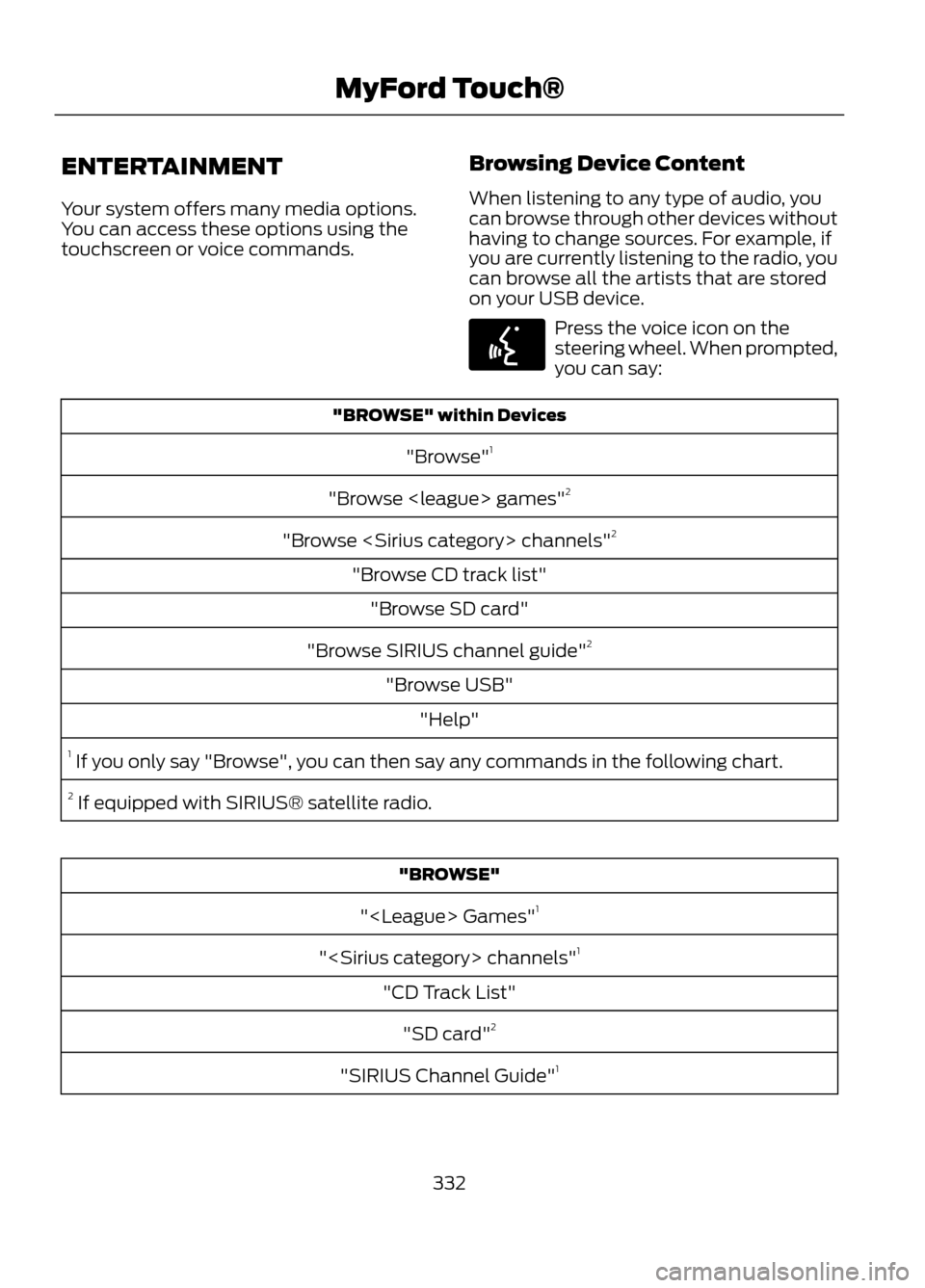
"BROWSE" within Devices
"Browse" 1
"Browse games" 2
"Browse channels" 2
"Browse CD track list" "Browse SD card"
"Browse SIRIUS channel guide" 2
"Browse USB" "Help"
1 If you only say "Browse", you can then say any commands in the following chart.
2 If equipped with SIRIUS® satellite radio.
"BROWSE"
" Games" 1
" channels" 1
"CD Track List" "SD card" 2
"SIRIUS Channel Guide" 1
332
MyFord Touch®
E142599
Page 337 of 423

Potential Station IssuesAction
Cause
Issues
None. Broadcast issue.
Poor time-alignment by the
radio broadcaster.
Echo, stutter, skip or repeat
in audio. Increase or
decrease in audio volume.
None. Reception issue that
may clear up as you
continue to drive.
The radio is shifting between
analog and digital audio.
Sound fading or blending in
and out.
None. This is normal beha-
vior. Wait until the audio is
available.
The digital multicast is not
available until the HD Radio
broadcast is decoded. Once
decoded, the audio is avail-
able.
Audio mute delay when
selecting HD2/HD3,
multicast preset or Direct
Tune.
None. The station is not
available in your current
location.
The previously stored
multicast preset or direct
tune is not available in your
current reception area.
Cannot access HD2/HD3
multicast channel when
recalling a preset or from a
direct tune.
Fill out the station issue
form at website listed
below.*
Data service issue by the
radio broadcaster.
Text information does not
match currently playing
audio.
Fill out the station issue
form at website listed
below.*
Data service issue by the
radio broadcaster.
No text information shown
for currently selected
frequency.
None. This is normal beha-
vior.
Pressing Scan disables HD2-
HD7 channel search.
HD2-HD7 stations not found
when Scan is pressed.
* http://www.ibiquity.com/automotive/report_radio_station_experiences
HD Radio Technology manufactured under
license from iBiquity Digital Corp. U.S. and
foreign patents. HD Radio and the HD and
HD Radio logos are proprietary trademarks
of iBiquity Digital Corp. Ford Motor
Company and iBiquity Digital Corp. are not
responsible for the content sent using HD
Radio technology. Content may be
changed, added or deleted at any time at
the station owner's discretion. Radio Voice Commands
If you are listening to the radio,
press the voice button on the
steering wheel controls. When
prompted, say any of the following
commands.
If you are not listening to the radio, press
the voice button and, after the tone, say
"Radio", then any of the following
commands.
337
MyFord Touch®
E142599
Page 343 of 423
SIRIUS Satellite Radio Voice
Commands
If you are listening to SIRIUS
satellite radio, press the voice
button on the steering wheel
controls. When prompted, say any of the
following commands. If you are not listening to SIRIUS satellite
radio, press the voice button and, after the
tone, say "SIRIUS", then any of the
following commands.
"SIRIUS"
"SAT 2 preset <#>"
"<0-223>"
"SAT 3"
""
"SAT 3 preset <#>"
"Preset <#>"
"SIRIUS off"
"SAT"
"SIRIUS on"
"SAT preset <#>"
"Sports game"1
"SAT 1"
"Tune"2
"SAT 1 Preset <#>"
"Help"
"SAT 2"
1 Late availability. If you have said "Sports game", refer to the following "Sports game"
chart.
2 If you have said "Tune", refer to the following "Tune" chart.
"SPORTS GAME"
"Tune to the game" "Tune to the game"
"Tune to the game" "Tune to the game" "Help"
343
MyFord Touch®
E142599
Page 345 of 423
You can also advance and reverse the
current track or current folder (if
applicable).CD Voice Commands
If you are listening to a CD, press
the voice button on the steering
wheel controls. When prompted,
say any of the following commands.
If you are not listening to a CD, press the
voice button and, after the tone, say "CD",
then any of the following commands.
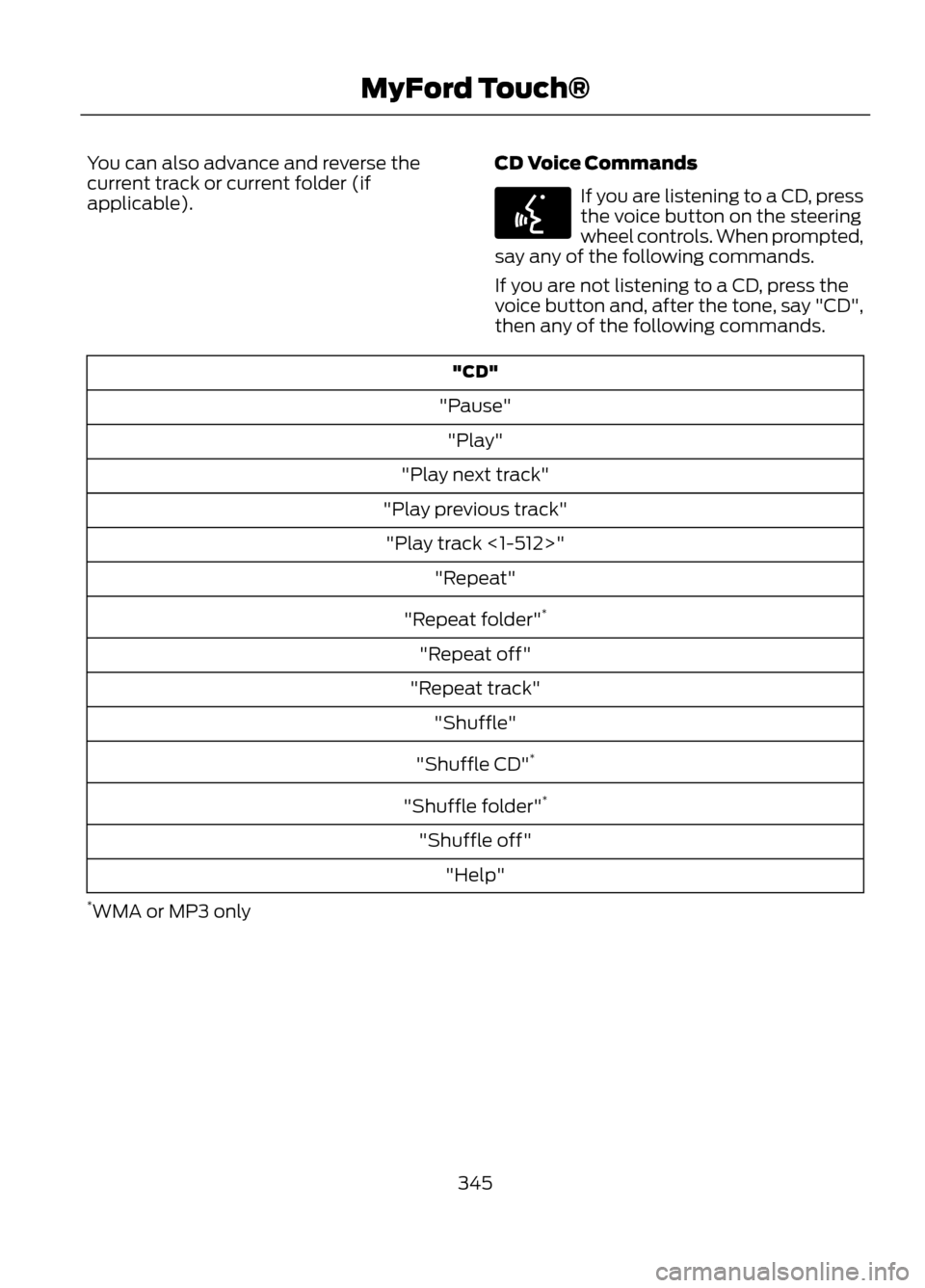
"CD"
"Pause" "Play"
"Play next track"
"Play previous track" "Play track <1-512>" "Repeat"
"Repeat folder" *
"Repeat off"
"Repeat track" "Shuffle"
"Shuffle CD" *
"Shuffle folder" *
"Shuffle off" "Help"
* WMA or MP3 only
345
MyFord Touch®
E142599
Page 348 of 423
To view song information such as Title,
Artist, File, Folder, Album, and Genre, touch
the on-screen album art. You can also
press What's Playing? to hear how the
system pronounces the current band and
song. This can be helpful when using voice
commands to make sure the system
correctly plays your request.USB and SD Card Voice Commands
If you are listening to a USB
device or an SD card, press the
voice button on the steering
wheel controls. When prompted, say any
of the following commands.
If you are not listening to a USB device or
an SD card, press the voice button and,
after the tone, say "USB" or "SD card",
then any of the following commands.
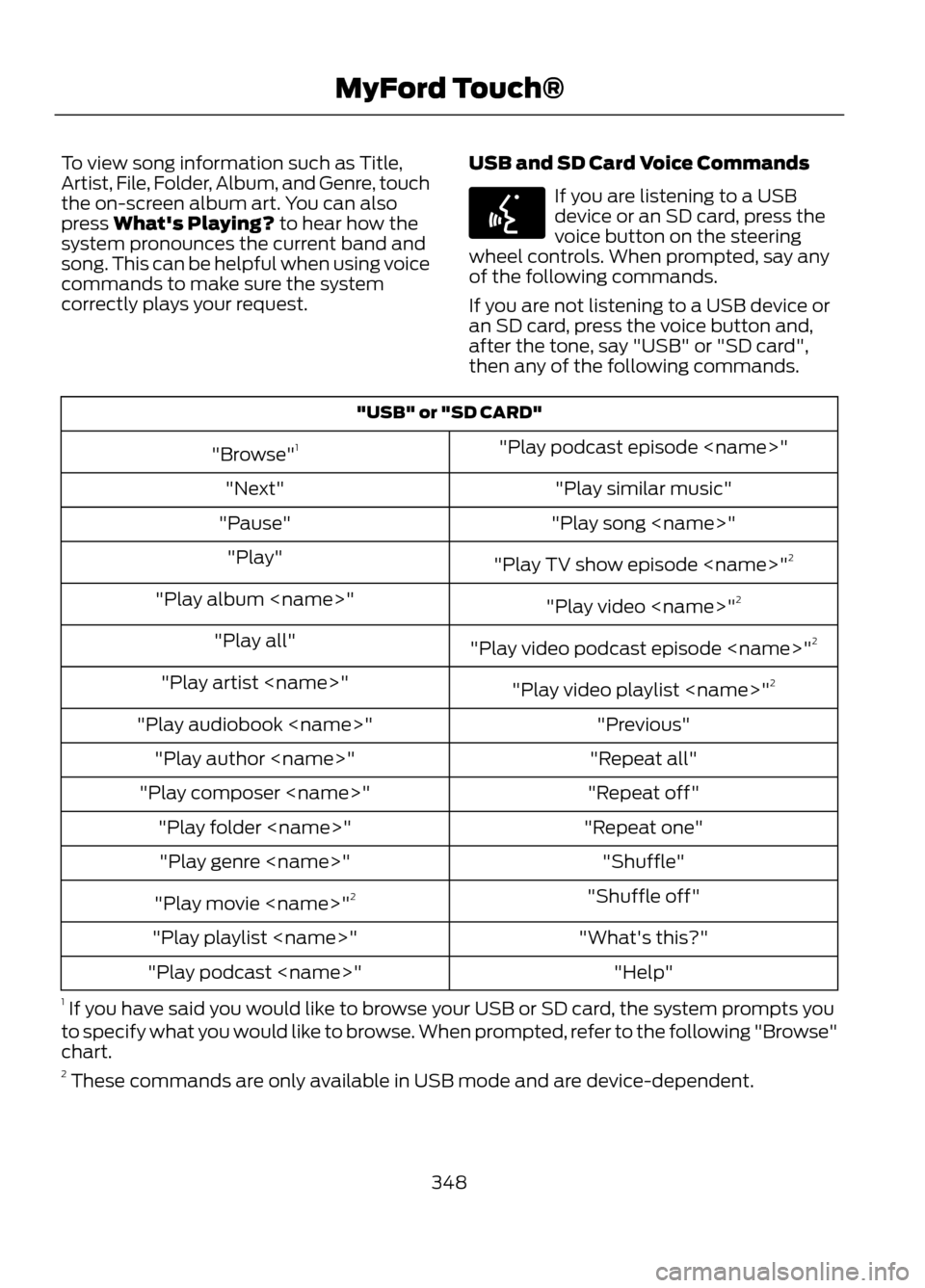
"USB" or "SD CARD"
"Play podcast episode "
"Browse" 1
"Play similar music"
"Next"
"Play song "
"Pause"
"Play TV show episode " 2
"Play"
"Play video "2
"Play album "
"Play video podcast episode " 2
"Play all"
"Play video playlist "2
"Play artist "
"Previous"
"Play audiobook "
"Repeat all"
"Play author "
"Repeat off"
"Play composer "
"Repeat one"
"Play folder "
"Shuffle"
"Play genre "
"Shuffle off"
"Play movie " 2
"What's this?"
"Play playlist "
"Help"
"Play podcast "
1 If you have said you would like to browse your USB or SD card, the system prompts you
to specify what you would like to browse. When prompted, refer to the following "Browse"
chart.
2 These commands are only available in USB mode and are device-dependent.
348
MyFord Touch®
E142599
Page 350 of 423

In order to playback video from your iPod®
or iPhone®, (if compatible), you MUST
have a special combination USB/RCA
composite video cable (available for
purchase from Apple® ). When the cable
is connected to your iPod® or iPhone®,
plug the other end into both the RCA jacks
and the USB port.
Bluetooth Audio
Your system allows you to stream audio
over your vehicle's speakers from your
connected, Bluetooth-enabled mobile
phone.
To access, press the lower left
corner on the touchscreen, then
select the BT tab.Bluetooth Audio Voice Commands
Note:
If your Bluetooth device supports
streaming metadata, all the commands
below are available. If your device does not,
only "Next song", "Pause", "Play" and
"Previous song" are available.
If you are listening to a Bluetooth
audio device, press the voice
button on the steering wheel
controls. When prompted, say any of the
commands in the following chart.
If you are not listening to a Bluetooth audio
device, press the voice button and, after
the tone, say “Bluetooth Audio ”, then any
of the commands in the following chart.
"BLUETOOTH AUDIO"
"Play genre "
"Browse composer
"
"Browse album "
"Play playlist "
"Browse folder "
"Browse all albums"
"Play podcast episode"
"Browse genre "
"Browse all artists"
"Play similar music"
"Browse playlist "
"Browse all audiobooks"
"Play song "
"Browse podcast "
"Browse all authors"
"Previous"
"Next"
"Browse all composers"
"Repeat all"
"Pause"
"Browse all folders"
"Repeat off"
"Play"
"Browse all genres"
"Repeat one"
"Play album "
"Browse all playlists"
"Shuffle"
"Play artist "
"Browse all podcasts"
"Shuffle album"
"Play audiobook "
"Browse all songs"
"Shuffle off"
"Play author "
"Browse artist "
"What’s this?"
"Play composer "
"Browse audiobook
"
"Help"
"Play folder "
"Browse author "
350
MyFord Touch®
E142611
E142599