2013 FORD ESCAPE tow
[x] Cancel search: towPage 169 of 423

Active guidelines are only shown with fixed
guidelines. To use active guidelines, turn
the steering wheel to point the guidelines
toward an intended path. If the steering
wheel position is changed while reversing,
the vehicle might deviate from the original
intended path.
The fixed and active guidelines fade in and
out depending on the steering wheel
position. The active guidelines are not
shown when the steering wheel position
is straight.
Always use caution while reversing.
Objects in the red zone are closest to your
vehicle and objects in the green zone are
farther away. Objects are getting closer to
your vehicle as they move from the green
zone to the yellow or red zones. Use the
side view mirrors and rear view mirror to
get better coverage on both sides and rear
of the vehicle.
Selectable settings for this feature are
ACTIVE + FIXED, FIXED and OFF.
Visual Park Aid Alert
Note:Visual park alert is only available
when the transmission is in R (Reverse).
Note: The reverse sensing system is not
effective at speeds above 3 mph (5 km/h)
and may not detect certain angular or
moving objects.
The system uses red, yellow and green
highlights which appear on top of the video
image when an object is detected by the
reverse sensing system. The alert highlights
the closest object detected. The reverse
sensing alert can be disabled and if visual
park aid alert is enabled, highlighted areas
are still displayed.
Selectable settings for this feature are ON
and OFF. Manual Zoom
WARNING
When manual zoom is on, the full
area behind the vehicle is not shown.
Be aware of your surroundings when
using the manual zoom feature.
Note: Manual zoom is only available when
the transmission is in R (Reverse).
Note: When manual zoom is enabled, only
the centerline is shown.
This allows you to get a closer view of an
object behind the vehicle. The zoomed
image keeps the bumper in the image to
provide a reference. The zoom is only
active while the transmission is in R
(Reverse). When the transmission is
shifted out of R (Reverse), the feature
automatically turns off and must be reset
when it is used again.
Selectable settings for this feature are OFF,
Level 1, Level 2 or Level 3. Press the up and
down arrows to change the view. The
selection level appears between the
buttons (i.e. Level 1). The default setting
for the manual zoom is OFF.
Rear Camera Delay
When shifting the transmission out of R
(Reverse) and into any gear other than P
(Park), the camera image remains in the
display until the vehicle speed reaches 5
mph (8 km/h). This occurs when the rear
camera delay feature is on, or until a radio
button is selected.
Selectable settings for this feature are ON
and OFF. The default setting for the rear
camera delay is OFF.
169
Parking Aids
Page 170 of 423

PRINCIPLE OF OPERATION
Cruise control lets you maintain a set
speed without keeping your foot on the
accelerator pedal.
USING CRUISE CONTROL
WARNING
Do not use cruise control in heavy
traffic or on roads that are winding,
slippery or unpaved.
Note:Vehicle speed may vary momentarily
when driving up or down a steep hill. Apply
the brakes if the vehicle speed increases
above the set speed while driving downhill.
Note: Cruise control will disengage if the
vehicle speed decreases more than 10 mph
(16 km/h) below your set speed while
driving uphill.
Switching On Cruise Control
Press and release ON.
Setting a Speed
Press and release SET+.
The indicator will display in the
instrument cluster. Changing the Set Speed
Accelerate
A
Decelerate
B
• Press and hold SET+ or SET-. Release
the control when you reach the desired
speed.
• Press and release SET+ or SET-. The
set speed will change in approximately
1 mph (2 km/h) increments.
• Press the accelerator or brake pedal
until you reach the desired speed. Press
and release SET+.
Canceling a Set Speed
Pull CAN toward you and release, or tap
the brake pedal. The set speed will not be
erased.
Resuming a Set Speed
Pull RES toward you and release.
Switching Off Cruise Control
Note: The set speed is erased when you
switch off cruise control.
Press and release OFF or switch off the
ignition.
170
Cruise Control
E142437
E71340
E142438
Page 174 of 423

Reasons for messages being displayedClean the fascia area in
front of the radar or remove the obstruction.
The radar
surface is dirty or
obstructed
Drive normally in traffic for
a few minutes to allow the radar to detect passing
vehicles so it can clear the blocked state.
The radar
surface is
not dirty or
obstructed
No action required. Thesystem automatically
resets to an unblocked
state once the rainfall or
snowfall rate decreases or stops. Do not use BLIS or
cross traffic alert in these conditions.
Heavy rain-
fall/snow- fall inter-
feres with the radar signals
System Limitations
The BLIS and cross traffic alert systems
do have their limitations; situations such
as severe weather conditions or debris
build-up on the sensor area may limit
vehicle detection.
The following are other situations that may
limit the BLIS:
• Certain maneuvering of vehicles
entering and exiting the blind zone.
• Vehicles passing through the blind zone
at very fast rates.
• When several vehicles forming a
convoy pass through the blind zone.
The following are other situations that may
limit the cross traffic alert system:
• Adjacently parked vehicles or objects
obstructing the sensors.
• Approaching vehicles passing at
speeds greater than 15 mph (24 km/h). •
Driving in reverse faster than 3 mph (5
km/h).
• Backing out of an angled parking spot.
False Alerts
Note: If the vehicle has a factory equipped
tow bar, and it is towing a trailer, the sensors
will detect the trailer and turn the BLIS off
to avoid false alerts. For non-factory
equipped tow bars you may want to turn
the BLIS off manually.
There may be certain instances when
either the BLIS or cross traffic alert
systems illuminate the alert indicator with
no vehicle in the coverage zone; this is
known as a false alert. Some amount of
false alerts are normal; they are temporary
and self-correct.
System Errors
If either system senses a problem with the
left or right sensor, the BLIS telltale
illuminates and remains on and the
following will appear in the information
display:
• BLIS: X sensor fault Service req’ d or
• Cross Traffic malfunction Service req’ d
When problems that may cause the left or
right indicator not to illuminate, only the
information display faults appear.
Switching the Systems Off and On
One or both systems can be switched off
temporarily by using the information
display control. See General Information
(page 84). When the BLIS is switched off,
you will not receive alerts and a telltale
illuminates in the information display. The
system switches back on whenever the
ignition is switched on.
174
Driving Aids
Page 181 of 423
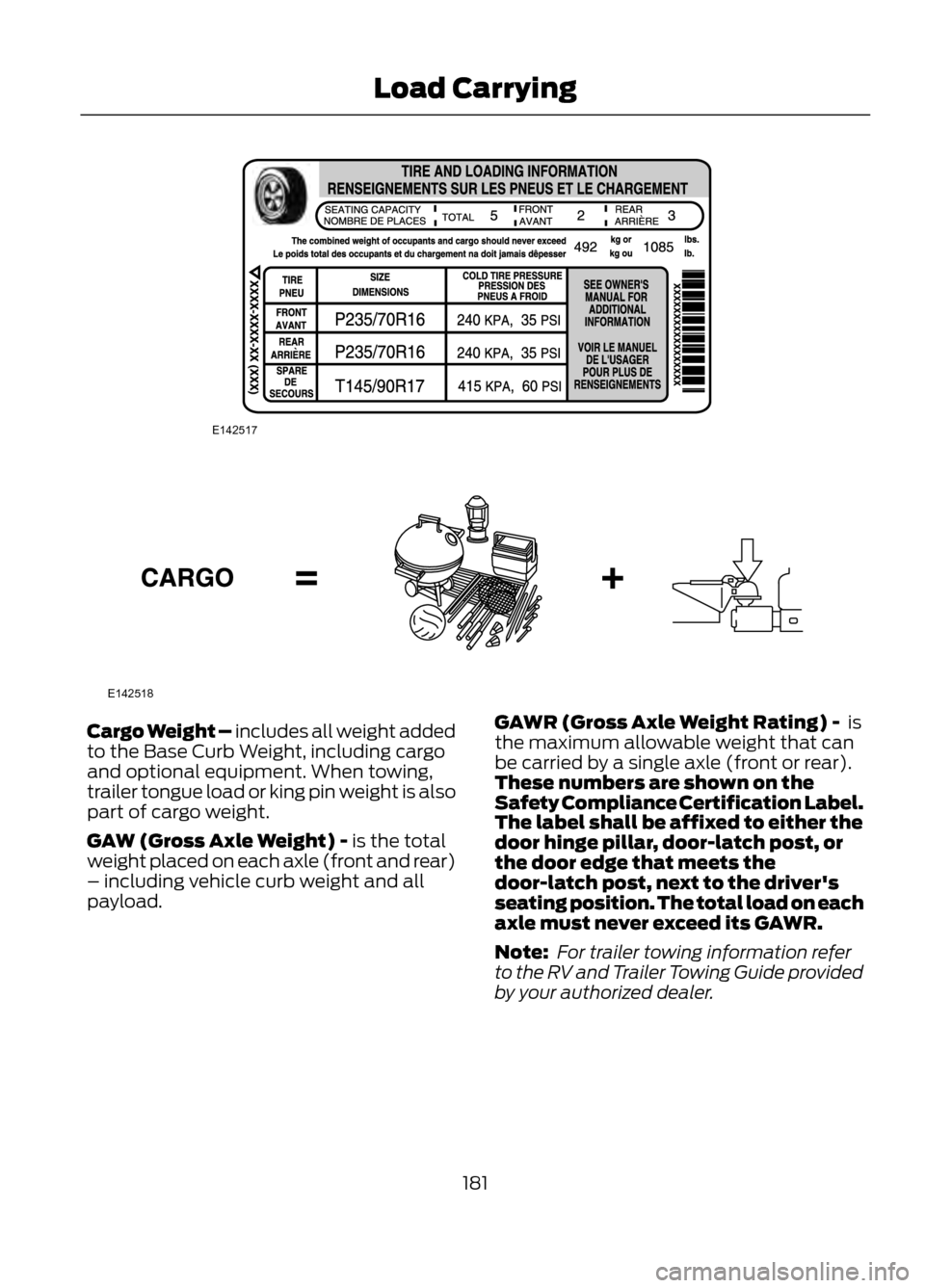
Cargo Weight – includes all weight added
to the Base Curb Weight, including cargo
and optional equipment. When towing,
trailer tongue load or king pin weight is also
part of cargo weight.
GAW (Gross Axle Weight) - is the total
weight placed on each axle (front and rear)
– including vehicle curb weight and all
payload.GAWR (Gross Axle Weight Rating) - is
the maximum allowable weight that can
be carried by a single axle (front or rear).
These numbers are shown on the
Safety Compliance Certification Label.
The label shall be affixed to either the
door hinge pillar, door-latch post, or
the door edge that meets the
door-latch post, next to the driver's
seating position. The total load on each
axle must never exceed its GAWR.
Note:
For trailer towing information refer
to the RV and Trailer Towing Guide provided
by your authorized dealer.
181
Load Carrying
E142517
E142518
Page 184 of 423

WARNING
Exceeding the Safety Compliance
Certification Label vehicle weight
rating limits could result in
substandard vehicle handling or
performance, engine, transmission and/or
structural damage, serious damage to the
vehicle, loss of control and personal injury.
GCW (Gross Combined Weight) - is the
weight of the loaded vehicle (GVW) plus
the weight of the fully loaded trailer
GCWR (Gross Combined Weight
Rating) -is the maximum allowable
weight of the vehicle and the loaded trailer
-including all cargo and passengers - that
the vehicle can handle without risking
damage. (Important: The towing vehicle ’s
braking system is rated for operation at
GVWR, not at GCWR.) Separate functional
brakes should be used for safe control of
towed vehicles and for trailers where the
GCW of the towing vehicle plus the trailer
exceed the GVWR of the towing vehicle.
The GCW must never exceed the GCWR.
Maximum Loaded Trailer Weight - is the
highest possible weight of a fully loaded
trailer the vehicle can tow. It assumes a
vehicle with only mandatory options, no
cargo (internal or external), a tongue load
of 10– 15% (conventional trailer) or king
pin weight of 15– 25% (fifth wheel trailer),
and driver only (150 lb. [68 kg]). Consult
your authorized dealer (or the RV and
Trailer Towing Guide provided by your
authorized dealer) for more detailed
information. Tongue Load or Fifth Wheel King Pin
Weight - refers to the amount of the
weight that a trailer pushes down on a
trailer hitch.
Examples: For a 5000 lb. (2268 kg)
conventional trailer, multiply 5000 by 0.10
and 0.15 to obtain a proper tongue load
range of 500 to 750 lb. (227 to 340 kg).
For an 11500 lb. (5216 kg) fifth wheel
trailer, multiply by 0.15 and 0.25 to obtain
a proper king pin load range of 1725 to 2875
lb. (782 to 1304 kg).
WARNINGS
Do not exceed the GVWR or the
GAWR specified on the Safety
Compliance Certification Label.
Do not use replacement tires with
lower load carrying capacities than
the original tires because they may
lower the vehicle ’s GVWR and GAWR
limitations. Replacement tires with a higher
limit than the original tires do not increase
the GVWR and GAWR limitations.
Exceeding any vehicle weight rating
limitation could result in serious
damage to the vehicle and/or
personal injury.
184
Load Carrying
E142526
Page 185 of 423

Steps for determining the correct load
limit:
1. Locate the statement "The combinedweight of occupants and cargo should
never exceed XXX kg or XXX lb." on
your vehicle ’s placard.
2. Determine the combined weight of the
driver and passengers that will be riding
in your vehicle.
3. Subtract the combined weight of the driver and passengers from XXX kg or
XXX lb.
4. The resulting figure equals the available amount of cargo and luggage
load capacity. For example, if the “XXX”
amount equals 1,400 lb. and there will
be five 150 lb. passengers in your
vehicle, the amount of available cargo
and luggage load capacity is 650 lb.
(1400-750 (5 x 150) = 650 lb.). In
metric units (635-340 (5 x 68) = 295
kg.)
5. Determine the combined weight of luggage and cargo being loaded on the
vehicle. That weight may not safely
exceed the available cargo and luggage
load capacity calculated in Step 4.
6. If your vehicle will be towing a trailer, load from your trailer will be transferred
to your vehicle. Consult this manual to
determine how this reduces the
available cargo and luggage load
capacity of your vehicle.
185
Load Carrying
Page 188 of 423

TOWING A TRAILER
WARNINGS
Do not exceed the GVWR or the
GAWR specified on the certification
label.
Towing trailers beyond the maximum
recommended gross trailer weight
exceeds the limit of the vehicle and
could result in engine damage,
transmission damage, structural damage,
loss of vehicle control, vehicle rollover and
personal injury.
Your vehicle's load capacity is designated
by weight, not by volume, so you cannot
necessarily use all available space when
loading a vehicle.
Towing a trailer places an additional load
on your vehicle's engine, transmission, axle,
brakes, tires and suspension. Inspect these
components periodically during, and after,
any towing operation.
TRAILER SWAY CONTROL (IF
EQUIPPED)
Note: This feature does not prevent trailer
sway, but reduces it once it begins. Note:
This feature cannot stop all trailers
from swaying.
Note: In some cases, if vehicle speed is too
high, the system may activate multiple
times, gradually reducing vehicle speed.
This feature applies the vehicle brakes at
individual wheels and, if necessary, reduces
engine power. If the trailer begins to sway,
the stability control light flashes. The first
thing to do is slow the vehicle down, then
pull safely to the side of the road and
check for proper tongue load and trailer
load distribution. See Load Carrying
(page 177).
RECOMMENDED TOWING
WEIGHTS
Note: For high altitude operation, reduce
the gross combined weight by 2% per 1000
feet (300 meters) elevation.
Note: Certain states require electric trailer
brakes for trailers over a specified weight.
Be sure to check state regulations for this
specified weight. The maximum trailer
weights listed may be limited to this
specified weight, as the vehicle's electrical
system does not include the wiring
connector needed to activate electric trailer
brakes.
Maximum Trailer
Frontal Area - ft 2
(m 2
)
Maximum Trailer
Weight - lb (kg)
Maximum GCWR - lb
(kg)
Powertrain
20 (1.86)
2000 (907)
5866 (2661)
2WD 1.6L
20 (1.86)
2000 (907)
6035 (2737)
4WD 1.6L
20 (1.86)
2000 (907)
5977 (2711)
2WD 2.0L 1
30 (2.78)
3500 (1588)
7477 (3391)
2WD 2.0L 2
20 (1.86)
2000 (907)
6126 (2779)
4WD 2.0L 1
188
Towing
Page 189 of 423

Maximum Trailer
Frontal Area - ft 2
(m 2
)
Maximum Trailer
Weight - lb (kg)
Maximum GCWR - lb
(kg)
Powertrain
30 (2.78)
3500 (1588)
7626 (3459)
4WD 2.0L 2
20 (1.86)
2000 (907)
5417 (2457)
2WD 2.5L
1 Without trailer tow package.
2 With trailer tow package.
189
Towing