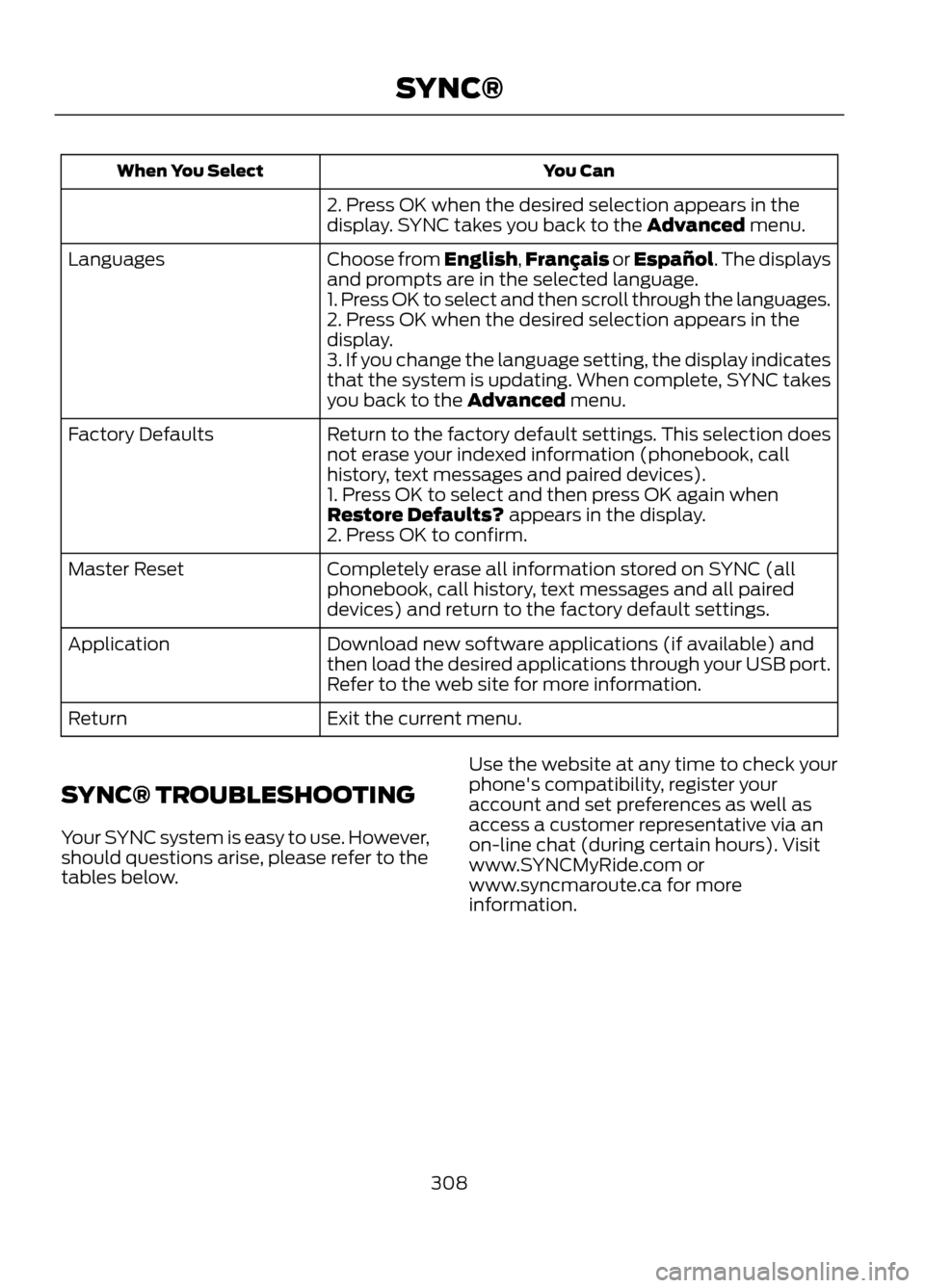
You Can
When You Select
2. Press OK when the desired selection appears in the
display. SYNC takes you back to the Advanced menu.
Choose from English,Français or Español. The displays
and prompts are in the selected language.
Languages
1. Press OK to select and then scroll through the languages.
2. Press OK when the desired selection appears in the
display.
3. If you change the language setting, the display indicates
that the system is updating. When complete, SYNC takes
you back to the Advanced menu.
Return to the factory default settings. This selection does
not erase your indexed information (phonebook, call
history, text messages and paired devices).
Factory Defaults
1. Press OK to select and then press OK again when
Restore Defaults? appears in the display.
2. Press OK to confirm.
Completely erase all information stored on SYNC (all
phonebook, call history, text messages and all paired
devices) and return to the factory default settings.
Master Reset
Download new software applications (if available) and
then load the desired applications through your USB port.
Refer to the web site for more information.
Application
Exit the current menu.
Return
SYNC® TROUBLESHOOTING
Your SYNC system is easy to use. However,
should questions arise, please refer to the
tables below. Use the website at any time to check your
phone's compatibility, register your
account and set preferences as well as
access a customer representative via an
on-line chat (during certain hours). Visit
www.SYNCMyRide.com or
www.syncmaroute.ca for more
information.
308
SYNC®
System SettingsDistance Units
Language
System Prompt Volume
Temperature Units
Keyboard Layout
Touchscreen Beeps
Master Reset
Install Applications
Voice Settings
Customize the level of system interaction,
help and feedback. Press Menu, Settings, then Voice.
Voice Settings
· Standard interaction mode provides more detailed
interaction and guidance.
Interaction Mode
· Advanced mode has less audible interaction and more
tone prompts.
Short questions asked by the system when the system
has not clearly heard or understood your request. (Even
with confirmation prompts turned off, you may be asked
to confirm settings occasionally.)
Confirmation Prompts
Candidate lists are possible results from your voice
commands. If these are turned off, the system simply
makes a best guess at your request.
Media Candidate Lists
Phone Candidate Lists
Allows you to adjust the voice volume level.
Voice Control Volume
Media Player Settings
To access settings for your media player,
press Menu, Settings, then Media Player.
Select from the following:
• Autoplay On/Off
• Bluetooth Devices
• Index Bluetooth On/Off
• Database Info
• Media Management On/Off Note:
With Autoplay and Index Bluetooth
turned on, you can listen to music which has
already been indexed. With these features
turned off, SYNC does not play any of your
music until all the media (on your USB
thumb drive, flash drive, portable music
player, etc.) has been indexed.
Navigation Settings
To access settings for your media player,
press Menu, Settings, then Navigation.
328
MyFord Touch®