Page 387 of 683
Using the Remote Control
•Select an audio channel (Channel 1 for 2nd row screen
and Channel 2 for 3rd row screen), then press the
source key and select VES™ Disc from the menu.
•Press popup/menu key to navigate disc menu and
options.
NOTE:Due to the size of the content on a Blu-ray disc,
the disc may not start playing immediately.
Play Video Games
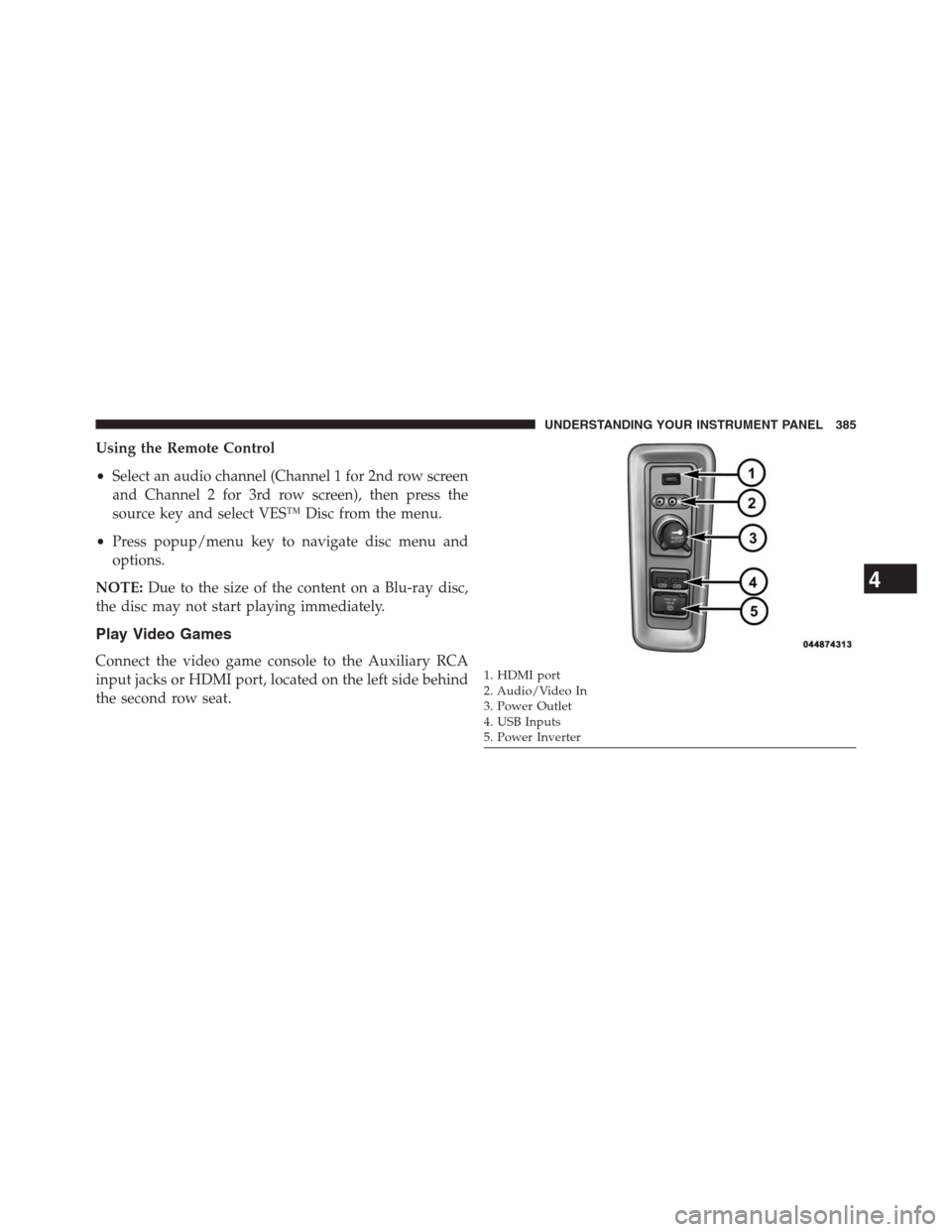
Connect the video game console to the Auxiliary RCA
input jacks or HDMI port, located on the left side behind
the second row seat.1. HDMI port
2. Audio/Video In
3. Power Outlet
4. USB Inputs
5. Power Inverter
4
UNDERSTANDING YOUR INSTRUMENT PANEL 385
Page 388 of 683
When connecting an external source to the AUX input, be
sure to follow the standard color coding for the VES™
jacks:
NOTE:
Certain high-end video games, such as Playstation3
and XBox360 will exceed the power limit of the vehicle’s
Power Inverter. Refer to the Power Inverter section in your
vehicle’s Owner’s Manual for more information.
Ensure the Remote Control and Headphone switch is on
Channel 1.
Using The Remote Control
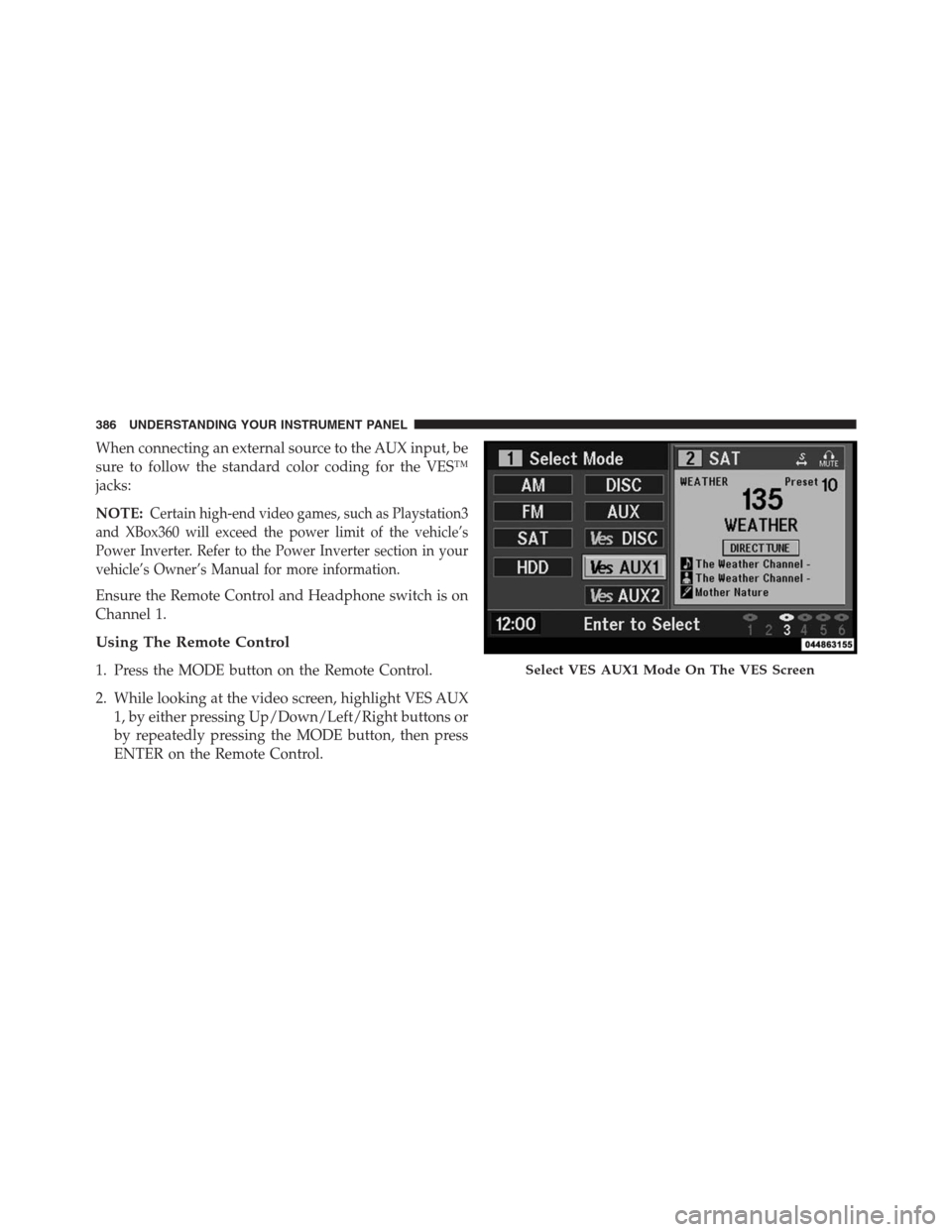
1. Press the MODE button on the Remote Control.
2. While looking at the video screen, highlight VES AUX
1, by either pressing Up/Down/Left/Right buttons or
by repeatedly pressing the MODE button, then press
ENTER on the Remote Control.Select VES AUX1 Mode On The VES Screen
386 UNDERSTANDING YOUR INSTRUMENT PANEL
Page 389 of 683
Using The Touch-Screen Radio Controls
1. Press the MENU hard-key on the radio faceplate.
2.
Touch the Rear VES soft-key to display the Rear VES
Controls. If a channel list is displayed, press the HIDE
LIST soft-key to display the Rear VES Controls screen.
3. Touch the 1 soft-key and then touch either AUX 1 or
AUX 2 in the VES column (depending which AUX
input is used). To exit press the back arrow soft-key at
the top of the screen.
Rear VES Soft-key
Select Channel/Screen 1 And AUX 1 In The VES
Column
4
UNDERSTANDING YOUR INSTRUMENT PANEL 387
Page 418 of 683
Display Settings
When watching a video source (DVD Video with the disc
in Play mode, Aux Video, etc.), pressing the remote
control’s SETUP button activates the Display Settings
menu. These settings control the appearance of the video
on the screen. The factory default settings are already set
for optimum viewing, so there is no need to change these
settings under normal circumstances.
To change the settings, press the remote control’s navi-
gation buttons (�,�) to select an item, then press the
remote control’s navigation buttons (�,�) to change the
value for the currently selected item. To reset all values
back to the original settings, select the Default Settings
menu option and press the remote control’s ENTER/OK
button.
Disc Features control the remote DVD player’s (if equipped)
settings of DVD being watched in the remote player.
Listening To Audio With The Screen Closed
To listen to only audio portion of the channel with the
screen closed:
•Set the audio to the desired source and channel.
•Close the video screen.
•To change the current audio mode, press the remote
control’s SOURCE button. This will automatically se-
lect the next available audio mode without using the
MODE/SOURCE Select menu.
•When the screen is reopened, the video screen will
automatically turn back on and show the appropriate
display menu or media.
If the screen is closed and there is no audio heard, verify
that the headphones are turned on (the ON indicator is
illuminated) and the headphone selector switch is on the
desired channel. If the headphones are turned on, press
416 UNDERSTANDING YOUR INSTRUMENT PANEL
Page 675 of 683

Odometer...............................312
Oil Change Indicator.......................313
Oil Change Indicator, Reset..................313
Oil, Engine..............................597
Capacity.............................638
Change Interval........................597
Checking.............................597
Disposal..............................599
Filter................................599
Filter Disposal.........................599
Identification Logo......................598
Materials Added to......................599
Recommendation.......................597
Synthetic.............................598
Viscosity.............................598
Oil Filter, Selection........................599
Onboard Diagnostic System..................592
Opener, Garage Door (HomeLink®)............256
Operator Manual (Owner’s Manual).............4Outside Rearview Mirrors...................130
Overhead Console.........................252
Overhead Travel Information Center............252
Overheating, Engine.......................322
Owner’s Manual (Operator Manual).............4
Paint Care..............................619
Panic Alarm..............................25
Parking Brake............................481
Park Sense System, Rear....................241
Pedals, Adjustable.........................235
Personal Settings..........................342
Pets, Transporting.........................112
Placard, Tire and Loading Information..........502
Power
Door Locks............................37
Lift Gate..............................53
Mirrors..............................133
Outlet (Auxiliary Electrical Outlet)
...........26910
INDEX 673