Page 293 of 699
•Upper storage bin can hold nine regular or 18 thin CDs
or other items
• Large console center storage will store headphones for
the available rear DVD entertainment system or other
items
• 12 Volt DC power outlet provides continuous power
inside the console for cell phones or other electronics.
• Rear occupant accessible
• Multiple adjustments
• Removable from vehicle for additional floor space.
The top and center console sections slide forward and
rearward to provide added user comfort. A one-piece cup
holder insert for both cavities can easily be removed for
cleaning. The cupholders will also accommodate large
size cups and 20 oz (.6 L) bottles. Position 1 shows the console closed with four cupholders
and a convenient storage tray.
Console Position 1
3
UNDERSTANDING THE FEATURES OF YOUR VEHICLE 291
Page 310 of 699
▫Vehicle Info (Customer Information Features) . . .343
▫Messages # ......................... .344
▫ Keyless Enter-N-Go™ Display —
If Equipped ......................... .344
▫ Compass / Temperature Display ..........344
▫ Compass Variance .....................347
▫ Customer-Programmable Features
(System Setup) ...................... .347
� Uconnect® 730N/430/430N CD/DVD/
HDD/NAV — IF EQUIPPED ..............354
▫ Operating Instructions (Voice Command
System) — If Equipped .................354
▫ Operating Instructions (Uconnect® Phone) —
If Equipped ......................... .354�
Uconnect® 130 ....................... .355
▫ Operating Instructions — Radio Mode .......355
▫ Operation Instructions — CD MODE For CD
And MP3 Audio Play ...................358
▫ Notes on Playing MP3 Files ..............361
▫ Operation Instructions - Auxiliary Mode .....363
� Uconnect® 130 WITH SATELLITE RADIO .....364
▫ Operating Instructions — Radio Mode .......364
▫ Operation Instructions — CD MODE for CD
and MP3 Audio Play ...................370
▫ Notes On Playing MP3 Files ..............373
▫ LIST Button (CD Mode for MP3 Play) .......375
▫ INFO Button (CD Mode for MP3 Play) ......375
308 UNDERSTANDING YOUR INSTRUMENT PANEL
Page 311 of 699
▫Uconnect® (Satellite Radio) — If Equipped . . .376
▫
Operating Instructions (Uconnect® Phone) —
If Equipped ......................... .380
�SETTING THE ANALOG CLOCK ...........381
� iPod®/USB/MP3 CONTROL —
IF EQUIPPED ........................ .381
▫ Connecting The iPod® Or External USB
Device ............................ .382
▫ Using This Feature .....................383
▫ Controlling The iPod® Or External USB Device
Using Radio Buttons ...................384
▫ Play Mode ......................... .384
▫ List Or Browse Mode ...................386
▫ Bluetooth Streaming Audio (BTSA) .........388�
UCONNECT® MULTIMEDIA — VIDEO
ENTERTAINMENT SYSTEM (VES™) —
If Equipped .......................... .389
▫ Getting Started ...................... .389
▫ Blu-ray Player ....................... .390
▫ Play Video Games .....................391
▫ Listen To An Audio Source On Channel 2
While A Video Is Playing On Channel 1 ......394
▫ Dual Video Screen .....................396
▫ Play A DVD Using The Touch-Screen Radio . . .396
▫ Play A DVD Using The VES™ Player
(If Equipped) ........................ .398
▫
Play A Blu-ray Disc Using The Blu-ray Player
(If Equipped) ........................ .401
4
UNDERSTANDING YOUR INSTRUMENT PANEL 309
Page 312 of 699
▫Listen To An Audio Source While A Video
Is Playing .......................... .403
▫ Important Notes For Dual Video Screen
System ............................ .405
▫ VES™ Remote Control – If Equipped .......406
▫
Blu-ray Player Remote Control – If Equipped . . .409
▫ Remote Control Storage .................411
▫ Locking The Remote Control .............412
▫ Replacing The Remote Control Batteries ......412
▫ Headphones Operation .................413
▫ Blu-ray Headphones Operation ............414
▫ Controls ........................... .415
▫ Replacing The Headphone Batteries .........416▫
Unwired® Stereo Headphone Lifetime
Limited Warranty .....................416
▫ System Information ....................417
▫ Shared Modes ....................... .417
▫ Information Mode Display ...............419
▫ Numeric Keypad Menu .................420
▫ Station List Menu .....................421
▫ Disc Menu ......................... .421
▫ Display Settings ...................... .422
▫ Listening To Audio With The Screen Closed . . .422
▫ Disc Formats ........................ .423
▫ Display ............................ .427
▫ Product Agreement ....................431
310 UNDERSTANDING YOUR INSTRUMENT PANEL
Page 313 of 699
�STEERING WHEEL AUDIO CONTROLS —
IF EQUIPPED ........................ .434
▫ Radio Operation ..................... .435
▫ CD Player .......................... .435
� CD/DVD DISC MAINTENANCE ...........436
�
RADIO OPERATION AND MOBILE PHONES . . .436
� CLIMATE CONTROLS ...................437
▫ Manual Heating And Air Conditioning
System — If Equipped .................437
▫
Rear Manual Climate Control — If Equipped . .443
▫ Automatic Temperature Control (ATC) —
If Equipped ........................ .446
▫ Summer Operation ....................458
▫ Winter Operation ..................... .458
▫ Vacation/Storage ..................... .459
▫ Window Fogging .....................459
▫ Outside Air Intake .....................459
▫ A/C Air Filter ...................... .459
4
UNDERSTANDING YOUR INSTRUMENT PANEL 311
Page 348 of 699
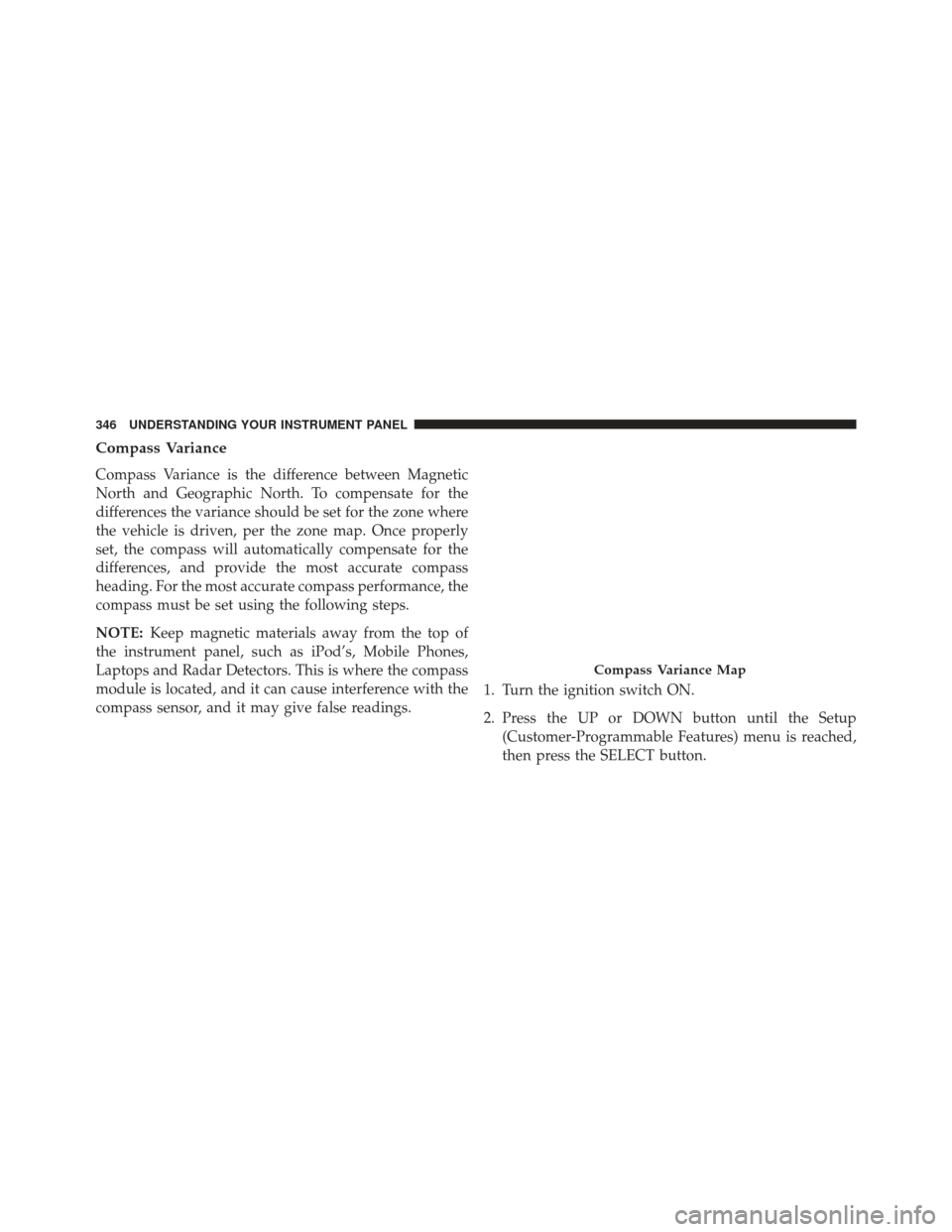
Compass Variance
Compass Variance is the difference between Magnetic
North and Geographic North. To compensate for the
differences the variance should be set for the zone where
the vehicle is driven, per the zone map. Once properly
set, the compass will automatically compensate for the
differences, and provide the most accurate compass
heading. For the most accurate compass performance, the
compass must be set using the following steps.
NOTE:Keep magnetic materials away from the top of
the instrument panel, such as iPod’s, Mobile Phones,
Laptops and Radar Detectors. This is where the compass
module is located, and it can cause interference with the
compass sensor, and it may give false readings. 1. Turn the ignition switch ON.
2. Press the UP or DOWN button until the Setup
(Customer-Programmable Features) menu is reached,
then press the SELECT button.
Compass Variance Map
346 UNDERSTANDING YOUR INSTRUMENT PANEL
Page 353 of 699
then press and release the SELECT button until a check-
mark appears next to the setting, showing that the setting
has been selected.
Headlamps with Wipers (Available with Auto
Headlights Only)
When ON is selected, and the headlight switch is in the
AUTO position, the headlights will turn on approxi-
mately 10 seconds after the wipers are turned on. The
headlights will also turn off when the wipers are turned
off if they were turned on by this feature. To make your
selection, press and release the SELECT button until a
check-mark appears next to the setting, showing that the
setting has been selected.
NOTE:Turning the headlights on during the daytime
causes the instrument panel lights to dim. To increase the
brightness, refer to “Lights” in “Understanding The
Features Of Your Vehicle.”
Intermittent Wiper Options — If Equipped
When ON is selected, the system will automatically
activate the windshield wipers if it senses moisture on
the windshield. To make your selection, press and release
the SELECT button until a check-mark appears next to
the feature showing the system has been activated or the
check-mark is removed showing the system has been
deactivated. When the system is deactivated, the system
reverts to the standard intermittent wiper operation.
Key-Off Power Delay
When this feature is selected, the power window
switches, radio, Uconnect™ phone (if equipped), DVD
video system (if equipped), power sunroof (if equipped),
and power outlets will remain active for up to 10 minutes
after the ignition switch is turned OFF. Opening either
front vehicle door will cancel this feature. To make your
selection, scroll up or down until the preferred setting is
4
UNDERSTANDING YOUR INSTRUMENT PANEL 351
Page 356 of 699
To make your selection, press and release the SELECT
button until a check-mark appears next to the feature
showing the system has been activated or the check-mark
is removed showing the system has been deactivated.
NOTE:If your vehicle has experienced any damage in
the area where the sensor is located, even if the fascia is
not damaged, the sensor may have become misaligned.
Take your vehicle to an authorized dealer to verify sensor
alignment. Having a sensor that is misaligned will result
in the BSM not operating to specification.
Calibrate Compass
Refer to “Compass Display” for more information.
Compass Variance
Refer to “Compass Display” for more information.
Turn Menu Off
Press and release SELECT to turn the menu off.
Uconnect® 730N/430/430N CD/DVD/HDD/NAV —
IF EQUIPPED
Refer to your Uconnect® user’s manual for detailed
operating instructions.
Operating Instructions (Voice Command
System) — If Equipped
Refer to “Voice Command” for further details.
Operating Instructions (Uconnect® Phone) —
If Equipped
Refer to “Uconnect® Phone” for further details.
354 UNDERSTANDING YOUR INSTRUMENT PANEL