Page 172 of 699
Voice Command
•For best performance, adjust the rearview mirror to
provide at least ½ in (1 cm) gap between the overhead
console (if equipped) and the mirror.
• Always wait for the beep before speaking.
• Speak normally without pausing, just as you would
speak to a person sitting a few feet/meters away from
you.
• Make sure that no one other than you is speaking
during a Voice Command period.
• Performance is maximized under:
• low-to-medium blower setting,
• low-to-medium vehicle speed,
• low road noise,
• smooth road surface, •
fully closed windows,
• dry weather condition.
• Even though the system is designed for users speaking
in North American English, French, and Spanish ac-
cents, the system may not always work for some.
• When navigating through an automated system such
as voice mail, or when sending a page, at the end of
speaking the digit string, make sure to say “Send”.
• Storing names in the phonebook when the vehicle is
not in motion is recommended.
• It is not recommended to store similar sounding names
in the Uconnect® Phonebook.
•
Phonebook (Downloaded and Uconnect® Phone Local)
name recognition rate is optimized when the entries are
not similar.
170 UNDERSTANDING THE FEATURES OF YOUR VEHICLE
Page 173 of 699
•Numbers must be spoken in single digits. “800” must
be spoken “eight-zero-zero” not “eight hundred”.
• You can say “O” (letter “O”) for “0” (zero).
• Even though international dialing for most number
combinations is supported, some shortcut dialing
number combinations may not be supported.
• In a convertible vehicle, system performance may be
compromised with the convertible top down.
Far End Audio Performance
• Audio quality is maximized under:
• low-to-medium blower setting,
• low-to-medium vehicle speed,
• low road noise,
• smooth road surface, •
fully closed windows,
• dry weather conditions, and
• operation from the driver’s seat.
• Performance, such as audio clarity, echo, and loudness
to a large degree rely on the phone and network, and
not the Uconnect® Phone.
• Echo at the phone far end can sometimes be reduced
by lowering the in-vehicle audio volume.
• In a convertible vehicle, system performance may be
compromised with the convertible top down.
Recent Calls
If your phone supports “Automatic Phonebook Down-
load”, Uconnect® Phone can list your Outgoing, Incom-
ing and Missed Calls.
3
UNDERSTANDING THE FEATURES OF YOUR VEHICLE 171
Page 174 of 699
Voice Text Reply
Uconnect® Phone can read or send new messages on
your phone.
Read Messages:
If you receive a new text message while your phone is
connected to Uconnect® Phone, an announcement will
be made to notify you that you have a new text message.
If you wish to hear the new message:
•Press the
button.
• After the “Ready” prompt and the following beep, say
“SMS Read” or “Read Messages.”
• Uconnect® Phone will play the new text message for
you.
After reading a message, you can “Reply” or “Forward”
the message using Uconnect® Phone. Send Messages:
You can send messages using Uconnect® Phone. To send
a new message:
•
Press the
button.
• After the “Ready” prompt and the following beep, say
“SMS Send” or “Send Message.”
• You can either say the message you wish to send or say
“List Messages.” There are 20 preset messages.
To send a message, press the
button while the
system is listing the message and say “Send.”
Uconnect® Phone will prompt you to say the name or
number of the person you wish to send the message to.
172 UNDERSTANDING THE FEATURES OF YOUR VEHICLE
Page 176 of 699
Turn SMS Incoming Announcement ON/OFF
Turning the SMS Incoming Announcement OFF will stop
the system from announcing the new incoming messages.
•Press thebutton.
• After the “Ready” prompt and the following beep, say
“Setup, SMS Incoming Message Announcement,” you
will then be given a choice to change it.
Bluetooth® Communication Link
Mobile phones have been found to lose connection to the
Uconnect® Phone. When this happens, the connection
can generally be reestablished by switching the phone
off/on. Your mobile phone is recommended to remain in
Bluetooth® ON mode.
Power-Up
After switching the ignition key from OFF to either the ON
or ACC position, or after a language change, you must wait
at least fifteen seconds prior to using the system.
174 UNDERSTANDING THE FEATURES OF YOUR VEHICLE
Page 181 of 699
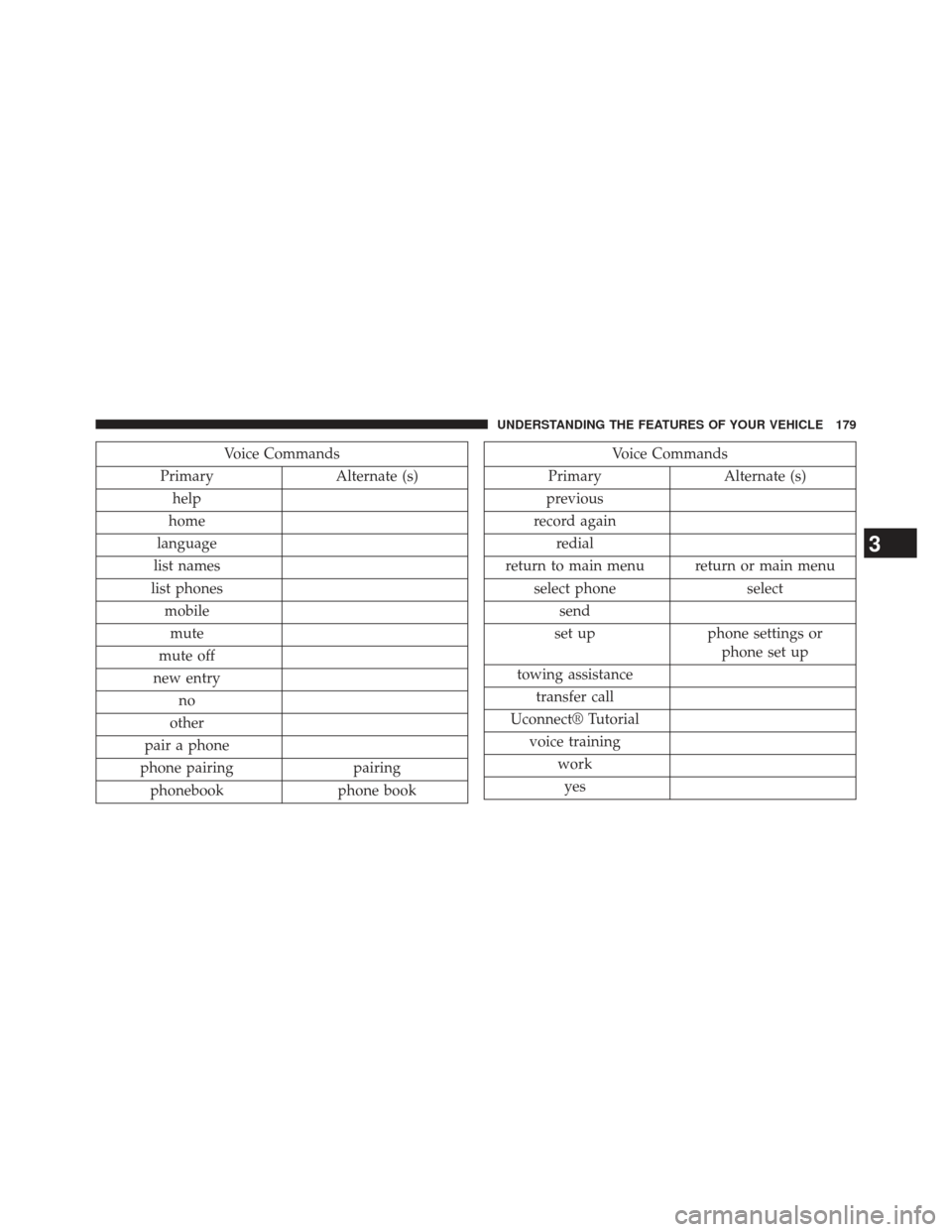
Voice Commands
Primary Alternate (s)
help
home
language
list names
list phones mobilemute
mute off
new entry no
other
pair a phone
phone pairing pairing
phonebook phone bookVoice Commands
Primary Alternate (s)
previous
record again redial
return to main menu return or main menu select phone select
send
set up phone settings or
phone set up
towing assistance transfer call
Uconnect® Tutorial voice training workyes
3
UNDERSTANDING THE FEATURES OF YOUR VEHICLE 179
Page 278 of 699
WARNING!
To avoid serious injury or death:
•Only devices designed for use in this type of outlet
should be inserted into any 12 Volt outlet.
• Do not touch with wet hands.
• Close the lid when not in use and while driving the
vehicle.
• If this outlet is mishandled, it may cause an electric
shock and failure.
CAUTION!
• Many accessories that can be plugged in draw
power from the vehicle’s battery, even when not
in use (i.e., cellular phones, etc.). Eventually, if
plugged in long enough, the vehicle’s battery will
discharge sufficiently to degrade battery life and/or
prevent the engine from starting.
(Continued)
CAUTION! (Continued)
•Accessories that draw higher power (i.e., coolers,
vacuum cleaners, lights, etc.), will degrade the
battery even more quickly. Only use these intermit-
tently and with greater caution.
• After the use of high power draw accessories, or
long periods of the vehicle not being started (with
accessories still plugged in), the vehicle must be
driven a sufficient length of time to allow the
alternator to recharge the vehicle’s battery.
• Power outlets are designed for accessory plugs
only. Do not hang any type of accessory or acces-
sory bracket from the plug. Improper use of the
power outlet can cause damage.
276 UNDERSTANDING THE FEATURES OF YOUR VEHICLE
Page 279 of 699
POWER INVERTER — IF EQUIPPED
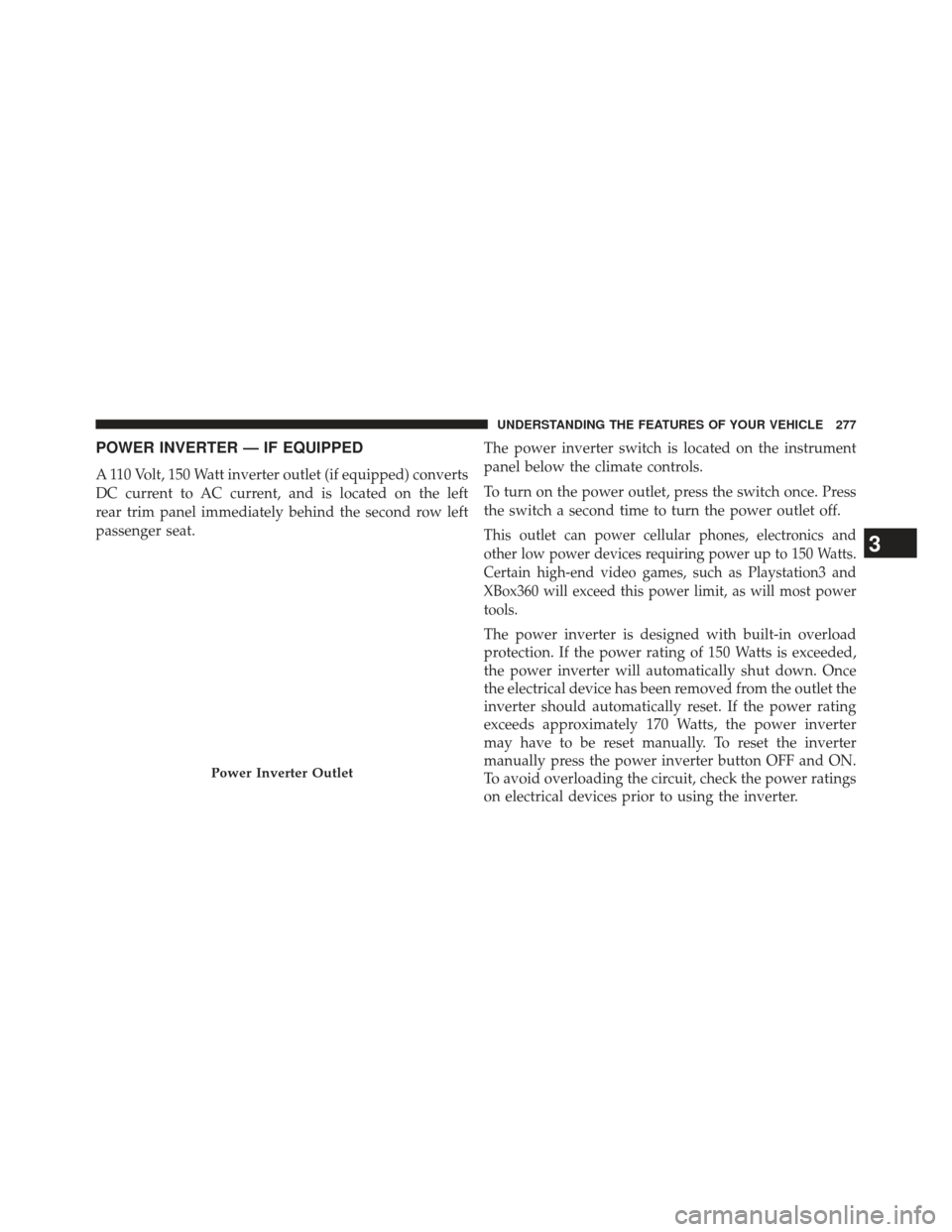
A 110 Volt, 150 Watt inverter outlet (if equipped) converts
DC current to AC current, and is located on the left
rear trim panel immediately behind the second row left
passenger seat.The power inverter switch is located on the instrument
panel below the climate controls.
To turn on the power outlet, press the switch once. Press
the switch a second time to turn the power outlet off.
This outlet can power cellular phones, electronics and
other low power devices requiring power up to 150 Watts.
Certain high-end video games, such as Playstation3 and
XBox360 will exceed this power limit, as will most power
tools.
The power inverter is designed with built-in overload
protection. If the power rating of 150 Watts is exceeded,
the power inverter will automatically shut down. Once
the electrical device has been removed from the outlet the
inverter should automatically reset. If the power rating
exceeds approximately 170 Watts, the power inverter
may have to be reset manually. To reset the inverter
manually press the power inverter button OFF and ON.
To avoid overloading the circuit, check the power ratings
on electrical devices prior to using the inverter.
Power Inverter Outlet
3
UNDERSTANDING THE FEATURES OF YOUR VEHICLE 277
Page 291 of 699
CONSOLE FEATURES
There are three consoles available: Basic, Premium and
Super.
WARNING!
Do not operate this vehicle with a console compart-
ment lid in the open position. Cellular phones, music
players, and other handheld electronic devices should
be stowed while driving. Use of these devices while
driving can cause an accident due to distraction, result-
ing in death or injury.
Basic Console
Basic Console features consist of the following:
•The basic console profile allows vehicle occupants to
easily pass through the first row to the second.
• Four cupholders accept up to extra large size beverage
cups or 20 oz (.6 L) plastic bottles. Cupholders are
dishwasher safe for cleaning.
• The cupholders are removable to access a large storage
bin.
• The basic console is removable from the vehicle for
additional floor space by removing the cap and clip at
the console base.
3
UNDERSTANDING THE FEATURES OF YOUR VEHICLE 289