2013 CHEVROLET CORVETTE mirror
[x] Cancel search: mirrorPage 47 of 414

Black plate (17,1)Chevrolet Corvette Owner Manual - 2013 - crc2 - 11/8/12
Keys, Doors, and Windows 2-17
Power Windows
{WARNING
Children could be seriously
injured or killed if caught in the
path of a closing window. Never
leave keys in a vehicle with
children. SeeKeys on page 2‑1.
Pull up or press down on the front of
the switch to raise or lower the
window. Retained Accessory Power (RAP)
allows you to use the power
windows when the ignition is off. For
more information, see
Retained
Accessory Power (RAP) on
page 9‑21.
Express-Down Window
Press the front of the switch to the
second position to activate the
express-down feature. To stop the
window as it is lowering, press the
switch again.
Window Indexing
This feature automatically lowers
the window a small amount when
the door is opened. When the door
is closed, the window will raise to its
full up position. If either window
does not index properly, it could be
due to loss of power. Before
returning to the dealer for service,
perform the power window initialize
procedure.
Power Window Initialize
After a power reconnect such as
battery replacement, the window
indexing feature and the power
convertible top (if equipped) will not
function until the system is
initialized.
Once power is restored:
1. Close the doors.
2. Raise the window and hold the switch up for three seconds after
the window is closed.
3. Release the switch, then hold the switch up again for
three seconds and release.
Sun Visors
Pull the visor toward you, or move it
to the side to help reduce glare.
To use the lighted mirror, lift the
cover.
Page 53 of 414
Black plate (23,1)Chevrolet Corvette Owner Manual - 2013 - crc2 - 11/8/12
Keys, Doors, and Windows 2-23
P (Park) or a manual transmission
in Neutral before raising or
lowering the convertible top.
Lowering the Manual
Convertible Top
1. Park on a level surface. Shift anautomatic transmission into
P (Park) and set the parking
brake. Shift a manual
transmission into Neutral and set
the parking brake.
2. Make sure the ignition is off.
3. Make sure the trunk is closed.
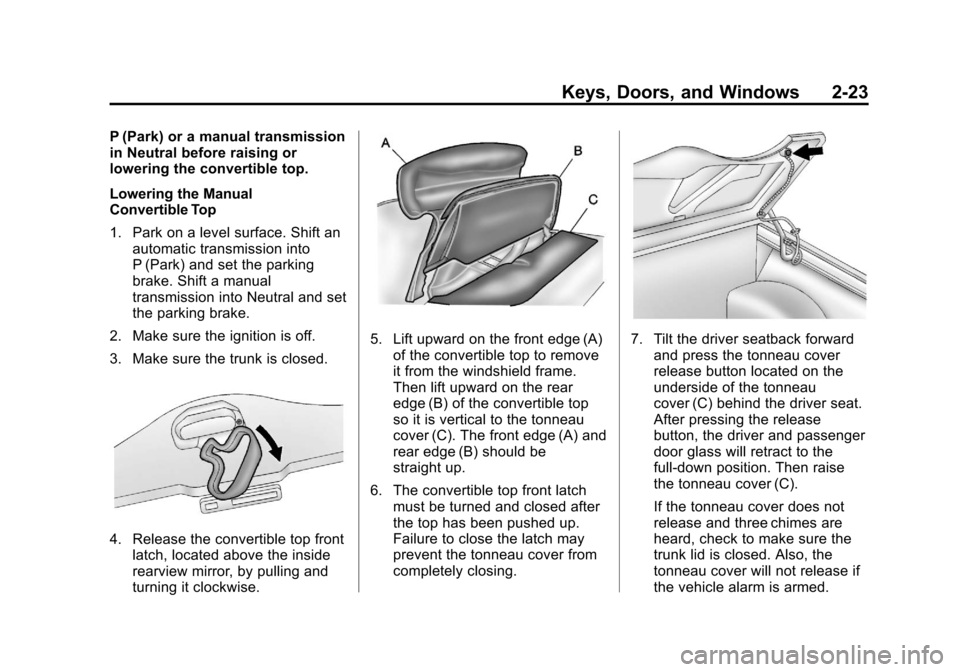
4. Release the convertible top front latch, located above the inside
rearview mirror, by pulling and
turning it clockwise.
5. Lift upward on the front edge (A)of the convertible top to remove
it from the windshield frame.
Then lift upward on the rear
edge (B) of the convertible top
so it is vertical to the tonneau
cover (C). The front edge (A) and
rear edge (B) should be
straight up.
6. The convertible top front latch must be turned and closed after
the top has been pushed up.
Failure to close the latch may
prevent the tonneau cover from
completely closing.7. Tilt the driver seatback forwardand press the tonneau cover
release button located on the
underside of the tonneau
cover (C) behind the driver seat.
After pressing the release
button, the driver and passenger
door glass will retract to the
full-down position. Then raise
the tonneau cover (C).
If the tonneau cover does not
release and three chimes are
heard, check to make sure the
trunk lid is closed. Also, the
tonneau cover will not release if
the vehicle alarm is armed.
Page 57 of 414
Black plate (27,1)Chevrolet Corvette Owner Manual - 2013 - crc2 - 11/8/12
Keys, Doors, and Windows 2-27
Lowering the Power
Convertible Top
1. Park on a level surface. Start theengine. Shift an automatic
transmission into P (Park) and
set the parking brake. Shift a
manual transmission into Neutral
and set the parking brake.
2. Make sure the trunk is closed, the rear trunk partition in the rear
storage area is in the fastened
upright position, and no objects
are forward of the divider. See
“Rear Trunk Partition” inRear
Storage on page 4‑1.
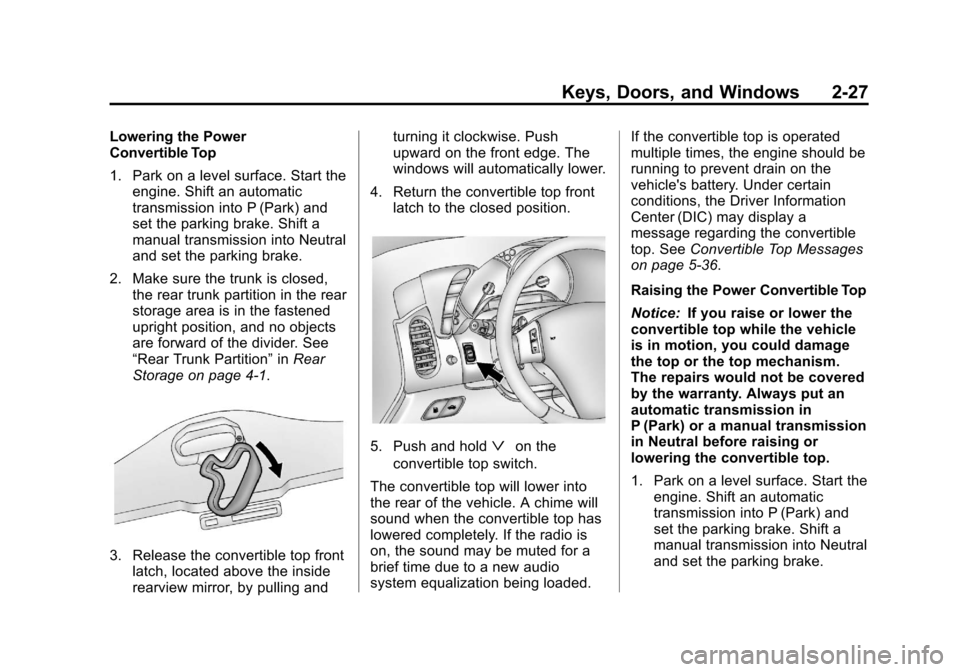
3. Release the convertible top front latch, located above the inside
rearview mirror, by pulling and turning it clockwise. Push
upward on the front edge. The
windows will automatically lower.
4. Return the convertible top front latch to the closed position.
5. Push and holdªon the
convertible top switch.
The convertible top will lower into
the rear of the vehicle. A chime will
sound when the convertible top has
lowered completely. If the radio is
on, the sound may be muted for a
brief time due to a new audio
system equalization being loaded. If the convertible top is operated
multiple times, the engine should be
running to prevent drain on the
vehicle's battery. Under certain
conditions, the Driver Information
Center (DIC) may display a
message regarding the convertible
top. See
Convertible Top Messages
on page 5‑36.
Raising the Power Convertible Top
Notice: If you raise or lower the
convertible top while the vehicle
is in motion, you could damage
the top or the top mechanism.
The repairs would not be covered
by the warranty. Always put an
automatic transmission in
P (Park) or a manual transmission
in Neutral before raising or
lowering the convertible top.
1. Park on a level surface. Start the engine. Shift an automatic
transmission into P (Park) and
set the parking brake. Shift a
manual transmission into Neutral
and set the parking brake.
Page 64 of 414

Black plate (4,1)Chevrolet Corvette Owner Manual - 2013 - crc2 - 11/8/12
3-4 Seats and Restraints
{WARNING
Sitting in a reclined position when
the vehicle is in motion can be
dangerous. Even when buckled
up, the safety belts cannot do
their job.
The shoulder belt will not be
against your body. Instead, it will
be in front of you. In a crash, you
could go into it, receiving neck or
other injuries.
The lap belt could go up over
your abdomen. The belt forces
would be there, not at your pelvic
bones. This could cause serious
internal injuries.
For proper protection when the
vehicle is in motion, have the
seatback upright. Then sit well
back in the seat and wear the
safety belt properly.
Do not have a seatback reclined if
the vehicle is moving.
Memory Seats
If available, the controls on the
driver door are used to program and
recall memory settings for the driver
seat, outside mirrors, and the
telescopic steering column (if
equipped).
The numbers on the back of the
Remote Keyless Entry (RKE)
transmitters correspond to the
numbers on the memory buttons.
Page 65 of 414

Black plate (5,1)Chevrolet Corvette Owner Manual - 2013 - crc2 - 11/8/12
Seats and Restraints 3-5
Storing Memory Positions
To save into memory:
1. Adjust the driver seat, bothoutside mirrors, and the
telescopic steering column (if
equipped).
2. Press and hold “1”until
two beeps sound.
3. Repeat for a second driver position using “2.”
To recall a memory position:
.On vehicles with an automatic
transmission, press and release
“1” or“2.”
If the vehicle is in P (Park), a
single beep sounds and the
memory position is recalled after
a brief delay.
If the vehicle is not in P (Park),
three beeps sound and the
memory position is not recalled.
.On vehicles with a manual
transmission, when the vehicle
is on, the parking brake must be
set to recall a memory position.
Press and release “1”or“2.”
A single beep sounds and the
memory position is recalled after
a brief delay.
If the vehicle is on and the
parking brake is not set,
three beeps sound and the
memory position is not recalled.
Memory Remote Recall (Automatic
Transmission)
This feature can recall the driver
seat, outside mirrors, and telescopic
steering column (if equipped) to
stored positions when entering the
vehicle.
To activate, enter the vehicle and
start the engine. The driver seat,
outside mirrors, and telescopic
steering column will move to the
memory position associated with the
transmitter used to unlock the
vehicle. This feature is turned on or off using
the vehicle personalization menu.
See
Vehicle Personalization on
page 5‑51.
To stop recall movement, press one
of the power seat controls, power
mirror or memory buttons, or the
telescopic steering column switch.
If something has blocked the driver
seat while recalling a memory
position, the recall may stop.
Remove the obstruction; then press
and hold the appropriate manual
control for the memory item that is
not recalling for two seconds. Try
recalling the memory position again
by pressing the appropriate memory
button. If the memory position is still
not recalling, see your dealer for
service.
Easy Exit Driver Seat
This feature can move the seat
rearward and the telescopic steering
column (if equipped) out of the way
to allow extra room to exit the
vehicle.
Page 80 of 414

Black plate (20,1)Chevrolet Corvette Owner Manual - 2013 - crc2 - 11/8/12
3-20 Seats and Restraints
{WARNING
A crash severe enough to inflate
the airbags may have also
damaged important functions in
the vehicle, such as the fuel
system, brake and steering
systems, etc. Even if the vehicle
appears to be drivable after a
moderate crash, there may be
concealed damage that could
make it difficult to safely operate
the vehicle.
Use caution if you should attempt
to restart the engine after a crash
has occurred.
In many crashes severe enough to
inflate the airbag, windshields are
broken by vehicle deformation.
Additional windshield breakage may
also occur from the front outboard
passenger airbag.
.Airbags are designed to inflate
only once. After an airbag
inflates, you will need some new parts for the airbag system.
If you do not get them, the
airbag system will not be there
to help protect you in another
crash. A new system will include
airbag modules and possibly
other parts. The service manual
for the vehicle covers the need
to replace other parts.
.The vehicle has a crash sensing
and diagnostic module which
records information after a
crash. See
Vehicle Data
Recording on page 13‑18.
.Let only qualified technicians
work on the airbag system.
Improper service can mean that
the airbag system will not work
properly. See your dealer for
service.
Passenger Sensing
System
The vehicle has a passenger
sensing system for the front
outboard passenger position. The passenger airbag status indicator
will light in the rearview mirror when
the vehicle is started.
United States
Canada and Mexico
The words ON and OFF, or the
symbol for on and off, will be visible
during the system check. When the
system check is complete, either the
word ON or OFF, or the symbol for
on or off, will be visible. See
Passenger Airbag Status Indicator
on page 5‑17.
Page 85 of 414
Black plate (25,1)Chevrolet Corvette Owner Manual - 2013 - crc2 - 11/8/12
Seats and Restraints 3-25
Adding Equipment to the
Airbag-Equipped Vehicle
Adding accessories that change the
vehicle's frame, bumper system,
height, front end or side sheet
metal, may keep the airbag system
from working properly. The
operation of the airbag system can
also be affected by changing or
moving any parts of the front seats,
safety belts, the airbag sensing and
diagnostic module, steering wheel,
instrument panel, inside rearview
mirror, front sensors, or airbag
wiring.
Your dealer and the service manual
have information about the location
of the airbag sensors, sensing and
diagnostic module, and airbag
wiring.
In addition, the vehicle has a
passenger sensing system for the
front outboard passenger position,
which includes sensors that are part
of the passenger seat. The
passenger sensing system may not
operate properly if the original seattrim is replaced with non-GM
covers, upholstery or trim, or with
GM covers, upholstery or trim
designed for a different vehicle. Any
object, such as an aftermarket seat
heater or a comfort enhancing pad
or device, installed under or on top
of the seat fabric, could also
interfere with the operation of the
passenger sensing system. This
could either prevent proper
deployment of the passenger
airbag(s) or prevent the passenger
sensing system from properly
turning off the passenger airbag(s).
See
Passenger Sensing System on
page 3‑20.
If you have to modify your vehicle
because you have a disability and
have questions about whether the
modifications will affect the vehicle's
airbag system, or if you have
questions about whether the airbag
system will be affected if the vehicle
is modified for any other reason, call Customer Assistance. See
Customer Assistance Offices (U.S.
and Canada) on page 13‑5
or
Customer Assistance Offices
(Mexico) on page 13‑5.
Airbag System Check
The airbag system does not need
regularly scheduled maintenance or
replacement. Make sure the airbag
readiness light is working. See
Airbag Readiness Light on
page 5‑16.
Notice: If an airbag covering is
damaged, opened, or broken, the
airbag may not work properly. Do
not open or break the airbag
coverings. If there are any
opened or broken airbag covers,
have the airbag covering and/or
airbag module replaced. For the
location of the airbags, see
Where Are the Airbags? on
page 3‑16. See your dealer for
service.
Page 109 of 414

Black plate (5,1)Chevrolet Corvette Owner Manual - 2013 - crc2 - 11/8/12
Instruments and Controls 5-5
window for about six seconds after
the button is released and then stop
or return to your preset speed.
{WARNING
In freezing weather, do not use
the washer until the windshield is
warmed. Otherwise the washer
fluid can form ice on the
windshield, blocking your vision.
If the fluid in the windshield washer
fluid reservoir is low a message may
appear on the Driver Information
Center (DIC) display. See Washer
Fluid Messages on page 5‑51. It will
take 15 seconds after the bottle is
refilled for this message to turn off.
For information on the correct
washer fluid to use, see Washer
Fluid on page 10‑32 and
Recommended Fluids and
Lubricants on page 11‑12.
Compass
Compass Operation
With the compass feature on, each
time the vehicle is started, the
compass will take a few seconds to
adjust and display the current
compass heading. For example, NE
is displayed for north-east.
Compass Calibration
PressPonce to turn the compass
display on or off.
If after several seconds the display
does not show a compass heading,
there may be a strong magnetic
field interfering with the compass.
Interference can be caused by a
magnetic antenna mount, note pad
holder, or similar object. If the
letter C or CAL appears in the
compass window, the compass
needs calibration.
Depending on the mirror, in order to
calibrate, CAL must be displayed in
the mirror compass windows. If CAL is not displayed, press
Pfor
several seconds or until CAL is
displayed.
If the compass has map lamps, it
can be placed in calibration mode
by pressing and holding the left map
light button until a C appears on the
compass display.
The mirror compass can be
calibrated by driving the vehicle in
circles at 8 km/h (5 mph) or less until
the display reads a direction.
Compass Variance
The mirror is set to zone eight.
If you do not live in zone eight or
drive out of the area, the compass
variance needs to be changed to
the appropriate zone.
To adjust for compass variance:
1. Find your current location and variance zone number on the
zone map that follows.