2013 CHEVROLET CORVETTE mirror
[x] Cancel search: mirrorPage 110 of 414

Black plate (6,1)Chevrolet Corvette Owner Manual - 2013 - crc2 - 11/8/12
5-6 Instruments and Controls
2. Press and holdPuntil a Z and
a zone number displays. The
compass is now in zone mode.
3. Once the zone number displays, press
Prepeatedly until you
reach the correct zone number.
Stop pressing
Pand the mirror
returns to normal operation.
Clock
To set the clock:
1. Press and hold H until the correct hour displays.
2. Press and hold M until the correct minute displays.
The clock mode automatically times
out with the changed display format
set as the current default setting.
To set the clock on a navigation
system, see the navigation manual.
Power Outlets
The accessory power outlet can be
used to plug in electrical equipment,
such as a cell phone or MP3 player.
The accessory power outlet is
located inside the center console
storage compartment, on the
forward left side.
Remove the cover to access and
replace when not in use.
{WARNING
Power is always supplied to the
outlets. Do not leave electrical
equipment plugged in when the
vehicle is not in use because the
vehicle could catch fire and cause
injury or death.
Notice: Leaving electrical
equipment plugged in for an
extended period of time while the
vehicle is off will drain the
battery. Always unplug electrical
equipment when not in use and
do not plug in equipment that
exceeds the maximum 20 ampere
rating.
Certain electrical accessories may
not be compatible with the
accessory power outlet and could
overload vehicle or adapter fuses.
If a problem is experienced, see
your dealer.
Page 121 of 414

Black plate (17,1)Chevrolet Corvette Owner Manual - 2013 - crc2 - 11/8/12
Instruments and Controls 5-17
{WARNING
If the airbag readiness light stays
on after the vehicle is started or
comes on while driving, it means
the airbag system might not be
working properly. The airbags in
the vehicle might not inflate in a
crash, or they could even inflate
without a crash. To help avoid
injury, have the vehicle serviced
right away.
Passenger Airbag Status
Indicator
The vehicle has the passenger
sensing system. SeePassenger
Sensing System on page 3‑20 for
important safety information. The
rearview mirror has a passenger
airbag status indicator.
United States
Canada and Mexico
When the vehicle is started, the
passenger airbag status indicator
will light ON and OFF, or the symbol
for on and off, for several seconds
as a system check. Then, after
several more seconds, the status
indicator will light either ON or OFF,
or the on or off symbol, to let you
know the status of the front
outboard passenger frontal and
seat-mounted side impact airbags. If the word ON or the on symbol is
lit on the passenger airbag status
indicator, it means that the front
outboard passenger frontal airbag
and seat-mounted side impact
airbag are allowed to inflate.
If the word OFF or the off symbol is
lit on the passenger airbag status
indicator, it means that the
passenger sensing system has
turned off the front outboard
passenger frontal airbag and
seat-mounted side impact airbag.
If, after several seconds, both status
indicator lights remain on, or if there
are no lights at all, there may be a
problem with the lights or the
passenger sensing system. See
your dealer for service.
Page 157 of 414
Black plate (53,1)Chevrolet Corvette Owner Manual - 2013 - crc2 - 11/8/12
Instruments and Controls 5-53
The DIC will display the current
driver number (1 or 2) for a few
seconds and then will display
instructions on which buttons to
use for setting the
personalizations. The RESET
button is used to select a setting
for a particular feature. The
OPTION button is used to move
to the next feature.
3. Press the OPTION button while the instruction screen is
displayed to enter the first
personalization menu item.
4. Once you have cycled through all of the personal options,
pressing the OPTION button a
final time exits the personal
options menu. In addition, if no
button is pressed within
45 seconds, the DIC will exit the
personal options menu. Personal Options
The following options are available
for programming:
Display Units:
This option allows
you to choose the measurement
units.
Press the OPTION button until
DISPLAY UNITS appears on the
display, then press the RESET
button to scroll through the following
modes:
.ENGLISH (default)
.METRIC
If you choose ENGLISH, all
information will be displayed in
English units.
If you choose METRIC, all
information will be displayed in
metric units.
When the mode you want is
selected, press the OPTION button
to set your choice and advance to
the next personal option. Auto Memory Recall (Automatic
Transmission only):
If your
automatic transmission vehicle has
the memory package, you may have
this option. This option allows the
driver seat, the telescopic steering
column, if your vehicle has this
feature, and the outside rearview
mirrors to automatically move to the
current driver's set position when
the engine starts.
Press the OPTION button until
AUTO MEMORY RECALL appears
on the display, then press the
RESET button to scroll through the
following modes:
.YES
.NO (default)
If you choose YES, the driver seat,
the outside rearview mirrors and the
telescopic steering column, if your
vehicle has this feature, positions
are recalled when you turn the
ignition on.
If you choose NO, this option will
turn off.
Page 176 of 414
Black plate (6,1)Chevrolet Corvette Owner Manual - 2013 - crc2 - 11/8/12
6-6 Lighting
Interior Lighting
Instrument Panel
Illumination Control
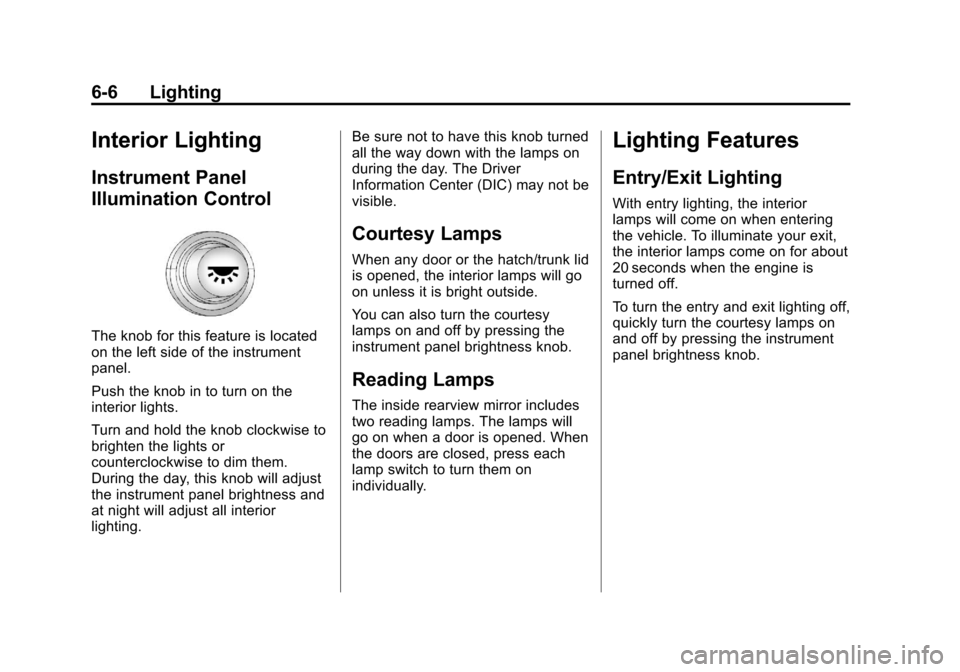
The knob for this feature is located
on the left side of the instrument
panel.
Push the knob in to turn on the
interior lights.
Turn and hold the knob clockwise to
brighten the lights or
counterclockwise to dim them.
During the day, this knob will adjust
the instrument panel brightness and
at night will adjust all interior
lighting.Be sure not to have this knob turned
all the way down with the lamps on
during the day. The Driver
Information Center (DIC) may not be
visible.
Courtesy Lamps
When any door or the hatch/trunk lid
is opened, the interior lamps will go
on unless it is bright outside.
You can also turn the courtesy
lamps on and off by pressing the
instrument panel brightness knob.
Reading Lamps
The inside rearview mirror includes
two reading lamps. The lamps will
go on when a door is opened. When
the doors are closed, press each
lamp switch to turn them on
individually.
Lighting Features
Entry/Exit Lighting
With entry lighting, the interior
lamps will come on when entering
the vehicle. To illuminate your exit,
the interior lamps come on for about
20 seconds when the engine is
turned off.
To turn the entry and exit lighting off,
quickly turn the courtesy lamps on
and off by pressing the instrument
panel brightness knob.
Page 177 of 414
Black plate (7,1)Chevrolet Corvette Owner Manual - 2013 - crc2 - 11/8/12
Lighting 6-7
Battery Power Protection
This vehicle has a feature to help
prevent the battery from being
drained in case any of the following
lamps are left on: the underhood
lamp, if your vehicle has this
feature, vanity mirror lamps, cargo
lamps, reading lamps, center
console, or glove box lamps. If any
of these lamps are left on, they will
automatically time-out after about
10 minutes. To reset it, all of the
above lamps must be turned off or
the ignition key on.
Exterior Lighting Battery
Saver
If the manual parking lamps or
headlamps have been left on, the
exterior lamps will turn off as soon
as the ignition is turned off or
Retained Accessory Power (RAP) is
active. This protects against
draining the battery in case you
have accidentally left the headlamps
or parking lamps on. The batterysaver does not work if the
headlamps are turned on after the
ignition switch is turned to off.
If you need to leave the lamps on,
use the exterior lamp control to turn
the lamps back on.
Page 209 of 414
Black plate (5,1)Chevrolet Corvette Owner Manual - 2013 - crc2 - 11/8/12
Climate Controls 8-5
cover the solar sensor located on
the top of the instrument panel near
the windshield or the system will not
work properly.
There is also a sensor located
behind the front bumper. This
sensor reads the outside air
temperature and helps to maintain
the temperature inside the vehicle.
Any cover on the front of the vehicle
could give a false reading in the
temperature.
If the outside temperature goes up,
the displayed temperature will not
change until:
.The vehicle's speed is above
19 km/h (12 mph) for
five minutes.
.The vehicle's speed is above
52 km/h (32 mph) for two and
one‐half minutes.
These delays prevent false
readings. If the temperature goes
down, the outside temperature will
be shown when you start the
vehicle. If it has been turned off for less than three hours, the
temperature will be recalled from the
previous vehicle operation.
There is also an inside temperature
sensor located to the left of the
ignition switch. The automatic
climate control system uses this
sensor to receive information, so if
you block or cover it, the system will
not function properly.
Rear Window Defogger
The rear window defogger uses a
warming grid to remove fog or frost
from the rear window.
The rear window defogger only
works when the engine is running.
=(Rear Window Defogger):
Press to turn the rear window
defogger on or off. Be sure to clear
as much snow from the rear window
as possible. An indicator light
comes on to show that the rear
window defogger is on.
The rear window defogger turns off
about 10 minutes after the button is
pressed when traveling less than 48 km/h (30 mph). If turned on
again, the defogger only runs for
about five minutes before turning
off. The defogger can also be turned
off by turning off the engine.
The vehicle has heated outside
rearview mirrors. The mirrors will
heat to help clear fog or frost from
the surface of the mirrors when the
rear window defogger button is
pressed.
For vehicles with a power
convertible top, the rear window
defogger and heated mirrors are
automatically disabled when the
power convertible top is moving
or down.
Notice:
Do not use anything
sharp on the inside of the rear
window. If you do, you could cut
or damage the warming grid, and
the repairs would not be covered
by the vehicle warranty. Do not
attach a temporary vehicle
license, tape, a decal, or anything
similar to the defogger grid.
Page 217 of 414
Black plate (5,1)Chevrolet Corvette Owner Manual - 2013 - crc2 - 11/8/12
Driving and Operating 9-5
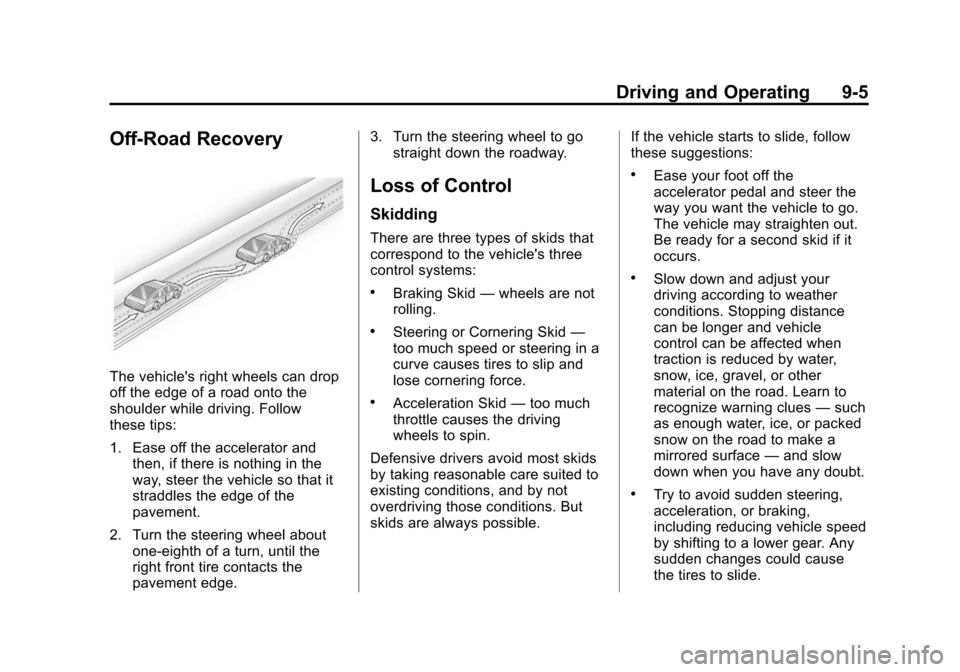
Off-Road Recovery
The vehicle's right wheels can drop
off the edge of a road onto the
shoulder while driving. Follow
these tips:
1. Ease off the accelerator andthen, if there is nothing in the
way, steer the vehicle so that it
straddles the edge of the
pavement.
2. Turn the steering wheel about one-eighth of a turn, until the
right front tire contacts the
pavement edge. 3. Turn the steering wheel to go
straight down the roadway.
Loss of Control
Skidding
There are three types of skids that
correspond to the vehicle's three
control systems:
.Braking Skid —wheels are not
rolling.
.Steering or Cornering Skid —
too much speed or steering in a
curve causes tires to slip and
lose cornering force.
.Acceleration Skid —too much
throttle causes the driving
wheels to spin.
Defensive drivers avoid most skids
by taking reasonable care suited to
existing conditions, and by not
overdriving those conditions. But
skids are always possible. If the vehicle starts to slide, follow
these suggestions:
.Ease your foot off the
accelerator pedal and steer the
way you want the vehicle to go.
The vehicle may straighten out.
Be ready for a second skid if it
occurs.
.Slow down and adjust your
driving according to weather
conditions. Stopping distance
can be longer and vehicle
control can be affected when
traction is reduced by water,
snow, ice, gravel, or other
material on the road. Learn to
recognize warning clues
—such
as enough water, ice, or packed
snow on the road to make a
mirrored surface —and slow
down when you have any doubt.
.Try to avoid sudden steering,
acceleration, or braking,
including reducing vehicle speed
by shifting to a lower gear. Any
sudden changes could cause
the tires to slide.
Page 221 of 414
Black plate (9,1)Chevrolet Corvette Owner Manual - 2013 - crc2 - 11/8/12
Driving and Operating 9-9
Hydroplaning
Hydroplaning is dangerous. Water
can build up under the vehicle's
tires so they actually ride on the
water. This can happen if the road is
wet enough and you are going fast
enough. When the vehicle is
hydroplaning, it has little or no
contact with the road.
There is no hard and fast rule about
hydroplaning. The best advice is to
slow down when the road is wet.
Other Rainy Weather Tips
Besides slowing down, other wet
weather driving tips include:
.Allow extra following distance.
.Pass with caution.
.Keep windshield wiping
equipment in good shape.
.Keep the windshield washer fluid
reservoir filled.
.Have good tires with proper
tread depth. SeeTires on
page 10‑52.
.Turn off cruise control.
Highway Hypnosis
Always be alert and pay attention to
your surroundings while driving.
If you become tired or sleepy, find a
safe place to park the vehicle
and rest.
Other driving tips include:
.Keep the vehicle well ventilated.
.Keep the interior
temperature cool.
.Keep your eyes moving —scan
the road ahead and to the sides.
.Check the rearview mirror and
vehicle instruments often.
Hill and Mountain Roads
Driving on steep hills or through
mountains is different than driving
on flat or rolling terrain. Tips for
driving in these conditions include:
.Keep the vehicle serviced and in
good shape.
.Check all fluid levels and brakes,
tires, cooling system, and
transmission.
.Shift to a lower gear when going
down steep or long hills.
{WARNING
If you do not shift down, the
brakes could get so hot that they
would not work well. You would
then have poor braking or even
none going down a hill. You could
crash. Shift down to let the engine
assist the brakes on a steep
downhill slope.