2013 CHEVROLET CORVETTE display
[x] Cancel search: displayPage 1 of 414

Black plate (1,1)Chevrolet Corvette Owner Manual - 2013 - crc2 - 11/8/12
2013 Chevrolet Corvette Owner ManualM
In Brief. . . . . . . . . . . . . . . . . . . . . . . . 1-1
Instrument Panel . . . . . . . . . . . . . . 1-2
Initial Drive Information . . . . . . . . 1-4
Vehicle Features . . . . . . . . . . . . . 1-15
Performance and Maintenance . . . . . . . . . . . . . . . . 1-20
Keys, Doors, and Windows . . . . . . . . . . . . . . . . . . . . 2-1
Keys and Locks . . . . . . . . . . . . . . . 2-1
Doors . . . . . . . . . . . . . . . . . . . . . . . . 2-10
Vehicle Security . . . . . . . . . . . . . . 2-12
Exterior Mirrors . . . . . . . . . . . . . . . 2-15
Interior Mirrors . . . . . . . . . . . . . . . . 2-16
Windows . . . . . . . . . . . . . . . . . . . . . 2-16
Roof . . . . . . . . . . . . . . . . . . . . . . . . . . 2-18
Seats and Restraints . . . . . . . . . 3-1
Head Restraints . . . . . . . . . . . . . . . 3-2
Front Seats . . . . . . . . . . . . . . . . . . . . 3-2
Safety Belts . . . . . . . . . . . . . . . . . . . . 3-8
Airbag System . . . . . . . . . . . . . . . . 3-14
Child Restraints . . . . . . . . . . . . . . 3-26 Storage
. . . . . . . . . . . . . . . . . . . . . . . 4-1
Storage Compartments . . . . . . . . 4-1
Additional Storage Features . . . 4-2
Instruments and Controls . . . . 5-1
Controls . . . . . . . . . . . . . . . . . . . . . . . 5-2
Warning Lights, Gauges, and
Indicators . . . . . . . . . . . . . . . . . . . . 5-8
Information Displays . . . . . . . . . . 5-25
Vehicle Messages . . . . . . . . . . . . 5-34
Vehicle Personalization . . . . . . . 5-51
Universal Remote System . . . . 5-60
Lighting . . . . . . . . . . . . . . . . . . . . . . . 6-1
Exterior Lighting . . . . . . . . . . . . . . . 6-1
Interior Lighting . . . . . . . . . . . . . . . . 6-6
Lighting Features . . . . . . . . . . . . . . 6-6
Infotainment System . . . . . . . . . 7-1
Introduction . . . . . . . . . . . . . . . . . . . . 7-1
Radio . . . . . . . . . . . . . . . . . . . . . . . . . . 7-6
Audio Players . . . . . . . . . . . . . . . . 7-12
Phone . . . . . . . . . . . . . . . . . . . . . . . . 7-17
Trademarks and License Agreements . . . . . . . . . . . . . . . . . 7-25 Climate Controls
. . . . . . . . . . . . . 8-1
Climate Control Systems . . . . . . 8-1
Air Vents . . . . . . . . . . . . . . . . . . . . . . . 8-6
Maintenance . . . . . . . . . . . . . . . . . . . 8-6
Driving and Operating . . . . . . . . 9-1
Driving Information . . . . . . . . . . . . . 9-2
Starting and Operating . . . . . . . 9-17
Engine Exhaust . . . . . . . . . . . . . . 9-24
Automatic Transmission . . . . . . 9-25
Manual Transmission . . . . . . . . . 9-29
Brakes . . . . . . . . . . . . . . . . . . . . . . . 9-32
Ride Control Systems . . . . . . . . 9-34
Cruise Control . . . . . . . . . . . . . . . . 9-42
Fuel . . . . . . . . . . . . . . . . . . . . . . . . . . 9-45
Towing . . . . . . . . . . . . . . . . . . . . . . . 9-50
Conversions and Add-Ons . . . 9-50
Vehicle Care . . . . . . . . . . . . . . . . . 10-1
General Information . . . . . . . . . . 10-2
Vehicle Checks . . . . . . . . . . . . . . . 10-6
Headlamp Aiming . . . . . . . . . . . 10-41
Bulb Replacement . . . . . . . . . . 10-41
Electrical System . . . . . . . . . . . . 10-44
Wheels and Tires . . . . . . . . . . . 10-52
Jump Starting . . . . . . . . . . . . . . . 10-75
Page 9 of 414

Black plate (3,1)Chevrolet Corvette Owner Manual - 2013 - crc2 - 11/8/12
In Brief 1-3
A.Air Vents on page 8‑6.
B. Head-Up Display Controls (If Equipped). See Head-Up
Display (HUD) on page 5‑30.
C. Turn and Lane-Change Lever. See Turn and Lane-Change
Signals on page 6‑4.
Cruise Control on page 9‑42.
Fog Lamps on page 6‑5.
Exterior Lamp Controls on
page 6‑1.
D. Manual Shift Paddles (If Equipped). See Automatic
Transmission on page 9‑25.
E. Driver Information Center (DIC)
on page 5‑25.
F. Instrument Cluster on page 5‑9.
G. Windshield Wiper/Washer on
page 5‑4.
H. Driver Information Center (DIC) Buttons. See Driver Information
Center (DIC) on page 5‑25.
I. Hazard Warning Flashers on
page 6‑4. J.
Infotainment on page 7‑1.
K. Dual Automatic Climate Control
System on page 8‑1.
L. Fuel Door Release Button. See Filling the Tank on page 9‑47.
Hatch/Trunk Release Button.
See “Hatch/Trunk Release”
under Hatch on page 2‑10.
M. Instrument Panel Illumination
Control on page 6‑6.
N. Convertible Top Switch (If Equipped). See Convertible
Top on page 2‑22.
O. Data Link Connector (DLC) (Out of View). See Malfunction
Indicator Lamp on page 5‑18.
P. Bluetooth Controls (If Equipped). See Bluetooth on
page 7‑17.
Steering Wheel Controls on
page 5‑3 (If Equipped).
Q. Steering Wheel Adjustment on
page 5‑2.
R. Horn on page 5‑4. S. Telescopic Steering Column
Control (If Equipped). See
Steering Wheel Adjustment on
page 5‑2.
T. Keyless Ignition. See Ignition
Positions on page 9‑18.
U. Heated Front Seats on page 3‑7
(If Equipped).
V. Shift Lever (Automatic Shown). See Automatic Transmission on
page 9‑25 orManual
Transmission on page 9‑29.
W. Active Handling System on
page 9‑35.
X. Power Outlets on page 5‑6.
Y. Selective Ride Control on
page 9‑40 (If Equipped).
Z. Parking Brake on page 9‑33.
Page 19 of 414
Black plate (13,1)Chevrolet Corvette Owner Manual - 2013 - crc2 - 11/8/12
In Brief 1-13
8:Use for a for a single wiping
cycle. For more wipes, hold the
lever down longer.
Windshield Washer: Press and
hold the button at the end of the
lever to spray washer fluid on the
windshield.
See Windshield Wiper/Washer on
page 5‑4.Climate Controls
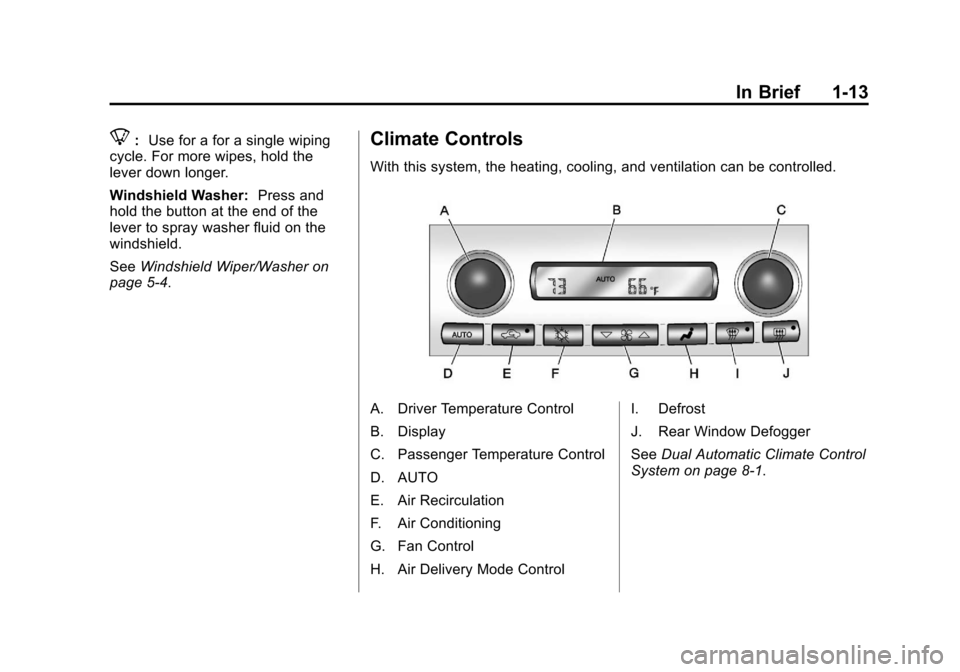
With this system, the heating, cooling, and ventilation can be controlled.
A. Driver Temperature Control
B. Display
C. Passenger Temperature Control
D. AUTO
E. Air Recirculation
F. Air Conditioning
G. Fan Control
H. Air Delivery Mode Control I. Defrost
J. Rear Window Defogger
See
Dual Automatic Climate Control
System on page 8‑1.
Page 20 of 414

Black plate (14,1)Chevrolet Corvette Owner Manual - 2013 - crc2 - 11/8/12
1-14 In Brief
Transmission
Manual Paddle Shift
(Automatic Transmission)
The Manual Paddle Shift system
can be used in D (Drive) or S (Sport
Mode). The system is activated by
pushing the paddle, above the
steering wheel spokes, to manually
up-shift to the next gear, or pulling
on the paddle, behind the steering
wheel spokes to manually
down-shift. The current gear will be
displayed in the Driver Information(DIC), or the Head-Up Display
(HUD), if the vehicle has either of
these features.
The Manual Paddle Shift system
can be deactivated by moving the
shift lever from S (Sport Mode) back
to D (Drive), or by holding the up‐
shift paddle for more than
one second. If the shift lever was in
D (Drive) when the system was
activated, the transmission will
return to automatic shifting after
10 seconds of cruising at a steady
speed and no manual shifts,
or when the vehicle comes to
a stop.
The Manual Paddle Shift system will
not allow either an up-shift or a
down-shift, if the vehicle speed is
too fast or too slow, nor will it allow
a start from 4 (Fourth) or
higher gear.
See
Manual Mode on page 9‑26.
One to Four Shift Light
(Manual Transmission)
On vehicles with a manual
transmission, when this light comes
on, you can only shift from 1 (First)
to 4 (Fourth) instead of 1 (First) to
2 (Second).
For more information about shifting
for the best fuel economy, see
Manual Transmission on page 9‑29.
Page 21 of 414
Black plate (15,1)Chevrolet Corvette Owner Manual - 2013 - crc2 - 11/8/12
In Brief 1-15
Vehicle Features
Radio(s)
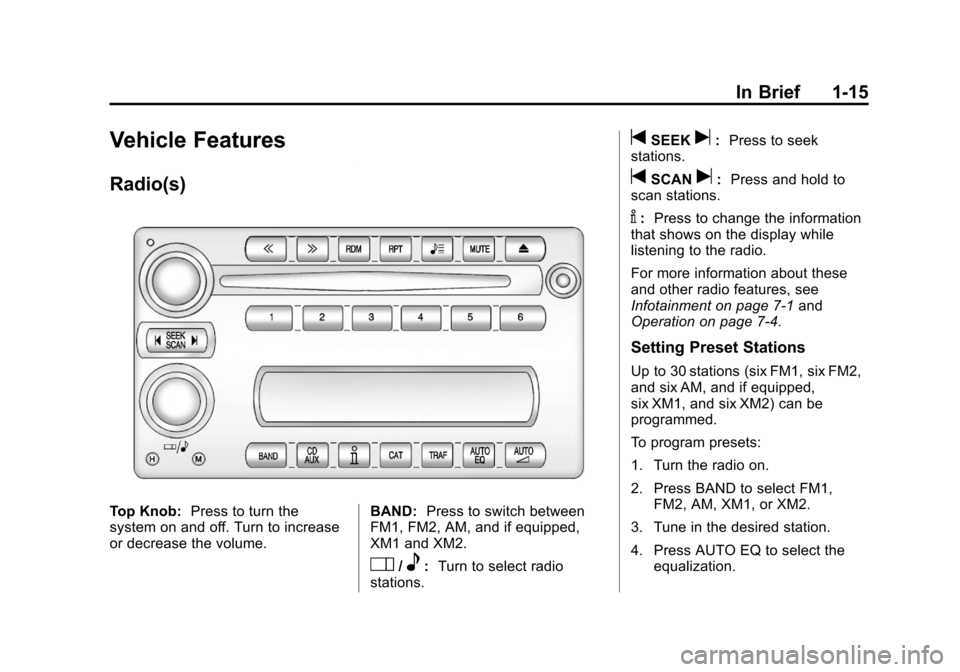
Top Knob:Press to turn the
system on and off. Turn to increase
or decrease the volume. BAND:
Press to switch between
FM1, FM2, AM, and if equipped,
XM1 and XM2.
O/e: Turn to select radio
stations.
tSEEKu: Press to seek
stations.
tSCANu: Press and hold to
scan stations.
V: Press to change the information
that shows on the display while
listening to the radio.
For more information about these
and other radio features, see
Infotainment on page 7‑1 and
Operation on page 7‑4.
Setting Preset Stations
Up to 30 stations (six FM1, six FM2,
and six AM, and if equipped,
six XM1, and six XM2) can be
programmed.
To program presets:
1. Turn the radio on.
2. Press BAND to select FM1,
FM2, AM, XM1, or XM2.
3. Tune in the desired station.
4. Press AUTO EQ to select the equalization.
Page 22 of 414

Black plate (16,1)Chevrolet Corvette Owner Manual - 2013 - crc2 - 11/8/12
1-16 In Brief
5. Press and hold one of the sixnumbered pushbuttons until the
radio beeps once.
6. Repeat the steps for each pushbutton.
See Operation on page 7‑4.
Setting the Clock
To set the clock:
1. Press and hold H until the
correct hour displays.
2. Press and hold M until the correct minute displays.
See Clock on page 5‑6.
Satellite Radio
SiriusXM is a satellite radio service
based in the 48 contiguous United
States and 10 Canadian provinces.
SiriusXM satellite radio has a wide
variety of programming and
commercial-free music, coast to
coast, and in digital-quality sound.
A fee is required to receive the
SiriusXM service. For more information, refer to:
.www.siriusxm.com or call
1-800-929-2100 (U.S.)
.www.xmradio.ca or call
1-877-438-9677 (Canada)
See Satellite Radio on page 7‑8.
Portable Audio Devices
The vehicle has an auxiliary input
jack located on the right side of the
faceplate. External devices such as
iPod
®, MP3 players, etc. can be
connected to the auxiliary input jack
using a 3.5 mm (1/8 in) input jack
cable. This is not an audio output;
do not plug a headphone set into
the auxiliary input jack. See
Auxiliary Devices on page 7‑17.
Bluetooth®
For vehicles with a Bluetooth
system, it allows users with a
Bluetooth-enabled cell phone to
make and receive hands-free calls
using the vehicle’ s audio system
and controls. The Bluetooth-enabled cell phone
must be paired with the Bluetooth
system before it can be used in the
vehicle. Not all phones will support
all functions. For more information,
see www.gm.com/bluetooth and
Bluetooth on page 7‑17.
Steering Wheel Controls
For vehicles with steering wheel
controls, some audio controls can
be adjusted at the steering wheel.
Page 24 of 414
Black plate (18,1)Chevrolet Corvette Owner Manual - 2013 - crc2 - 11/8/12
1-18 In Brief
Driver Information
Center (DIC)
The DIC displays on the instrument
cluster. It shows the status of many
vehicle systems and enables
access to the personalization menu.
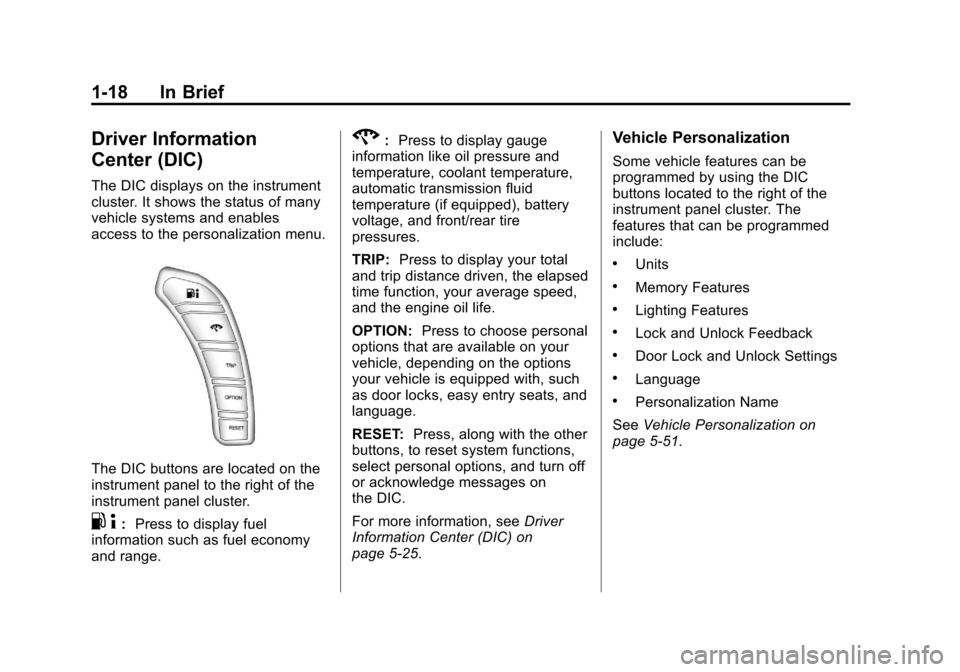
The DIC buttons are located on the
instrument panel to the right of the
instrument panel cluster.
.4:Press to display fuel
information such as fuel economy
and range.
2: Press to display gauge
information like oil pressure and
temperature, coolant temperature,
automatic transmission fluid
temperature (if equipped), battery
voltage, and front/rear tire
pressures.
TRIP: Press to display your total
and trip distance driven, the elapsed
time function, your average speed,
and the engine oil life.
OPTION: Press to choose personal
options that are available on your
vehicle, depending on the options
your vehicle is equipped with, such
as door locks, easy entry seats, and
language.
RESET: Press, along with the other
buttons, to reset system functions,
select personal options, and turn off
or acknowledge messages on
the DIC.
For more information, see Driver
Information Center (DIC) on
page 5‑25.Vehicle Personalization
Some vehicle features can be
programmed by using the DIC
buttons located to the right of the
instrument panel cluster. The
features that can be programmed
include:
.Units
.Memory Features
.Lighting Features
.Lock and Unlock Feedback
.Door Lock and Unlock Settings
.Language
.Personalization Name
See Vehicle Personalization on
page 5‑51.
Page 26 of 414

Black plate (20,1)Chevrolet Corvette Owner Manual - 2013 - crc2 - 11/8/12
1-20 In Brief
Convertible
If equipped, the convertible top can
be lowered and stowed under the
tonneau cover behind the rear seat.
For step-by-step instructions, see
Convertible Top on page 2‑22.
Performance and
Maintenance
Traction Control
System (TCS)
The traction control system limits
wheel spin. The system turns on
automatically every time the vehicle
is started.
.To turn off traction control, press
and release the Active Handling
button located on the center
console.
iilluminates and the
appropriate DIC message
displays. See Ride Control
System Messages on page 5‑42.
.Press and release the Active
Handling button again to turn on
traction control.
See Traction Control System (TCS)
on page 9‑34. The vehicle has an Active Handling
System that helps maintain
directional control of the vehicle in
difficult driving conditions. See
Active Handling System on
page 9‑35.
The vehicle may have Competitive
Driving Mode (except Z06 with
magnetic Selective Ride Control or
ZR1), Performance Traction
Management (Z06 with magnetic
Selective Ride Control or ZR1), and
Launch Control systems designed to
allow increased performance while
accelerating and cornering. See
Competitive Driving Mode on
page 9‑36.