2013 CHEVROLET CAPTIVA SPORT radio
[x] Cancel search: radioPage 1 of 374

Black plate (1,1)Chevrolet Captiva Sport Owner Manual - 2013 - crc - 11/12/12
2013 Chevrolet Captiva Sport Owner Manual MIn Brief . . . . . . . . . . . . . . . . . . . . . . . . 1-1
Instrument Panel . . . . . . . . . . . . . . 1-2
Initial Drive Information . . . . . . . . 1-4
Vehicle Features . . . . . . . . . . . . . 1-16
Performance and
Maintenance . . . . . . . . . . . . . . . . 1-19
Keys, Doors, and
Windows . . . . . . . . . . . . . . . . . . . . 2-1
Keys and Locks . . . . . . . . . . . . . . . 2-1
Doors . . . . . . . . . . . . . . . . . . . . . . . . . . 2-8
Vehicle Security . . . . . . . . . . . . . . . . 2-9
Exterior Mirrors . . . . . . . . . . . . . . . 2-12
Interior Mirrors . . . . . . . . . . . . . . . . 2-13
Windows . . . . . . . . . . . . . . . . . . . . . 2-14
Roof . . . . . . . . . . . . . . . . . . . . . . . . . . 2-15
Seats and Restraints . . . . . . . . . 3-1
Head Restraints . . . . . . . . . . . . . . . 3-2
Front Seats . . . . . . . . . . . . . . . . . . . . 3-3
Rear Seats . . . . . . . . . . . . . . . . . . . . 3-8
Safety Belts . . . . . . . . . . . . . . . . . . . . 3-9
Airbag System . . . . . . . . . . . . . . . . 3-17
Child Restraints . . . . . . . . . . . . . . 3-32 Storage . . . . . . . . . . . . . . . . . . . . . . . 4-1
Storage Compartments . . . . . . . . 4-1
Additional Storage Features . . . 4-2
Roof Rack System . . . . . . . . . . . . . 4-3
Instruments and Controls . . . . 5-1
Controls . . . . . . . . . . . . . . . . . . . . . . . 5-2
Warning Lights, Gauges, and
Indicators . . . . . . . . . . . . . . . . . . . . 5-8
Information Displays . . . . . . . . . . 5-23
Vehicle Messages . . . . . . . . . . . . 5-28
Vehicle Personalization . . . . . . . 5-36
Universal Remote System . . . . 5-41
Lighting . . . . . . . . . . . . . . . . . . . . . . . 6-1
Exterior Lighting . . . . . . . . . . . . . . . 6-1
Interior Lighting . . . . . . . . . . . . . . . . 6-4
Lighting Features . . . . . . . . . . . . . . 6-6
Infotainment System . . . . . . . . . 7-1
Introduction . . . . . . . . . . . . . . . . . . . . 7-1
Radio . . . . . . . . . . . . . . . . . . . . . . . . . . 7-5
Audio Players . . . . . . . . . . . . . . . . 7-10
Phone . . . . . . . . . . . . . . . . . . . . . . . . 7-23 Climate Controls . . . . . . . . . . . . . 8-1
Climate Control Systems . . . . . . 8-1
Air Vents . . . . . . . . . . . . . . . . . . . . . . . 8-8
Maintenance . . . . . . . . . . . . . . . . . . . 8-8
Driving and Operating . . . . . . . . 9-1
Driving Information . . . . . . . . . . . . . 9-2
Starting and Operating . . . . . . . 9-14
Engine Exhaust . . . . . . . . . . . . . . 9-19
Automatic Transmission . . . . . . 9-20
Drive Systems . . . . . . . . . . . . . . . . 9-24
Brakes . . . . . . . . . . . . . . . . . . . . . . . 9-24
Ride Control Systems . . . . . . . . 9-27
Cruise Control . . . . . . . . . . . . . . . . 9-29
Object Detection Systems . . . . 9-31
Fuel . . . . . . . . . . . . . . . . . . . . . . . . . . 9-35
Towing . . . . . . . . . . . . . . . . . . . . . . . 9-39
Conversions and Add-Ons . . . 9-45
Vehicle Care . . . . . . . . . . . . . . . . . 10-1
General Information . . . . . . . . . . 10-2
Vehicle Checks . . . . . . . . . . . . . . . 10-3
Headlamp Aiming . . . . . . . . . . . 10-26
Bulb Replacement . . . . . . . . . . 10-26
Page 5 of 374

Black plate (1,1)Chevrolet Captiva Sport Owner Manual - 2013 - crc - 11/12/12
In Brief 1-1
In Brief Instrument Panel Instrument Panel Overview . . . . 1-2
Initial Drive Information Initial Drive Information . . . . . . . . 1-4
Remote Keyless Entry (RKE)
System . . . . . . . . . . . . . . . . . . . . . . 1-4
Remote Vehicle Start . . . . . . . . . 1-4
Door Locks . . . . . . . . . . . . . . . . . . . 1-5
Liftgate . . . . . . . . . . . . . . . . . . . . . . . . 1-6
Windows . . . . . . . . . . . . . . . . . . . . . . 1-6
Seat Adjustment . . . . . . . . . . . . . . 1-7
Second Row Seats . . . . . . . . . . . 1-9
Heated Seats . . . . . . . . . . . . . . . . . 1-9
Head Restraint
Adjustment . . . . . . . . . . . . . . . . . 1-10
Safety Belts . . . . . . . . . . . . . . . . . . 1-10 Passenger Sensing System
(United States) . . . . . . . . . . . . . 1-10
Mirror Adjustment . . . . . . . . . . . . 1-11
Steering Wheel
Adjustment . . . . . . . . . . . . . . . . . 1-12
Interior Lighting . . . . . . . . . . . . . . 1-12
Exterior Lighting . . . . . . . . . . . . . 1-13
Windshield Wiper/Washer . . . . 1-13
Climate Controls . . . . . . . . . . . . . 1-14
Transmission . . . . . . . . . . . . . . . . 1-15
Vehicle Features Radio(s) . . . . . . . . . . . . . . . . . . . . . 1-16
Satellite Radio . . . . . . . . . . . . . . . 1-16
Portable Audio Devices . . . . . . 1-17
Bluetooth ®
. . . . . . . . . . . . . . . . . . . 1-17
Steering Wheel Controls . . . . . 1-17
Cruise Control . . . . . . . . . . . . . . . 1-17
Driver Information
Center (DIC) . . . . . . . . . . . . . . . 1-18 Rear Vision
Camera (RVC) . . . . . . . . . . . . . 1-18
Ultrasonic Parking Assist . . . . 1-18
Power Outlets . . . . . . . . . . . . . . . 1-19
Universal Remote System . . . 1-19
Performance and Maintenance Traction Control
System (TCS) . . . . . . . . . . . . . . 1-19
StabiliTrak ®
System . . . . . . . . . 1-20
Tire Pressure Monitor . . . . . . . . 1-20
Engine Oil Life System . . . . . . 1-20
Fuel E85 (85% Ethanol) . . . . . 1-21
Driving for Better Fuel
Economy . . . . . . . . . . . . . . . . . . . 1-21
Roadside Assistance
Program . . . . . . . . . . . . . . . . . . . . 1-21
OnStar ®
. . . . . . . . . . . . . . . . . . . . . 1-22
Page 7 of 374

Black plate (3,1)Chevrolet Captiva Sport Owner Manual - 2013 - crc - 11/12/12
In Brief 1-31. Air Vents on page 8 ‑ 8 .
2. Instrument Panel Illumination
Control on page 6 ‑ 4 .
3. Turn and Lane-Change Lever.
See Turn and Lane-Change
Signals on page 6 ‑ 3 .
4. Instrument Cluster on page 5 ‑ 9 .
5. Windshield Wiper/Washer on
page 5 ‑ 3 .
6. AM-FM Radio on page 7 ‑ 5 .
7. Auxiliary Input Jack. See
Auxiliary Devices on page 7 ‑ 19 .
8. Fog Lamps on page 6 ‑ 4 .
Exterior Lamp Controls on
page 6 ‑ 1 .
9. Driver Information Center (DIC)
Buttons. See Driver Information
Center (DIC) on page 5 ‑ 23 . 10. Instrument Panel Storage on
page 4 ‑ 1 .
11. Data Link Connector (DLC)
(Out of View). See Malfunction
Indicator Lamp on page 5 ‑ 14 .
12. Hood Release. See Hood on
page 10 ‑ 3 .
13. Cruise Control on page 9 ‑ 29 .
14. Steering Wheel Adjustment on
page 5 ‑ 2 .
15. Horn on page 5 ‑ 3 .
16. Steering Wheel Controls on
page 5 ‑ 2 (If Equipped).
17. Rear Window Wiper/Washer on
page 5 ‑ 4 .
18. Traction Control System (TCS)
on page 9 ‑ 27 .
19. Shift Lever. See Automatic
Transmission on page 9 ‑ 20 . 20. Climate Control Systems on
page 8 ‑ 1 (If Equipped).
Automatic Climate Control
System on page 8 ‑ 4 (If
Equipped).
21. Hazard Warning Flashers on
page 6 ‑ 3 .
22. Passenger Airbag Status
Indicator. See Passenger
Sensing System (United
States) on page 3 ‑ 25 .
23. Passenger Safety Belt
Reminder. See Safety Belt
Reminders on page 5 ‑ 11 .
Page 20 of 374
Black plate (16,1)Chevrolet Captiva Sport Owner Manual - 2013 - crc - 11/12/12
1-16 In Brief
Vehicle Features Radio(s)
O : Press to turn the system on
and off. Turn to increase or
decrease the volume.
BAND: Press to choose between
FM, AM, or SiriusXM ®
, if equipped.
f : Select radio stations.
© SEEK or
¨ SEEK: Seek or scan
stations.
4 (Information): For vehicles with
XM, MP3, WMA, or RDS features,
press to display additional text
information related to the current
FM-RDS or SiriusXM station; or CD,
MP3, WMA song. Song title
information will be displayed on the
top line of the display while the artist
information will be displayed on the
bottom line, if the information is
available during XM, CD, MP3,
or WMA playback. When
information is not available, "No
Info" displays. For more information about these
and other radio features, see
Operation on page 7 ‑ 3 .
Storing a Favorite Station A maximum of 36 stations can be
stored as favorites using the six
softkeys located below the radio
station frequency tabs and by using
the radio FAV button. Press FAV to
go through up to six pages of
favorites, each having six favorite
stations available per page. Each
page of favorites can contain any
combination of AM, FM, or SiriusXM
stations.
See Operation on page 7 ‑ 3 .
Setting the Clock To set the time and date:
1. Turn the ignition key to ACC/
ACCESSORY or ON/RUN.
2. Press
O to turn the radio on.
3. Press
H and HR, MIN, MM, DD,
and YYYY (hour, minute, month,
day, and year) display. 4. Press the softkey located below
any one of the tabs that you
want to change.
5. Increase or decrease the time or
date by turning
f clockwise or
counterclockwise.
See Clock on page 5 ‑ 6 .
Satellite Radio SiriusXM ®
is a satellite radio service
based in the 48 contiguous United
States and 10 Canadian provinces.
SiriusXM satellite radio has a wide
variety of programming and
commercial-free music, coast to
coast, and in digital-quality sound.
A fee is required to receive the
SiriusXM service.
For more information, refer to: .
www.siriusxm.com or call
1-866-635-2349 (U.S.) .
www.xmradio.ca or call
1-877-209-0079 (Canada)
See Satellite Radio on page 7 ‑ 6 .
Page 21 of 374

Black plate (17,1)Chevrolet Captiva Sport Owner Manual - 2013 - crc - 11/12/12
In Brief 1-17
Portable Audio Devices The vehicle may have a 3.5 mm
(1/8 in) auxiliary input jack on the
audio faceplate and a USB port in
the center console. Some portable
audio devices such as iPods ®
, MP3
players, and USB storage devices
can be connected to the vehicle
using a 3.5 mm (1/8 in) cable or a
USB cable.
See Auxiliary Devices on page 7 ‑ 19 .
Bluetooth ®
For vehicles with a Bluetooth
system, it allows users with a
Bluetooth-enabled cell phone to
make and receive hands-free calls
using the vehicle ’ s audio system
and controls.
The Bluetooth-enabled cell phone
must be paired with the Bluetooth
system before it can be used in the
vehicle. Not all phones will support
all functions. For more information,
see www.gm.com/bluetooth and
Bluetooth on page 7 ‑ 23 . Steering Wheel Controls
For vehicles with audio steering
wheel controls, some audio controls
can be adjusted at the steering
wheel.
+ / − : Press and release to go to
the next or the previous preset radio
station or CD track.
J /
0 : For vehicles with Bluetooth ®
and OnStar ®
, press to interact with
those systems. Press and release to
mute the system. Press it again to
turn the sound back on. K : Press to reject an incoming
call, or end a current call. Press to
silence the vehicle speakers while
using the infotainment system.
Press again to turn the sound on.
v + or
v − : Move the thumbwheel
up or down to increase or to
decrease the volume.
Cruise Control
E : Press to turn the cruise control
system on and off. An indicator light
comes on.
Page 28 of 374
Black plate (2,1)Chevrolet Captiva Sport Owner Manual - 2013 - crc - 11/12/12
2-2 Keys, Doors, and Windows
The two keys can be used for the
ignition and all locks.
The key code is stamped on the key
number plate and can be used to
make new keys at any dealer. Store
this information in a safe place
outside the vehicle.
If it becomes difficult to turn a key,
inspect the key blade for debris.
Periodically clean with a brush
or pick.
With an active OnStar subscription,
an OnStar Advisor may remotely
unlock the vehicle. See OnStar
Overview on page 14 ‑ 1 . Remote Keyless Entry
(RKE) System See Radio Frequency Statement on
page 13 ‑ 20 for information
regarding Part 15 of the Federal
Communications Commission (FCC)
rules and Industry Canada
Standards RSS-GEN/210/220/310.
If there is a decrease in the RKE
operating range: .
Check the distance. The
transmitter may be too far from
the vehicle. .
Check the location. Other
vehicles or objects may be
blocking the signal. .
Check the transmitter's battery.
See “ Battery Replacement ” later
in this section. .
If the transmitter is still not
working correctly, see your
dealer or a qualified technician
for service. Remote Keyless Entry
(RKE) System Operation The Remote Keyless Entry (RKE)
transmitter functions work up to
20 m (65 ft) away from the vehicle.
Some conditions can affect the
performance of the transmitter. See
Remote Keyless Entry (RKE)
System on page 2 ‑ 2 .
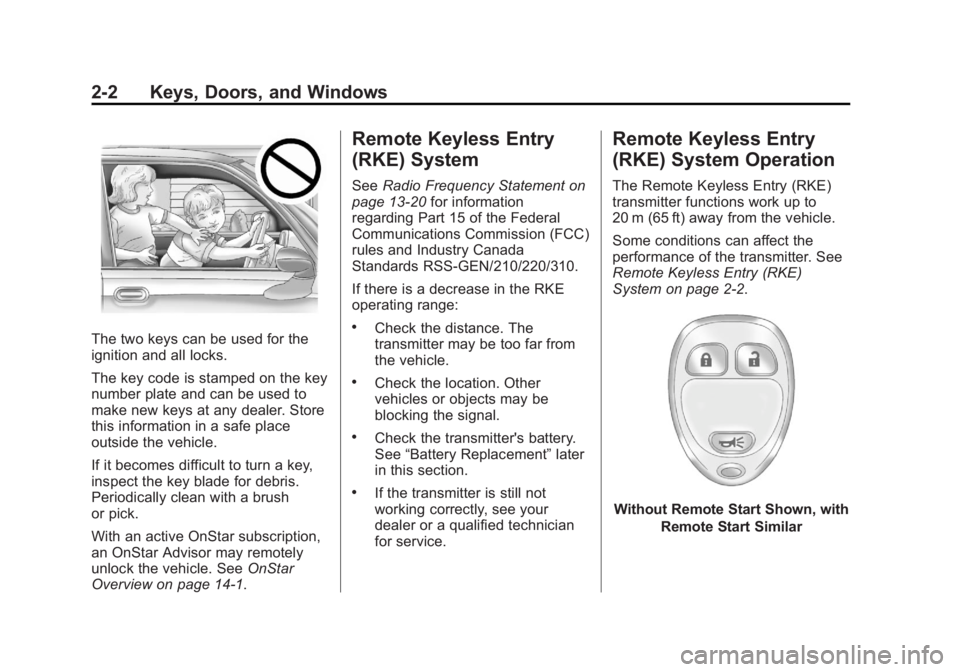
Without Remote Start Shown, with
Remote Start Similar
Page 36 of 374

Black plate (10,1)Chevrolet Captiva Sport Owner Manual - 2013 - crc - 11/12/12
2-10 Keys, Doors, and Windows To avoid setting off the alarm by
accident, always unlock a door with
the RKE transmitter or a key.
Unlocking a door any other way will
set off the alarm if the system has
been armed.
If you set off the alarm by accident,
turn off the alarm by pressing
Q or
K on the RKE transmitter or by
placing the key in the ignition and
turning it to START.
Testing the Alarm To test the alarm:
1. From inside the vehicle, lower
the driver window and open the
driver door.
2. Get out of the vehicle, close the
door, and activate the system by
locking the doors with the RKE
transmitter.
3. Wait for the security light to flash
slowly. 4. Reach in through the window,
unlock the door with the manual
door lock, and open the door.
This should set off the alarm.
If the alarm does not sound when it
should, but the vehicle's headlamps
flash, check to see if the horn
works. The horn fuse may be blown.
To replace the fuse, see Fuses and
Circuit Breakers on page 10 ‑ 30 .
If the alarm does not sound or the
vehicle's headlamps do not flash,
see your dealer for service.
Immobilizer See Radio Frequency Statement on
page 13 ‑ 20 for information
regarding Part 15 of the Federal
Communications Commission (FCC)
rules and Industry Canada
Standards RSS-GEN/210/220/310. Immobilizer Operation This vehicle has PASS-Key ®
III+
(Personalized Automotive Security
System) theft-deterrent system.
PASS-Key III+ is a passive
theft-deterrent system.
The system is automatically armed
when the key is removed from the
ignition.
You do not have to manually arm or
disarm the system.
The security light comes on if there
is a problem with the theft-deterrent
system operation.
When the PASS-Key III+ system
senses that someone is using the
wrong key, it prevents the vehicle
from starting. Anyone using a
trial-and-error method to start the
vehicle will be discouraged because
of the high number of electrical key
codes.
Page 98 of 374

Black plate (2,1)Chevrolet Captiva Sport Owner Manual - 2013 - crc - 11/12/12
5-2 Instruments and Controls Object Detection System
Messages . . . . . . . . . . . . . . . . . . 5-32
Ride Control System
Messages . . . . . . . . . . . . . . . . . . 5-32
Airbag System Messages . . . . 5-33
Service Vehicle Messages . . . 5-34
Tire Messages . . . . . . . . . . . . . . . 5-34
Transmission Messages . . . . . 5-35
Vehicle Reminder
Messages . . . . . . . . . . . . . . . . . . 5-35
Vehicle Personalization Vehicle Personalization . . . . . . 5-36
Universal Remote System Universal Remote System . . . 5-41
Universal Remote System
Programming . . . . . . . . . . . . . . . 5-41
Universal Remote System
Operation . . . . . . . . . . . . . . . . . . 5-44 Controls Steering Wheel
Adjustment
To adjust the steering wheel:
1. Hold the steering wheel and pull
the lever down.
2. Move the steering wheel up
or down.
3. Pull or push the steering wheel
closer or away from you. 4. Pull the lever up to lock the
steering wheel in place.
Do not adjust the steering wheel
while driving.
Steering Wheel Controls
For vehicles with audio steering
wheel controls, some audio controls
can be adjusted at the steering
wheel.
+ / − (Next/Previous): Press and
release to go to the next or the
previous preset radio station or CD
track.