2013 AUDI Q7 turn
[x] Cancel search: turnPage 44 of 348

42 Openin g and clo sing
readiness light, located in the upper part of
the driver's door panel, will start to blink.
- T he vehicle interior lights turn off.
Unlocking and l ocking with Conven ience
k ey*
On vehicles which a re equipped w ith the C o n
ve nience k ey*
authorization system, the
doors are unlocked without a key by means of
a proximity sensor in the door handle. The
doors are simi larly locked without a key using
the locking button. Each door has a proximity
sensor and a locking button .
Automatic l ock ing
The automatic locking feature locks all the ve
hicle doors and the rear lid when you drive
faster than 9 mph (15 km/h). This function can be turned on and off in the MMI
C entr al
lo cking
Menu c:> page 44.
You can un lock the vehicle from the inside by :
- removing the key from the ign it ion sw itch
(the vehicle will automat ica lly unlock itself)
or
- pressing the unlock part of the power lock
switch @or
- pull ing the door handle (twice to open the
rear doors).
Unintent ionall y locking yourself out
In the following cases there safeguards to
prevent you locking your remote master key in
the vehicle :
- The veh icle does not lock with the power
locking sw itch
c:> page 44 if the driver's
door is open.
- On vehicles with Convenience key* , if the
most recently used master key is in the lug
gage compartment, the rear lid is automati
cal ly unloc ked aga in after it is closed.
Do not lock your vehicle with the
r e mot e m as
t e r k ey or Convenienc e key*
until all doors
and the rea r lid are closed. In t his way you
avoid locking yourse lf out accidenta lly.
A WARNING
- When you lock your vehicle from outside,
nobody- espec ially children -should re
main inside the vehicle . Remember,
when you lock the vehicle from the out
side the windows cannot be opened from
the inside.
- When you leave the veh icle, always re
move the ignition key and take it with
you . This will prevent passengers (chil
dren, for example) from accidentally be
ing locked in the vehicle should they acci
dentally press the power locking switch
in the front doors.
- Do not leave children inside the vehicle
unsupervised. In an emergency it would
be imposs ible to open the doors from
the outside without the key.
(D Tips
- In the event of a crash with airbag de
ployment all locked doors will be auto
matically unlocked to give access to the
vehicle occupants from the outside.
- If the power locking system sho uld mal
function, you can lock each door individ
ually using the vehicle key
c:> page 45 .
-If the power locking system shou ld fa il,
you can still open the fuel tank flap in an
emergency
c:> page 261 .
-You are well advised not to keep va lua
bles inside an unattended vehicle, v is ible
or not. Even a properly locked vehicle
cannot p rov ide the secur ity of a safe .
Page 45 of 348

Unlocking and locking the vehicle with
the remote control
How the remote control works.
Fig. 32 Remot e contr ol: fun ctio n but ton s
Either the driver 's door only or the entire vehi
cle will unlock when the unlock button @ is
pressed once, depending on the settings in
the MMI
Central locking menu ¢ page 44 .
To unlock the vehicle CD
.. Press button @.
.. Press button @two
times within two sec
onds
to unlock all doors and the rear lid .
To lock the vehicle 5'.l
.. Press button @¢.&. in General description
on page 42 .
.. Watch that all turn signal lights flash once.
To unlock rear lid only~
.. Press button © for app roximately one sec
ond .
PANIC Button
.. Push the red button@) to act ivate the panic
function. The horn sounds and the turn sig nals flash .
.. Push the button @again to deactivate the
panic function.
On vehicles w ith Convenience key*, the selec
tor lever must be in the P posit ion, otherwise
the vehicle cannot be locked.
_& WARNING
Read and follow all WARNINGS ¢&. in
General description on page 42.
-
Opening and closing 43
@ Tips
-In order to make sure the locking func
tion is working, you should a lways keep
your eye on the vehicle to make s ure it is
properly locked.
- Do not use the remote control if you are
inside the car, otherwise you may unin
tentionally lock the vehicle, and then you
would set off the anti-theft alarm when
you try to start the eng ine or open a
door . In case this happens anyhow, push
the unlock button@.
- Use the pan ic function on ly if you are in
an emergency s ituation.
Operating locks with the key
To lock and unlock the vehicle from the out
side, turn the key in the lock of the driver's door .
Fig. 33 Key turns fo r open in g and clos ing .
To unlock the vehicle
.. Insert the key into the lock of the driver's
door .
N N N :;
~
.. Turn the key one time to position @to un
lock the driver's door.
.. Turn the key
two times to position @
¢
fig . 33 to unlock all doors and the rear lid .
To lock the vehicle
.. Close all windows and doors properly.
.. Turn the key in the lock of the driver's door
to the lock pos ition @ ¢
A in General de-
scription on page 42. ..,.
Page 47 of 348

-Front doors: you can un lock and open the
doors from the inside by pulling on the door
handle.
- Rear doors: pu ll the door handle
once to re
lease the lock. Pull the hand le
again to open
the doo r.
- If the driver's door is opened (after you have
locked the vehicle from the inside using the
power locking switch), the door will remain
unlocked to prevent you from locking your
self out of your vehicle . After you close the
door, you have to lock the driver 's door
again .
- If you have a crash and the airbag is act ivat
ed, the doors automatically unlock.
A WARNING
- If you use the powe r locking switch with
the doors closed, remember that all the
vehicle doors will lock.
- Locked doors make it more difficult for
emergency workers to get into the vehi
cle, which puts lives at risk. Do not leave
anyone behind in the vehicle, especially
children.
Emergency locking
If the central locking system fails (power sup
ply), each door has to be locked separately.
Fig. 36 Em ergency lockin g o f the front passe nger's
doo r
i:i N
-..:,
~
An emergency locking mechanism is integrat
ed in the edge of the passenger's door and in
the rear doors (only visible when the doo r is
open) .
~ Open the door.
Opening and closing 45
~ Pull the protective cover out of the hole
¢fig. 36.
~ Insert the key into the inner slot and turn it
to the right (right-s ide doors) or the left
(left-s ide door) as far as it can go.
After you close the door, you will no longer be
able to open it from the outside.
T he door can be opened from the inside by
pulling once respectively twice (rear doors) on
the door handle . If the chi ld safety lock is en
gaged in one of the rear doors, the door has to
be opened from the outside after pull ing on
the handle once from the inside.
Rear lid
Opening and closing rear lid
You can open the rear lid from inside the vehi
cle using a switch in the driver's door.
Fig. 37 Driver 's doo r: remote rear lid release
Fig. 38 Posit io n of ha ndle in t he re ar lid
Opening the rear lid
~ Press the middle button C::5 on the remote
cont rol master key, or
~ Press the un lock button C::5 in the driver's
door
¢ fig . 37, or
U) N
"' -..:,
i3
~ Press the handle on the rear lid ¢ fig. 38 . .,.
Page 48 of 348

46 Opening and clo sing
• The rear lid un locks automatically and
opens slight ly.
• Lift the rear lid .
Clos ing the r ear lid
• Pull the rear lid down and allow it to drop
gently. The lid is then closed automat ica lly
Q A .
A WARNING
-After closing the rear lid, always pull up
on it to make sure that it is properly
closed. Otherw ise it could open sudden ly
when the vehicle is moving .
- To help prevent po isonous exhaust gas
from being drawn into the veh icle , al
ways keep the rear lid closed while dr iv
ing . Never transport objects larger than
those which fit completely into the lug
gage area, because then the rear lid can
not be fully closed .
- Never leave you r vehicle unattended es
peci ally wi th the re ar lid left open. A
c h ild could c rawl into the ca r th rough the
l u ggage compartment and pull the lid
shut, becom ing trapped and unab le to
get out. To reduce the risk of persona l in
jury, never let children play in or around yo ur vehicle . A lways keep the rear lid as
well as the vehicle doors closed when not
in use .
- Always ensure that no one is w ith in
range of the rear lid when it is mov ing, in
part icula r close to the h inges -fingers o r
hands can be pinched.
@ Tips
- If the rear lid is open or not properly
clos ed w hen the ig nition is turned on,
the door and rea r lid war ning
Q page 22
appears in the ins trument clus ter dis
play.
- Should you not b e able to open the re ar
li d as desc ribed, make sure the valet key
func tion is not ac tiv at ed
~ page 41.
Automatic rear lid/trunk lid operation
Applies to vehicles: with automatic rear lid/trunk lid oper
ation
The trunk lid can be opened and closed auto
matically.
Fig. 39 D rive r's doo r: Unlock ing t he rea r lid
Fi g. 4 0 Lock ing sw itc h in t he rear l id
Opening rear lid
• Press the middle button C:$ on the remote
key for at least one second, or
• Press the u nlock button
c:5 in the driver's
door ~
fig. 39, o r
• Press the handle o n the rear lid
¢ page 45,
fig. 38 .
• Th e open ing pro cess is stopped immediate
ly if the middle button c:5 on the remote
key is pressed again for at least one second
or the unlock button
c:5 in the dr iv e r's door
is pressed again or the hand le in the rear lid
is pressed aga in.
• Middle button in the remote key and unlock
button in the driver's door:
T he open ing
p rocess is cont inued by pressing on e of the
buttons aga in.
• Handle in the rear lid: the rear l id is closed
ag ain by p ress ing the handle again
Q A . ..,.
Page 49 of 348

Clos ing re ar lid /trunk lid
"' Press the close button in the open rear lid
~ fig. 40. T he trunk lid moves to the closed
posit ion by itself and soft close locks it auto
matically ~&_ .
"' The closing process
is stopped immedi atel y
if the clo se button in the rear lid is pressed
again.
"' By pushing the button again, the rear lid is
opened again .
Saving the open ing a ngle of the rear lid
"' Bring the rear lid manua lly or automatic ally
to the desired opening posi tion and leave it
i n th is position .
"' Press the button in the rear lid
~ fig . 40 for
at least four seconds in order to save the de
s ired opening position. The position ca n only
be saved start ing at a certain level.
A WARNING
- Never close the rear lid inattentively or
without checking fi rst . Altho ugh the
closing force of the rear lid is lim ited,
yo u can st ill ser iously injure yourself or
others.
- Always ensure that no one is w ith in
range of the rear lid when it is moving, in
part icu lar close to the hinges and the up
per and lower edges -fingers or hands
can be p inched .
- To help prevent po isonous exhaust gas
from being d rawn into the vehicle, al
ways keep the rear lid closed while driv ing. Never transport objects larger than
those which fit completely into the lug
gage area, because then the rear lid can
not be fully closed.
- Never leave you r vehicle unattended es
pecially with the rea r lid left open . A
child could crawl into the car through the
l u ggage compa rtment and pull the lid
shut, becom ing trapped and unab le to
get out. To reduce the risk of persona l in
jury , never let children p lay in or around
your vehicle . A lways keep the rear lid as
-
Opening and clo sin g 47
well as the vehicle doors closed when not
in use .
- If there is a l uggage rack or bicycle rack
mounted on the rear lid, it may not be
ab le to open completely or an opened
rear lid may close by itself because of the
added weight . So the open rear lid must
be supported or the weight must be re
moved from the luggage rac k first.
@ Tips
- If the rear lid is open or not properly
locked when the ign ition is turned on,
the door and rear lid warning ~
page 22
appears in the instrument cluster dis-
play .
- T he automatic rear lid opening/clos ing
process can be stopped by ho ld in g the
re ar lid w ith your hand. The lid can then
be f urther opened/closed by h and.
- I f there is a mechan ica l problem wit h the
automatic rear lid
opening proces s or
there is an obstruction, the process is
stop ped immediately.
- I f there is a mechan ica l problem wit h au
tomatic closing for the rea r lid or there
is an obstr uction, it opens again slightly
r ight away . Chec k to see why the rear lid
cou ld not be closed before attempting to
close it again .
- If the rear lid on a locked vehicle is un
locked with the midd le button~ on the
remote key, the rear lid is automat ically
locked again immed iate ly after closing .
T his is indicated by the turn signals
blinking.
- The followi ng applies to vehicles equ ip
ped w ith the Convenience key* feature: if
the remote control key is left in the lug
gage compa rtment, l uggage compa rt
ment w ill autom atic ally unlo ck itsel f af
ter yo u lock the vehicle. This preven ts
you from unintentionally locking you r
key in the luggage compartment.
- If the vehicle battery charge drops be low
a certain level, yo u can sti ll open o r close
the rear lid manually, however, you w ill
need to apply more force to close it. ..,.
Page 50 of 348

48 Openin g and clo sing
- As soon as the electrical connec tion to
the trailer socket is completed on
vehicles with a factory installed towing
hitch, or a trailer hitch that was installed
later according to factory specifications,
the automatic rear lid function can only be operated v ia the handle in the rear lid.
Rear lid emergency unlocking
If the rear lid cannot be opened, an emergen
cy release is provided .
1----------------- --,l~ N
Fig . 4 1 Section of the luggage compar tment : Access to
emerge ncy re lease
Fig . 42 Sect ion of the luggage compartment: Emer
gency release
,.. Tilt the seatback forward .
,.. Move into the t runk.
,.. Take the sc rewd river from the veh icle tool
kit . As an alternat ive, you can a lso use the
vehicle key.
• Put the flat side of the screw driver into the
recess and pry the cover up
o fig. 41 -Arrow-.
• Press the lever in the direction of the arrow
ofig . 42 to unlock the rear lid .
Child safety lock
Power child safety lock for the rear
doors
The power child safety lock t prevents the
rear doors from being opened from the in
side .
Fig . 43 Sect ion fro m driver's door: controls
The rear doors are equipped with a power
child safety lock.
It is operated with the two
safety buttons
III in the dr iver's door o fig. 43.
• Press the left and/or right safety button to
disab le the rear power window(s) and pre
vent the respective rear door from being
opened from the inside. The LED in the but
ton will light up when the child safety lock is
turned
on .
,.. Press the illum inated button aga in to turn
the child safety featu res
off .
When the c hild safety lock is activated, the in
te rior door opening lever is inoperative; the
doo r can only be opened from th e outside. In
addition, the window reg ulator for that doo r
is also inoperative when the child safety lock
is activa ted.
If the child safety lock has been ac tivated on
one or both sides, the butto ns in the rear for
the Panoramic slid ing su nroof* are disabled .
If the child safety lock has been act ivated on
the left
and on the right side, the rear con
tro ls are locked on veh icles with rear a ir-condi
tion ing *. Dashes" ••• " are show n in t he dis
plays for the rear climate contro ls, and the
rear air-conditioning can on ly be operated
from the climate controls in the cabin
opage 97.
Page 52 of 348
50 Openin g and clo sing
When a door is unlocked, the driver 's door is
a lways unlocked as we ll.
It depends on the
settings in the central locking menu in the
MMI whether the entire vehicle is unlocked or
only certain doors ¢
page 44.
{O) Tips
If your vehicle has been stand ing for an ex
tended period, please note the following:
- The proximity sensors are deactivated af-
ter a few days to save power. You then
have to pull on the door handle once to
unlock the vehicle and a second time to
open the veh icle.
- To prevent the battery from being dis
charged and to preserve your veh icle's
ability to start for as long as possible,
the energy management system gradu
a lly switches off unnecessary co nven
i ence f unct io ns.
It is possible that you
will not be able to unlock your vehicle us
ing these convenience f unctions.
Locking the vehicle
Applies to vehicles: with Conve nience key
The vehicle can be locked without operating
the master key.
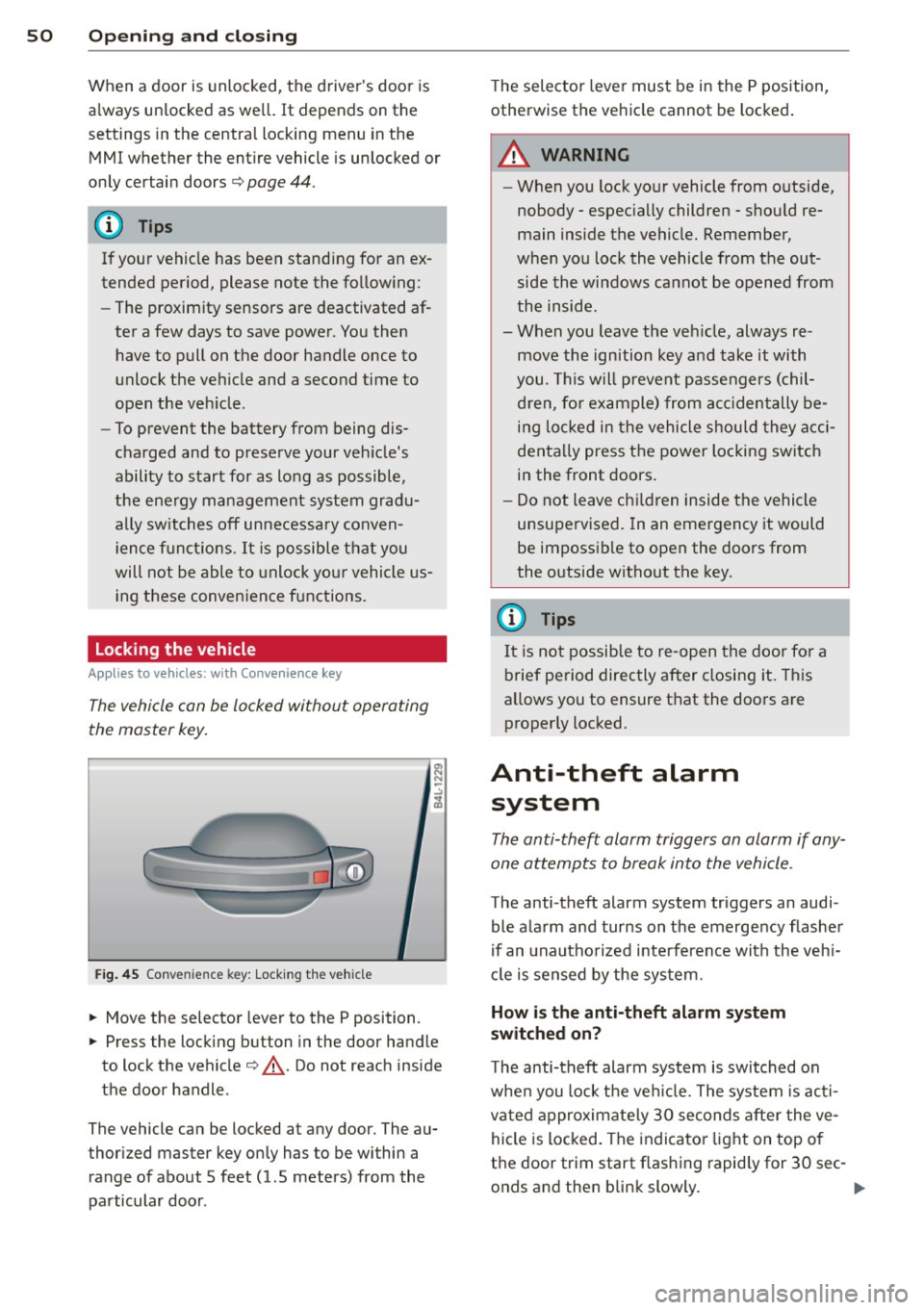
Fig . 45 Conve nience key: Lock ing th e ve hicle
.. Move the selector lever to the P position.
.. Press the locking button in the door handle
to lock the vehicle¢,&.. Do not reach inside
the door handle .
The vehicle can be locked at any door. The au
thor ized master key on ly has to be within a
range of about 5 feet (1.5 meters) from the
pa rticular door . T
he selec tor lever must be in the P position,
otherwise the ve hicle cannot be locked .
A WARNING
--When you lock yo ur vehicle from o utside,
nobody - espec ia lly children - shou ld re
main inside the vehicle. Remember,
when you lock the vehicle from the out
side the wi ndows cannot be opened from
the inside.
- When you leave the veh icle, always re
move the ign ition key and take it with
you. This will prevent passengers (chil
d ren, fo r ex ample) from acci dentally be
i n g lo cked in the vehicle shou ld they acci
denta lly press the power locking switch
in the front doors.
- Do not leave ch ildren inside the vehicle
unsupervised. In an emergency it would
be impossible to open the doors from
the o utside witho ut the key.
(J} Tips
It i s no t possible to re -open the doo r fo r a
brief pe riod directly after closing it. This
allows you to ensure that the doo rs are
properly locked.
Anti-theft alarm system
The anti-theft alarm triggers an alarm if any
one attempts to break into the vehicle.
The anti-theft alarm system triggers an audi
ble ala rm and turns on the emergency flashe r
if an unautho rized interfe rence with the veh i
cl e is sensed by the sys tem.
How is the anti-theft alarm system
switched on?
T he anti-theft alarm system is switched on
whe n you lock the ve hicle. The system is ac ti
vated approximate ly 30 seconds after the ve
hicle is locked. The indicato r ligh t on top o f
the door trim start flashing rapid ly for 30 sec -
onds and then blink slowly. ..,.
Page 55 of 348

switch when the chi ld safety lock is acti
vated .
Switch in the front passenger 's door and
on the rear doors
F ig. 4 7 Swit ch loca tion front pass engers door
The power window sw itch has a two-po sit ion
function :
Opening the windows
.. Press the switch to the fir st position and
hold it until you have opened t he window as
f ar as yo u wan t.
.. Press the sw itch quickly to the
second posi
tion
and the window w ill automatically open
all the way .
Closing the windows
.. Pull t he swi tch to the first position and
hold it until you have closed the window as
far as yo u want .
.. Pull the switch q uickly to the
second posi
tion
and the window wi ll automatically close
all the way.
(D Tips
The windows can st ill be opened and
closed for abo ut ten minutes after the ig
nition has been t urned off . The powe r win
dows are not sh ut off until o ne of t he front
doors is opened .
Opening and clo sin g 53
Convenience close/open feature with the
lock in the dr iver 's door
I
You can close or open the windows from out
side when you lock or unlock your car wi th the
key in the driver's door lo ck .
Fig. 48 Key turns for opening and closing
Closing windows
.. Insert the key into the lock of the dr iver's
door .
.. Make su re that the windows are not blocked
¢ _& .
.. Turn and hold the key i n the lock pos it io n @
¢ fig . 48 unt il the windows and the Panor
amic sliding sunroof * with the power s un
blin d are comp letely closed.
Opening windows
.. Insert the key into the lock of the driver's
door .
.. Turn and hold the key in the open posit ion
@ .
The automatic close/open f unction w ill cease
if the key is returned to its orig inal pos ition .
A WARNING
-
- Be careful wh en clos ing the w indows .
Che ck to see t hat no one is in the way, o r
ser ious injury could result!
- Always rea d an d h eed WARN ING
¢ A in
G eneral descrip tion on p age 42.