2013 AUDI Q7 media
[x] Cancel search: mediaPage 64 of 348
62 Clear vis ion
• Press one of the switches ~~ to tu rn the
right or left reading light on or off~
fig. 60.
For vehicles w ith third row seating*, the lug
gage compartment light can be switched on
and off with the button'*' and used as a read
ing light
~fig. 61. The rear lid has to be
closed.
The lights in the l uggage compartment and in
the rear lid sw itch on and off automatically
when the lid is opened and closed .
@ Tips
If the rear lid remains open longer than 10
minutes, the luggage compartment lights
turn off a utomatically to prevent the vehi
cle battery from discharging.
Ambience lighting
App lies to vehicles: with amb ience light ing
The ambience lighting con be adjusted in the
MMI .
• Se lect: ICARI f u nct ion button > Sy stem s*
control button > Ambience lighting . Or
• Se lect:
ICARI function button > Ca r sy s
tems*
control button > Vehicle settings >
Interior l ighting .
When the ve hicle is unlocked, t he standard
lighting turns on automatically and d ims after
approx. 2 minutes, and when the ignition is
turned on it switches off immediately .
The following interior lighting is controlled :
- Front footwe ll
- Rea r footwell
- Front door panel
- Rear doo r panel
Vision
Sun visors
Using the sun visors makes driving safer .
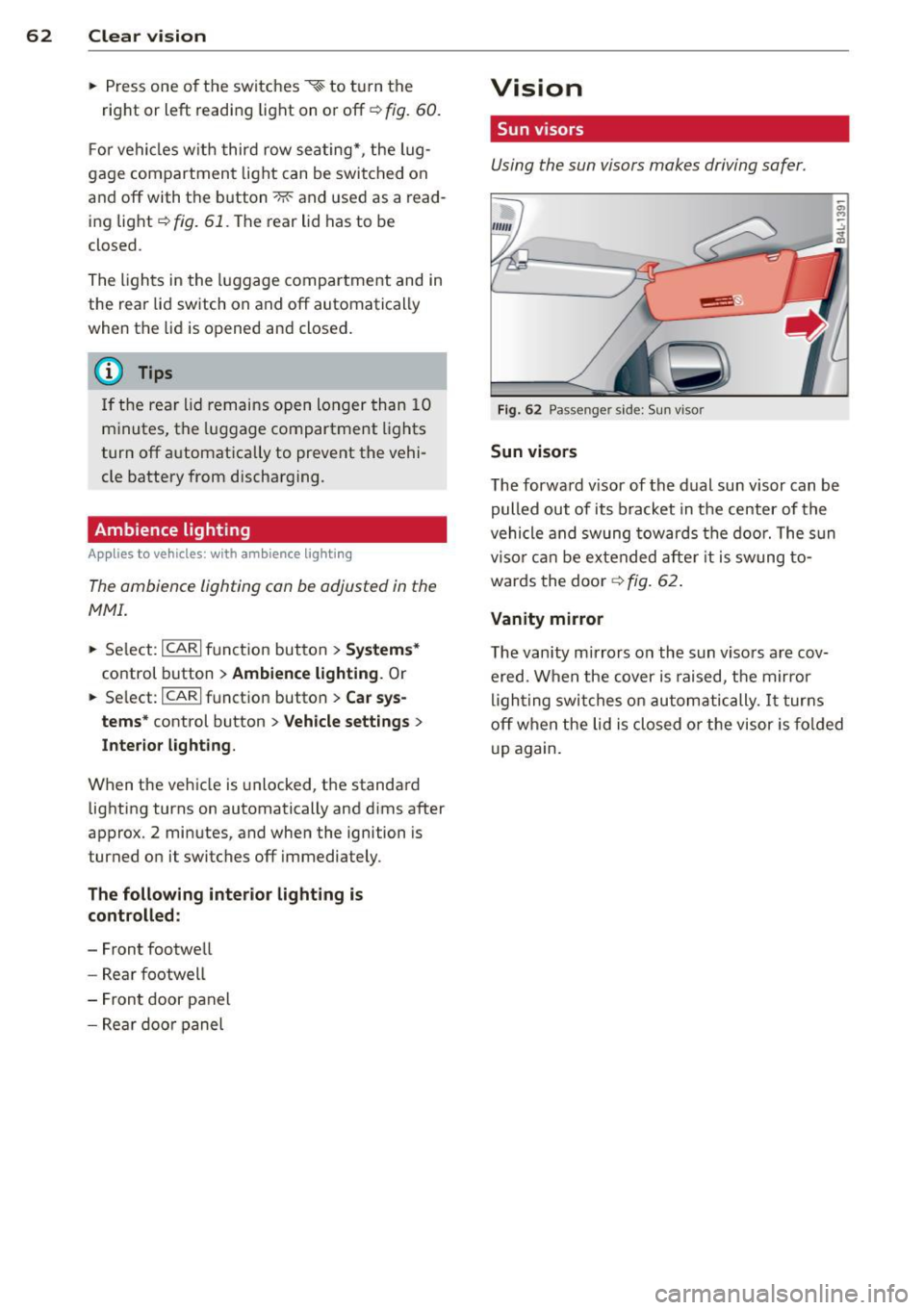
Fig . 62 Passe nger side: Su n visor
Sun visors
The forwa rd v isor of the dual sun visor can be
pulled out of its bracket in the center of the
vehicle and swung tow ards the door. The s un
vi so r ca n be e xtended afte r it is swung to
wards the door
~ fig. 62.
Vanity mirror
The vanity mirrors on the sun viso rs are cov
ered. When the cover is raised, the mirror
l igh ting swit ches on au tom atic ally.
It tur ns
off when the lid is closed or the visor is fol ded
u p again.
Page 71 of 348

Dimming the mirrors
Fig. 71 Automatic d imm ing rearv iew mir ror*
Manu al ant i-glar e adjustment
.. Move the small lever (located on the bot
tom edge of the mirror) to the rear.
Automatically dimming mirror s*
.. To d im the rearview mirror and both ex teri
o r mirro rs*, press the @button . The diode
@ turns on. The rearview and exterior mir
rors* dim a utomatically when light shines
on them, for example from headlights on a
vehicle to the rear .
&_ WARNING
Electrolyte flu id can leak from automatic
dimming mirrors if the glass is broken.
Electrolyte flu id can irritate s kin, eyes and
respi ratory system.
- Repeated or prolonged exposure to elec
tr olyte can cause ir ritation to the resp ira
tory system, espec ially among people
with asthma or other respiratory cond i
tions. Get fres h air immedia tely by leav
ing the vehicle or, if that is not possible,
open windows and doors a ll the way.
- If electrolyte gets into the eyes, flush
them thoroughly with large amounts of
clean water for at least 15 m inutes;
med ica l attent ion is recommended.
- If electrolyte contacts skin , flush affect
ed area with clean water for at least 15
minutes and then wash affected area
w ith soap and water; medical attention
is recommended. T ho roughly wash af
fected clothing and sho es before reuse.
Clear vi sion 69
- If swallowed and perso n is conscious,
rinse mouth with water for at least 15
m inutes. Do not induce vomiting unless
instructed to do so by med ica l professio·
nal. Get medical attention immediately .
(D Note
Liquid e lectrolyte leaking from broken m ir
ror glass w ill damage any plastic surfaces
i t comes in contact wit h. Clea n up spilled
electrolyte immediately w it h clean water
and a sponge.
@ Tips
- Switching off the dimming function of
the inside rear view mir ro r also deacti·
vates the automatic dimming function of t he exter ior mirro rs*.
- T he automatic dimming m irrors do not
dim when the inte rior lighting is tu rned
on or the reve rse gear is sele cted.
- Automatic d imm ing fo r the mirror only
operates proper ly if the sun shade* for
t he re ar w indow is not in use or the ligh t
st riking the inside mirror is not hindered
by othe r objects.
Digital compass
Activating or deactivating the compass
App lies to vehicles: with digital compass
The direction is displayed on the interior rear
view mirror .
Fig. 72 Inside rear view mirror: digita l compass act i·
vated
.. To activate or deactivate, hold the @but
ton down unt il the red display appears or
disappears .
Page 79 of 348

@ Tips
Correctly adjusted head restraints and
safety belts are an extremely effective
com bi nation of safety features.
Rear head restraints
F ig . 82 Rear seat: outer head restraint
Fig. 83 Rear seat; ce nte r head restraint
If there are passengers in the rear seat, fold
the head restraints up on the occupied seats
or slide the ce nter head restraint upward at
least to the next notch ¢ &, .
Adjusting the outer head restraints
• To fold the head restraint out, pull on the
tab
¢fig. 82.
• To fold the head restraint up, til t it upward
until you feel it click into place.
Adjusting the center head restraint
• To move the head restrai nt up, hold it at the
s ides with both hands and slide it upward
u ntil you feel it click into p lace
~ fig. 83.
• To move the head restraint down, press the
button -arrow- and slide the head restraint
downward.
Seats and storage 77
Removing the center head restraint
• Move the head restraint upward as far as it
can go.
• Press the b utton -arrow- and pull the head
restraint out of the backrest¢&,.
Installing the center head restraint
• Slide the posts on the head restraint down
into the guides until you fee l the posts click
into place.
• Press the button -arrow- and sl ide the head
restraint all the way down . You should not
be able to pull the head restraint out of the
backrest.
A WARNING
- Only remove the rear seat head restraint when necessary in order to install a child
seat. Install the head restraint again im mediately once the child seat is removed .
Driving without head restraints or with
head restraints that are not properly ad
justed increases the risk of serious or fa
tal neck injury dramatica lly .
- The head restraints for the outer seats in
the second row must be folded up when
persons are being carried in the third row
seating* -danger of injury!
- Read and heed all WARNINGS
¢page 168
Armrest
The armrest contains a storage compartment
and two cup holders.
Fig. 84 Armrest betwee n dri ver's and passe nger's seat
• Push on the release lever ¢ fig. 84 to open
the storage compartment.
Page 101 of 348

Rear air distribution ~
Applies to vehicles: with four-zone automatic comfort air
conditioning
The automatically controlled air distribution
con be changed manually.
.. Press the Gil button.
.. Rotate the regu lator to the desired setting .
You can adj ust the air circulation so that air
flows from specific vents .
- In position
:J, all air flows from the vents in
the center console and the outlets to the
door pilla rs.
- In position
:0, air flows from the outlets in
the door p illars.
- In position
!,8, air flows from the outlets un-
der the front seats.
There are additional combinations available to
adjust air d istr ibut io n as needed.
To regulate air distribution automatically,
sw itch to
IAU TO I.
Basic settings
General
The basic climate control settings con be ad
justed in the MMI.
.,. Select: I CARI funct ion button > AC control
button . Or
.,. Se lect:
I CARI funct io n button > Car sys-
tem s*
control bu tton > A C.
The follow ing funct ions can be selected :
- Auto recirculation
c> page 99
- Synchronization c> page 99
-Supplementary heater * ¢page 100
-Rear oper ation* c> page 100
Warm and c old 99
Automatic recirculation mode
An air quality sensor detects increased con
centrations of pollutants in the outside air
and automatically switches to recirculation
mode .
We recommend that you always keep auto
matic a ir recirculation ON to p revent polluted
outside air from enteri ng the veh icle inter ior.
If the
a ir qu ality sensor l ocated in the air con
ditioning system detects polluted outs ide a ir,
the sensor dec ides whether the air pollut ion
can be reduced by the facto ry-installed pollu
ta nt fi lter or whethe r it is necessary to switc h
to air recirc ulation. With heavy conce ntra ti ons
of pollu tants, the a ir condit ion ing system is
switched automatica lly to recirc ulation mode
and the supp ly of outside air is blocked . As
soon as the concentration of pollutants in the
outside air drops, fresh air is supplied to the
vehicle interior aga in.
In the event that the windows fog up during
automat ic air rec irculat ion, you must press
the® button immediately.
Under certa in ope rating cond itions, a utomatic
air recirculation is switched off automatica lly.
With outside temperatures be low about 50 °F
(+10
°(), automatic air rec irculat ion is limited
to 30 seconds. W it h outside temperatures be
low about 30 °F ( -1 °C) a nd with the air condi
tione r switched off, the a utomatic air recircu
l ation is limited to 15 seconds.
Synchronization
One climate control setting for the driver and
front passenger seats .
With synchro nization active, the driver's set
tings a re adopted for the passenger o r vice
versa . All the othe r setti ngs that were made
are t ransferred to t he other seat . This in
cl udes all the cl ima te co ntro l settings, excep t
for the se at heating/ven tilat ion* .
If a different setting is selected at a
"synchron ized seat ", synchronization is can
c e lled.
Page 108 of 348

106 On the road
Starting and stopping
the engine
Starting the engine
The engine can only be started with your orig
inal Audi key.
Fig. 120 I gni tion key positio ns
Vehicles with gasoline engine:
.. Step on the brake .
.. Move the selector lever into P or N
¢ A.
.. Tu rn the ignition key to position @
9 fig. 120 -do not depress the gas pedal
when starting the engine.
Vehicles with diesel engine:
.. Step on the brake.
.. Move the selector lever into P or N
¢ &.
.. Turn the ignition key to position ©- the
glow plug indicator light
m illuminates
when the glow plug system is act ive .
.,. When the indicator light
I.I switches off,
turn the ignition key to pos it ion @ but do
not press the accelerator pedal.
.. Re lease the ignition key once the engine
sta rts. The starter must not continue run
ning.
A cold engine may sound loud after it has
been started . This is due to the hydraulic
va lves building up oil pressure. This is normal
and is not a need for concern.
If the engine does not start immediately, stop
trying after 10 seconds and then try to restart
the engine about 30 seconds Later.
Glow plug system*
Diesel engines are equipped with a glow plug
system whose preheating t ime is controlled by the coo
lant and outs ide temperature . Start
the engine
immediately after the glow plug
indicator light
m sw itches off.
The glow plug indicator light will only illumi
nate for approximate ly 1 second when the en
gine is warm or the outside temperature is
higher than 46 °F (8 °C). That means you can
start the engine
immediately .
A WARNING
-Never start or let the engine run in a con-
fined or enclosed area. Exhaust fumes
from the engine contain carbon monoxide,
a colorless and odorless gas . Carbon mon
oxide can be fatal if inhaled.
- Never leave the engine idling unattend
ed. An unattended veh icle w ith a runn ing
engine poses a danger of personal injury
or theft .
(D Note
- Avo id high engine speeds, fast accelera
tion or heavy engine loads while the en gine is still cold. This could damage the
eng ine .
- Th e engine cannot be started by pushing
or towing the vehicle .
@ For the sake of the environment
To avoid unnecessary engine wear and to
reduce exhaust emissions, do not let your
vehicle stand and warm up. Be ready to
drive
off immediately after starting your
vehicle. Maintain moderate speed until the
engine is completely warm . Remember,
the engine performs best at operating
temperature.
· Stopping the engine
.,. Turn the ignition key to position @
¢page 106, fig . 120 .
A WARNING
-
-Never turn off the engine until the vehi-
cle has come to a complete stop.
Page 109 of 348

-The brake booster and servotronic only
work when the engine is running. With
the ignition turned off, you have to apply
more force when steering or braking .
S ince you cannot steer and stop normal
ly, this can lead to accidents and ser ious
injuries.
- The rad iator fan can continue to run for
up to 10 min utes even after you have
turned off the engine and removed the ign ition key. The radiator fan can also
turn on again if the engine coolant heats
up because of intense sunlight or heat
build -up in the engine compartment.
«I) Note
Do not stop the engine immed iate ly after
hard or extended dr iving. Keep the engine
running for approximately two minutes to
prevent excessive heat build-up .
Starting and stopping
the engine with
Convenience key
Starting the engine with the~
button
App lies to vehicles: with Convenie nce key
This bu tton swi tches on the ign ition and
starts the engine .
Fig. 121 Co nvenie nce k ey: ENG INE START b utton
The I S TAR T! button is provided w ith two -sta ge
o p era tion
¢ fig. 121.
Switching the ignition on
.. Press the !START I button once to the fir st
stage to switch on only the ign ition .
On th e road 107
Gasoline eng in e: St arting th e engine
.. Step on the brake.
.. Move the se lector lever to the P or N posi
tion ¢,&. .
.. Press the
r::1s=Tc:- A=RT =I button to th e seco nd
stage to start the engine .
Diesel en gine : Starting the engine
.. Step on the brake.
.. Mov e the selector lever to the P or N posi
tion ¢,&. .
.. Press the
r::1s=TAc:-=R T=I button down to the fi rst
level to begin the preheating process . The
glow plug indica tor light
II illumina tes
when t he glow plug system is active .
.. When the indicator light
II switches off,
press the
I ST ART ! button down to the se c
ond
level to star t the eng ine .
After a cold engine is started, there may be a br ief period of increased no ise because oil
pressure must first build up in the hydraulic
valve adjuste rs. This is norma l and not a cause
for concern .
If the engine does not start immediately, stop
trying after 10 seconds and then try to restart
the engine abou t 30 seconds later .
Glow plug system *
Di ese l engine s
are equ ipped with a glow plug
system whose preheating time is controlled
by the coolant and outs ide temperature . Start
the engine
immediately afte r the glow plug
indicator light
II sw itches off .
The glow plug indicator light will only illumi
nate fo r approximate ly 1 second when the en
gine is warm or the outs ide temperature is
highe r than 46 °F (8 °C) . That means yo u can
start the eng ine
immediately .
WARNING
Never allow the engine to run in confined
spaces -danger of asphyxiation .
(D Note
-Avo id h igh engine rpm, full thrott le and
heavy engine loads until the eng ine has
Page 113 of 348

vehicle must be standing in uphill driving direction.
After releasing the brake pedal , the brake
power is held for a
brief moment to prevent
the vehicle from rolling back when starting. At
this time, you can easily beg in to move your
veh icle.
A WARNING
- If you did not begin moving immediately
after releasing the brake pedal, under
certain circumstances, the vehicle would
begin to roll backward . Depress the
brake pedal immediately or engage the
park ing brake.
- Should the engine stall, depress the
brake pedal immediately or engage the
par king brake.
- In order to prevent the vehicle from ro ll
ing back un intentionally when sta rting in
stop-and-go traffic, keep the brake pedal depressed for a few seconds before d riv
ing off.
- When you leave the vehicle -even if only
briefly - , switch off the ignition and
make sure to remove the ignition key . Al
so engage the
p a rking b rake to prevent
your vehicle from rolling unintentionally. Th is particu larly applies if ch ildren are
left in the veh icle -danger of acc ident!
Cruise control
Switching the system on
The cruise control system makes it possible to
drive at a constant speed starting at
20 mph
(30 km/h).
F ig . 124 Con tro l le ver w ith set button
On th e road 111
Fig. 1 2 5 Disp lay: Se lec te d speed
.. Pull the lever to position@c::> fig. 124 to
sw itch the system on .
.. Drive at the speed you wish to set .
.. Press button @to set tha t speed.
The display c::>
fig. 125 will show the set speed .
T he display may vary depend ing on the type of
display in your veh icle. The indicato r light
@;\1)~1~ (US model)/ B (Canadian model) w il l
also light up in the instrument cluster.
_& WARNING
- Always pay attention to traffic even when
the cruise control is switched on. You are
always responsible for your speed and
the distance between your veh icle and
other vehicles .
- For safety reasons, the cruise contro l
should not be used in the city , in stop
and -go traffic, on twisting roads and
when road condit ions are poor (such as
ice, fog , gravel , heavy rain and hydro
p lan ing) -risk of accident.
- Turn off the cruise control temporarily
when enter ing turn lanes, highway exit
lanes or in construction zones.
- Please note that inadvertently "resting"
your foo t on the accelerator pedal causes
the cruise contro l not to bra ke. This is
because the c ruise control is overridden
by the driver's acceleration.
- Never use the cruise control whe n driving
off -road or on unpaved roads. The c ruise
contro l is intended for use only when the
vehicle is being operated on paved roads,
and is not suitable for use off-road or on
unpaved roads.
1J1,,,
Page 126 of 348

124 Adaptive cruise control
Stationary object ahead
The text message Stationary object ahead ap
pears, when you want to activate the system
and there is a stationary vehicle or an object
immediately in front of you .
Gradient too steep
The text message Gradient too steep appears
when the max imum gradient for proper ACC
operation has been exceeded. Adaptive cruise
contro l is turned
off . A warning tone also
sounds as a reminder.
Shift lever position!
The text message Shift lever position! ap
pears when the selector lever is moved to po
sition
N . In this position, adaptive cruise con
trol is not ava ilab le .
Driver intervention prompt
Applies to vehicles: with adaptive cruise co ntrol
The driver intervention prompt calls on the
driver to toke over the situation.
Fig. 138 I n st rument cluste r: Drive r in terven tion
prompt
I n certain situat ions , the braking power of the
adapt ive cr uise control is not enough to main
tain an adequate distance to the vehicle up
ahead. In these situations, the adaptive cruise
control calls the driver to take action.
The
driver intervention prompt alerts you vis
ually and audib ly to take over.
- A red vehicle is shown in the instrument
cluster display ~
fig. 138.
- T he text DISTANCE! appears in the status
line. -
The indicator light- in the speedome
ter blinks red.
- A warning tone sounds.
0) Tips
-Adaptive cruise control is switched off af
ter pressing the footbrake. The speed
saved up this point can be resumed.
- To res um e the saved speed, release the
brake pedal and press the control lever
~ page 118, Turning adoptive cruise
control off temporarily.
-If you use the accelerator to go faster
than the speed of the vehicle ahead of
you, the
driver intervention prompt wi ll
not be accompanied by a warning s ignal.
- If the speed you previously set is exceed
ed, the indicator light in the speedome
ter will switch
off.
MMI settings
Applies to vehicles : with adaptive cruise contro l
Individual settings for adoptive cruise control
con be selected in the
MMI.
Settings for the Driving program can be ad
justed individually to the particular user and
saved in the MMI. This can only be done with
the engine running .
.,. Select:
!CAR ! function button> Systems*
cont ro l button > adaptive cruise control >
Driving program. Or
.,. Select: !CAR ! function button> Car sys·
tems *
control button > Driver assist > Adap
tive cruise control > Driving program .
Setting the driving program
In the Driving program menu you can ad just
the characteristics of adaptive cruise control
to your own preferences using
Dynamic,
Standard
or Comfort .
Saving settings
Your individual settings are automatically
saved and assigned to the remote control key
being used (remote key storage) . If the key is ..,_