2013 AUDI Q7 media
[x] Cancel search: mediaPage 36 of 348
34 Driver information display
Do not drive vehicle: steering defective
• Contact you r nearest authorized Audi dea le r
or qualified workshop.
• Do
not tow yo ur vehicle .
.&, WARNING
-
Your vehicle must not be towed in the
event of a malfunction in the electronic
steering column lock because it cannot be
steered due to the locked steering. If it is
towed w ith the steering locked, there is
the risk of an accident .
~ Ignition lock malfunction
A malfunction in the ignition lock must be re
paired immediately.
If the . symbo l in the display blinks, there is
a ma lfunction in the electronic ignition lock.
An addit ional driver message ca n also be d is
played by pressing the
! CHECK I button:
Ignition lock defective. Contact workshop !
• Do not turn the eng ine off.
• Drive immediately to an authorized Audi
dealer to have the ma lf u nction corrected.
If there is a ma lfunction in the e lectronic igni
tion lock, the ignition cannot be turned off.
Drive immediately to an authorized Audi dea l
er to have the cause of the ma lfunction cor
rected.
On vehicles with Convenience key*, the engine
should not be switched off using the
! STOP !
button beca use the engine ca nnot be sta rted
again after the ignition is switched off.
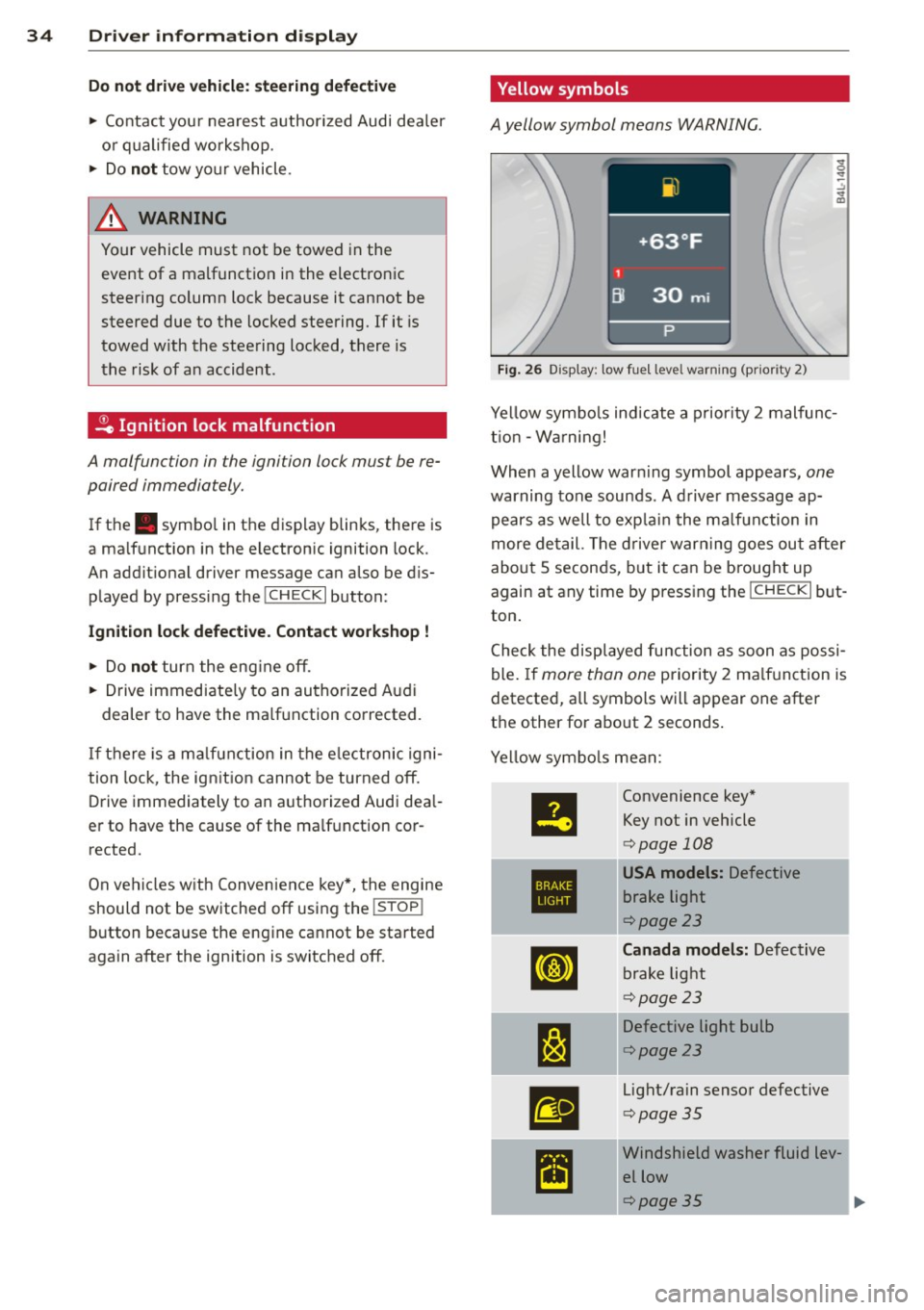
' Yellow symbols
A yellow symbol means WARNING.
Fig . 26 Display: low fuel level warning (priority 2)
Yellow symbo ls indicate a priority 2 malfunc
t ion -Warning!
When a yellow war ning symbol appears,
one
warning tone sounds . A driver message ap
pears as well to exp lain the malfunction in
more de tail. The driver warning goes out after
about 5 seconds, but it can be brought up
again at any time by pressing the
! CHECK I but
ton .
Check the displayed function as soon as possi
ble. If more than one priority 2 ma lf u nction is
detected, all symbols will appear one after
the other for about 2 seconds .
Yellow symbols mean:
II
Convenience key"
Key not in vehicle
c> page 108
•
USA models: Defective
brake light
c>pa ge23
[IJ
Canada models: Defective
brake light
c> page 23
1:1
Defective light bulb
c>page 23
.
m
Light/rain sensor defective
c>pag e 35
~
Windshield washer fluid lev-
el low
1 .. c>page35
Page 38 of 348
![AUDI Q7 2013 Owner´s Manual 36 Driver in formation d isplay
When this symbo l Ii] il luminates for the first
time, the fuel reserve in your vehicle is sti ll
between
2 .6 and 3 .2 gallons (10- 12 liters) .
Ref](/manual-img/6/40278/w960_40278-37.png "AUDI Q7 2013 Owner´s Manual 36 Driver in formation d isplay
When this symbo l Ii] il luminates for the first
time, the fuel reserve in your vehicle is sti ll
between
2 .6 and 3 .2 gallons (10- 12 liters) .
Ref")
36 Driver in formation d isplay
When this symbo l Ii] il luminates for the first
time, the fuel reserve in your vehicle is sti ll
between
2 .6 and 3 .2 gallons (10- 12 liters) .
Refue l as soon as possib le
¢ page 258.
If the symbol lights up, even when there is
ample fuel in the tank, and the text
T a nk sys
tem malfunction! Cont act wor kshop
appears
in the display, there is a fault in the system.
Contact a qualified workshop to have the fau lt
rectified .
t::l Battery voltage
If the battery's state of charge is not in the
optimal range , the (•) symbo l is shown in the
d isp lay and the dr iver message
Low battery
c harge : battery will be charged while driving
appears.
W hil e this dr iver not ificat io n is displayed, you
have to be p repared for lim ited start ing capa
b ili ty.
Driver m essage appears and goes out
again
I f t his driver message appea rs after the igni
tion is turned o n or wh ile driving and it goes
out again after a while, the battery has been
adequately recharged .
Driver message appears and does not go
out again
If th is driver notification appe ars after the ig
nition is turned on or while driving and does
not go out again, the battery 's state of charge
is not in the opt imal range. Starting capability
is restricted. Have the battery checked by an
authorized Audi dealer as soo n as poss ible.
{0 : Worn brake pads
llJ Brake pads!
If the warn ing light illum inates, immediately
contact your authorized Audi dealer or quali
fied workshop to have all brake pads inspect
ed . On USA models the wa rning lig ht
llJ
l ) - : USA mod els only
comes on together with the warning light
1111 . Both sets of brake pads on an ax le
must a lways be rep laced at the same time.
A WARNING
=
Driving w it h bad brakes can cause a colli-
sion and ser ious personal in jury.
- I f the warn ing light
llJ and the warning
light
11111 ' with the message Brake
pads!
comes o n in the inst rument cluste r
d isp lay, immediately contact your au
thor ized A udi dealer or qualified wo rk
shop to have all b rake pads checked or
re placed if ne cessa ry.
~(i) Headlight range control
fl Headlight rang e control defe ctive !
-
If the symbol illuminates, th e dynamic head
li ght rang e control is no longer work ing prop
erly. Have the system checked and repa ired at
yo ur authorized Aud i dea le r.
~ -Engine oil level
Ill Please check oil level
When the symbol illum inates, check the en
gine o il level a s soon as possible ¢
page 269.
Top off t he oil at your ear liest opportu nity
¢ page 270 .
't::r.~ Engine oil sensor defective
Ill Oil le vel ! Sensor defect ive
If t he symbol illum ina tes, contact yo ur au
thorized Aud i dea le r and have the oil sensor
inspected. Unti l yo u have this done, check t he
oi l level each time you refue l just to be on the
safe s ide
¢ page 269.
! ?')
Engine speed limitation
Applies to vehicles: wit h engine speed limitatio n
(m Do not e xceed ma x. engine speed of
XXXX rpm
Page 40 of 348

38 Opening and closing
Opening and closing
Keys
Key set
Fig. 27 Key set
@ Master key with remote control
You can centrally lock and unlock your vehicle
and start the engine with the master key with
remote control.
@ Valet key
The valet key only fits the lock in the driver's
door and the ignition lock . If you have to leave
the key with somebody else, you are well-ad
vised to turn over the valet key only
¢ page 41.
© Emergency key
The emergency key is only for temporary use if
the vehicle key should be lost or misplaced
¢ .&. .
Key replacement
If you lose a key, contact your authorized Audi
dealer immediately to have the
lost key disa
b led . Be sure to bring all your keys with you.
Registered keys
You can check to find out how many keys have
been registered to your vehicle. Therefore,
when buying a used vehicle, make sure to get
all of the remote keys be long to it .
Ca lling up the registered keys¢
page 12.
Data in the master key
While you are driving, serv ice and mainte
nance relevant data are being continuously stored on your master key. Your Audi
Service
Advisor can read out these data and tell you
about work that is needed on your vehicle .
This also app lies to vehicles w ith Convenience
key*.
A WARNING
--
- Do not leave your vehicle unattended
with the key in the ignition lock. Entry by
unauthorized persons could endanger
you or result in theft or damage the vehi
cle. A lways lock all doors and take the
key.
- Do not leave children unattended in the
veh icle, especially with access to vehicle
keys . Unguarded access to the keys pro
vides children the opportun ity to start
the engine and/or activate vehicle sys
tems such as the power windows etc. Un
supervised operation of any vehicle sys
tem by children can result in serious in
Jury .
(D Tips
- If you open the driver's door with the key
left in the ignition lock, a chime w ill
sound. T his is your reminder to remove
the key and lock the door.
- For security reasons, replacement keys
are only ava ilable from Audi dealers.
Master key with remote control
The remote control allows you to lock or un
lock the vehicle electronically .
Fig. 28 Fold-up maste r key with remo te control
., To fold the key out and back in place, press
t he release button ¢
fig. 28. .,.
Page 48 of 348

46 Opening and clo sing
• The rear lid un locks automatically and
opens slight ly.
• Lift the rear lid .
Clos ing the r ear lid
• Pull the rear lid down and allow it to drop
gently. The lid is then closed automat ica lly
Q A .
A WARNING
-After closing the rear lid, always pull up
on it to make sure that it is properly
closed. Otherw ise it could open sudden ly
when the vehicle is moving .
- To help prevent po isonous exhaust gas
from being drawn into the veh icle , al
ways keep the rear lid closed while dr iv
ing . Never transport objects larger than
those which fit completely into the lug
gage area, because then the rear lid can
not be fully closed .
- Never leave you r vehicle unattended es
peci ally wi th the re ar lid left open. A
c h ild could c rawl into the ca r th rough the
l u ggage compartment and pull the lid
shut, becom ing trapped and unab le to
get out. To reduce the risk of persona l in
jury, never let children play in or around yo ur vehicle . A lways keep the rear lid as
well as the vehicle doors closed when not
in use .
- Always ensure that no one is w ith in
range of the rear lid when it is mov ing, in
part icula r close to the h inges -fingers o r
hands can be pinched.
@ Tips
- If the rear lid is open or not properly
clos ed w hen the ig nition is turned on,
the door and rea r lid war ning
Q page 22
appears in the ins trument clus ter dis
play.
- Should you not b e able to open the re ar
li d as desc ribed, make sure the valet key
func tion is not ac tiv at ed
~ page 41.
Automatic rear lid/trunk lid operation
Applies to vehicles: with automatic rear lid/trunk lid oper
ation
The trunk lid can be opened and closed auto
matically.
Fig. 39 D rive r's doo r: Unlock ing t he rea r lid
Fi g. 4 0 Lock ing sw itc h in t he rear l id
Opening rear lid
• Press the middle button C:$ on the remote
key for at least one second, or
• Press the u nlock button
c:5 in the driver's
door ~
fig. 39, o r
• Press the handle o n the rear lid
¢ page 45,
fig. 38 .
• Th e open ing pro cess is stopped immediate
ly if the middle button c:5 on the remote
key is pressed again for at least one second
or the unlock button
c:5 in the dr iv e r's door
is pressed again or the hand le in the rear lid
is pressed aga in.
• Middle button in the remote key and unlock
button in the driver's door:
T he open ing
p rocess is cont inued by pressing on e of the
buttons aga in.
• Handle in the rear lid: the rear l id is closed
ag ain by p ress ing the handle again
Q A . ..,.
Page 49 of 348

Clos ing re ar lid /trunk lid
"' Press the close button in the open rear lid
~ fig. 40. T he trunk lid moves to the closed
posit ion by itself and soft close locks it auto
matically ~&_ .
"' The closing process
is stopped immedi atel y
if the clo se button in the rear lid is pressed
again.
"' By pushing the button again, the rear lid is
opened again .
Saving the open ing a ngle of the rear lid
"' Bring the rear lid manua lly or automatic ally
to the desired opening posi tion and leave it
i n th is position .
"' Press the button in the rear lid
~ fig . 40 for
at least four seconds in order to save the de
s ired opening position. The position ca n only
be saved start ing at a certain level.
A WARNING
- Never close the rear lid inattentively or
without checking fi rst . Altho ugh the
closing force of the rear lid is lim ited,
yo u can st ill ser iously injure yourself or
others.
- Always ensure that no one is w ith in
range of the rear lid when it is moving, in
part icu lar close to the hinges and the up
per and lower edges -fingers or hands
can be p inched .
- To help prevent po isonous exhaust gas
from being d rawn into the vehicle, al
ways keep the rear lid closed while driv ing. Never transport objects larger than
those which fit completely into the lug
gage area, because then the rear lid can
not be fully closed.
- Never leave you r vehicle unattended es
pecially with the rea r lid left open . A
child could crawl into the car through the
l u ggage compa rtment and pull the lid
shut, becom ing trapped and unab le to
get out. To reduce the risk of persona l in
jury , never let children p lay in or around
your vehicle . A lways keep the rear lid as
-
Opening and clo sin g 47
well as the vehicle doors closed when not
in use .
- If there is a l uggage rack or bicycle rack
mounted on the rear lid, it may not be
ab le to open completely or an opened
rear lid may close by itself because of the
added weight . So the open rear lid must
be supported or the weight must be re
moved from the luggage rac k first.
@ Tips
- If the rear lid is open or not properly
locked when the ign ition is turned on,
the door and rear lid warning ~
page 22
appears in the instrument cluster dis-
play .
- T he automatic rear lid opening/clos ing
process can be stopped by ho ld in g the
re ar lid w ith your hand. The lid can then
be f urther opened/closed by h and.
- I f there is a mechan ica l problem wit h the
automatic rear lid
opening proces s or
there is an obstruction, the process is
stop ped immediately.
- I f there is a mechan ica l problem wit h au
tomatic closing for the rea r lid or there
is an obstr uction, it opens again slightly
r ight away . Chec k to see why the rear lid
cou ld not be closed before attempting to
close it again .
- If the rear lid on a locked vehicle is un
locked with the midd le button~ on the
remote key, the rear lid is automat ically
locked again immed iate ly after closing .
T his is indicated by the turn signals
blinking.
- The followi ng applies to vehicles equ ip
ped w ith the Convenience key* feature: if
the remote control key is left in the lug
gage compa rtment, l uggage compa rt
ment w ill autom atic ally unlo ck itsel f af
ter yo u lock the vehicle. This preven ts
you from unintentionally locking you r
key in the luggage compartment.
- If the vehicle battery charge drops be low
a certain level, yo u can sti ll open o r close
the rear lid manually, however, you w ill
need to apply more force to close it. ..,.
Page 56 of 348

54 Opening and closing
Reactivating the system after battery
disconnection
If the vehicle battery is disconnected and then
reconnected, the a utomatic closing and open
ing function wilt not work until it is reactivat
ed. To reactivate this feature, perform the fol
lowing steps:
Reactivating close /open feature
., Pull and hold the power window switch un
til the window is completely closed .
., Release the switch .
., Pull the switch again for one second. The
automatic closing/opening is now reactivat
ed .
Panoramic sliding
sunroof
Description
App lies to vehicles: with Pa noramic slidi ng sunroo f
The Panoramic sliding sunroof is comprised of
two individual g lass roof segments, which can
be adjusted electrically independently of each
other.
The front segment can be tilted and slid open.
The rear segment can be tilted, but it cannot
be slid open .
The Panoramic sliding sunroof is operated by
the driver or passenger when the ignition is on
with a rotary switch (for the front roof seg
ment) and a rocker switch (rear roof seg
ment).
After the ignition has been switched off, the Panoramic sliding sunroof can st ilt be opened
or closed for about 10 m inutes. However, as
soon as the driver's or passenger's door is
opened , the switches for the Panoramic slid
ing sun roof are inoperat ive.
CD Note
You should always close the Panoramic
sliding sunroof when you leave you r vehi
cle. Sudden rain can drench the interior
equ ipment and damage the electronic con
venience features in your vehicle .
(D Tips
If you park your vehicle in the sun, we rec
ommend that you close both sun blinds
c>page56.
Tilting/sliding open Panoramic sliding
sunroof
Applies to vehicles: w ith Panoramic sliding sunroof
Fig. 49 Se ction o f fro nt headline r: Sw itch for Pa noram
i c slid ing sunroof
Fi g. SO Sect ion of head liner in rear : Switc h for Panor
amic s lidin g sunroof
Tilting front roof segment
., Press switch c>fig. 49@ in the in itia l posi
tion @)
briefly to open the roof segment
completely . Press it
longer to set an inter
mediate pos ition manually.
Tilting rear roof segment
., Tap the rocker switch c> fig. 49 ® or
,:¢, fig. SO@in the rear area i;:::) briefly, the
roof segment tilts up automatica lly .
., To set an intermediate position manually,
press the rocker switch ® or© in the rear
area
i;:::) until the roof segment has reached
the desired tilted position . ..,.
Page 57 of 348

Opening front r oof segment to comf ort
se ttin g
" Turn the rotary switch c::> fig. 49@ to posi
tion ©, you will feel the switch engage . The
roof segment is slid open only to a comfort
position w ith low wind noise. This is the rec
ommended standard sett ing for normal
driv ing cond itions .
Sliding front roof segment full y open
" Rotate and ho ld the switch @ in position @
unt il the roof segment has reached the de
s ired pos it ion. There may be increased wind
noise in this pos it ion.
(D Tips
- In posit ion @, the switch jumps back to
pos ition © again as soon as the switch is
released .
- When dr iv ing with the Panoramic slid ing
sunroof open, open the front roof seg
ment to the comfort setting to m inim ize
wind noise .
Closing Panoramic sliding sunroof
Applies to vehicles: with Panoram ic sliding sunroof
Clos ing tilted front roof segm ent
" Pull the switch c::> page 54, fig . 49 @ and
ho ld it until the roof segment has reached
the des ired pos ition.
" Pull the switch
bri efl y to close the roo f seg
ment automatica lly. By activating the switch
briefly again, the roof segment can be stop
ped in any position
c::, .,&_ .
Clos ing front r oof s egment wh en slid
o p en
" Rotate switch c::, page 54, fig. 49@ to posi
t ion @ to close the roof segment
c::> .,&_. To
move to an intermediate posit ion, rotate the
switch to the corresponding click-stop .
Clos ing tilt ed r ear roof segm ent
" Tap the rocker switch c::> page 54, fig . 49 ®
or c::> page 54, fig. 50 © in the front area Q
br iefl y to close the roof segment completely
c::> A.
Opening and clo sin g 55
" To set an intermediate position manually ,
press the rocker switch in the front area~
until the roof segment has reached the de
sired tilt posit ion
c::> .,&_ .
A WARNING
Improper use of the Panoram ic sliding
sunroof can cause serious personal injury.
- Be careful when closing the Panoramic
-
sliding sunroof . Not paying attention
could cause you or others to be trapped
and injured as the Panoram ic sliding sun
roof closes.
- Always take the key w ith you when you
leave the vehicle to prevent injur ies
caused by the Panoramic slid ing sunroof
clos ing
- Never leave children or persons requiring
assistance alone in the vehicle, especially
when they could access the vehicle keys .
Unsupervised use of the keys can result
in the engine being started or use of ve
hicle systems such as the power win
dows, etc. wh ich could result in serious
injury. The doors could be locked with
the remote key, de laying help in an
emergency.
- The Panoramic slid ing sunroof will con
tinue to operate until the ign ition key
has been removed and one of the front
doors has been opened.
Convenience closing feature
Applies to vehicles: wit h Pa noramic slid ing sunroof
The Panoramic sliding sunroof can be closed
from outside with the key in the driver's door lock .
" Insert the key into the dr iver's door lock .
" Tu rn and hold the key in the lock pos it ion @
c::> page 43, fig . 33 until the Panoramic slid
ing sunroof is complete ly closed
c::> .,&_ in
Closing Panoramic sliding sunroof on
page 55.
Th e power s un blind is a lso closed . .,..
Page 58 of 348

56 Openin g and clo sing
& WARNING
Be careful when closing the Panoramic
sliding sunroof. Not pay ing attention cou ld
cause you or others to be trapped and in
jured as the Pa noramic s lid ing sunroof
closes.
Opening and closing sunshade
App lies to vehicles: with Pa norami c sli di ng sunroo f
s [:)
o::~ o ..
Fig. S l Section of front head liner : Sw itch fo r su nshade
r: ,
B O ~ OG
Fig. 5 2 Section of headliner in rear: Switc h for sun
shade
The two segments of the Pano ramic sliding
sun roof are each equipped with a suns hade
for protection against the sun's r ays. The fro nt
shade is power opera ted, the rear shade is
opened and closed ma nually . To prevent the
vehicle interior from heating up, you should
close both sunshades when you park your ve
hicle in the sun.
Opening and clo sing front sunshade
.,. Tap t he rear -:w· of the rocker switc h
<=> fig. 51 or the rocker switc h for rear-seat
passengers
c:> fig. 52 briefly to open the
sunshade fully .
.,. Tap the front
:y'T-of the rocker switch briefl y
to close the sunshade fully c:> &.-
.,. To set an intermediate position manually,
press the front or rear of the rocker switch
(depending on the pos ition of the shade)
un
til the desired position is reached c:> &.-
Opening and clo sing rea r sun shade
.,. Hold the sunshade by the g rip and push it
to the desired position.
A WARNING
Never close the sunshade without paying
attention or checking - danger of in jury!
· Emergency closing of the Panoramic
sliding sunroof
App lies to vehicles: wit h Pano ramic sli ding su nroof
If the Panoramic sl iding sunroof detects an
object in i ts path when it is closing, it w ill
open again automa tically. In th is case, you
c an close the roof with t he power emergency
cl osing function.
Emergency closing of f ront roof segment
.,. Turn the switch c:> page 54, fig . 49 @to the
normal pos ition @ .
.,. Within five seconds after the sunroo f opens
a utomatically, pu ll the switc h until the roof
segmen t closes .
Emergency closing of rear roof segment
.,. Within five seconds after the sunroof opens
automatically, p ress the front~ of the
rocke r swi tch
c:> page 54, fig. 49 @ until the
roof segme nt closes.