2013 AUDI Q5 warning light
[x] Cancel search: warning lightPage 55 of 316

Notes o n these featur es
-The turn signals only work with the ignition
turned on. The indicator lights
II or Ill in
the instrument cluster
¢page 14 also b link.
- After you have turned a corner, the turn sig-
nal switches off automatica lly.
- The
high beam works only when the head
lights are on. The indicator light
II in th e
instrument cluster illuminates when the
high beams are on.
- The
headlight flasher wo rks only as long as
you hold the lever -even if there are no
lights turned on. The indicator light
II in
the instrument cluster illuminates when you
use the headlight flasher.
A WARNING
Do not use the high beam or headlight
flasher if you know that thes e cou ld blind
oncoming traffic.
Interior lights
Front interior lights
-
The front interior lights also contain reading
lights for the driver and passenger .
r ,,,,, , 11111
~8 ,~
G) Gl
,o . . o
I
Fig. 49 Headliner: Fro nt inte rior/rea ding lights
The rocker switch @¢ fig. 49 for operating
the interior lighting has the following func
tions :
Door cont act swi tch
.,. Place the switch @ in the middle position.
Inte rior light switched on
.,. Place the switch@ in posit ion I.
Clear vision 5 3
Interior light switch ed off
.,. Place the sw itch @ in position 0.
Front re ad in g lights ~
.,. Press one of the switches@ to turn the
r ight or left reading light on or off .
With the door contact switch turned on, the
interior lights turn on as soon as you unlock
the vehicle or open the doors. The lighting is
also turned on when the ignition key is re
moved. The lights go out about 30 seconds af
ter the doors are closed. When the vehicle is locked or when the ignition is turned on, the
interior lights are turned off.
When a doo r is open, the interior lights are
tu rned off after about 10 minutes to prevent
draining of the battery .
The brightness of the lights is controlled au
tomat ica lly by a d immer when they are
swi tched on and off.
Rear interior lights
There are reading lights in the rear for the
passengers .
Fig . 50 Headliner: Rear read ing lig hts
The read ing l ights are switched on and off us
ing the buttons ~-
Depending on your model, the appearance
and the location of the reading lights may be
different .
Page 57 of 316

while driving. You can switch this function off by moving the lever to position ® within 10
seconds of the afterwipe operation. The after
wipe function is reactivated the next time the ignit ion is switched on.
The rear wiper automatically switches on
when the reverse gear is engaged and the
front w indshield wipers are on and in opera
tion .
C lea ning the headlights *. The headlight wash
er system * operates on ly when the headlights
are on. If you move the lever to pos ition ®,
the headlights are washed in interva ls .
® -Wipe the rear window. The rear wiper
moves about every 4 seconds .
0-Clean the rear window. The number of
wiping operations depends on how long the l ever is held in positio n 7.
A WARNING
-The ra in sensor is only intended to assist
the driver. The driver is still responsible
for man ually sw itching the w ipers on ac
cording to the v is ibility conditions.
- The windshie ld may not be treated w ith
water-repe lling windshie ld coat ing
agents. Unfavorable conditions, such as
wetness, darkness, low sun, can res ult in
increased glare. W iper b lade chatter is
also possible .
- Proper ly functioning w indshie ld w iper
blade s are required fo r a clear view and
sa fe dr iv ing .
(D Note
-In the case of frost, check whether the
windsh ield wiper b lades a re fro zen to
t h e windshie ld. Swit ching on the wind
s h ield wipers can d amage t he wipe r
blades!
- Prior to using a car w ash, the windshield
wipe r system m ust be swit ched off (lever
i n position 0) . This helps to prevent unin
tentiona l switching on and damage to
the windshie ld w iper system.
Clear v is ion 5 5
(D Tips
- The windshie ld w ipers are switched off
when the ign it ion is tu rned off . Act ivate
the windsh ield wipers after the ignition
is switc hed back on by moving t he wind
shield wipe r lever to any position .
- Worn or d irty windshield wiper blades
result in streaking. This ca n affect the
rai n sensor function. Check your wind
shield w iper blades regularly.
- The washer fluid nozz les of the wind
shield washe r system a re heated at low
tempe rat ures whe n the ignition is on .
- When stopping temporarily, e .g. at a
t raffic light, the set spe ed of the wind
shield wiper s is automatically reduced by
one speed.
Service position
The windshield wiper blades ore replaced in
the service position.
"' If the w iper blades are no t frozen to t he
w indshield, br ing the w indshie ld w iper lever
to the basic position @¢
page 54, fig . 53 .
"' Sele ct: !CAR !func tion butt on> Windshield
wipers
> Service position . Or
"' Sele ct: I CAR I func tion b utton > Car sy s
tem s*
contro l butto n > Servicing & checks >
Wiper service position . Or
"' Switch the ignit ion off and move the wind
shield w iper lever to position ©¢
page 54,
fig . 53.
- On -changing the windshield wiper b lades
can only be done if you b ring the wiper arms
to the service position . You will also avoid
pai nt damage to the hood when working on
the wipe rs in th is posit ion .
-Off -the w indshield w ipers are moved to
their in itia l position again .
(D Note
Neve r mane uver yo ur vehicle with t he
front windshie ld w iper arms raised s ince
they wi ll automatically be moved back to
Page 59 of 316

Attaching the wiper bl ade
• Press the w iper blade holder in the arrow d i
rect ion
c::> fig. 56 into the mount.
• Fold the windshield wiper arm back onto
the windshie ld .
A WARNING
- To prevent streaking, clean the wiper
blades regularly w ith a glass cleaner. In
the case of significant contamination,
e.g. from insect rema ins, the wiper
blades can be cleaned with a sponge or
cl oth.
- For safety reasons, the windsh ield wiper
blades sho uld be replaced once or twice
each year.
Mirrors
Adjusting the exterior mirrors
-
Fi g. 57 Forward section of dr iver 's armrest: power mir ·
ror co ntro ls
Adju sting e xterior m irrors
• Rotate the knob to the© position (driver's
exterior mirror) or to the® pos ition (pas·
senger's exterior mirror)
c::> fig. 57.
• Rotate the knob and the mirror so that you
have a clear view to the rear.
Heated mi rrors
• Rotate the knob to posit ion ® ·
Folding both e xterior mirrors*
• Turn the knob to pos it io n @ .
Depending on the outside temperature, the
m irror surfaces are heated unt il the ignition is
Clear vi sion 5 7
switched off -even if the knob is no longer in
position @.
You are we ll-advised to fold the exter ior mir·
rors in when maneuver ing in tight spaces o r
when leaving the car parked close to other
vehicles.
Memory for exterior mirrors*
On vehicles with memory for the drive r's seat,
the cur rent setting for the exter ior mirro rs is
automat ica lly stored a long w ith the sea t posi·
tion
c::> page 63.
Tilt function f or the passenger 's mirror*
(only with memory for e xterior mirrors )
When the reverse gear is engaged, the mirror
surface tilts downward slightly if the setting
is for the passenger's mirror (knob in position
®
c::> fig. 57) . This all ows you to see the curb
during parallel parking.
The mirror returns to its initial position as
soon as reverse gear is disengaged and vehicle
speed is above about 9 mph
(15 km/h). The
mirror also returns to its initial position if the
switch is moved to the dr iver's exterior mirror
© or the ignition is switched off .
If the position of the mirror surface is
changed on a tilted mirror, this new position
will be automatically assigned to the remote
key when the vehicle is taken out of reverse
gear .
(D Note
-Curved mirror surfaces (convex or spheri·
cal*) increase you r field of v iew . Remem
ber that vehicles or other objects will ap
pear smalle r and farther away than when
seen in a flat m irror.
If you use this mir
ror to estimate distances of following
vehicles when changing lanes, you could
estimate incorrectly and cause an acci·
dent.
- If the m irror housing is moved uninten
tionally (for examp le, while pa rking your .,..
Page 60 of 316

58 Clear vision
vehicle), then you must first fold the mir
ror electrically. Do not readjust the mir
ror housing manually. You could damage
the motor which controls the mirror.
- If you wash the vehicle in an automatic
car wash, you must fold the exterior mir
rors in to reduce the risk of damage to
the mirrors. Never fold power folding ex
terior mirrors* by hand . Only fold them
in and out using the power controls.
@ Tips
If there should be a malfunction in the
electrical system, you can still adjust the
exterior mirrors by pressing the edge of
the mirror.
Dimming the mirrors
Fig. 58 Automat ic dimming rearview mirror*
Manual anti-glare adjustment
.. Move the small lever (located on the bot
tom edge of the mirror) to the rear.
Automatically dimming mirrors* .. To dim the rearview mirror and both exteri
or mirrors*, press the@button. The diode
@ turns on. The rearview and exterior mir
rors* dim automatically when light shines
on them, for example from headlights on a
vehicle to the rear .
A WARNING
Electrolyte fluid can leak from automatic
dimming mirrors if the glass is broken.
Electrolyte fluid can irritate skin, eyes and
respiratory system. -
Repeated or prolonged exposure to elec
trolyte can cause irritation to the respira
tory system, especially among people
with asthma or other respiratory condi
tions. Get fresh air immediately by leav
ing the vehicle or, if that is not possible,
open windows and doors all the way.
- If electrolyte gets into the eyes, flush
them thoroughly with large amounts of clean water for at least 15 minutes;
medical attention is recommended.
- If electrolyte contacts skin, flush affect
ed area with clean water for at least 15
minutes and then wash affected area
with soap and water; medical attention
is recommended. Thoroughly wash af
fected clothing and shoes before reuse.
- If swallowed and person is conscious,
rinse mouth with water for at least 15
minutes. Do not induce vomiting unless
instructed to do so by medical professio
nal. Get medical attention immediately .
(D Note
Liquid electrolyte leaking from broken mir
ror glass will damage any plastic surfaces
i t comes in contact with. Clean up spilled
electrolyte immediately with clean water
and a sponge.
@ Tips
- Switching off the dimming function of
the inside rear view mirror also deacti
vates the automatic dimming function of
the exterior mirrors* .
- The automatic dimming mirrors do not
dim when the interior lighting is turned
on or the reverse gear is selected.
-Automatic dimming for the mirror only
operates properly if the light striking the
inside mirror is not hindered by other ob
jects.
Page 63 of 316

Seats and storage
General recommen
dations
Why is your seat adjustment so important?
The safety belts and the airbag system can
only provide maximum protection if the front
seats are correctly adjusted.
There are various ways of adjusting the front
seats to provide safe and comfortable support
for the driver and the front passenger. Adjust
your seat properly so that :
- you can easily and quick ly reach all the
switches and controls in the instrument
panel
- your body is properly supported thus reduc ing physical stress and fatigue
- the safety belts and airbag system can offe r
maximum protection
¢ page 157.
In the following sections, you will see exactly
how you can best adjust your seats .
There are special regulations and instructions
for installing a child safety seat on the front passenger's seat. Always follow the informa
tion regard ing child safety provided in
¢ page 178, Child Safety.
A WARNING
Incorrect seating position of the driver and
all other passengers can result in serious
personal injury.
- Always keep your feet on the f loor when
the vehicle is in motion -never p ut your
feet on top of the instrument panel, out
of the w indow or on top of the seat cush
ion. Th is applies especially to the passen
gers . If your seating position is incorrect,
you increase the r isk of injury in the case
of sudden braking or an acc ident. If the
airbag inflates and the seating position
is incorrect, this could result in persona l
injury or even death.
- It is important for bo th the driver and
front passenger to keep a distance of a t
Seat s an d sto rage 61
least 10 inches (25 cm) between them
selves and the steering wheel and/or in
strument panel. If you're s itting any
closer than th is, the airbag system can
not protect you properly. In addition, the
front seats and head restraints must be
adjusted to your body height so that t hey
can give you maximum protect ion.
- Always try to keep as much distance as
possible between yourself and the s teer
ing wheel o r instrument pane l.
- Do not adjust the driver's or front pas
senger's seat whi le the vehicle is moving.
Your sea t may move unexpected ly, caus
ing sudden loss of vehicle cont rol and
personal injury . If you adjust yo ur seat
while the veh icle is moving, yo u are out
of posit ion.
Driver's seat
The correct seat position is important for safe
and relaxed driving.
We recommend that you adjus t the dr iver's
seat in the fo llowing manner:
.,. Adjust t he seat in fore and aft direction so
that you can easily push the peda ls to the
floor wh ile keeping your knees s lightly bent
i:::> A in Why is your seat adjustment so im
portant? on page 61.
.,. Adjust the seatback so that when you sit
w ith your back against the seatback, you can
still grasp the top of the steering wheel.
.,. Adjust the head restraint so the upper edge
is as even as possible with the top of your head . If that is not poss ible , try to adjust
the head res traint so that it is as close to
this pos ition as possib le
i:::> page 65.
A WARNING
Never place any objects in the dr iver's foot
well. An object could get into the pedal
area and interfere with pedal funct ion . In
case of sudden braking or an acc ident, you
wo uld not be able to brake or accelerate.
Page 65 of 316

Seat memory
Memory for driver's seat
Applies to vehicles: with seat memory
The seat adjustment settings for two drivers
can be stored using the memory buttons in
the driver's door.
Fig. 62 Driver 's door : Seat me mory
In addition to the setting for the driver's seat ,
the exterior rear view mirror setting can be
stored and recalled through seat memory if
the vehicle is properly equipped.
Storing and recalling settings
With the help of the memory buttons 1 and 2
c::> fig. 62 the settings for two different dr ivers
can be stored and recalled
c::> page 63.
The current settings are also automatically as
signed to the remote control key being used
when the vehicle is locked . When the vehicle
is unlocked, the settings assigned to the re
mote contro l key being used are automatically
recalled.
Turning seat memory on and off
If the IOFF I switch is depressed, the seat
memory is inope rative. When the Memory
function is off , the LED in the button lights up.
A ll the stored settings are retained. We rec
ommend using the
I OFF I switch and deactivat
ing the seat memory if the vehicle is only go
ing to be used
temporarily by a driver whose
settings are not going to be stored.
Seats and storage 63
Storing and recalling settings
Applies to vehicles: with seat memory
Storing settings
.,. Adjust the driver's seat.
.,. Adjust the two exterior mirrors.
.,. Press the
ISETI button. The light in the but
ton will come on .
.,. Now press a memory button
tion tone will sound.
Recalling settings
.,. If the driver's door is open, tap the corre
sponding memory button briefly .
.,. If the driver's door is closed, press the ap
propriate memory button until the stored
position is reached.
Successful storage is confirmed audib ly and
by the light in the
ISE TI button i lluminating
c::> page 63, fig. 62 .
When the vehicle is locked , the current set
tings are stored and assigned to the remote
control key. But the settings stored on
memo
ry buttons 1 to 2 are not deleted. They can be
recalled at any time . When the vehicle is
un
locked ,
the settings assigned to the remote
control key are restored .
If your vehicle is driven by other persons using
your remote control key, you should save you r
individual seat position on one of the memory
buttons . You can recall your settings again
s imply and conveniently by pressing the corre
sponding memory button . When the vehicle is
locked, these sett ings are automatically re-as
signed to the remote control key and stored.
A WARNING
- For safety reasons , the seat setting can
only be recalled when the vehicle is sta
tionary -otherwise yo u risk having an ac
cident.
- In an emergency the recall p rocedure can
be cancelled by pressing the
IO FF I switch
or by tapping of the memory buttons .
Page 71 of 316

weight flying freely through the passenger
compartment can cause in a co llision at a
speed considered relat ively low .
.&_ WARNING
Weak, damaged or improper straps used
to secure items to t ie-downs can fail dur
ing hard brak ing or in a collision and cause
ser ious personal injury.
- Always use suitable retaining straps and
properly secure items to the tie -downs in
the luggage compartment to help pre
vent items from sh ifting or flying for
wa rd.
- When the rear seat backrest is folded down, always use su itab le retain ing
straps and properly sec ure items to the
t ie-downs in the luggage compartment
to help prevent items from flying for
ward into the passenger compartment .
- Never attach a child safety seat tether
strap to a tie -down .
Luggage compartment cover
Fig. 73 Lu ggage compartmen t: cover atta ch ed
Fig . 7 4 Lu ggage compartmen t: sto ring t he cove r
Removing
.. Unhook the straps(!) ¢fig. 73.
Sea ts a nd s to rage 69
.. Pull the cover@ out of the retainers @ in
the direction of the arrow.
Installing
.. Slide the cover into the retainers @ .
.. Attach the straps @¢&,
Storing
.. Slide the rear seat forward ¢ page 64 .
.. Fold the cover together and store it beh ind
the rear seat
¢ fig . 74 .
.&_ WARNING
- To prevent acc idents, never instal l the
luggage compartmen t cover unsecured .
- Whenever driving, neve r pla ce any hard
or heavy objects on the luggage com
partment or allow pets to sit on the lug
gage compartment cover. They could be
come a hazard to vehicle occ upants in
the event of sudden braking or in an acci
dent.
(D Note
You cou ld damaged a stored luggage com
partment cover when you move the rear
seat or rear seat backrest.
(D Tips
- You can use the luggage compartment
cover to store light weight clothing or ar
ticles but do not leave any heavy or sharp
objects in the pockets of the clothing.
- Remember that plac ing clothing or arti
cles on the luggage compartment
cover
can block the driver's vision in the rear
view mirror. This also applies especially
when you have to transport large ob
jects .
- So that stale air can escape from the ve
hicle be su re not to cove r the ventilation
slot between the rear lid and the lug
gage compa rtment cover .
-
Page 76 of 316
7 4 Seats and storage
Climatized cupholders
Appl ies to vehicles: wit h clim atized beverage holders
The driver side beverage holder can keep your
beverage warm or cold.
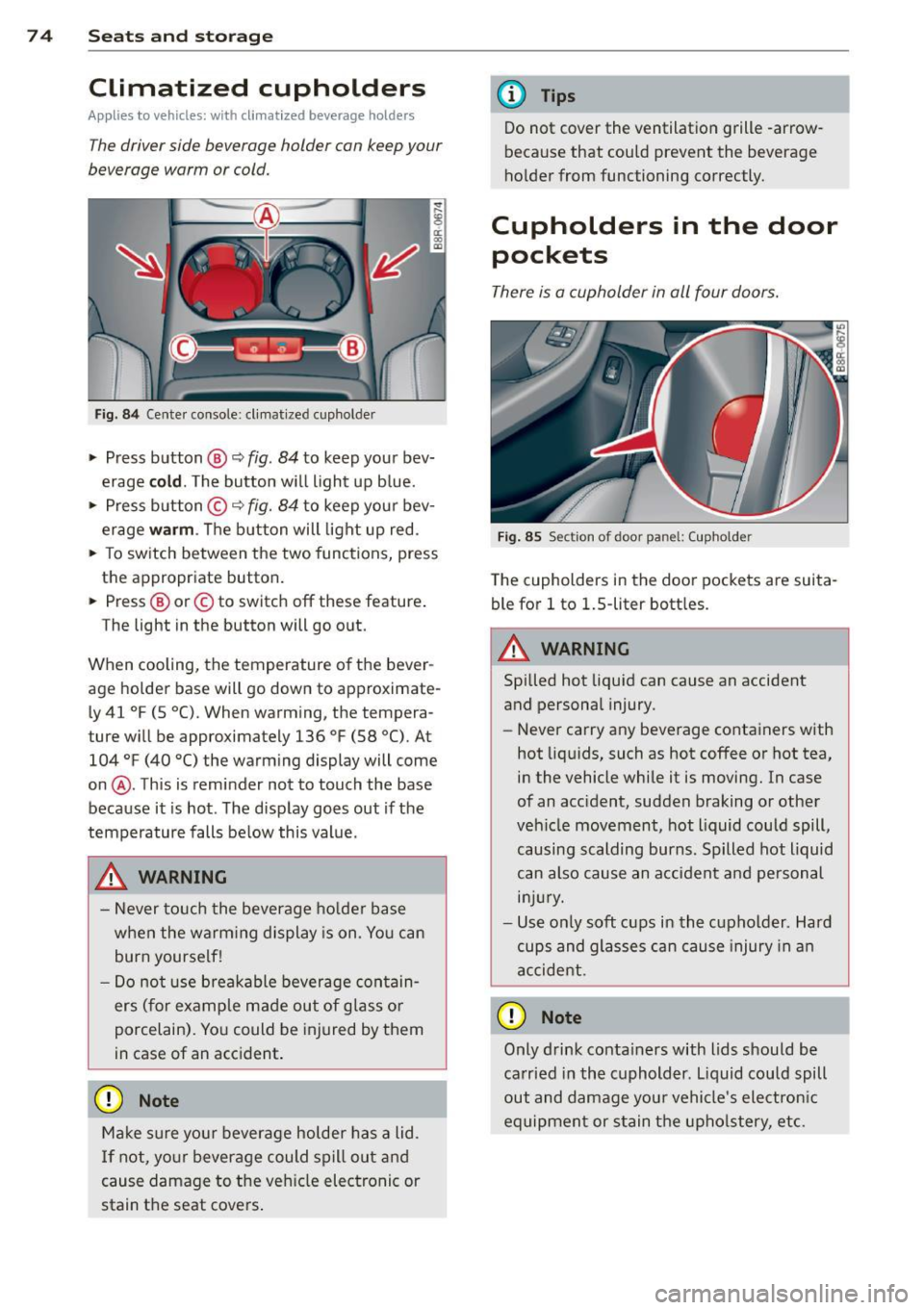
Fi g. 8 4 Center console: cl imat ized cupholder
.,. Press button ®~ fig. 84 to keep you r bev
erage
cold . The button w ill light up b lue .
.,. Press button ©~
fig. 84 to keep your bev
erage
warm . The button will light up red .
.,. To sw itch between the two func tions, press
the appropriate button.
.,. Press ® or© to switch off these feature .
The light in the button will go o ut.
When cooling, the temperature of the bever
age holde r base will go down to approximate
l y 41
°F (5 °C). When warming, the tempera
ture w ill be approximately 136
°F (58 °(). At
104
°F (40 °() the warm ing display will come
on @. This is reminder not to touch the base
because it is hot . The disp lay goes out if the
temperature falls be low this value.
_& WARNING
- Never to uch the beverage ho lde r base
when the warm ing display is on. Yo u can
burn yourse lf!
- Do not use breakable beverage con tain
ers (for example made out of glass o r
porcelain). Yo u could be injured by them
in case of an acc ident.
(D Note
Ma ke sure you r beverage holder has a lid.
I f not, yo ur beverage could spill out and
cause damage to t he ve hicle elec tronic or
stain th e seat cove rs .
-
(D Tips
Do not cover the ventilation grille -arrow
because that could prevent the beverage
ho lder from functioning correctly.
Cupholders in the door
pockets
There is a cupholder in all four doors.
F ig . 85 Sect ion of door panel: (upholder
The cupholders in the doo r pockets are suita
ble for
l to 1.5-liter bott les.
.&_ WARNING
-==
Spilled hot liquid can cause an accident
and personal injury.
-
- Never carry any beverage containers with
hot liq uids, such as hot coffee or hot tea,
in the vehicle while it is moving. In case
of an accident, sudden braking or othe r
veh icle movement, hot liquid could spill,
causing scalding burns. Spilled hot liquid
can also cause an a ccident and pe rsonal
in jur y.
- Use on ly soft cups in the cupholder . Hard
cups and glasses can cause injury in a n
accident.
0 Note
Only drink conta iners with lids should be
ca rried in the cuphold er. L iquid could spill
out and damage you r vehicle's electron ic
equipment or stain the upho lstery, etc.