2012 VOLVO V60 door lock
[x] Cancel search: door lockPage 5 of 400

Table of contents
* Option/accessory, for more information, see Introduction.3
03
03 Your driving environment
Instruments and controls.......................... 70
Volvo Sensus ........................................... 79
Key positions............................................ 80
Seats......................................................... 82
Steering wheel.......................................... 87
Lighting..................................................... 88
Wipers and washing.................................. 97
Windows, rearview and door mirrors...... 100
Compass*............................................... 105
Power sunroof*....................................... 106
Alcoguard*.............................................. 108
Starting the engine.................................. 112
Starting the engine – Flexifuel.................114
Starting the engine – external battery..... 116
Gearboxes............................................... 117
Eco Start/Stop DRIVe*............................ 123
All-wheel drive – AWD*...........................130
Foot brake............................................... 131
Parking brake.......................................... 133
HomeLink
Ÿ *............................................ 137
04
04 Comfort and driving pleasure
Menus and messages............................. 142
Menu source MY CAR............................144
Climate control........................................ 152
Fuel-driven engine block heater and pas-
senger compartment heater*.................. 162
Additional heater*.................................... 165
Trip computer......................................... 166
DSTC – Stability and traction control sys-
tem.......................................................... 168
Adapting driving characteristics............. 170
Cruise control*........................................ 171
Speed limiter*.......................................... 173
Adaptive cruise control*.......................... 175
Distance Warning*.................................. 185
City Safety™........................................... 188
Collision Warning with Auto Brake &
Pedestrian Protection*............................ 192
Driver Alert System – DAC*..................... 199
Driver Alert System - LDW*..................... 202
Park assist syst*...................................... 205
Park assist camera*................................ 208
BLIS* – Blind Spot Information System. . 211
Comfort inside the passenger compart-
ment........................................................ 215
05
05 Infotainment system
General information on infotainment...... 220
Quick start............................................... 222
General infotainment functions............... 226
Radio....................................................... 229
Media player........................................... 236
External audio source via AUX/USB*
input........................................................ 240
Media Bluetooth
Ÿ* ................................. 243
TV*........................................................... 246
Remote control* ..................................... 249
Bluetooth
Ÿ handsfree*............................251
Voice recognition* mobile phone............ 259
Menu navigation, Infotainment............... 263
ProCarManuals.com
Page 40 of 400
01 Safety
Child safety 01
38
Press down with your hand in the centre of
the cushion in order to lock it.
WARNING
If the instructions regarding the two-stage
booster cushion are not followed then this
could cause serious injury to a child in the
event of an accident.
IMPORTANT
Check that there are no loose objects (e.g.
toys) left behind in the space under the
cushion before lowering.
NOTE
The booster cushion must be lowered first
when lowering the backrest.
Child safety locks, rear doors
The controls for operating the rear door power
windows and the rear door opening handles
can be blocked from opening from the inside.
For more information, see page 64.
ISOFIX fixture system for child seats
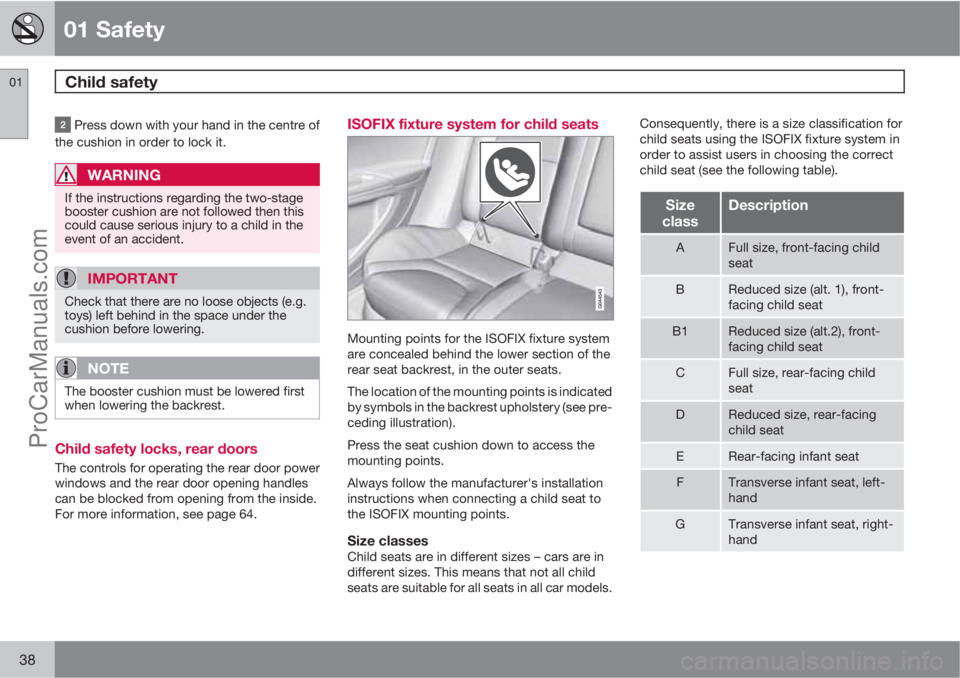
Mounting points for the ISOFIX fixture system
are concealed behind the lower section of the
rear seat backrest, in the outer seats.
The location of the mounting points is indicated
by symbols in the backrest upholstery (see pre-
ceding illustration).
Press the seat cushion down to access the
mounting points.
Always follow the manufacturer's installation
instructions when connecting a child seat to
the ISOFIX mounting points.
Size classesChild seats are in different sizes – cars are in
different sizes. This means that not all child
seats are suitable for all seats in all car models.Consequently, there is a size classification for
child seats using the ISOFIX fixture system in
order to assist users in choosing the correct
child seat (see the following table).
Size
classDescription
AFull size, front-facing child
seat
BReduced size (alt. 1), front-
facing child seat
B1Reduced size (alt.2), front-
facing child seat
CFull size, rear-facing child
seat
DReduced size, rear-facing
child seat
ERear-facing infant seat
FTransverse infant seat, left-
hand
GTransverse infant seat, right-
hand
ProCarManuals.com
Page 48 of 400

02 Locks and alarm
Remote control key/key blade
02
46
General
The car is supplied with 2 remote control keys
or PCCs (Personal Car Communicator). They
are used to start the car and for locking and
unlocking.
More remote control keys can be ordered – up
to 6 can be programmed and used for the same
car.
The PCC has increased functionality com-
pared with the remote control key. The contin-
uation of this chapter describes the functions
available in both the PCC and the remote con-
trol key.
WARNING
If there are children in the car:
Always remember to switch off the power
supply to power windows and sunroof by
removing the remote control key if the driver
leaves the car.
Loss of a remote control keyIf you lose a remote control key then new ones
can be ordered at a workshop - an authorised
Volvo workshop is recommended. The remain-
ing remote control keys must then be taken to
the workshop. The code of the missing remotecontrol key must be erased from the system as
a theft prevention measure.
The current number of keys registered to the
car can be checked in the menu system MY
CAR under Information
Number of keys.
For a description of the menu system, see
page 144.
Key memory1 – door mirrors and driver's
seat
The settings are automatically connected to
each respective remote control key, see pages
83 and 102.
The function can be activated/deactivated in
the menu system MY CAR under Settings
Car settingsCar key memory.
For a description of the menu system, see
page 144.
For cars with Keyless drive system, see
page 55.
Indicator for locking/unlockingWhen the car is locked or unlocked using the
remote control key, the direction indicators
confirm that locking/unlocking was correctly
performed.
•Locking - one flash and the door mirrors
are folded2 in.
•Unlocking - two flashes and the door mir-
rors are folded2 out.
After locking the indication is only given if all
locks have been activated once the doors have
been closed.
Selecting the functionDifferent options for indicating locking/unlock-
ing with light can be set in the car's menu sys-
tem, see page 144.
Search in the menu system MY CAR for
Settings
Car settingsLight settings
and select
Lock confirmation light and/orUnlock confirmation light.
1Only in combination with power driver's seat and power mirrors.2Only for cars with retractable power door mirrors.
ProCarManuals.com
Page 50 of 400

02 Locks and alarm
Remote control key/key blade
02
48* Option/accessory, for more information, see Introduction.
G021079
Remote control key with PCC* - Personal Car
Communicator.
Information
Function buttons
Locking – Locks the doors and tailgate
while the alarm is activated.
Press and hold (at least 2 seconds) to close all
the windows and sunroof* simultaneously.
WARNING
If the sunroof and windows are closed using
the remote control key, check that no one is
in danger of getting hands caught.
Unlocking – Unlocks the doors and tail-
gate while the alarm is deactivated.Press and hold (at least 4 seconds) to open all
windows simultaneously.
The function can be changed from unlocking
all doors simultaneously, to unlocking the driv-
er's door only with one press of the button and,
after a further press of the button - within 10
seconds - unlocking the remaining doors.
The function can be changed in the menu sys-
tem MY CAR under Settings
Car settings
Lock settingsDoors unlock with both
the alternatives
All doors and Driver door,
then all. For a description of the menu system,
see page 144.
Approach light duration – Used to switch
on the car's lighting at a distance. For more
information, see page 93.
Tailgate - Unlocks and disarms the alarm
for the tailgate only. For more information, see
page 62.
Panic function – Used to attract attention
in an emergency.
Press and hold the button for at least 3 sec-
onds or press it twice within 3 seconds to acti-
vate the direction indicators and the horn.
The function can be turned off with the same
button once it has been active for at least
5 seconds. Otherwise the function switches off
automatically after 2 minutes and 45 seconds.
RangeThe remote key's functions have a range of
about 20 m from the car.
If the car does not verify a button being pressed
- move closer and try again.
NOTE
The remote control key functions can be
disrupted by surrounding radio waves,
buildings, topographical conditions etc. The
car can always be locked/unlocked using
the key blade, see page 50.
ProCarManuals.com
Page 52 of 400

02 Locks and alarm
Remote control key/key blade
02
50* Option/accessory, for more information, see Introduction.
NOTE
If no indicator lamps illuminate when
the information button is used within range
then this may be because the last commu-
nication between the PCC and the car was
disrupted by surrounding radio waves,
buildings, topographical conditions etc.
Detachable key blade
A remote control key contains a detachable
key blade of metal with which some functions
can be activated and some operations carried
out.
The key blade's unique code is provided by
authorised Volvo workshops, which are rec-
ommended when ordering new key blades.
Key blade functionsUsing the remote control key's detachable key
blade:
•the left-hand front door can be opened
manually if central locking cannot be acti-
vated with the remote control key, see
page 56.
•the rear doors' mechanical child safety
locks can be activated/deactivated, see
page 64.
•the right-hand front door and the rear
doors can be locked manually, e.g. in the
event of power failure, see page 59.
•access to the glovebox and cargo area
(privacy locking*) can be blocked, see
page 51.
•the airbag for front passenger seat
(PACOS)* can be activated/deactivated,
see page 22.
Removing the key blade
G021082
Slide the spring-loaded catch to the side.
At the same time pull the key blade straight
out backwards.
Attaching the key bladeCarefully refit the key blade into its location in
the remote control key.1. Hold the remote control key with the slot
pointed up and lower the key blade into its
slot.
2. Lightly press the key blade. You should
hear a "click" when the key blade is locked
in.
Unlocking doors with the key blade
If central locking cannot be activated with the
remote control key - e.g. if the batteries are
discharged - then the left-hand front door can
be opened as follows:
1. Unlock the left-hand front door with the key
blade in the door handle's lock cylinder.
See also the figure and further information
on page see page 56.
NOTE
When the door has been unlocked using the
key blade and is opened, the alarm is trig-
gered.
2. Deactivate the alarm by inserting the
remote control key in the ignition switch.
For a car with the Keyless system, see
page 56.
ProCarManuals.com
Page 53 of 400

02 Locks and alarm
Privacy locking*
02
* Option/accessory, for more information, see Introduction.51 General information on privacy locking
G017869
Active locks for remote control key with key blade.
G017870
Active locks for remote control key, without key
blade and privacy locking activated.
The privacy locking function is intended for
when the car is left for service, with a hotel
parking valet or similar. The glovebox is thenlocked and the tailgate lock is disconnected
from the central locking - the tailgate cannot be
opened with either the central locking button in
the front doors or the remote control key.
This means that the remote control key without
key blade can only be used to activate/deacti-
vate the alarm, to open the doors and to drive
the car.
The remote control key without key blade can
then be handed over to the service or hotel staff
- the loose key blade is retained by the car
owner.
NOTE
Do not forget to pull out the cargo cover
over the cargo area before closing the tail-
gate, see page 281.
Activate/deactivate
Activating privacy locking.
To activate privacy locking:
Insert the key blade in the glovebox lock
cylinder.
Turn the key blade 180 degrees clockwise.
The keyhole is vertical in the locked posi-
tion for privacy locking.
Pull out the key blade. The information dis-
play shows a message at the same time.
The glovebox is then locked and the tailgate
can no longer be unlocked with the remote
control key or the central locking button.
ProCarManuals.com
Page 57 of 400

02 Locks and alarm
Keyless drive*
02
* Option/accessory, for more information, see Introduction.55 Keyless lock and ignition system (only
PCC
1)
General
The keyless drive function in the PCC allows
the car to be unlocked, driven and locked with-
out the need for a key. You simply have to have
the PCC with you. The system makes it easier
and more convenient to open the car, e.g.
when your hands are full.
Both of the car's PCCs incorporate the Keyless
function. Additional PCCs can be ordered, see
page 46.
PCC rangeIn order to open a door or the tailgate, a PCC
must be no more than approx. 1.5 metres fromthe car door handle or tailgate. This means that
the person who wishes to lock or unlock a door
must have the PCC with him or her. It is not
possible to lock or unlock a door if the PCC is
on the opposite side of the car.
The red rings in the preceding illustration indi-
cate the range covered by the system's anten-
nas.
If all PCCs are removed from the car when the
engine is running or key position I or II is active
(see page 80) and if all doors are closed, then
a warning message is shown in the information
display and an audible reminder signal sounds
at the same time.
The warning message clears and the audio
reminder signal stops when the PCC is brought
back to the car after:
•a door has been opened and closed
•the PCC is inserted into the ignition switch
•the READ button has been pressed.
Handling the PCC safelyIf a PCC with keyless drive function is left in the
car, it is deactivated temporarily when the car
is locked. This prevents unauthorised entry.
However, if someone breaks into the car,
opens the door and finds the PCC, it can bereactivated. It is therefore important to handle
all PCCs with great care.
IMPORTANT
Never leave a PCC behind in the car.
Interference to PCC functionElectromagnetic fields and screening can inter-
fere with the keyless drive system.
NOTE
Do not place/store the PCC near a mobile
phone or metal object - no closer than 10-15
cm.
If interference is experienced nonetheless, use
the PCC and the key blade as a remote control
key, see page 47.
1Personal Car Communicator, see page 49.
ProCarManuals.com
Page 58 of 400

02 Locks and alarm
Keyless drive*
02
56* Option/accessory, for more information, see Introduction.
Locking
Cars with the Keyless system have a pressure-
sensitive area on the outer handle of the doors and
a rubberised button next to the tailgate's rubber-
ised pressure plate.
Lock the doors and the tailgate with one long
press on any of the door handles' pressure-
sensitive areas or press the smaller of the tail-
gate's two rubberised buttons - the lock indi-
cator in the windscreen confirms that locking
has been completed by starting to flash, see
page 47.
All doors and the tailgate must be closed
before the car can be locked - otherwise the
car is not locked.
NOTE
On cars with automatic transmission, the
gear selector must be set in the P position
– otherwise the car cannot be locked or the
alarm armed.
UnlockingUnlocking takes place when a hand grasps a
door handle or the tailgate's rubberised pres-
sure plate is actuated - open the door or tail-
gate as normal.
NOTE
The door handles normally register a hand
that takes hold of the handle, but with thick
gloves on or after a very quick hand move-
ment a second attempt may be required, or
with the glove taken off.
Unlocking with the key blade
Hole for key blade - to loosen the cover.
If central locking cannot be activated with the
PCC, e.g. if the batteries are discharged, then
the left-hand front door can be opened with the
PCC's detachable key blade (see page 50).
To access the lock cylinder, the door handle's
plastic cover must be removed - this is also
done with the key blade:
1. Press the key blade approx. 1 cm straight
up into the hole on the underside of the
door handle/cover - do not prize.
> The plastic cover loosens automatically
by means of the torque when the blade
ProCarManuals.com