Page 180 of 532
180 2-1. Driving procedures
URBAN CRUISER_EE (OM52C21E)
Stopping the engine
Stop the vehicle.
Shift the shift lever to “N”.
Set the parking brake. (P. 188)
Press the “ENGINE START STOP” switch.
Release the brake pedal and check that the indicator on the
“ENGINE START STOP” switch is off.
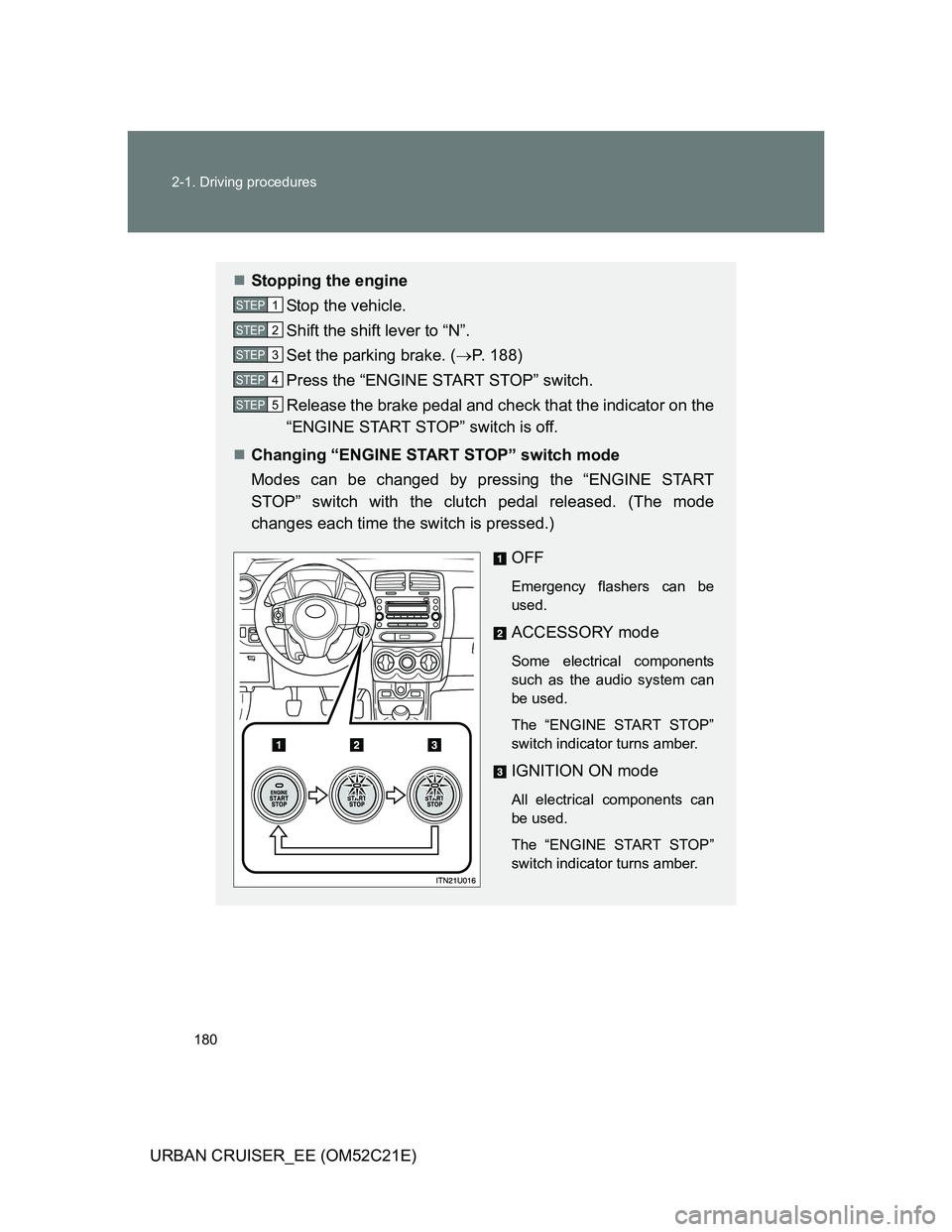
Changing “ENGINE START STOP” switch mode
Modes can be changed by pressing the “ENGINE START
STOP” switch with the clutch pedal released. (The mode
changes each time the switch is pressed.)
OFF
Emergency flashers can be
used.
ACCESSORY mode
Some electrical components
such as the audio system can
be used.
The “ENGINE START STOP”
switch indicator turns amber.
IGNITION ON mode
All electrical components can
be used.
The “ENGINE START STOP”
switch indicator turns amber.
STEP1
STEP2
STEP3
STEP4
STEP5
Page 214 of 532
214 2-4. Using other driving systems
URBAN CRUISER_EE (OM52C21E)
Automatic engine start function
In the following situations, the engine may start even without the clutch pedal
being depressed after the “ECO” indicator flashes for a few seconds.
The brake pedal is pumped or strongly depressed.
The air conditioning system is being used or turned on.
Vehicles with an automatic air conditioning system only: The windshield
defogger is turned on.
The battery is not sufficiently charged.
The vehicle starts to roll on an incline.
Automatic reactivation of the Stop & Start system
Even if the Stop & Start system is disabled by the “ECO OFF” switch, it will
be automatically re-enabled once the engine switch is turned to the “LOCK”
position then to the “START” position (vehicles without a smart entry & start
system) or the “ENGINE START STOP” switch is turned to OFF then the
engine is started (vehicles with a smart entry & start system).
The Stop & Start system protection feature
When an excessively loud sound is being projected by the audio system, the
audio system may be automatically cut off in order to maintain power for the
Stop & Start system function.
If this occurs, turning the engine switch to the “LOCK” position then to the
“ACC” or “ON” position (vehicles without a smart entry & start system) or the
“ENGINE START STOP” switch to the OFF then to ACCESSORY or IGNI-
TION ON mode (vehicles with a smart entry & start system) re-enables the
audio system.
Steering wheel operation
When the engine is stopped by the Stop & Start system, the steering wheel
may become heavier than when driving.
Page 243 of 532
3Interior features
243
URBAN CRUISER_EE (OM52C21E)
3-2. Using the audio system
Audio system types .......... 264
Using the radio ................. 266
Using the CD player ......... 270
Playing back MP3 and
WMA discs...................... 277
Optimal use of the audio
system ............................ 285
Using the AUX port ........... 288
Using the steering
switches .......................... 289
3-3. Using the hands-free system
(for cellular phone)
Hands-free system
(for cellular phone).......... 291
Using the hands-free
system ............................ 298
Making a phone call.......... 302
Setting a cellular
phone ............................. 306
Security and system
setup ............................... 310
Using the phone book....... 3143-4. Using the interior lights
Interior lights list ................ 320
• Interior light ..................... 320
• Personal lights ................ 321
3-5. Using the storage features
List of storage features ..... 322
• Glove boxes.................... 323
• Cup holders .................... 324
• Bottle holders.................. 326
• Auxiliary box ................... 327
3-6. Other interior features
Sun visors ......................... 328
Vanity mirror ..................... 329
Clock ................................. 330
Portable ashtray................ 331
Cigarette lighter ................ 332
Seat heaters ..................... 333
Floor mat........................... 335
Luggage compartment
features........................... 337
Page 264 of 532
264
URBAN CRUISER_EE (OM52C21E)
3-2. Using the audio system
Audio system types
: If equipped
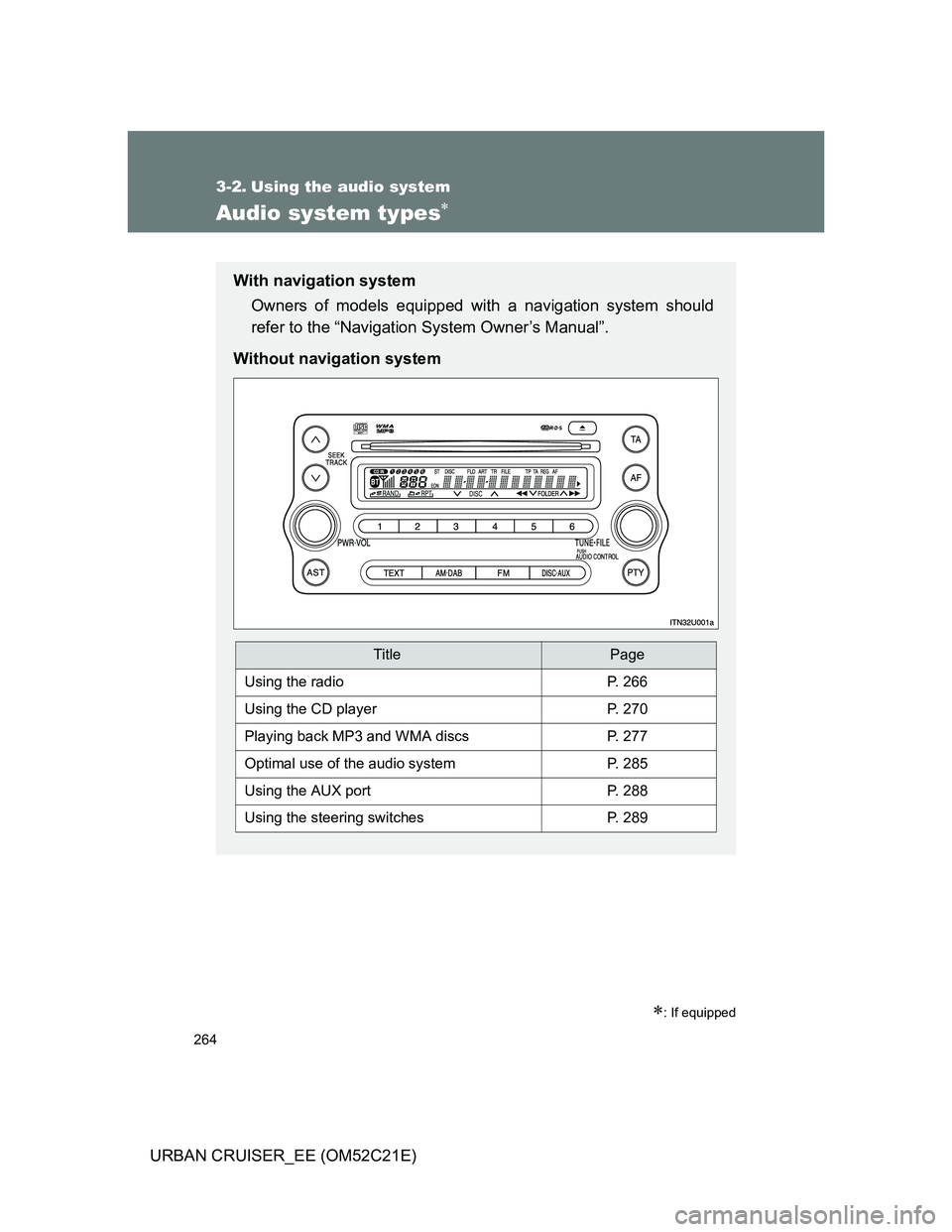
With navigation system
Owners of models equipped with a navigation system should
refer to the “Navigation System Owner’s Manual”.
Without navigation system
TitlePage
Using the radioP. 266
Using the CD playerP. 270
Playing back MP3 and WMA discsP. 277
Optimal use of the audio systemP. 285
Using the AUX portP. 288
Using the steering switchesP. 289
Page 265 of 532
265 3-2. Using the audio system
3
Interior features
URBAN CRUISER_EE (OM52C21E)
Using cellular phones
Interference may be heard through the audio system’s speakers if a cellular
phone is being used inside or close to the vehicle while the audio system is
operating.
NOTICE
To prevent battery discharge
Do not leave the audio system on longer than necessary with the engine off.
To avoid damaging the audio system
Take care not to spill drinks or other fluids over the audio system.
Page 266 of 532
266
3-2. Using the audio system
URBAN CRUISER_EE (OM52C21E)
Using the radio
Setting station presets
Manually
In AF-ON mode the radio changes frequency to the strongest sig-
nal of the selected station.
Search for desired stations by turning the dial or
pressing “”or “” on .
Press and hold the button (from to ) the station is
to be set to, and you hear a beep.
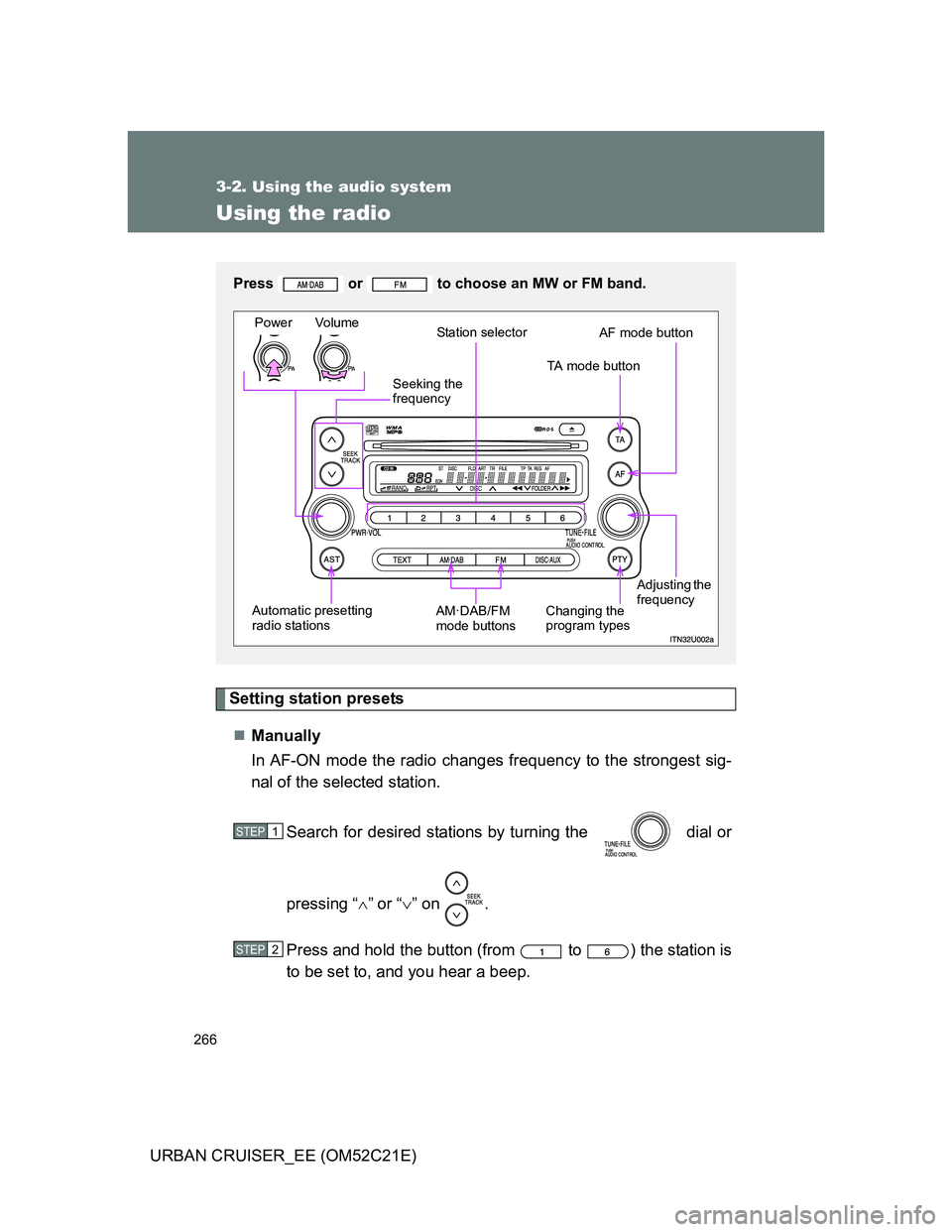
Press or to choose an MW or FM band.
Power Volume
Station selector
TA mode button
Adjusting the
frequency AF mode button
Changing the
program types AM·DAB/FM
mode buttons Automatic presetting
radio stationsSeeking the
frequency
STEP1
STEP2
Page 267 of 532
267 3-2. Using the audio system
3
Interior features
URBAN CRUISER_EE (OM52C21E)Automatically
Press and hold until you hear a beep.
Up to 6 stations are set in order of reception quality. When the settings
are finished, 2 beeps will be heard.
In the FM1 or FM2 mode, the stations automatically set by the audio sys-
tem will be set in the FM3 presets.
RDS (Radio Data System)
This feature allows your radio to receive station and program informa-
tion (classical, news, etc.) from radio stations that broadcast this
information.
Listening to stations of the same network
Press .
AF-ON, REG-OFF modes: A station among those of the same net-
work with strong reception is selected.
Switching between different regional
programs of the same station might
occur.
AF-ON, REG-ON modes: A station among those of the same net-
work with strong reception and broad-
casting the same program is selected.
Each time is pressed, the mode changes in the order of AF-ON,
REG-OFFAF-ON, REG-ONAF-OFF, REG-OFF.
Page 268 of 532
268 3-2. Using the audio system
URBAN CRUISER_EE (OM52C21E)Specifying program type
Press .
Each time is pressed, the program type changes in the order of
“NEWS”“SPORTS”“TALK”“POP”“CLASSICS”.
Traffic information
Press .
TP mode: The system automatically switches to traffic information
when a broadcast with a traffic information signal is
received.
The station returns to the previous one when the traffic infor-
mation ends.
TA mode: Traffic information can be heard only when a signal is
received. The system switches to the mute mode when
a signal is not received. In the CD or MP3/WMA mode,
the system automatically switches to traffic information
when a signal is received.
The audio system returns to the mute, CD or MP3/WMA
mode when the traffic information ends.
The audio system mode changes as follows each time is
pressed.
FM modes: TPTAOFF
Modes other than the radio modes: TAOFF
Emergency broadcast reception mode
“ALARM” appears in the display in the event that an emergency
broadcast is received, and the emergency broadcast is aired.