Page 738 of 860

738 5-2. Steps to take in an emergency
SIENNA_U (OM45477U)
■If the malfunction indicator lamp comes on while driving
First check the following:
● Is the fuel tank empty?
If it is, fill the fuel tank immediately.
● Is the fuel tank cap loose?
If it is, tighten it securely.
The malfunction indicator lamp will go off after taking several driving trips.
If the malfunction indicator lamp does not go off even after several trips, con-
tact your Toyota dealer as soon as possible.
■
When the tire pressure warning light comes on
Check the tire inflation pressure and adjust to the appropriate level.
Pushing the tire pressure warning reset switch will not turn off the tire
pressure warning light.
■The tire pressure warning light may come on due to natural causes
The tire pressure warning light may come on due to natural causes such
as natural air leaks and tire inflat ion pressure changes caused by tem-
perature. In this case, adjusting the tire inflation pressure will turn off the
warning light (after a few minutes).
■When a tire is replaced with a spare tire (vehicles with compact
spare tire)
The compact spare tire is not equipped with a tire pressure warning
valve and transmitter. If a tire goes flat, the tire pressure warning light will
not turn off even though the flat tire has been replaced with the spare
tire. Replace the spare tire with the re paired tire and adjust the tire infla-
tion pressure. The tire pressure wa rning light will go off after a few min-
utes.
Page 756 of 860
756 5-2. Steps to take in an emergency
SIENNA_U (OM45477U)
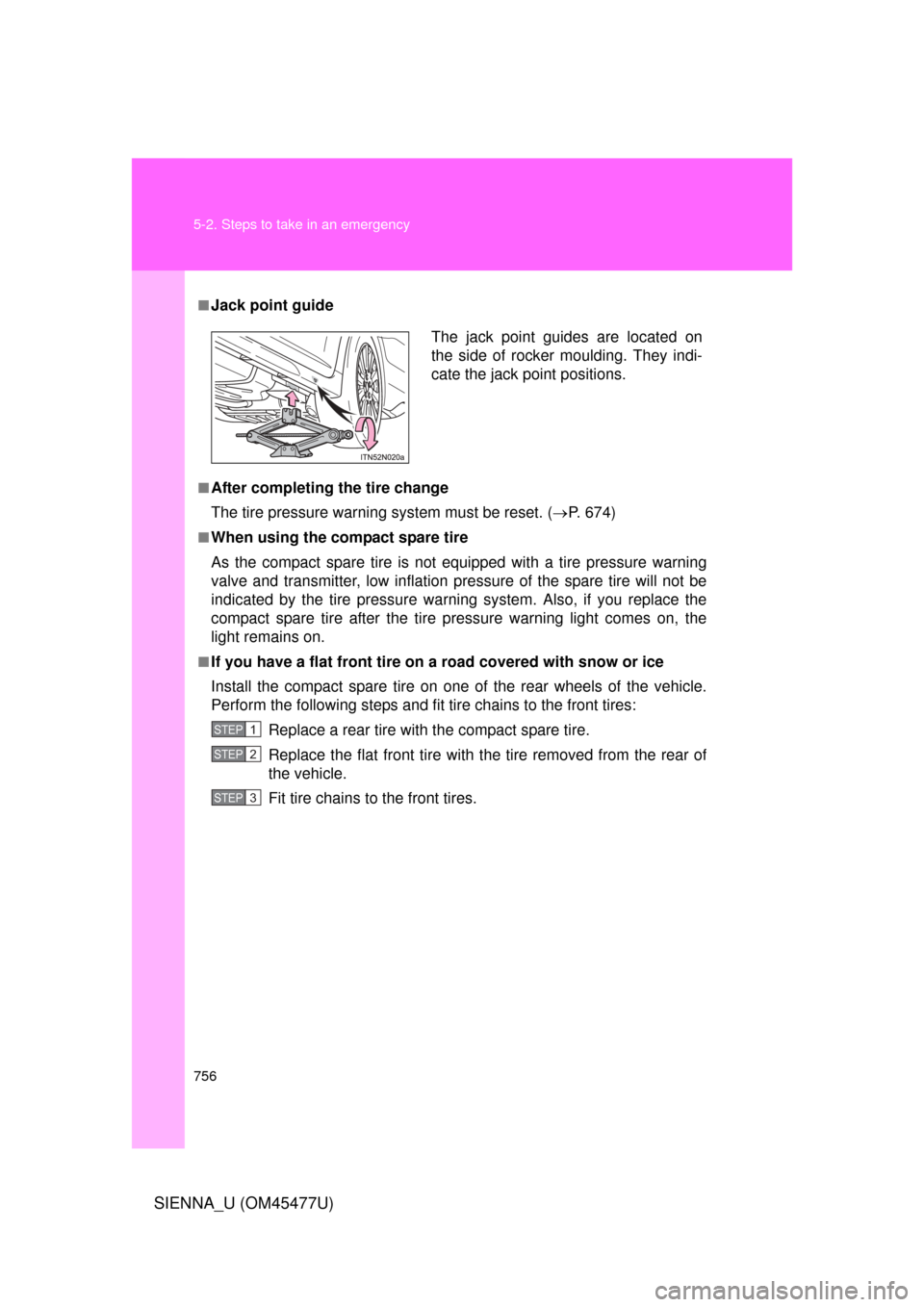
■Jack point guide
■After completing the tire change
The tire pressure warning system must be reset. ( P. 674)
■When using the compact spare tire
As the compact spare tire is not equipped with a tire pressure warning
valve and transmitter, low inflation pressure of the spare tire will not be
indicated by the tire pressure warn ing system. Also, if you replace the
compact spare tire after the tire pressure warning light comes on, the
light remains on.
■If you have a flat front tire on a road covered with snow or ice
Install the compact spare tire on one of the rear wheels of the vehicle.
Perform the following steps and fit tire chains to the front tires:
Replace a rear tire with the compact spare tire.
Replace the flat front tire with the tire removed from the rear of
the vehicle.
Fit tire chains to the front tires.
The jack point guides are located on
the side of rocker moulding. They indi-
cate the jack point positions.
STEP1
STEP2
STEP3
Page 820 of 860
820 6-2. Customization
SIENNA_U (OM45477U)
Customizing the features by using the multi-information display
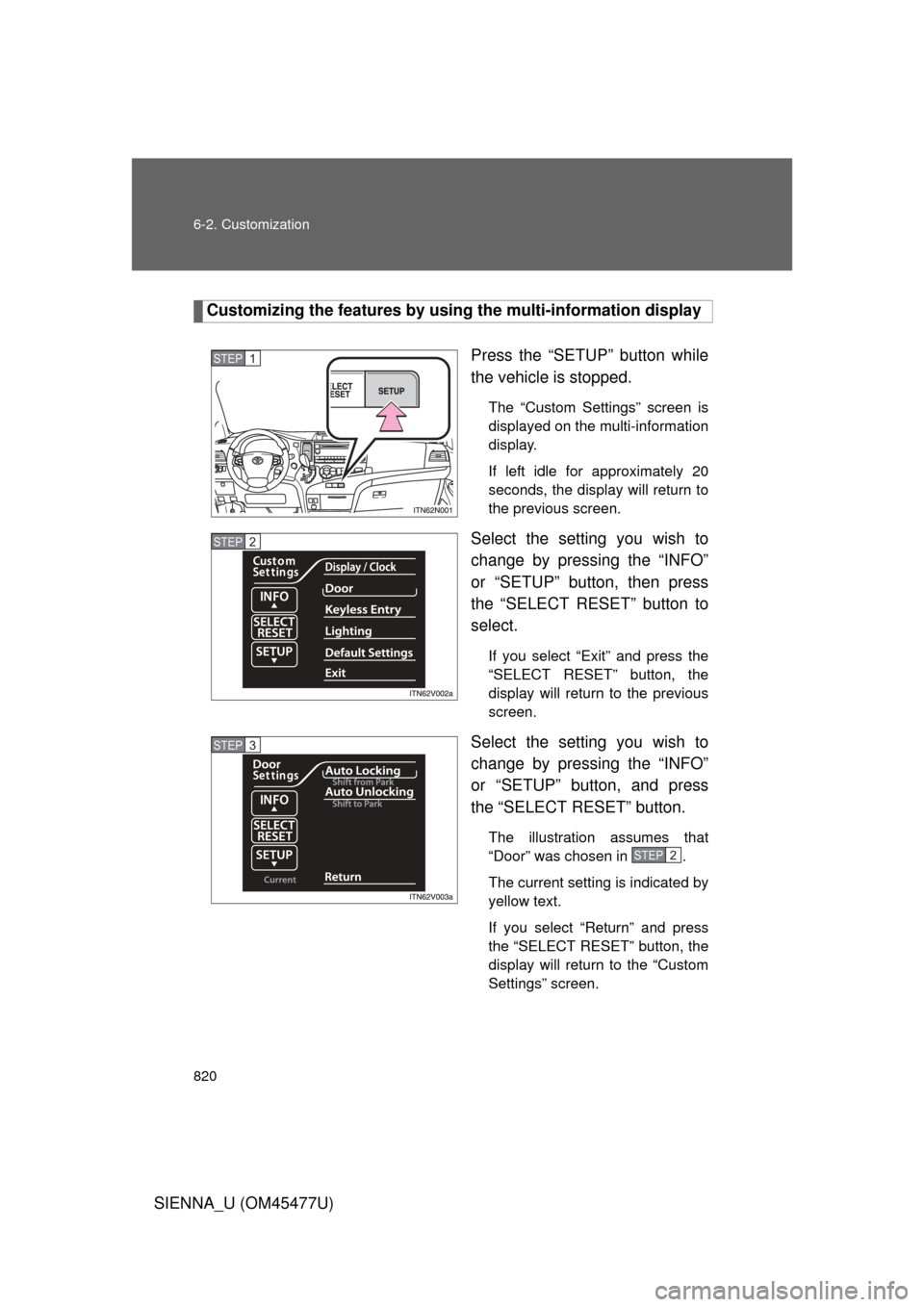
Press the “SETUP” button while
the vehicle is stopped.
The “Custom Settings” screen is
displayed on the multi-information
display.
If left idle for approximately 20
seconds, the display will return to
the previous screen.
Select the setting you wish to
change by pressing the “INFO”
or “SETUP” button, then press
the “SELECT RESET” button to
select.
If you select “Exit” and press the
“SELECT RESET” button, the
display will return to the previous
screen.
Select the setting you wish to
change by pressing the “INFO”
or “SETUP” button, and press
the “SELECT RESET” button.
The illustration assumes that
“Door” was chosen in .
The current setting is indicated by
yellow text.
If you select “Return” and press
the “SELECT RESET” button, the
display will return to the “Custom
Settings” screen.
STEP1
STEP2
STEP3
STEP2
Page 821 of 860
821
6-2. Customization
6
Vehicle specifications
SIENNA_U (OM45477U)
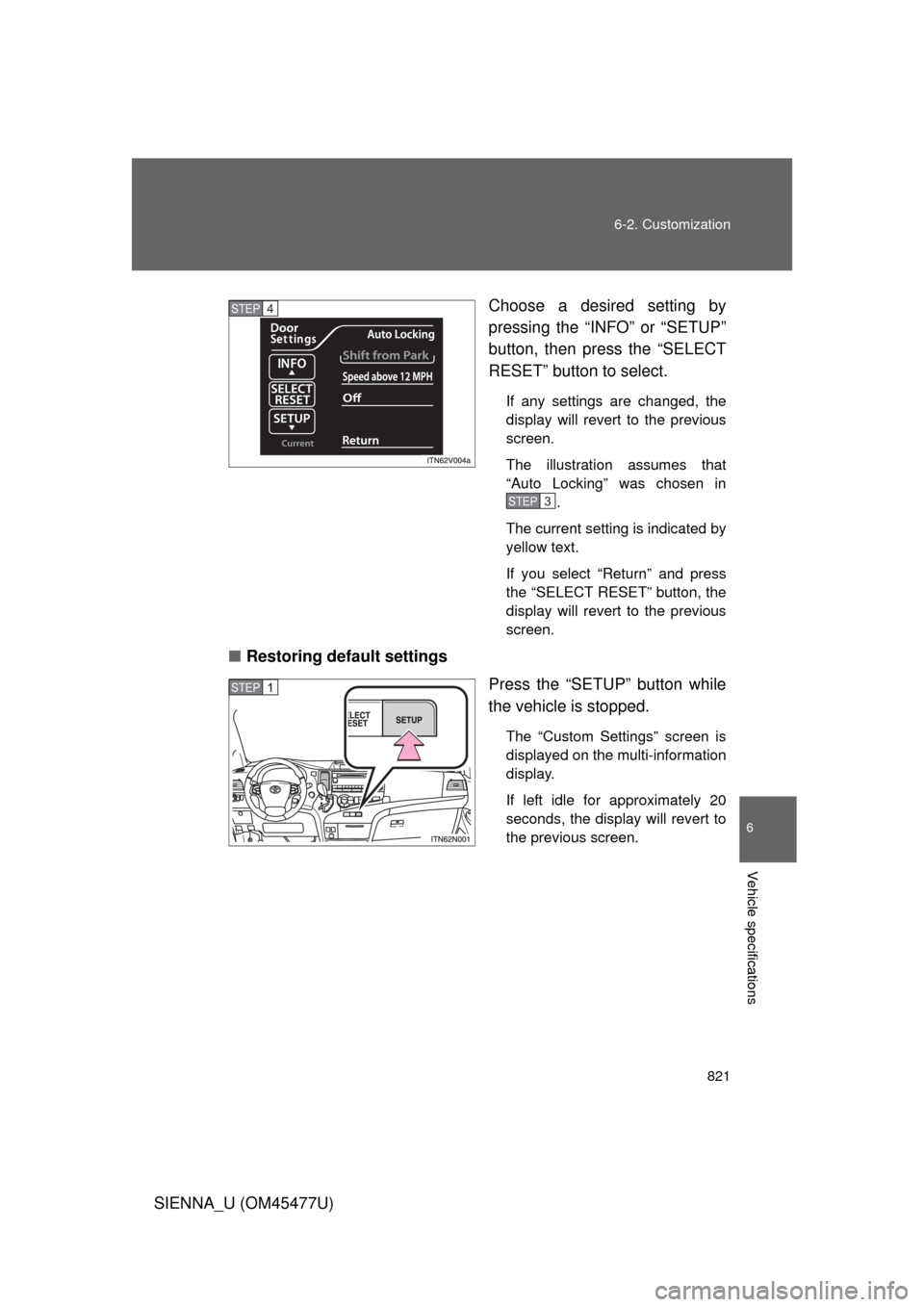
Choose a desired setting by
pressing the “INFO” or “SETUP”
button, then press the “SELECT
RESET” button to select.
If any settings are changed, the
display will revert to the previous
screen.
The illustration assumes that
“Auto Locking” was chosen in
.
The current setting is indicated by
yellow text.
If you select “Return” and press
the “SELECT RESET” button, the
display will revert to the previous
screen.
■ Restoring default settings
Press the “SETUP” button while
the vehicle is stopped.
The “Custom Settings” screen is
displayed on the multi-information
display.
If left idle for approximately 20
seconds, the display will revert to
the previous screen.
STEP4
STEP3
STEP1
Page 822 of 860
822 6-2. Customization
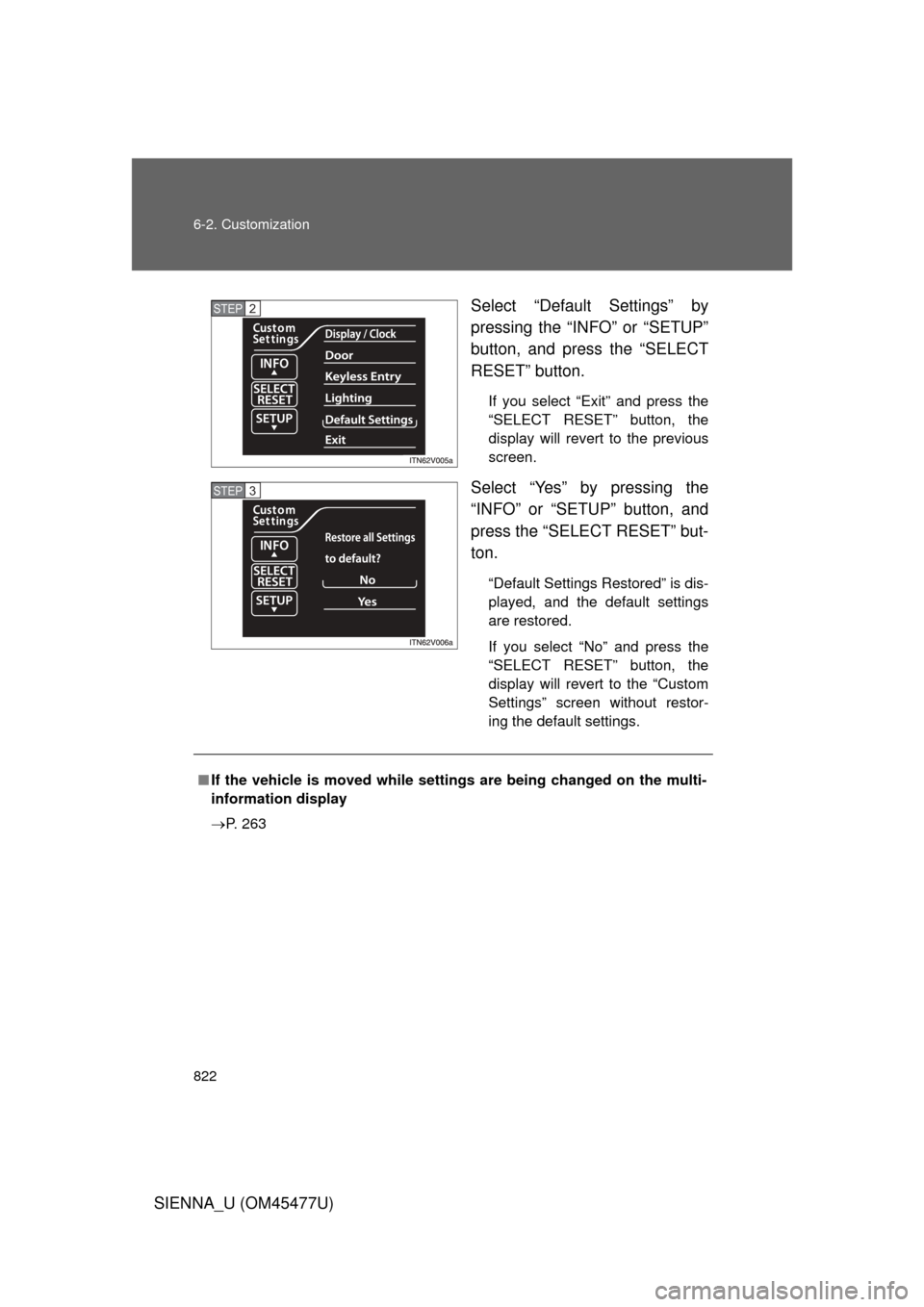
SIENNA_U (OM45477U)Select “Default Settings” by
pressing the “INFO” or “SETUP”
button, and press the “SELECT
RESET” button.
If you select “Exit” and press the
“SELECT RESET” button, the
display will revert to the previous
screen.
Select “Yes” by pressing the
“INFO” or “SETUP” button, and
press the “SELECT RESET” but-
ton.
“Default Settings Restored” is dis-
played, and the default settings
are restored.
If you select “No” and press the
“SELECT RESET” button, the
display will revert to the “Custom
Settings” screen without restor-
ing the default settings.
STEP2
STEP3
■
If the vehicle is moved while setti ngs are being changed on the multi-
information display
P. 263
Page 850 of 860

850 Alphabetical index
SIENNA_U (OM45477U)
MaintenanceDo-it-yourself maintenance ....................... 647
General maintenance ............642
Maintenance data.................. 784
Maintenance requirements....639
Reset the maintenance data .....................................640
Meter
Instrument panel light control .................................245
Meters ...................................244
Mirrors Conversation mirror............... 593
Inside rear view mirror...........138
Side mirror heaters................405
Side mirrors ...........................140
Vanity mirrors ........................591
Moon roof .................................150
MP3 disc ...................................431
Multi-information display ........ 252
Noise from under vehicle .......... 24
Odometer .................................. 244
Oil Engine oil ..............................657
Opener Back door ................................82
Fuel filler door ....................... 155
Hood......................................651
Outer foot lights
Outer foot lights ..................... 566
Replacing light bulbs ............. 709
Wattage .................................796
Outside rear view mirrors Adjusting and folding ............. 140
Driving position memory........ 120
Overhead console .................... 578
Overheating, Engine ................775 Parking assist sensors............ 314
Parking brake ........................... 242
Parking lights
Replacing light bulbs ............. 709
Switch ................................... 266
Wattage................................. 796
PCS ........................................... 336
Personal lights Switch ................................... 567
Wattage................................. 796
Power back door ........................ 82
Power outlets ........................... 594
Power windows ................ 144, 148
Pre-collision system ................ 336
Quarter windows...................... 148
Radar cruise control ................ 298
Radiator .................................... 664
Radio ......................................... 412
Rear automatic air conditioning system ............. 401
Rear ceiling light
Switch ................................... 570
Wattage................................. 796
Rear manual air conditioning
system .................................... 398
Rear seat Adjustment ............................ 100
Folding third seats......... 109, 110
Installing second seats.......... 107
Removing second seats........ 104
Stowing third seats........ 111, 113
Rear seat entertainment system .................................... 488M
N
O
P
Q
R