Page 545 of 860
545
3-5. Using the hand
s-free phone system (for cellular phone)
3
Interior features
SIENNA_U (OM45477U)
Speed dialing
Press the off-hook switch.
Press the preset button in which the desired number is regis-
tered.
Press the off-hook switch.
When receiving a phone call■ Answering the phone
Press the off-hook switch.
■ Refusing the call
Press the on-hook switch.
Transferring a call
A call can be transferred between the cellular phone and system
while dialing or receiving a call, or during a call. Use one of the follow-
ing methods:
a. Operate the cellular phone.
Refer to the manual that comes with the cellular phone for the oper-
ation of the phone.
b. Press the off-hook switch*1.
c. Press the talk switch and say “Call Transfer”
*2.
*1: This operation can be performed only when transferring a call from the cellular phone to the system during a call.
*2: While the vehicle is in motion, a call cannot be transferred
from the system to the cellular phone.
STEP1
STEP2
STEP3
Page 562 of 860
562 3-5. Using the hands-free phone system (for cellular phone)
SIENNA_U (OM45477U)
Setting speed dials
Select “Set Speed Dial (Spee d Dial)” using a voice command
or .
Select the data to be registered as a speed dial by one of the
following methods:
a. Press the talk switch, say desired name, and select “Con-
firm” using a voice command or .
b. Press the talk switch, and say “List names”. While the desired name is being read aloud, press the talk switch,
and select “Confirm” using a voice command or .
c. Select the desired data using .
Select the desired preset butt on, and register the data into
speed dial by either of the following methods:
a. Press the desired pres et button, and select “Confirm” using
a voice command or .
b. Press and hold the desired preset button.
STEP1
STEP2
STEP3
Page 564 of 860
564 3-5. Using the hands-free phone system (for cellular phone)
SIENNA_U (OM45477U)
Deleting registered data
Select “Delete Entry” using a voice command or .
Select the data to be deleted by either of the following meth-
ods, and select “Confirm” us ing a voice command or :
a. Press the talk switch, and say the name of the desired phone number to be deleted.
b. Press the talk switch, say “List Names”. While the name of the desired phone number is bei ng read aloud, press the
talk switch.
c. Select the desired data using .
Deleting speed dials Select “Delete Speed Dial (Del Spd Dial)” using a voice com-
mand or .
Press the preset button in which the desired speed dial is reg-
istered, and select “Confirm” using a voice command or
.
STEP1
STEP2
STEP1
STEP2
Page 640 of 860
640 4-2. Maintenance
SIENNA_U (OM45477U)
■Allow inspection and repairs to be performed by a Toyota dealer
● Toyota technicians are well-trained specialists and are kept up to date
with the latest service information. They are well informed about the
operations of all systems on your vehicle.
● Keep a copy of the repair order. It proves that the maintenance that has
been performed is under warranty coverage. If any problem should arise
while your vehicle is under warranty, your Toyota dealer will promptly
take care of it.
■ Reset the maintenance data (U.S.A. only)
After the required maintenance is preformed according to the maintenance
schedule, please reset the maintenance data.
To reset the data, follow the procedures described below:
Vehicles without a smart key system
Switch the display to the trip meter A ( P. 244) and then turn the
engine switch off.
Vehicles with a smart key system
Switch the display to the trip meter A ( P. 244) and then turn the
“ENGINE START STOP” switch off.
Vehicles without a smart key system
While pressing the trip meter reset button ( P. 244), turn the
engine switch to the “ON” position.
Vehicles with a smart key system
While pressing the trip meter reset button ( P. 244), turn the
“ENGINE START STOP” switch to IGNITION ON mode.
Vehicles without a multi-information display
Continue to press and hold the button until the trip meter A displays
“000000”.
Vehicles with a multi-information display
Continue to press and hold the button until “COMPLETE” appears
on the multi-information display.
STEP1
STEP2
STEP3
Page 675 of 860
675
4-3. Do-it-yourself maintenance
4
Maintenance and care
SIENNA_U (OM45477U)
Turn the engine switch to the “O
N” position (vehicles without a
smart key system) or “ENGINE START STOP” switch to IGNI-
TION ON mode (vehicles with a smart key system).
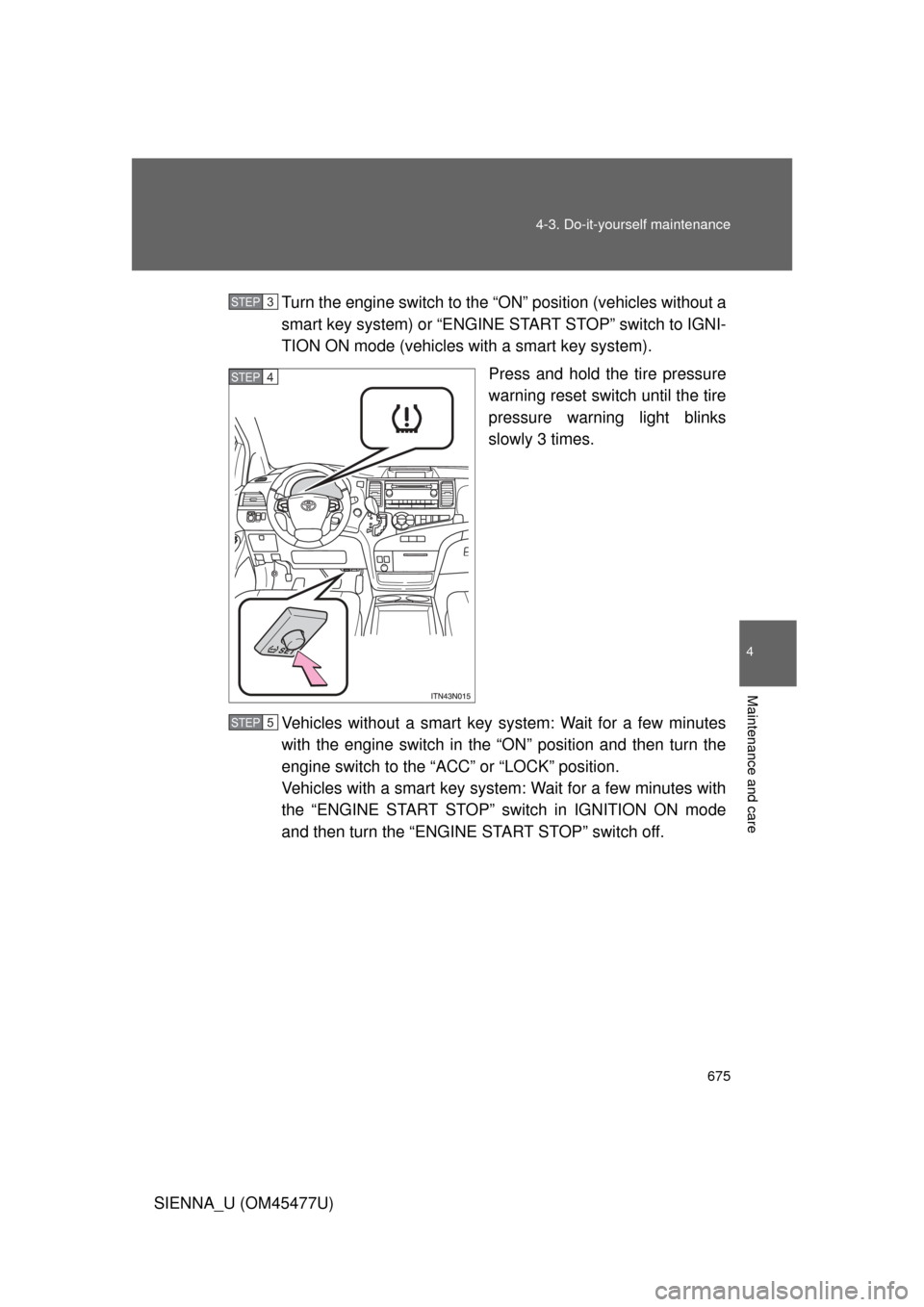
Press and hold the tire pressure
warning reset switch until the tire
pressure warning light blinks
slowly 3 times.
Vehicles without a smart key system: Wait for a few minutes
with the engine switch in the “ON” position and then turn the
engine switch to the “ACC” or “LOCK” position.
Vehicles with a smart key system: Wait for a few minutes with
the “ENGINE START STOP” switch in IGNITION ON mode
and then turn the “ENGINE START STOP” switch off.
STEP3
STEP4
STEP5
Page 679 of 860
679
4-3. Do-it-yourself maintenance
4
Maintenance and care
SIENNA_U (OM45477U)
■Initializing the tire pressure warning system
Initialize the system with the tire infl
ation pressure adjusted to the speci-
fied level.
■If the tread on snow tires wears down below 0.16 in. (4 mm)
The effectiveness of the tires as snow tires is lost.
■If you press the tire pressure warning reset switch accidentally
If initialization is performed, adjust t he tire inflation pressure to the speci-
fied level and initialize the tire pressure warning system again.
■When the initialization of the tire pressure warning system has
failed
Initialization can be completed in a few minutes. However, in the follow-
ing cases, the settings has not bee n recorded and the system will not
operate properly. If repeated attempts to record tire inflation pressure
settings are unsuccessful, have the vehicle inspected by your Toyota
dealer.
●When operating the tire pressure warning reset switch, the tire pres-
sure warning light doe s not blink 3 times.
●After driving for a certain period of time since the initialization has
been completed, the wa rning light comes on after blinking for 1
minute.
Page 681 of 860
681
4-3. Do-it-yourself maintenance
4
Maintenance and care
SIENNA_U (OM45477U)
CAUTION
■When inspecting or replacing tires
Observe the following precautions to
prevent accidents. Failure to do so
may cause damage to parts of the drive train, as well as dangerous han-
dling characteristics, which may lead to an accident resulting in death or
serious injury.
●Do not mix tires of different ma kes, models or tread patterns.
Also, do not mix tires of remarkably different treadwear.
●Do not use tire sizes other than those recommended by Toyota.
●Do not mix differently constructed ti res (radial, bias-belted or bias-ply
tires).
●Do not mix summer, all season and snow tires.
●Do not use tires that have been used on another vehicle.
Do not use tires if you do not know how they were used previously.
●Do not tow if your vehicle has a compact spare tire installed.
■When initializing the tire pressure warning system
Do not operate the tire pressure wa rning reset switch without first adjust-
ing the tire inflation pr essure to the specified level. Otherwise, the tire
pressure warning light may not come on even if the tire inflation pressure
is low, or it may come on when the ti re inflation pressure is actually nor-
mal.
Page 735 of 860
5
When trouble arises
735
5-2. Steps to take in an emergency
SIENNA_U (OM45477U)
Warning lightWarning light/DetailsCorrection procedure
(U.S.A.) Maintenance required
reminder light
Indicates that mainte-
nance is requires accord-
ing to the driven distance
on the maintenance
schedule.
*3
Illuminates for about 3 sec-
onds and then flashes for
about 15 seconds approxi-
mately 4500 miles
(7200 km) after the mainte-
nance data has been reset. If necessary, perform main-
tenance.
Comes on and remains on if
the distance driven exceeds
5000 miles (8000 km) after
the maintenance data has
been reset. (The indicator
will not work property unless
the maintenance data has
been reset.) Perform the necessary
maintenance.
Please reset the mainte-
nance is performed.
(
P. 6 4 0)
Third seat warning light
(if equipped) Indicates that the third
seat operation is not yet
complete. Complete the third seat
operation.