Page 3 of 636

1
2
3
4
5
6
7
3
2-1. Driving proceduresDriving the vehicle............... 180
Power (ignition) switch ........ 192
EV drive mode .................... 199
Hybrid transmission ............ 202
Turn signal lever ................. 211
Parking brake ...................... 212
Horn .................................... 213
2-2. Instrument cluster Gauges and meters ............ 214
Indicators and warning lights ................................. 219
Multi-information display ..... 223
Head-up display .................. 243
2-3. Operating the lights and windshield wipers
Headlight switch .................. 250
Fog light switch ................... 256
Windshield wipers and washer .............................. 258
Rear window wiper and washer .............................. 262
Headlight cleaner switch ..... 265 2-4. Using other driving systems
Cruise control ..................... 266
Dynamic radar cruise control .............................. 270
LKA (Lane-Keeping Assist) .............................. 286
Driving assist systems ........ 296
Hill-start assist control ........ 301
PCS (Pre-Collision System) ............................ 303
2-5. Driving information Cargo and luggage ............. 311
Vehicle load limits............... 316
Winter driving tips ............... 317
Trailer towing ...................... 322
Dinghy towing ..................... 323
2When driving
Page 4 of 636

TABLE OF CONTENTSIndex
4
3-1. Using the air conditioning system and defogger
Air conditioning system ...... 326
Using the steering wheel climate remote control
switches ........................... 337
Solar Ventilation System .... 339
Remote Air Conditioning System ............................. 342
Rear window and outside rear view mirror defogger
switch ............................... 346
3-2. Using the audio system Audio system types ............ 347
Using the AUX port/USB port .......................... 352
3-3. Using the interior lights Interior lights list ................. 353
• Front interior lights ........... 354
• Personal lights ................. 355
• Rear interior light .............. 355 3-4. Using the storage features
List of storage features ....... 357
• Glove boxes ..................... 358
• Console box ..................... 359
• Cup holders ...................... 360
• Bottle holders ................... 362
• Auxiliary boxes ................. 363
3-5. Other interior features Sun visors ........................... 364
Vanity mirrors ..................... 365
Outside temperature display .............................. 366
Power outlets ...................... 367
Seat heaters ....................... 369
Armrest ............................... 371
Floor mats........................... 372
Luggage compartment features ............................ 374
Garage door opener ........... 380
Safety Connect ................... 388
3Interior features
Page 8 of 636
8
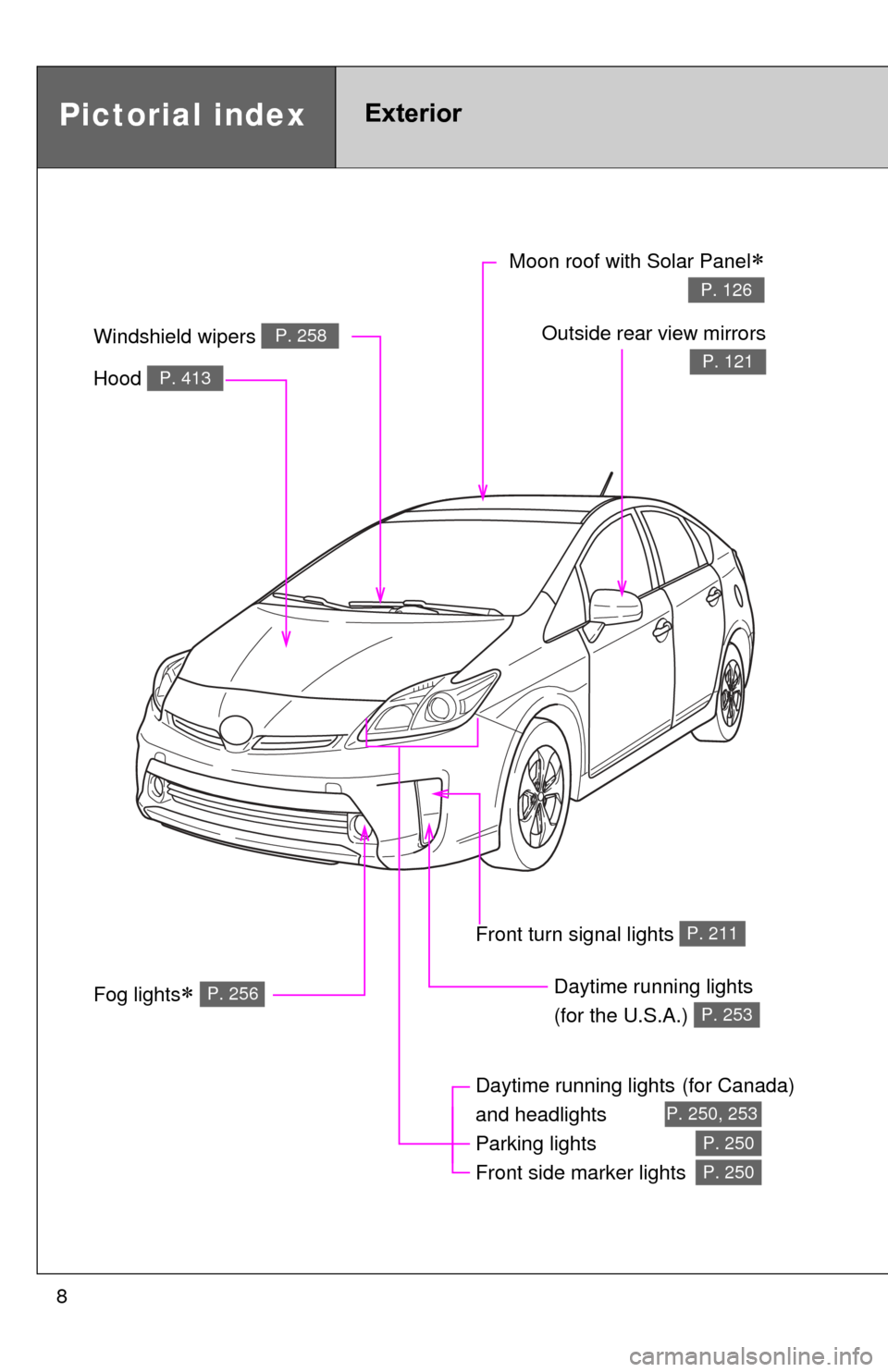
Pictorial indexExterior
Fog lights P. 256
Daytime running lights(for Canada)
and headlights
Parking lights
Front side marker lights
P. 250, 253
P. 250
P. 250
Hood P. 413
Windshield wipers P. 258Outside rear view mirrors
P. 121
Moon roof with Solar Panel
P. 126
Front turn signal lights P. 211
Daytime running lights
(for the U.S.A.)
P. 253
Page 9 of 636
9
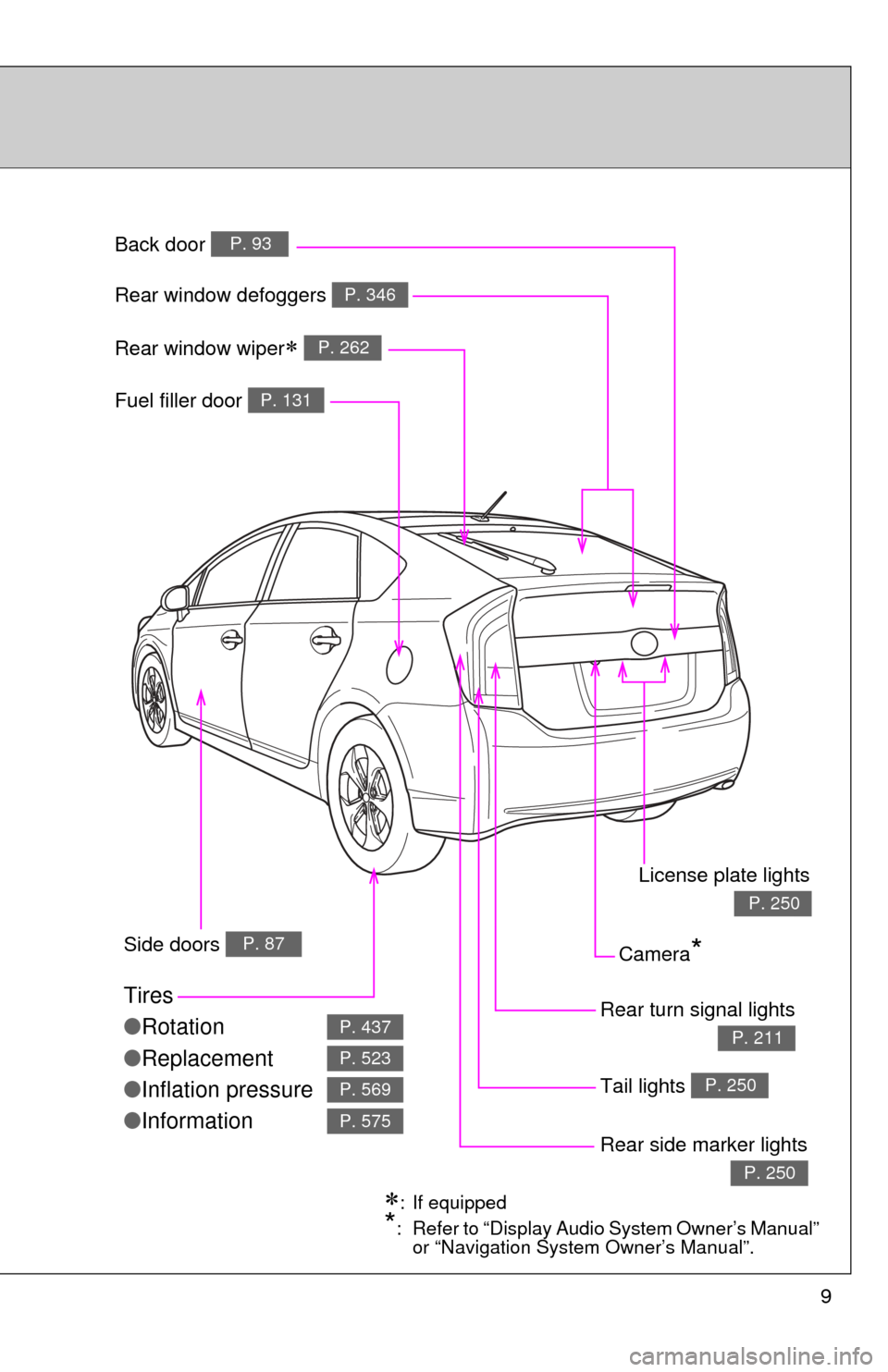
Fuel filler door
P. 131
Rear turn signal lights
P. 211
Rear window defoggers P. 346
Tires
●
Rotation
● Replacement
● Inflation pressure
● Information
P. 437
P. 523
P. 569
P. 575
Rear side marker lights
P. 250
Tail lights P. 250
Camera*Side doors P. 87
Back door P. 93
Rear window wiper P. 262
: If equipped
*: Refer to “Display Audio System Owner’s Manual”
or “Navigation System Owner’s Manual”.
License plate lights
P. 250
Page 11 of 636
11
A
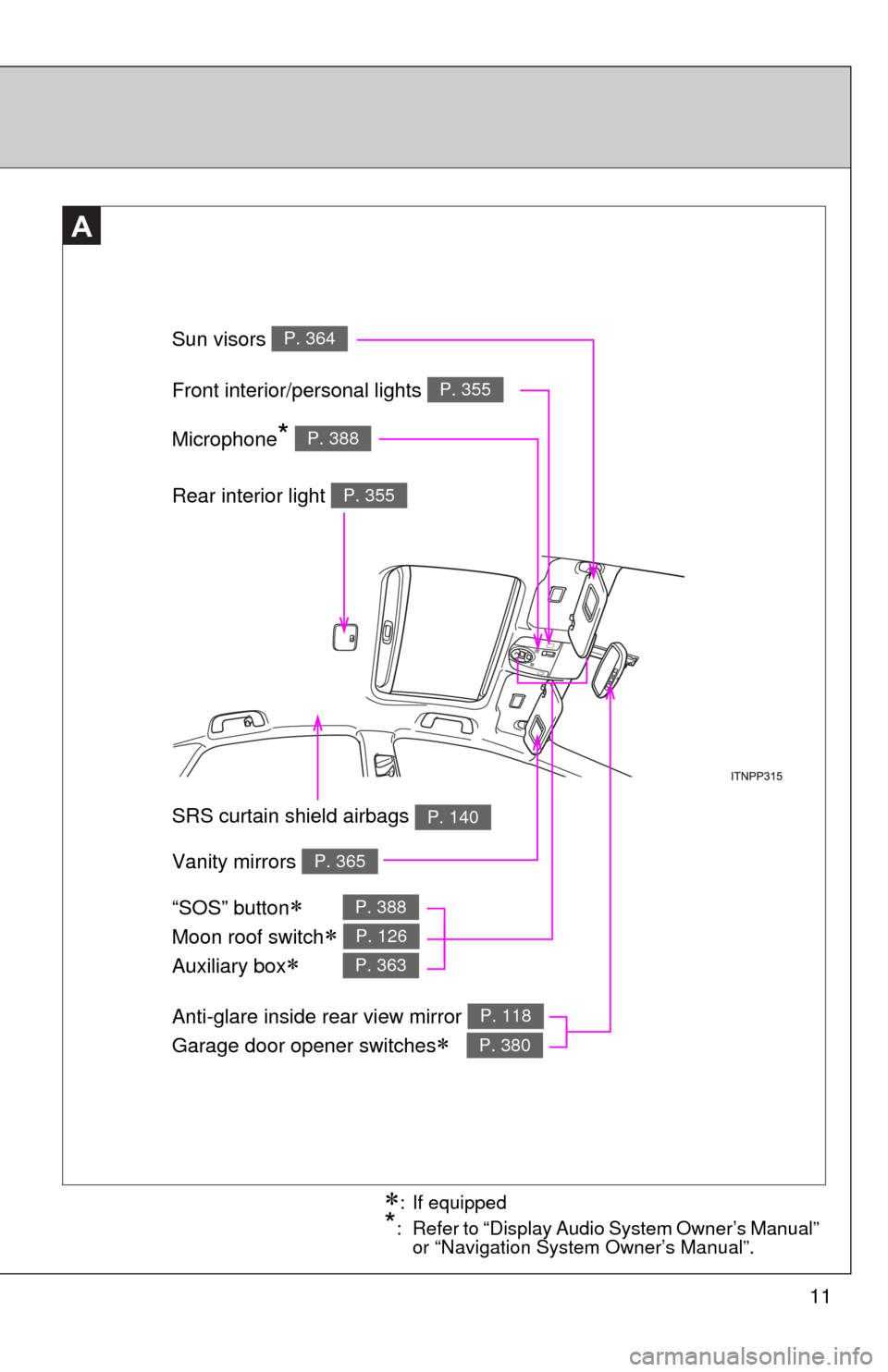
Anti-glare inside rear view mirror
Garage door opener switches
P. 118
P. 380
Sun visors P. 364
SRS curtain shield airbags P. 140
Rear interior light P. 355
Vanity mirrors P. 365
Front interior/personal lights P. 355
: If equipped
*: Refer to “Display Audio System Owner’s Manual” or “Navigation System Owner’s Manual”.
Microphone* P. 388
“SOS” button
Moon roof switch
Auxiliary box
P. 388
P. 126
P. 363
Page 56 of 636
56
1-1. Hybrid system
Hybrid vehicle driving tips
For economical and ecological driving, pay attention to the
following points:
■Using Eco drive mode
When using Eco drive mode, the torque corresponding to the
accelerator pedal depression amount can be generated more
smoothly than it is in normal conditions. In addition, the opera-
tion of the air conditioning system (heating/cooling) will be mini-
mized, improving th e fuel economy. (P. 204)
■ Use of Hybrid System Indicator
Eco-friendly driving is possible by keeping the indicate of Hybrid
System Indicator within Eco area. ( P. 225)
■ When braking the vehicle
Make sure to operate the brakes gently and in good time. A
greater amount of electrical energy can be retained when slow-
ing down.
■ Delays
Repeated acceleration and deceleration, as well as long waits at
traffic lights, will lead to bad fuel consumption. Check traffic
reports before leaving and avoid delays as much as possible.
When encountering a delay, gently release the brake pedal to
allow the vehicle to move forward slightly while avoiding overuse
of the accelerator pedal. Doing so can help control excessive
gasoline consumption.
■ Highway driving
Control your speed and keep at a constant speed. Also, before
stopping at a toll booth or similar, allow plenty of time to release
the accelerator and gently apply the brakes. A greater amount of
electrical energy can be reta ined when slowing down.
Page 67 of 636

67
1-3. Opening, closing and locking the doors
1
Before driving
■
Alarms and warning lights
A combination of exterior and interior alarms as well as warning lights are
used to prevent theft of the vehicle and accidents resulting from erroneous
operation. Take appropriate measures in response to any warning message
shown on the multi-information display. ( P. 517)
The following table describes circumstances and correction procedures
when only alarms are sounded.
AlarmSituationCorrection procedure
Interior alarm
pings once and
exterior alarm
sounds once for
5 seconds
*1
An attempt was made to
lock the doors using the
entry function while the
electronic key was still
inside the passenger com-
partment Retrieve the elec-
tronic key from the
passenger compart-
ment and lock the
doors again
An attempt was made to
exit the vehicle and lock
the doors without first turn-
ing the “POWER” switch
off Turn the “POWER”
switch off and lock the
doors again
Exterior alarm
sounds once for
5 seconds An attempt was made to
lock the vehicle while a
door is open Close all of the doors
and lock the doors
again
Page 86 of 636
86 1-3. Opening, closing and locking the doors
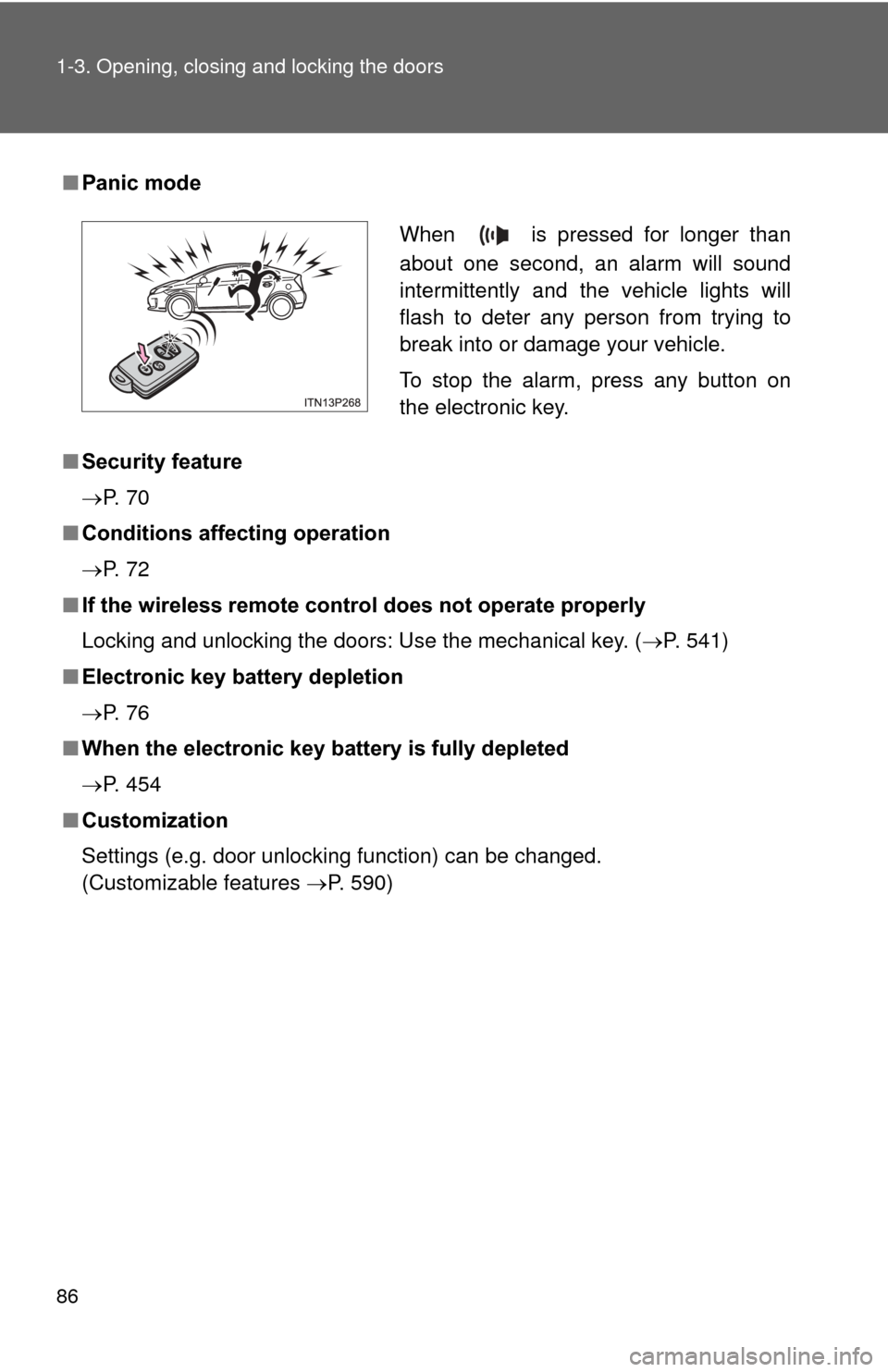
■Panic mode
■ Security feature
P. 7 0
■ Conditions affecting operation
P. 7 2
■ If the wireless remote contro l does not operate properly
Locking and unlocking the doors: Use the mechanical key. ( P. 541)
■ Electronic key battery depletion
P. 7 6
■ When the electronic key battery is fully depleted
P. 454
■ Customization
Settings (e.g. door unlocking function) can be changed.
(Customizable features P. 590)
When is pressed for longer than
about one second, an alarm will sound
intermittently and the vehicle lights will
flash to deter any person from trying to
break into or damage your vehicle.
To stop the alarm, press any button on
the electronic key.