Page 5 of 636

1
2
3
4
5
6
7
5
4-1. Maintenance and careCleaning and protecting the vehicle exterior............ 396
Cleaning and protecting the vehicle interior............. 399
4-2. Maintenance Maintenance requirements ..................... 402
General maintenance.......... 405
Emission inspection and maintenance (I/M)
programs........................... 409
4-3. Do-it-yourself maintenance Do-it-yourself service precautions ....................... 410
Hood ................................... 413
Positioning a floor jack ........ 416
Engine compartment ........... 419
12-volt battery ..................... 431
Tires .................................... 437
Tire inflation pressure ......... 447
Wheels ................................ 451
Electronic key battery.......... 454
Checking and replacing fuses ................................. 456
Light bulbs........................... 467 5-1. Essential information
Emergency flashers............ 484
If your vehicle needs to be towed........................... 485
If you think something is wrong ............................ 492
5-2. Steps to take in an emergency If a warning light turns on or a warning buzzer
sounds.............................. 493
If a warning message is displayed ...................... 507
If you have a flat tire ........... 523
If the hybrid system will not start ............................ 538
If you lose your keys........... 540
If the electronic key does not operate properly ......... 541
If the 12-volt battery is discharged........................ 543
If your vehicle overheats .... 549
If the vehicle becomes stuck ................................. 554
If your vehicle has to be stopped in an
emergency ....................... 556
4Maintenance and care5When trouble arises
Page 66 of 636
66 1-3. Opening, closing and locking the doors
■Operation signals
A buzzer sounds and the emergency flashers flash to indicate that the doors
have been locked/unlocked. (Locked: Once; Unlocked: Twice)
■ When the door cannot be locked by the lock sensor on the upper part
of the door handle
If the door will not lock even when the
topside sensor area is touched, try touch-
ing both the topside and underside sen-
sor areas at the same time.
Page 74 of 636

74 1-3. Opening, closing and locking the doors
■Note for locking the doors
●Touching the door lock sensor while wearing gloves may delay or prevent
lock operation. Remove the gloves and touch the lock sensor again.
● When the lock operation is performed using the lock sensor, recognition
signals will be shown up to two consecutive times. After this, no recogni-
tion signals will be given.
● If the door handle becomes wet while the electronic key is within the
effective range, the door may lock and unlock repeatedly. Place the key
in a position 6 ft. (2 m) or more separate from the vehicle while the vehi-
cle is being washed. (Take care to ensure that the key is not stolen.)
● If the electronic key is inside the vehicle and a door handle becomes wet
during a car wash, a buzzer will sound outside the vehicle. To turn off the
alarm, lock all the doors.
● The lock sensor may not work properly if it comes into contact with ice,
snow, mud, etc. Clean the lock sensor and attempt to operate it again, or
use the lock sensor on the lower part of the door handle.
● Fingernails may scrape against the door during operation of the door
handle. Be careful not to injure fingernails or damage the surface of the
door.
Page 85 of 636
85
1
1-3. Opening, closing and locking the doors
Before driving
Wireless remote control
■Operation signals
A buzzer sounds and the emergency flashers flash to indicate that the doors
have been locked/unlocked. (Locked: Once; Unlocked: Twice)
■ Door lock buzzer (vehicle s with entry function)
If an attempt to lock the doors is made when a door is not fully closed, a
buzzer sounds continuously for 5 seconds. Fully close the door to stop the
buzzer, and lock the vehicle once more.
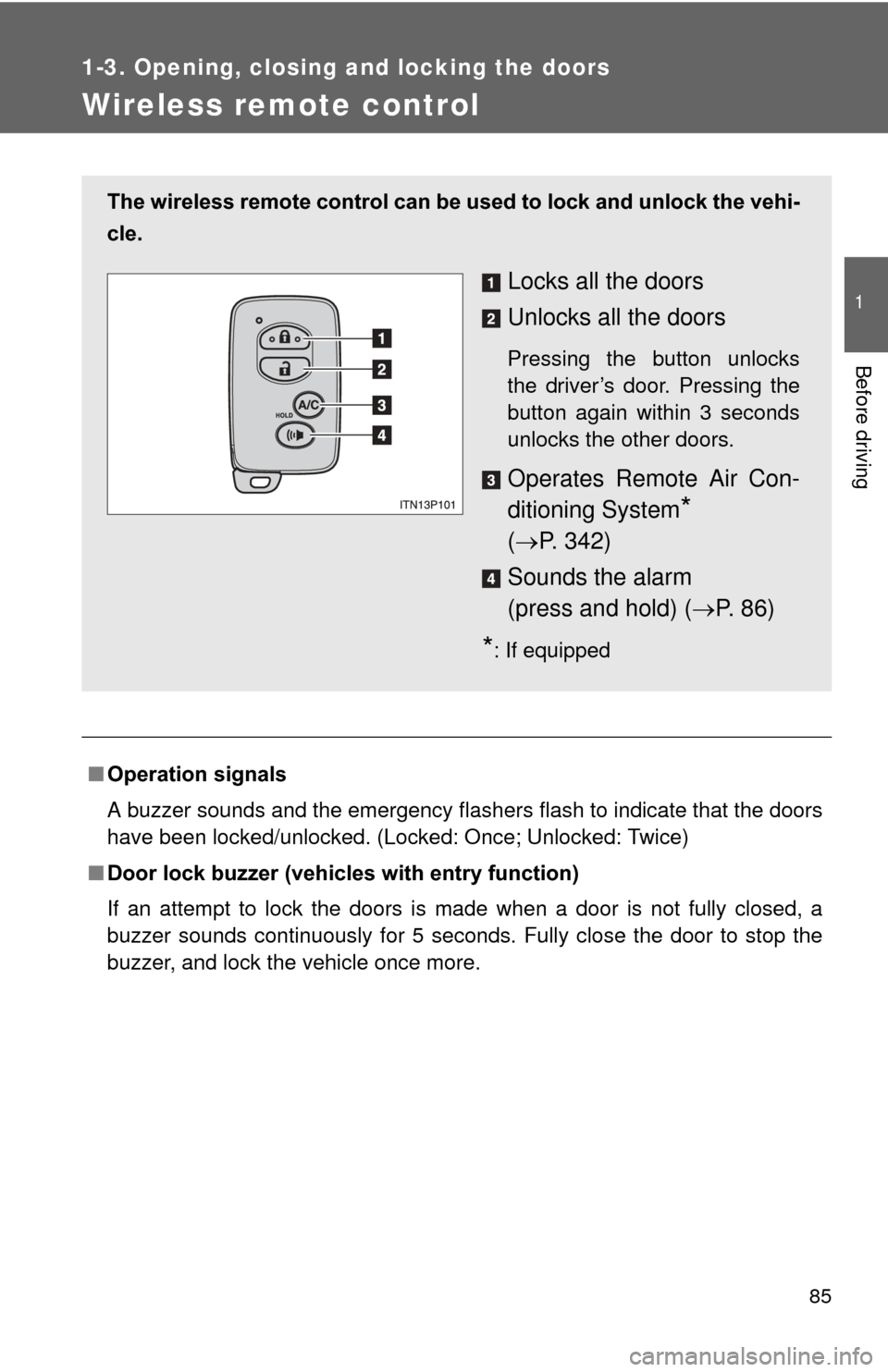
The wireless remote control can be used to lock and unlock the vehi-
cle.
Locks all the doors
Unlocks all the doors
Pressing the button unlocks
the driver’s door. Pressing the
button again within 3 seconds
unlocks the other doors.
Operates Remote Air Con-
ditioning System
*
( P. 342)
Sounds the alarm
(press and hold) ( P. 8 6 )
*: If equipped
Page 128 of 636

128 1-5. Opening and closing the windows and moon roof
■Jam protection function
If an object is detected between the moon roof and the frame while closing
or tilting down, travel is stopped and the moon roof opens slightly.
■ To reduce moon roof wind noise
When the moon roof is opened automatically, it will stop slightly before the
fully open position. Driving with the moon roof in this position can help
reduce wind noise.
■ Sunshade
The sunshade can be opened and closed manually. However, the sunshade
will open automatically when the moon roof is opened.
■ Solar Panel
The solar panel contains solar cells, and produces energy to operate the
Solar Ventilation System by receiving sunlight.
■ Moon roof open warning buzzer
The buzzer sounds when the “POWER” switch is turned off and the driver’s
door is opened with the moon roof open.
■ If the moon roof cannot be closed
If the moon roof cannot be closed, such as when the jam protection function
activates accidentally due to a malfunction, pressing and holding “CLOSE”
switch closes the moon roof.
After this, to make the automatic opening function and jam protection func-
tion available again, press and hold the “OPEN” switch until the moon roof
opens fully and then closes slightly.
If the functions do not activate, contact your Toyota dealer.
Page 193 of 636
193
2-1. Driving procedures
2
When driving
Check that the “READY” indicator is on.
If the “READY” indicator changes from a flashing light to a solid
light and the buzzer sounds, the hybrid system is starting nor-
mally.
The vehicle will not move when
the “READY” indicator is off.
The vehicle can move when the “READY” indicator is on even if
the engine is stopped. (The gasoline engine starts or stops auto-
matically in accordance with the state of the vehicle.)
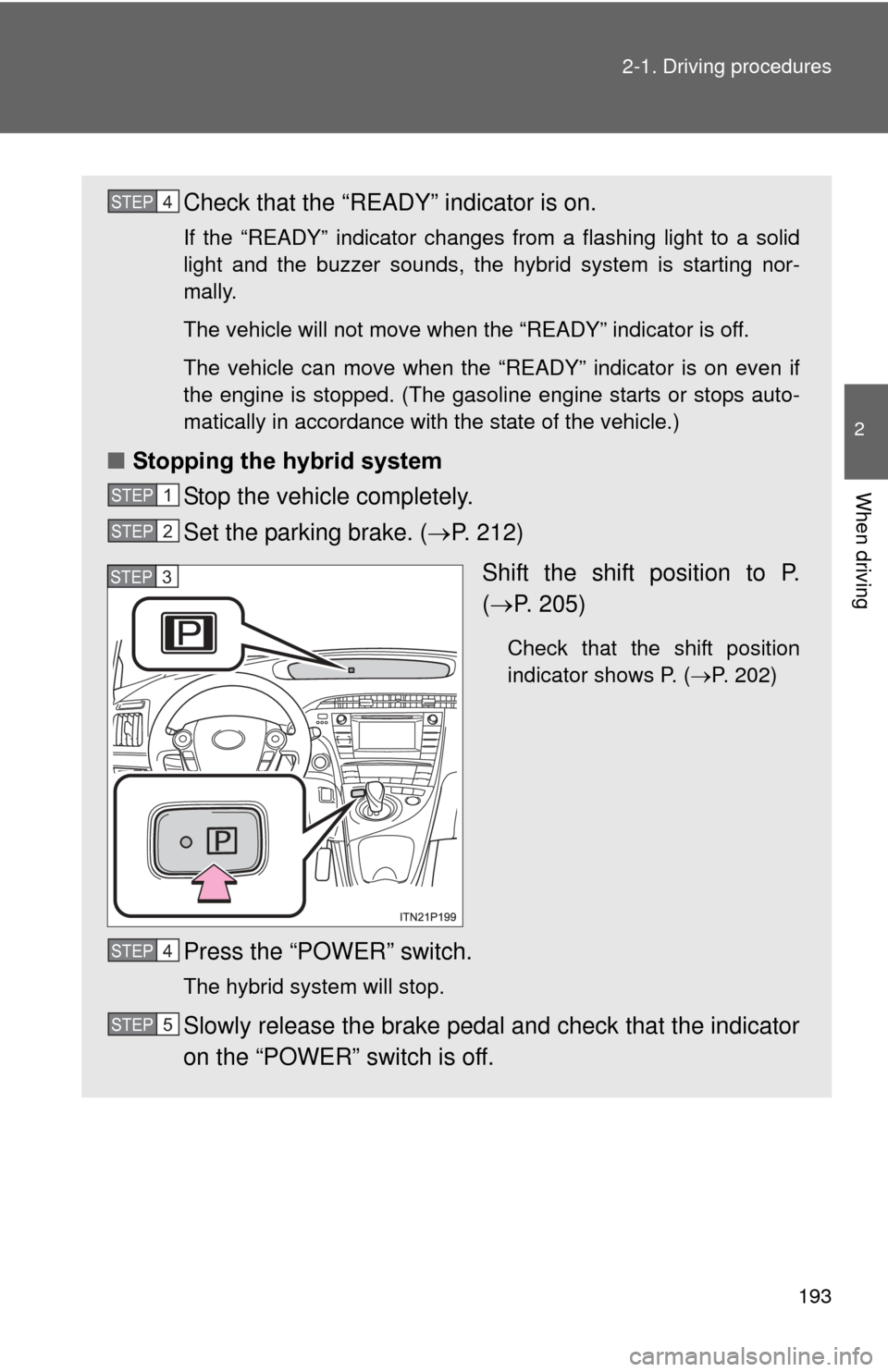
■ Stopping the hybrid system
Stop the vehicle completely.
Set the parking brake. ( P. 212)
Shift the shift position to P.
( P. 205)
Check that the shift position
indicator shows P. ( P. 202)
Press the “POWER” switch.
The hybrid system will stop.
Slowly release the brake pedal and check that the indicator
on the “POWER” switch is off.
STEP 4
STEP 1
STEP 2
STEP 3
STEP 4
STEP 5
Page 200 of 636

200 2-1. Driving procedures
■Situations in which EV dri ve mode cannot be turned on
It may not be possible to turn EV drive mode on in the following situations.
*
If it cannot be turned on, a buzzer will sound and a message will be shown
on the multi-information display.
● The temperature of the hybrid system is high.
The vehicle has been left in the sun, driven on a hill, driven at high
speeds, etc.
● The temperature of the hybrid system is low.
The vehicle has been left in temperatures lower than about 32
F (0C)
for a long period of time etc.
● The gasoline engine is warming up.
● The hybrid battery (traction battery) is low.
When the amount of remaining hybrid battery (traction battery) charge
displayed on the meter is low. ( P. 42)
● Vehicle speed is high.
● The accelerator pedal is depressed firmly or the vehicle is on a hill etc.
● The windshield defogger is in use.
*: Depending on the circumstances, EV drive mode may also not be
switched to in situations other than those above.
■ Switching to EV drive mode when the gasoline engine is cold
If the hybrid system is started while the gasoline engine is cold, the gasoline
engine will start automatically after a short period of time in order to warm
up. In this case, you will become unable to switch to EV drive mode.
After the hybrid system has started and the “READY” indicator has illumi-
nated, press the EV drive mode switch before the gasoline engine starts to
switch to EV drive mode.
Page 201 of 636

201
2-1. Driving procedures
2
When driving
■
Automatic cancelation of EV drive mode
When driving in EV drive mode, the gasoline engine may automatically
restart in the following situations. When EV drive mode is canceled, a buzzer
will sound and the EV drive mode indicator will flash and go off.
●The hybrid battery (traction battery) becomes low.
● Vehicle speed becomes high.
● The accelerator pedal is depressed firmly or the vehicle is on a hill etc.
■ Possible driving distance when driving in EV drive mode
In EV drive mode, it is possible to drive up to about 1.3 mile (2 km) if driving
at a speed of about 25 mph (40 km/h) or less. (The distance that is possible
depends on the hybrid battery [traction battery] level and driving conditions.)
■ Changing a driving mode when in EV drive mode
EV drive mode can be used in conjunction with Eco drive mode and power
mode.
However, EV drive mode may be automatically canceled when used in con-
junction with power mode.
■ Fuel economy
PRIUS is designed to achieve the best possible fuel economy during normal
driving (using the gasoline engine and electric motor [traction motor]). Driv-
ing in EV drive mode more than necessary may lower fuel economy.
CAUTION
■While driving
When driving in EV drive mode, pay special attention to the area around the
vehicle. Because there is no engine noise, pedestrians, people riding bicy-
cles or other people and vehicles in the area may not be aware of the vehicle
starting off or approaching them, so take extra care while driving.