Page 205 of 636
205
2-1. Driving procedures
2
When driving
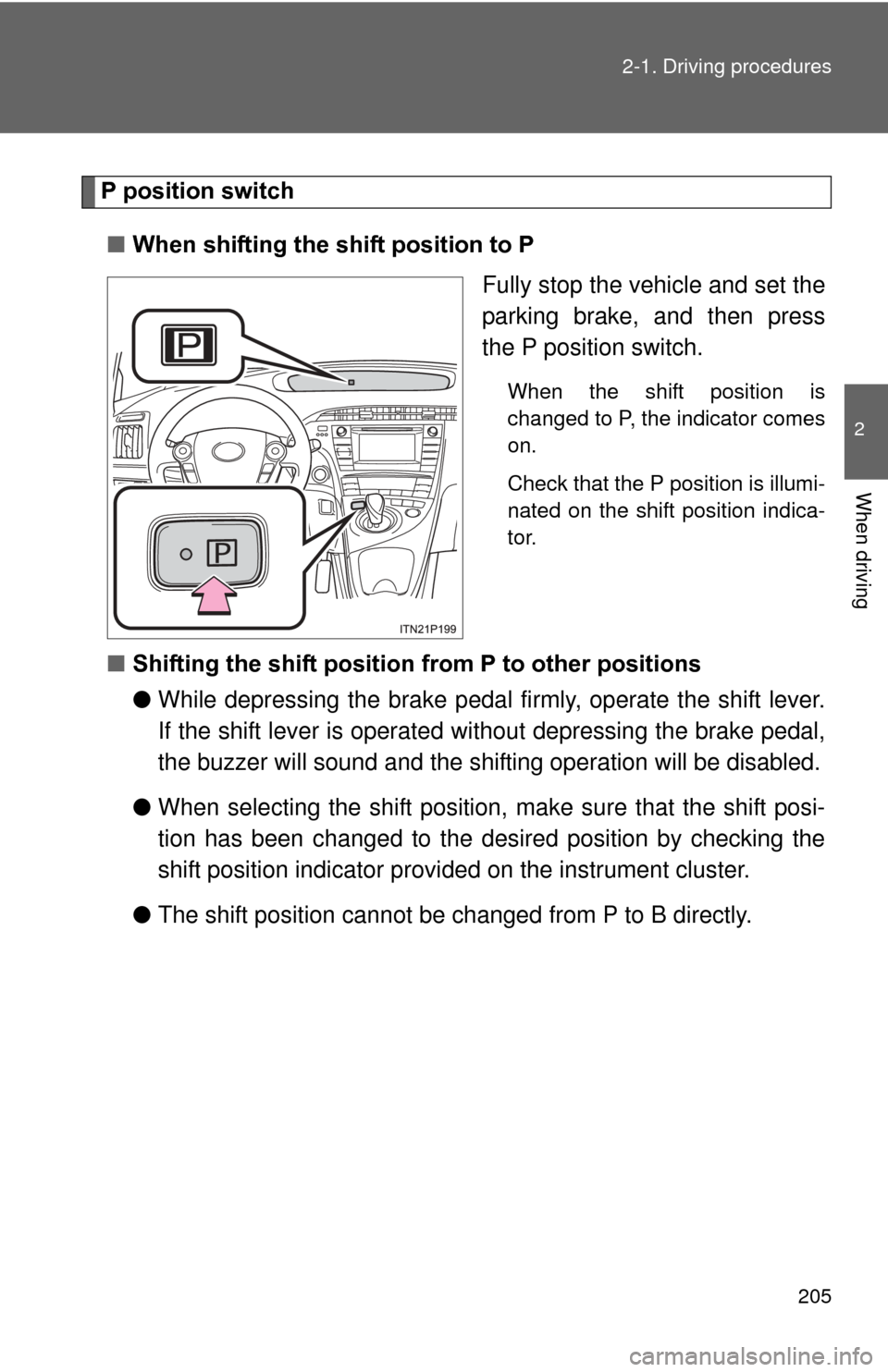
P position switch
■ When shifting the shift position to P
Fully stop the vehicle and set the
parking brake, and then press
the P position switch.
When the shift position is
changed to P, the indicator comes
on.
Check that the P position is illumi-
nated on the shift position indica-
tor.
■Shifting the shift position from P to other positions
●While depressing the brake pedal firmly, operate the shift lever.
If the shift lever is operated wi thout depressing the brake pedal,
the buzzer will sound and the shifting operation will be disabled.
● When selecting the shift position, make sure that the shift posi-
tion has been changed to the desired position by checking the
shift position indicator provi ded on the instrument cluster.
● The shift position cannot be changed from P to B directly.
Page 206 of 636

206 2-1. Driving procedures
■Operation of the air conditio ning system in Eco drive mode
Eco drive mode controls the heating/cooling operations and fan speed of the
air conditioning system to enhance fuel efficiency. ( P. 204) To improve air
conditioning performance, adjust the fan speed or turn off Eco drive mode.
■ For the shift positions
●When the “POWER” switch is off, the shift position cannot be changed.
● When the “POWER” switch is in ON mode (the hybrid system is not oper-
ating), the shift position can only be changed to N. The shift position will
be changed to N even if the shift lever is shifted to D or R and held in that
position.
● When the “READY” indicator is on, the shift position can be changed
from P to D, N or R.
● When the “READY” indicator is flashing, the shift position cannot be
changed from P to another position even if the shift lever is operated.
Wait until the “READY” indicator changes from a flashing to a solid light,
and then operate the shift lever again.
● The shift position can only be changed to B directly from D.
In addition, if an attempt is made to change the shift position by moving the
shift lever in any of the following situations, the buzzer will sound and the
shifting operation will be disabled or the shift position will automatically
change to N. When this happens, select an appropriate shift position.
● Situations where the shifting operation will be disabled:
• When an attempt is made to change the shift position from P to another
position by moving the shift lever without depressing the brake pedal.
• When an attempt is made to change the shift position from P or N to B by moving the shift lever.
Page 207 of 636

207
2-1. Driving procedures
2
When driving
●
Situations where the shift position will automatically change to N:
• When the P position switch is pressed while the vehicle is running.
*1
• When an attempt is made to select the R position by moving the shift
lever when the vehicle is moving forward.
*2
• When an attempt is made to select the D position by moving the shiftlever when the vehicle is moving in reverse.
*3
• When an attempt is made to change the shift position from R to B bymoving the shift lever.
*1: Shift position may be changed to P when driving at extremely lowspeeds.
*2: Shift position may be changed to R when driving at low speeds.
*3: Shift position may be changed to D when driving at low speeds.
■ Reverse warning buzzer
When shifting into R, a buzzer will sound to inform the driver that the shift
position is in R.
■ Automatically P position selection function
When the shift position is in a position other than P, pressing the “POWER”
switch with the vehicle stopped completely will cause the shift position to
change to P automatically, and then the “POWER” switch will turn off.
■ If the shift position cannot be shifted from P
There is a possibility that the 12-volt battery is discharged. Check the 12-volt
battery in this situation. ( P. 543)
Page 209 of 636
209
2-1. Driving procedures
2
When driving
■
Customization
Settings (e.g. Reverse warning buzzer) can be changed.
(Customizable features P. 590)
CAUTION
■When driving on slippery road surfaces
Do not accelerate or shift the shift position suddenly.
Sudden changes in engine braking may cause the vehicle to spin or skid,
resulting in an accident.
■ For the shift lever
Do not remove the shift lever knob or use anything but a genuine Toyota shift
lever knob. Also, do not hang anything on the shift lever.
Doing so could prevent the shift lever from returning to position, causing
unexpected accidents to occur when the vehicle is in motion.
■ P position switch
Do not press the P position switch while the vehicle is moving.
If the P position switch is pressed when driving at very low speeds (for
example, directly before stopping the vehicle), the vehicle may stop sud-
denly when the shift position switches to P, which could lead to an accident.
Page 212 of 636
212
2-1. Driving procedures
Parking brake
■Parking brake engaged warning buzzer
P. 493
■ Usage in winter time
P. 317
NOTICE
■Before driving
Fully release the parking brake.
Driving the vehicle with the parking brake set will lead to brake components
overheating, which may affect braking performance and increase brake
wear.
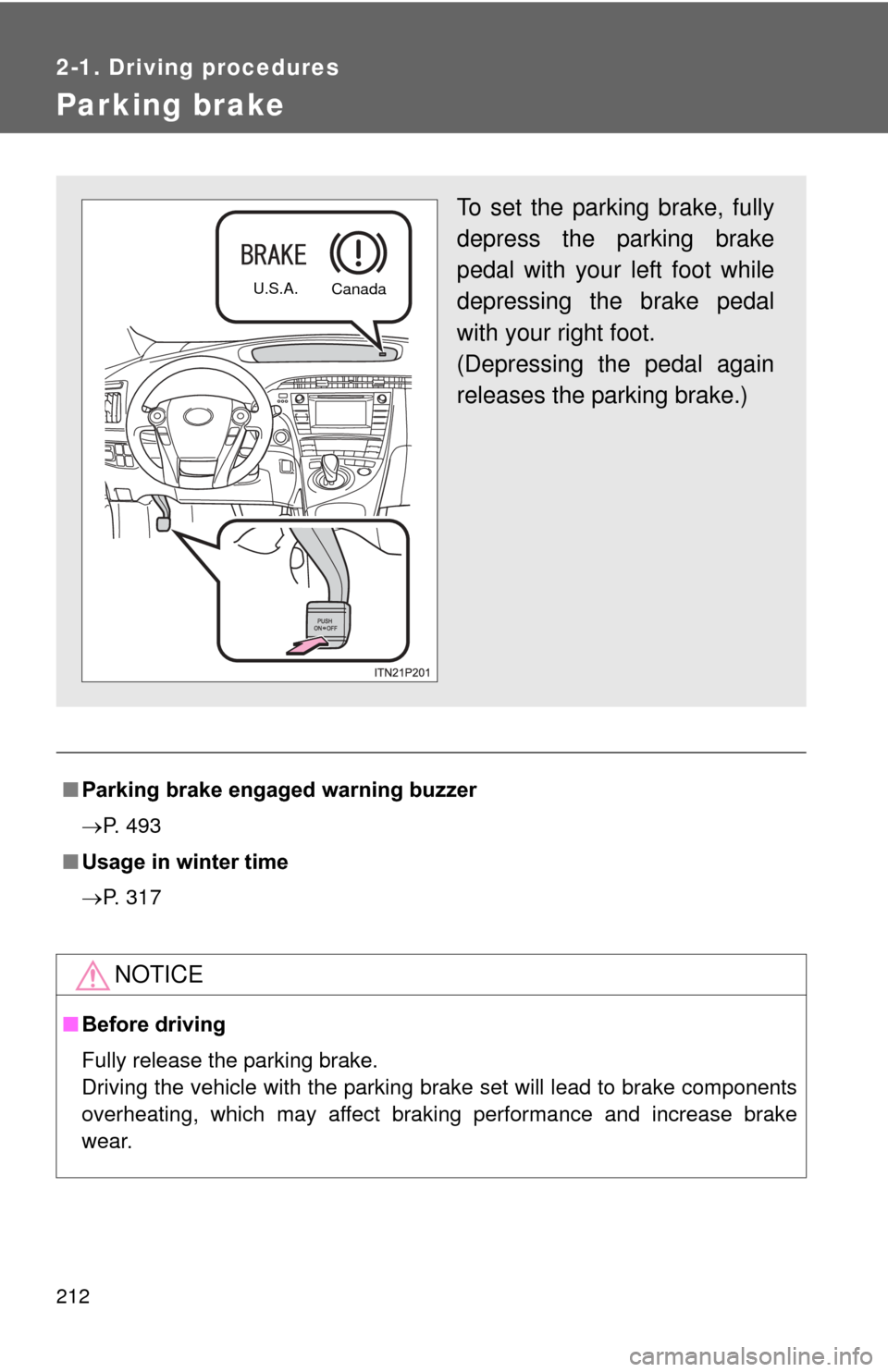
To set the parking brake, fully
depress the parking brake
pedal with your left foot while
depressing the brake pedal
with your right foot.
(Depressing the pedal again
releases the parking brake.)
U.S.A.
Canada
Page 277 of 636
277
2-4. Using other
driving systems
2
When driving
Approach warning
When your vehicle is too close to a vehicle ahead, and sufficient
automatic deceleration via the cruise control is not possible, the dis-
play will flash and the buzzer will sound to alert the driver. An exam-
ple of this would be if another driver cuts in front of you while you are
following a vehicle. Apply the brakes to ensure an appropriate vehi-
cle-to-vehicle distance.
■ Warnings may not occur when
In the following instances, there is a possibility that the warnings
will not occur:
● When the speed of the vehicl e ahead matches or exceeds your
vehicle speed
● When the vehicle ahead is traveling at an extremely slow speed
● Immediately after the cruise control speed was set
● At the instant the accelerator is applied
Page 281 of 636

281
2-4. Using other
driving systems
2
When driving
■Warning lights, messages and buzze rs for dynamic radar cruise con-
trol
Warning lights, warning messages and buzzers are used to indicate a sys-
tem malfunction or to inform the driver of the need for caution while driving.
■ Certification
For vehicles sold in the U.S.A.
FCC ID: HYQDNMWR004
This device complies with part 15 of the FCC Rules. Operation is subject to
the following two conditions: (1) This device may not cause harmful interfer-
ence, and (2) this device must accept any interference received, including
interference that may cause undesired operation.
FCC WARNING
Changes or modifications not expressly approved by the party responsible
for compliance could void the user’s authority to operate the equipment.
Radiofrequency radiation exposure Information:
This equipment complies with FCC radiation exposure limits set forth for an
uncontrolled environment.
This equipment should be installed and operated with minimum distance of
20 cm between the radiator (antenna) and your body.
This transmitter must not be co-located or operating in conjunction with any
other antenna or transmitter.
For vehicles sold in Canada
Operation is subject to the following two conditions: (1) this device may not
cause interference, and (2) this device must accept any interference, includ-
ing interference that may cause undesired operation of the device.
Page 283 of 636
283
2-4. Using other
driving systems
2
When driving
CAUTION
■To avoid inadvertent cruise control activation
Switch the cruise control off using the “ON-OFF” button when not in use.
■ Situations unsuitable for dynamic radar cruise control
Do not use dynamic radar cruise control in any of the following situations.
Doing so may result in inappropriate speed control and could cause an acci-
dent resulting in death or serious injury.
●In heavy traffic
● On roads with sharp bends
● On winding roads
● On slippery roads, such as those covered with rain, ice or snow
● On steep downhills, or where there are sudden changes between sharp up
and down gradients
Vehicle speed may exceed the set speed when driving down a steep hill.
● At entrances to expressways
● When weather conditions are bad enough that they may prevent the sen-
sors from functioning correctly (fog, snow, sandstorm, heavy rain, etc.)
● When an approach warning buzzer is heard often
● During emergency towing