Page 219 of 636
219
2-2. Instrument cluster
2
When driving
Indicators and warning lights
The indicator and warning lights on the instrument cluster and
instrument panel inform the driver of the status of the vehicle’s vari-
ous systems.
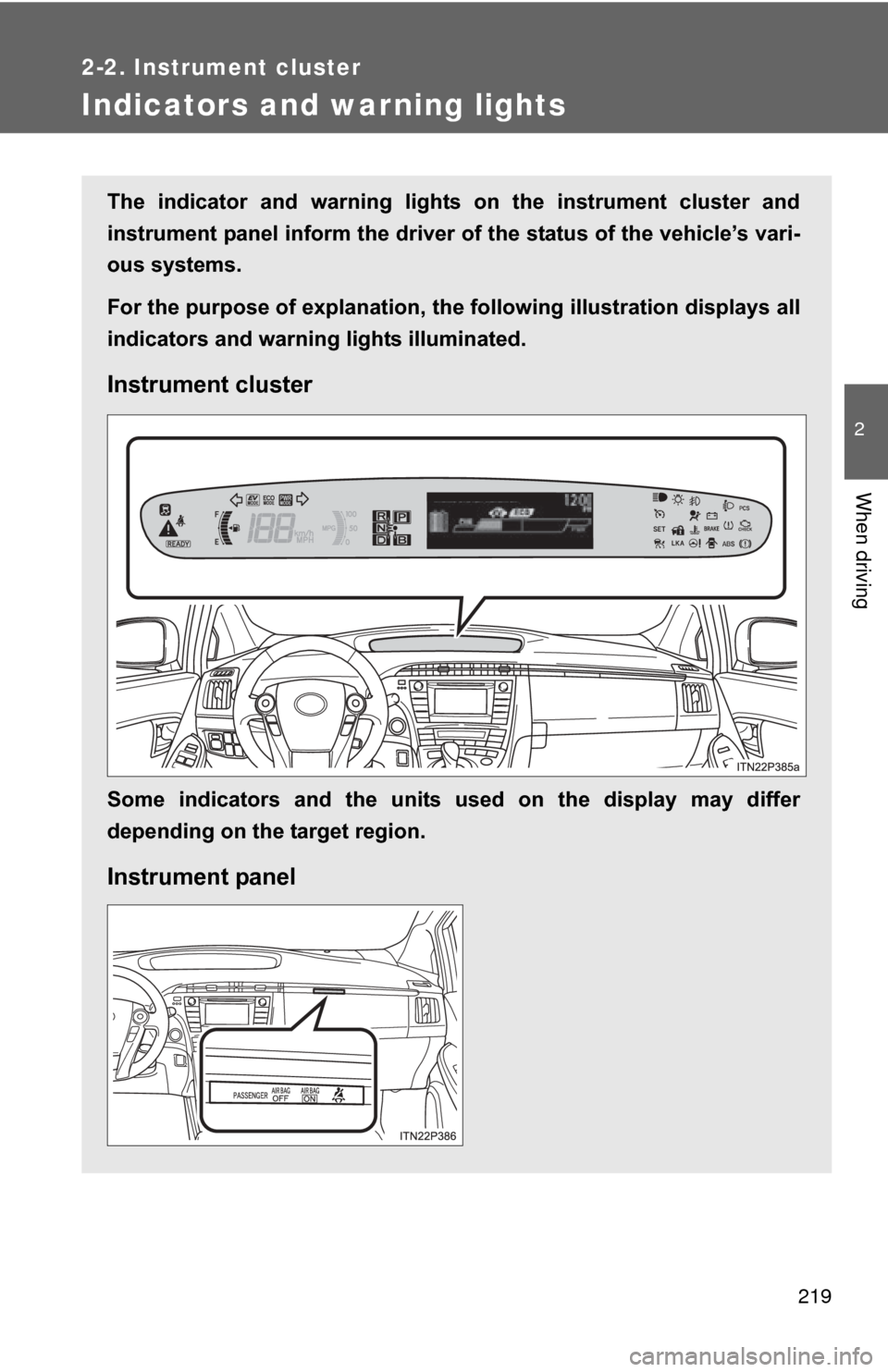
For the purpose of explanation, the following illustration displays all
indicators and warning lights illuminated.
Instrument cluster
Some indicators and the units used on the display may differ
depending on the target region.
Instrument panel
Page 221 of 636
221
2-2. Instrument cluster
2
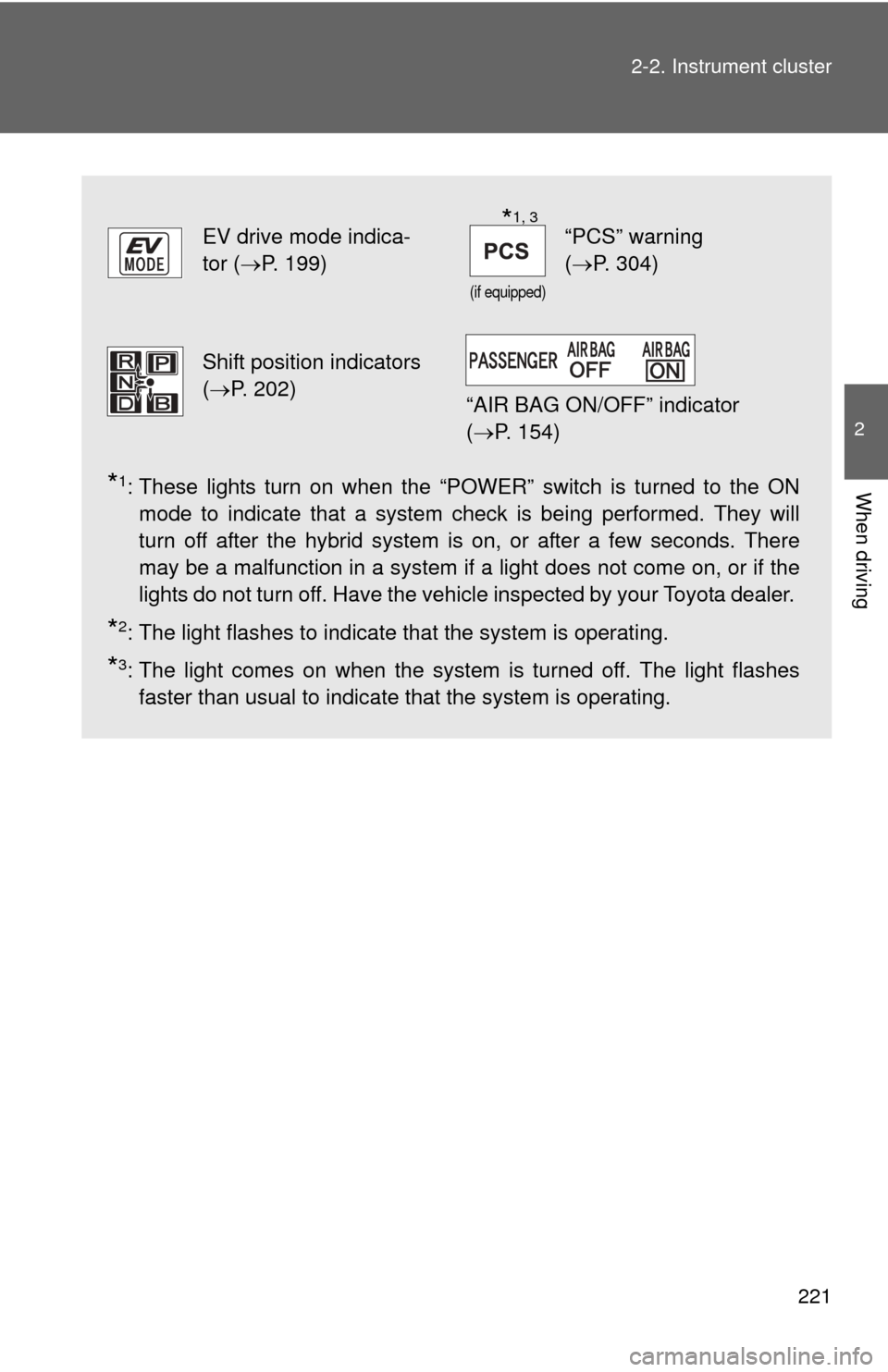
When driving*1: These lights turn on when the “POWER” switch is turned to the ON
mode to indicate that a system check is being performed. They will
turn off after the hybrid system is on, or after a few seconds. There
may be a malfunction in a system if a light does not come on, or if the
lights do not turn off. Have the vehicle inspected by your Toyota dealer.
*2: The light flashes to indicate that the system is operating.
*3: The light comes on when the system is turned off. The light flashes
faster than usual to indicate that the system is operating.
EV drive mode indica-
tor ( P. 199)
(if equipped)
“PCS” warning
(P. 304)
Shift position indicators
(P. 202)
“AIR BAG ON/OFF” indicator
( P. 154)
*1, 3
Page 222 of 636
222 2-2. Instrument cluster
CAUTION
■If a safety system warning light does not come on
Should a safety system light such as the ABS and SRS airbag warning light
not come on when you start the hybrid system, this could mean that these
systems are not available to help protect you in an accident, which could
result in death or serious injury. Have the vehicle inspected by your Toyota
dealer immediately if this occurs.
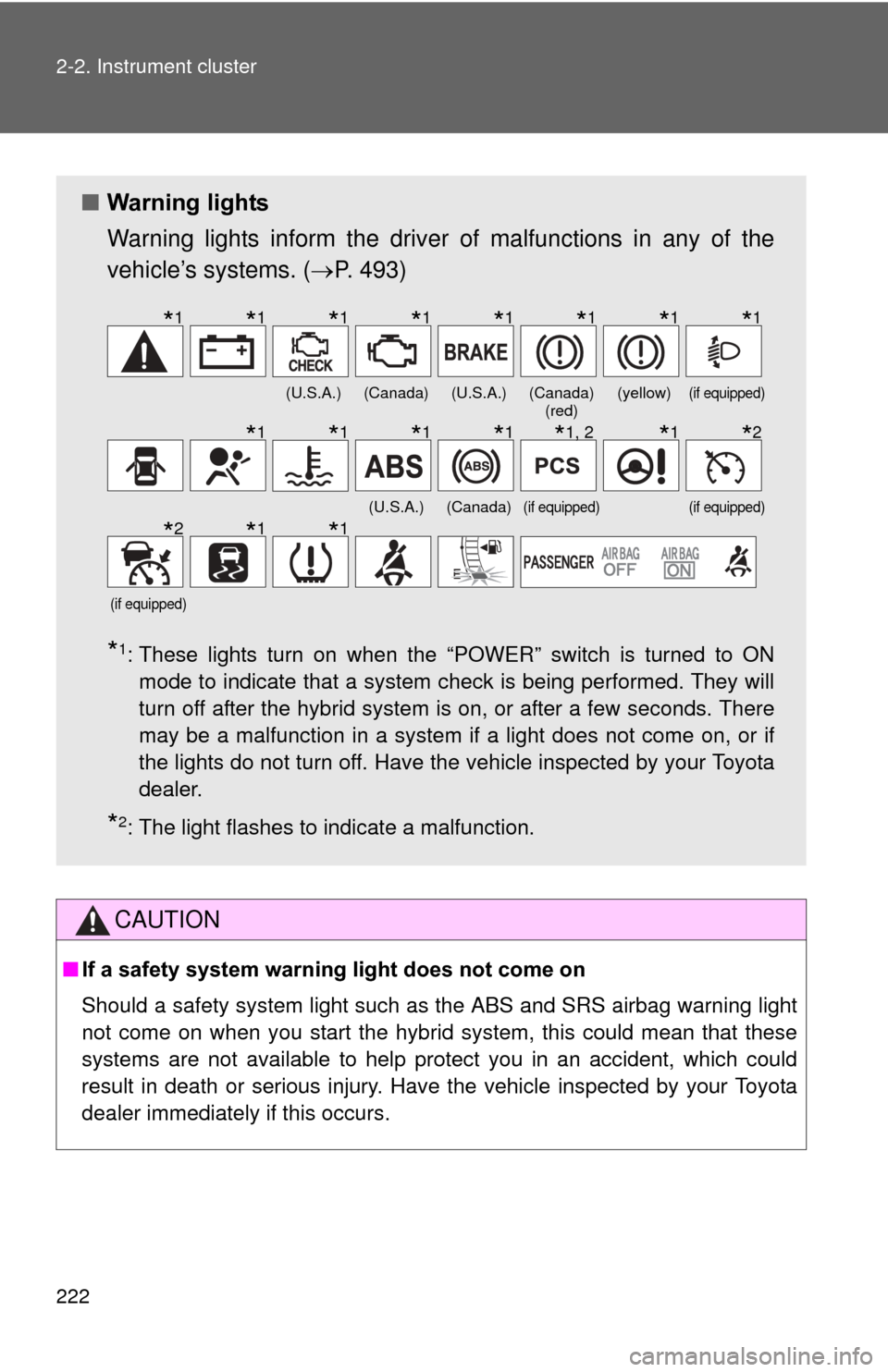
■ Warning lights
Warning lights inform the driver of malfunctions in any of the
vehicle’s systems. ( P. 493)
*1: These lights turn on when the “POWER” switch is turned to ON
mode to indicate that a system check is being performed. They will
turn off after the hybrid system is on, or after a few seconds. There
may be a malfunction in a system if a light does not come on, or if
the lights do not turn off. Have the vehicle inspected by your Toyota
dealer.
*2: The light flashes to indicate a malfunction.
(U.S.A.)(Canada)(U.S.A.)(Canada) (red)(yellow)(if equipped)
(U.S.A.)(Canada)(if equipped)(if equipped)
(if equipped)
*1*1*1*1*1*1*1*1
*1*1*1*1*1, 2*1*2
*2*1*1
Page 250 of 636
250
2-3. Operating the lights and windshield wipers
Headlight switch
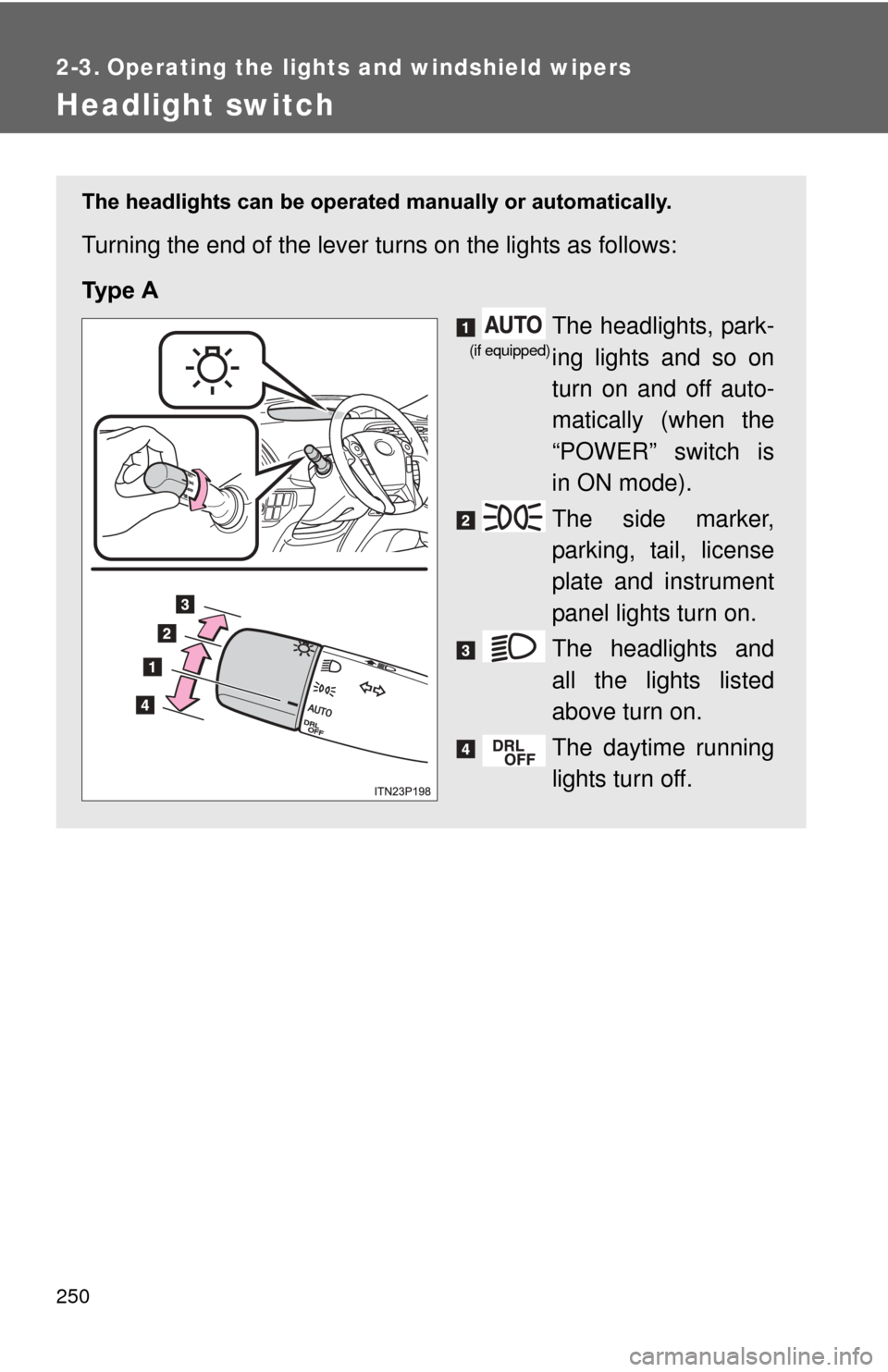
The headlights can be operated manually or automatically.
Turning the end of the lever turns on the lights as follows:
Ty p e A
The headlights, park-
ing lights and so on
turn on and off auto-
matically (when the
“POWER” switch is
in ON mode).
The side marker,
parking, tail, license
plate and instrument
panel lights turn on.
The headlights and
all the lights listed
above turn on.
The daytime running
lights turn off.
(if equipped)
Page 251 of 636
251
2-3. Operating the lights and windshield wipers
2
When driving
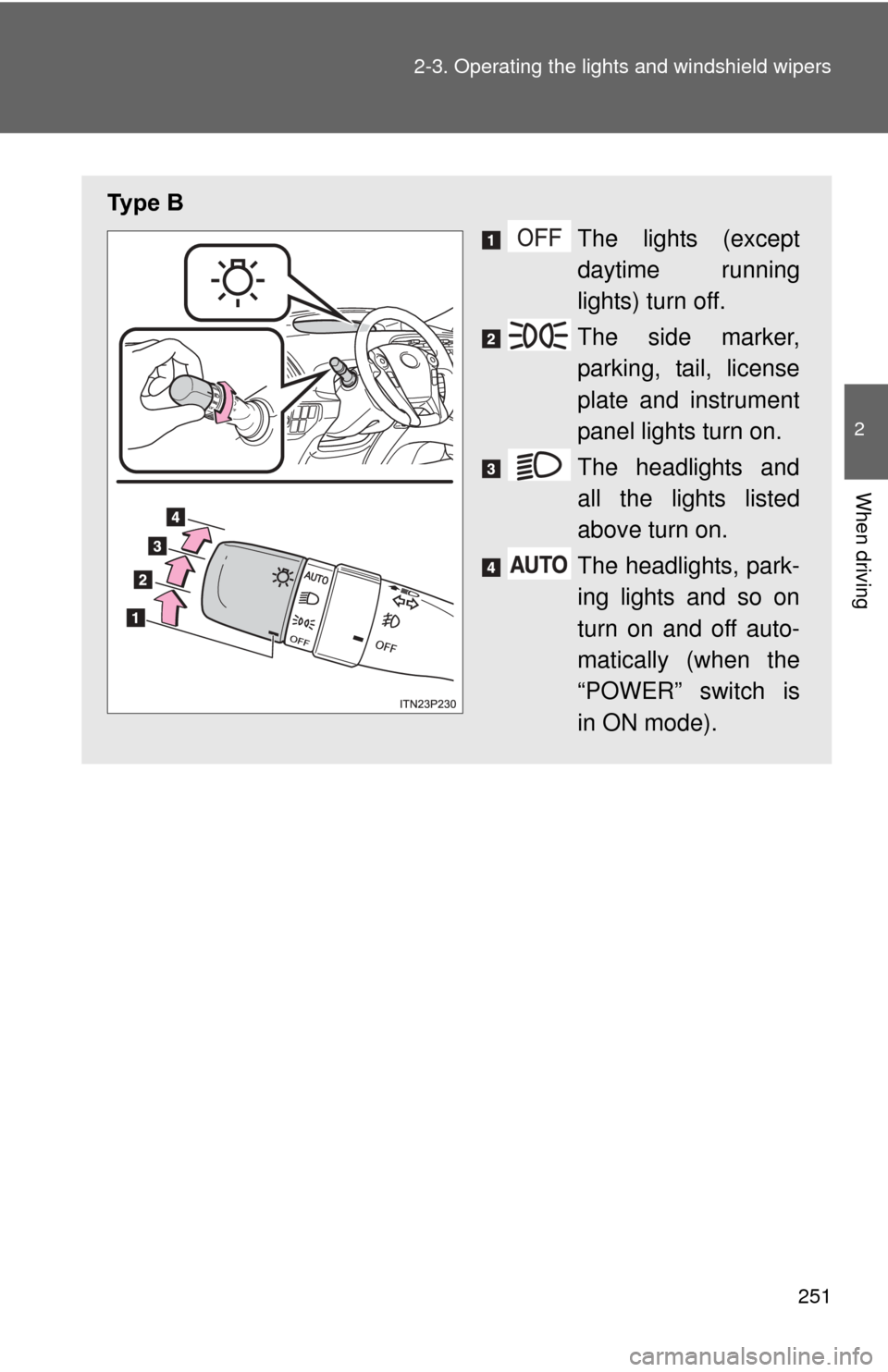
Ty p e B
The lights (except
daytime running
lights) turn off.
The side marker,
parking, tail, license
plate and instrument
panel lights turn on.
The headlights and
all the lights listed
above turn on.
The headlights, park-
ing lights and so on
turn on and off auto-
matically (when the
“POWER” switch is
in ON mode).
Page 252 of 636
252 2-3. Operating the lights and windshield wipers
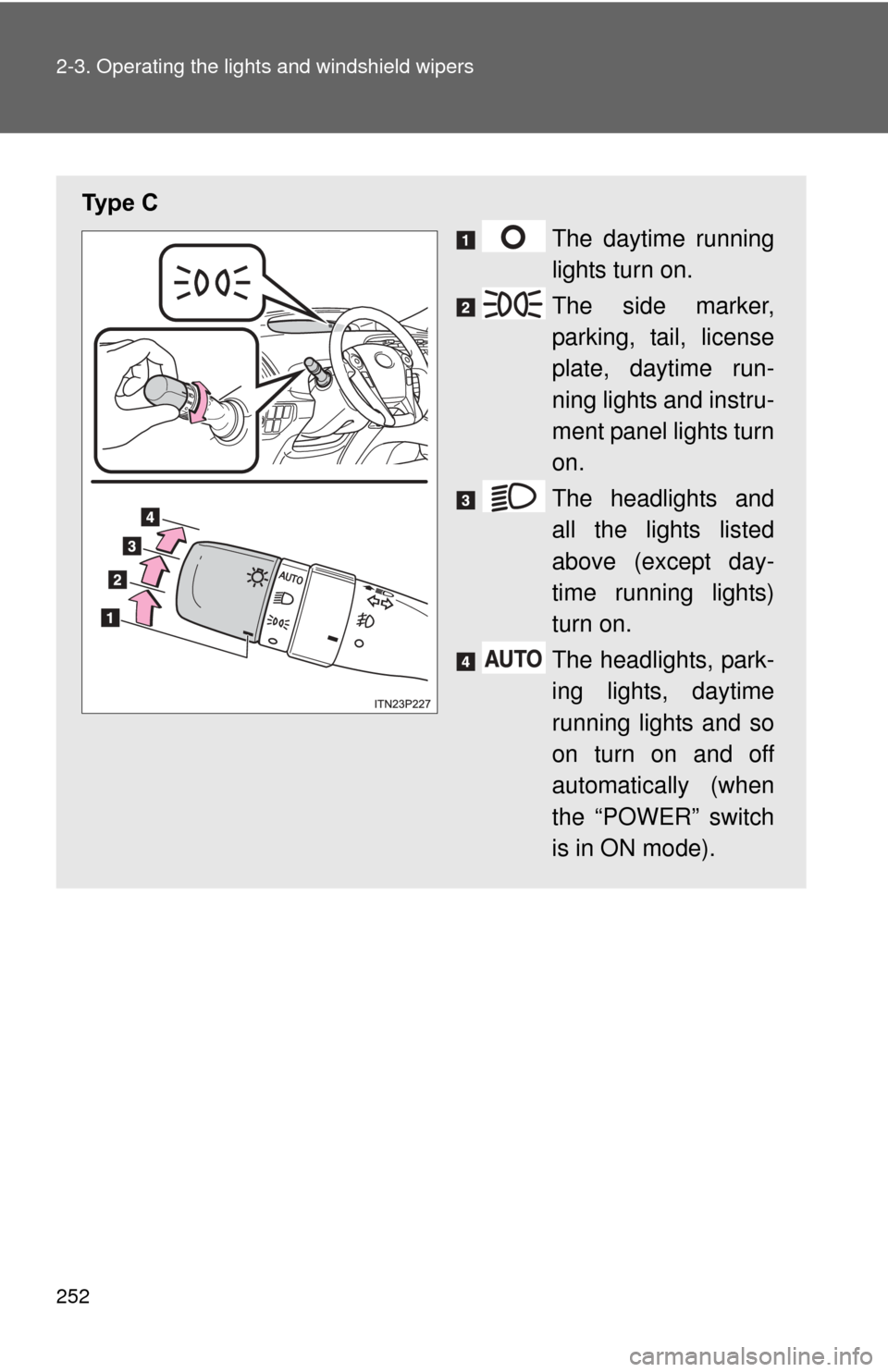
Ty p e C
The daytime running
lights turn on.
The side marker,
parking, tail, license
plate, daytime run-
ning lights and instru-
ment panel lights turn
on.
The headlights and
all the lights listed
above (except day-
time running lights)
turn on.
The headlights, park-
ing lights, daytime
running lights and so
on turn on and off
automatically (when
the “POWER” switch
is in ON mode).
Page 253 of 636
253
2-3. Operating the lights and windshield wipers
2
When driving
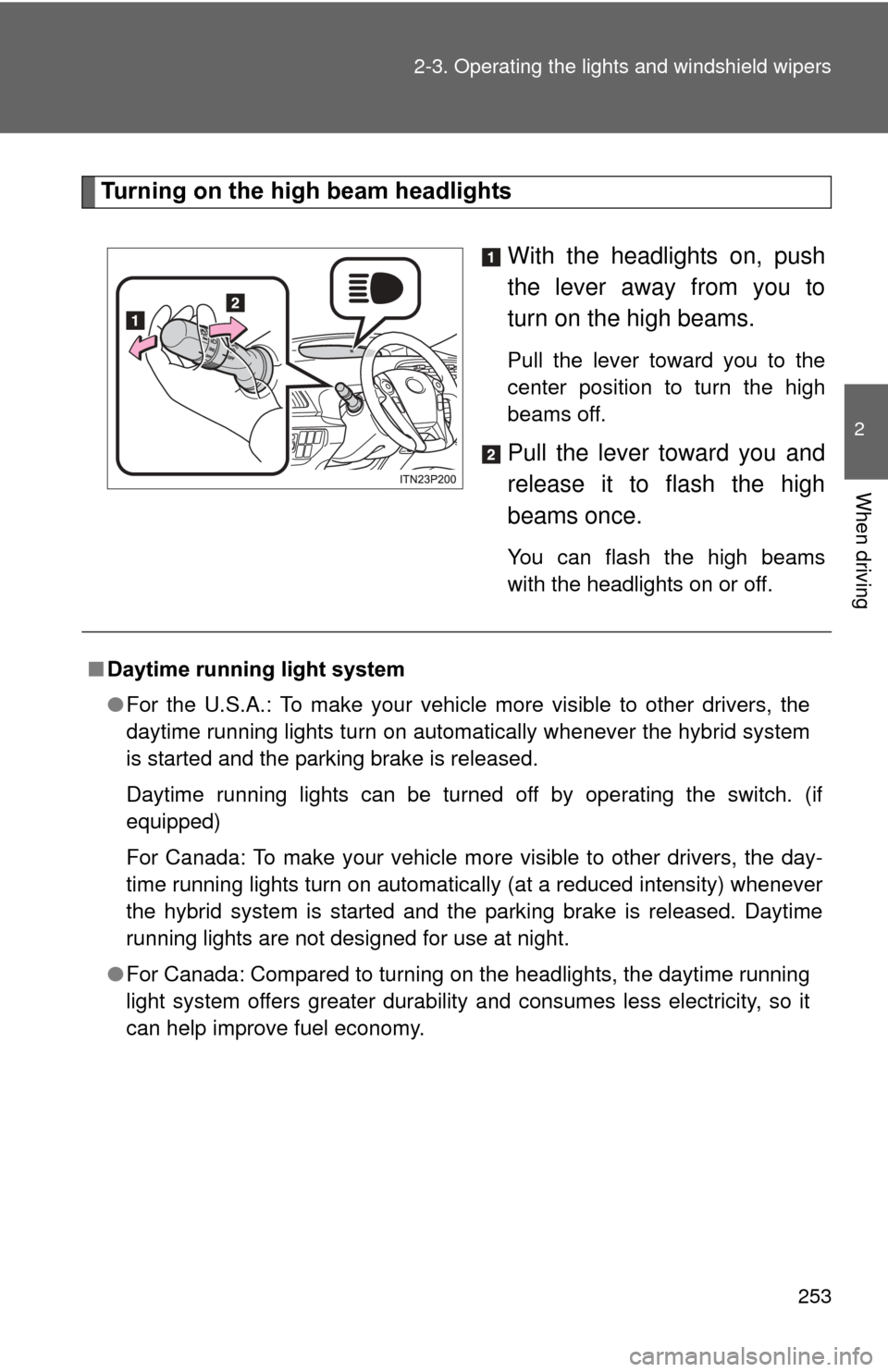
Turning on the high beam headlights
With the headlights on, push
the lever away from you to
turn on the high beams.
Pull the lever toward you to the
center position to turn the high
beams off.
Pull the lever toward you and
release it to flash the high
beams once.
You can flash the high beams
with the headlights on or off.
■Daytime running light system
●For the U.S.A.: To make your vehicle more visible to other drivers, the
daytime running lights turn on automatically whenever the hybrid system
is started and the parking brake is released.
Daytime running lights can be turned off by operating the switch. (if
equipped)
For Canada: To make your vehicle more visible to other drivers, the day-
time running lights turn on automatically (at a reduced intensity) whenever
the hybrid system is started and the parking brake is released. Daytime
running lights are not designed for use at night.
● For Canada: Compared to turning on the headlights, the daytime running
light system offers greater durability and consumes less electricity, so it
can help improve fuel economy.
Page 254 of 636

254 2-3. Operating the lights and windshield wipers
■Headlight control sensor (if equipped)
■ Automatic light off system
●When the headlights come on: The headlights and tail lights turn off 30
seconds after a door is opened and closed if the “POWER” switch is
turned to ACCESSORY mode or turned off. (The lights turn off immedi-
ately if on the key is pressed after all the doors are locked.)
● When only the tail lights come on: The tail lights turn off automatically if
the “POWER” switch is turned to ACCESSORY mode or turned off and
the driver’s door is opened.
To turn the lights on again, turn the “POWER” switch to ON mode, or turn the
light switch off once and then back to or .
The sensor may not function properly if
an object is placed on the sensor, or any-
thing that blocks the sensor is affixed to
the windshield.
Doing so interferes with the sensor
detecting the level of ambient light and
may cause the automatic headlight sys-
tem to malfunction.
Air conditioning operation may also be
interrupted.
ITO23P105