Page 318 of 636
318 2-5. Driving information
■Before driving the vehicle
Perform the following according to the driving conditions:
●Do not try to forcibly open a window or move a wiper that is
frozen. Pour warm water over the frozen area to melt the ice.
Wipe away the water immediately to prevent it from freezing.
● To ensure proper operation of th e climate control system fan,
remove any snow that has accumulated on the air inlet vents
in front of the windshield.
● Check for and remove any excess ice or snow that may have
accumulated on the exterior lights, vehicle’s roof, chassis,
around the tires or on the brakes.
● Remove snow or mud from the bottom of your shoes before
getting in the vehicle.
■ When driving the vehicle
Accelerate the vehicle slowly, keep a safe distance between you
and the vehicle ahead, and drive at a reduced speed suitable to
road conditions.
■ When parking the vehicle
Park the vehicle and shift the shift position to P and block the
wheel under the vehicle without setting the parking brake. The
parking brake may freeze up, preventing it from being released.
If necessary, block the wheels to prevent inadvertent sliding or
creeping.
Page 325 of 636
Interior features3
325
3-1. Using the air conditioning system and defogger
Air conditioning system ........................... 326
Using the steering wheel climate remote control
switches ......................... 337
Solar Ventilation System ........................... 339
Remote Air Conditioning System ........................... 342
Rear window and outside rear view mirror defogger
switch ............................. 346
3-2. Using the audio system Audio system types .......... 347
Using the AUX port/USB port................................. 352 3-3. Using the interior lights
Interior lights list ............... 353
• Front interior lights ......... 354
• Personal lights ............... 355
• Rear interior light ........... 355
3-4. Using the storage features List of storage features .... 357
• Glove boxes ................... 358
• Console box ................... 359
• Cup holders ................... 360
• Bottle holders ................. 362
• Auxiliary boxes ............... 363
3-5. Other interior features Sun visors ........................ 364
Vanity mirrors ................... 365
Outside temperature display............................ 366
Power outlets ................... 367
Seat heaters..................... 369
Armrest ............................ 371
Floor mats ........................ 372
Luggage compartment features .......................... 374
Garage door opener......... 380
Safety Connect ................ 388
Page 343 of 636

343
3-1. Using the air conditioning system
and defogger
3
Interior features
■Using the Remote Air Conditioning System effectively
Efficiency can be increased by using the system in conjunction with the
Solar Ventilation System. ( P. 339)
■ When leaving the vehicle
●Check that the headlights are switched to either off or “AUTO”.
● Check that the wiper switch is turned off.
● Check that all windows are closed.
■ Remote Air Conditioning System automatic shut-off
The system will automatically shut off under the following conditions:
●About 3 minutes have passed since operation began
● Any one of the operating conditions is not met
The system may also shut off if the charge level of the hybrid battery (trac-
tion battery) drops to low. ( P. 42)
■ Conditions affecting operation
The system may not start in the following situations:
●The charge level of the hybrid battery (traction battery) is low ( P. 42)
● The air conditioning temperature is set at a high level or outside tempera-
ture is low
● When the vehicle has been left parked for a number of days
● When the hybrid system is cool (for example, after being left for a long
time in low temperatures)
Page 353 of 636
353
3
Interior features
3-3. Using the interior lights
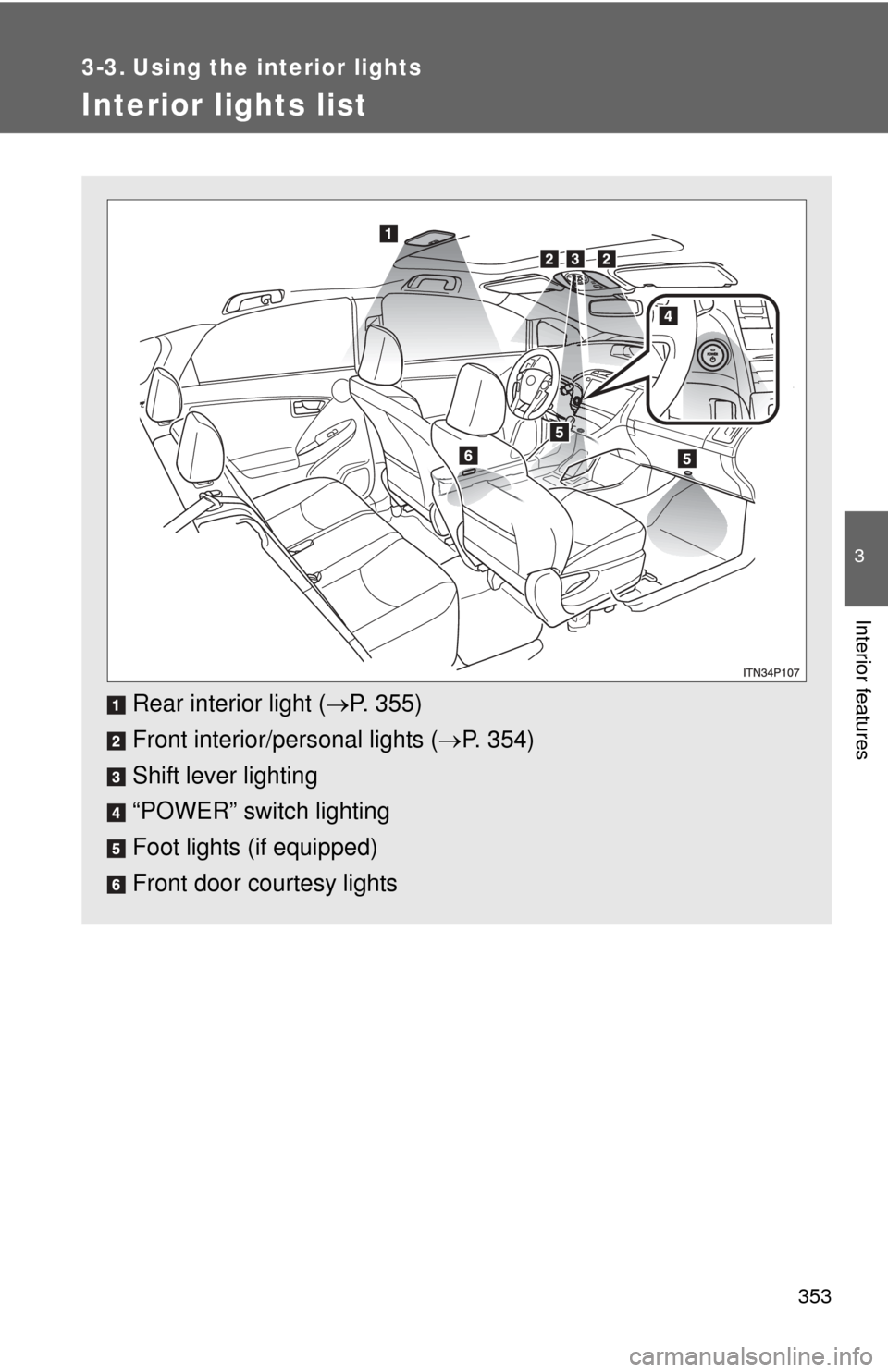
Interior lights list
Rear interior light (P. 355)
Front interior/personal lights ( P. 354)
Shift lever lighting
“POWER” switch lighting
Foot lights (if equipped)
Front door courtesy lights
Page 354 of 636
354 3-3. Using the interior lights
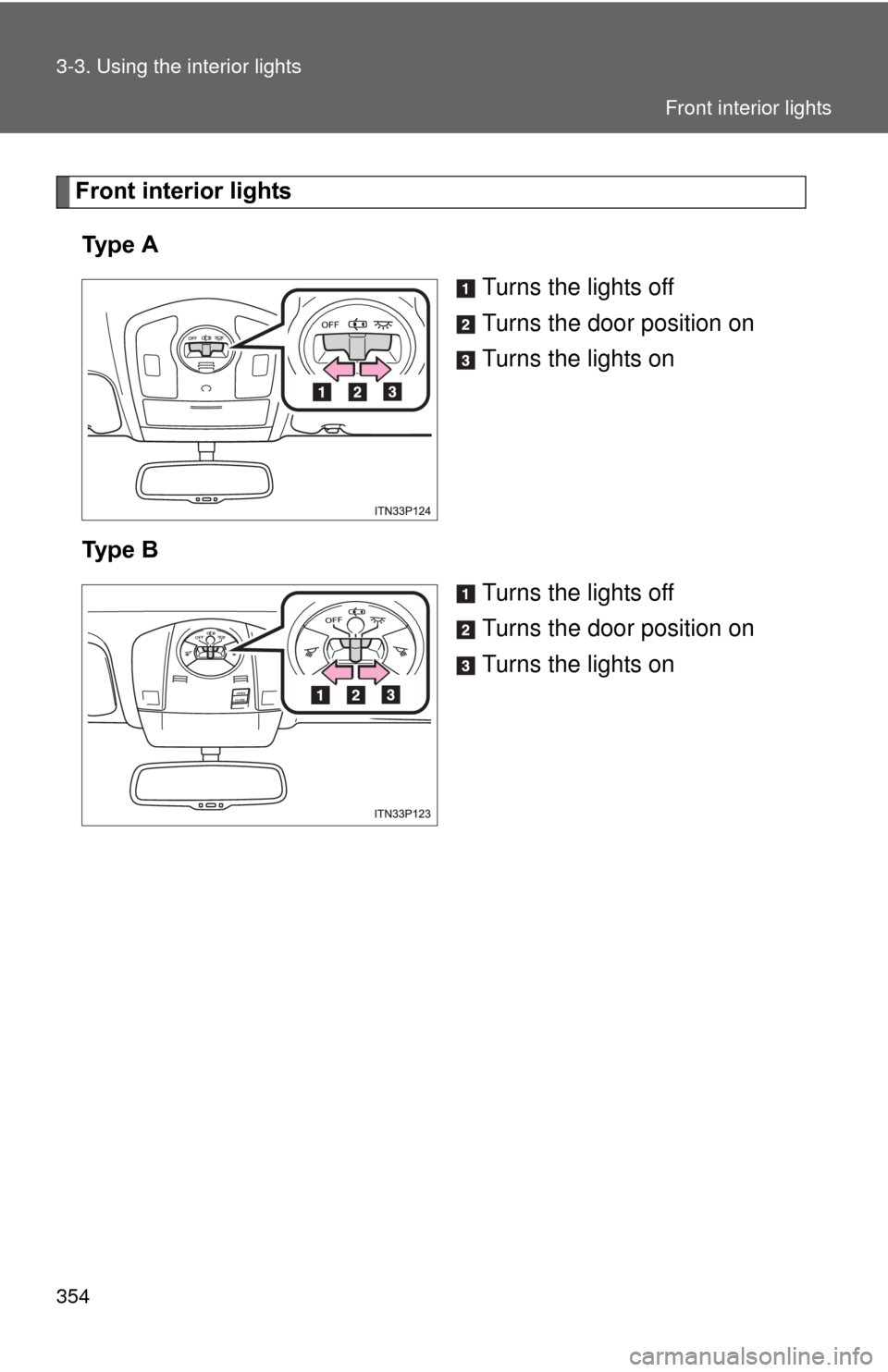
Front interior lightsTy p e A Turns the lights off
Turns the door position on
Turns the lights on
Ty p e B Turns the lights off
Turns the door position on
Turns the lights on
Front interior lights
Page 355 of 636
355
3-3. Using the interior lights
3
Interior features
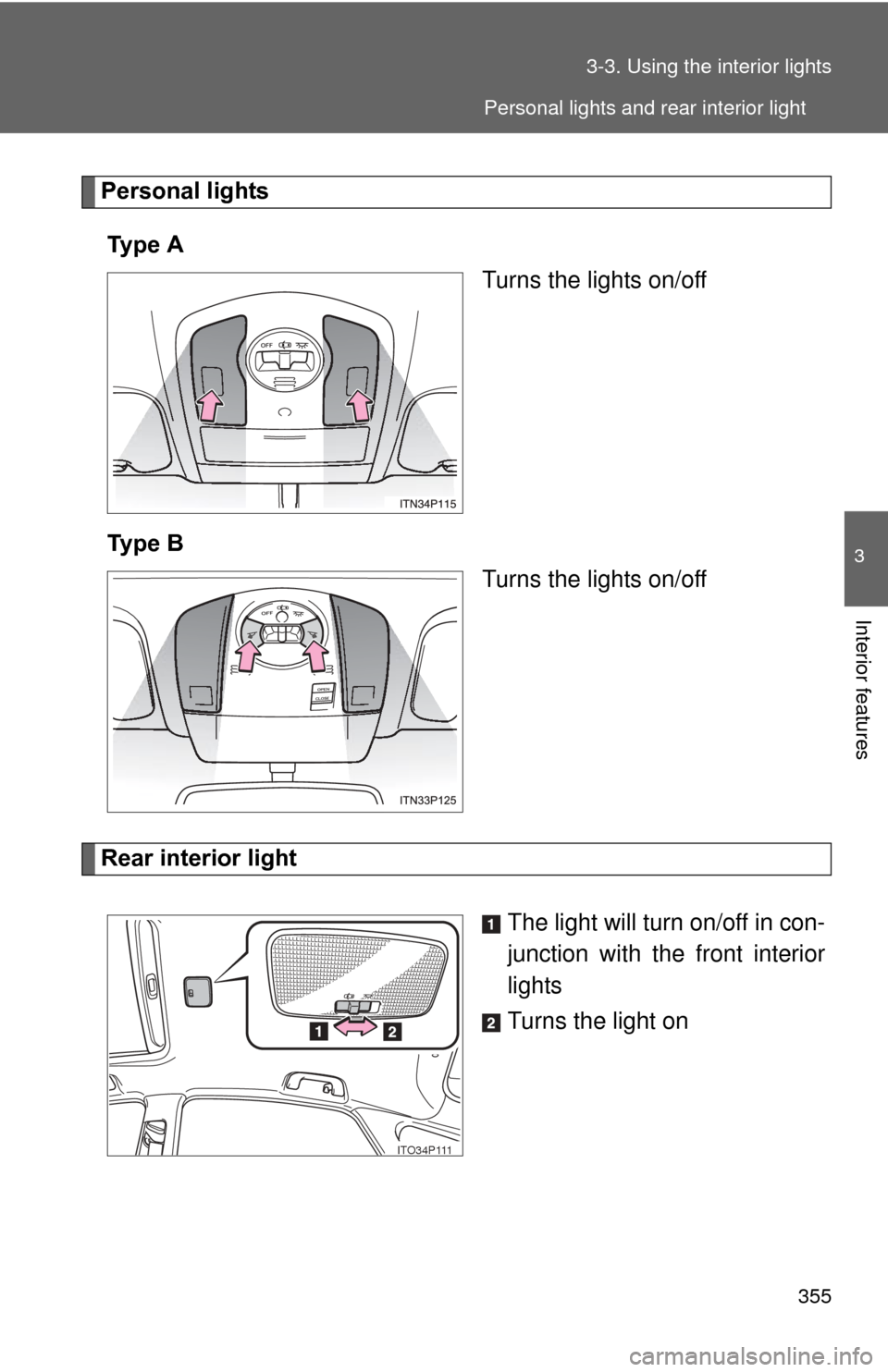
Personal lights
Ty p e A Turns the lights on/off
Ty p e B Turns the lights on/off
Rear interior light
The light will turn on/off in con-
junction with the front interior
lights
Turns the light on
ITO34P111
Personal lights and rear interior light
Page 356 of 636
356 3-3. Using the interior lights
■Illuminated entry system
The lights automatically turn on/off according to “POWER” switch mode, the
presence of the electronic key, whether the doors are locked/unlocked, and
whether the doors are opened/closed.
■ To prevent 12-volt battery discharge
If the interior lights remain on when the door is not fully closed and the inte-
rior light switch (door position on/off) is on, the lights will go off automatically
after 20 minutes.
■ Customization
Setting (e.g. The time elapsed before lights turn off) can be changed.
(Customizable features P. 594)
NOTICE
■To prevent 12-volt battery discharge
Do not leave the lights on longer than necessary when the hybrid system is
off.
Rear interior light
Page 358 of 636
358 3-4. Using the storage features
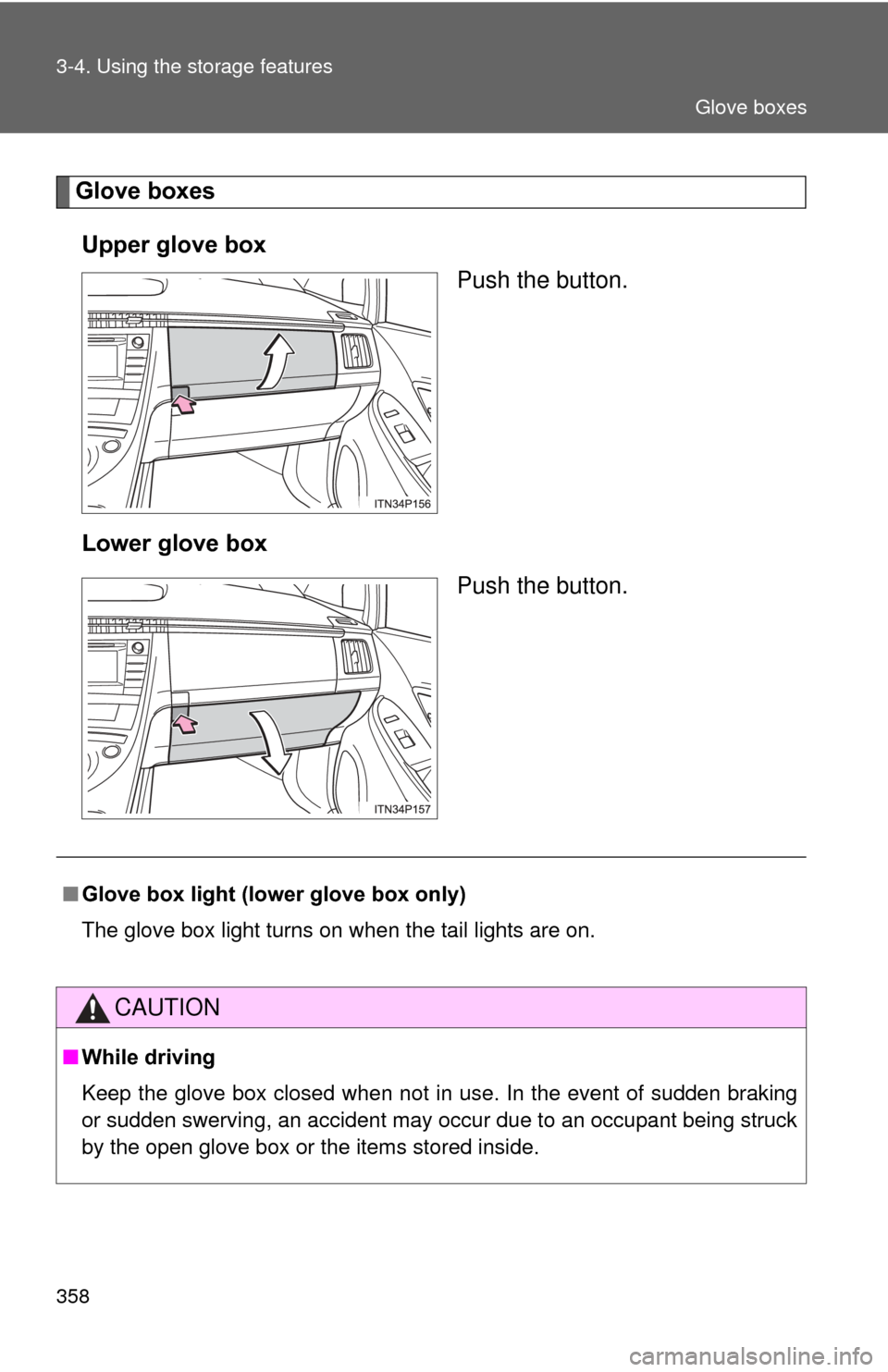
Glove boxesUpper glove box Push the button.
Lower glove box Push the button.
■Glove box light (lower glove box only)
The glove box light turns on when the tail lights are on.
CAUTION
■While driving
Keep the glove box closed when not in use. In the event of sudden braking
or sudden swerving, an accident may occur due to an occupant being struck
by the open glove box or the items stored inside.
Glove boxes