Page 190 of 692
190
2-1. Driving procedures
L/C200_EE (OM60G38E)
Engine (ignition) switch
Performing the following operations when carrying the electronic
key on your person starts the engine or changes “ENGINE START
STOP” switch modes.
Starting the engine
Check that the parking brake is set.
Check that the shift lever is set in “P”.
Sit in the driver’s seat and firmly depress the brake pedal.
The “ENGINE START STOP” switch indicator turns green.
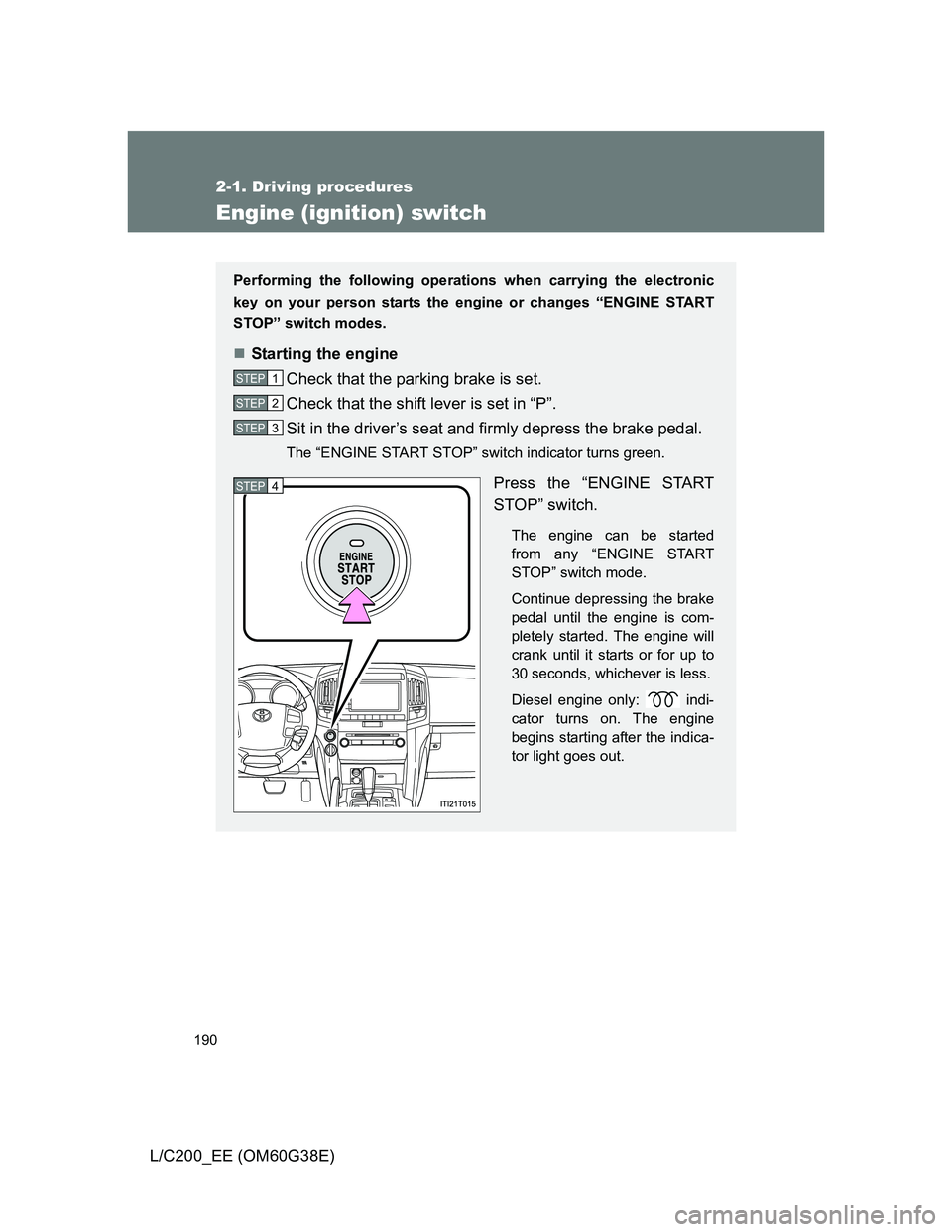
Press the “ENGINE START
STOP” switch.
The engine can be started
from any “ENGINE START
STOP” switch mode.
Continue depressing the brake
pedal until the engine is com-
pletely started. The engine will
crank until it starts or for up to
30 seconds, whichever is less.
Diesel engine only: indi-
cator turns on. The engine
begins starting after the indica-
tor light goes out.
STEP1
STEP2
STEP3
STEP4
Page 193 of 692
193 2-1. Driving procedures
2
When driving
L/C200_EE (OM60G38E)
CAUTION
When starting the engine
Always start the engine while sitting in the driver’s seat. Do not depress the
accelerator pedal while starting the engine under any circumstances.
Doing so may cause an accident resulting in death or serious injury.
Stopping the engine in an emergency
If you want to stop the engine in an emergency while driving the vehicle,
press and hold the “ENGINE START STOP” switch for more than 3 seconds,
or press it briefly 3 times or more in succession. (P. 640)
However, do not touch the “ENGINE START STOP” switch while driving
except in an emergency. Turning the engine off while driving will not cause
loss of steering or braking control, but the power assist to these systems will
be lost. This will make it more difficult to steer and brake, so you should pull
over and stop the vehicle as soon as it is safe to do so.
NOTICE
To prevent battery discharge
Do not leave the “ENGINE START STOP” switch in ACCESSORY or IGNI-
TION ON mode for long periods without the engine running.
When starting the engine
Do not race a cold engine.
If the engine becomes difficult to start or stalls frequently, have your vehi-
cle checked by any authorized Toyota dealer or repairer, or another duly
qualified and equipped professional immediately.
Symptoms indicating a malfunction with the “ENGINE START STOP”
switch
If the “ENGINE START STOP” seems to be operating somewhat differently
than usual, such as the switch sticking slightly, there may be a malfunction.
Contact any authorized Toyota dealer or repairer, or another duly qualified
and equipped professional.
Page 195 of 692
195 2-1. Driving procedures
2
When driving
L/C200_EE (OM60G38E)
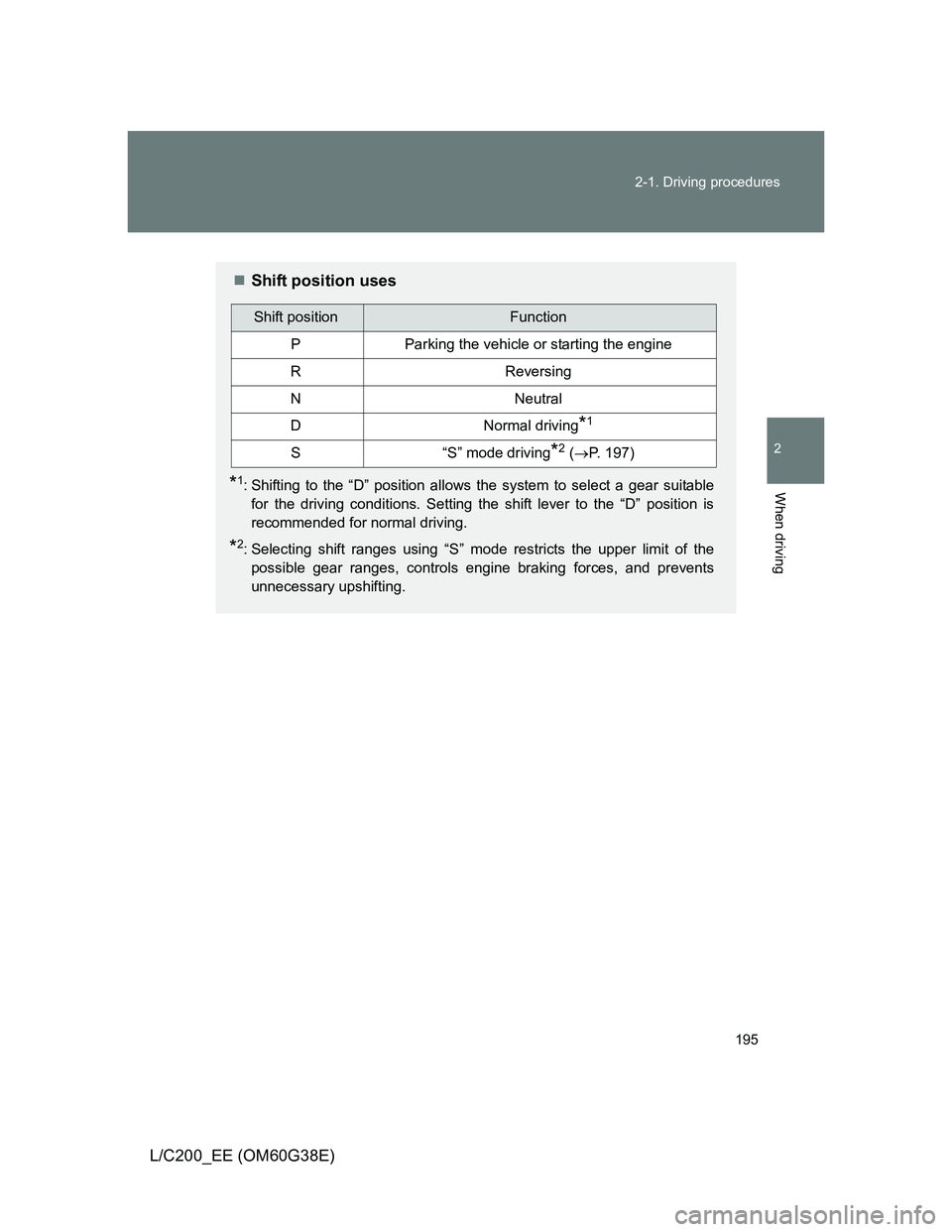
Shift position uses
*1: Shifting to the “D” position allows the system to select a gear suitable
for the driving conditions. Setting the shift lever to the “D” position is
recommended for normal driving.
*2: Selecting shift ranges using “S” mode restricts the upper limit of the
possible gear ranges, controls engine braking forces, and prevents
unnecessary upshifting.
Shift positionFunction
PParking the vehicle or starting the engine
RReversing
NNeutral
DNormal driving*1
S“S” mode driving*2 (P. 197)
Page 196 of 692
196 2-1. Driving procedures
L/C200_EE (OM60G38E)
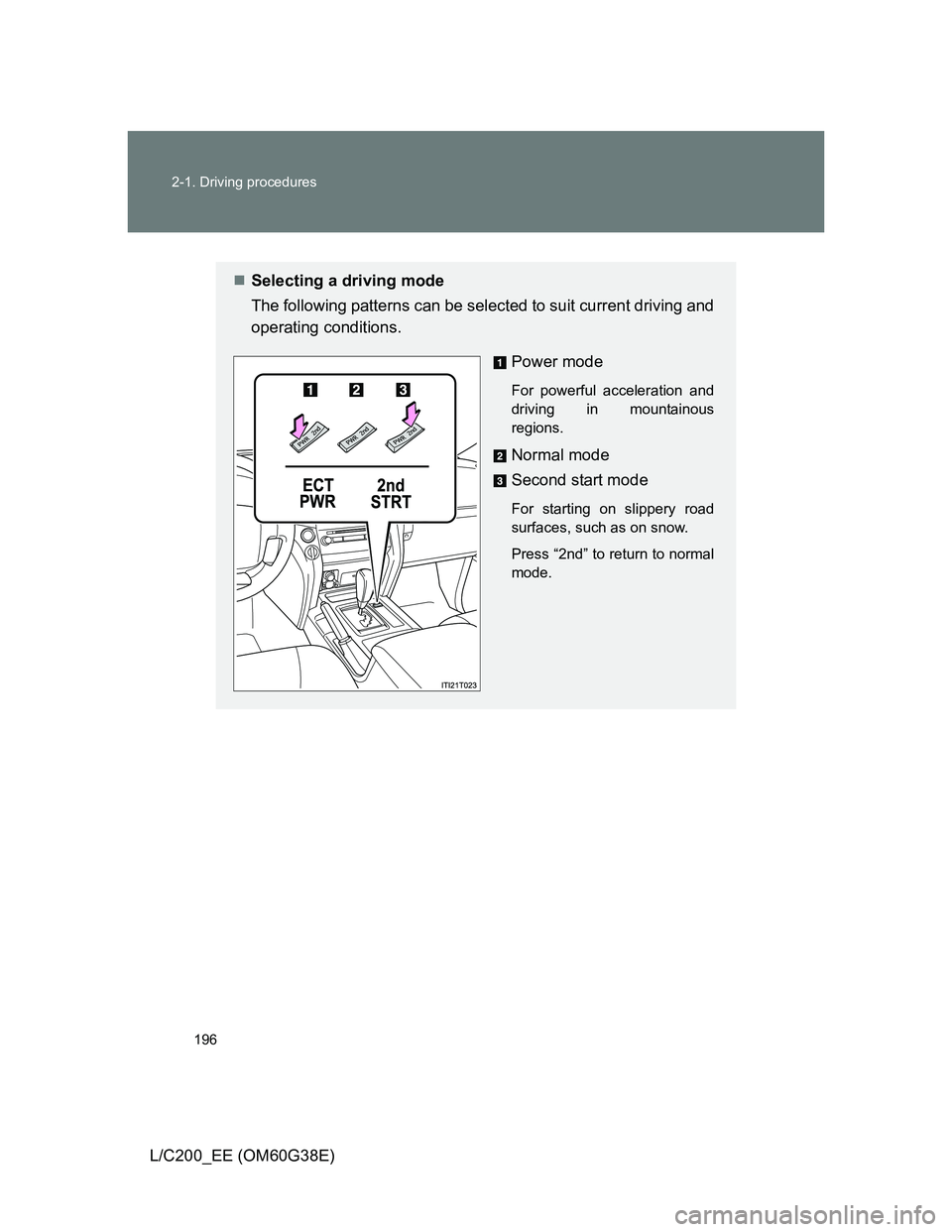
Selecting a driving mode
The following patterns can be selected to suit current driving and
operating conditions.
Power mode
For powerful acceleration and
driving in mountainous
regions.
Normal mode
Second start mode
For starting on slippery road
surfaces, such as on snow.
Press “2nd” to return to normal
mode.
Page 198 of 692
198 2-1. Driving procedures
L/C200_EE (OM60G38E)Shift ranges and their functions
Automatically selecting gears between 1 and 6 according to
vehicle speed and driving conditions. But, the gear is limited
according to selected shift range.
You can choose from 6 levels of engine braking force.
A lower shift range will provide greater engine braking force than
a higher shift range, and the engine speed will also increase.
“S” mode
When the shift range is “5” or lower, holding the shift lever toward “+” sets
the shift range to “6”.
To prevent excessive engine speed, a function was adopted that auto-
matically selects a higher shift range before the engine speed becomes
too high.
To protect the automatic transmission, a function is adopted that auto-
matically selects a higher shift range when the fluid temperature is high.
Downshifting restrictions warning buzzer (in the “S” mode)
To help ensure safety and driving performance, downshifting operation may
sometimes be restricted. In some circumstances, downshifting may not be
possible even when the shift lever is operated. (The warning buzzer will
sound twice.)
When driving with the cruise control activated
Even when performing the following actions with the intent of enabling
engine braking, engine braking will not activate because cruise control will
not be canceled.
While driving in “S” mode, downshifting to “5” or “4”. (P. 233)
When switching the driving mode to power mode while driving in “D”
position. (P. 196)
Page 199 of 692
199 2-1. Driving procedures
2
When driving
L/C200_EE (OM60G38E)
Second start mode automatic deactivation
Second start mode is automatically deactivated if the engine is turned off
after driving in second start mode.
If the shift lever cannot be shifted from “P”
P. 625
If the “S” indicator does not come on even after shifting the shift lever
to “S”
This may indicate a malfunction in the automatic transmission system. Have
the vehicle inspected by any authorized Toyota dealer or repairer, or another
duly qualified and equipped professional, immediately.
(In this situation, the vehicle will operate as if the shift lever is in “D”.)
AI-SHIFT
The AI-SHIFT automatically shifts the gear to the suitable position according
to the driver performance and driving conditions.
The AI-SHIFT automatically operates when the shift lever is in the “D” posi-
tion. (Shifting the shift lever to the “S” position cancels the function.)
Page 209 of 692
209 2-2. Instrument cluster
2
When driving
L/C200_EE (OM60G38E)
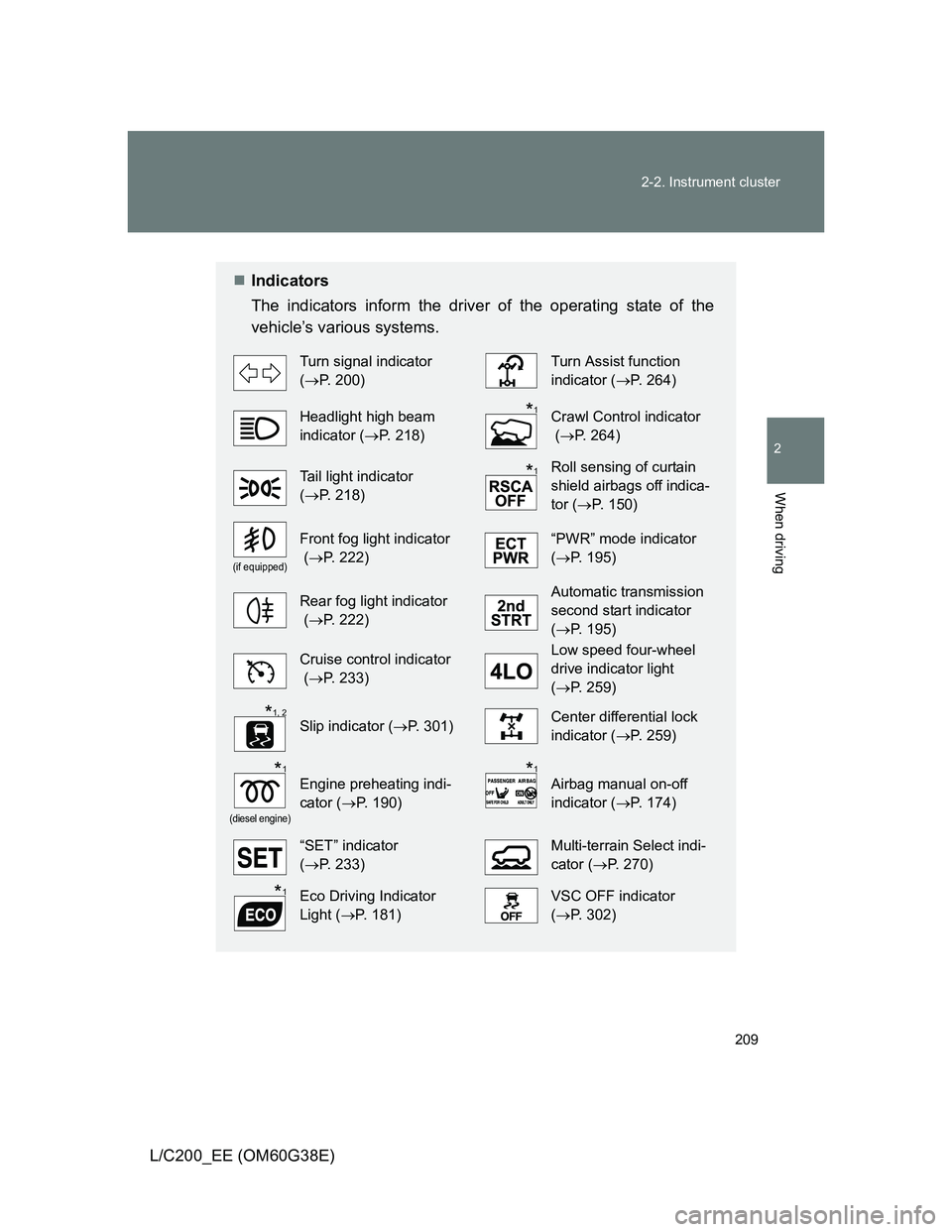
Indicators
The indicators inform the driver of the operating state of the
vehicle’s various systems.
Turn signal indicator
(P. 200)Turn Assist function
indicator (P. 264)
Headlight high beam
indicator (P. 218)Crawl Control indicator
(P. 264)
Tail light indicator
(P. 218) Roll sensing of curtain
shield airbags off indica-
tor (P. 150)
(if equipped)
Front fog light indicator
(P. 222)“PWR” mode indicator
(P. 195)
Rear fog light indicator
(P. 222)Automatic transmission
second start indicator
(P. 195)
Cruise control indicator
(P. 233)Low speed four-wheel
drive indicator light
(P. 259)
Slip indicator (P. 301)Center differential lock
indicator (P. 259)
(diesel engine)
Engine preheating indi-
cator (P. 190)Airbag manual on-off
indicator (P. 174)
“SET” indicator
(P. 233)Multi-terrain Select indi-
cator (P. 270)
Eco Driving Indicator
Light (P. 181)VSC OFF indicator
(P. 302)
*1
*1
*1, 2
*1*1
*1
Page 216 of 692
216 2-2. Instrument cluster
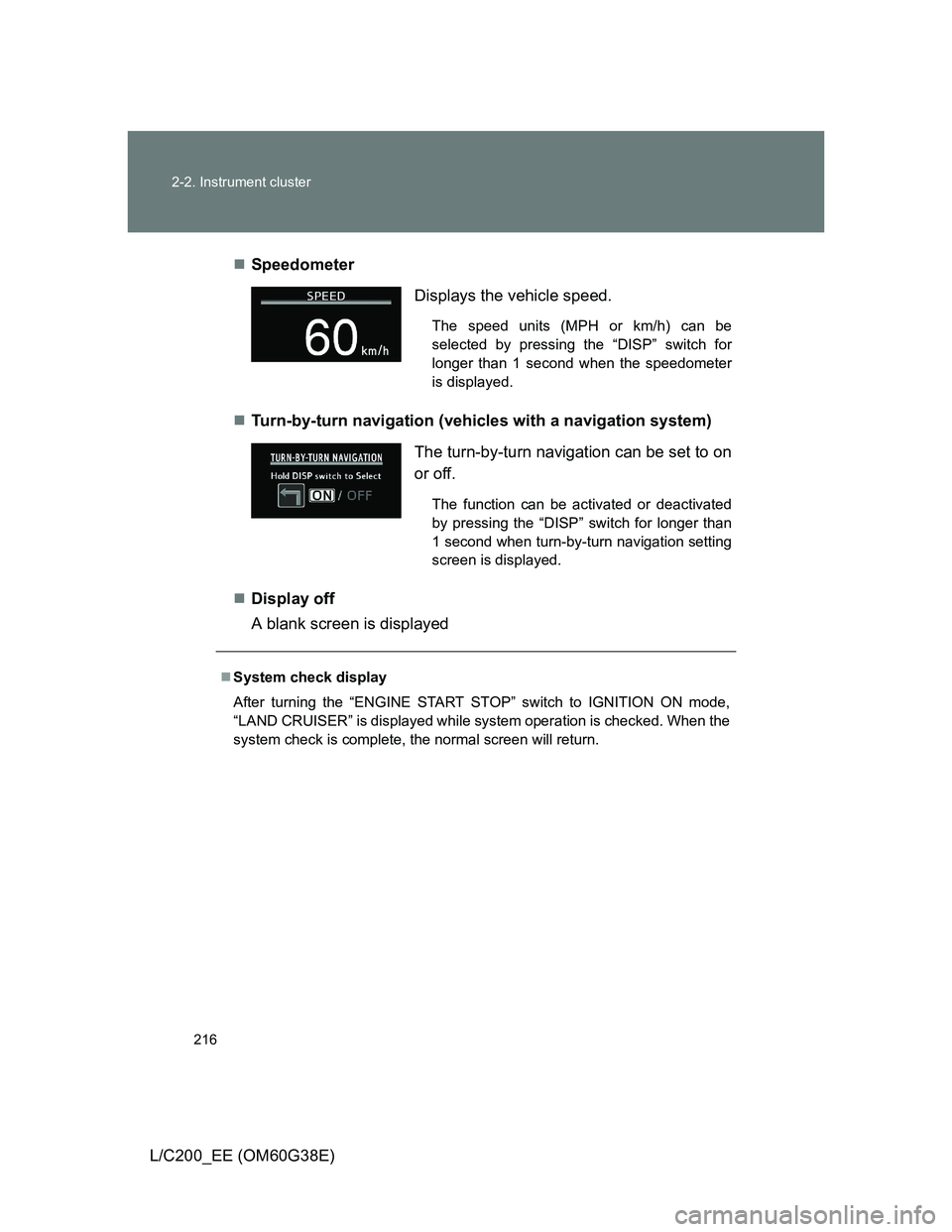
L/C200_EE (OM60G38E)Speedometer
Turn-by-turn navigation (vehicles with a navigation system)
Display off
A blank screen is displayed
Displays the vehicle speed.
The speed units (MPH or km/h) can be
selected by pressing the “DISP” switch for
longer than 1 second when the speedometer
is displayed.
The turn-by-turn navigation can be set to on
or off.
The function can be activated or deactivated
by pressing the “DISP” switch for longer than
1 second when turn-by-turn navigation setting
screen is displayed.
System check display
After turning the “ENGINE START STOP” switch to IGNITION ON mode,
“LAND CRUISER” is displayed while system operation is checked. When the
system check is complete, the normal screen will return.