Page 383 of 692
383 3-2. Using the audio system
3
Interior features
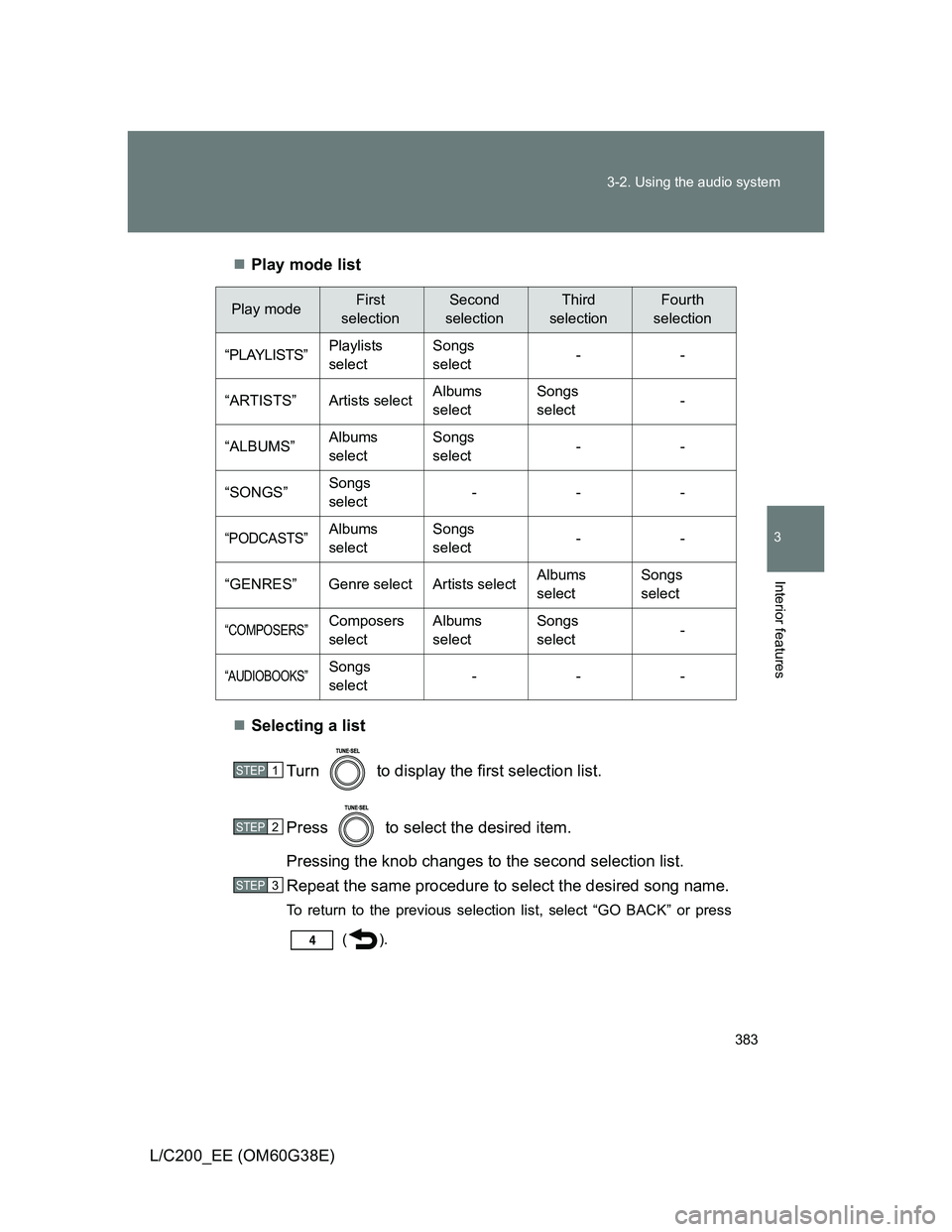
L/C200_EE (OM60G38E)Play mode list
Selecting a list
Turn to display the first selection list.
Press to select the desired item.
Pressing the knob changes to the second selection list.
Repeat the same procedure to select the desired song name.
To return to the previous selection list, select “GO BACK” or press
().
Play modeFirst
selectionSecond
selectionThird
selectionFourth
selection
“PLAYLISTS”Playlists
selectSongs
select--
“ARTISTS” Artists selectAlbums
selectSongs
select-
“ALBUMS”Albums
selectSongs
select--
“SONGS”Songs
select---
“PODCASTS”Albums
selectSongs
select--
“GENRES” Genre select Artists selectAlbums
selectSongs
select
“COMPOSERS”Composers
selectAlbums
selectSongs
select-
“AUDIOBOOKS”Songs
select---
STEP1
STEP2
STEP3
Page 385 of 692
385 3-2. Using the audio system
3
Interior features
L/C200_EE (OM60G38E)
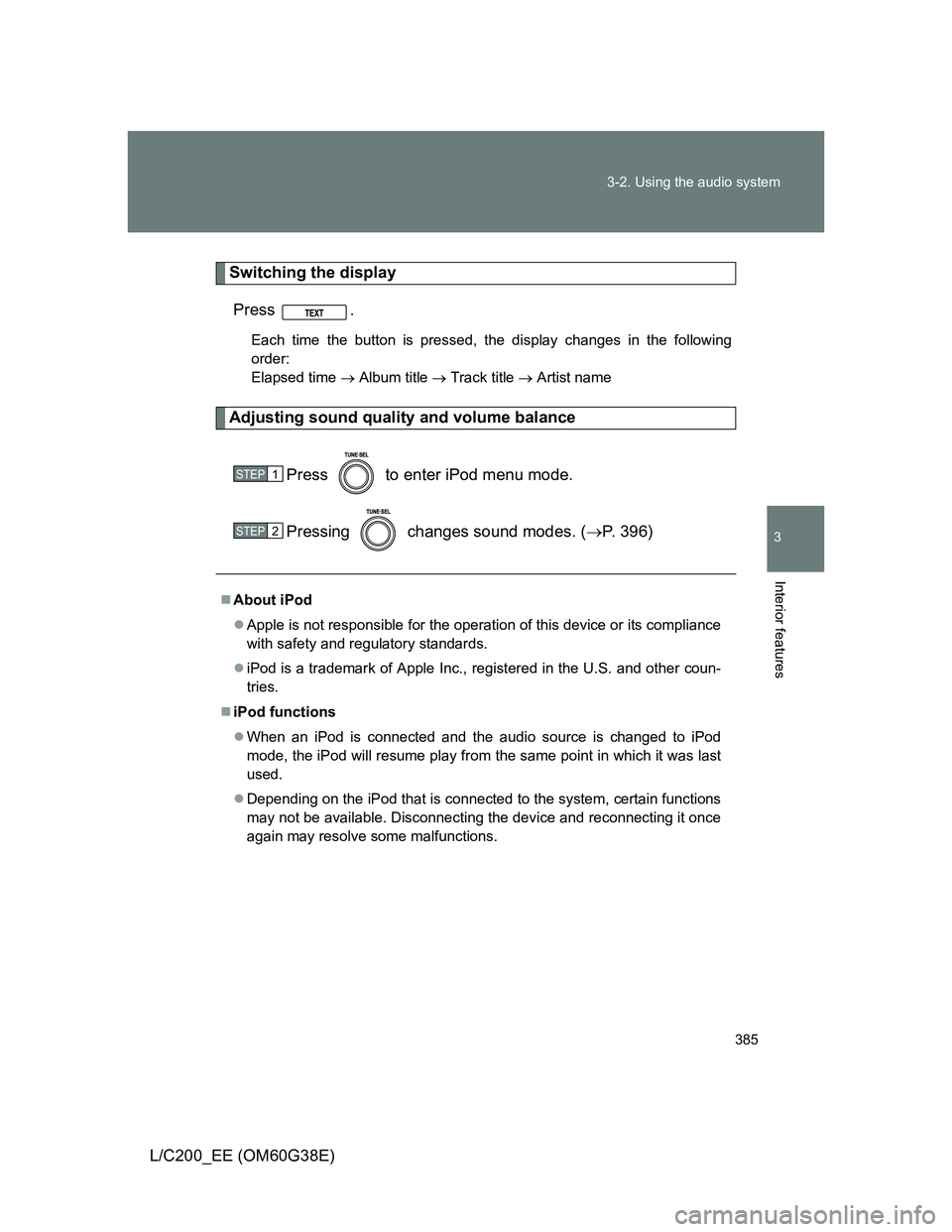
Switching the display
Press .
Each time the button is pressed, the display changes in the following
order:
Elapsed time Album title Track title Artist name
Adjusting sound quality and volume balance
Press to enter iPod menu mode.
Pressing changes sound modes. (P. 396)
About iPod
Apple is not responsible for the operation of this device or its compliance
with safety and regulatory standards.
iPod is a trademark of Apple Inc., registered in the U.S. and other coun-
tries.
iPod functions
When an iPod is connected and the audio source is changed to iPod
mode, the iPod will resume play from the same point in which it was last
used.
Depending on the iPod that is connected to the system, certain functions
may not be available. Disconnecting the device and reconnecting it once
again may resolve some malfunctions.
STEP1
STEP2
Page 393 of 692
393 3-2. Using the audio system
3
Interior features
L/C200_EE (OM60G38E)
MP3 and WMA files
MP3 (MPEG Audio LAYER 3) is a standard audio compression format.
Files can be compressed to approximately 1/10 of their original size using
MP3 compression.
WMA (Windows Media Audio) is a Microsoft audio compression format.
This format compresses audio data to a size smaller than that of the MP3
format.
There is a limit to the MP3 and WMA file standards that can be used and
to the media/formats on which the files are recorded.
MP3 file compatibility
• Compatible standards
MP3 (MPEG1 AUDIO LAYERII, III, MPEG2 AUDIO LAYERII, III,
MPEG2.5)
• Compatible sampling frequencies
MPEG1 AUDIO LAYERII, III: 32, 44.1, 48 (kHz)
MPEG2 AUDIO LAYERII, III: 16, 22.05, 24 (kHz)
MPEG2.5: 8, 11.025, 12 (kHz)
• Compatible bit rates (compatible with VBR)
MPEG1 AUDIO LAYERII, III: 32-320 (kbps)
MPEG2 AUDIO LAYERII, III: 32-160 (kbps)
MPEG2.5: 32-160 (kbps)
• Compatible channel modes: stereo, joint stereo, dual channel and
monaural
WMA file compatibility
• Compatible standards
WMA Ver. 9
• Compatible sampling frequencies
HIGH PROFILE 32, 44.1, 48 (kHz)
• Compatible bit rates
HIGH PROFILE 32-320 (kbps, VBR)
Page 394 of 692
394 3-2. Using the audio system
L/C200_EE (OM60G38E)
File names
The only files that can be recognized as MP3/WMA and played are those
with the extension .mp3 or .wma.
ID3 and WMA tags
ID3 tags can be added to MP3 files, making it possible to record the track
title, artist name, etc.
The system is compatible with ID3 Ver. 1.0, 1.1, and Ver. 2.2, 2.3, 2.4 ID3
tags. (The number of characters is based on ID3 Ver. 1.0 and 1.1.)
WMA tags can be added to WMA files, making it possible to record the
track title and artist name in the same way as with ID3 tags.
MP3 and WMA playback
• When a device containing MP3 or WMA files is connected, all files in
the USB memory device are checked. Once the file check is finished,
the first MP3 or WMA file is played. To make the file check finish more
quickly, we recommend that you do not include any files other than
MP3 or WMA files or create any unnecessary folders.
• When the USB device is connected and the audio source is changed to
USB memory mode, the USB device will start playing the first file in the
first folder. If the same device is removed and reinserted (and the con-
tents have not been changed), the USB device will resume play from
the same point in which it was last used.
Extensions
If the file extensions .mp3 and .wma are used for files other than MP3 and
WMA files, they will be mistakenly recognized and played as MP3 and
WMA files. This may result in large amounts of interference and damage
to the speakers.
Page 403 of 692
403 3-3. Using the Bluetooth
® audio system
3
Interior features
L/C200_EE (OM60G38E)
When transferring ownership of the vehicle
Be sure to initialize the system to prevent personal data from being improp-
erly accessed. (P. 440)
About Bluetooth
®
Compatible models
Bluetooth
® specifications:
Ver. 1.2, or higher (Recommended: Ver. 2.0+EDR or higher)
Following Profiles:
• A2DP (Advanced Audio Distribution Profile) Ver. 1.0 or higher
• AVRCP (Audio/Video Remote Control Profile) Ver. 1.0 or higher
(Ver. 1.3 or higher recommended)
Portable players must correspond to the above specifications in order to be
connected to the Bluetooth
® audio system. However, please note that some
functions may be limited depending on the type of portable player.
Bluetooth is a registered trademark of
Bluetooth SIG. Inc.
Page 478 of 692
478 3-7. Other interior features
L/C200_EE (OM60G38E)
The seat heaters and ventilators can be used when
The “ENGINE START STOP” switch is in IGNITION ON mode.
Replacing the air filters
Filters are installed in the seat ventilators. For replacement of the filters, con-
tact any authorized Toyota dealer or repairer, or another duly qualified and
equipped professional.
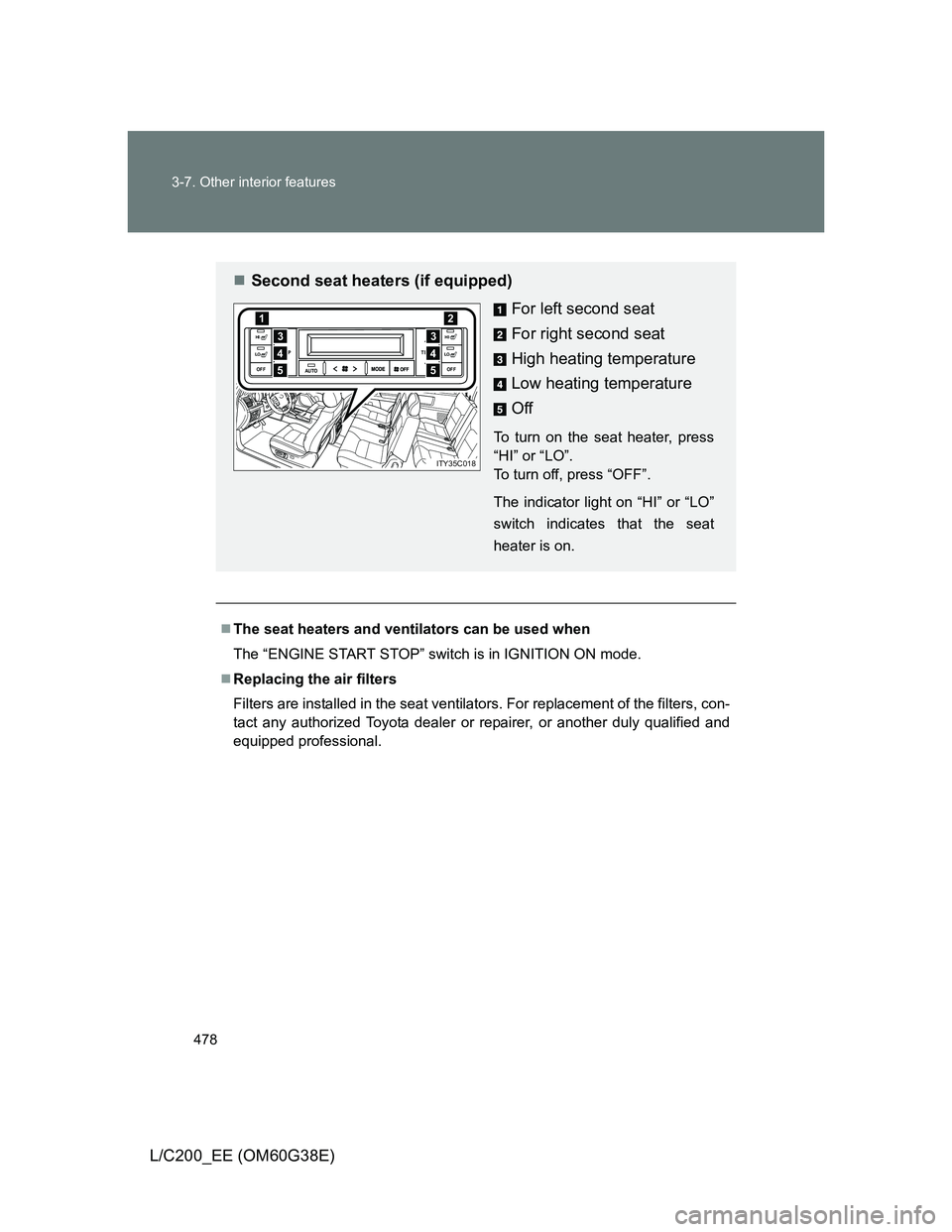
Second seat heaters (if equipped)
For left second seat
For right second seat
High heating temperature
Low heating temperature
Off
To turn on the seat heater, press
“HI” or “LO”.
To turn off, press “OFF”.
The indicator light on “HI” or “LO”
switch indicates that the seat
heater is on.
AUTO TEMP
OFFTEMP
HI
LOOFF
HI
LO4
12
3
5
4
3
5
ITY35C018
Page 483 of 692
483 3-7. Other interior features
3
Interior features
L/C200_EE (OM60G38E)
CAUTION
Observe the following precautions.
Failure to do so may cause the driver’s floor mat to slip, possibly interfering
with the pedals while driving. An unexpectedly high speed may result or it may
become difficult to stop the vehicle, leading to a serious accident.
When installing the driver’s floor mat
Do not use floor mats designed for other models or different model year
vehicles, even if they are Toyota Genuine floor mats.
Only use floor mats designed for the driver’s seat.
Always install the floor mat securely using the retaining hooks (clips) pro-
vided.
Do not use two or more floor mats on top of each other.
Do not place the floor mat bottom-side up or upside-down.
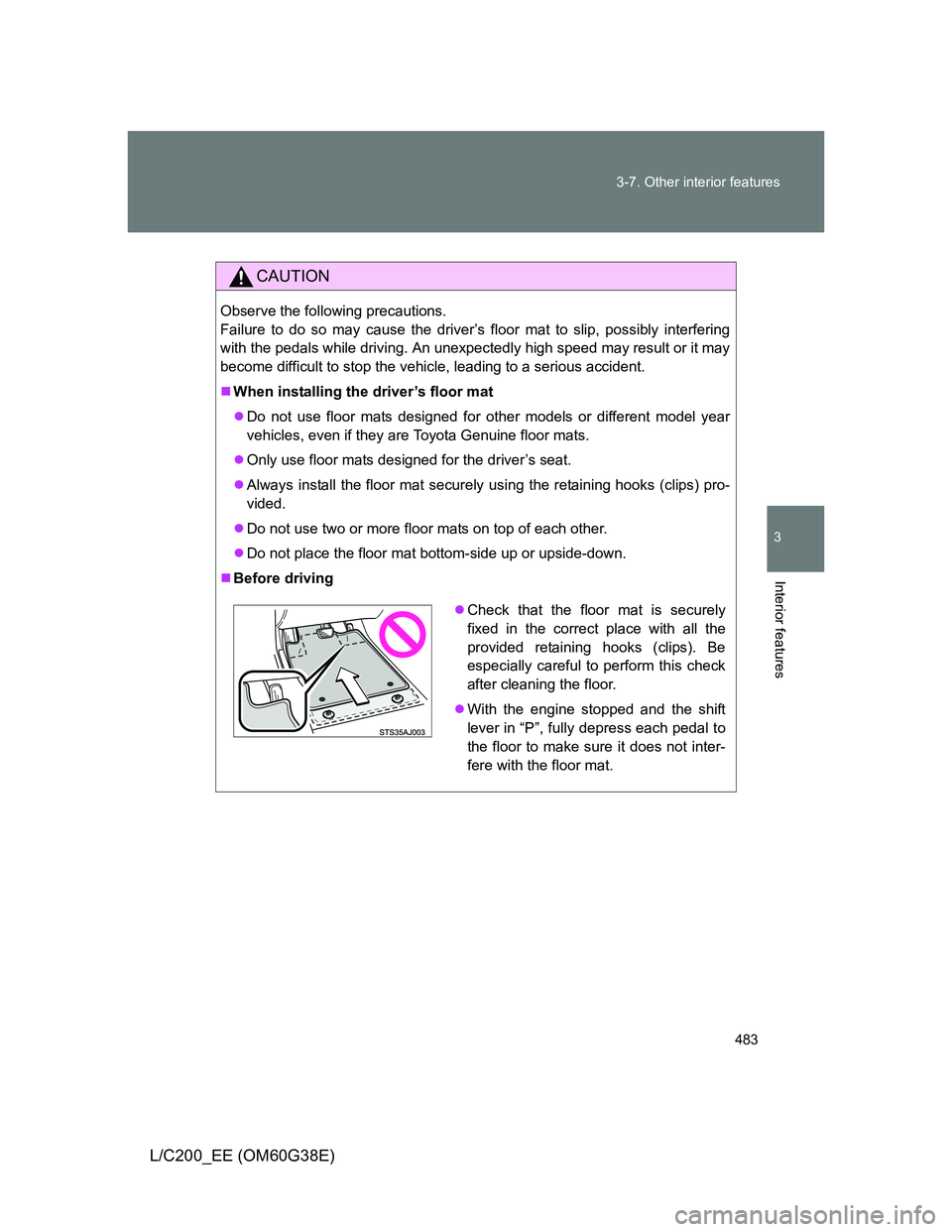
Before driving
Check that the floor mat is securely
fixed in the correct place with all the
provided retaining hooks (clips). Be
especially careful to perform this check
after cleaning the floor.
With the engine stopped and the shift
lever in “P”, fully depress each pedal to
the floor to make sure it does not inter-
fere with the floor mat.
Page 499 of 692
499 4-3. Do-it-yourself maintenance
4
Maintenance and care
L/C200_EE (OM60G38E)
CAUTION
The engine compartment contains many mechanisms and fluids that may
move suddenly, become hot, or become electrically energized. To avoid death
or serious injury observe the following precautions.
When working on the engine compartment
Keep hands, clothing, and tools away from the moving fan and engine
drive belt.
Be careful not to touch the engine, radiator, exhaust manifold, etc. right
after driving as they may be hot. Oil and other fluids may also be hot.
Do not leave anything that may burn easily, such as paper or rags, in the
engine compartment.
Do not smoke, cause sparks or expose an open flame to fuel or the bat-
tery. Fuel and battery fumes are flammable.
Be extremely cautious when working on the battery. It contains poisonous
and corrosive sulfuric acid.
Take care because brake fluid can harm your hands or eyes and damage
painted surfaces.
If fluid gets on your hands or in your eyes, flush the affected area with
clean water immediately.
If you still experience discomfort, see a doctor.
When working near the electric cooling fan or radiator grille
Be sure the “ENGINE START STOP” switch is off.
With the “ENGINE START STOP” switch in IGNITION ON mode, the electric
cooling fan may automatically start to run if the air conditioning is on and/or
the coolant temperature is high. (P. 511)
When working on or under the vehicle
Do not get under the vehicle with just the jack supporting it.
Always use automotive jack stands or other solid supports.
Use eye protection to prevent flying or falling material, fluid spray, etc. from
getting in your eyes.