Page 86 of 692
86
1-3. Adjustable components (seats, mirrors, steering wheel)
L/C200_EE (OM60G38E)
Driving position memor y system
: If equipped
Your preferred driving position (the position of the driver’s seat,
steering wheel and outside rear view mirrors) can be entered into the
computer’s memory and recalled with the touch of a button. It is also
possible to set this function to activate automatically when the
doors are unlocked.
Three different driving positions can be entered into memory.
Entering a position to memory
Turn the “ENGINE START STOP” switch to IGNITION ON
mode.
Adjust the driver’s seat, steering wheel, and outside rear
view mirrors to the desired positions.
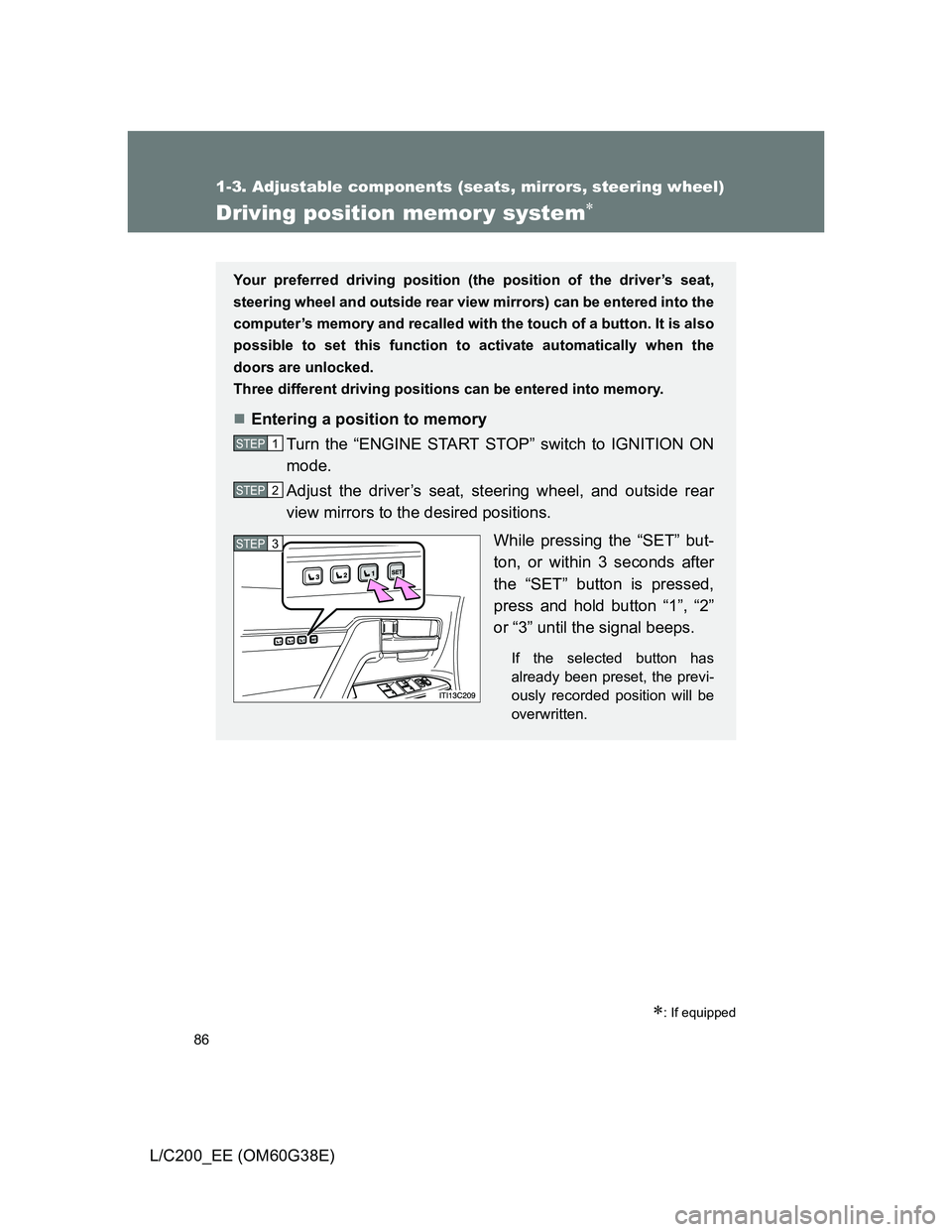
While pressing the “SET” but-
ton, or within 3 seconds after
the “SET” button is pressed,
press and hold button “1”, “2”
or “3” until the signal beeps.
If the selected button has
already been preset, the previ-
ously recorded position will be
overwritten.
STEP1
STEP2
STEP3
Page 90 of 692
90 1-3. Adjustable components (seats, mirrors, steering wheel)
L/C200_EE (OM60G38E)
Retained accessory power
Each memorized position (except for the steering wheel position) can be
activated within 3 minutes after the driver’s door is opened, even if the
“ENGINE START STOP” switch is turned off.
Each memorized position (except for the steering wheel position) can be
activated within 60 seconds after the driver’s door is closed, even if the
“ENGINE START STOP” switch is turned off.
To cancel seat position recall
Perform any one of the following operations.
Press the “SET” button
Press button “1”, “2” or “3”.
Adjust the seat using the switches (only cancels seat position recall)
Adjust the steering wheel using the tilt and telescopic steering control
switch (only cancels steering wheel position recall)
If the battery is disconnected
The memorized positions must be reset because the computer’s memory is
erased when the battery is disconnected.
CAUTION
Seat adjustment caution
Take care during seat adjustment that the seat does not strike the rear pas-
senger or squeeze your body against the steering wheel.
Page 204 of 692
204 2-2. Instrument cluster
L/C200_EE (OM60G38E)
Switching the display
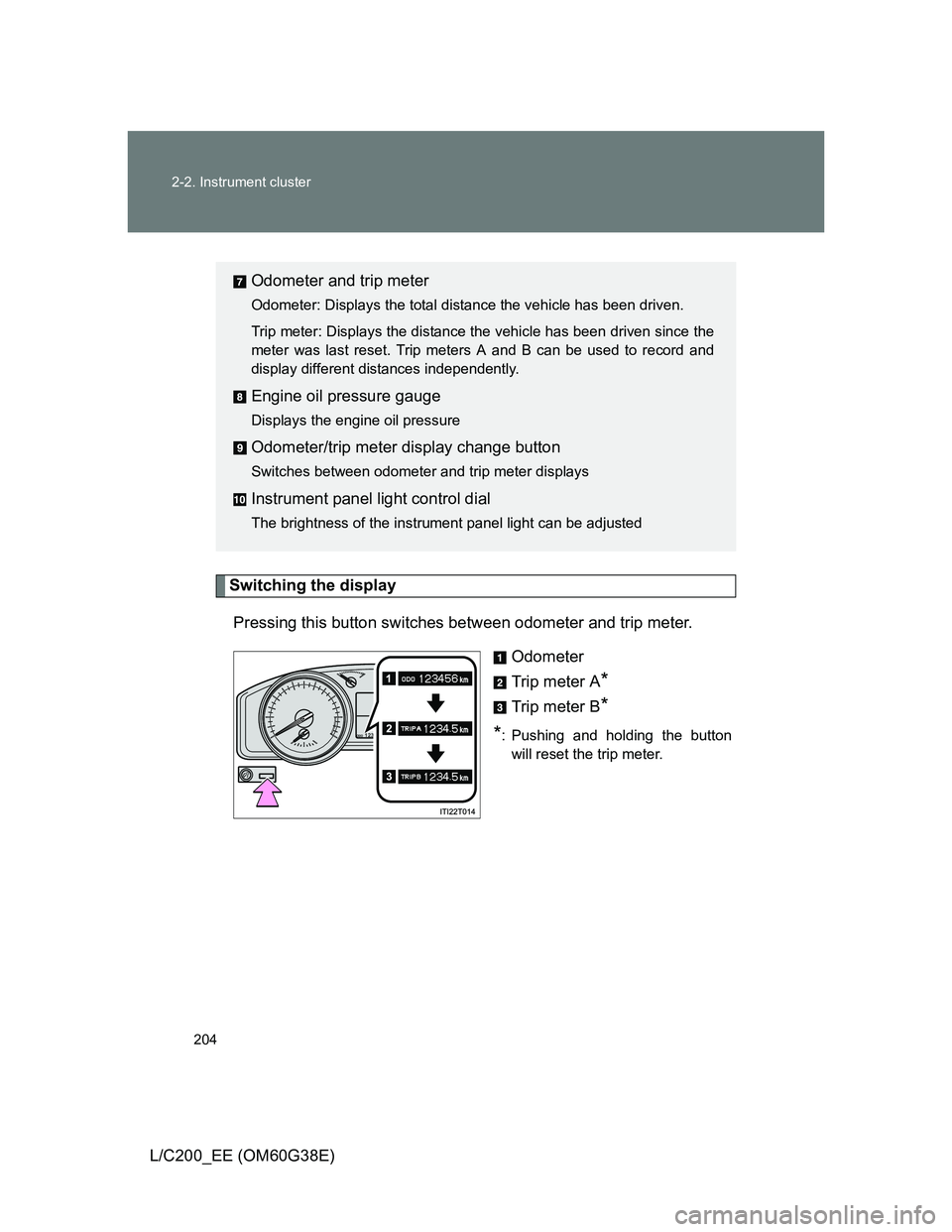
Pressing this button switches between odometer and trip meter.
Odometer
Trip meter A
*
Trip meter B*
*
: Pushing and holding the button
will reset the trip meter.
Odometer and trip meter
Odometer: Displays the total distance the vehicle has been driven.
Trip meter: Displays the distance the vehicle has been driven since the
meter was last reset. Trip meters A and B can be used to record and
display different distances independently.
Engine oil pressure gauge
Displays the engine oil pressure
Odometer/trip meter display change button
Switches between odometer and trip meter displays
Instrument panel light control dial
The brightness of the instrument panel light can be adjusted
Page 215 of 692
215 2-2. Instrument cluster
2
When driving
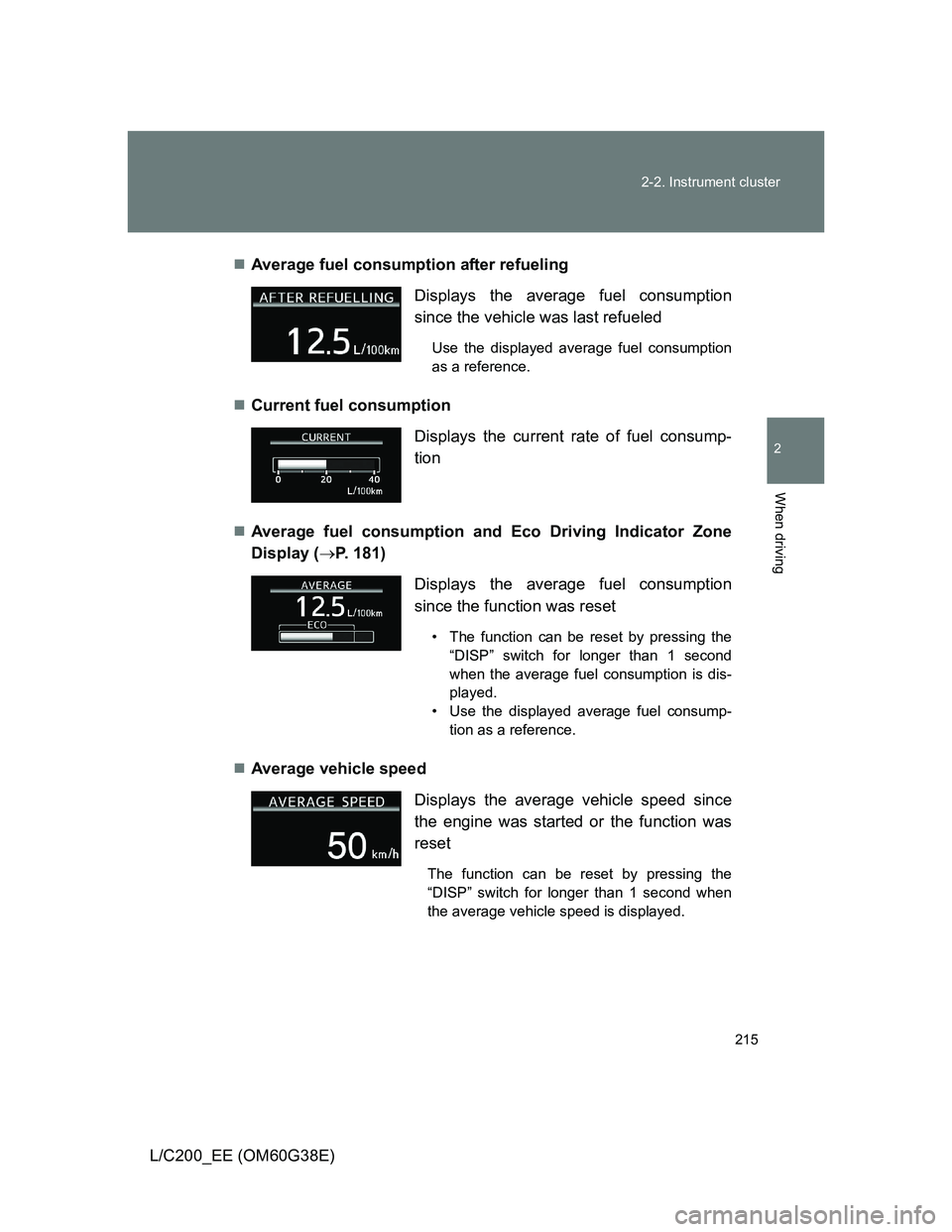
L/C200_EE (OM60G38E)Average fuel consumption after refueling
Current fuel consumption
Average fuel consumption and Eco Driving Indicator Zone
Display (P. 181)
Average vehicle speed Displays the average fuel consumption
since the vehicle was last refueled
Use the displayed average fuel consumption
as a reference.
Displays the current rate of fuel consump-
tion
Displays the average fuel consumption
since the function was reset
• The function can be reset by pressing the
“DISP” switch for longer than 1 second
when the average fuel consumption is dis-
played.
• Use the displayed average fuel consump-
tion as a reference.
Displays the average vehicle speed since
the engine was started or the function was
reset
The function can be reset by pressing the
“DISP” switch for longer than 1 second when
the average vehicle speed is displayed.
Page 217 of 692
217 2-2. Instrument cluster
2
When driving
L/C200_EE (OM60G38E)
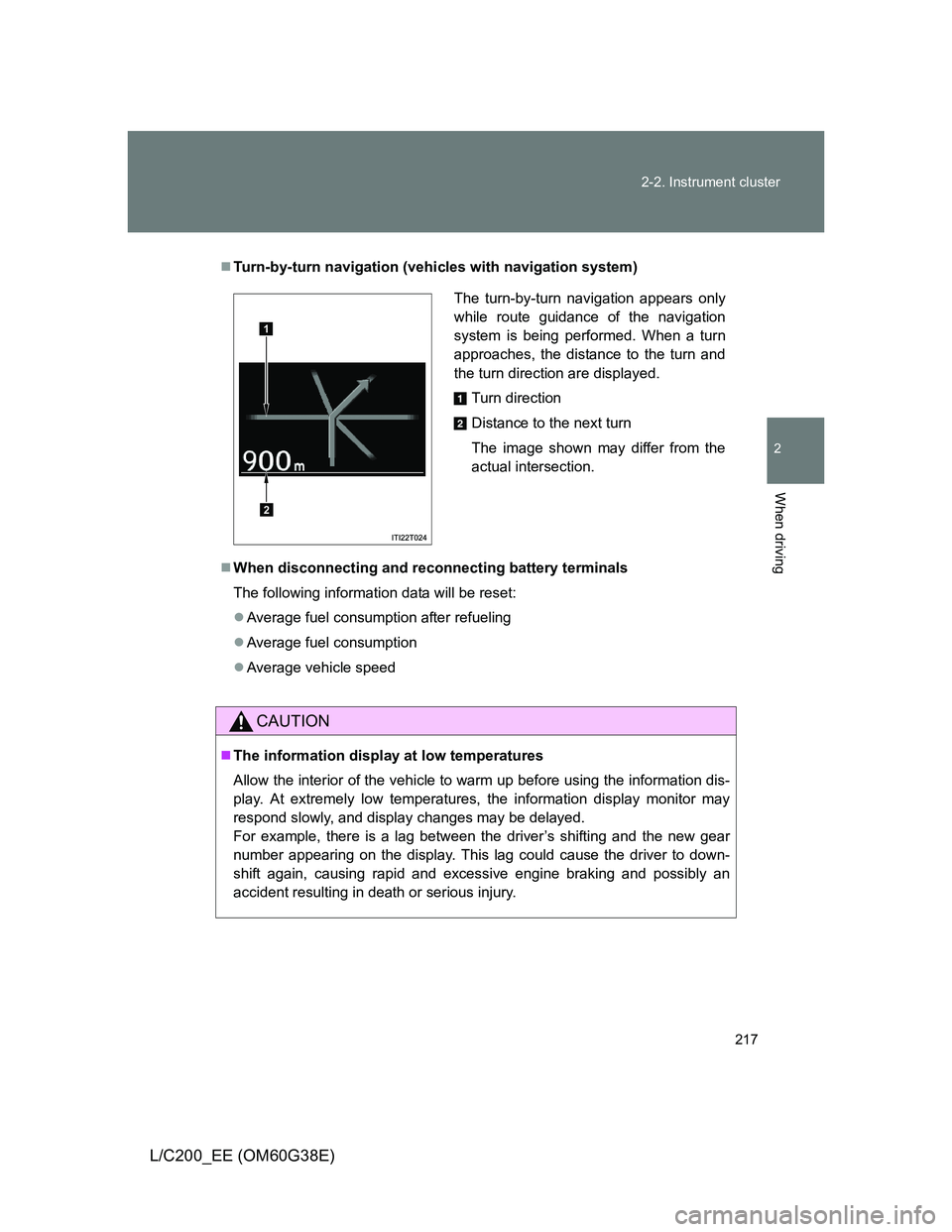
Turn-by-turn navigation (vehicles with navigation system)
When disconnecting and reconnecting battery terminals
The following information data will be reset:
Average fuel consumption after refueling
Average fuel consumption
Average vehicle speed
CAUTION
The information display at low temperatures
Allow the interior of the vehicle to warm up before using the information dis-
play. At extremely low temperatures, the information display monitor may
respond slowly, and display changes may be delayed.
For example, there is a lag between the driver’s shifting and the new gear
number appearing on the display. This lag could cause the driver to down-
shift again, causing rapid and excessive engine braking and possibly an
accident resulting in death or serious injury.
The turn-by-turn navigation appears only
while route guidance of the navigation
system is being performed. When a turn
approaches, the distance to the turn and
the turn direction are displayed.
Turn direction
Distance to the next turn
The image shown may differ from the
actual intersection.
1
2
Page 235 of 692
235 2-4. Using other driving systems
2
When driving
L/C200_EE (OM60G38E)
Cruise control can be set when
Vehicles with an automatic transmission: The shift lever is in the “D” or
more than range “4” of “S” has been selected.
Vehicle speed is above approximately 40 km/h (25 mph).
Accelerating after setting the vehicle speed
The vehicle can be accelerated normally. After acceleration, the set
speed resumes.
Even without canceling the cruise control, the set speed can be
increased by first accelerating the vehicle to the desired speed and then
pushing the lever down to set the new speed.
Automatic cruise control cancelation
Cruise control will stop maintaining the vehicle speed in any of the following
situations.
Actual vehicle speed falls more than approximately 16 km/h (10 mph)
below the preset vehicle speed.
At this time, the memorized set speed is not retained.
Actual vehicle speed is below approximately 40 km/h (25 mph).
VSC is activated (if equipped).
The switching operation continues for 5 seconds or more after the center
differential lock switch has been operated.
If the warning message for the cruise control is shown on the multi-
information display
Press the “ON-OFF” button once to deactivate the system, and then press
the button again to reactivate the system.
If the cruise control speed cannot be set or if the cruise control cancels
immediately after being activated, there may be a malfunction in the cruise
control system. Have the vehicle inspected by any authorized Toyota dealer
or repairer, or another duly qualified and equipped professional.
Page 362 of 692
362
3-2. Using the audio system
L/C200_EE (OM60G38E)
Using the radio
Setting station presets
Manually
In AF-ON mode the radio changes frequency to the strongest sig-
nal of the selected station.
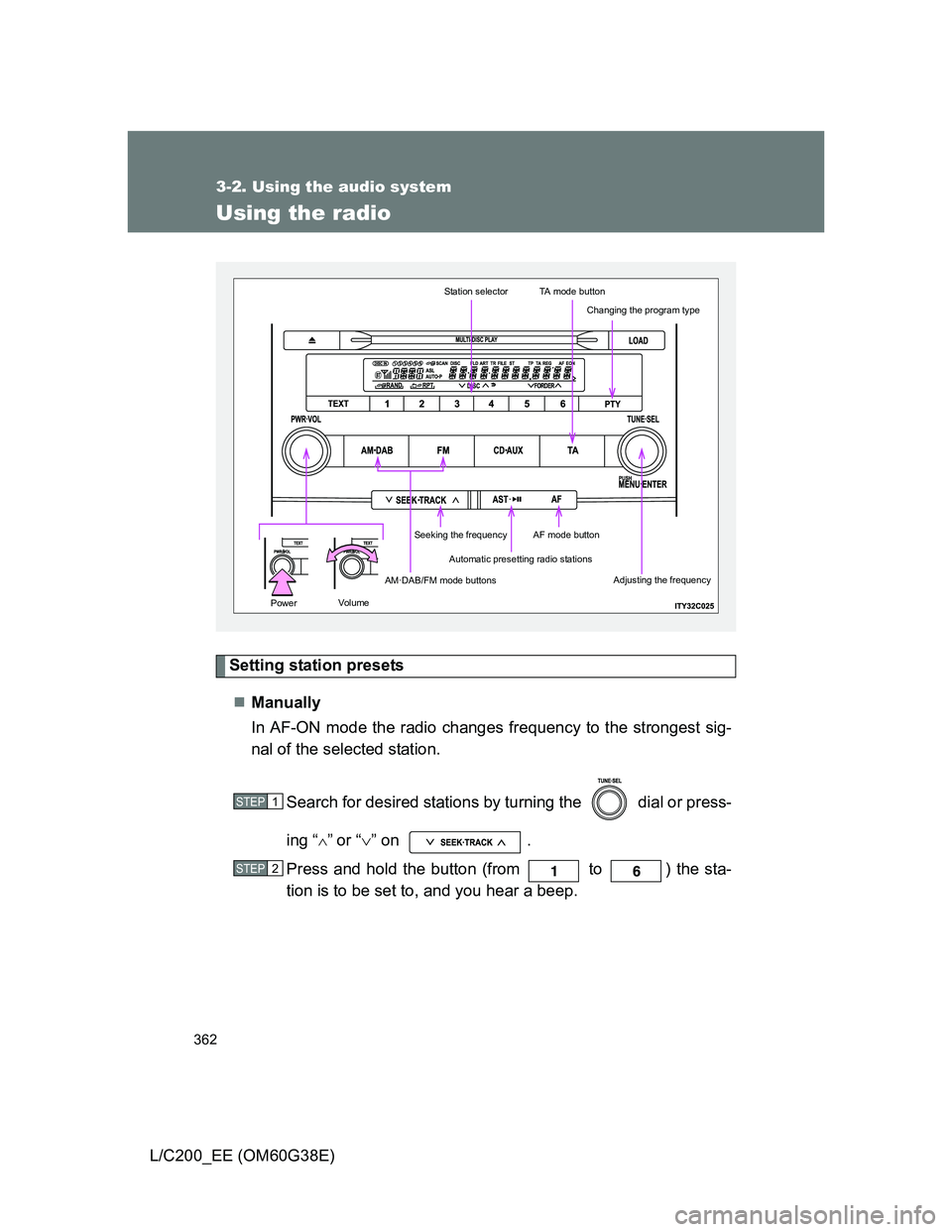
Search for desired stations by turning the dial or press-
ing “
”or “” on .
Press and hold the button (from to ) the sta-
tion is to be set to, and you hear a beep.
Automatic presetting radio stations
Station selectorTA mode button
AM·DAB/FM mode buttons
Seeking the frequencyAF mode button
Changing the program type
Adjusting the frequency
Volu mePower
STEP1
STEP2
Page 363 of 692
363 3-2. Using the audio system
3
Interior features
L/C200_EE (OM60G38E)Automatically
Press and hold until you hear a beep.
Up to 6 stations are set in order of reception quality. When the settings
are finished, 2 beeps will be heard.
In the FM1 or FM2 mode, the stations automatically set by the audio sys-
tem will be set in the FM3 presets.
RDS (Radio Data System)
This feature allows your radio to receive station and program informa-
tion (classical, news, etc.) from radio stations that broadcast this
information.
Listening to stations of the same network
Press .
AF-ON, REG-OFF modes: A station among those of the same net-
work with strong reception is selected.
Switching between different regional
programs of the same station might
occur.
AF-ON, REG-ON modes: A station among those of the same net-
work with strong reception and broad-
casting the same program is selected.
Each time is pressed, the mode changes in the order of AF-ON,
REG-OFF AF-ON, REG-ON AF-OFF, REG-OFF.
Specifying program type
Press .
Each time is pressed, the program type changes in the order of
“NEWS” “SPORTS” “TALK” “POP” “CLASSICS”.