Page 108 of 476

108
iQ_WE_74014E
1-6. Theft deterrent system
Engine immobilizer system
System maintenance
The vehicle has a maintenance-free type engine immobilizer system.
Conditions that may cause the system to malfunction
If the key is in contact with a metallic object
If the key is in close proximity to or touching a key to the security system
(key with a built-in transponder chip) of another vehicle
The vehicle’s keys have built-in transponder chips that prevent the
engine from starting if the key has not been previously registered in
the vehicle’s on-board computer.
Never leave the keys inside the vehicle when you leave the vehicle.
Vehicles without smart entry & start system: The system begins
operating after the key has been removed from the engine switch.
Vehicles with smart entry & start system: The system begins oper-
ating after the “ENGINE START STOP” switch has been turned
OFF.
Vehicles without smart entry & start system: The system is can-
celed after the registered key has been inserted into the engine
switch.
Vehicles with smart entry & start system: The system is canceled
after the “ENGINE START STOP” switch has been turned to
ACCESSORY or IGNITION ON mode.
Page 163 of 476

2When driving
163
iQ_WE_74014E
2-1. Driving procedures
Driving the vehicle ............ 164
Engine (ignition) switch
(vehicles without smart
entry & start system)....... 176
Engine (ignition) switch
(vehicles with smart
entry & start system)....... 179
Multidrive .......................... 185
Manual transmission......... 189
Turn signal lever ............... 193
Parking brake ................... 194
Horn .................................. 196
2-2. Instrument cluster
Gauges and meters .......... 197
Indicators and warning
lights ............................... 199
Multi-information display ... 205
2-3. Operating the lights and
wipers
Headlight switch ............... 211
Fog light switch ................. 216
Windshield wipers and
washer ............................ 218
Rear window wiper and
washer ............................ 2222-4. Using other driving systems
Driving assist systems ...... 224
2-5. Driving information
Cargo and luggage ........... 229
Winter driving tips ............. 231
Trailer towing .................... 235
Page 176 of 476
176
2-1. Driving procedures
iQ_WE_74014E
Engine (ignition) switch (vehicles without smart entr y & start system)
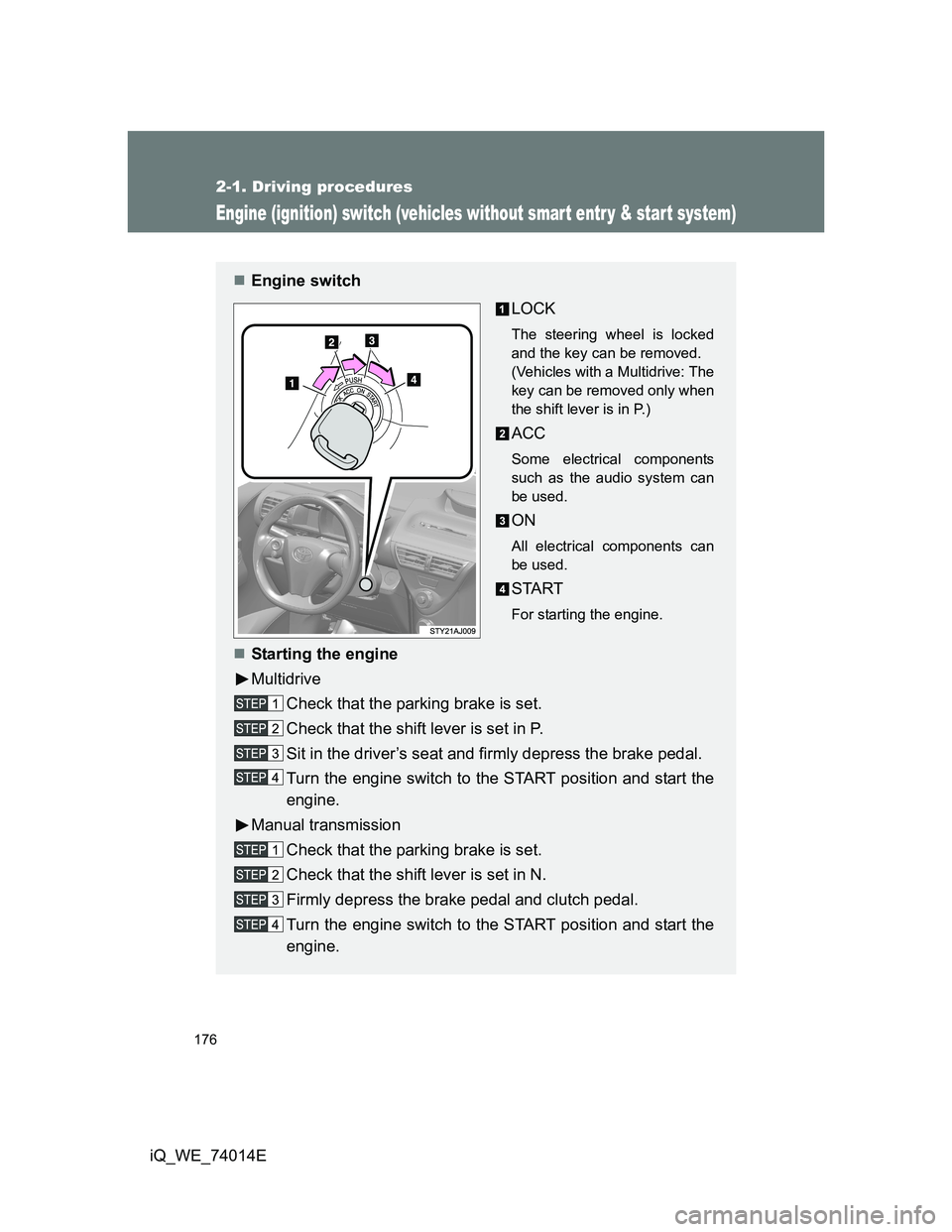
Engine switch
LOCK
The steering wheel is locked
and the key can be removed.
(Vehicles with a Multidrive: The
key can be removed only when
the shift lever is in P.)
ACC
Some electrical components
such as the audio system can
be used.
ON
All electrical components can
be used.
START
For starting the engine.
Starting the engine
Multidrive
Check that the parking brake is set.
Check that the shift lever is set in P.
Sit in the driver’s seat and firmly depress the brake pedal.
Turn the engine switch to the START position and start the
engine.
Manual transmission
Check that the parking brake is set.
Check that the shift lever is set in N.
Firmly depress the brake pedal and clutch pedal.
Turn the engine switch to the START position and start the
engine.
Page 179 of 476
179
2-1. Driving procedures
2
When driving
iQ_WE_74014E
Engine (ignition) switch (vehicles with smart entr y & start system)
Performing the following operations when carrying the electronic
key on your person starts the engine or changes “ENGINE START
STOP” switch modes.
Starting the engine
Multidrive
Check that the parking brake is set.
Check that the shift lever is set in P.
Sit in the driver’s seat and firmly depress the brake pedal.
The “ENGINE START STOP” switch indicator turns green. If the
indicator does not turn green, the engine cannot be started.
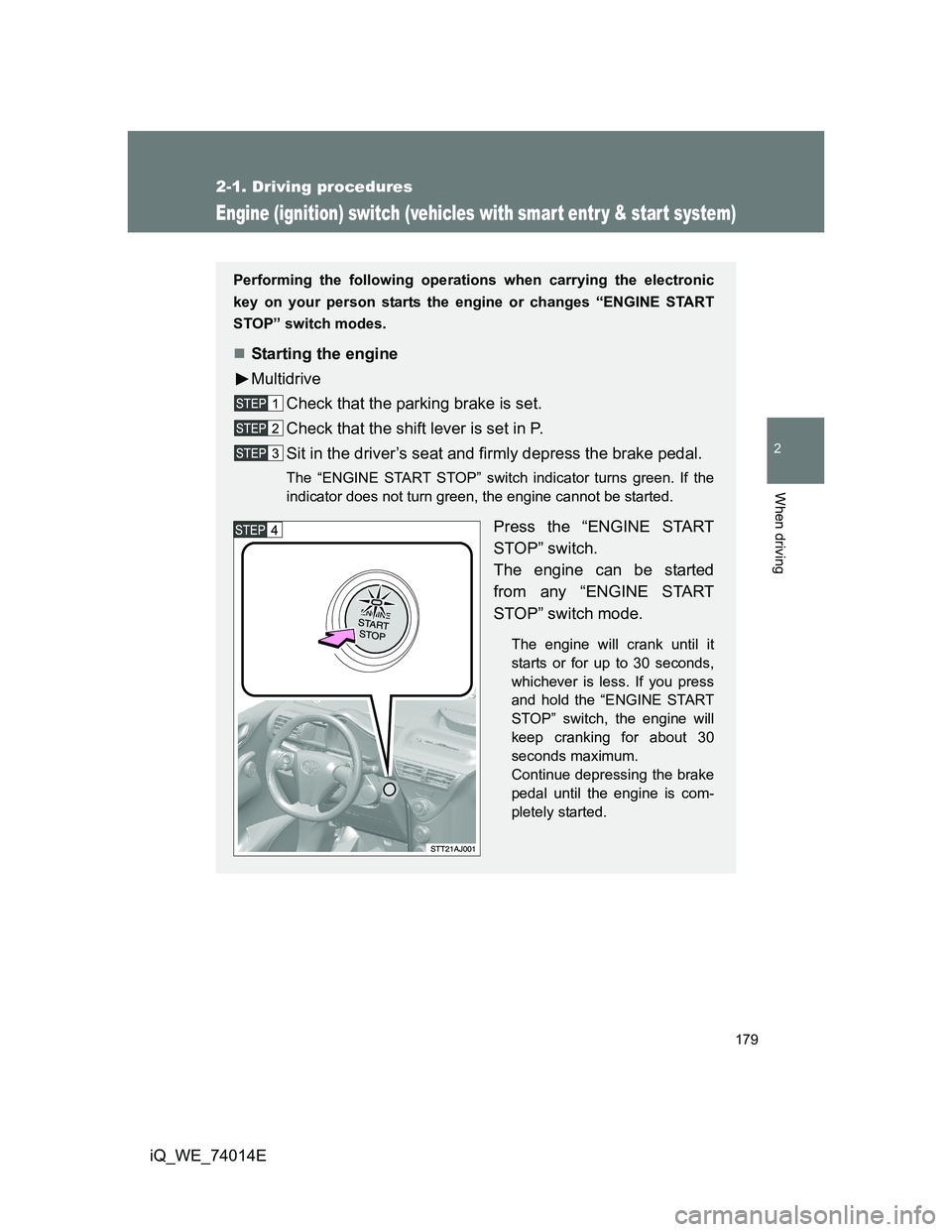
Press the “ENGINE START
STOP” switch.
The engine can be started
from any “ENGINE START
STOP” switch mode.
The engine will crank until it
starts or for up to 30 seconds,
whichever is less. If you press
and hold the “ENGINE START
STOP” switch, the engine will
keep cranking for about 30
seconds maximum.
Continue depressing the brake
pedal until the engine is com-
pletely started.
Page 181 of 476
181 2-1. Driving procedures
2
When driving
iQ_WE_74014E
Changing “ENGINE START STOP” switch mode
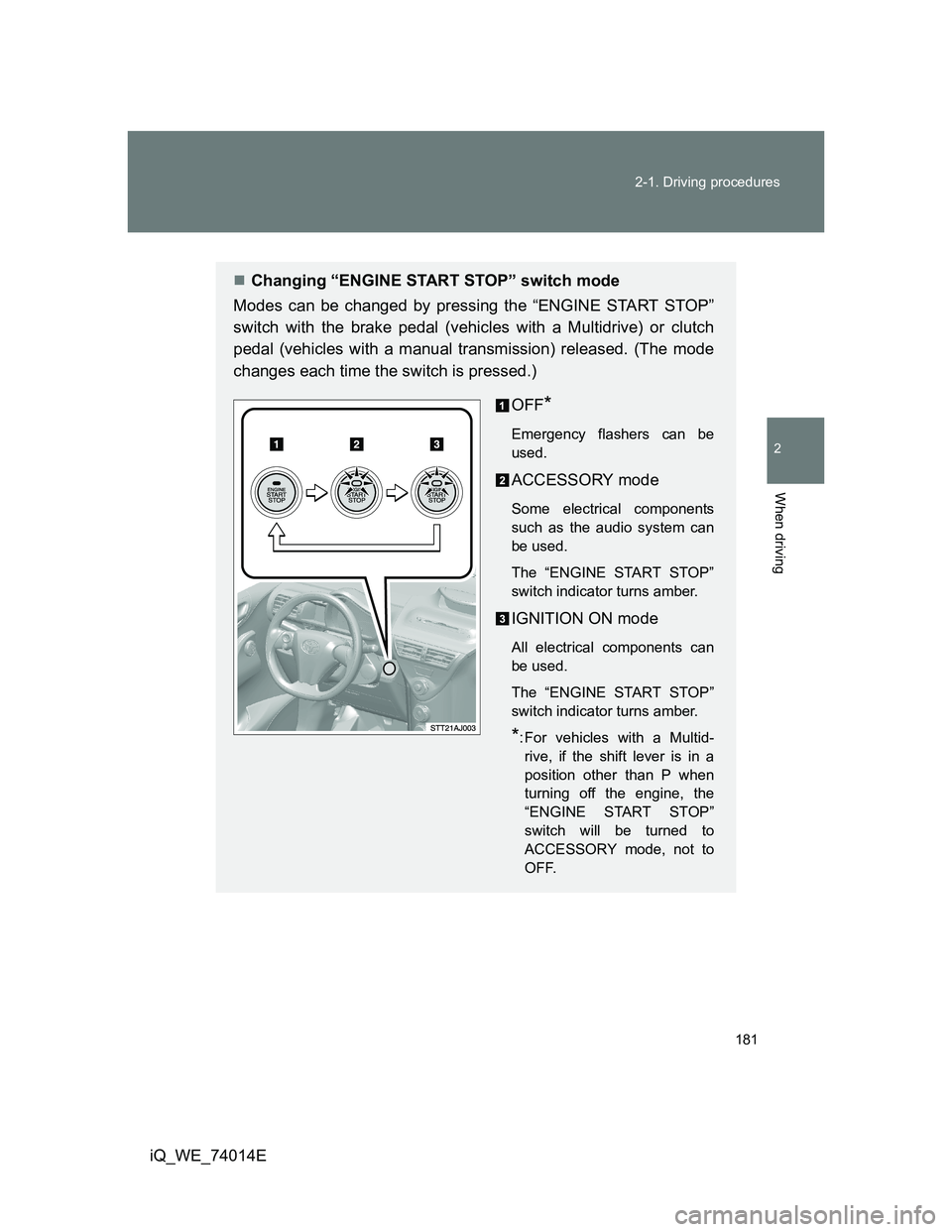
Modes can be changed by pressing the “ENGINE START STOP”
switch with the brake pedal (vehicles with a Multidrive) or clutch
pedal (vehicles with a manual transmission) released. (The mode
changes each time the switch is pressed.)
OFF
*
Emergency flashers can be
used.
ACCESSORY mode
Some electrical components
such as the audio system can
be used.
The “ENGINE START STOP”
switch indicator turns amber.
IGNITION ON mode
All electrical components can
be used.
The “ENGINE START STOP”
switch indicator turns amber.
*: For vehicles with a Multid-
rive, if the shift lever is in a
position other than P when
turning off the engine, the
“ENGINE START STOP”
switch will be turned to
ACCESSORY mode, not to
OFF.
Page 183 of 476
183 2-1. Driving procedures
2
When driving
iQ_WE_74014E
Auto power OFF function
Multidrive
If the vehicle is left in ACCESSORY mode for more than 20 minutes or
IGNITION ON mode (the engine is not running) for more than an hour
with the shift lever in P, the “ENGINE START STOP” switch will automati-
cally turn off. However, this function cannot entirely prevent battery dis-
charge. Do not leave the vehicle with the “ENGINE START STOP” switch
in ACCESSORY or IGNITION ON mode for long periods of time when the
engine is not running.
Manual transmission
If the vehicle is left in ACCESSORY mode for more than 20 minutes or
IGNITION ON mode (the engine is not running) for more than an hour, the
“ENGINE START STOP” switch will automatically turn off. However, this
function cannot entirely prevent battery discharge. Do not leave the
vehicle with the “ENGINE START STOP” switch in ACCESSORY or
IGNITION ON mode for long periods of time when the engine is not
running.
“ENGINE START STOP” switch operation
When operating the “ENGINE START STOP” switch, push it quickly and
firmly. If the switch is not pushed firmly, the mode may not change or the
engine may not start. Furthermore, if the switch is pushed quickly and firmly,
there is no need to hold it down.
If the electronic key does not operate properly
P. 427
Electronic key battery depletion
P. 4 3
When the electronic key battery is fully depleted
P. 357
Conditions affecting operation
P. 6 1
Note for the entry function
P. 4 4
Page 185 of 476
185
2-1. Driving procedures
2
When driving
iQ_WE_74014E
Multidrive
: If equipped
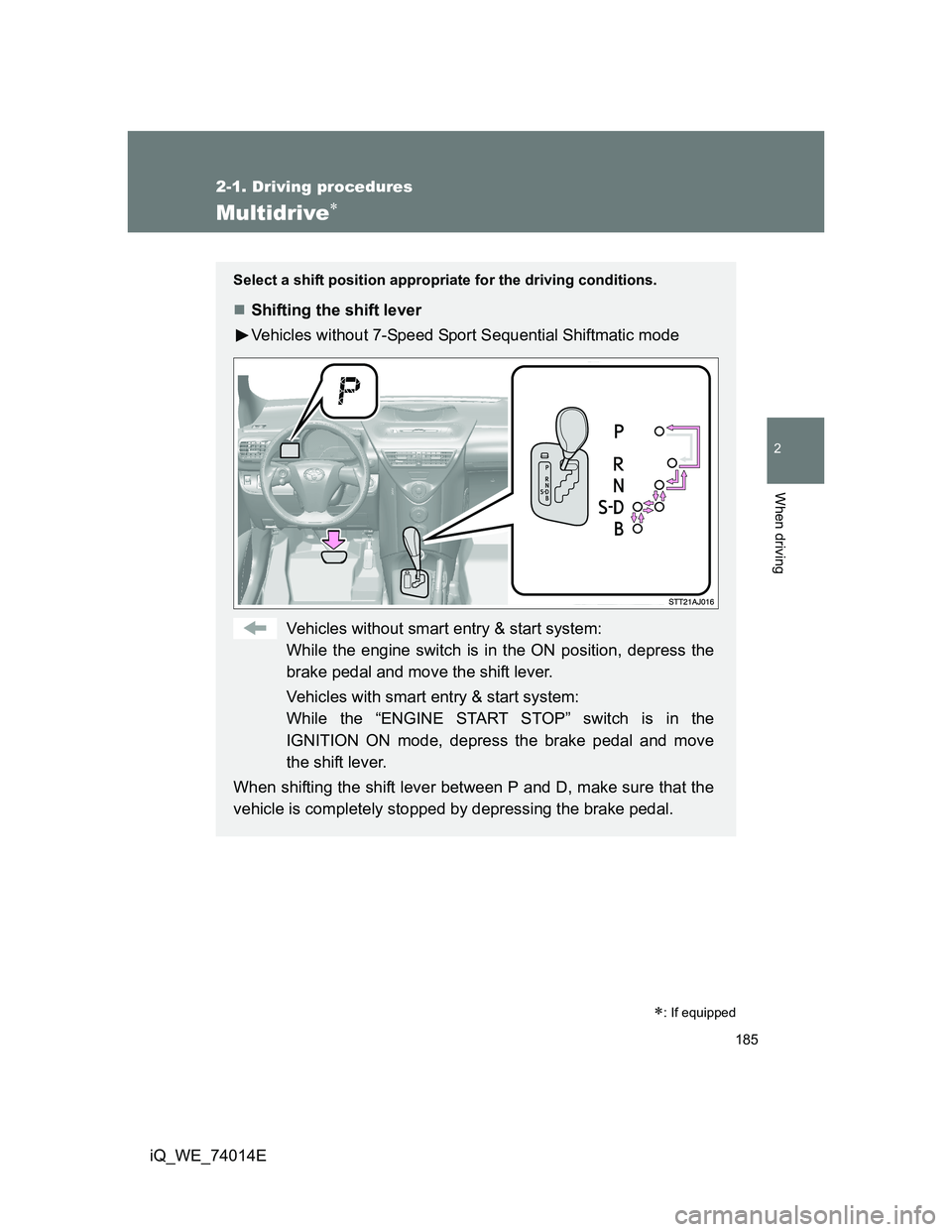
Select a shift position appropriate for the driving conditions.
Shifting the shift lever
Vehicles without 7-Speed Sport Sequential Shiftmatic mode
Vehicles without smart entry & start system:
While the engine switch is in the ON position, depress the
brake pedal and move the shift lever.
Vehicles with smart entry & start system:
While the “ENGINE START STOP” switch is in the
IGNITION ON mode, depress the brake pedal and move
the shift lever.
When shifting the shift lever between P and D, make sure that the
vehicle is completely stopped by depressing the brake pedal.
Page 186 of 476
186 2-1. Driving procedures
iQ_WE_74014E
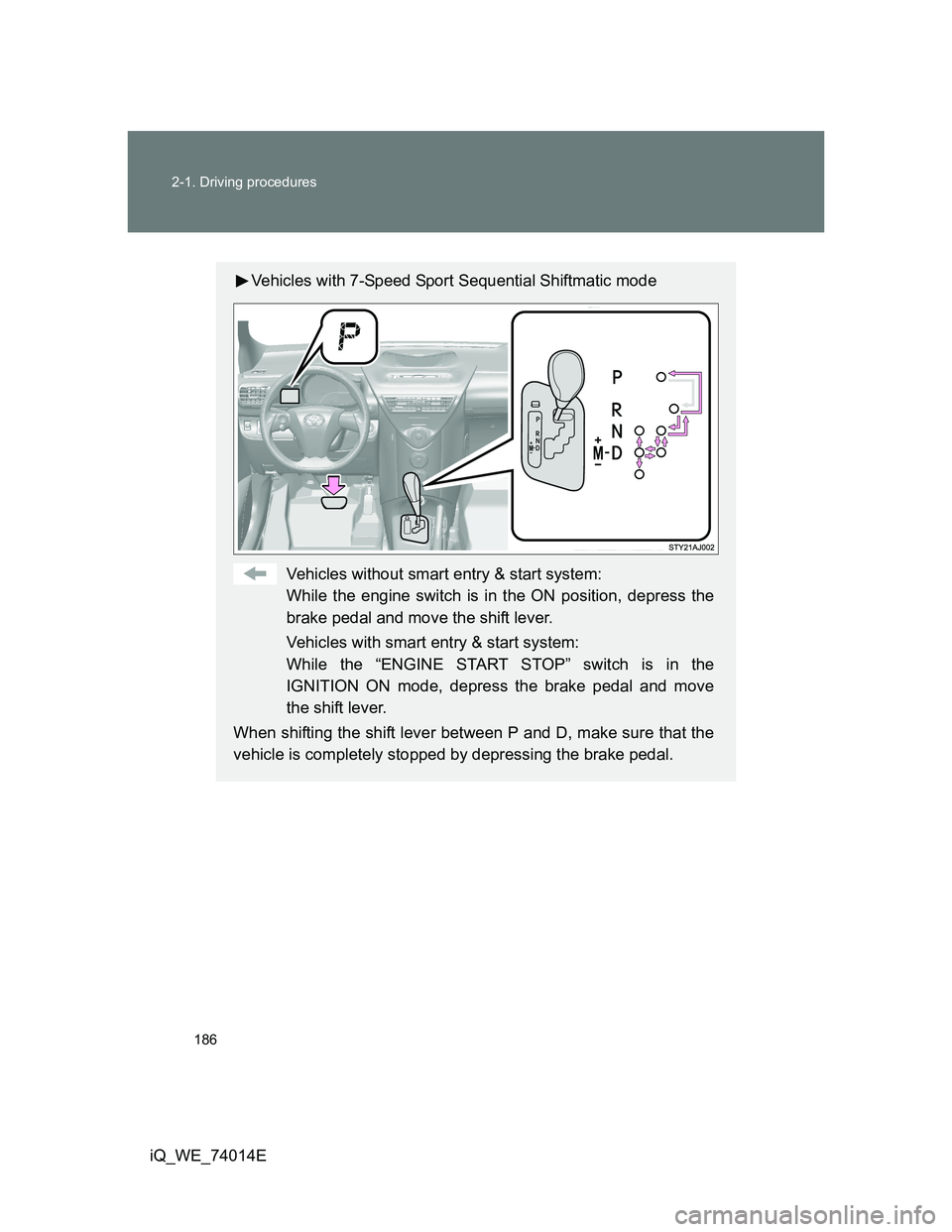
Vehicles with 7-Speed Sport Sequential Shiftmatic mode
Vehicles without smart entry & start system:
While the engine switch is in the ON position, depress the
brake pedal and move the shift lever.
Vehicles with smart entry & start system:
While the “ENGINE START STOP” switch is in the
IGNITION ON mode, depress the brake pedal and move
the shift lever.
When shifting the shift lever between P and D, make sure that the
vehicle is completely stopped by depressing the brake pedal.