Page 261 of 700
261
2-4. Using other
driving systems
2
When driving
4RUNNER_U
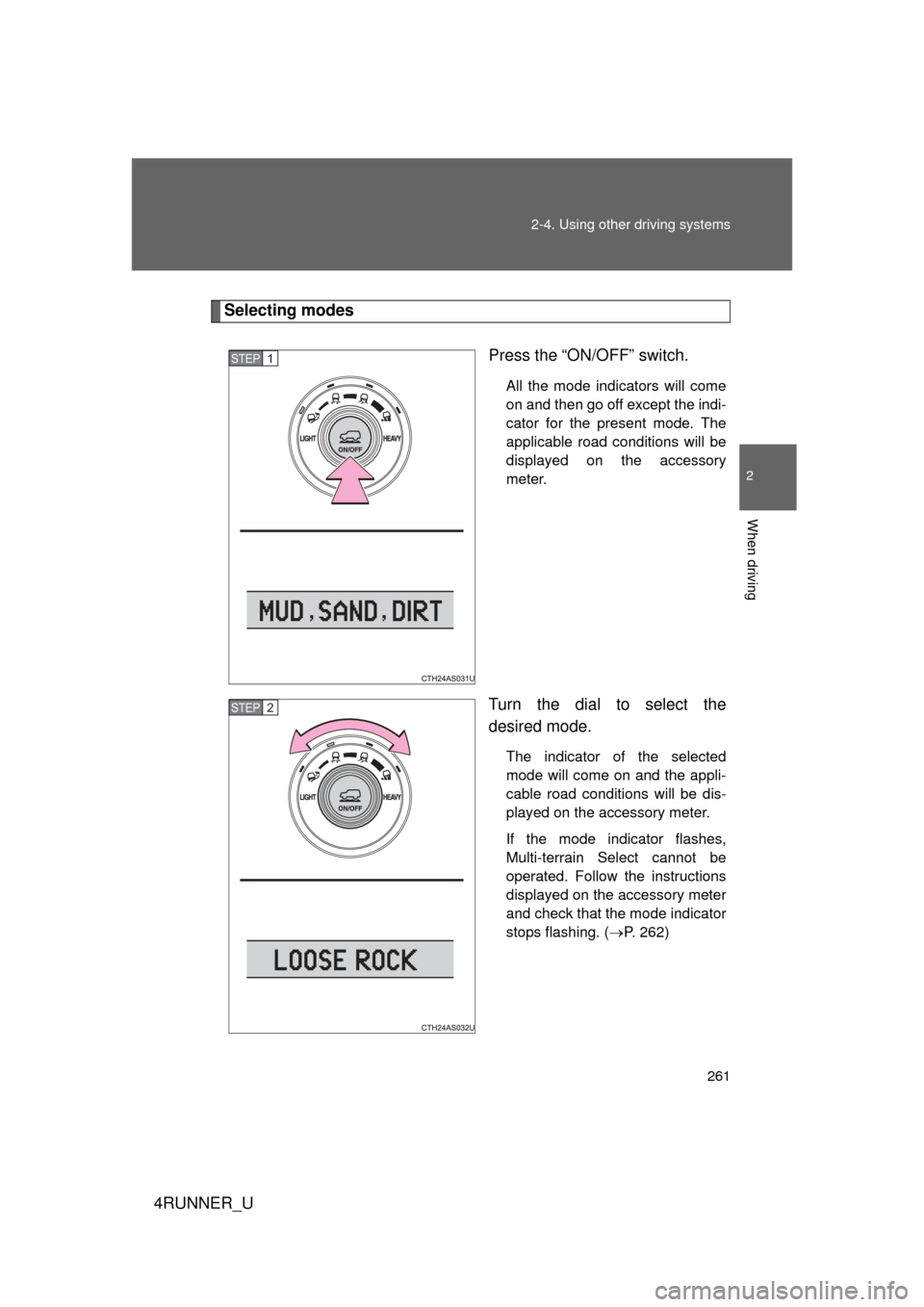
Selecting modes
Press the “ON/OFF” switch.
All the mode indicators will come
on and then go off except the indi-
cator for the present mode. The
applicable road conditions will be
displayed on the accessory
meter.
Turn the dial to select the
desired mode.
The indicator of the selected
mode will come on and the appli-
cable road conditions will be dis-
played on the accessory meter.
If the mode indicator flashes,
Multi-terrain Select cannot be
operated. Follow the instructions
displayed on the accessory meter
and check that the mode indicator
stops flashing. (P. 262)
STEP 1
STEP 2
Page 262 of 700
262 2-4. Using other driving systems
4RUNNER_U
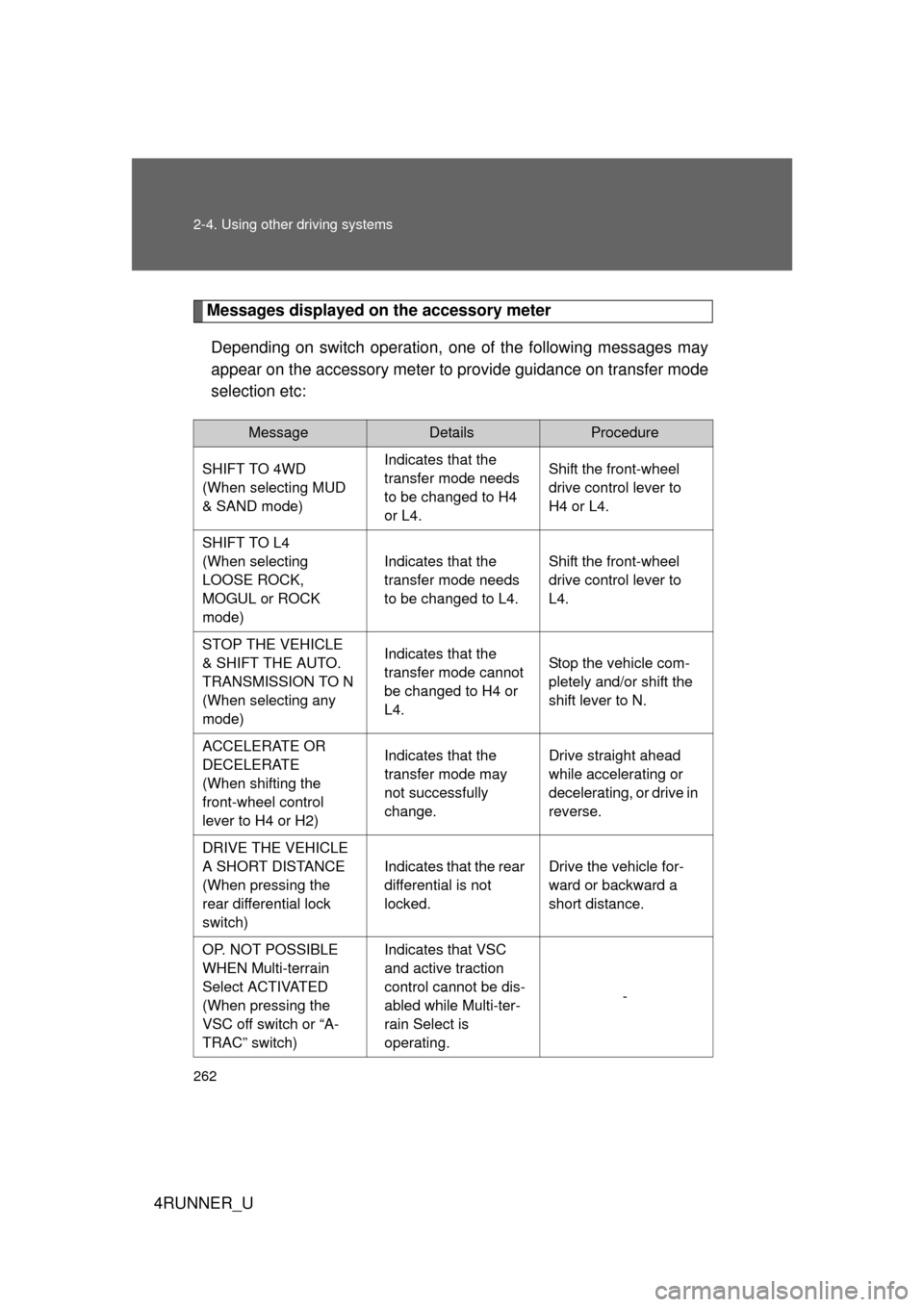
Messages displayed on the accessory meterDepending on switch operation, one of the following messages may
appear on the accessory meter to provide guidance on transfer mode
selection etc:
MessageDetailsProcedure
SHIFT TO 4WD
(When selecting MUD
& SAND mode) Indicates that the
transfer mode needs
to be changed to H4
or L4.Shift the front-wheel
drive control lever to
H4 or L4.
SHIFT TO L4
(When selecting
LOOSE ROCK,
MOGUL or ROCK
mode) Indicates that the
transfer mode needs
to be changed to L4.
Shift the front-wheel
drive control lever to
L4.
STOP THE VEHICLE
& SHIFT THE AUTO.
TRANSMISSION TO N
(When selecting any
mode) Indicates that the
transfer mode cannot
be changed to H4 or
L4.
Stop the vehicle com-
pletely and/or shift the
shift lever to N.
ACCELERATE OR
DECELERATE
(When shifting the
front-wheel control
lever to H4 or H2) Indicates that the
transfer mode may
not successfully
change.
Drive straight ahead
while accelerating or
decelerating, or drive in
reverse.
DRIVE THE VEHICLE
A SHORT DISTANCE
(When pressing the
rear differential lock
switch) Indicates that the rear
differential is not
locked.
Drive the vehicle for-
ward or backward a
short distance.
OP. NOT POSSIBLE
WHEN Multi-terrain
Select ACTIVATED
(When pressing the
VSC off switch or “A-
TRAC” switch) Indicates that VSC
and active traction
control cannot be dis-
abled while Multi-ter-
rain Select is
operating.
-
Page 313 of 700
Interior features3
313
4RUNNER_U
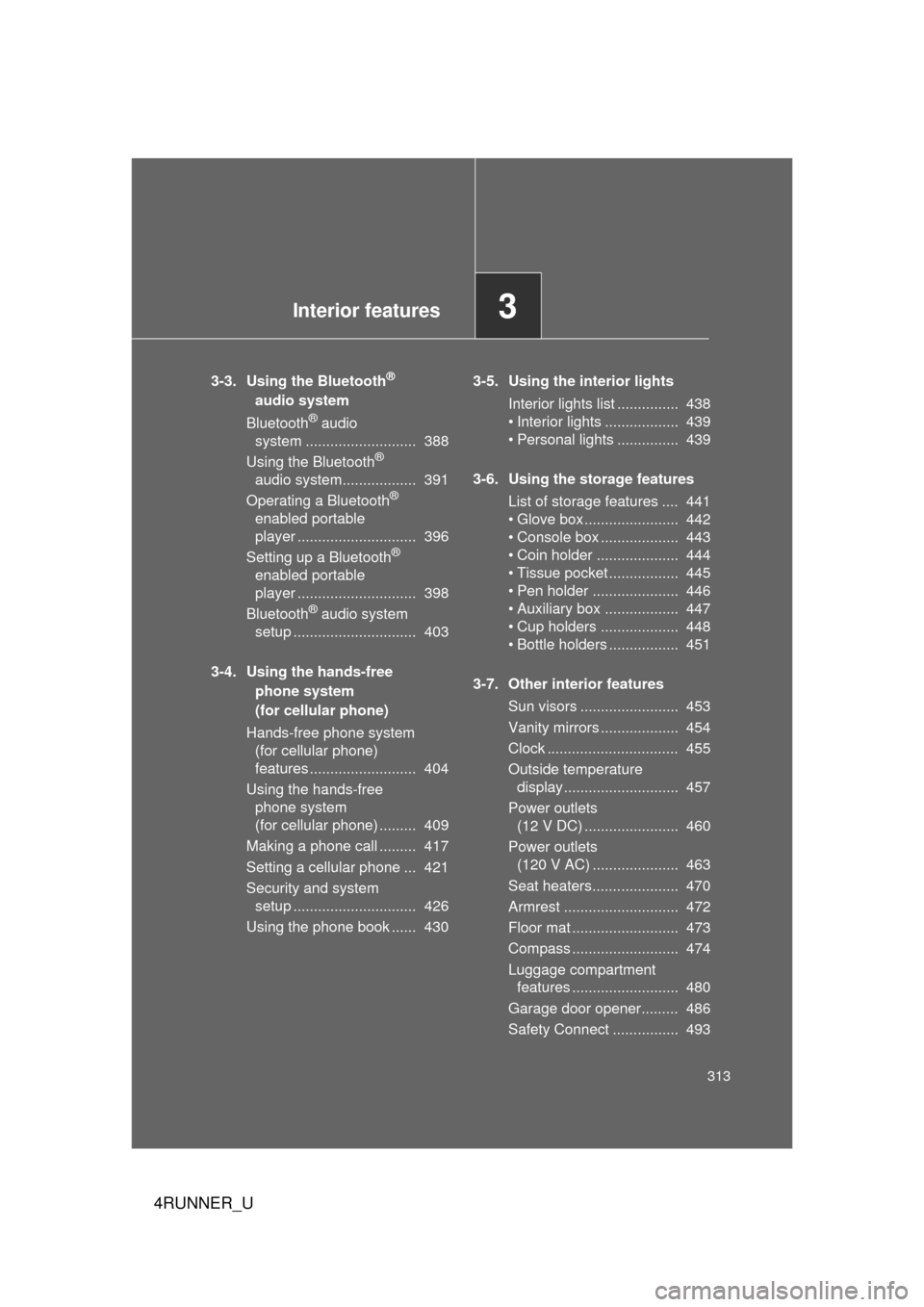
3-3. Using the Bluetooth®
audio system
Bluetooth
® audio
system ........................... 388
Using the Bluetooth
®
audio system.................. 391
Operating a Bluetooth
®
enabled portable
player ............................. 396
Setting up a Bluetooth
®
enabled portable
player ............................. 398
Bluetooth
® audio system
setup .............................. 403
3-4. Using the hands-free phone system
(for cellular phone)
Hands-free phone system (for cellular phone)
features .......................... 404
Using the hands-free phone system
(for cellular phone) ......... 409
Making a phone call ......... 417
Setting a cellular phone ... 421
Security and system setup .............................. 426
Using the phone book ...... 430 3-5. Using the interior lights
Interior lights list ............... 438
• Interior lights .................. 439
• Personal lights ............... 439
3-6. Using the storage features List of storage features .... 441
• Glove box....................... 442
• Console box ................... 443
• Coin holder .................... 444
• Tissue pocket ................. 445
• Pen holder ..................... 446
• Auxiliary box .................. 447
• Cup holders ................... 448
• Bottle holders ................. 451
3-7. Other interior features Sun visors ........................ 453
Vanity mirrors ................... 454
Clock ................................ 455
Outside temperature display............................ 457
Power outlets (12 V DC) ....................... 460
Power outlets (120 V AC) ..................... 463
Seat heaters..................... 470
Armrest ............................ 472
Floor mat .......................... 473
Compass .......................... 474
Luggage compartment features .......................... 480
Garage door opener......... 486
Safety Connect ................ 493
Page 320 of 700
320
3-1. Using the air conditioning system and defogger
4RUNNER_U
Automatic air conditioning system
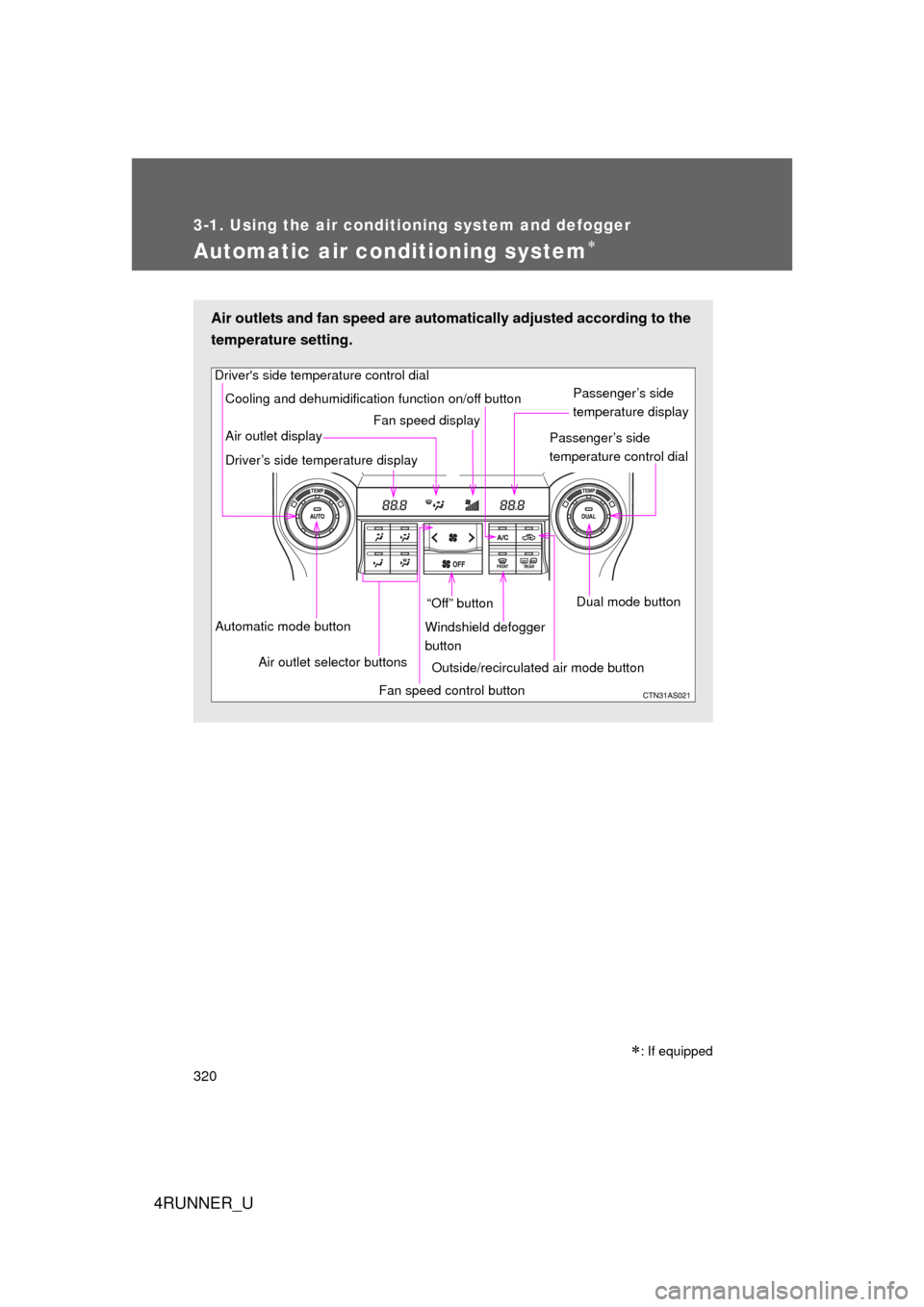
Air outlets and fan speed are automatically adjusted according to the
temperature setting.
Driver's side temperature control dial
Air outlet display
Driver’s side temperature display Fan speed display
Passenger’s side
temperature display
Passenger’s side
temperature control dial
Automatic mode button Air outlet selector buttons “Off” button
Cooling and dehumidification function on/off button
Fan speed control buttonWindshield defogger
button
Outside/recirculated air mode button Dual mode button
: If equipped
Page 322 of 700
322 3-1. Using the air conditioning system and defogger
4RUNNER_U
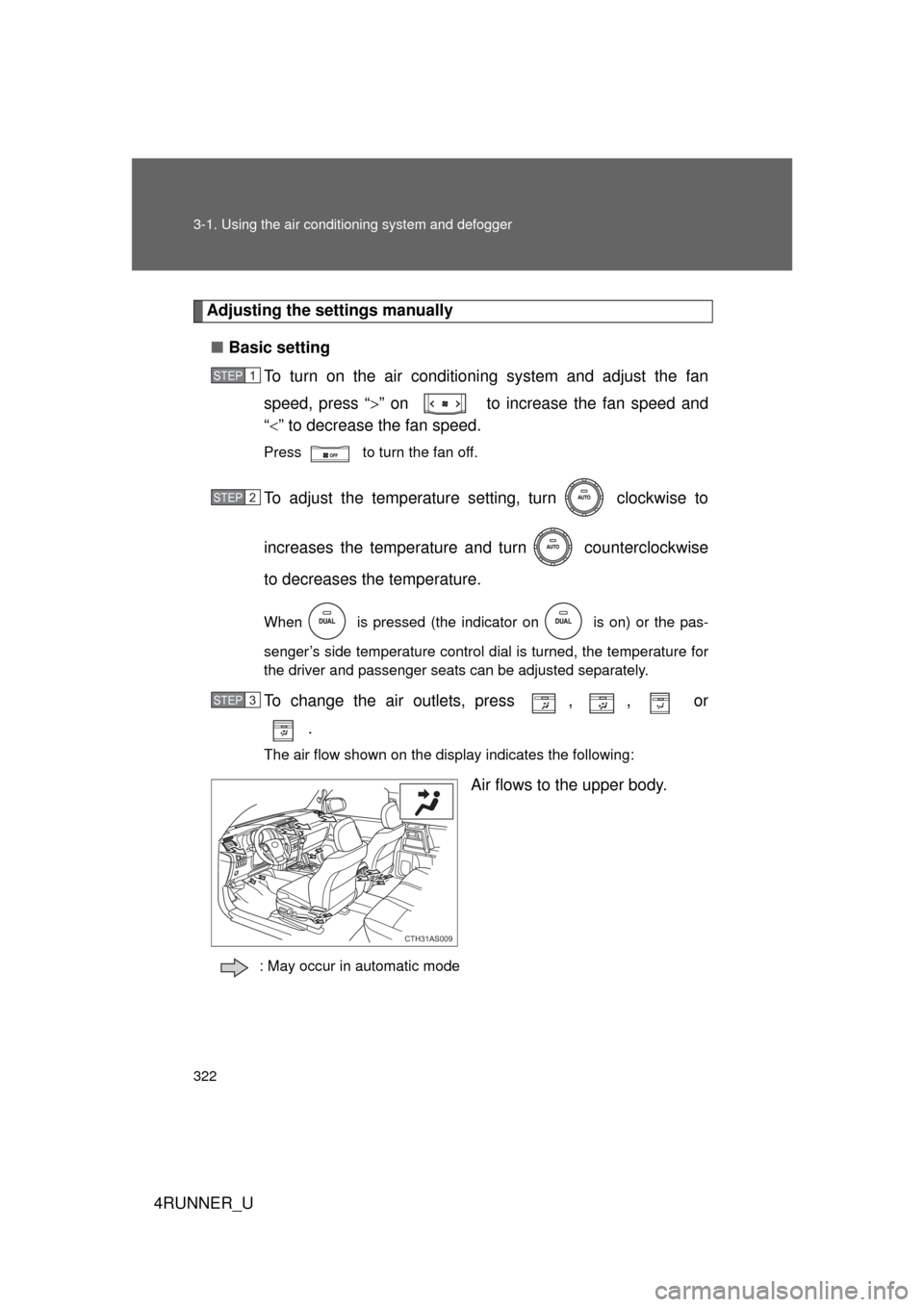
Adjusting the settings manually
■ Basic setting
To turn on the air conditioning system and adjust the fan
speed, press “ ” on to increase the fan speed and
“ ” to decrease the fan speed.
Press to turn the fan off.
To adjust the temperature setting, turn clockwise to
increases the temperature a nd turn counterclockwise
to decreases the temperature.
When is pressed (the indicator on is on) or the pas-
senger’s side temperature control dial is turned, the temperature for
the driver and passenger seats can be adjusted separately.
To change the air outlets, press , , or .
The air flow shown on the display indicates the following:
Air flows to the upper body.
: May occur in automatic mode
STEP 1
STEP 2
STEP 3
CTH31AS009
Page 331 of 700
331
3
Interior features
4RUNNER_U
3-2. Using the audio system
Audio system types
Without navigation system and Display Audio system
Type A: CD player with changer controller and AM/FM radio
Type B: CD player with changer controller and AM/FM radio
Page 333 of 700
333
3-2. Using the audio system
3
Interior features
4RUNNER_U
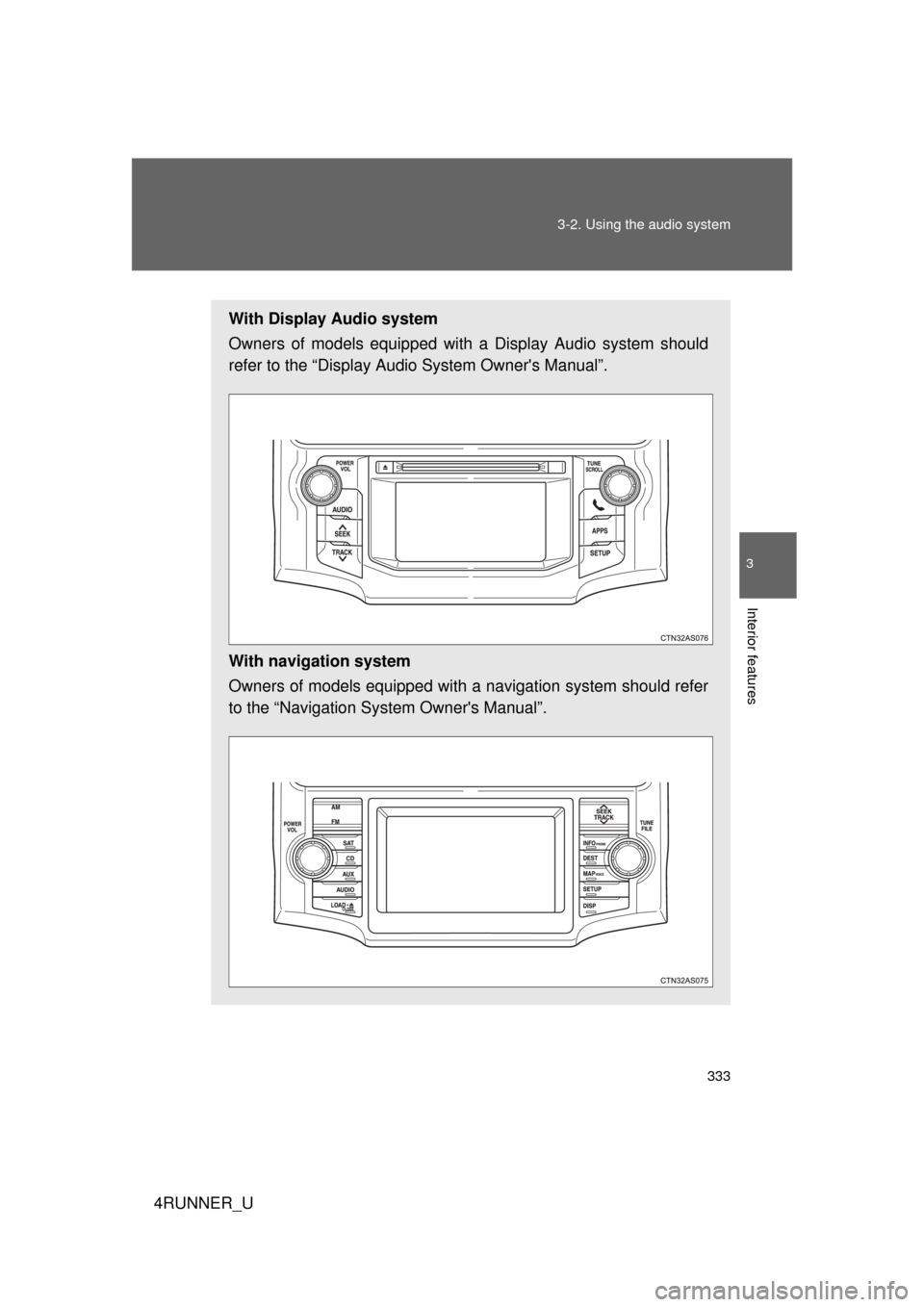
With Display Audio system
Owners of models equipped with
a Display Audio system should
refer to the “Display Audio System Owner's Manual”.
With navigation system
Owners of models equipped with a navigation system should refer
to the “Navigation Sy stem Owner's Manual”.
Page 335 of 700

335
3-2. Using the audio system
3
Interior features
4RUNNER_U
■
Certification
For the Display Audio system
FCC ID: AJDK032
IC ID: 775E-K032
For the Display Audio system and the audio system
NOTE:
This device complies with Part 15 of FCC Rules and Industry Canada
licence-exempt RSS standard(s). Operation is subject to the following two
conditions: (1) this device may not cause interference, and (2) this device
must accept any interference, including interference that may cause undes-
ired operation of this device.
Le présent appareil est conforme aux la partie 15 des règles de la FCC et
CNR d’Industrie Canada applicables aux appareils radio exempts de
licence. L’exploitation est autorisée aux deux conditions suivantes: (1)
l’appareil ne doit pas produire de brouillage, et (2) l’utilisateur de l’appareil
doit accepter tout brouillage radioélectrique subi, même si le brouillage est
susceptible d’en compromettre le fonctionnement.
The antenna for Bluetooth cannot be removed (or replaced) by user.
L'antenne de Bluetooth ne peut pas être supprimé (ou remplacé) par l'utili-
sateur.
This device complies with RSS-310 of Industry Canada. Operation is subject
to the condition that this device does not cause harmful interference.
Cet appareil est conforme au CNR-310 d'Industrie Canada. Son exploitation
est autorisée sous réserve que l'appareil ne cause pas de brouillage préjudi-
ciable.
FCC WARNING:
Changes or modifications not expressly approved by the party responsible
for compliance could void the user's authority to operate the equipment.