Page 168 of 700
168 2-1. Driving procedures
4RUNNER_U
NOTICE
■When driving the vehicle
● Do not depress the accelerator and brake pedals at the same time during
driving, as this may restrain driving torque.
● Do not use the accelerator pedal or depress the accelerator and brake
pedals at the same time to hold the vehicle on a hill.
■ When parking the vehicle
Always shift the shift lever to P. Failure to do so may cause the vehicle to
move or the vehicle may accelerate suddenly if the accelerator pedal is acci-
dentally depressed.
■ Avoiding damage to vehicle parts
● Do not turn the steering wheel fully in either direction and hold it there for
an extended period of time.
Doing so may damage the power steering pump.
● When driving over bumps in the road, drive as slowly as possible to avoid
damaging the wheels, underside of the vehicle, etc.
■ If you get a flat tire while driving
A flat or damaged tire may cause the following situations. Hold the steering
wheel firmly and gradually depress the br ake pedal to slow down the vehicle.
● It may be difficult to control your vehicle.
● The vehicle will make abnormal sounds or vibrations.
● The vehicle will lean abnormally.
Information on what to do in case of a flat tire ( P. 603)
Page 232 of 700
232 2-4. Using other driving systems
4RUNNER_U
■Rear view monitor system camera
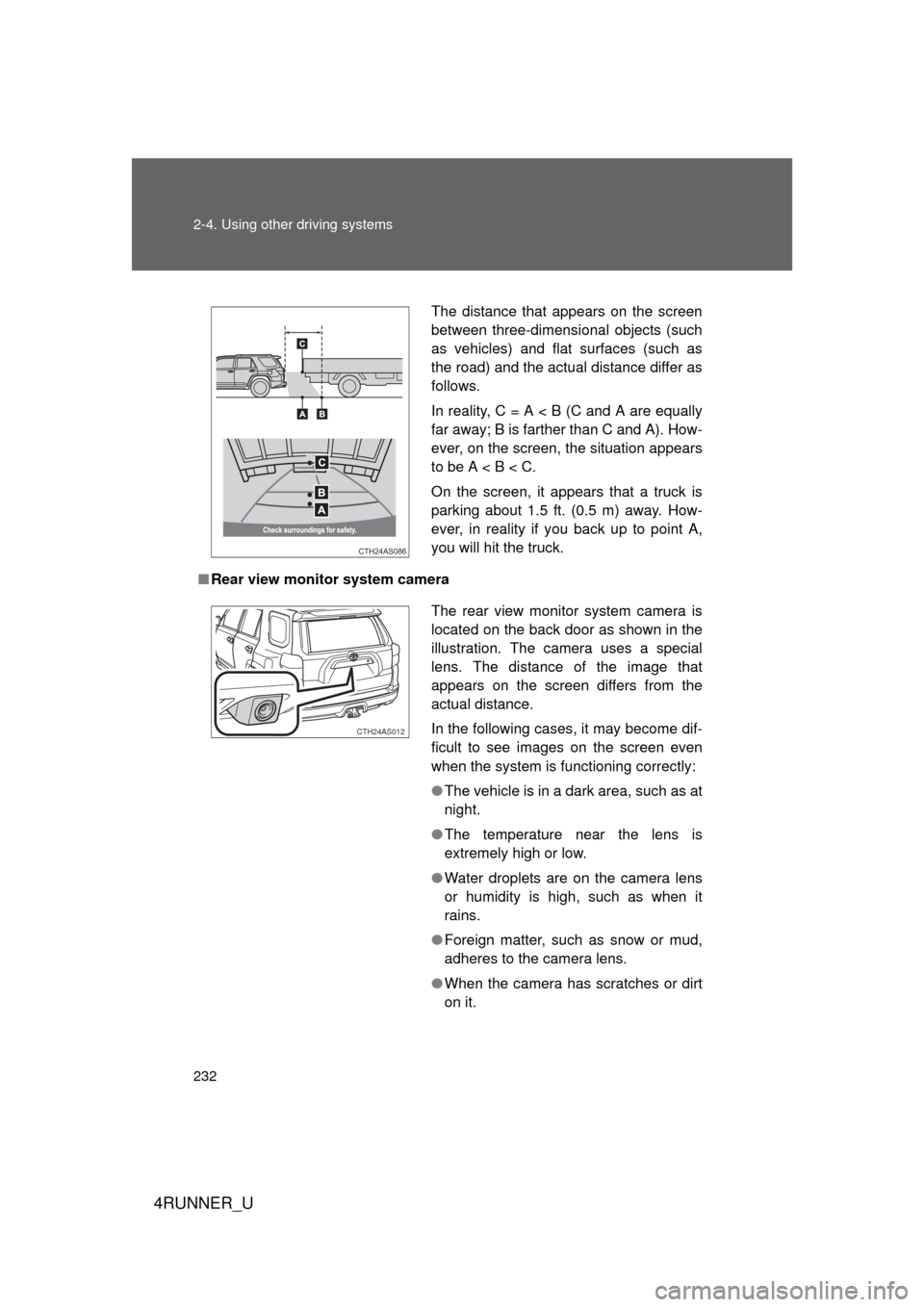
The distance that appears on the screen
between three-dimensional objects (such
as vehicles) and flat surfaces (such as
the road) and the actual distance differ as
follows.
In reality, C = A < B (C and A are equally
far away; B is farther than C and A). How-
ever, on the screen, the situation appears
to be A < B < C.
On the screen, it appears that a truck is
parking about 1.5 ft. (0.5 m) away. How-
ever, in reality if you back up to point A,
you will hit the truck.
CTH24AS086
The rear view monitor system camera is
located on the back door as shown in the
illustration. The camera uses a special
lens. The distance of the image that
appears on the screen differs from the
actual distance.
In the following cases, it may become dif-
ficult to see images on the screen even
when the system is functioning correctly:
● The vehicle is in a dark area, such as at
night.
● The temperature near the lens is
extremely high or low.
● Water droplets are on the camera lens
or humidity is high, such as when it
rains.
● Foreign matter, such as snow or mud,
adheres to the camera lens.
● When the camera has scratches or dirt
on it.
CTH24AS012
Page 234 of 700
234 2-4. Using other driving systems
4RUNNER_U
CAUTION
■When using the rear view monitor system
Observe the following precautions to avoid an accident that could result in
death or serious injuries:
● Never depend solely on the monitor system when reversing.
● Always check visually and with the mirrors to confirm your intended path is
clear.
● Use your own eyes to confirm the vehicle’s surroundings, as the displayed
image may become faint or dark, and moving images will be distorted, or
not entirely visible when the outside temperature is low. When backing up,
be sure to check behind and all around the vehicle visually and with the
mirrors before proceeding.
● Always check the vehicle surroundi ng area, because the guide lines are
ancillary lines.
● The guide lines are ancillary lines and do not change even if the steeri\
ng
wheel is turned.
● Depicted distances between objects and flat surfaces differ from actual
distances.
● Do not use the system if the back door is open.
■ Conditions which may affect the rear view monitor system
● If the back of the vehicle has been hit, the camera’s position and mounting
angle may have changed. Have the vehicle inspected by your Toyota
dealer.
● Rapid temperature changes, such as when hot water is poured on the
vehicle in cold weather, may cause the system to function abnormally.
● If the camera lens is dirty, it cannot transmit a clear image. Rinse with
water and wipe with a soft cloth. If the camera lens is extremely dirty, wash
with a mild cleanser and rinse.
● The displayed image may be darker and moving images may be slightly
distorted when the system is cold.
■ Caution while driving in reverse
Do not change modes while the vehicle is moving.
Page 274 of 700

274 2-4. Using other driving systems
4RUNNER_U
CAUTION
■When the VSC is activated
The slip indicator light flashes. Always drive carefully.
Reckless driving may cause an accident. Exercise particular care when the
indicator light flashes.
■ When TRAC/VSC systems are turned off
Be especially careful and drive at a speed appropriate to the road condi-
tions. As these are systems to ensure vehicle stability and driving force, do
not turn the TRAC/VSC systems off unless necessary.
■ Replacing tires
Make sure that all tires are of the specified size, brand, tread pattern and
total load capacity. In addition, make sure that the tires are inflated to the
recommended tire inflation pressure level.
The ABS, Multi Terrain ABS and VSC will not function correctly if different
tires are fitted on the vehicle.
Contact your Toyota dealer for further information when replacing tires or
wheels.
■ Handling of tires and the suspension
Using tires with any kind of problem or modifying the suspension will affect
the driving assist systems, and may cause a system to malfunction.
Page 303 of 700

303
2-5. Driving information
2
When driving
4RUNNER_U
Trailer towing tips
Your vehicle will handle differently when towing a trailer. Help to avoid
an accident, death or serious injury, keep the following in mind when
towing:
● Speed limits for towing a trailer vary by state or province. Do not
exceed the posted towing speed limit.
● Toyota recommends that the vehicle-trailer speed limit is 65 mph
(104 km/h) on a flat, straight, dry road. Do not exceed this limit, the
posted towing speed limit or the speed limit for your trailer as set
forth in your trailer owner’s man ual, whichever is lowest. Instability
of the towing vehicle-trailer combin ation (trailer sway) increases as
speed increases. Exceeding speed limits may cause loss of con-
trol.
● Before starting out, check the trailer lights, tires and the vehicle-
trailer connections. Recheck after driving a short distance.
● Practice turning, stopping and reve rsing with the trailer attached in
an area away from traffic until you become accustomed to the feel
of the vehicle-trailer combination.
● Reversing with a trailer attached is difficult and requires practice.
Grip the bottom of the steering wheel and move your hand to the
left to move the trailer to the left. Move your hand to the right to
move the trailer to right. (This is generally opposite to reversing
without a trailer attached.) Avoid sharp or prolonged turning. Have
someone guide you when reversing to reduce the risk of an acci-
dent.
● As stopping distance is increased when towing a trailer, vehicle-to
vehicle distance should be increased. For each 10 mph (16 km/h)
of speed, allow at least o ne vehicle and trailer length.
● Avoid sudden braking as you may skid, resulting in the trailer jack-
knifing and a loss of vehicle control. This is especially true on wet
or slippery surfaces.
Page 306 of 700
306 2-5. Driving information
4RUNNER_U
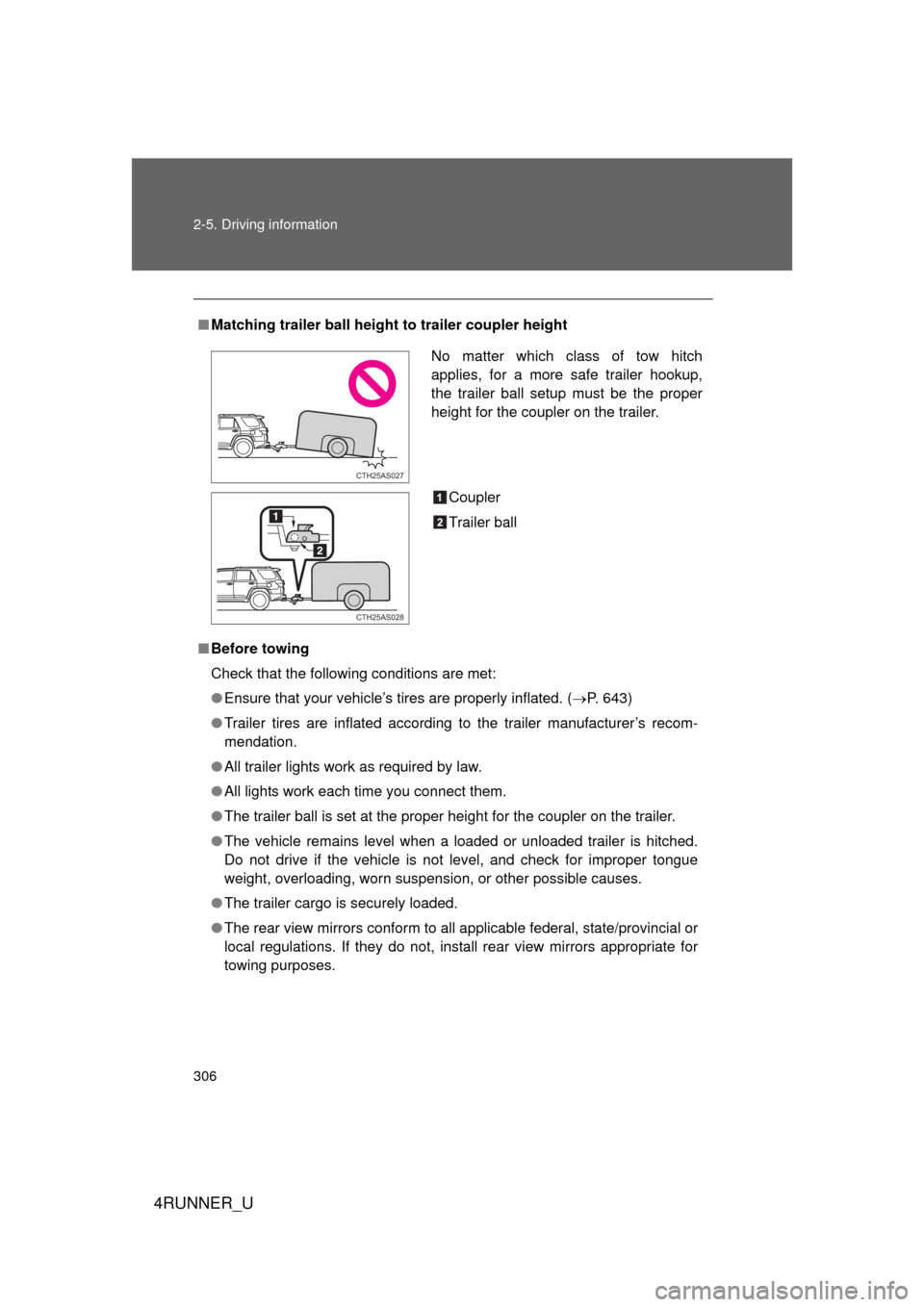
■Matching trailer ball height to trailer coupler height
■ Before towing
Check that the following conditions are met:
● Ensure that your vehicle’s tires are properly inflated. ( P. 643)
● Trailer tires are inflated according to the trailer manufacturer’s recom-
mendation.
● All trailer lights work as required by law.
● All lights work each time you connect them.
● The trailer ball is set at the proper height for the coupler on the trai\
ler.
● The vehicle remains level when a loaded or unloaded trailer is hitched.
Do not drive if the vehicle is not level, and check for improper tongue
weight, overloading, worn suspension, or other possible causes.
● The trailer cargo is securely loaded.
● The rear view mirrors conform to all applicable federal, state/provincial or
local regulations. If they do not, install rear view mirrors appropriate for
towing purposes.
No matter which class of tow hitch
applies, for a more safe trailer hookup,
the trailer ball setup must be the proper
height for the coupler on the trailer.
Coupler
Trailer ball
CTH25AS027
CTH25AS028
Page 497 of 700
497
3-7. Other interior features
3
Interior features
4RUNNER_U
■
Stolen Vehicle Location
If your vehicle is stolen, Safety Connect can work with local author-
ities to assist them in locating and recovering the vehicle. After fil-
ing a police report, call the Safe ty Connect response center at 1-
800-331-4331 and follow the prompts for Safety Connect to initiate
this service.
In addition to assisting law enforc ement with recovery of a stolen
vehicle, Safety-Connect-equipped vehicle location data may, under
certain circumstances, be shared with third parties to locate your
vehicle. Further information is available at Toyota.com.
■ Emergency Assistance Button (“SOS”)
In the event of an emergency on the road, push the “SOS” button
to reach the Safety Connect response center. The answering
agent will determine your vehicl e’s location, assess the emer-
gency, and dispatch the necessary assistance required.
If you accidentally press the “SOS” button, tell the response-center agent
that you are not experiencing an emergency.
■ Enhanced Roadside Assistance
Enhanced Roadside Assistance adds GPS data to the already
included warranty-based Toyota roadside service.
Subscribers can press the “SOS” button to reach a Safety Connect
response-center agent, who can help with a wide range of needs,
such as: towing, flat tire, fuel deliv ery, etc. For a description of the
Enhanced Roadside Assistance se rvices and their limitations,
please see the Safety Connec t Terms and Conditions, which are
available at Toyota.com.
Page 501 of 700
Maintenance and care4
501
4RUNNER_U
4-1. Maintenance and careCleaning and protecting the vehicle exterior ......... 502
Cleaning and protecting the vehicle interior .......... 505
4-2. Maintenance Maintenance requirements .................. 508
General maintenance....... 511
Emission inspection and maintenance (I/M)
programs ........................ 515
4-3. Do-it-yourself maintenance
Do-it-yourself service precautions .................... 516
Hood ................................ 519
Engine compartment ........ 520
Tires ................................. 537
Tire inflation pressure ...... 543
Wheels ............................. 547
Air conditioning filter......... 550
Wireless remote control/ electronic key battery
....... 552
Checking and replacing fuses .............................. 555
Light bulbs........................ 565
